
postman 安装,对elasticsearch进行请求
1 使用postman对elasticsearch进行测试
:下载插件: https://www.getpostman.com/apps ,下载时exe文件,双击自动安装,首次打开注册。下面就可以使用进行测试
请求:
响应:

2:elasticsearch中可以使用post,put,get等请求方式,索引原理:https://my.oschina.net/90888/blog/1617292
3:对elasticsearch操作有,post新增索引,数据,put更新索引,数据,get获取,分词等
3.1:新增一条索引,数据,index只能小写。
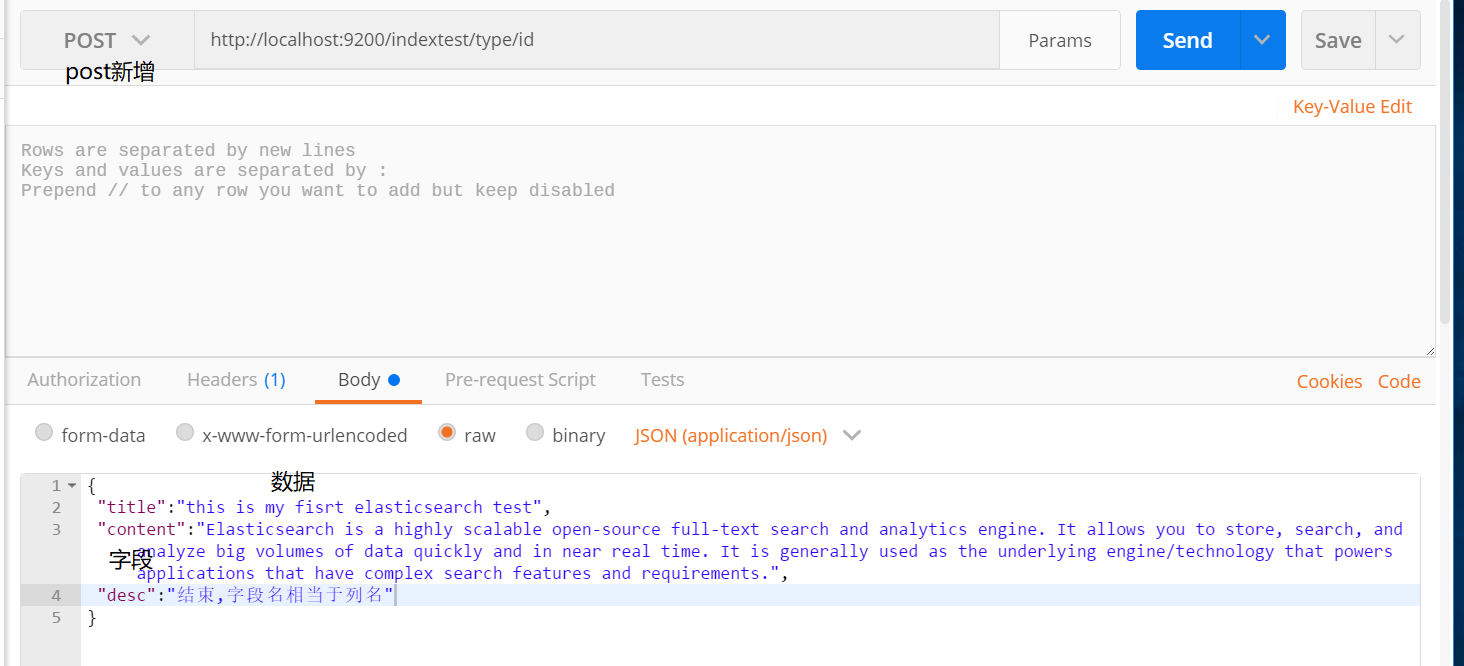
新增结果:
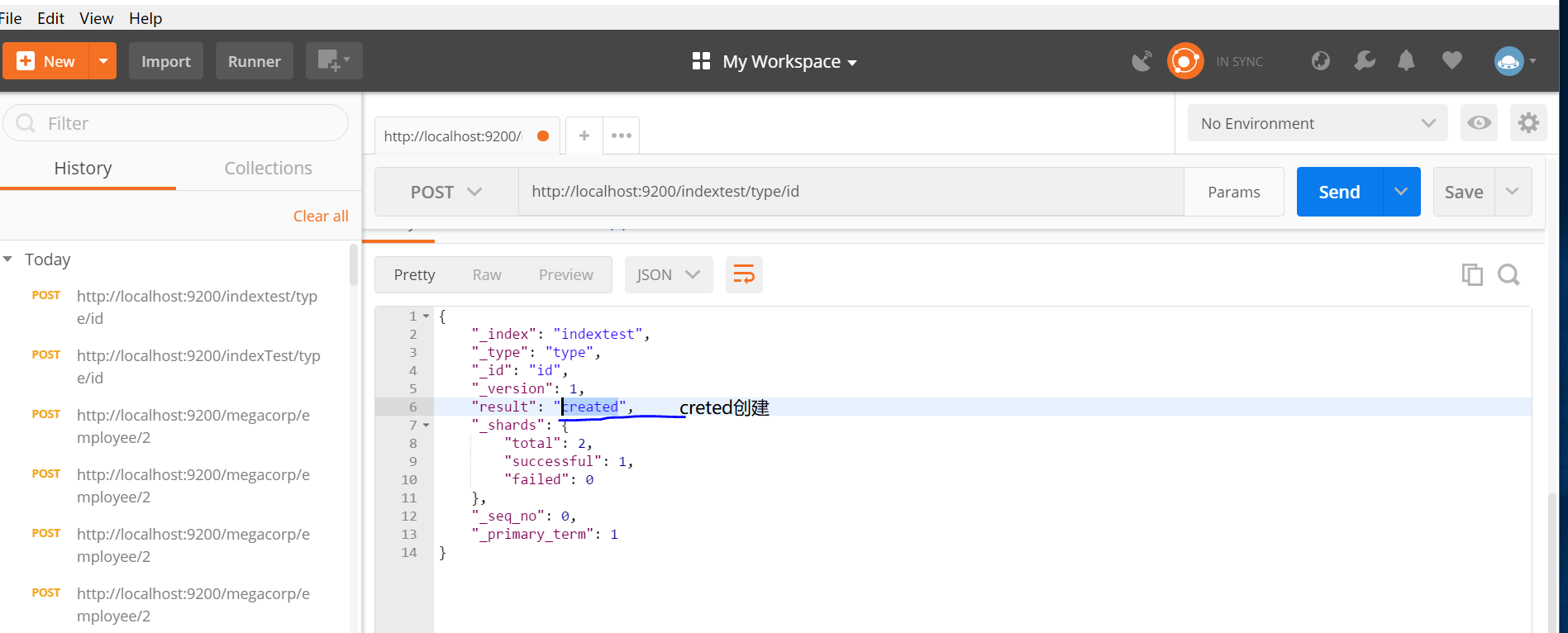
如果post中没有id值,elasticsearch将会自动创建id,
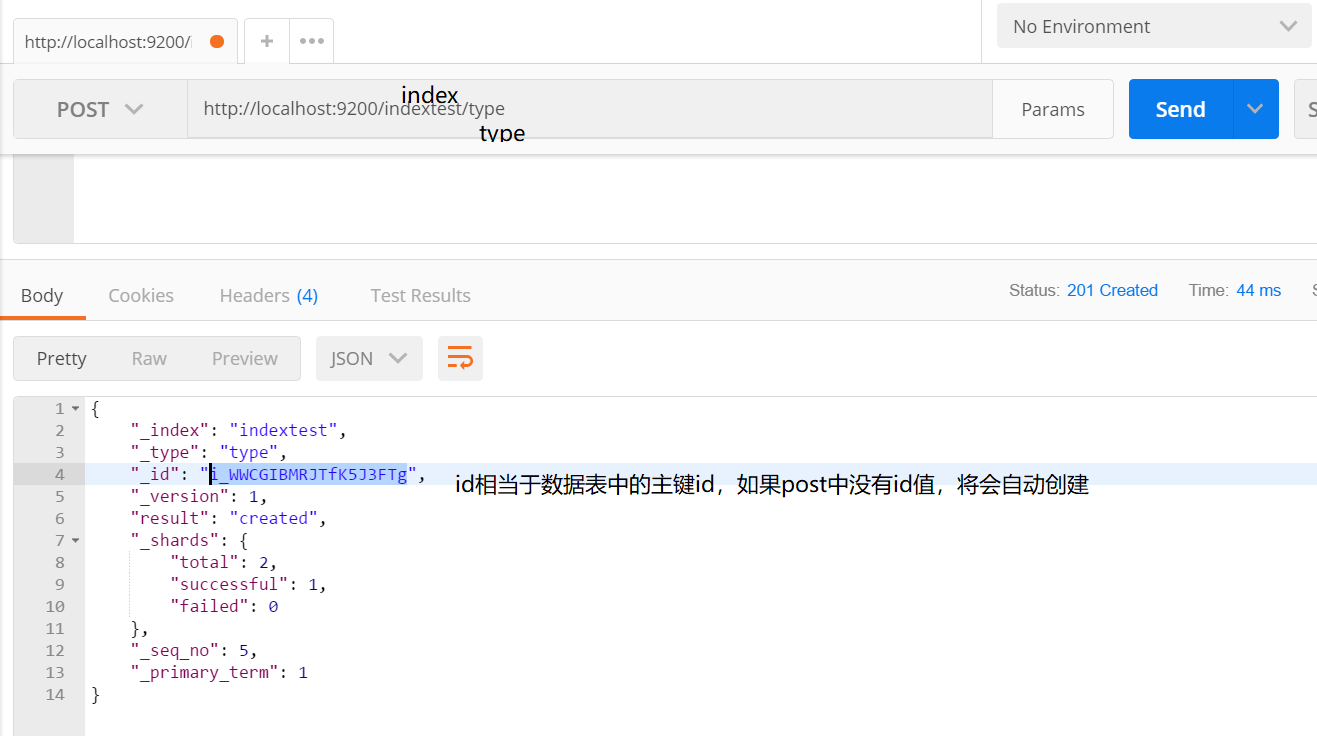
3.2 查询数据
往查询url POST数据即可:
URL格式:http://xxxhost:8201/qa_xx2/qa_xx3/_search
a. 查询title中包含有my字段的文档。Highlight设置高亮命中的词。POST方法的body:
{

    "query": {

        "match": {

            "title": {   //字段

                "query": "my "

            }

        }

    },

    "highlight": {

        "fields": {

            "title": {    //查询到的文档进行高亮

            }

        }

    }

}

结果:查询成功
{

    "took": 3,

    "timed_out": false,

    "_shards": {

        "total": 5,

        "successful": 5,

        "skipped": 0,

        "failed": 0

    },

    "hits": {

        "total": 1,

        "max_score": 0.2876821,

        "hits": [

            {

                "_index": "indextest",

                "_type": "type",

                "_id": "i_WWCGIBMRJTfK5J3FTg",

                "_score": 0.2876821,

                "_source": {   //源文档

                    "title": "this is my fisrt elasticsearch test",

                    "content": "Elasticsearch is a highly scalable open-source full-text search and analytics engine. It allows you to store, search, and analyze big volumes of data quickly and in near real time. It is generally used as the underlying engine/technology that powers applications that have complex search features and requirements.",

                    "desc": "结束,字段名相当于列名"

                },

                "highlight": {  //高亮显示

                    "title": [

                        "this is <em>my</em> fisrt elasticsearch test"

                    ]

                }

            }

        ]

    }

}
4 使用javaapi对elasticsearch进行操作
4.1 添加maven依赖 build.gradle
'org.elasticsearch:elasticsearch:6.0.0',

            'org.elasticsearch.client:transport:6.0.0',

            'com.alibaba:fastjson:1.2.44',
4.2进行测试
    @Test

    public void getData() {

        try {

            Settings settings = Settings.builder().put("cluster.name", "my-esLearn").build();

            //创建client

            client = new PreBuiltTransportClient(settings)

                    .addTransportAddress(new TransportAddress(InetAddress.getByName("127.0.0.1"), 9300));

            //搜索数据  blog 索引,article,类型,1 id

            GetResponse response = client.prepareGet("blog", "article", "1").execute().actionGet();

            //输出结果

            System.out.println(response.getSource());

            //关闭client

            client.close();

        } catch (Exception e) {

            e.printStackTrace();

        }

    }
结果: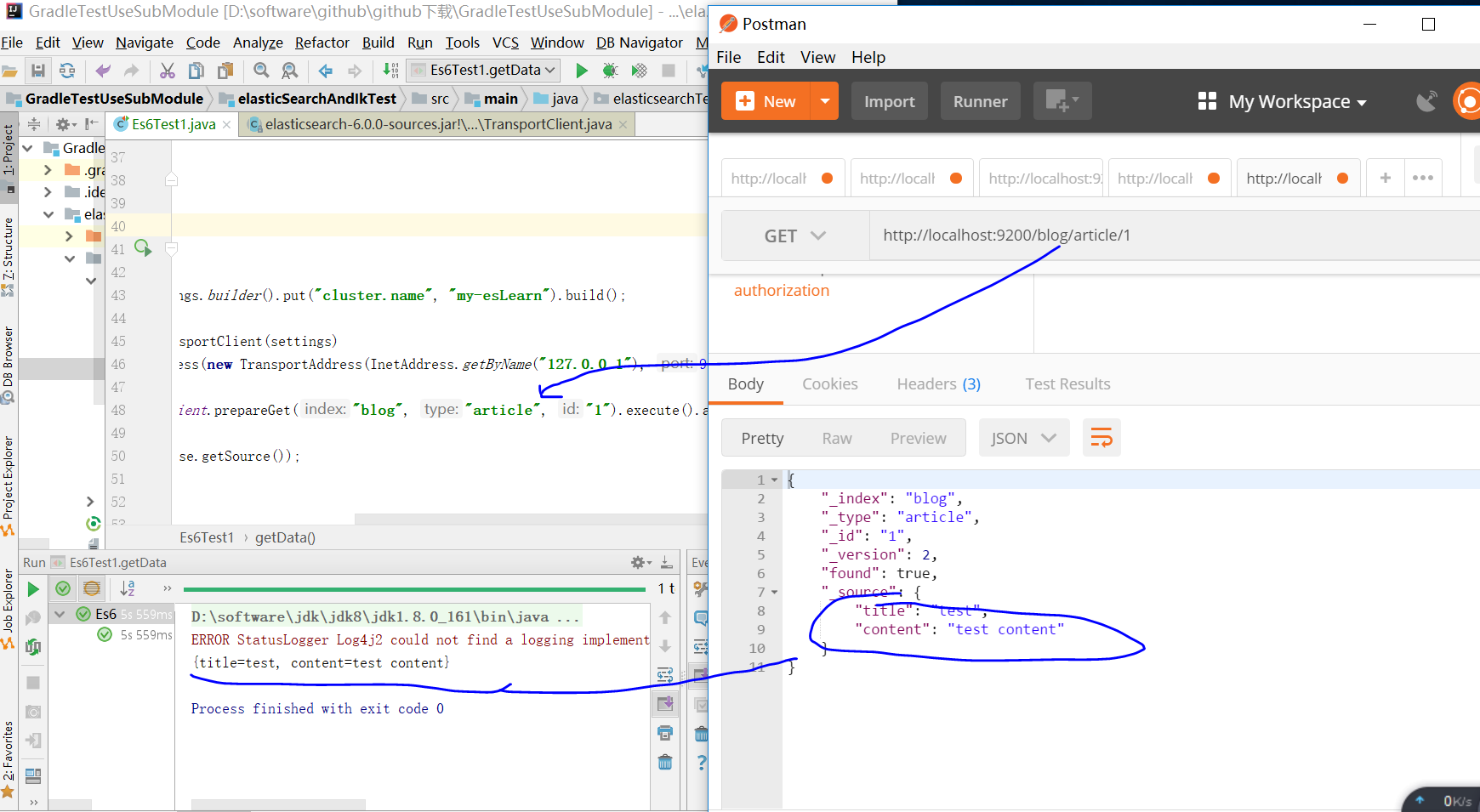
5:使用java api对elasticsearch进行请求并指定ik分词器
   @Test

    public void test2() throws IOException {

        BulkRequestBuilder bulkRequest = client.prepareBulk();

// either use client#prepare, or use Requests# to directly build index/delete requests

        bulkRequest.add(client.prepareIndex("twitter", "tweet", "1")  //创建索引

                .setSource(jsonBuilder()   //请求体,数据

                        .startObject()

                        .field("analyzer","ik_max_word")  //指定分词器

                        .field("user", "kimchy")

                        .field("postDate", new Date())

                        .field("message", "trying out Elasticsearch")

                        .endObject()

                )

        );

        bulkRequest.add(client.prepareIndex("twitter", "tweet", "2")

                .setSource(jsonBuilder()

                        .startObject()

                        .field("user", "kimchy")

                        .field("postDate", new Date())

                        .field("message", "another post")

                        .endObject()

                )

        );

        BulkResponse bulkResponse = bulkRequest.get();

        if (bulkResponse.hasFailures()) {

            // process failures by iterating through each bulk response item

        }

        BulkItemResponse[] items = bulkResponse.getItems();  //一次发送多个请求,会返回一个响应数组。

        DocWriteResponse response = items[0].getResponse();

        String index = response.getIndex();

        System.out.println(index);  //结果  twitter

    }
参考:https://www.cnblogs.com/cswuyg/p/5651620.html
javaapi 操作elasticsearch http://blog.csdn.net/zjcjava/article/details/78659721
英文 文档:https://www.elastic.co/guide/en/elasticsearch/reference/current/docs.html
1. Elasticsearch在电商领域的实战应用
http://t.cn/REEzwES
2.使用Docker和Elasticsearch搭建全文本搜索引擎应用
http://t.cn/REEzUng
3.剖析Elasticsearch索引原理
https://my.oschina.net/90888/blog/1617292
编辑:铭毅天下
归档:https://elasticsearch.cn/article/525
订阅:https://tinyletter.com/elastic-daily
postman 安装,对elasticsearch进行请求的更多相关文章
- (转)postman安装及简单使用
Postman安装与使用 2018-06-04 22:58 by 虫师, 46636 阅读, 10 评论, 收藏, 编辑 Postman一款非常流行的API调试工具.其实,开发人员用的更多.因为测试人 ...
- 浅入深出Vue:工具准备之PostMan安装配置及Mock服务配置
浅入深出Vue之工具准备(二):PostMan安装配置 由于家中有事,文章没顾得上.在此说声抱歉,这是工具准备的最后一章. 接下来就是开始环境搭建了~尽情期待 工欲善其事必先利其器,让我们先做好准备工 ...
- 2.postman安装及使用
一.postman说明 postman是研发和测试进行接口调试的工具.可以用来很方便的模拟get或者post或者其他方式的请求来调试接口. 二.postman安装 ①作为谷歌浏览器插件安装 参考资料: ...
- Postman安装与简单介绍
Postman简介 Postman是一个 Chrome 扩展,能提供强大的 Web API HTTP 请求调试功能.Postman能够发送任何类型的http请求,支持GET/PUT/POST/DELE ...
- 使用postman模拟appium的http请求
Appium是Server,接收http请求,使用Postman模拟请求 1.anyproxy 1.1.安装和运行 #安装 npm i -g anyproxy # 运行anyproxy,端口默认800 ...
- Postman安装及入门实践(以百度搜索为例)
一.Postman安装 可以FQ的小伙伴可以直接去官网下载:https://www.getpostman.com 如果不能,可以用我的安装包,版本找最新的:链接:https://pan.baidu.c ...
- Postman安装教程
Postman 安装教程 在web开发和一些需要模拟HTTP请求的时候,Postman非常有用. 因为实习的时候接触到了,感觉确实非常好用.就记录下来. 以下是参考其他博主的博文,地址:http:// ...
- 如何安装搜索引擎Elasticsearch?
最近工作中要用到搜索引擎,由于目前用的搜索引擎是LeanCloud 提供的 ,不太好用,不支持范围等搜索,而且每天还收费30元,请求次数也有限制.基于这些原因,我们只好在自己的服务器上部署搜索引擎了. ...
- Postman 安装及使用入门教程(我主要使用接口测试)
1.Postman 安装及使用入门教程(我主要使用接口测试)Postman的English官网:https://www.getpostman.com/chrome插件整理的Postman中文使用教程( ...
随机推荐
- Sqlserver 数据库、表常用查询操作
查询所有表以及记录数: select a.name as 表名,max(b.rows) as 记录条数 from sysobjects a ,sysindexes b where a.id=b.id ...
- 对 Sea.js 进行配置 seajs.config
配置 可以对 Sea.js 进行配置,让模块编写.开发调试更方便. seajs.config seajs.config(options) 用来进行配置的方法. seajs.config({ // 别名 ...
- 链表一元多项式计算器的实现(Java语言描述)
链表的经典应用,程序在多项式相加同类项合并还有小的瑕疵,有待改进. 代码如下: package 一元多项式计算器; public class PolyNode { private double a; ...
- 【Eclipse】启动时报错:No Java virtual machine (已解决)
在 Ubuntu 上下了个最新的 Eclipse ,解压后运行报这样的错误: 当然 JDK 的安装及环境变量的配置是没有问题的.使用 java -version 查询本机的JDK版本是可以的. 如果不 ...
- jconsole连接远程Tomcat应用
一.环境信息 远程tomcat:linux 64位 centos 7 上tomcat 8 本机:windows7 二.步骤 linux上,在tomcat安装目录的bin下,新建setenv.sh,内容 ...
- OpenMax概述
一.OpenMax简介 OpenMAX是一个多媒体应用程序的标准.由NVIDIA公司和Khronos™在2006年推出. 它是无授权费的.跨平台的C语言程序接口序列,这些接口对音频.视频.静态图片的常 ...
- [LintCode] Find the Missing Number 寻找丢失的数字
Given an array contains N numbers of 0 .. N, find which number doesn't exist in the array. Example G ...
- WF的简单使用
WWF(Windows Workflow Foundation):是微软提供的工作流技术,工作流就是对工作流程的规范和抽象.主要有三个部分Activity(活动).Runtime(工作流运行时)和To ...
- System.Web.UI.Page.Cache 页面 缓存 清除
这个也是网上查询到方法,不错记录一下! /// <summary> /// 清空所有的Cache /// </summary> public static void Clear ...
- SQL Fundamentals || Single-Row Functions || 日期函数date functions
SQL Fundamentals || Oracle SQL语言 SQL Fundamentals: Using Single-Row Functions to Customize Output使 ...