
Android之ToolBar和自定义ToolBar实现沉浸式状态栏
沉浸式状态栏确切的说应该叫做透明状态栏。一般情况下,状态栏的底色都为黑色,而沉浸式状态栏则是把状态栏设置为透明或者半透明。
沉浸式状态栏是从android Kitkat(Android 4.4)开始出现的,它可以被设置成与APP顶部相同的颜色,这就使得切换APP时,整个界面就好似切换到了与APP相同的风格样式一样。在内容展示上会显得更加美观。
本博客主要说的是结合ToolBar来实现状态栏的两种实现方式,效果如图:
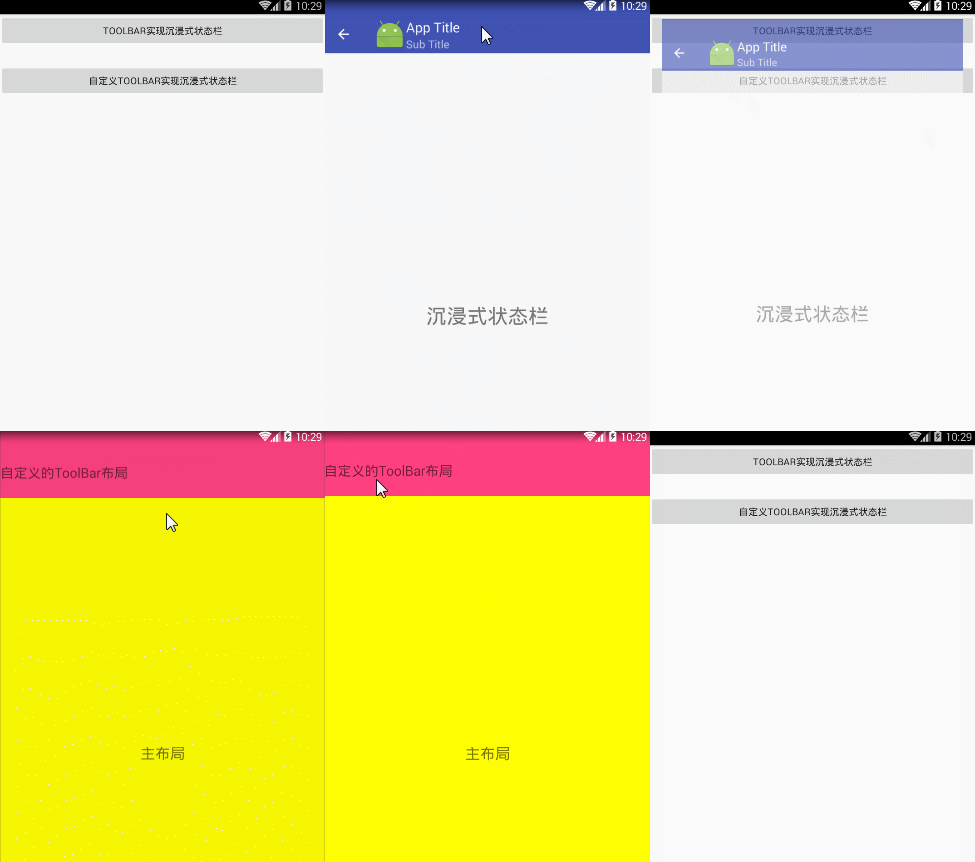
前提条件是 Api得大于等于19(4.4版本以上)
方式1:
布局 toolbar1.xml
<LinearLayout xmlns:android="http://schemas.android.com/apk/res/android"

    xmlns:app="http://schemas.android.com/apk/res-auto"

    android:layout_width="match_parent"

    android:layout_height="match_parent"

    android:orientation="vertical">

    <android.support.v7.widget.Toolbar

        android:id="@+id/toolbar"

        android:layout_width="match_parent"

        app:title="App Title"

        app:subtitle="Sub Title"

        app:navigationIcon="@android:drawable/ic_input_add"

        android:layout_height="wrap_content"

        android:background="?attr/colorPrimary"

        android:fitsSystemWindows="true"

        android:theme="@style/ThemeOverlay.AppCompat.Dark.ActionBar"

        app:popupTheme="@style/ThemeOverlay.AppCompat.Light"/>

    <RelativeLayout

        android:layout_width="match_parent"

        android:layout_height="match_parent">

        <TextView

            android:layout_width="wrap_content"

            android:layout_height="wrap_content"

            android:layout_centerInParent="true"

            android:text="沉浸式状态栏"

            android:textSize="30sp" />

    </RelativeLayout>

</LinearLayout>
Activity.Java
public class TooBarStatusActivity1 extends AppCompatActivity{

    @Override

    protected void onCreate(@Nullable Bundle savedInstanceState) {

        super.onCreate(savedInstanceState);

        requestWindowFeature(Window.FEATURE_NO_TITLE);//去标题

        setContentView(R.layout.toolbar_layout);

        //透明状态栏

        getWindow().addFlags(WindowManager.LayoutParams.FLAG_TRANSLUCENT_STATUS);

        //透明导航栏

        getWindow().addFlags(WindowManager.LayoutParams.FLAG_TRANSLUCENT_NAVIGATION);

        //透明导航栏

        Toolbar mToolbar = (Toolbar) findViewById(R.id.toolbar);

        mToolbar.setTitle("App Title"); //设置Toolbar标题

        mToolbar.setSubtitle("Sub Title"); //设置Toolbar 副标题

        mToolbar.setLogo(R.mipmap.ic_launcher);//设置Toolbar的Logo

        mToolbar.setNavigationIcon(R.mipmap.abc_ic_ab_back_mtrl_am_alpha);

        setSupportActionBar(mToolbar);

    }

}
方式2:
布局 toolbar2.xml
<LinearLayout xmlns:android="http://schemas.android.com/apk/res/android"

    xmlns:tools="http://schemas.android.com/tools"

    android:layout_width="match_parent"

    android:layout_height="match_parent"

    android:background="@android:color/white"

    android:orientation="vertical"

   >

    <TextView

        android:layout_width="match_parent"

        android:layout_height="100dp"

        android:background="@color/colorAccent"

        android:fitsSystemWindows="true"

        android:clipToPadding="true"

        android:text="自定义的ToolBar布局"

        android:textSize="20sp"

        android:gravity="center_vertical"

        />

    <TextView

        android:layout_width="match_parent"

        android:layout_height="match_parent"

        android:background="#FFFF00"

        android:text="主布局"

        android:textSize="22sp"

        android:gravity="center"

        />

</LinearLayout>
Activity.Java
public class TooBarStatusActivity2 extends AppCompatActivity {

    @Override

    protected void onCreate(@Nullable Bundle savedInstanceState) {

        super.onCreate(savedInstanceState);

        setContentView(R.layout.toolbar_layout2);

        if (Build.VERSION.SDK_INT >= Build.VERSION_CODES.KITKAT) {

            //透明状态栏

            getWindow().addFlags(WindowManager.LayoutParams.FLAG_TRANSLUCENT_STATUS);

            //透明导航栏

            getWindow().addFlags(WindowManager.LayoutParams.FLAG_TRANSLUCENT_NAVIGATION);

        }

    }

}
style.xml
<style name="AppTheme" parent="Theme.AppCompat.Light.DarkActionBar">

        <!-- Customize your theme here. -->

        <item name="colorPrimary">@color/colorPrimary</item>

        <item name="colorPrimaryDark">@color/colorPrimaryDark</item>

        <item name="colorAccent">@color/colorAccent</item>

        <item name="windowActionBar">false</item>

        <item name="windowNoTitle">true</item>

    </style>
源码点击下载
Android之ToolBar和自定义ToolBar实现沉浸式状态栏的更多相关文章
- Android 之低版本高版本实现沉浸式状态栏
沉浸式状态栏确切的说应该叫做透明状态栏.一般情况下,状态栏的底色都为黑色,而沉浸式状态栏则是把状态栏设置为透明或者半透明. 沉浸式状态栏是从android Kitkat(Android 4.4)开始出 ...
- android 4.4以上能够实现的沉浸式状态栏效果
仅仅有android4.4以及以上的版本号才支持状态栏沉浸效果 先把程序执行在4.4下面的手机上,看下效果: 在4.4以上的效果: watermark/2/text/aHR0cDovL2Jsb2cuY ...
- Android App 沉浸式状态栏解决方案
伴随着 Android 5.0 发布的 Material Design,让 Android 应用告别了以前的工程师审美,迎来了全新的界面,灵动的交互,也让越来越多的 App 开始遵从 material ...
- 分别用ToolBar和自定义导航栏实现沉浸式状态栏
一.ToolBar 1.在build.gradle中添加依赖,例如: compile 'com.android.support:appcompat-v7:23.4.0' 2.去掉应用的ActionBa ...
- 商城项目实战 | 2.2 Android 仿京东商城——自定义 Toolbar (二)
本文为菜鸟窝作者刘婷的连载."商城项目实战"系列来聊聊仿"京东淘宝的购物商城"如何实现. 上一篇文章<商城项目实战 | 2.1 Android 仿京东商城 ...
- [置顶]
Xamarin android沉浸式状态栏
虽然关于android "沉浸式"状态栏有很多博客介绍过,从小菜到大神无一例外.我第一次看到这种"沉浸"式的效果我也以为真的是这么叫,然而根本不是这么回事,完全 ...
- android -------- 沉浸式状态栏和沉浸式导航栏(ImmersionBar)
android 4.4以上沉浸式状态栏和沉浸式导航栏管理,包括状态栏字体颜色,适用于Activity.Fragment.DialogFragment.Dialog,并且适配刘海屏,适配软键盘弹出等问题 ...
- Android开发 android沉浸式状态栏的适配(包含刘海屏)转载
原文地址:https://blog.csdn.net/liup1211/article/details/86583015 写在前面: 1,本文阐述如何实现沉浸式状态栏 2,部分代码有从其他博客摘抄,也 ...
- Android沉浸式状态栏(透明状态栏)最佳实现
Android沉浸式状态栏(透明状态栏)最佳实现 在Android4.4之前,我们的应用没法改变手机的状态栏颜色,当我们打开应用时,会出现上图中左侧的画面,在屏幕的顶部有一条黑色的状态栏,和应用的风格 ...
随机推荐
- HTML5 -canvas拖拽、移动 绘制图片可操作移动,拖动
关于canvas 的基础知识就不多说了,可以进这个网址学习 http://www.w3school.com.cn/html5/html_5_canvas.asp 对于canvas 和 SVG 其实一开 ...
- DNS正反向区域解析(二)
域名查询工具 Nslookup命令 >server 202.106.0.20 #指定DNS服务器 >set q=A #指定要查询的类型(A,PTR,MX,CNAME,NS) >www ...
- 负载均衡之-haproxy
老规矩,先介绍?复制一段? 1)HAProxy提供高可用性.负载均衡以及基于TCP和HTTP应用的代理,支持虚拟主机,它是免费.快速并且可靠的一种解决方案. 2)HAProxy特别适用于那些负载特大的 ...
- Jquery 数组与字符串之间的转换
var auth_list = []; $("input[name='auth_list']:checkbox").each(function () { if ($(this).a ...
- CSS style 属性
CSS style 属性 定义和用法 必需的 type 属性规定样式表的 MIME 类型. type 属性指示 <style> 与 </style> 标签之间的内容. 值 &q ...
- nginx负载均衡技术的优缺点
在原来的公司,一般都是采用F5 BIG-IP作为前端负载均衡服务器,后端一般直接用LVS作为mysql的负载均衡机制(应用服务器之间一般采用自行开发的TCP通信机制,其内置了负载均衡和HA),实际用a ...
- 20145305 《网络对抗》MSF基础应用
实践过程及结果截图 主动攻击ms08_067 Kali的IP:10.43.46.93 靶机的IP:10.43.49.28 MS08_067远程漏洞攻击实践:Shell 攻击成功的结果 在kali上执行 ...
- 20145334赵文豪网络对抗Web安全基础实践
1.SQL注入攻击原理,如何防御? SQL注入攻击就是通过把SQL命令插入到Web表单递交或输入域名或页面请求的查询字符串,最终达到欺骗服务器执行恶意SQL命令的目的. 对于SQL注入攻击的防范,我觉 ...
- 2018-2019-1 20189218《Linux内核原理与分析》第六周作业
向menuOS中增加命令 修改menu目录下的test.c文件,增加自己的函数定义,并在修改main()函数,按照前面的menuconfig的写法写好自己的menuconfig. 我选择的是acces ...
- intent bundle的使用
1.什么是bundle Bundle主要用于传递数据:它保存的数据,是以key-value(键值对)的形式存在的.我们经常使用Bundle在Activity之间传递数据,传递的数据可以是boolean ...