
springbatch---->springbatch的使用(三)
这里我们对上篇博客的例子做一个修改性的测试来学习一下springbatch的一些关于chunk的一些有用的特性。我渐渐能意会到,深刻并不等于接近事实。
springbatch的学习
一、chunk的skip-limit属性的使用
关于这个属性的介绍:Maximum number of skips during processing of the step. If processing reaches the skip limit, the next exception thrown on item processing (read, process, or write) causes the step to fail.
我们修改batch.xml里面的关于readWriter里面的设置属性。如下:
<!-- old -->

<step id="readWriter" next="clean">

    <tasklet>

        <chunk reader="reader" writer="writer" commit-interval="100" processor="processor">

        </chunk>

    </tasklet>

</step>

<!-- new -->

<step id="readWriter" next="clean">

    <tasklet>

        <chunk reader="reader" writer="writer" commit-interval="100" skip-limit="2" processor="processor">

            <skippable-exception-classes>

                <include class="org.springframework.batch.item.file.FlatFileParseException"/>

            </skippable-exception-classes>

        </chunk>

    </tasklet>

</step>
FlatFileParseException:Exception thrown when errors are encountered parsing flat files.修改的解压文件的内容,让它有一条数据是错误的。如下:这个日期肯定是错误的,当然这里是为了测试skip-limit属性才做如此的方法处理。其实面对这样的数据,可以放在process里面进行过滤处理的。
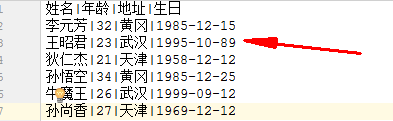
运行后的结果,数据库的数据如下:
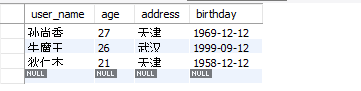
可以看到上述的那条错误数据没有插入到表中,但是正常的数据已经插入到数据库中。如果增加解压文件的错误条数。比如3条的时候。控制台会报错:org.springframework.batch.core.step.skip.SkipLimitExceededException: Skip limit of '2' exceeded。数据库表的数据也没有成功的插入。
二、chunk的skip-policy属性的使用
如果在意异常数量的话,用上述的skip-limit比较方便和简单。如果不在意异常数量的话,我们可以自己定义忽略的策略,也就是这段要学习的部分。修改batch.xml里面的关于readWriter里面的设置属性如下:
<step id="readWriter" next="clean">

    <tasklet>

        <chunk reader="reader" writer="writer" commit-interval="100" skip-policy="skipPolicy" processor="processor"/>

    </tasklet>

</step>

<step id="clean">

    <tasklet ref="cleanTasklet"/>

</step>
在job.xml中声明定义skipPolicy,内容如下
<bean id="skipPolicy" class="spring.batch.readFile.ExceptionSkipPolicy">

    <constructor-arg value="org.springframework.batch.item.file.FlatFileParseException"/>

</bean>
ExceptionSkipPolicy是我们自定义的异常策略实现类
package spring.batch.readFile;

import org.springframework.batch.core.step.skip.SkipLimitExceededException;

import org.springframework.batch.core.step.skip.SkipPolicy;

/**

 * @Author: huhx

 * @Date: 2017-11-01 下午 4:58

 */

public class ExceptionSkipPolicy implements SkipPolicy {

    private Class<? extends Exception> exceptionClassToSkip;

    public ExceptionSkipPolicy(Class<? extends Exception> exceptionClassToSkip) {

        super();

        this.exceptionClassToSkip = exceptionClassToSkip;

    }

    @Override

    public boolean shouldSkip(Throwable t, int skipCount) throws SkipLimitExceededException {

        return exceptionClassToSkip.isAssignableFrom(t.getClass());

    }

}
修改解压文件的内容,其实就是上述的错误3条数据的内容。如下
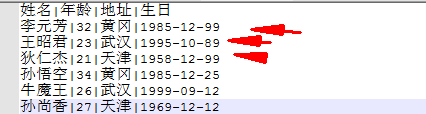
运行之后的数据库数据如下:

三、SkipListener监听skip的数据
我们基于上述做的修改,现在的job节点xml配置如下:
<job id="readFlatFileJob">

    <step id="decompress" next="readWriter">

        <tasklet ref="decompressTasklet"/>

    </step>

    <step id="readWriter" next="clean">

        <tasklet>

            <chunk reader="reader" writer="writer" commit-interval="100" skip-policy="skipPolicy" processor="processor"/>

            <listeners>

                <listener ref="skipListener"/>

            </listeners>

        </tasklet>

    </step>

    <step id="clean">

        <tasklet ref="cleanTasklet"/>

    </step>

</job>
job.xml中配置skipListener
<bean id="skipListener" class="spring.batch.readFile.FileSkipListener"/>
FileSkipListener的代码如下:
package spring.batch.readFile;

import org.apache.commons.io.FileUtils;

import org.springframework.batch.core.annotation.OnSkipInProcess;

import org.springframework.batch.core.annotation.OnSkipInRead;

import org.springframework.batch.core.annotation.OnSkipInWrite;

import org.springframework.batch.item.file.FlatFileParseException;

import java.io.File;

import java.io.IOException;

/**

 * @Author: huhx

 * @Date: 2017-11-01 下午 5:32

 */

public class FileSkipListener {

    private File file = new File("file/log.txt");

    @OnSkipInRead

    public void readLog(Throwable t) throws IOException {

        if (t instanceof FlatFileParseException) {

            FlatFileParseException ffpe = (FlatFileParseException) t;

            String dataLog = "from read " + ffpe.getInput() + ", line number = " + ffpe.getLineNumber() + "\n";

            FileUtils.write(file, dataLog, true);

        }

    }

    @OnSkipInProcess

    public void processLog(People people, Throwable t) throws IOException {

        if (t instanceof FlatFileParseException) {

            FlatFileParseException ffpe = (FlatFileParseException) t;

            String dataLog = "from process " + ffpe.getInput() + ", line number = " + ffpe.getLineNumber() + "\n";

            String peopleInfo = people.getUsername() + ", address " + people.getBirthday() + "\n";

            FileUtils.write(file, dataLog + peopleInfo, true);

        }

    }

    @OnSkipInWrite

    public void writeLog(People people, Throwable t) throws IOException {

        if (t instanceof FlatFileParseException) {

            FlatFileParseException ffpe = (FlatFileParseException) t;

            String dataLog = "from write " + ffpe.getInput() + ", line number = " + ffpe.getLineNumber() + "\n";

            String peopleInfo = people.getUsername() + ", address " + people.getBirthday() + "\n";

            FileUtils.write(file, dataLog + peopleInfo, true);

        }

    }

}
对于上述错误的几条记录,我们记日志在log.txt里面。现在log.txt的内容如下:
from read 李元芳||黄冈|--, line number =

from read 王昭君|百里|武汉|--, line number =

from read 狄仁杰||天津|--, line number =
springbatch提供的SkipListener接口去监听skip的数据项。
public interface SkipListener<T,S> extends StepListener {

    void onSkipInRead(Throwable t);

    void onSkipInProcess(T item, Throwable t);

    void onSkipInWrite(S item, Throwable t);

}
当然比较方便的一种做法,就是springbatch提供的上述的@OnSkipInRead,@OnSkipInProcess and @OnSkipInWrite注解方式。
四、类似于上述的skip策略,springbatch还支持retry(重试)的功能
定义重试的方式有二种,和skip的类似。这里我们列举如下:
- 默认retry策略的可以定义重试次数的方式:
<tasklet>

    <chunk reader="reader" writer="writer" commit-interval="100" retry-limit="3">

        <retryable-exception-classes>

            <include class="org.springframework.daoOptimisticLockingFailureException" />

        </retryable-exception-classes>

    </chunk>

</tasklet>
- 自定义重试策略的方式:
<tasklet>

    <chunk reader="reader" writer="writer" commit-interval="100" retry-policy="retryPolicy" />

</tasklet>
retryPolicy的定义如下:
<bean id="retryPolicy" class="org.springframework.retry.policy.ExceptionClassifierRetryPolicy">

    <property name="policyMap">

        <map>

            <entry key="org.springframework.dao.ConcurrencyFailureException">

                <bean class="org.springframework.retry.policy.SimpleRetryPolicy">

                    <property name="maxAttempts" value="3"/>

                </bean>

            </entry>

            <entry key="org.springframework.dao.DeadlockLoserDataAccessException">

                <bean class="org.springframework.retry.policy.SimpleRetryPolicy">

                    <property name="maxAttempts" value="5"/>

                </bean>

            </entry>

        </map>

    </property>

</bean>
当然,retry也有类似于skip的SkipListener。操作及用法如下
package spring.batch.readFile;

import org.slf4j.Logger;

import org.slf4j.LoggerFactory;

import org.springframework.retry.RetryCallback;

import org.springframework.retry.RetryContext;

import org.springframework.retry.listener.RetryListenerSupport;

/**

 * @Author: huhx

 * @Date: 2017-11-01 下午 7:00

 */

public class Slf4jRetryListener extends RetryListenerSupport {

    private static final Logger LOG = LoggerFactory.getLogger(Slf4jRetryListener.class);

    @Override

    public <T, E extends Throwable> void onError(RetryContext context, RetryCallback<T, E> callback, Throwable throwable) {

        LOG.error("retried operation",throwable);

    }

}
友情链接
springbatch---->springbatch的使用(三)的更多相关文章
- SpringBatch Sample (三)(XML文件操作)
前篇关于Spring Batch的文章,讲述了Spring Batch 对CSV文件的读写操作. 本文将通过一个完整的实例,与大家一起讨论运用Spring Batch对XML文件的读写操作.实例流程是 ...
- YII内置验证规则
required: 必填字段验证, 来自 CRequiredValidator类的别名 array(‘字段名列表用逗号隔开’, ‘required’), 就这样的一个小小的写法,可以让字段前面加 ...
- Spring Batch介绍
简介 SpringBatch 是一个大数据量的并行处理框架.通常用于数据的离线迁移,和数据处理,⽀持事务.并发.流程.监控.纵向和横向扩展,提供统⼀的接⼝管理和任务管理;SpringBatch是Spr ...
- SpringBatch的初步了解
一.SpringBatch是一个批处理的框架,作为一个Spring组件,提供了通过使用Spring的依赖注入来处理批处理的条件. 什么是批处理呢? 在现代企业应用当中,面对复杂的业务以及海量的数据,除 ...
- Spring-boot+Spring-batch+hibernate+Quartz简单批量读文件写数据用例
本文程序集成了Spring-boot.Spring-batch.Spring-data-jpa.hibernate.Quartz.H2等.完整代码在Github上共享,地址https://github ...
- springBatch学习 batch的使用方式(5)
首先讲一下batch框架提供的一组job执行的api 如下图 说明: 应用场景 包含三种 标准的web ,定时任务调度,命令行 1.命令行 通过命令行在单独的jvm中调用 进行批处理作业 spring ...
- SpringBoot整合SpringBatch实用简例
SpringBatch主要是一个轻量级的大数据量的并行处理(批处理)的框架. 作用和Hadoop很相似,不过Hadoop是基于重量级的分布式环境(处理巨量数据),而SpringBatch是基于轻量的应 ...
- SpringBatch异常To use the default BatchConfigurer the context must contain no more thanone DataSource
SpringBoot整合SpringBatch项目,已将代码开源至github,访问地址:https://github.com/cmlbeliever/SpringBatch 欢迎star or fo ...
- SpringBoot整合SpringBatch
一.引入依赖 pom.xml <?xml version="1.0" encoding="UTF-8"?> <project xmlns=&q ...
- 业务可视化-让你的流程图"Run"起来(6.定时任务&Spring-Batch的集成)
前言 首先,感谢大家对上一篇文章[业务可视化-让你的流程图"Run"起来(5.SpringBoot集成&微服务编排)]的支持. 分享一下近期我对这个项目的一些改进. 在项目 ...
随机推荐
- c# mvc 获取 HtmlHelper 表达式值和时间格式化 去边框
/// <summary> /// 返回没有边框的只读的TextBox标签 /// </summary> /// <typeparam name="TModel ...
- Oracle错误IMP-00010: 不是有效的导出文件, 头部验证失败 分类: Oracle 2015-07-09 13:56 20人阅读 评论(0) 收藏
Oracle 11g的dmp备份文件导入到Oracle 10g,出现错误信息: Import: Release 10.2.0.1.0 - Production on 星期四 7月 9 13:47:04 ...
- at 命令
每天什么时候执形at 12:00 /every:Monday,Tuesday,Wednesday,Thursday,Friday,Saturday,Sunday shutdown -r
- Java Number类
一般地,当需要使用数字的时候,我们通常使用内置数据类型,如:byte.int.long.double等. 例如: int i = 5000; float gpa = 13.65; byte mask ...
- unity3d Start执行不同时问题
1.一个Scene的场景里有许多的GameObject,很多GameObject上绑定了Script,每个Script上又都有Start函数 using UnityEngine; using Syst ...
- 在Android中,px,dp,dip,sp的不同之处
最近在学习Android开发,一直没有弄清楚px,dp,dip,sp的区别.今天正好有时间,就花时间研究了一下. 众所周知,Android厂商非常多,各种尺寸的Android手机 ...
- Node.js 模块之 morgan中间件记录日志
NodeJs中Express框架使用morgan中间件记录日志 Express中的app.js文件已经默认引入了该中间件var logger = require('morgan'); 使用app.us ...
- VC++ 链接错误LINK : fatal error LNK1104: cannot open file "*.lib"
问题描述: 运行VC++编译时经常出现 Linking… LINK : fatal error LNK1104: cannot open file “*.lib” Error executing li ...
- Centos修改时间显示的时区,将UTC修改为CST
问题说明: 今天一同事反应,系统的时间不对和正常的时间差8个小时.就登录主机看了下时间 系统时间显示为: # date Fri Dec :: UTC # 备注:查看了下,正好和当前的时间差了8个小时. ...
- js获取图片原始大小
摘要: 浏览器中显示的图片大小未必是他真实的高和宽,比如像下面这样,我们给他加上宽和高的样式 <img src="IE.png" style="width:25px ...