
使用java连接数据库以后显示“ Establishing SSL connection without server's identity verification is not recommended”的警告如何解决
今天写了一段查询数据库的操作,如下
package MySQL;

import java.sql.*;

public class MySQL {

    //JDBC驱动名以及数据库URL

    static final String JDBC_DRIVER = "com.mysql.jdbc.Driver";

    static final String DB_URL = "jdbc:mysql://localhost:3306/test";

    //数据库的用户名和密码

    static final String USER = "root";

    static final String PASS = "0825";

    public static void main(String args[]) {

        Connection conn = null;

        Statement stmt = null;

        try {

            //注册JDBS驱动

            Class.forName("com.mysql.jdbc.Driver");

            //打开连接

            System.out.println("连接数据库");

            conn = DriverManager.getConnection(DB_URL, USER, PASS);

            //执行查询

            System.out.println(" 实例化Statement对象...");

            stmt = conn.createStatement();

            String sql;

            sql = "select * from users";

            ResultSet rs = stmt.executeQuery(sql);

            //展开结果集数据库

            while(rs.next()){

                //通过字段见索引

                int id = rs.getInt("id");

                String name = rs.getString("name");

                int age = rs.getInt("age");

                //输出数据

                System.out.println("Id:"+id);

                System.out.println("名字:"+name);

                System.out.println("年龄"+age);

            }

            //完成后进行关闭

            rs.close();

            stmt.close();

            conn.close();

        } catch (SQLException se) {

            // 处理 JDBC 错误

            se.printStackTrace();

        } catch (Exception e) {

            // 处理 Class.forName 错误

            e.printStackTrace();

        } finally {

            // 关闭资源

            try {

                if (stmt != null) stmt.close();

            } catch (SQLException se2) {

            }// 什么都不做

            try {

                if (conn != null) conn.close();

            } catch (SQLException se) {

                se.printStackTrace();

            }

            System.out.println("Goodbye!");

        }

    }

}
表结构和表内容:

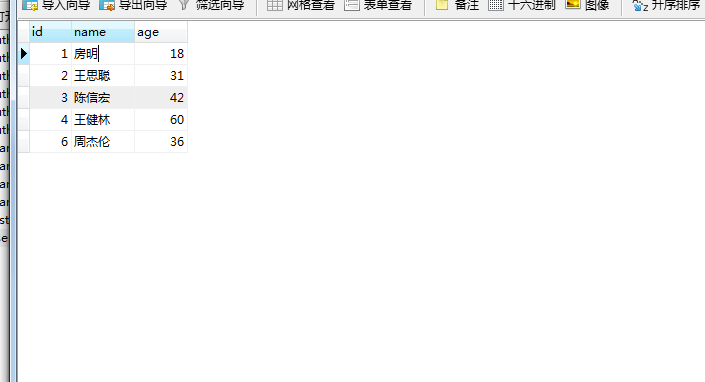
好,那么我们来看一下运行的结果:
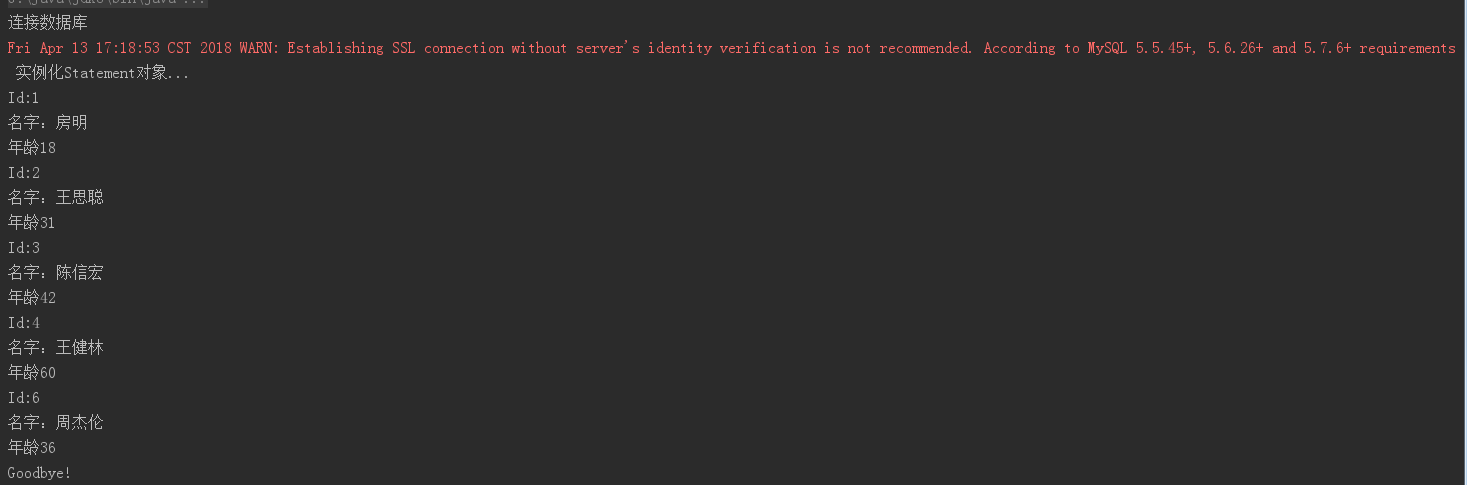
没有影响显示,但是却出现了警告,网上查询资料,原来是需要在DB_URL后面加上参数:
// 加了 ?useUnicode=true&characterEncoding=utf-8&useSSL=false

 static final String DB_URL = "jdbc:mysql://localhost:3306/test?useUnicode=true&characterEncoding=utf-8&useSSL=false";
OK,成功运行,其实这个警告不影响使用,只是SQL版本的事情罢了
使用java连接数据库以后显示“ Establishing SSL connection without server's identity verification is not recommended”的警告如何解决的更多相关文章
- Java连接MySQL Warning: Establishing SSL connection without server's identity verification is not recommended
1. 数据库 1.1 创建表 在当前数据库students中,创建数据表student: mysql> create table student( ),#学生ID ),#学生姓名 -> a ...
- java链接Mysql出现警告:Establishing SSL connection without server's identity verification is not recommended. According to MySQL 5.5.45+, 5.6.26+ and 5.7.6+ requirements SSL connection must be established by
Java使用mysql-jdbc连接MySQL出现如下警告: Establishing SSL connection without server's identity verification is ...
- Java连接mysql——Establishing SSL connection without server's identity verification is not recommended.
Establishing SSL connection without server's identity verification is not recommended. 出现这个错误的原因是因为m ...
- Java连接MySQL报出警告 WARN: Establishing SSL connection without server's identity verification is not recommended.
很多人使用JDBC连接MySQL时报出警告: WARN: Establishing SSL connection without server's identity verification is n ...
- Java连接Mysql数据库警告: Establishing SSL connection without server's identity verification is not recommended. According to MySQL 5.5.45+, 5.6.26+ and 5.7.6+ requirements SSL connection must be established
详细错误: Establishing SSL connection without server's identity verification is not recommended. Accordi ...
- java运行jdk连接mysql出现了:Establishing SSL connection without server's identity verification is not recommended
注意:出现这类提示也不会影响对数据库的增删改查操作,所以不用紧张.. 在运行练习时出现下面的错误信息提示: Establishing SSL connection without server's i ...
- Wed Sep 19 20:48:46 CST 2018 WARN: Establishing SSL connection without server's identity verification is not recommended. According to MySQL 5.5.45+, 5.6.26+ and 5.7.6+ requirements SSL connection mus
Wed Sep 19 20:48:46 CST 2018 WARN: Establishing SSL connection without server's identity verificatio ...
- WARN: Establishing SSL connection without server's identity verification is not recommended. According to MySQL 5.5.45+, 5.6.26+ and 5.7.6+ requirements SSL connection must be established by default i
jdbc连接数据库候,对数据进行访问,访问正常当出现如下警告: WARN: Establishing SSL connection without server's identity verifica ...
- 【警告】WARN: Establishing SSL connection without server's identity verification is not recommended.
1.Java访问Mysql时出现如下警告: 2019-04-02 10:30:50.545 INFO 1290 --- [nio-8080-exec-1] com.zaxxer.hikari.Hika ...
随机推荐
- 【CUDA学习】结构体指针复制
内核函数中要用data结构作用参数 typedef struct { int* value; int* num; } data; //host端 data* h_input; h_input=(dat ...
- Wireshark 抓包小例子
捕捉过滤器(CaptureFilters): 用于决定将什么样的信息记录在捕捉结果中. 语法详见:http://www.cnblogs.com/SZxiaochun/p/7920962.html 显示 ...
- Spring JDBC入门程序
要了解JdbcTemplate类与Spring JDBC框架相关的概念,下面通过编写一个简单的例子演示如何使用Spring JDBC框架,在这个示例中,将在以student表上实现插入数据和读取数据的 ...
- 创建Swing的步骤
(1)导入Swing包 (2)选择界面风格 (3)设置顶层容器 (4)设置按钮和标签 (5)将组件放到容器上 (6)为组件增加边框 (7)处理事件 (8)辅助技术支持 package Com.MySw ...
- (原)多线程sdl_ttf显示文字
最近在使用sdl做视频显示,因为需要显示文字,所以就找了sdl的拓展库,sdl_ttf来做文字显示. 这里说明一下:sdl_ttf不支持多线程,官方上面有说明,它不是多线程安全的. 所以当我最初使用s ...
- 命令查询职责分离模式(Command Query Responsibility Segregation,CQRS)
浅谈命令查询职责分离(CQRS)模式 CQRS架构简介 对CQRS的一次批判性思考
- QIIME1 聚OTU
qiime 本身不提供聚类的算法,它只是对其他聚otu软件的封装 根据聚类软件的算法,分成了3个方向: de novo: pick_de_novo_otus.py ...
- thinkphp中的AJAX返回ajaxReturn()
系统支持任何的AJAX类库,Action类提供了ajaxReturn方法用于AJAX调用后返回数据给客户端.并且支持JSON.XML和EVAL三种方式给客户端接受数据,通过配置DEFAULT_AJAX ...
- ZeroClipboard插件——复制到剪切板
ZeroClipboard是一个轻量级的jQuery“复制到剪贴板”插件采用了时下流行的零剪贴板库.官网:http://www.steamdev.com/zclip 参数及默认值path(必选) Z ...
- cocos2d - CCSprite各种动画
转自 ITeye技术网站 // 触摸屏 -(void) ccTouchesEnded:(NSSet *)touches withEvent:(UIEvent *)event { for( UITouc ...