
【swagger学习】.net WebApi中使用swagger
我在WebApi中使用swagger的时候发现会出现很多问题,搜索很多地方都没找到完全解决问题的方法,后面自己解决了,希望对于遇到同样问题朋友有帮助。我将先一步一步的演示项目中解决swagger遇到问题及解决方法。
首先我们新建一个api项目
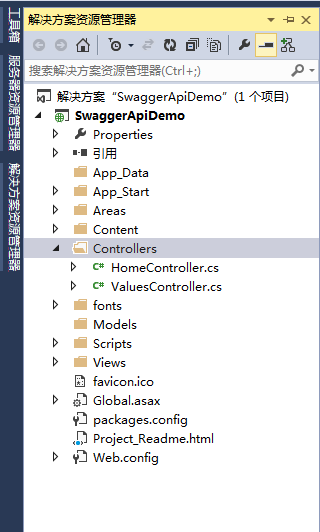
图1 (默认生成项目)
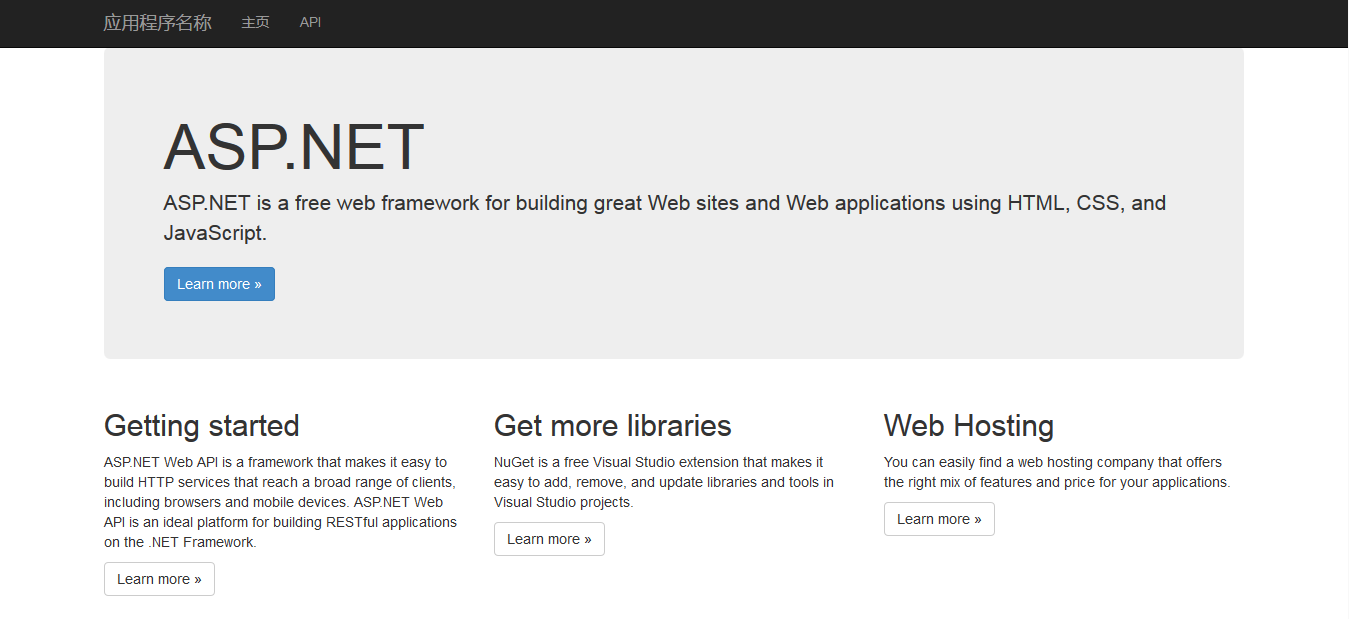
图2(运行首页)

图3(默认Api列表)
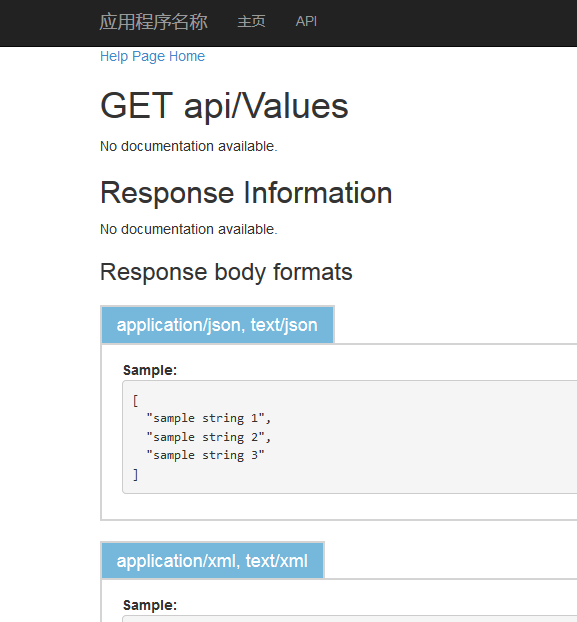
图4(默认Get的Api)
以上图1-4都是默认情况下生成页面看起来不是那么好看,而且测试也不方便,下面将介绍怎么使用swagger。
使用nuget包获取Swashbule、swagger的包并安装。
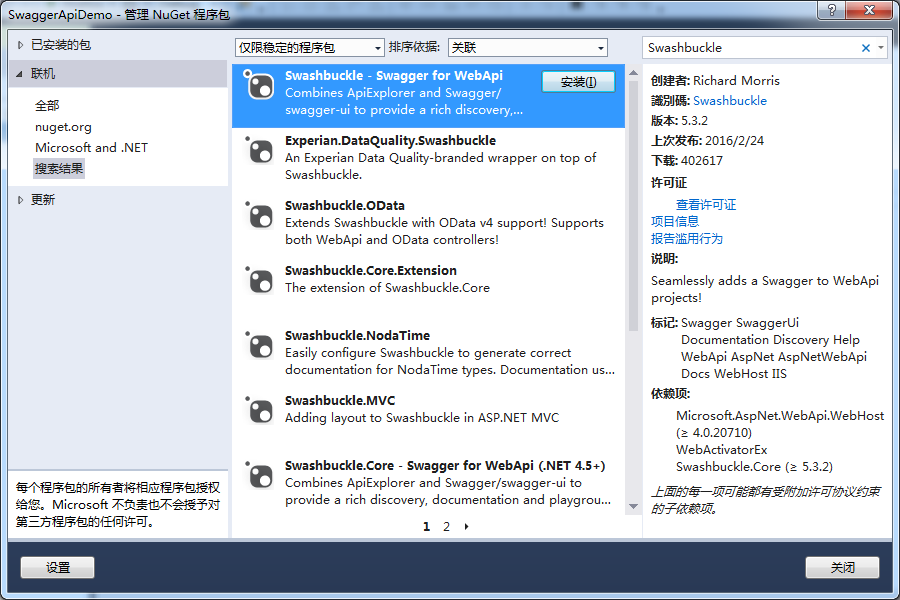
图5(Swashbule - swagger for Api)

图6(swagger UI for net)
一般安装到就应该可以正常运行了。但是运行后我们发现抛出异常
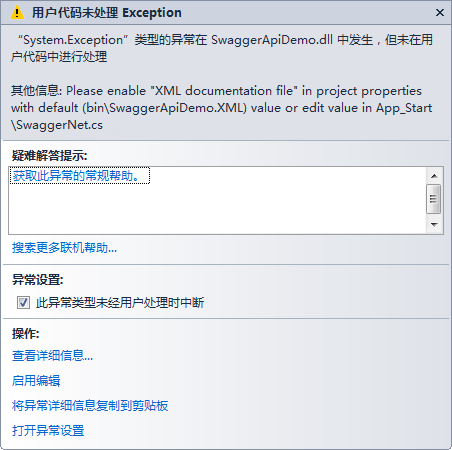
图7(异常1)
打开解决方案属性-->生成,勾选XML文档文件,保存就ok。

图8
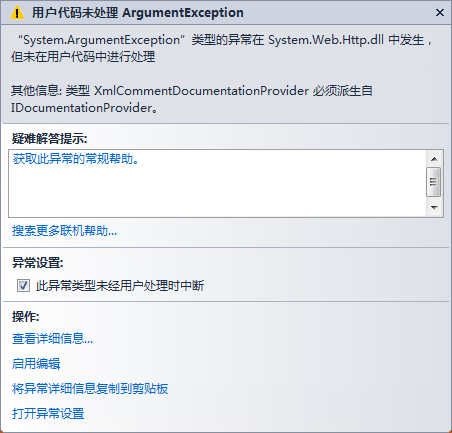
图9(异常2)
出现该异常是由于没有增加依赖项,大家可以自行查看自己的dll文件版本,做出修改,把下面的代码插入到web.config中。
    <dependentAssembly>

        <assemblyIdentity name="System.Net.Http.Formatting" publicKeyToken="31bf3856ad364e35" culture="neutral" />

        <bindingRedirect oldVersion="0.0.0.0-5.0.0.0" newVersion="5.0.0.0" />

      </dependentAssembly>

      <dependentAssembly>

        <assemblyIdentity name="System.Web.Http" publicKeyToken="31bf3856ad364e35" culture="neutral" />

        <bindingRedirect oldVersion="0.0.0.0-5.0.0.0" newVersion="5.0.0.0" />

      </dependentAssembly>

      <dependentAssembly>

        <assemblyIdentity name="Newtonsoft.Json" publicKeyToken="30ad4fe6b2a6aeed" culture="neutral" />

        <bindingRedirect oldVersion="0.0.0.0-8.0.0.0" newVersion="8.0.0.0" />

      </dependentAssembly>
在把swagger.net中两行代码注释,估计是因为nuget包中的代码没有更新导致这个异常出现

图10(注释不需要代码)
好了现在我们来看看可以运行后的效果,在浏览器中输入URL:http://localhost:28129/swagger会自动跳转到http://localhost:28129/swagger/ui/index

图11
至此我们就能够正常运行swagger非常方便调试接口。
为了方便测试我们新建一个App的Model

    /// <summary>

    /// App信息

    /// </summary>

    public class App

    {

        /// <summary>

        /// App的ID号

        /// </summary>

        public int Id { get; set; }

        /// <summary>

        /// App的名称

        /// </summary>

        public string Name { get; set; }

        /// <summary>

        /// App的说明

        /// </summary>

        public string Remark { get; set; }

    }
返回消息ResultJson的Model
    /// <summary>

    /// 返回处理结果

    /// </summary>

    public class ResultJson

    {

        /// <summary>

        /// 返回代码

        /// </summary>

        public int Code { get; set; }

        /// <summary>

        /// 返回消息

        /// </summary>

        public string Message { get; set; }

    }
新增加一个AppController的Api
 public class AppController : ApiController

    {

        private List<App> GetApps()

        {

            List<App> list = new List<App>();

            list.Add(new App() { Id = 1, Name = "WeChat", Remark = "WeChat" });

            list.Add(new App() { Id = 2, Name = "FaceBook", Remark = "FaceBook" });

            list.Add(new App() { Id = 3, Name = "Google", Remark = "Google" });

            list.Add(new App() { Id = 4, Name = "QQ", Remark = "QQ" });

            return list;

        }

        /// <summary>

        /// 获取所有APP

        /// </summary>

        /// <returns>所有APP集合</returns>

        [HttpGet]

        public HttpResponseMessage Get()

        {

            return MyJson.ObjectToJson(GetApps());

        }

        /// <summary>

        /// 获取指定APP

        /// </summary>

        /// <param name="id">需要获取APP的id</param>

        /// <returns>返回指定APP</returns>

        [HttpGet]

        public HttpResponseMessage Get(int id)

        {

            var app = GetApps().Where(m => m.Id.Equals(id)).FirstOrDefault();

            return MyJson.ObjectToJson(app);

        }

        /// <summary>

        /// 增加App信息

        /// </summary>

        /// <param name="value"></param>

        /// <returns></returns>

        [HttpPost]

        public HttpResponseMessage Insert([FromBody]App value)

        {

            ResultJson json = new ResultJson() { Code = 200, Message = "Ok" };

            return MyJson.ObjectToJson(json);

        }

        /// <summary>

        /// 更新APP信息

        /// </summary>

        /// <param name="value">APP信息</param>

        /// <returns>更新结果</returns>

        [HttpPut]

        public HttpResponseMessage UpdateApp([FromBody]App value)

        {

            ResultJson json = new ResultJson() { Code = 200, Message = "Ok" };

            return MyJson.ObjectToJson(json);

        }

        /// <summary>

        /// 删除APP信息

        /// </summary>

        /// <param name="id">APP编号</param>

        /// <returns>删除结果</returns>

        [HttpDelete]

        public HttpResponseMessage DeleteApp(int id)

        {

            ResultJson json = new ResultJson() { Code = 200, Message = "Ok" };

            return MyJson.ObjectToJson(json);

        }

    }
为了满足使用中需要用到Json格式数据,提出一个类
    public class MyJson

    {

        public static HttpResponseMessage ObjectToJson(object obj)

        {

            JavaScriptSerializer js = new JavaScriptSerializer();

            string r = js.Serialize(obj);

            var result = new HttpResponseMessage(HttpStatusCode.OK)

            {

                Content = new StringContent(r, Encoding.UTF8, "text/json")

            };

            return result;

        }

        public static HttpResponseMessage ObjectToJson(List<object> objs)

        {

            JavaScriptSerializer js = new JavaScriptSerializer();

            string r = js.Serialize(objs);

            var result = new HttpResponseMessage(HttpStatusCode.OK)

            {

                Content = new StringContent(r, Encoding.UTF8, "text/json")

            };

            return result;

        }

    }
好了我们运行后可以看看效果

图12
点击 Try it out
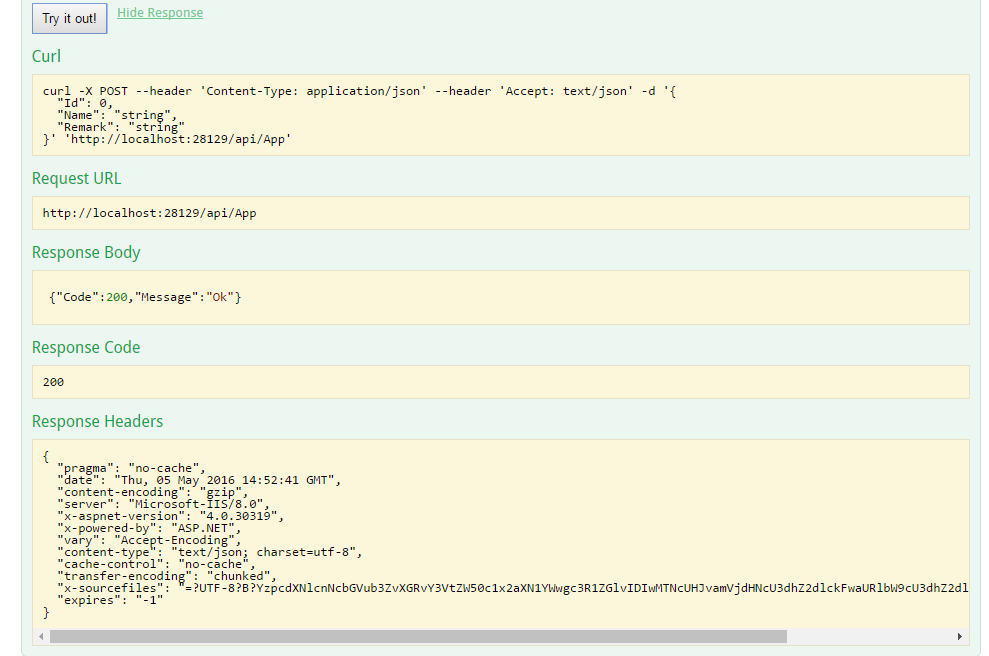
图13
我们还可以将注释打开,我们就可以在页面里面看到注释,方便调试接口时候调用人了解各参数信息。打开
public class SwaggerConfig

{

    public static void Register()

     {

            var thisAssembly = typeof(SwaggerConfig).Assembly;

            GlobalConfiguration.Configuration

                .EnableSwagger(c =>

                    {

                        c.SingleApiVersion("v1", "SwaggerApiDemo");

                        c.IncludeXmlComments(GetXmlCommentsPath());

                    })

                .EnableSwaggerUi(c =>

                    {

            });

        }

        private static string GetXmlCommentsPath()

        {

            return string.Format("{0}/bin/SwaggerApiDemo.XML", System.AppDomain.CurrentDomain.BaseDirectory);

        }

}
上面标记颜色为新增加内容,好了我们来看看最终效果
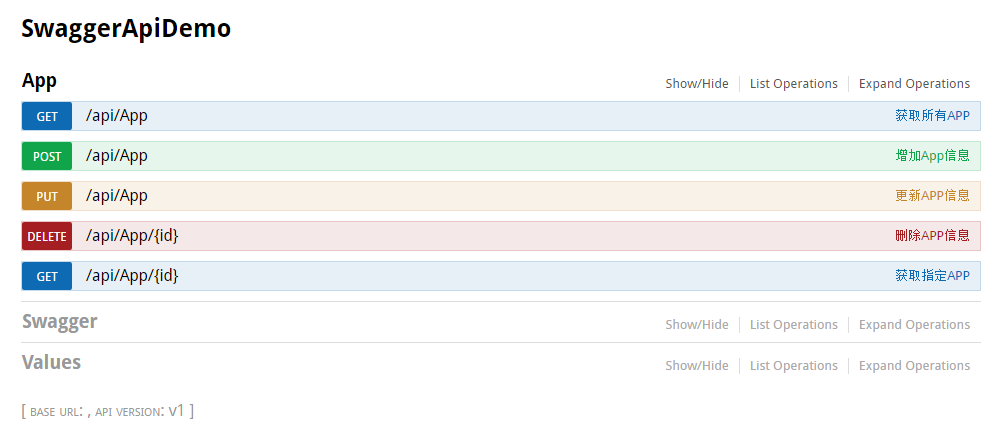
图14

图15
我们可以看到注释部分了,这样我们的swagger就完成了。
我把最终的代码发到此处,有需要代码的时候朋友可以直接下载。
http://pan.baidu.com/s/1mhFVZ4W
转自
https://www.cnblogs.com/youngh/p/5462537.html
【swagger学习】.net WebApi中使用swagger的更多相关文章
- webapi中使用swagger
net WebApi中使用swagger 我在WebApi中使用swagger的时候发现会出现很多问题,搜索很多地方都没找到完全解决问题的方法,后面自己解决了,希望对于遇到同样问题朋友有帮助.我将先一 ...
- ASP.NET Core 3.0 WebApi中使用Swagger生成API文档简介
参考地址,官网:https://docs.microsoft.com/zh-cn/aspnet/core/tutorials/getting-started-with-swashbuckle?view ...
- .net WebApi中使用swagger
我在WebApi中使用swagger的时候发现会出现很多问题,搜索很多地方都没找到完全解决问题的方法,后面自己解决了,希望对于遇到同样问题朋友有帮助.我将先一步一步的演示项目中解决swagger遇到问 ...
- .net WebApi中使用swagger生成WepApi集成测试工具
我在WebApi中使用swagger的时候发现会出现很多问题,搜索很多地方都没找到完全解决问题的方法,后面自己解决了,希望对于遇到同样问题朋友有帮助.我将先一步一步的演示项目中解决swagger遇到问 ...
- 在webapi中使用swagger
1 在webapi项目下安装swagger,包名 Swashbuckle.AspNetCore 2 在webapi的startup.cs文件中添加swagger服务 /// <summary&g ...
- 在WebApi中 集成 Swagger
1. Swagger(俗称:丝袜哥)是什么东西? Swagger 是一个规范和完整的框架,用于生成.描述.调用和可视化 RESTful 风格的 Web 服务.总体目标是使客户端和文件系统作为服务器以同 ...
- C# WebAPI中使用Swagger
随着互联网技术的发展,现在的网站架构基本都由原来的后端渲染,变成了:前端渲染.前后端分离的形态,而且前端技术和后端技术在各自的道路上越走越远. 前端和后端的唯一联系变成了API接口:API文档变成了前 ...
- ASP.NET WebApi 中使用swagger 构建在线帮助文档
1 在Visual Studio 中创建一个Asp.NET WebApi 项目,项目名:Com.App.SysApi(本例创建的是 .net 4.5 框架程序) 2 打开Nuget 包管理软件,查 ...
- .NET webAPI中集成swagger
最近做的项目使用winform三层+webapi,对于webAPI路由文档管理一直觉得单独做一些管理比较麻烦,并且测试的时候项目内的代码测试运行起来也比较麻烦,所以在网上开始检索相关办法,发现热度比较 ...
随机推荐
- (原)在firefly_rk3288开发板上解决openGL在设置32位色深以后出现花屏的问题
转载请注明出处:http://www.cnblogs.com/lihaiping/p/5567141.html 在做openGL测试的过程中,根据论坛上的帖子,在使用/bin/fbset -a -no ...
- Wrong codepoints for non-ASCII characters inserted in UTF-8 database using CLP
Technote (troubleshooting) Problem(Abstract) During insert from the CLP there is no codepage convers ...
- 9款极具创意的HTML5/CSS3进度条动画
今天我们要分享9款极具创意的HTML5/CSS3进度条动画,这些进度条也许可以帮你增强用户交互和提高用户体验,喜欢的朋友就收藏了吧. 1.HTML5/CSS3图片加载进度条 可切换多主题 今天要分享的 ...
- #define中的特殊符号
(关于#define的用法,看这里 http://www.cppblog.com/kenny/archive/2011/04/26/145087.html) #define Conn(x,y) x## ...
- <转>Win8.1+CentOS7 双系统 U盘安装
0.准备工作 1.宏碁 Aspire 4752G 笔记本 2.Win8.1 企业版操作系统 3.8G 以上 U 盘 4.UltraISO(当然也可以选择其他的U盘制作工具,看个人喜好) 5.下载 Ce ...
- UNIX环境编程学习笔记(16)——进程管理之进程环境变量
lienhua342014-10-03 1 环境表和环境指针 在每个进程启动时,都会接到一张环境表.环境表是一个字符指针数组,其中每个指针包含一个以 null 结束的 C 字符串的地址.全局变量env ...
- UITextField禁用掉编辑之后...
某些UITextField只为了摆数据,还有响应点击,为了避免频繁出现键盘,所以把UITextField的人机交互(userInteractionEnabled)给关闭了 此时,给UITextFiel ...
- [转] fitnesse中的Map处理
http://blog.csdn.net/doubeizhucele/article/details/42263887 fintesse会把!{}标记的变量视为HashTable对象,展现到页面上的将 ...
- JS判断设备类型跳转至PC端或移动端相应页面
if((navigator.userAgent.match(/(phone|pad|pod|iPhone|iPod|ios|iPad|Android|Mobile|BlackBerry|IEMobil ...
- windows下WAMP php5.x redis扩展
其解压到php的扩展目录ext下,在php.ini文件中扩展部分增加一行:extension=php_redis.dll 新增下载地下: php5.3 http://download.csdn.net ...