
SharePoint 2013 Step by Step——How to Create a Lookup Column to Another Site(Cross Site)
OverView
In this post,I want to show u how to add a look up column in my list or library that looks up data which comes from a list or library of another site.
I have to say,it is a awesome Function and easy for sharepoint end users.So,Let me guide you through this .And,more remarkable,as long as you must stay in the same site collection.You can create a lookup Site Column that will be used to get information from list which is available in a parent site.The Site Column must be created in the same site as the referenced list/library.
So Let's go ahead.
Step by Step-> Create Lookup Site Column in a parent site(root website)
- Go to Site Action then Site Settings
- Click on Site Columns in Web Designer Galleries

- Click on Create and Create a new Site Column

- Type in a Distinguished name and Select the type in this column is Lookup

- Put this site column into Existing group.for example Custom Columns

- Select a List/Library as information source

- Check it Whether Exist in Custom Columns Group
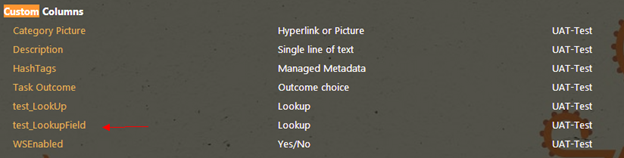
- Add my Site Column to any list/library you would like to use it with.Just Click on List Settings on Ribbon Menu.

- Click on add from existing site columns

- Select site columns form custom columns

- Success.Look up column looking for values of a list/library on another parent site.

- Just click on the hyperlink as shown in below and finally pop up a dialog to show information.

- Pop up a dialog to show relevant information.

Note:When you click hyperlink . Unfortunately get a error "List does not exist.The page you selected contains a list that does not exist. It may have been deleted by another user".
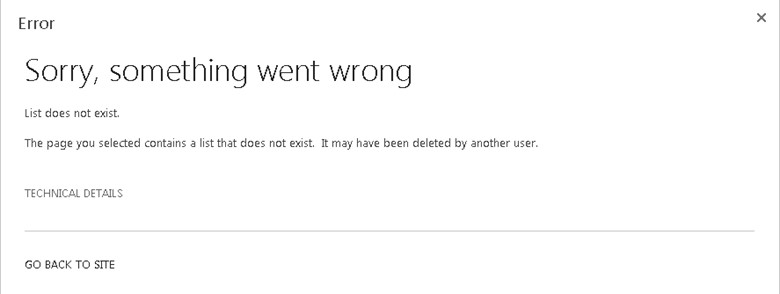
To Fix this error,just install the latest update of sharepoint and the bug will disappeared.
SharePoint 2013 Step by Step——How to Create a Lookup Column to Another Site(Cross Site)的更多相关文章
- SharePoint 2013 Step by Step——使用自定义的List Template
Overview 对于企业员工来说,"扁平结构"的LIST是日常操作中经常使用到的,LIST的好处是方便数据的录入以及数据的整理分析,尤其是Quick Edit功能,可以实现快速编 ...
- Integrate SharePoint 2013 with Team Foundation Server 2012
Now that SharePoint 2013 is out I want to make sure that I can integrate SharePoint 2013 with Team F ...
- Creating a New Master Page in SharePoint 2013
Creating a New Master Page in SharePoint 2013 This article explains how to create a Master Page in S ...
- SharePoint 2013 Step by Step—— How to Upload Multiple Documents in Document Library
How to Upload Multiple documents in SharePoint 2013,Options to add multiple files in a document libr ...
- SharePoint 2013 Step by Step—— 为终端用户提供故障恢复的解决方案 Part I
Disaster Recovery,我把他直译"故障恢复",或者也可以翻译成 "灾难复原 ".光字面意思就可以领会到,当SharePoint Server发生了 ...
- SharePoint 2013 create workflow by SharePoint Designer 2013
这篇文章主要基于上一篇http://www.cnblogs.com/qindy/p/6242714.html的基础上,create a sample workflow by SharePoint De ...
- Step by step Dynamics CRM 2011升级到Dynamics CRM 2013
原创地址:http://www.cnblogs.com/jfzhu/p/4018153.html 转载请注明出处 (一)检查Customizations 从2011升级到2013有一些legacy f ...
- Create a “% Complete” Progress Bar with JS Link in SharePoint 2013
Create a “% Complete” Progress Bar with JS Link in SharePoint 2013 SharePoint 2013 has a lot new fea ...
- Step by step Dynamics CRM 2013安装
原创地址:http://www.cnblogs.com/jfzhu/p/4008391.html 转载请注明出处 SQL Server可以与CRM装在同一台计算机上,也可安装在不同的计算机上.演示 ...
随机推荐
- iOS应用程序状态图
理解应用的状态对于我们开发iOS大有裨益. 当前应用所处什么状态,什么促使它在各个状态间进行过渡,你的代码又是如何 唤醒这些过渡,等等等等. 先请看下图: 1. 当应用出于非运行状态时,它处于图中的& ...
- FIS前端集成解决方案
FIS前端集成解决方案-文档结构 什么是FIS 部署FIS FIS基本使用 模块定义 加载方式 调用Tangram 2.0 FIS开发实例 --附件下载-- 什么是FIS FIS提供了一套贯穿开发流程 ...
- 微信小程序 - 图片懒加载
wxml <!-- 数据源 --> <view class='item-{{index}}' wx:for="{{lazyData}}" wx:key=" ...
- PPT里面的背景音乐找不到?
ppt,找不到播放器,却有音乐播放!如何实现? 原来是在幻灯片切换处的音效添加的音乐~ 文章来源:刘俊涛的博客 欢迎关注,有问题一起学习欢迎留言.评论
- Git诞生
很多人都知道,Linus在1991年创建了开源的Linux,从此,Linux系统不断发展,已经成为最大的服务器系统软件了. Linus虽然创建了Linux,但Linux的壮大是靠全世界热心的志愿者参与 ...
- 【JDBC】Mysql海量数据插入——PreparedStatement加快数据插入
转载请注明原文地址:http://www.cnblogs.com/ygj0930/p/5861959.html 使用JDBC连接数据库时,如果插入的数据量大,一条一条地插入数据会变得非常缓慢.此时,我 ...
- flink 入门
http://ifeve.com/flink-quick-start/ http://vinoyang.com/2016/05/02/flink-concepts/ http://wuchong.me ...
- 〖Linux〗Ubuntu设定Proxy及忽略Proxy
1. 设定代理:. ~/.proxyenv #!/bin/sh # for terminal export proxyserveraddr=123.123.123.123 export proxyse ...
- Selenium如何支持测试Windows application
很长一段时间大家都支持Selenium是只支持测试Web应用程序的. 纵观Selenium的成长历程,不难解释这个原因.Selenium开始的时候是作为一个Firefox中的插件出现的,而且做得是纯J ...
- 江南白衣整理和开发的java常用工具类
江南白衣的公众号的介绍文章:http://mp.weixin.qq.com/s/6JUo1vmUa-7SuDH6yIxKeQ github的地址:https://github.com/springsi ...