
MVC教程八:缓存过滤器
缓存过滤器用来输出页面缓存,其用法如下图所示:

注意:
Duration:表示缓存多少秒;VaryByParam:表示缓存是否随地址参数而改变。OutputCache除了可以定义在Action方法上面以外,还可以定义在控制器上面。
演示示例:
新建一个MVC应用程序,添加一个名为Cache的控制器,Cache控制器的Index方法里面将当前时间输出到页面中,Cache控制器定义如下:
 using System;

 using System.Collections.Generic;

 using System.Linq;

 using System.Web;

 using System.Web.Mvc;

 namespace _2_缓存过滤器.Controllers

 {

     public class CacheController : Controller

     {

         [OutputCache(Duration =,VaryByParam ="none")]

         // GET: Cache

         public ActionResult Index(int? id)

         {

             ViewData["CurrentTime"] = "现在的时间是:" + DateTime.Now;

             return View();

         }

     }

 }
2、Cache控制器的Index视图定义如下:
@{

    Layout = null;

}

<!DOCTYPE html>

<html>

<head>

    <meta name="viewport" content="width=device-width" />

    <title>Index</title>

</head>

<body>

    <div>

        <h2>@ViewData["CurrentTime"]</h2>

    </div>

</body>

</html>
3、程序运行结果

刷新页面的时候,只有时间过了5秒以后,页面上面显示的时间才会刷新。
如果把VaryByParam的值改为id,那么在5秒的时间范围内,页面显示的时间会随着id值的改变而改变,即只要id的值改变一次,页面显示的时间就会改变。
在MVC程序中使用缓存过滤器的时候,由于控制器的代码需要编译后才能发布,在发布之后,如果要修改缓存的策略,就很麻烦,这时可以采用如下图所示的方法,把缓存策略写在配置文件里面,这样即使在程序发布之后,我们也可以随时调整缓存的策略。
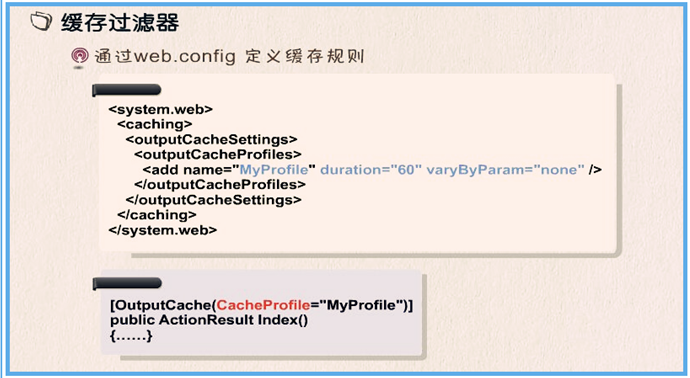
配置文件修改如下:
<?xml version="1.0" encoding="utf-8"?>
<!--
有关如何配置 ASP.NET 应用程序的详细信息,请访问
https://go.microsoft.com/fwlink/?LinkId=301880
-->
<configuration>
<appSettings>
<add key="webpages:Version" value="3.0.0.0" />
<add key="webpages:Enabled" value="false" />
<add key="ClientValidationEnabled" value="true" />
<add key="UnobtrusiveJavaScriptEnabled" value="true" />
</appSettings>
<system.web>
<compilation debug="true" targetFramework="4.6.1" />
<httpRuntime targetFramework="4.6.1" />
<httpModules>
<add name="ApplicationInsightsWebTracking" type="Microsoft.ApplicationInsights.Web.ApplicationInsightsHttpModule, Microsoft.AI.Web" />
</httpModules>
<!--缓存策略-->
<caching>
<outputCacheSettings>
<outputCacheProfiles>
<add name="cpfile" duration="5" varyByParam="none"/>
</outputCacheProfiles>
</outputCacheSettings>
</caching>
</system.web>
<runtime>
<assemblyBinding xmlns="urn:schemas-microsoft-com:asm.v1">
<dependentAssembly>
<assemblyIdentity name="Newtonsoft.Json" culture="neutral" publicKeyToken="30ad4fe6b2a6aeed" />
<bindingRedirect oldVersion="0.0.0.0-6.0.0.0" newVersion="6.0.0.0" />
</dependentAssembly>
<dependentAssembly>
<assemblyIdentity name="System.Web.Optimization" publicKeyToken="31bf3856ad364e35" />
<bindingRedirect oldVersion="1.0.0.0-1.1.0.0" newVersion="1.1.0.0" />
</dependentAssembly>
<dependentAssembly>
<assemblyIdentity name="WebGrease" publicKeyToken="31bf3856ad364e35" />
<bindingRedirect oldVersion="0.0.0.0-1.5.2.14234" newVersion="1.5.2.14234" />
</dependentAssembly>
<dependentAssembly>
<assemblyIdentity name="System.Web.Helpers" publicKeyToken="31bf3856ad364e35" />
<bindingRedirect oldVersion="1.0.0.0-3.0.0.0" newVersion="3.0.0.0" />
</dependentAssembly>
<dependentAssembly>
<assemblyIdentity name="System.Web.WebPages" publicKeyToken="31bf3856ad364e35" />
<bindingRedirect oldVersion="1.0.0.0-3.0.0.0" newVersion="3.0.0.0" />
</dependentAssembly>
<dependentAssembly>
<assemblyIdentity name="System.Web.Mvc" publicKeyToken="31bf3856ad364e35" />
<bindingRedirect oldVersion="1.0.0.0-5.2.3.0" newVersion="5.2.3.0" />
</dependentAssembly>
</assemblyBinding>
</runtime>
<system.webServer>
<validation validateIntegratedModeConfiguration="false" />
<modules>
<remove name="ApplicationInsightsWebTracking" />
<add name="ApplicationInsightsWebTracking" type="Microsoft.ApplicationInsights.Web.ApplicationInsightsHttpModule, Microsoft.AI.Web" preCondition="managedHandler" />
</modules>
</system.webServer>
<system.codedom>
<compilers>
<compiler language="c#;cs;csharp" extension=".cs" type="Microsoft.CodeDom.Providers.DotNetCompilerPlatform.CSharpCodeProvider, Microsoft.CodeDom.Providers.DotNetCompilerPlatform, Version=1.0.8.0, Culture=neutral, PublicKeyToken=31bf3856ad364e35" warningLevel="4" compilerOptions="/langversion:default /nowarn:1659;1699;1701" />
<compiler language="vb;vbs;visualbasic;vbscript" extension=".vb" type="Microsoft.CodeDom.Providers.DotNetCompilerPlatform.VBCodeProvider, Microsoft.CodeDom.Providers.DotNetCompilerPlatform, Version=1.0.8.0, Culture=neutral, PublicKeyToken=31bf3856ad364e35" warningLevel="4" compilerOptions="/langversion:default /nowarn:41008 /define:_MYTYPE=\"Web\" /optionInfer+" />
</compilers>
</system.codedom>
</configuration>
程序代码修改如下:
 using System;

 using System.Collections.Generic;

 using System.Linq;

 using System.Web;

 using System.Web.Mvc;

 namespace _2_缓存过滤器.Controllers

 {

     public class CacheController : Controller

     {

         [OutputCache(CacheProfile = "cpfile")]

         // GET: Cache

         public ActionResult Index(int? id)

         {

             ViewData["CurrentTime"] = "现在的时间是:" + DateTime.Now;

             return View();

         }

     }

 }
运行结果和上面的结果一样。
MVC教程八:缓存过滤器的更多相关文章
- MVC教程:授权过滤器
一.过滤器 过滤器(Filter)的出现使得我们可以在ASP.NET MVC程序里更好的控制浏览器请求过来的URL,并不是每个请求都会响应内容,只有那些有特定权限的用户才能响应特定的内容.过滤器理论上 ...
- MVC教程八:母版页(布局页)视图
一.母版页介绍和使用 母版页的扩展名为".cshtml",也叫做视图布局页,它相当于网页的模板.在其他网页中,只要引用了母版页,母版页的页面内容就可以自动显示出来,设计者可以修改引 ...
- ASP.NET MVC教程八:_ViewStart.cshtml
一.引言 _ViewStart.cshtml是在ASP.NET MVC 3.0及更高版本以后出现的,用Razor模板引擎新建项目后,Views目录下面会出现一个这样的文件: 打开_ViewStart. ...
- 2017.3.31 spring mvc教程(八) <mvc:annotation-driven />所做的工作
学习的博客:http://elf8848.iteye.com/blog/875830/ 我项目中所用的版本:4.2.0.博客的时间比较早,11年的,学习的是Spring3 MVC.不知道版本上有没有变 ...
- 自学MVC看这里——全网最全ASP.NET MVC 教程汇总
MVC架构已深得人心,微软也不甘落后,推出了Asp.net MVC.小编特意整理博客园乃至整个网络最具价值的MVC技术原创文章,为想要学习ASP.NET MVC技术的学习者提供一个整合学习入口.本文从 ...
- ASP.NET MVC 教程汇总
自学MVC看这里——全网最全ASP.NET MVC 教程汇总 MVC架构已深得人心,微软也不甘落后,推出了Asp.net MVC.小编特意整理博客园乃至整个网络最具价值的MVC技术原创文章,为想要 ...
- 【转】ASP.NET MVC教程
转自:http://www.cnblogs.com/QLeelulu/category/123326.html ASP.NET MVC的最佳实践与性能优化的文章 摘要: 就一些文章链接,就不多废话了. ...
- 全网最全ASP.NET MVC 教程汇总
全网最全ASP.NET MVC 教程汇总 MVC架构已深得人心,微软也不甘落后,推出了Asp.net MVC.小编特意整理博客园乃至整个网络最具价值的MVC技术原创文章,为想要学习ASP.NET MV ...
- 自学MVC看这里——全网最全ASP.NET MVC 教程汇总(转)
自学MVC看这里——全网最全ASP.NET MVC 教程汇总 MVC架构已深得人心,微软也不甘落后,推出了Asp.net MVC.小编特意整理博客园乃至整个网络最具价值的MVC技术原创文章,为想要 ...
随机推荐
- 《Deep Learning》(深度学习)中文版 开发下载
<Deep Learning>(深度学习)中文版开放下载 <Deep Learning>(深度学习)是一本皆在帮助学生和从业人员进入机器学习领域的教科书,以开源的形式免费在 ...
- springboot 错误处理
在 java web开发过程中,难免会有一些系统异常或人为产生一些异常.在 RESTful springboot 项目中如何优雅的处理? 分析:在RESTful 风格的springboot 项目中,返 ...
- ansible 批量推送公钥
这里我们使用ansible的playbook 的功能来推送秘钥 使用方法参见:http://blog.csdn.net/magedu_linux/article/details/48529645 这里 ...
- Java数据结构和算法(五):队列
简介 队列(queue)是一种特殊的线性表,特殊之处在于它只允许在表的前端(front)进行删除操作,而在表的后端(rear)进行插入操作,和栈一样,队列是一种操作受限制的线性表.进行插入操作的端称为 ...
- 怎么设置Linux swap分区?方法教程
如何设置Linux swap分区 看到不少朋友问linux下swap分区的问题,收集到一篇 不错的文章 ,分享下. 什么是Swap?Swap,即交换区,除了安装Linux的时候,有多少人关心过它呢?其 ...
- Vivado与SDK的联合调试方法-使用ILA
首先介绍一下我的硬件平台:使用的开发板为米联客出的MIZ702,这个开发板与ZedBoard是兼容的. Vivado硬件调试有几种手段:ILA(集成逻辑分析器Integrated Logic Anal ...
- 深入理解Linux内核-内存寻址
1.逻辑地址怎么转换为线性地址的: 逻辑地址 = 段选择符(16bit)+偏移量(32bit) 段选择符又三部分组成:index(索引序号).T1(表指示器).RPL(request privileg ...
- Oracle Time Model Statistics(时间模型统计)
Oracle数据库从10g開始,启用以时间模型统计为主.命中率为辅等性能度量指标.基于时间模型统计,主要是基于操作类型測量在数据库中花费的时间的统计信息.最重要的时间模型统计是数据库时间.或DB时间. ...
- centos7配置网桥
在Centos7上玩KVM的话一定要配置网桥的: [root@localhost nb]# ls /etc/sysconfig/network-scripts ifcfg-8866 ifdown if ...
- OpenStack OVS GRE/VXLAN
https://www.jianshu.com/p/0b52de73a4b3 OpenStack OVS GRE/VXLAN网络 学习或者使用OpenStack普遍有这样的现象:50%的时间花费在了网 ...