
MyBatis学习笔记-1 Idea配置MyBatis
一、创建工程
1、创建Java项目,勾选Java EE,Next,修改名称,Finish
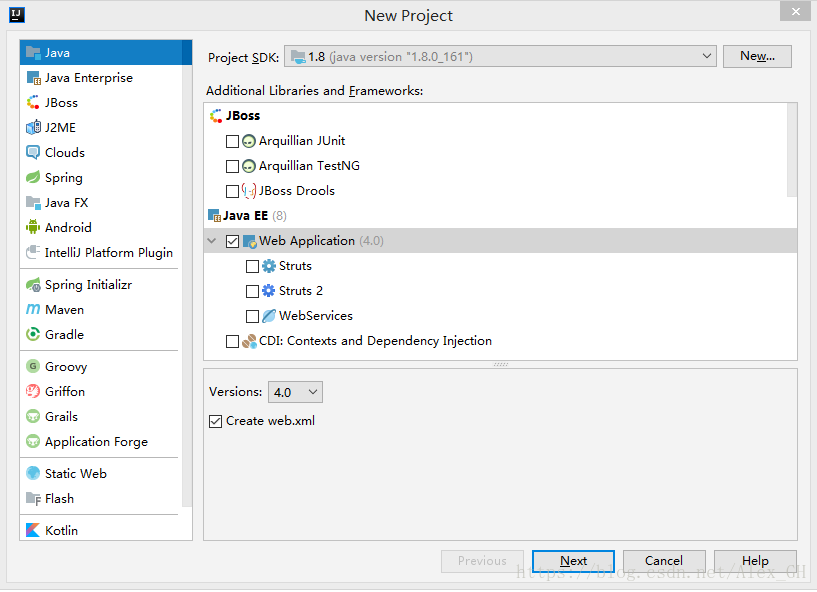
2、在WEB-INF下创建两个文件夹classes和lib,分别用作输出文件目录和库文件目录
3、File-Project Structure, Modules-Path中将Out path和Test Out path更改为classes
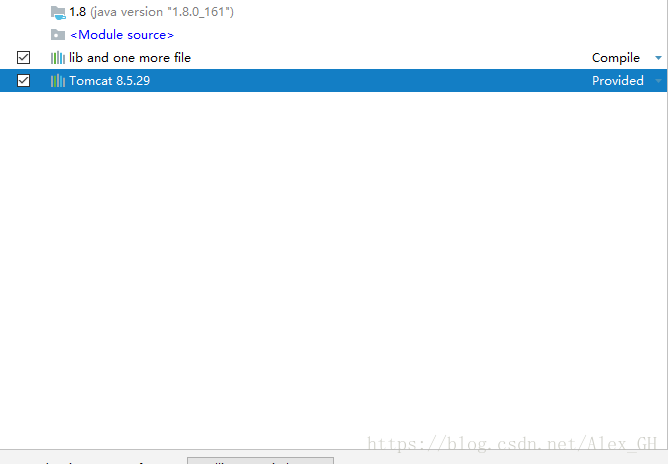
4、Module-Dependencies添加Jars or Directories选中lib文件夹,添加Library选中Tomcat
5、打开Edit Configuration,创建一个Tomcat Server

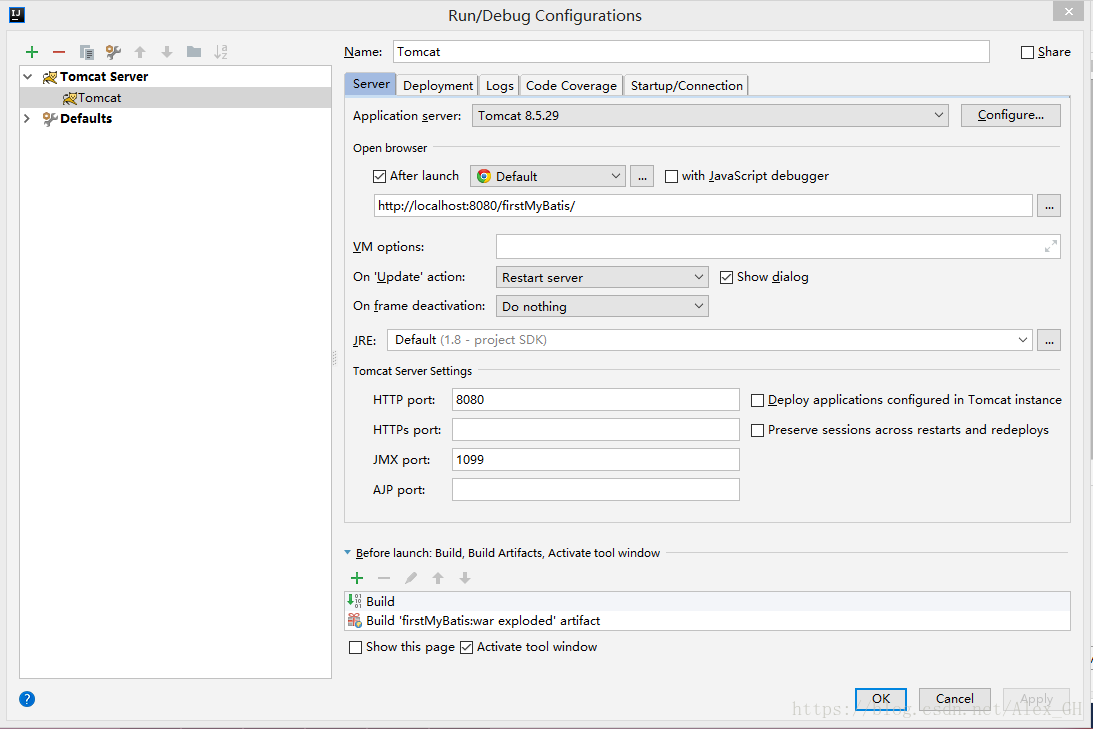
6、点击运行,能打开index.jsp,配置完成
二、准备数据库
1、创建数据库MyBatis
CREATE DATABASE mybatis DEFAULT CHARACTER SET utf8 COLLATE utf8_general_ci;
2、创建数据表
use mybatis;

CREATE TABLE IF NOT EXISTS country (

id int NOT NULL AUTO_INCREMENT,

countryname varchar(255) NULL,

countrycode varchar(255) NULL,

PRIMARY KEY (id));
insert country(countryname, countrycode)

values ('中国','CN'),('美国','US'),('俄罗斯','RU'),

('英国','GB'),('法国','FR');
三、配置MyBatis
1、添加MySQL、MyBatis及其依赖库包至lib下,右键Add As Library
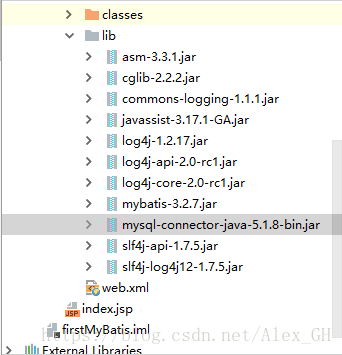
2、创建config目录,创建jdbc.properties文件,放置配置信息
jdbc.DriverClassName=com.mysql.jdbc.Driver

jdbc.url=jdbc:mysql://127.0.0.1:3306/mybatis

jdbc.username=root

jdbc.password=password
3、在config目录下,创建mybatis.xml文件
<?xml version="1.0" encoding="UTF-8" ?>

<!DOCTYPE configuration

PUBLIC "-//mybatis.org//DTD Config 3.0//EN"

"http://mybatis.org/dtd/mybatis-3-config.dtd">

<configuration>

<!--加载资源文件-->

<properties resource="jdbc.properties"></properties>

<!--settings配置LOG4J输出日志 -->

<settings>

<setting name="logImpl" value="LOG4J"/>

</settings>

<!--typeAliases配置包的别名-->

<!--<typeAliases>-->

<!--<package name=""-->

<!--</typeAliases>-->

<!--environments配置了数据库连接,配置了driver、url、username、password属性-->

<environments default="development">

<environment id="development">

<transactionManager type="JDBC">

<property name="" value="" />

</transactionManager>

<dataSource type="UNPOOLED">

<property name="driver" value="${jdbc.DriverClassName}" />

<property name="url" value="${jdbc.url}" />

<property name="username" value="${jdbc.username}" />

<property name="password" value="${jdbc.password}" />

</dataSource>

</environment>

</environments>

<!--配置一个SQL语句和映射的配置文件-->

<mappers>

<mapper resource="Country.xml" />

</mappers>

</configuration>
4、在src目录下创建实体类Country.java
package model;

public class Country {

private Long id;

private String countryname;

private String countrycode;

public String getCountryname() {

return countryname;

}

public void setCountryname(String countryname) {

this.countryname = countryname;

}

public String getCountrycode() {

return countrycode;

}

public void setCountrycode(String countrycode) {

this.countrycode = countrycode;

}

public Long getId() {

return id;

}

@Override

public String toString() {

return "Country{" +

"id=" + id +

", countryname='" + countryname + '\'' +

", countrycode='" + countrycode + '\'' +

'}';

}

}
5、在config下创建mapper文件Country.xml,存放SQL语句及其映射
<?xml version="1.0" encoding="UTF-8" ?>

<!DOCTYPE mapper

PUBLIC "-//mybatis.org//DTD Mapper 3.0//EN"

"http://mybatis.org/dtd/mybatis-3-mapper.dtd">

<!--mapper为根元素,namespace指定了命名空间-->

<mapper namespace="model.Country">

<!--定义一个SELECT查询-->

<select id="selectAll" resultType="model.Country">

SELECT * FROM country

</select>

</mapper>
6、配置Log4j(可选,若不配置,最后运行会报WARN)

# Configure logging for testing: optionally with log file

log4j.rootLogger=WARN, stdout

# log4j.rootLogger=WARN, stdout, logfile

log4j.appender.stdout=org.apache.log4j.ConsoleAppender

log4j.appender.stdout.layout=org.apache.log4j.PatternLayout

log4j.appender.stdout.layout.ConversionPattern=%d %p [%c] - %m%n

log4j.appender.logfile=org.apache.log4j.FileAppender

log4j.appender.logfile.File=target/spring.log

log4j.appender.logfile.layout=org.apache.log4j.PatternLayout

log4j.appender.logfile.layout.ConversionPattern=%d %p [%c] - %m%n
7、编写测试代码Demo1.java
package test;

import model.Country;

import org.apache.ibatis.io.Resources;

import org.apache.ibatis.session.SqlSession;

import org.apache.ibatis.session.SqlSessionFactory;

import org.apache.ibatis.session.SqlSessionFactoryBuilder;

import org.junit.BeforeClass;

import org.junit.Test;

import java.io.IOException;

import java.io.InputStream;

import java.util.List;

public class Demo1 {

private static SqlSessionFactory sqlSessionFactory;

//使用junit4

@BeforeClass

public static void init(){

try{

//将mybatis.xml读入InputStream

InputStream inputStream = Resources.getResourceAsStream("mybatis.xml");

//通过SqlSessionFactoryBuilder创建sqlSessionFactory

sqlSessionFactory = new SqlSessionFactoryBuilder().build(inputStream);

inputStream.close();

} catch (IOException e) {

e.printStackTrace();

}

}

//测试

@Test

public void testSelectAll(){

//打开会话

SqlSession sqlSession = sqlSessionFactory.openSession();

try {

List<Country> countryList = sqlSession.selectList("model.Country.selectAll");

printCountryList(countryList);

}finally {

//关闭会话

sqlSession.close();

}

}

private void printCountryList(List<Country>countryList){

for (Country country : countryList){

System.out.println(country);

}

}

}
项目结构:

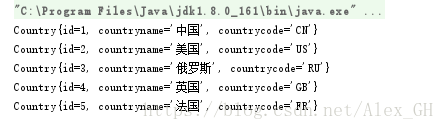
运行结果如下:
MyBatis学习笔记-1 Idea配置MyBatis的更多相关文章
- Mybatis学习笔记导航
Mybatis小白快速入门 简介 本人是一个Java学习者,最近才开始在博客园上分享自己的学习经验,同时帮助那些想要学习的uu们,相关学习视频在小破站的狂神说,狂神真的是我学习到现在觉得最GAN的老师 ...
- Mybatis学习笔记汇总(包括源码和jar包)
博客整理 Mybatis学习笔记(一)--对原生jdbc中问题的总结 Mybatis学习笔记(二)--Mybatis框架 Mybatis学习笔记(三)--入门程序 MyBatis学习笔记(四)--入门 ...
- 【MyBatis学习笔记】
[MyBatis学习笔记]系列之预备篇一:ant的下载与安装 [MyBatis学习笔记]系列之预备篇二:ant入门示例 [MyBatis学习笔记]系列之一:MyBatis入门示例 [MyBatis学习 ...
- Mybatis学习笔记(二) 之实现数据库的增删改查
开发环境搭建 mybatis 的开发环境搭建,选择: eclipse j2ee 版本,mysql 5.1 ,jdk 1.7,mybatis3.2.0.jar包.这些软件工具均可以到各自的官方网站上下载 ...
- MyBatis:学习笔记(1)——基础知识
MyBatis:学习笔记(1)--基础知识 引入MyBatis JDBC编程的问题及解决设想 ☐ 数据库连接使用时创建,不使用时就释放,频繁开启和关闭,造成数据库资源浪费,影响数据库性能. ☐ 使用数 ...
- mybatis学习笔记(五) -- maven+spring+mybatis从零开始搭建整合详细过程(附demo和搭建过程遇到的问题解决方法)
文章介绍结构一览 一.使用maven创建web项目 1.新建maven项目 2.修改jre版本 3.修改Project Facts,生成WebContent文件夾 4.将WebContent下的两个文 ...
- mybatis学习笔记(四)-- 为实体类定义别名两种方法(基于xml映射)
下面示例在mybatis学习笔记(二)-- 使用mybatisUtil工具类体验基于xml和注解实现 Demo的基础上进行优化 以新增一个用户为例子,原UserMapper.xml配置如下: < ...
- mybatis学习笔记(二)-- 使用mybatisUtil工具类体验基于xml和注解实现
项目结构 基础入门可参考:mybatis学习笔记(一)-- 简单入门(附测试Demo详细过程) 开始体验 1.新建项目,新建类MybatisUtil.java,路径:src/util/Mybatis ...
- Mybatis学习笔记二
本篇内容,紧接上一篇内容Mybatis学习笔记一 输入映射和输出映射 传递简单类型和pojo类型上篇已介绍过,下面介绍一下包装类型. 传递pojo包装对象 开发中通过可以使用pojo传递查询条件.查询 ...
随机推荐
- python3.5.3rc1学习九:正则表达式
# 正则表达式 ''''' 正则表达式是有一些特殊字符组成,能够帮你找到一些符合一定规则的字符串 先来了解几个符号所代表的意思 \d 匹配所有的数字 \D 匹配所有,但是数字除外 \s 空格 \S 匹 ...
- scrapy 爬取视频
利用FilesPipeline 下载视频 1.setting.py # 保存log信息的文件名 LOG_LEVEL = "INFO" # LOG_STDOUT = True # L ...
- Flink/CEP/规则引擎/风控
基于 Apache Flink 和规则引擎的实时风控解决方案 对一个互联网产品来说,典型的风控场景包括:注册风控.登陆风控.交易风控.活动风控等,而风控的最佳效果是防患于未然,所以事前事中和事后三 ...
- zz“老司机”成长之路:自动驾驶车辆调试实践
随着自动驾驶技术的发展,一辆新车从被改装到上路需要经过的调试流程也有了许多提升.今天,我希望结合自己之前的调车经验来跟大家分享一下我们是如何将系统的各个模块逐步上车.调试.集成,进而将一辆“新手”车培 ...
- CF358D Dima and Hares
CF358D Dima and Hares 洛谷评测传送门 题目描述 Dima liked the present he got from Inna very much. He liked the p ...
- 【2019.8.12 慈溪模拟赛 T1】钥匙(key)(暴力DP)
暴力\(DP\) 这题做法很多,有\(O(n^2)\)的,有\(O(n^2logn)\)的,还有徐教练的\(O(nlogn)\)的,甚至还有\(bzt\)的二分+线段树优化建图的费用流. 我懒了点,反 ...
- [LOJ 6288]猫咪[CF 700E]Cool Slogans
[LOJ 6288]猫咪[CF 700E]Cool Slogans 题意 给定一个字符串 \(T\), 求一个最大的 \(K\) 使得存在 \(S_1,S_2,\dots,S_k\) 满足 \(S_1 ...
- Python apply函数
Python apply函数 1.介绍 apply函数是pandas里面所有函数中自由度最高的函数.该函数如下: DataFrame.apply(func, axis=0, broadcast=Fal ...
- Angular命令和基础操作
本文档假设你已经熟悉了 HTML,CSS,JavaScript和来自最新标准的一些知识,比如类和模块. 一.Angular命令 命令语法: 大多数命令以及少量选项,会有别名.别名会显示在每个命令的语法 ...
- (二十三)golang--内置函数
1.用于求长度,占多少个字节 2.内置函数new:分配内存,主要用来分配值类型,比如int.float等,其第一个实参为类型,而非值,其返回值为指向该类型的新分配的零值的指针: 3.make:用来分配 ...