
Nginx常见的安装方式
Nginx常见的安装方式
作者:尹正杰
版权声明:原创作品,谢绝转载!否则将追究法律责任。
一.Nginx概述
Nginx的安装版本分为开发版、稳定版和过期版, Nginx安装可以使用yum或源码安装,但是推荐使用源码安装,原因如下:

  >.是yum的版本比较旧;

  >.是编译安装可以更方便自定义相关路径;

  >.是使用源码编译可以自定义相关功能,更方便业务的上的使用。

源码安装需要提前准备以下环境:

  标准的编译器,GCC的全称是(GNU Compiler collection),其有GNU开发,并以GPL即LGPL许可,是自由的类UNIX即苹果电脑Mac OS X操作系统的标准编译器,因为GCC原本只能处理C语言,所以原名为GNU C语言编译器,后来得到快速发展,可以处理C++,Fortran,pascal,objective-C,java以及Ada等其他语言

  此外还需要Automake工具,以完成自动创建Makefile的工作
  Nginx的一些模块需要依赖第三方库,比如pcre(支持rewrite),zlib(支持gzip模块)和openssl(支持ssl模块)等。
二.yum方式安装nginx(生产环境中进来不要使用yum方式安装nginx,尽管它的安装方式很简单)
1>.查看nginx官网提供的安装包
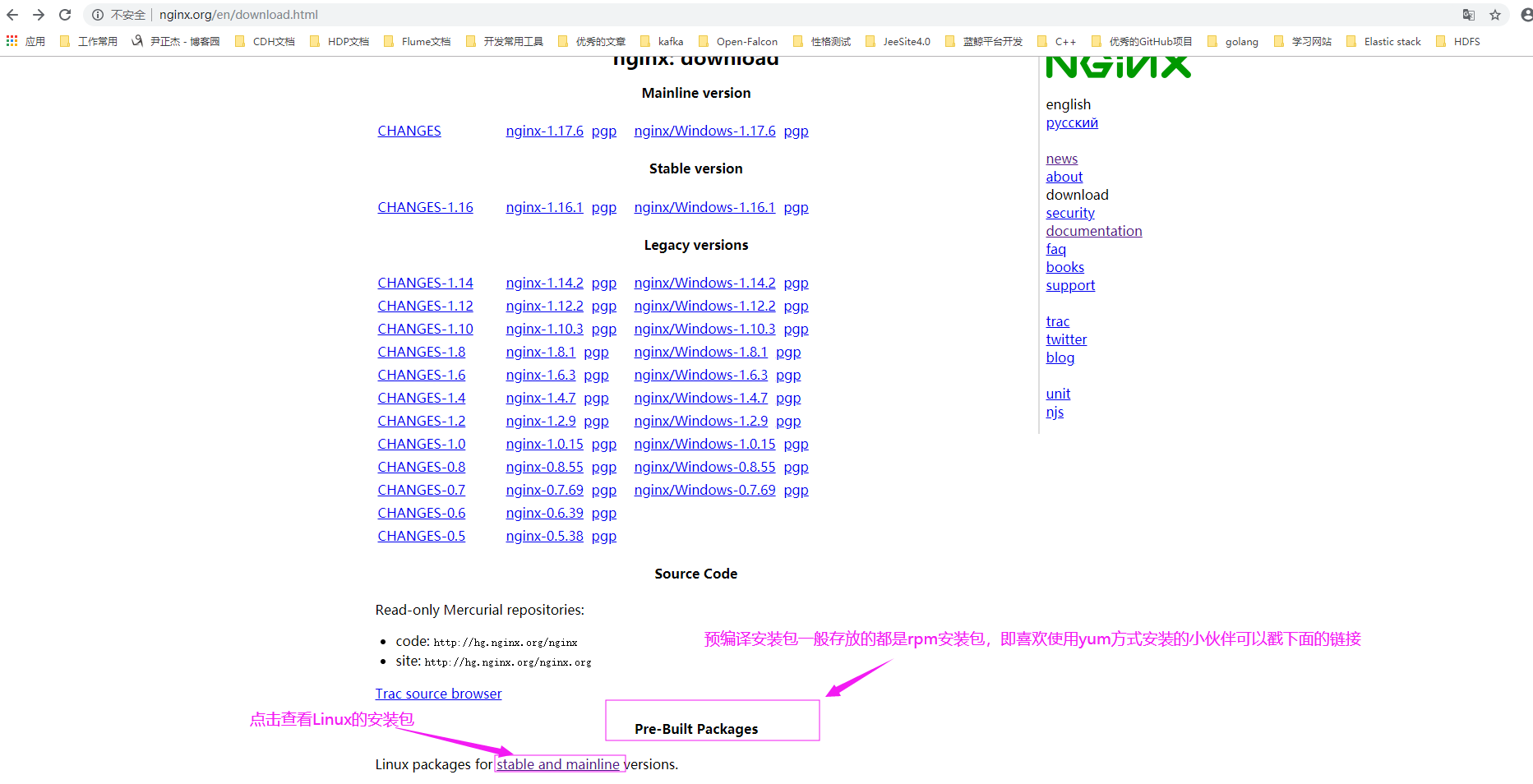
2>.如下图所示,选择相应的操作系统
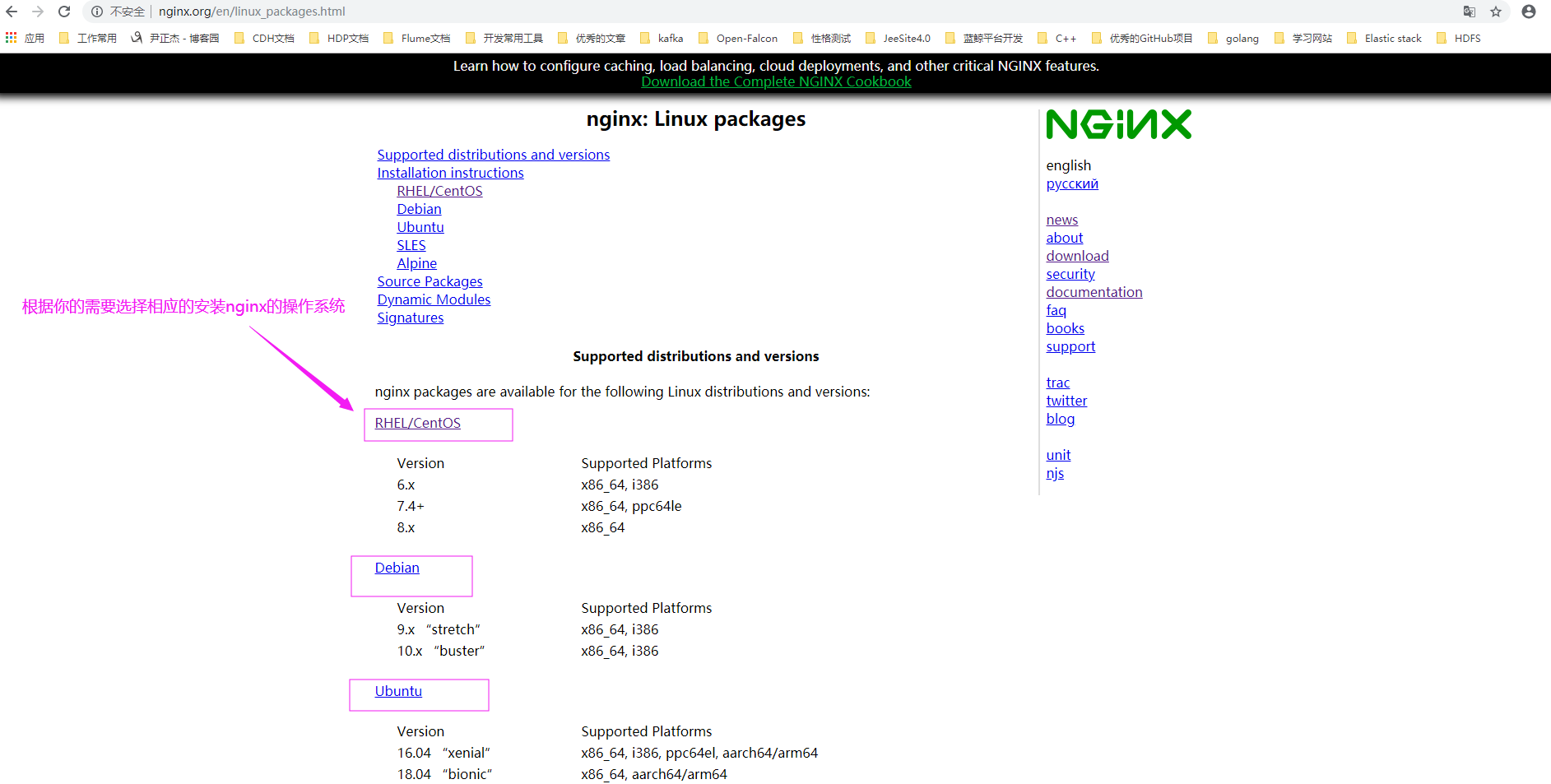
3>.查看CentOS基于yum方式安装nginx的官网文档(http://nginx.org/en/linux_packages.html#RHEL-CentOS)
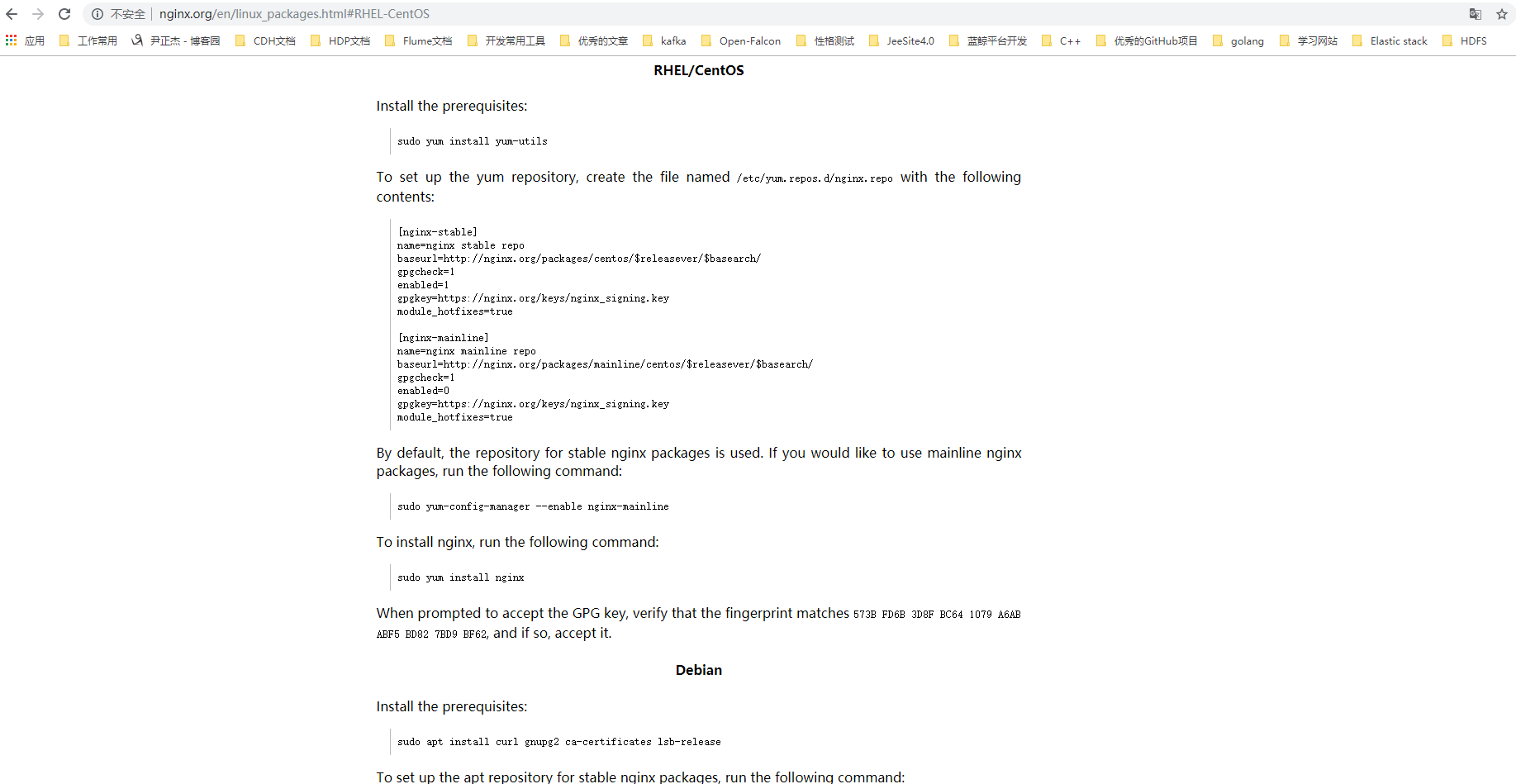
4>.根据官方文档基于yum方式安装nginx实战
[root@node108.yinzhengjie.org.cn ~]# yum -y install yum-utils

Loaded plugins: fastestmirror

Loading mirror speeds from cached hostfile

 * base: mirror.bit.edu.cn

 * epel: hk.mirrors.thegigabit.com

 * extras: mirror.jdcloud.com

 * updates: mirror.bit.edu.cn

Resolving Dependencies

--> Running transaction check

---> Package yum-utils.noarch :1.1.-.el7 will be installed

--> Processing Dependency: python-kitchen for package: yum-utils-1.1.-.el7.noarch

--> Processing Dependency: libxml2-python for package: yum-utils-1.1.-.el7.noarch

--> Running transaction check

---> Package libxml2-python.x86_64 :2.9.-.el7_2. will be installed

---> Package python-kitchen.noarch :1.1.-.el7 will be installed

--> Processing Dependency: python-chardet for package: python-kitchen-1.1.-.el7.noarch

--> Running transaction check

---> Package python-chardet.noarch :2.2.-.el7 will be installed

--> Finished Dependency Resolution

Dependencies Resolved

============================================================================================================================================================================

 Package                                      Arch                                 Version                                         Repository                          Size

============================================================================================================================================================================

Installing:

 yum-utils                                    noarch                               1.1.-.el7                                   base                                k

Installing for dependencies:

 libxml2-python                               x86_64                               2.9.-.el7_2.                                 base                                k

 python-chardet                               noarch                               2.2.-.el7                                     base                                k

 python-kitchen                               noarch                               1.1.-.el7                                     base                                k

Transaction Summary

============================================================================================================================================================================

Install   Package (+ Dependent packages)

Total download size:  k

Installed size: 4.3 M

Downloading packages:

(/): python-chardet-2.2.-.el7.noarch.rpm                                                                                                         |  kB  ::

(/): libxml2-python-2.9.-.el7_2..x86_64.rpm                                                                                                     |  kB  ::

(/): yum-utils-1.1.-.el7.noarch.rpm                                                                                                            |  kB  ::

(/): python-kitchen-1.1.-.el7.noarch.rpm                                                                                                         |  kB  ::

----------------------------------------------------------------------------------------------------------------------------------------------------------------------------

Total                                                                                                                                       1.9 MB/s |  kB  ::

Running transaction check

Running transaction test

Transaction test succeeded

Running transaction

  Installing : python-chardet-2.2.-.el7.noarch                                                                                                                        /

  Installing : python-kitchen-1.1.-.el7.noarch                                                                                                                        /

  Installing : libxml2-python-2.9.-.el7_2..x86_64                                                                                                                    /

  Installing : yum-utils-1.1.-.el7.noarch                                                                                                                           /

  Verifying  : python-kitchen-1.1.-.el7.noarch                                                                                                                        /

  Verifying  : yum-utils-1.1.-.el7.noarch                                                                                                                           /

  Verifying  : libxml2-python-2.9.-.el7_2..x86_64                                                                                                                    /

  Verifying  : python-chardet-2.2.-.el7.noarch                                                                                                                        /

Installed:

  yum-utils.noarch :1.1.-.el7

Dependency Installed:

  libxml2-python.x86_64 :2.9.-.el7_2.                    python-chardet.noarch :2.2.-.el7                    python-kitchen.noarch :1.1.-.el7

Complete!

[root@node108.yinzhengjie.org.cn ~]#
[root@node108.yinzhengjie.org.cn ~]# yum -y install yum-utils #安装依赖包
[root@node108.yinzhengjie.org.cn ~]# vim /etc/yum.repos.d/nginx.repo      #手动创建nginx.repo文件

[root@node108.yinzhengjie.org.cn ~]#

[root@node108.yinzhengjie.org.cn ~]# cat /etc/yum.repos.d/nginx.repo

[nginx-stable]

name=nginx stable repo

baseurl=http://nginx.org/packages/centos/$releasever/$basearch/

gpgcheck=

enabled=

gpgkey=https://nginx.org/keys/nginx_signing.key

module_hotfixes=true

[nginx-mainline]

name=nginx mainline repo

baseurl=http://nginx.org/packages/mainline/centos/$releasever/$basearch/

gpgcheck=

enabled=

gpgkey=https://nginx.org/keys/nginx_signing.key

module_hotfixes=true

[root@node108.yinzhengjie.org.cn ~]#

[root@node108.yinzhengjie.org.cn ~]# yum list nginx                  #可以确认咱们的配置生效了

Loaded plugins: fastestmirror

Loading mirror speeds from cached hostfile

 * base: mirror.bit.edu.cn

 * epel: mirrors.tuna.tsinghua.edu.cn

 * extras: mirrors.huaweicloud.com

 * updates: mirrors.huaweicloud.com

Available Packages

nginx.x86_64                                                                 :1.16.-.el7.ngx                                                                 nginx-stable

[root@node108.yinzhengjie.org.cn ~]#
[root@node108.yinzhengjie.org.cn ~]# vim /etc/yum.repos.d/nginx.repo #手动创建nginx.repo文件
[root@node108.yinzhengjie.org.cn ~]# yum list nginx*

Loaded plugins: fastestmirror

Loading mirror speeds from cached hostfile

 * base: mirror.bit.edu.cn

 * epel: mirrors.tuna.tsinghua.edu.cn

 * extras: mirrors.huaweicloud.com

 * updates: mirrors.huaweicloud.com

Available Packages

nginx.x86_64                                                                             :1.16.-.el7.ngx                                                     nginx-stable

nginx-all-modules.noarch                                                                 :1.16.-.el7                                                         epel

nginx-debug.x86_64                                                                       :1.8.-.el7.ngx                                                      nginx-stable

nginx-debuginfo.x86_64                                                                   :1.16.-.el7.ngx                                                     nginx-stable

nginx-filesystem.noarch                                                                  :1.16.-.el7                                                         epel

nginx-mod-http-image-filter.x86_64                                                       :1.16.-.el7                                                         epel

nginx-mod-http-perl.x86_64                                                               :1.16.-.el7                                                         epel

nginx-mod-http-xslt-filter.x86_64                                                        :1.16.-.el7                                                         epel

nginx-mod-mail.x86_64                                                                    :1.16.-.el7                                                         epel

nginx-mod-stream.x86_64                                                                  :1.16.-.el7                                                         epel

nginx-module-geoip.x86_64                                                                :1.16.-.el7.ngx                                                     nginx-stable

nginx-module-geoip-debuginfo.x86_64                                                      :1.16.-.el7.ngx                                                     nginx-stable

nginx-module-image-filter.x86_64                                                         :1.16.-.el7.ngx                                                     nginx-stable

nginx-module-image-filter-debuginfo.x86_64                                               :1.16.-.el7.ngx                                                     nginx-stable

nginx-module-njs.x86_64                                                                  :1.16.1.0.3.7-.el7.ngx                                               nginx-stable

nginx-module-njs-debuginfo.x86_64                                                        :1.16.1.0.3.7-.el7.ngx                                               nginx-stable

nginx-module-perl.x86_64                                                                 :1.16.-.el7.ngx                                                     nginx-stable

nginx-module-perl-debuginfo.x86_64                                                       :1.16.-.el7.ngx                                                     nginx-stable

nginx-module-xslt.x86_64                                                                 :1.16.-.el7.ngx                                                     nginx-stable

nginx-module-xslt-debuginfo.x86_64                                                       :1.16.-.el7.ngx                                                     nginx-stable

nginx-nr-agent.noarch                                                                    2.0.-.el7.ngx                                                       nginx-stable

[root@node108.yinzhengjie.org.cn ~]#
[root@node108.yinzhengjie.org.cn ~]# yum list nginx* #可以看到yum源所有nginx版本
[root@node108.yinzhengjie.org.cn ~]# yum -y install nginx

Loaded plugins: fastestmirror

Loading mirror speeds from cached hostfile

 * base: mirror.bit.edu.cn

 * epel: mirrors.tuna.tsinghua.edu.cn

 * extras: mirrors.huaweicloud.com

 * updates: mirrors.huaweicloud.com

Resolving Dependencies

--> Running transaction check

---> Package nginx.x86_64 :1.16.-.el7.ngx will be installed

--> Finished Dependency Resolution

Dependencies Resolved

============================================================================================================================================================================

 Package                             Arch                                 Version                                          Repository                                  Size

============================================================================================================================================================================

Installing:

 nginx                               x86_64                               :1.16.-.el7.ngx                               nginx-stable                                k

Transaction Summary

============================================================================================================================================================================

Install   Package

Total download size:  k

Installed size: 2.7 M

Downloading packages:

warning: /var/cache/yum/x86_64//nginx-stable/packages/nginx-1.16.-.el7.ngx.x86_64.rpm: Header V4 RSA/SHA1 Signature, key ID 7bd9bf62: NOKEY1 kB/s |  kB  :: ETA

Public key for nginx-1.16.-.el7.ngx.x86_64.rpm is not installed

nginx-1.16.-.el7.ngx.x86_64.rpm                                                                                                                    |  kB  ::

Retrieving key from https://nginx.org/keys/nginx_signing.key

Importing GPG key 0x7BD9BF62:

 Userid     : "nginx signing key <signing-key@nginx.com>"

 Fingerprint: 573b fd6b 3d8f bc64  a6ab abf5 bd82 7bd9 bf62

 From       : https://nginx.org/keys/nginx_signing.key

Running transaction check

Running transaction test

Transaction test succeeded

Running transaction

  Installing : :nginx-1.16.-.el7.ngx.x86_64                                                                                                                          /

----------------------------------------------------------------------

Thanks for using nginx!

Please find the official documentation for nginx here:

* http://nginx.org/en/docs/

Please subscribe to nginx-announce mailing list to get

the most important news about nginx:

* http://nginx.org/en/support.html

Commercial subscriptions for nginx are available on:

* http://nginx.com/products/

----------------------------------------------------------------------

  Verifying  : :nginx-1.16.-.el7.ngx.x86_64                                                                                                                          /

Installed:

  nginx.x86_64 :1.16.-.el7.ngx

Complete!

[root@node108.yinzhengjie.org.cn ~]#
[root@node108.yinzhengjie.org.cn ~]# yum -y install nginx #安装nginx
[root@node108.yinzhengjie.org.cn ~]# rpm -ql nginx

/etc/logrotate.d/nginx

/etc/nginx

/etc/nginx/conf.d

/etc/nginx/conf.d/default.conf

/etc/nginx/fastcgi_params

/etc/nginx/koi-utf

/etc/nginx/koi-win

/etc/nginx/mime.types

/etc/nginx/modules

/etc/nginx/nginx.conf

/etc/nginx/scgi_params

/etc/nginx/uwsgi_params

/etc/nginx/win-utf

/etc/sysconfig/nginx

/etc/sysconfig/nginx-debug

/usr/lib/systemd/system/nginx-debug.service

/usr/lib/systemd/system/nginx.service

/usr/lib64/nginx

/usr/lib64/nginx/modules

/usr/libexec/initscripts/legacy-actions/nginx

/usr/libexec/initscripts/legacy-actions/nginx/check-reload

/usr/libexec/initscripts/legacy-actions/nginx/upgrade

/usr/sbin/nginx

/usr/sbin/nginx-debug

/usr/share/doc/nginx-1.16.

/usr/share/doc/nginx-1.16./COPYRIGHT

/usr/share/man/man8/nginx..gz

/usr/share/nginx

/usr/share/nginx/html

/usr/share/nginx/html/50x.html

/usr/share/nginx/html/index.html

/var/cache/nginx

/var/log/nginx

[root@node108.yinzhengjie.org.cn ~]#
[root@node108.yinzhengjie.org.cn ~]# rpm -ql nginx #查看安装nginx服务时都生成了哪些文件或目录。
[root@node108.yinzhengjie.org.cn ~]# rpm -qi nginx

Name        : nginx

Epoch       :

Version     : 1.16.

Release     : .el7.ngx

Architecture: x86_64

Install Date: Sun  Dec  :: AM CST

Group       : System Environment/Daemons

Size        :

License     : -clause BSD-like license

Signature   : RSA/SHA1, Wed  Aug  :: AM CST, Key ID abf5bd827bd9bf62

Source RPM  : nginx-1.16.-.el7.ngx.src.rpm

Build Date  : Tue  Aug  :: PM CST

Build Host  : centos74-amd64-builder-builder.gnt.nginx.com

Relocations : (not relocatable)

Vendor      : Nginx, Inc.

URL         : http://nginx.org/

Summary     : High performance web server

Description :

nginx [engine x] is an HTTP and reverse proxy server, as well as

a mail proxy server.

[root@node108.yinzhengjie.org.cn ~]#
[root@node108.yinzhengjie.org.cn ~]# rpm -qi nginx #查看nginx安装包相关信息
[root@node108.yinzhengjie.org.cn ~]# cat /usr/lib/systemd/system/nginx.service

[Unit]

Description=nginx - high performance web server

Documentation=http://nginx.org/en/docs/

After=network-online.target remote-fs.target nss-lookup.target

Wants=network-online.target

[Service]

Type=forking

PIDFile=/var/run/nginx.pid

ExecStart=/usr/sbin/nginx -c /etc/nginx/nginx.conf

ExecReload=/bin/kill -s HUP $MAINPID

ExecStop=/bin/kill -s TERM $MAINPID

[Install]

WantedBy=multi-user.target

[root@node108.yinzhengjie.org.cn ~]#

[root@node108.yinzhengjie.org.cn ~]#
[root@node108.yinzhengjie.org.cn ~]# cat /usr/lib/systemd/system/nginx.service #查看默认nginx启动脚本
[root@node108.yinzhengjie.org.cn ~]# ss -ntl

State      Recv-Q Send-Q                                         Local Address:Port                                                        Peer Address:Port

LISTEN                                                                   *:                                                                     *:*

LISTEN                                                                  :::                                                                    :::*

[root@node108.yinzhengjie.org.cn ~]#

[root@node108.yinzhengjie.org.cn ~]# systemctl start nginx                                                    #启动nginx服务

[root@node108.yinzhengjie.org.cn ~]#

[root@node108.yinzhengjie.org.cn ~]# ss -ntl

State      Recv-Q Send-Q                                         Local Address:Port                                                        Peer Address:Port

LISTEN                                                                   *:                                                                     *:*

LISTEN                                                                   *:                                                                     *:*

LISTEN                                                                  :::                                                                    :::*

[root@node108.yinzhengjie.org.cn ~]#

[root@node108.yinzhengjie.org.cn ~]# ps -ef | grep nginx

root              : ?        :: nginx: master process /usr/sbin/nginx -c /etc/nginx/nginx.conf

nginx          : ?        :: nginx: worker process

root           : pts/    :: grep --color=auto nginx

[root@node108.yinzhengjie.org.cn ~]#
[root@node108.yinzhengjie.org.cn ~]# systemctl start nginx #启动nginx服务,启动后就可以访问到web界面啦,如下图所示。

5>.基于epel源安装nginx
[root@node108.yinzhengjie.org.cn ~]# yum -y install epel-release

Loaded plugins: fastestmirror

Loading mirror speeds from cached hostfile

 * base: mirrors.tuna.tsinghua.edu.cn

 * extras: mirror.jdcloud.com

 * updates: mirrors.tuna.tsinghua.edu.cn

Resolving Dependencies

--> Running transaction check

---> Package epel-release.noarch :- will be installed

--> Finished Dependency Resolution

Dependencies Resolved

============================================================================================================================================================================

 Package                                       Arch                                    Version                                Repository                               Size

============================================================================================================================================================================

Installing:

 epel-release                                  noarch                                  -                                   extras                                    k

Transaction Summary

============================================================================================================================================================================

Install   Package

Total download size:  k

Installed size:  k

Downloading packages:

epel-release--.noarch.rpm                                                                                                                         |   kB  ::

Running transaction check

Running transaction test

Transaction test succeeded

Running transaction

  Installing : epel-release--.noarch                                                                                                                                 /

  Verifying  : epel-release--.noarch                                                                                                                                 /

Installed:

  epel-release.noarch :-

Complete!

[root@node108.yinzhengjie.org.cn ~]#

[root@node108.yinzhengjie.org.cn ~]#
[root@node108.yinzhengjie.org.cn ~]# yum -y install epel-release
[root@node108.yinzhengjie.org.cn ~]# yum list nginx

Loaded plugins: fastestmirror

Loading mirror speeds from cached hostfile

epel/x86_64/metalink                                                                                                                                 | 7.6 kB  ::

 * base: mirrors.tuna.tsinghua.edu.cn

 * epel: mirrors.tuna.tsinghua.edu.cn

 * extras: mirror.jdcloud.com

 * updates: mirrors.tuna.tsinghua.edu.cn

epel                                                                                                                                                 | 5.3 kB  ::

(/): epel/x86_64/group_gz                                                                                                                          |   kB  ::

(/): epel/x86_64/updateinfo                                                                                                                        | 1.0 MB  ::

(/): epel/x86_64/primary_db                                                                                                                        | 6.9 MB  ::

Available Packages

nginx.x86_64                                                                       :1.16.-.el7                                                                       epel

[root@node108.yinzhengjie.org.cn ~]#
三.编译方式安装nginx
1>.下载nginx长期支持版本
博主推荐阅读:

  https://nginx.org/en/download.html
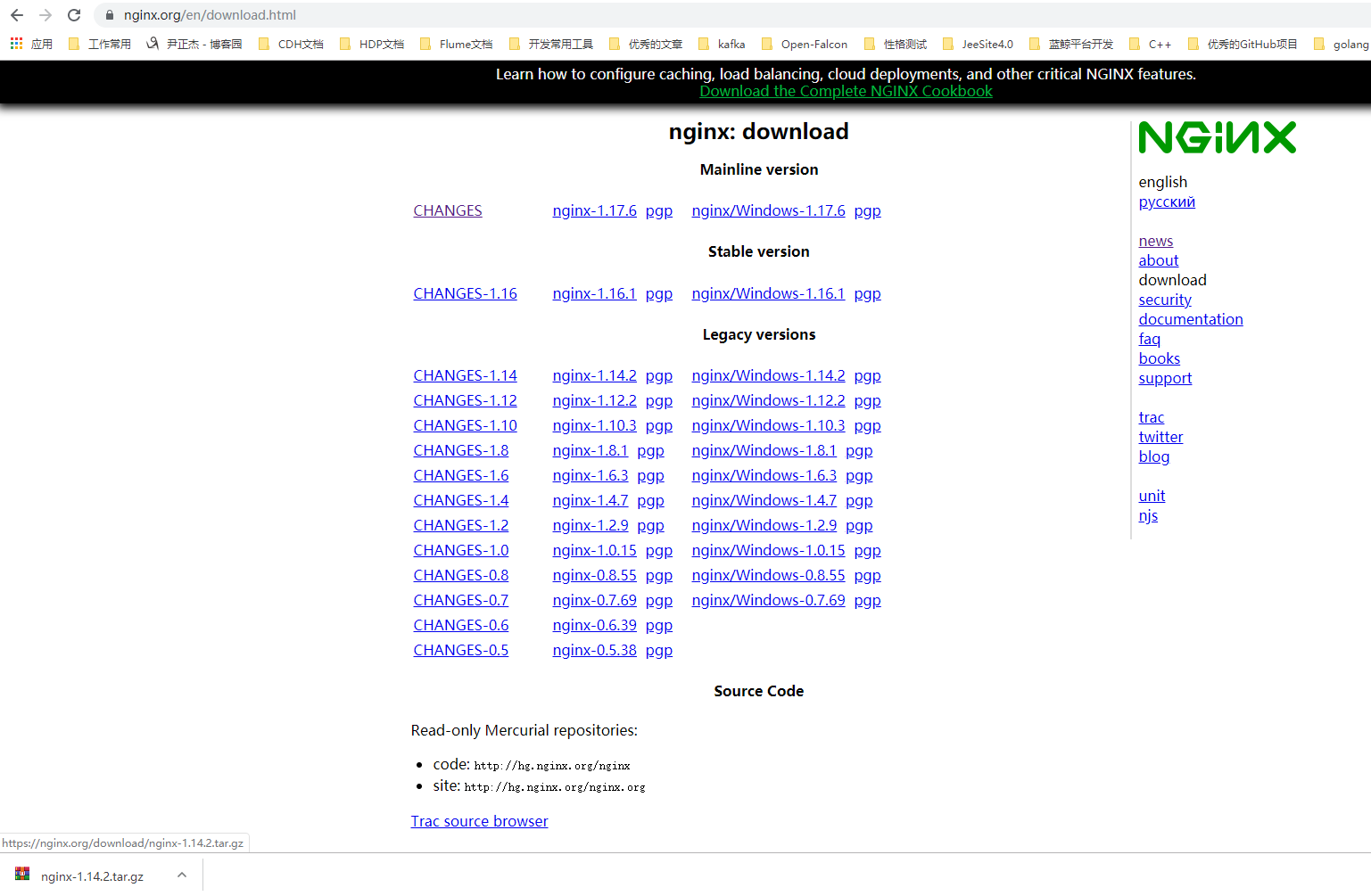
2>.如上图所示,将下载的软件上传到服务器进行后续的安装操作,如果服务器有网络的情况下,也可以直接在互联网下载
[root@node101.yinzhengjie.org.cn ~]# yum -y install wget

Loaded plugins: fastestmirror

Determining fastest mirrors

 * base: mirror.bit.edu.cn

 * extras: mirror.bit.edu.cn

 * updates: mirrors.huaweicloud.com

base                                                                                                                                                 | 3.6 kB  ::

extras                                                                                                                                               | 2.9 kB  ::

updates                                                                                                                                              | 2.9 kB  ::

(/): base//x86_64/group_gz                                                                                                                        |  kB  ::

(/): extras//x86_64/primary_db                                                                                                                    |  kB  ::

(/): base//x86_64/primary_db                                                                                                                      | 6.0 MB  ::

(/): updates//x86_64/primary_db                                                                                                                   | 5.8 MB  ::

Resolving Dependencies

--> Running transaction check

---> Package wget.x86_64 :1.14-.el7_6. will be installed

--> Finished Dependency Resolution

Dependencies Resolved

============================================================================================================================================================================

 Package                               Arch                                    Version                                          Repository                             Size

============================================================================================================================================================================

Installing:

 wget                                  x86_64                                  1.14-.el7_6.                                  base                                   k

Transaction Summary

============================================================================================================================================================================

Install   Package

Total download size:  k

Installed size: 2.0 M

Downloading packages:

wget-1.14-.el7_6..x86_64.rpm                                                                                                                      |  kB  ::

Running transaction check

Running transaction test

Transaction test succeeded

Running transaction

  Installing : wget-1.14-.el7_6..x86_64                                                                                                                              /

  Verifying  : wget-1.14-.el7_6..x86_64                                                                                                                              /

Installed:

  wget.x86_64 :1.14-.el7_6.

Complete!

[root@node101.yinzhengjie.org.cn ~]#
[root@node101.yinzhengjie.org.cn ~]# yum -y install wget #安装下载工具
[root@node101.yinzhengjie.org.cn ~]# cd /usr/local/src/

[root@node101.yinzhengjie.org.cn /usr/local/src]#

[root@node101.yinzhengjie.org.cn /usr/local/src]#

[root@node101.yinzhengjie.org.cn /usr/local/src]#  wget https://nginx.org/download/nginx-1.14.2.tar.gz

---- ::--  https://nginx.org/download/nginx-1.14.2.tar.gz

Resolving nginx.org (nginx.org)... 95.211.80.227, 62.210.92.35, :1af8::a004:::e3

Connecting to nginx.org (nginx.org)|95.211.80.227|:... connected.

HTTP request sent, awaiting response...  OK

Length:  (992K) [application/octet-stream]

Saving to: ‘nginx-1.14..tar.gz’

%[==================================================================================================================================>] ,,   .5KB/s   in 85s

-- :: (11.7 KB/s) - ‘nginx-1.14..tar.gz’ saved [/]

[root@node101.yinzhengjie.org.cn /usr/local/src]#
[root@node101.yinzhengjie.org.cn /usr/local/src]# wget https://nginx.org/download/nginx-1.14.2.tar.gz
3>.解压nginx文件
[root@node101.yinzhengjie.org.cn /usr/local/src]# ll

total

-rw-r--r--  root root  Dec     nginx-1.14..tar.gz

[root@node101.yinzhengjie.org.cn /usr/local/src]#

[root@node101.yinzhengjie.org.cn /usr/local/src]# tar -xf nginx-1.14..tar.gz

[root@node101.yinzhengjie.org.cn /usr/local/src]#

[root@node101.yinzhengjie.org.cn /usr/local/src]# ll

total

drwxr-xr-x         Dec     nginx-1.14.

-rw-r--r--  root root  Dec     nginx-1.14..tar.gz

[root@node101.yinzhengjie.org.cn /usr/local/src]#

[root@node101.yinzhengjie.org.cn /usr/local/src]#
[root@node101.yinzhengjie.org.cn /usr/local/src]# tar -xf nginx-1.14.2.tar.gz
4>.准备编译安装的基础环境
[root@node101.yinzhengjie.org.cn ~]# yum -y install vim lrzsz tree screen psmisc lsof tcpdump wget ntpdate gcc gcc-c++ glibc glibc-devel pcre pcre-devel openssl openssl-devel systemd-devel net-tools iotop bc zip unzip zlib-devel bash-completion nfs-utils automake libxml2 libxml2-devel libxslt libxslt-devel perl perl-ExtUtils-Embed
  gcc为GNU Compiler Collection的缩写,可以编译C和C++源代码等,它是GNU开发的C和C++以及其他很多种语言的编译器(最早的时候只能编译C,后来很快进化成一个编译多种语言的集合,如Fortran、Pascal、Objective-C、Java、Ada、 Go等。)

  gcc 在编译C++源代码的阶段,只能编译 C++ 源文件,而不能自动和 C++ 程序使用的库链接(编译过程分为编译、链接两个阶段,注意不要和可执行文件这个概念搞混,相对可执行文件来说有三个重要的概念:编译(compile)、链接(link)、加载(load)。源程序文件被编译成目标文件,多个目标文件连同库被链接成一个最终的可执行文件,可执行文件被加载到内存中运行)。因此,通常使用 g++ 命令来完成 C++ 程序的编译和连接,该程序会自动调用 gcc 实现编译。

  gcc-c++也能编译C源代码,只不过把会把它当成C++源代码,后缀为.c的,gcc把它当作是C程序,而g++当作是c++程序;后缀为.cpp的,两者都会认为是c++程序,注意,虽然c++是c的超集,但是两者对语法的要求是有区别的。

  automake是一个从Makefile.am文件自动生成Makefile.in的工具。为了生成Makefile.in,automake还需用到perl,由于automake创建的发布完全遵循GNU标准,所以在创建中不需要perl。libtool是一款方便生成各种程序库的工具。


  pcre pcre-devel:在Nginx编译需要 PCRE(Perl Compatible Regular Expression),因为Nginx的Rewrite模块和HTTP 核心模块会使用到PCRE正则表达式语法。

  zlip zlib-devel:nginx启用压缩功能的时候,需要此模块的支持。

  openssl openssl-devel:开启SSL的时候需要此模块的支持。
5>.配置nginx模块(该步骤会检查nginx编译时需要的环境,如依赖包等,若不满足则会在配置过程中失败,并且会生成一个)
[root@node101.yinzhengjie.org.cn /usr/local/src]#

[root@node101.yinzhengjie.org.cn /usr/local/src]# ll

total

drwxr-xr-x         Dec     nginx-1.14.

-rw-r--r--  root root  Dec     nginx-1.14..tar.gz

[root@node101.yinzhengjie.org.cn /usr/local/src]#

[root@node101.yinzhengjie.org.cn /usr/local/src]# cd nginx-1.14.

[root@node101.yinzhengjie.org.cn /usr/local/src/nginx-1.14.]#

[root@node101.yinzhengjie.org.cn /usr/local/src/nginx-1.14.]# ll

total

drwxr-xr-x        Dec  : auto

-rw-r--r--     Dec     CHANGES

-rw-r--r--     Dec     CHANGES.ru

drwxr-xr-x        Dec  : conf

-rwxr-xr-x       Dec     configure

drwxr-xr-x         Dec  : contrib

drwxr-xr-x         Dec  : html

-rw-r--r--       Dec     LICENSE

drwxr-xr-x         Dec  : man

-rw-r--r--         Dec     README

drwxr-xr-x         Dec  : src

[root@node101.yinzhengjie.org.cn /usr/local/src/nginx-1.14.]#

[root@node101.yinzhengjie.org.cn /usr/local/src/nginx-1.14.]# file configure

configure: POSIX shell script, ASCII text executable

[root@node101.yinzhengjie.org.cn /usr/local/src/nginx-1.14.]#

[root@node101.yinzhengjie.org.cn /usr/local/src/nginx-1.14.]#

[root@node101.yinzhengjie.org.cn /usr/local/src/nginx-1.14.]# ./configure --help

  --help                             print this message

  --prefix=PATH                      set installation prefix

  --sbin-path=PATH                   set nginx binary pathname

  --modules-path=PATH                set modules path

  --conf-path=PATH                   set nginx.conf pathname

  --error-log-path=PATH              set error log pathname

  --pid-path=PATH                    set nginx.pid pathname

  --lock-path=PATH                   set nginx.lock pathname

  --user=USER                        set non-privileged user for

                                     worker processes

  --group=GROUP                      set non-privileged group for

                                     worker processes

  --build=NAME                       set build name

  --builddir=DIR                     set build directory

  --with-select_module               enable select module

  --without-select_module            disable select module

  --with-poll_module                 enable poll module

  --without-poll_module              disable poll module

  --with-threads                     enable thread pool support

  --with-file-aio                    enable file AIO support

  --with-http_ssl_module             enable ngx_http_ssl_module

  --with-http_v2_module              enable ngx_http_v2_module

  --with-http_realip_module          enable ngx_http_realip_module

  --with-http_addition_module        enable ngx_http_addition_module

  --with-http_xslt_module            enable ngx_http_xslt_module

  --with-http_xslt_module=dynamic    enable dynamic ngx_http_xslt_module

  --with-http_image_filter_module    enable ngx_http_image_filter_module

  --with-http_image_filter_module=dynamic

                                     enable dynamic ngx_http_image_filter_module

  --with-http_geoip_module           enable ngx_http_geoip_module

  --with-http_geoip_module=dynamic   enable dynamic ngx_http_geoip_module

  --with-http_sub_module             enable ngx_http_sub_module

  --with-http_dav_module             enable ngx_http_dav_module

  --with-http_flv_module             enable ngx_http_flv_module

  --with-http_mp4_module             enable ngx_http_mp4_module

  --with-http_gunzip_module          enable ngx_http_gunzip_module

  --with-http_gzip_static_module     enable ngx_http_gzip_static_module

  --with-http_auth_request_module    enable ngx_http_auth_request_module

  --with-http_random_index_module    enable ngx_http_random_index_module

  --with-http_secure_link_module     enable ngx_http_secure_link_module

  --with-http_degradation_module     enable ngx_http_degradation_module

  --with-http_slice_module           enable ngx_http_slice_module

  --with-http_stub_status_module     enable ngx_http_stub_status_module

  --without-http_charset_module      disable ngx_http_charset_module

  --without-http_gzip_module         disable ngx_http_gzip_module

  --without-http_ssi_module          disable ngx_http_ssi_module

  --without-http_userid_module       disable ngx_http_userid_module

  --without-http_access_module       disable ngx_http_access_module

  --without-http_auth_basic_module   disable ngx_http_auth_basic_module

  --without-http_mirror_module       disable ngx_http_mirror_module

  --without-http_autoindex_module    disable ngx_http_autoindex_module

  --without-http_geo_module          disable ngx_http_geo_module

  --without-http_map_module          disable ngx_http_map_module

  --without-http_split_clients_module disable ngx_http_split_clients_module

  --without-http_referer_module      disable ngx_http_referer_module

  --without-http_rewrite_module      disable ngx_http_rewrite_module

  --without-http_proxy_module        disable ngx_http_proxy_module

  --without-http_fastcgi_module      disable ngx_http_fastcgi_module

  --without-http_uwsgi_module        disable ngx_http_uwsgi_module

  --without-http_scgi_module         disable ngx_http_scgi_module

  --without-http_grpc_module         disable ngx_http_grpc_module

  --without-http_memcached_module    disable ngx_http_memcached_module

  --without-http_limit_conn_module   disable ngx_http_limit_conn_module

  --without-http_limit_req_module    disable ngx_http_limit_req_module

  --without-http_empty_gif_module    disable ngx_http_empty_gif_module

  --without-http_browser_module      disable ngx_http_browser_module

  --without-http_upstream_hash_module

                                     disable ngx_http_upstream_hash_module

  --without-http_upstream_ip_hash_module

                                     disable ngx_http_upstream_ip_hash_module

  --without-http_upstream_least_conn_module

                                     disable ngx_http_upstream_least_conn_module

  --without-http_upstream_keepalive_module

                                     disable ngx_http_upstream_keepalive_module

  --without-http_upstream_zone_module

                                     disable ngx_http_upstream_zone_module

  --with-http_perl_module            enable ngx_http_perl_module

  --with-http_perl_module=dynamic    enable dynamic ngx_http_perl_module

  --with-perl_modules_path=PATH      set Perl modules path

  --with-perl=PATH                   set perl binary pathname

  --http-log-path=PATH               set http access log pathname

  --http-client-body-temp-path=PATH  set path to store

                                     http client request body temporary files

  --http-proxy-temp-path=PATH        set path to store

                                     http proxy temporary files

  --http-fastcgi-temp-path=PATH      set path to store

                                     http fastcgi temporary files

  --http-uwsgi-temp-path=PATH        set path to store

                                     http uwsgi temporary files

  --http-scgi-temp-path=PATH         set path to store

                                     http scgi temporary files

  --without-http                     disable HTTP server

  --without-http-cache               disable HTTP cache

  --with-mail                        enable POP3/IMAP4/SMTP proxy module

  --with-mail=dynamic                enable dynamic POP3/IMAP4/SMTP proxy module

  --with-mail_ssl_module             enable ngx_mail_ssl_module

  --without-mail_pop3_module         disable ngx_mail_pop3_module

  --without-mail_imap_module         disable ngx_mail_imap_module

  --without-mail_smtp_module         disable ngx_mail_smtp_module

  --with-stream                      enable TCP/UDP proxy module

  --with-stream=dynamic              enable dynamic TCP/UDP proxy module

  --with-stream_ssl_module           enable ngx_stream_ssl_module

  --with-stream_realip_module        enable ngx_stream_realip_module

  --with-stream_geoip_module         enable ngx_stream_geoip_module

  --with-stream_geoip_module=dynamic enable dynamic ngx_stream_geoip_module

  --with-stream_ssl_preread_module   enable ngx_stream_ssl_preread_module

  --without-stream_limit_conn_module disable ngx_stream_limit_conn_module

  --without-stream_access_module     disable ngx_stream_access_module

  --without-stream_geo_module        disable ngx_stream_geo_module

  --without-stream_map_module        disable ngx_stream_map_module

  --without-stream_split_clients_module

                                     disable ngx_stream_split_clients_module

  --without-stream_return_module     disable ngx_stream_return_module

  --without-stream_upstream_hash_module

                                     disable ngx_stream_upstream_hash_module

  --without-stream_upstream_least_conn_module

                                     disable ngx_stream_upstream_least_conn_module

  --without-stream_upstream_zone_module

                                     disable ngx_stream_upstream_zone_module

  --with-google_perftools_module     enable ngx_google_perftools_module

  --with-cpp_test_module             enable ngx_cpp_test_module

  --add-module=PATH                  enable external module

  --add-dynamic-module=PATH          enable dynamic external module

  --with-compat                      dynamic modules compatibility

  --with-cc=PATH                     set C compiler pathname

  --with-cpp=PATH                    set C preprocessor pathname

  --with-cc-opt=OPTIONS              set additional C compiler options

  --with-ld-opt=OPTIONS              set additional linker options

  --with-cpu-opt=CPU                 build for the specified CPU, valid values:

                                     pentium, pentiumpro, pentium3, pentium4,

                                     athlon, opteron, sparc32, sparc64, ppc64

  --without-pcre                     disable PCRE library usage

  --with-pcre                        force PCRE library usage

  --with-pcre=DIR                    set path to PCRE library sources

  --with-pcre-opt=OPTIONS            set additional build options for PCRE

  --with-pcre-jit                    build PCRE with JIT compilation support

  --with-zlib=DIR                    set path to zlib library sources

  --with-zlib-opt=OPTIONS            set additional build options for zlib

  --with-zlib-asm=CPU                use zlib assembler sources optimized

                                     for the specified CPU, valid values:

                                     pentium, pentiumpro

  --with-libatomic                   force libatomic_ops library usage

  --with-libatomic=DIR               set path to libatomic_ops library sources

  --with-openssl=DIR                 set path to OpenSSL library sources

  --with-openssl-opt=OPTIONS         set additional build options for OpenSSL

  --with-debug                       enable debug logging

[root@node101.yinzhengjie.org.cn /usr/local/src/nginx-1.14.]#
[root@node101.yinzhengjie.org.cn /usr/local/src/nginx-1.14.2]# ./configure --help #查看nginx的配置参数支持的参数
[root@node101.yinzhengjie.org.cn /usr/local/src/nginx-1.14.]# ./configure --prefix=/yinzhengjie/softwares/nginx \      #指定编译安装时的路径,这些编译参数在帮助信息均有记录哟~

> --user=nginx \                    #指定以nginx用户运行服务

> --group=nginx \                    #指定以nginx组运行服务

> --with-http_ssl_module \              #支持ssl功能

> --with-http_v2_module \              #支持http2功能

> --with-http_realip_module \            #做反向代理时可以转发真实的IP地址

> --with-http_stub_status_module \         #开启状态页

> --with-http_gzip_static_module \         #开启静态压缩功能

> --with-pcre \                    #支持正则

> --with-stream \                   #支持TCP代理的方式

> --with-stream_ssl_module \

> --with-stream_realip_module

......

checking for OpenSSL library ... found

checking for zlib library ... found

creating objs/Makefile

Configuration summary

+ using system PCRE library

+ using system OpenSSL library

+ using system zlib library

nginx path prefix: "/yinzhengjie/softwares/nginx"

nginx binary file: "/yinzhengjie/softwares/nginx/sbin/nginx"

nginx modules path: "/yinzhengjie/softwares/nginx/modules"

nginx configuration prefix: "/yinzhengjie/softwares/nginx/conf"

nginx configuration file: "/yinzhengjie/softwares/nginx/conf/nginx.conf"

nginx pid file: "/yinzhengjie/softwares/nginx/logs/nginx.pid"

nginx error log file: "/yinzhengjie/softwares/nginx/logs/error.log"

nginx http access log file: "/yinzhengjie/softwares/nginx/logs/access.log"

nginx http client request body temporary files: "client_body_temp"

nginx http proxy temporary files: "proxy_temp"

nginx http fastcgi temporary files: "fastcgi_temp"

nginx http uwsgi temporary files: "uwsgi_temp"

nginx http scgi temporary files: "scgi_temp"

[root@node101.yinzhengjie.org.cn /usr/local/src/nginx-1.14.]# echo $?

[root@node101.yinzhengjie.org.cn /usr/local/src/nginx-1.14.]#

[root@node101.yinzhengjie.org.cn /usr/local/src/nginx-1.14.]# ll Makefile           #注意,"./configure"这个步骤会有两个操作,第一是检查编译安装需要依赖的软件包等环境,如果缺少依赖包则配置不成功;第二是会生成Makefile的配置文件哟~

-rw-r--r--  root root  Dec  : Makefile

[root@node101.yinzhengjie.org.cn /usr/local/src/nginx-1.14.]#

[root@node101.yinzhengjie.org.cn /usr/local/src/nginx-1.14.]# date

Sun Dec  :: CST

[root@node101.yinzhengjie.org.cn /usr/local/src/nginx-1.14.]#
[root@node101.yinzhengjie.org.cn /usr/local/src/nginx-1.14.]# cat Makefile

default:    build

clean:

    rm -rf Makefile objs

build:

    $(MAKE) -f objs/Makefile

install:

    $(MAKE) -f objs/Makefile install

modules:

    $(MAKE) -f objs/Makefile modules

upgrade:

    /yinzhengjie/softwares/nginx/sbin/nginx -t

    kill -USR2 `cat /yinzhengjie/softwares/nginx/logs/nginx.pid`

    sleep

    test -f /yinzhengjie/softwares/nginx/logs/nginx.pid.oldbin

    kill -QUIT `cat /yinzhengjie/softwares/nginx/logs/nginx.pid.oldbin`

[root@node101.yinzhengjie.org.cn /usr/local/src/nginx-1.14.]#
[root@node101.yinzhengjie.org.cn /usr/local/src/nginx-1.14.2]# cat Makefile #在编译时会使用该文件
6>.编译(该步骤会根据Makefile文件生成相应的模块)
[root@node101.yinzhengjie.org.cn /usr/local/src/nginx-1.14.]# lscpu

Architecture:          x86_64

CPU op-mode(s):        -bit, -bit

Byte Order:            Little Endian

CPU(s):

On-line CPU(s) list:   -

Thread(s) per core:

Core(s) per socket:

Socket(s):

NUMA node(s):

Vendor ID:             GenuineIntel

CPU family:

Model:

Model name:            Intel(R) Core(TM) i7-8750H CPU @ .20GHz

Stepping:

CPU MHz:               2208.000

BogoMIPS:              4416.00

Hypervisor vendor:     KVM

Virtualization type:   full

L1d cache:             32K

L1i cache:             32K

L2 cache:              256K

L3 cache:              9216K

NUMA node0 CPU(s):     -

Flags:                 fpu vme de pse tsc msr pae mce cx8 apic sep mtrr pge mca cmov pat pse36 clflush mmx fxsr sse sse2 ht syscall nx rdtscp lm constant_tsc rep_good nopl

xtopology nonstop_tsc eagerfpu pni pclmulqdq ssse3 cx16 pcid sse4_1 sse4_2 x2apic movbe popcnt aes xsave avx rdrand hypervisor lahf_lm abm 3dnowprefetch fsgsbase avx2 invpcid rdseed clflushopt flush_l1d[root@node101.yinzhengjie.org.cn /usr/local/src/nginx-1.14.]#
[root@node101.yinzhengjie.org.cn /usr/local/src/nginx-1.14.2]# lscpu #查看CPU的核心数
[root@node101.yinzhengjie.org.cn /usr/local/src/nginx-1.14.]# make -j

......

objs/src/stream/ngx_stream_ssl_module.o \

objs/src/stream/ngx_stream_realip_module.o \

objs/src/stream/ngx_stream_limit_conn_module.o \

objs/src/stream/ngx_stream_access_module.o \

objs/src/stream/ngx_stream_geo_module.o \

objs/src/stream/ngx_stream_map_module.o \

objs/src/stream/ngx_stream_split_clients_module.o \

objs/src/stream/ngx_stream_return_module.o \

objs/src/stream/ngx_stream_upstream_hash_module.o \

objs/src/stream/ngx_stream_upstream_least_conn_module.o \

objs/src/stream/ngx_stream_upstream_zone_module.o \

objs/ngx_modules.o \

-ldl -lpthread -lcrypt -lpcre -lssl -lcrypto -ldl -lpthread -lz \

-Wl,-E

sed -e "s|%%PREFIX%%|/yinzhengjie/softwares/nginx|" \

    -e "s|%%PID_PATH%%|/yinzhengjie/softwares/nginx/logs/nginx.pid|" \

    -e "s|%%CONF_PATH%%|/yinzhengjie/softwares/nginx/conf/nginx.conf|" \

    -e "s|%%ERROR_LOG_PATH%%|/yinzhengjie/softwares/nginx/logs/error.log|" \

    < man/nginx. > objs/nginx.

make[]: Leaving directory `/usr/local/src/nginx-1.14.'

[root@node101.yinzhengjie.org.cn /usr/local/src/nginx-1.14.]#

[root@node101.yinzhengjie.org.cn /usr/local/src/nginx-1.14.]# echo $?

[root@node101.yinzhengjie.org.cn /usr/local/src/nginx-1.14.]#
[root@node101.yinzhengjie.org.cn /usr/local/src/nginx-1.14.2]# make -j 4
7>.安装(该步骤会创建目录,并将生成的模块和文件复制到相应的目录)
[root@node101.yinzhengjie.org.cn /usr/local/src/nginx-1.14.]# make install

make -f objs/Makefile install

make[]: Entering directory `/usr/local/src/nginx-1.14.'

test -d '/yinzhengjie/softwares/nginx' || mkdir -p '/yinzhengjie/softwares/nginx'

test -d '/yinzhengjie/softwares/nginx/sbin' \

    || mkdir -p '/yinzhengjie/softwares/nginx/sbin'

test ! -f '/yinzhengjie/softwares/nginx/sbin/nginx' \

    || mv '/yinzhengjie/softwares/nginx/sbin/nginx' \

        '/yinzhengjie/softwares/nginx/sbin/nginx.old'

cp objs/nginx '/yinzhengjie/softwares/nginx/sbin/nginx'

test -d '/yinzhengjie/softwares/nginx/conf' \

    || mkdir -p '/yinzhengjie/softwares/nginx/conf'

cp conf/koi-win '/yinzhengjie/softwares/nginx/conf'

cp conf/koi-utf '/yinzhengjie/softwares/nginx/conf'

cp conf/win-utf '/yinzhengjie/softwares/nginx/conf'

test -f '/yinzhengjie/softwares/nginx/conf/mime.types' \

    || cp conf/mime.types '/yinzhengjie/softwares/nginx/conf'

cp conf/mime.types '/yinzhengjie/softwares/nginx/conf/mime.types.default'

test -f '/yinzhengjie/softwares/nginx/conf/fastcgi_params' \

    || cp conf/fastcgi_params '/yinzhengjie/softwares/nginx/conf'

cp conf/fastcgi_params \

    '/yinzhengjie/softwares/nginx/conf/fastcgi_params.default'

test -f '/yinzhengjie/softwares/nginx/conf/fastcgi.conf' \

    || cp conf/fastcgi.conf '/yinzhengjie/softwares/nginx/conf'

cp conf/fastcgi.conf '/yinzhengjie/softwares/nginx/conf/fastcgi.conf.default'

test -f '/yinzhengjie/softwares/nginx/conf/uwsgi_params' \

    || cp conf/uwsgi_params '/yinzhengjie/softwares/nginx/conf'

cp conf/uwsgi_params \

    '/yinzhengjie/softwares/nginx/conf/uwsgi_params.default'

test -f '/yinzhengjie/softwares/nginx/conf/scgi_params' \

    || cp conf/scgi_params '/yinzhengjie/softwares/nginx/conf'

cp conf/scgi_params \

    '/yinzhengjie/softwares/nginx/conf/scgi_params.default'

test -f '/yinzhengjie/softwares/nginx/conf/nginx.conf' \

    || cp conf/nginx.conf '/yinzhengjie/softwares/nginx/conf/nginx.conf'

cp conf/nginx.conf '/yinzhengjie/softwares/nginx/conf/nginx.conf.default'

test -d '/yinzhengjie/softwares/nginx/logs' \

    || mkdir -p '/yinzhengjie/softwares/nginx/logs'

test -d '/yinzhengjie/softwares/nginx/logs' \

    || mkdir -p '/yinzhengjie/softwares/nginx/logs'

test -d '/yinzhengjie/softwares/nginx/html' \

    || cp -R html '/yinzhengjie/softwares/nginx'

test -d '/yinzhengjie/softwares/nginx/logs' \

    || mkdir -p '/yinzhengjie/softwares/nginx/logs'

make[]: Leaving directory `/usr/local/src/nginx-1.14.'

[root@node101.yinzhengjie.org.cn /usr/local/src/nginx-1.14.]#

[root@node101.yinzhengjie.org.cn /usr/local/src/nginx-1.14.]# echo $?

[root@node101.yinzhengjie.org.cn /usr/local/src/nginx-1.14.]#

[root@node101.yinzhengjie.org.cn /usr/local/src/nginx-1.14.]#
[root@node101.yinzhengjie.org.cn /usr/local/src/nginx-1.14.2]# make install
[root@node101.yinzhengjie.org.cn /usr/local/src/nginx-1.14.]# ll /yinzhengjie/softwares/nginx/

total

drwxr-xr-x  root root  Dec  : conf          #保存nginx所有的配置文件,其中nginx.conf是nginx服务器的最核心最主要的配置文件,其他的.conf则是用来配置nginx相关的功能的,例如fastcgi功能使用的是fastcgi.conf和fastcgi_params两个文件,配置文件一般都有个样板配置文件,是文件名.default结尾,使用的使用将其复制为并将default去掉即可。

drwxr-xr-x  root root   Dec  : html           #保存了nginx服务器的web文件,但是可以更改为其他目录保存web文件,另外还有一个50x的web文件是默认的错误页面提示页面

drwxr-xr-x  root root    Dec  : logs         #用来保存nginx服务器的访问日志错误日志等日志,logs目录可以放在其他路径,比如/var/logs/nginx里面。

drwxr-xr-x  root root   Dec  : sbin         #保存nginx二进制启动脚本,可以接受不同的参数以实现不同的功能。

[root@node101.yinzhengjie.org.cn /usr/local/src/nginx-1.14.]#
8>.创建nginx并授权
[root@node101.yinzhengjie.org.cn ~]#

[root@node101.yinzhengjie.org.cn ~]# useradd nginx -s /sbin/nologin -u

[root@node101.yinzhengjie.org.cn ~]#

[root@node101.yinzhengjie.org.cn ~]# chown nginx:nginx -R /yinzhengjie/softwares/nginx/

[root@node101.yinzhengjie.org.cn ~]#
9>.启动nginx服务
[root@node101.yinzhengjie.org.cn ~]# ss -ntl

State      Recv-Q Send-Q                                         Local Address:Port                                                        Peer Address:Port

LISTEN                                                                   *:                                                                    *:*

LISTEN                                                                   *:                                                                     *:*

LISTEN                                                                  :::                                                                    :::*

[root@node101.yinzhengjie.org.cn ~]#

[root@node101.yinzhengjie.org.cn ~]# /yinzhengjie/softwares/nginx/sbin/nginx -t

nginx: the configuration file /yinzhengjie/softwares/nginx/conf/nginx.conf syntax is ok

nginx: configuration file /yinzhengjie/softwares/nginx/conf/nginx.conf test is successful

[root@node101.yinzhengjie.org.cn ~]#

[root@node101.yinzhengjie.org.cn ~]# /yinzhengjie/softwares/nginx/sbin/nginx         #启动nginx程序成功后,可以通过web界面访问

[root@node101.yinzhengjie.org.cn ~]#

[root@node101.yinzhengjie.org.cn ~]# ss -ntl

State      Recv-Q Send-Q                                         Local Address:Port                                                        Peer Address:Port

LISTEN                                                                   *:                                                                    *:*

LISTEN                                                                   *:                                                                     *:*

LISTEN                                                                   *:                                                                     *:*

LISTEN                                                                  :::                                                                    :::*

[root@node101.yinzhengjie.org.cn ~]#

[root@node101.yinzhengjie.org.cn ~]#

10>.CentOS 7.6编写nginx启动脚本
[root@node101.yinzhengjie.org.cn ~]# vim /usr/lib/systemd/system/nginx.service

[root@node101.yinzhengjie.org.cn ~]#

[root@node101.yinzhengjie.org.cn ~]# cat /usr/lib/systemd/system/nginx.service

[Unit]

Description=YinZhengJie's nginx - high performance web server

Documentation=http://nginx.org/en/docs/

After=network-online.target remote-fs.target nss-lookup.target

Wants=network-online.target

[Service]

Type=forking

PIDFile=/yinzhengjie/softwares/nginx/logs/nginx.pid

ExecStart=/yinzhengjie/softwares/nginx/sbin/nginx -c /yinzhengjie/softwares/nginx/conf/nginx.conf

ExecReload=/bin/kill -s HUP $MAINPID

ExecStop=/bin/kill -s TERM $MAINPID

[Install]

WantedBy=multi-user.target

[root@node101.yinzhengjie.org.cn ~]#
[root@node101.yinzhengjie.org.cn ~]# vim /usr/lib/systemd/system/nginx.service #编写nginx的启动脚本,可参考yum方式安装的脚本,修改几项参数即可
[root@node101.yinzhengjie.org.cn ~]# systemctl status nginx.service

● nginx.service - YinZhengJie's nginx - high performance web server

   Loaded: loaded (/usr/lib/systemd/system/nginx.service; disabled; vendor preset: disabled)

   Active: inactive (dead)

     Docs: http://nginx.org/en/docs/

Dec  :: node101.yinzhengjie.org.cn systemd[]: Unit nginx.service cannot be reloaded because it is inactive.

Dec  :: node101.yinzhengjie.org.cn systemd[]: Starting YinZhengJie's nginx - high performance web server...

Dec  :: node101.yinzhengjie.org.cn systemd[]: Started YinZhengJie's nginx - high performance web server.

Dec  :: node101.yinzhengjie.org.cn systemd[]: Stopping YinZhengJie's nginx - high performance web server...

Dec  :: node101.yinzhengjie.org.cn systemd[]: Stopped YinZhengJie's nginx - high performance web server.

[root@node101.yinzhengjie.org.cn ~]#

[root@node101.yinzhengjie.org.cn ~]#

[root@node101.yinzhengjie.org.cn ~]# ss -ntl

State      Recv-Q Send-Q                                         Local Address:Port                                                        Peer Address:Port

LISTEN                                                                   *:                                                                     *:*

LISTEN                                                                  :::                                                                    :::*

[root@node101.yinzhengjie.org.cn ~]#

[root@node101.yinzhengjie.org.cn ~]# systemctl start nginx.service                 #启动nginx服务

[root@node101.yinzhengjie.org.cn ~]#

[root@node101.yinzhengjie.org.cn ~]# ss -ntl

State      Recv-Q Send-Q                                         Local Address:Port                                                        Peer Address:Port

LISTEN                                                                   *:                                                                     *:*

LISTEN                                                                   *:                                                                     *:*

LISTEN                                                                  :::                                                                    :::*

[root@node101.yinzhengjie.org.cn ~]#

[root@node101.yinzhengjie.org.cn ~]# systemctl status nginx.service

● nginx.service - YinZhengJie's nginx - high performance web server

   Loaded: loaded (/usr/lib/systemd/system/nginx.service; disabled; vendor preset: disabled)

   Active: active (running) since Sun -- :: CST; 4s ago

     Docs: http://nginx.org/en/docs/

  Process:  ExecStart=/yinzhengjie/softwares/nginx/sbin/nginx -c /yinzhengjie/softwares/nginx/conf/nginx.conf (code=exited, status=/SUCCESS)

 Main PID:  (nginx)

   CGroup: /system.slice/nginx.service

           ├─ nginx: master process /yinzhengjie/softwares/nginx/sbin/nginx -c /yinzhengjie/softwares/nginx/conf/nginx.conf

           └─ nginx: worker process

Dec  :: node101.yinzhengjie.org.cn systemd[]: Starting YinZhengJie's nginx - high performance web server...

Dec  :: node101.yinzhengjie.org.cn systemd[]: Started YinZhengJie's nginx - high performance web server.

[root@node101.yinzhengjie.org.cn ~]#

[root@node101.yinzhengjie.org.cn ~]#
[root@node101.yinzhengjie.org.cn ~]# systemctl start nginx.service #启动nginx服务
[root@node101.yinzhengjie.org.cn ~]# systemctl status nginx.service

● nginx.service - YinZhengJie's nginx - high performance web server

   Loaded: loaded (/usr/lib/systemd/system/nginx.service; disabled; vendor preset: disabled)

   Active: active (running) since Sun -- :: CST; 48s ago

     Docs: http://nginx.org/en/docs/

  Process:  ExecStart=/yinzhengjie/softwares/nginx/sbin/nginx -c /yinzhengjie/softwares/nginx/conf/nginx.conf (code=exited, status=/SUCCESS)

 Main PID:  (nginx)

   CGroup: /system.slice/nginx.service

           ├─ nginx: master process /yinzhengjie/softwares/nginx/sbin/nginx -c /yinzhengjie/softwares/nginx/conf/nginx.conf

           └─ nginx: worker process

Dec  :: node101.yinzhengjie.org.cn systemd[]: Starting YinZhengJie's nginx - high performance web server...

Dec  :: node101.yinzhengjie.org.cn systemd[]: Started YinZhengJie's nginx - high performance web server.

[root@node101.yinzhengjie.org.cn ~]#

[root@node101.yinzhengjie.org.cn ~]# ss -ntl

State      Recv-Q Send-Q                                         Local Address:Port                                                        Peer Address:Port

LISTEN                                                                   *:                                                                     *:*

LISTEN                                                                   *:                                                                     *:*

LISTEN                                                                  :::                                                                    :::*

[root@node101.yinzhengjie.org.cn ~]#

[root@node101.yinzhengjie.org.cn ~]# systemctl stop nginx.service                                           #停止nginx服务

[root@node101.yinzhengjie.org.cn ~]#

[root@node101.yinzhengjie.org.cn ~]# ss -ntl

State      Recv-Q Send-Q                                         Local Address:Port                                                        Peer Address:Port

LISTEN                                                                   *:                                                                     *:*

LISTEN                                                                  :::                                                                    :::*

[root@node101.yinzhengjie.org.cn ~]#

[root@node101.yinzhengjie.org.cn ~]# systemctl status nginx.service

● nginx.service - YinZhengJie's nginx - high performance web server

   Loaded: loaded (/usr/lib/systemd/system/nginx.service; disabled; vendor preset: disabled)

   Active: inactive (dead)

     Docs: http://nginx.org/en/docs/

Dec  :: node101.yinzhengjie.org.cn systemd[]: Unit nginx.service cannot be reloaded because it is inactive.

Dec  :: node101.yinzhengjie.org.cn systemd[]: Starting YinZhengJie's nginx - high performance web server...

Dec  :: node101.yinzhengjie.org.cn systemd[]: Started YinZhengJie's nginx - high performance web server.

Dec  :: node101.yinzhengjie.org.cn systemd[]: Stopping YinZhengJie's nginx - high performance web server...

Dec  :: node101.yinzhengjie.org.cn systemd[]: Stopped YinZhengJie's nginx - high performance web server.

Dec  :: node101.yinzhengjie.org.cn systemd[]: Starting YinZhengJie's nginx - high performance web server...

Dec  :: node101.yinzhengjie.org.cn systemd[]: Started YinZhengJie's nginx - high performance web server.

Dec  :: node101.yinzhengjie.org.cn systemd[]: Stopping YinZhengJie's nginx - high performance web server...

Dec  :: node101.yinzhengjie.org.cn systemd[]: Stopped YinZhengJie's nginx - high performance web server.

[root@node101.yinzhengjie.org.cn ~]#
[root@node101.yinzhengjie.org.cn ~]# systemctl stop nginx.service #停止nginx服务
[root@node101.yinzhengjie.org.cn ~]# systemctl status nginx.service

● nginx.service - YinZhengJie's nginx - high performance web server

   Loaded: loaded (/usr/lib/systemd/system/nginx.service; disabled; vendor preset: disabled)

   Active: active (running) since Sun -- :: CST; 11s ago

     Docs: http://nginx.org/en/docs/

  Process:  ExecStart=/yinzhengjie/softwares/nginx/sbin/nginx -c /yinzhengjie/softwares/nginx/conf/nginx.conf (code=exited, status=/SUCCESS)

 Main PID:  (nginx)

   CGroup: /system.slice/nginx.service

           ├─ nginx: master process /yinzhengjie/softwares/nginx/sbin/nginx -c /yinzhengjie/softwares/nginx/conf/nginx.conf

           └─ nginx: worker process

Dec  :: node101.yinzhengjie.org.cn systemd[]: Starting YinZhengJie's nginx - high performance web server...

Dec  :: node101.yinzhengjie.org.cn systemd[]: Started YinZhengJie's nginx - high performance web server.

[root@node101.yinzhengjie.org.cn ~]#

[root@node101.yinzhengjie.org.cn ~]# ps -ef | grep nginx

root             : ?        :: nginx: master process /yinzhengjie/softwares/nginx/sbin/nginx -c /yinzhengjie/softwares/nginx/conf/nginx.conf

nginx        : ?        :: nginx: worker process

root         : pts/    :: grep --color=auto nginx

[root@node101.yinzhengjie.org.cn ~]#

[root@node101.yinzhengjie.org.cn ~]# systemctl reload nginx        #重新加载nginx的配置文件,此时nginx的master进程不会消亡,而是worker生成了新的worker进程,之前的worker进程处理完现有的进程后会自动消亡。

[root@node101.yinzhengjie.org.cn ~]#

[root@node101.yinzhengjie.org.cn ~]# ps -ef | grep nginx

root             : ?        :: nginx: master process /yinzhengjie/softwares/nginx/sbin/nginx -c /yinzhengjie/softwares/nginx/conf/nginx.conf

nginx        : ?        :: nginx: worker process

root         : pts/    :: grep --color=auto nginx

[root@node101.yinzhengjie.org.cn ~]#

[root@node101.yinzhengjie.org.cn ~]#
11>.推荐手动管理nginx服务(通常情况下,我们可能不喜欢使用centos自带的命令去管理nginx,因为敲得命令比较长呗~我们会更乐意给nginx创建一个软连接进行管理)
[root@node101.yinzhengjie.org.cn ~]# ss -ntl

State      Recv-Q Send-Q                                         Local Address:Port                                                        Peer Address:Port

LISTEN                                                                   *:                                                                     *:*

LISTEN                                                                   *:                                                                     *:*

LISTEN                                                                  :::                                                                    :::*

[root@node101.yinzhengjie.org.cn ~]#

[root@node101.yinzhengjie.org.cn ~]# ln -sv /yinzhengjie/softwares/nginx/sbin/nginx /usr/sbin/      #是不是上面介绍直接使用centos7的systemctl命令管理nginx敲击命令太长了?因此生产环境中我更喜欢创建一个软连接。

‘/usr/sbin/nginx’ -> ‘/yinzhengjie/softwares/nginx/sbin/nginx’

[root@node101.yinzhengjie.org.cn ~]#

[root@node101.yinzhengjie.org.cn ~]# nginx -t

nginx: the configuration file /yinzhengjie/softwares/nginx/conf/nginx.conf syntax is ok

nginx: configuration file /yinzhengjie/softwares/nginx/conf/nginx.conf test is successful

[root@node101.yinzhengjie.org.cn ~]#

[root@node101.yinzhengjie.org.cn ~]# nginx -s stop

[root@node101.yinzhengjie.org.cn ~]#

[root@node101.yinzhengjie.org.cn ~]# ss -ntl

State      Recv-Q Send-Q                                         Local Address:Port                                                        Peer Address:Port

LISTEN                                                                   *:                                                                     *:*

LISTEN                                                                  :::                                                                    :::*

[root@node101.yinzhengjie.org.cn ~]#

[root@node101.yinzhengjie.org.cn ~]#
四.nginx命令常用参数介绍
1>.查看帮助信息
[root@node108.yinzhengjie.org.cn ~]# nginx -h

nginx version: nginx/1.16.

Usage: nginx [-?hvVtTq] [-s signal] [-c filename] [-p prefix] [-g directives]

Options:

  -?,-h         : this help

  -v            : show version and exit

  -V            : show version and configure options then exit

  -t            : test configuration and exit

  -T            : test configuration, dump it and exit

  -q            : suppress non-error messages during configuration testing

  -s signal     : send signal to a master process: stop, quit, reopen, reload

  -p prefix     : set prefix path (default: /etc/nginx/)

  -c filename   : set configuration file (default: /etc/nginx/nginx.conf)

  -g directives : set global directives out of configuration file

[root@node108.yinzhengjie.org.cn ~]#
2>."-v"参数使用案例
[root@node108.yinzhengjie.org.cn ~]# nginx -v                #查看nginx的版本简要信息

nginx version: nginx/1.16.

[root@node108.yinzhengjie.org.cn ~]#
3>."-V"参数使用案例
[root@node108.yinzhengjie.org.cn ~]# nginx -V               #会列出nginx版本以及配置选项,升级安装时,我们得参考这些配置选项,升级时别忘记把列出的所有参数都带上,这样升级也做到了向下兼容。

nginx version: nginx/1.16.

built by gcc 4.8.  (Red Hat 4.8.-) (GCC)

built with OpenSSL 1.0.2k-fips   Jan

TLS SNI support enabled

configure arguments: --prefix=/etc/nginx --sbin-path=/usr/sbin/nginx --modules-path=/usr/lib64/nginx/modules --conf-path=/etc/nginx/nginx.conf --error-log-path=/var/log/ngi

nx/error.log --http-log-path=/var/log/nginx/access.log --pid-path=/var/run/nginx.pid --lock-path=/var/run/nginx.lock --http-client-body-temp-path=/var/cache/nginx/client_temp --http-proxy-temp-path=/var/cache/nginx/proxy_temp --http-fastcgi-temp-path=/var/cache/nginx/fastcgi_temp --http-uwsgi-temp-path=/var/cache/nginx/uwsgi_temp --http-scgi-temp-path=/var/cache/nginx/scgi_temp --user=nginx --group=nginx --with-compat --with-file-aio --with-threads --with-http_addition_module --with-http_auth_request_module --with-http_dav_module --with-http_flv_module --with-http_gunzip_module --with-http_gzip_static_module --with-http_mp4_module --with-http_random_index_module --with-http_realip_module --with-http_secure_link_module --with-http_slice_module --with-http_ssl_module --with-http_stub_status_module --with-http_sub_module --with-http_v2_module --with-mail --with-mail_ssl_module --with-stream --with-stream_realip_module --with-stream_ssl_module --with-stream_ssl_preread_module --with-cc-opt='-O2 -g -pipe -Wall -Wp,-D_FORTIFY_SOURCE=2 -fexceptions -fstack-protector-strong --param=ssp-buffer-size=4 -grecord-gcc-switches -m64 -mtune=generic -fPIC' --with-ld-opt='-Wl,-z,relro -Wl,-z,now -pie'

[root@node108.yinzhengjie.org.cn ~]#
4>."-t"参数使用案例
[root@node108.yinzhengjie.org.cn ~]# nginx -t          #检查nginx的配置文件语法是否正确

nginx: the configuration file /etc/nginx/nginx.conf syntax is ok

nginx: configuration file /etc/nginx/nginx.conf test is successful

[root@node108.yinzhengjie.org.cn ~]#
5>."-T"参数使用案例
[root@node108.yinzhengjie.org.cn ~]# nginx -T      #检查mnginx的配置文件语法是否正确并列出生效的文件内容

nginx: the configuration file /etc/nginx/nginx.conf syntax is ok

nginx: configuration file /etc/nginx/nginx.conf test is successful

# configuration file /etc/nginx/nginx.conf:

user  nginx;

worker_processes  ;

error_log  /var/log/nginx/error.log warn;

pid        /var/run/nginx.pid;

events {

    worker_connections  ;

}

http {

    include       /etc/nginx/mime.types;

    default_type  application/octet-stream;

    log_format  main  '$remote_addr - $remote_user [$time_local] "$request" '

                      '$status $body_bytes_sent "$http_referer" '

                      '"$http_user_agent" "$http_x_forwarded_for"';

    access_log  /var/log/nginx/access.log  main;

    sendfile        on;

    #tcp_nopush     on;

    keepalive_timeout  ;

    #gzip  on;

    include /etc/nginx/conf.d/*.conf;

}

# configuration file /etc/nginx/mime.types:

types {

    text/html                                        html htm shtml;

    text/css                                         css;

    text/xml                                         xml;

    image/gif                                        gif;

    image/jpeg                                       jpeg jpg;

    application/javascript                           js;

    application/atom+xml                             atom;

    application/rss+xml                              rss;

    text/mathml                                      mml;

    text/plain                                       txt;

    text/vnd.sun.j2me.app-descriptor                 jad;

    text/vnd.wap.wml                                 wml;

    text/x-component                                 htc;

    image/png                                        png;

    image/svg+xml                                    svg svgz;

    image/tiff                                       tif tiff;

    image/vnd.wap.wbmp                               wbmp;

    image/webp                                       webp;

    image/x-icon                                     ico;

    image/x-jng                                      jng;

    image/x-ms-bmp                                   bmp;

    font/woff                                        woff;

    font/woff2                                       woff2;

    application/java-archive                         jar war ear;

    application/json                                 json;

    application/mac-binhex40                         hqx;

    application/msword                               doc;

    application/pdf                                  pdf;

    application/postscript                           ps eps ai;

    application/rtf                                  rtf;

    application/vnd.apple.mpegurl                    m3u8;

    application/vnd.google-earth.kml+xml             kml;

    application/vnd.google-earth.kmz                 kmz;

    application/vnd.ms-excel                         xls;

    application/vnd.ms-fontobject                    eot;

    application/vnd.ms-powerpoint                    ppt;

    application/vnd.oasis.opendocument.graphics      odg;

    application/vnd.oasis.opendocument.presentation  odp;

    application/vnd.oasis.opendocument.spreadsheet   ods;

    application/vnd.oasis.opendocument.text          odt;

    application/vnd.openxmlformats-officedocument.presentationml.presentation

                                                     pptx;

    application/vnd.openxmlformats-officedocument.spreadsheetml.sheet

                                                     xlsx;

    application/vnd.openxmlformats-officedocument.wordprocessingml.document

                                                     docx;

    application/vnd.wap.wmlc                         wmlc;

    application/x-7z-compressed                      7z;

    application/x-cocoa                              cco;

    application/x-java-archive-diff                  jardiff;

    application/x-java-jnlp-file                     jnlp;

    application/x-makeself                           run;

    application/x-perl                               pl pm;

    application/x-pilot                              prc pdb;

    application/x-rar-compressed                     rar;

    application/x-redhat-package-manager             rpm;

    application/x-sea                                sea;

    application/x-shockwave-flash                    swf;

    application/x-stuffit                            sit;

    application/x-tcl                                tcl tk;

    application/x-x509-ca-cert                       der pem crt;

    application/x-xpinstall                          xpi;

    application/xhtml+xml                            xhtml;

    application/xspf+xml                             xspf;

    application/zip                                  zip;

    application/octet-stream                         bin exe dll;

    application/octet-stream                         deb;

    application/octet-stream                         dmg;

    application/octet-stream                         iso img;

    application/octet-stream                         msi msp msm;

    audio/midi                                       mid midi kar;

    audio/mpeg                                       mp3;

    audio/ogg                                        ogg;

    audio/x-m4a                                      m4a;

    audio/x-realaudio                                ra;

    video/3gpp                                       3gpp 3gp;

    video/mp2t                                       ts;

    video/mp4                                        mp4;

    video/mpeg                                       mpeg mpg;

    video/quicktime                                  mov;

    video/webm                                       webm;

    video/x-flv                                      flv;

    video/x-m4v                                      m4v;

    video/x-mng                                      mng;

    video/x-ms-asf                                   asx asf;

    video/x-ms-wmv                                   wmv;

    video/x-msvideo                                  avi;

}

# configuration file /etc/nginx/conf.d/default.conf:

server {

    listen       80;

    server_name  localhost;

    #charset koi8-r;

    #access_log  /var/log/nginx/host.access.log  main;

    location / {

        root   /usr/share/nginx/html;

        index  index.html index.htm;

    }

    #error_page  404              /404.html;

    # redirect server error pages to the static page /50x.html

    #

    error_page   500 502 503 504  /50x.html;

    location = /50x.html {

        root   /usr/share/nginx/html;

    }

    # proxy the PHP scripts to Apache listening on 127.0.0.1:80

    #

    #location ~ \.php$ {

    #    proxy_pass   http://127.0.0.1;

    #}

    # pass the PHP scripts to FastCGI server listening on 127.0.0.1:9000

    #

    #location ~ \.php$ {

    #    root           html;

    #    fastcgi_pass   127.0.0.1:9000;

    #    fastcgi_index  index.php;

    #    fastcgi_param  SCRIPT_FILENAME  /scripts$fastcgi_script_name;

    #    include        fastcgi_params;

    #}

    # deny access to .htaccess files, if Apache's document root

    # concurs with nginx's one

    #

    #location ~ /\.ht {

    #    deny  all;

    #}

}

[root@node108.yinzhengjie.org.cn ~]#
[root@node108.yinzhengjie.org.cn ~]# nginx -T #检查mnginx的配置文件语法是否正确并列出生效的文件内容
6>."-q"参数使用案例
[root@node108.yinzhengjie.org.cn ~]# nginx -t

nginx: the configuration file /etc/nginx/nginx.conf syntax is ok

nginx: configuration file /etc/nginx/nginx.conf test is successful

[root@node108.yinzhengjie.org.cn ~]#

[root@node108.yinzhengjie.org.cn ~]# ss -ntl

State      Recv-Q Send-Q                                         Local Address:Port                                                        Peer Address:Port

LISTEN                                                                   *:                                                                     *:*

LISTEN                                                                  :::                                                                    :::*

[root@node108.yinzhengjie.org.cn ~]#

[root@node108.yinzhengjie.org.cn ~]# nginx -q           #在配置测试期间禁止显示非错误消息,也就是说如果没有输出就没有错误,即没有输出就是最好的结果啦~

[root@node108.yinzhengjie.org.cn ~]#

[root@node108.yinzhengjie.org.cn ~]# ss -ntl

State      Recv-Q Send-Q                                         Local Address:Port                                                        Peer Address:Port

LISTEN                                                                   *:                                                                     *:*

LISTEN                                                                   *:                                                                     *:*

LISTEN                                                                  :::                                                                    :::*

[root@node108.yinzhengjie.org.cn ~]#

[root@node108.yinzhengjie.org.cn ~]#

[root@node108.yinzhengjie.org.cn ~]# nginx -q         #第一次执行时若配置文件无问题,则会启用nginx服务,但第二次在执行的话,又一次启动nginx服务会导致地址的端口冲突的,因此会抛出端口被占用的错误提示哟,错误提示如下所示。

nginx: [emerg] bind() to 0.0.0.0: failed (: Address already in use)

nginx: [emerg] bind() to 0.0.0.0: failed (: Address already in use)

nginx: [emerg] bind() to 0.0.0.0: failed (: Address already in use)

nginx: [emerg] bind() to 0.0.0.0: failed (: Address already in use)

nginx: [emerg] bind() to 0.0.0.0: failed (: Address already in use)

nginx: [emerg] still could not bind()

[root@node108.yinzhengjie.org.cn ~]#
[root@node108.yinzhengjie.org.cn ~]# nginx -q #第一次执行时若配置文件无问题,则会启用nginx服务,但第二次在执行的话,又一次启动nginx服务会导致地址的端口冲突的,因此会抛出端口被占用的错误提示哟~
7>."-s"参数使用案例
[root@node108.yinzhengjie.org.cn ~]# nginx -h

nginx version: nginx/1.16.

Usage: nginx [-?hvVtTq] [-s signal] [-c filename] [-p prefix] [-g directives]

Options:

  -?,-h         : this help

  -v            : show version and exit

  -V            : show version and configure options then exit

  -t            : test configuration and exit

  -T            : test configuration, dump it and exit

  -q            : suppress non-error messages during configuration testing

  -s signal     : send signal to a master process: stop, quit, reopen, reload

  -p prefix     : set prefix path (default: /etc/nginx/)

  -c filename   : set configuration file (default: /etc/nginx/nginx.conf)

  -g directives : set global directives out of configuration file

[root@node108.yinzhengjie.org.cn ~]#

[root@node108.yinzhengjie.org.cn ~]# ss -ntl

State      Recv-Q Send-Q                                         Local Address:Port                                                        Peer Address:Port

LISTEN                                                                   *:                                                                     *:*

LISTEN                                                                  :::                                                                    :::*

[root@node108.yinzhengjie.org.cn ~]#

[root@node108.yinzhengjie.org.cn ~]# nginx

[root@node108.yinzhengjie.org.cn ~]#

[root@node108.yinzhengjie.org.cn ~]# ss -ntl

State      Recv-Q Send-Q                                         Local Address:Port                                                        Peer Address:Port

LISTEN                                                                   *:                                                                     *:*

LISTEN                                                                   *:                                                                     *:*

LISTEN                                                                  :::                                                                    :::*

[root@node108.yinzhengjie.org.cn ~]#

[root@node108.yinzhengjie.org.cn ~]# nginx -s stop            #停止nginx服务

[root@node108.yinzhengjie.org.cn ~]#

[root@node108.yinzhengjie.org.cn ~]# ss -ntl

State      Recv-Q Send-Q                                         Local Address:Port                                                        Peer Address:Port

LISTEN                                                                   *:                                                                     *:*

LISTEN                                                                  :::                                                                    :::*

[root@node108.yinzhengjie.org.cn ~]#
[root@node108.yinzhengjie.org.cn ~]# nginx -s stop #停止nginx服务
8>."-c"参数使用案例
[root@node108.yinzhengjie.org.cn ~]# ss -ntl

State      Recv-Q Send-Q                                         Local Address:Port                                                        Peer Address:Port

LISTEN                                                                   *:                                                                     *:*

LISTEN                                                                  :::                                                                    :::*

[root@node108.yinzhengjie.org.cn ~]#

[root@node108.yinzhengjie.org.cn ~]# nginx -c /etc/nginx/nginx.conf         #指定nginx的配置文件启动

[root@node108.yinzhengjie.org.cn ~]#

[root@node108.yinzhengjie.org.cn ~]# ss -ntl

State      Recv-Q Send-Q                                         Local Address:Port                                                        Peer Address:Port

LISTEN                                                                   *:                                                                     *:*

LISTEN                                                                   *:                                                                     *:*

LISTEN                                                                  :::                                                                    :::*

[root@node108.yinzhengjie.org.cn ~]#

[root@node108.yinzhengjie.org.cn ~]#
[root@node108.yinzhengjie.org.cn ~]# nginx -c /etc/nginx/nginx.conf #指定nginx的配置文件启动
五.Nginx默认配置文件参数说明
博主推荐阅读:

  https://www.cnblogs.com/yinzhengjie/p/12032229.html
Nginx常见的安装方式的更多相关文章
- Nginx采用yum安装方式及安装后的目录
第一次写博客就不讲究格式了,纯文字了吧 开始 第一步先执行 rpm -ivh http://nginx.org/packages/centos/6/noarch/RPMS/nginx-release- ...
- Centos 7下编译安装PHP7.2(与Nginx搭配的安装方式)
一.下载源码包 百度云网盘下载地址:https://pan.baidu.com/s/1li4oD3qjvFyIaEZQt2NVRg 提取码:4yde 二.安装php依赖组件 yum -y instal ...
- Nginx安装方式探究
Ubuntu 16.04(阿里云ECS),Nginx 1.10.3 (Ubuntu) 本文探究两种安装方式: 1.源码安装(手动) 2.APT安装(自动) 源码安装(手动) 步骤简介: 下载.解压.. ...
- Linux操作系统常见安装方式
Linux操作系统常见安装方式 作者:尹正杰 版权声明:原创作品,谢绝转载!否则将追究法律责任. 在window操作系统安装程序只需要点点鼠标就能搞定的事情,但是在Linux操作系统中,尤其是字符终端 ...
- Linux下软件常见安装方式
pasting 分类: Linux2007-12-08 16:31 1909人阅读 评论(0) 收藏 举报 linuxredhat脚本文档managerfile Linux下软件安装主 ...
- linux下常见的包安装方式
linux下常见的包安装方式 一.总结 一句话总结: rpm包安装 tar.gz源代码包安装 yum方式安装rpm包 bin文件安装 1.yum是什么? 安装所有依赖的软件包 Yum(全称为 Yell ...
- Centos7 设置自定义安装nginx的systemctl启动方式
一.systemctl方式启动设置过程 1.首先创建服务配置文件(名字和路径就是这个) vim /usr/lib/systemd/system/nginx.service 2.添加配置内容 [Unit ...
- 安装Nginx:通过yum方式
1.配置yum源: 在/etc/yum.repos.d中新建后缀为.repo的文件,此处以nginx.repo为例. 2.更新yum源: yum clean all yum makecache 3 ...
- Nginx多种安装方式
不指定参数配置的Nginx编译安装 ./configuremake make install wget下载或浏览器下载上传.解压进入目录[root@mcw1 nginx-1.10.2]# ls #查看 ...
随机推荐
- 【oracle】lpad函数 作用(填充)
- 在树莓派上配置MariaDB
在树莓派上配置MariaDB 前言 MariaDB是由原本开发MySQL的一些原始开发者领导,他们担心Oracle收购MySQL后会有一些隐患.MariaDB与MySQL保持这高度兼容性,并使用了一个 ...
- 【2019.7.25 NOIP模拟赛 T1】变换(change)(思维+大分类讨论)
几个性质 我们通过推式子可以发现: \[B⇒AC⇒AAB⇒AAAC⇒C\] \[C⇒AB⇒AAC⇒AAAB⇒B\] 也就是说: 性质一: \(B,C\)可以相互转换. 则我们再次推式子可以发现: \[ ...
- [LeetCode] 718. Maximum Length of Repeated Subarray 最长的重复子数组
Given two integer arrays A and B, return the maximum length of an subarray that appears in both arra ...
- 第04组 团队Git现场编程实战
组员职责分工 组员 分工 林涛(组长) 分配任务.整理数据.写博客 童圣滔 UI界面制作 林红莲 UI界面制作 潘雨佳 测评出福州最受欢迎的商圈 于瀚翔 测评出福州最受欢迎的商圈 覃鸿浩 测评出福州人 ...
- Java之数据库基础理论
一.事务的四大特性 ACID 只有满足一致性,事务的执行结果才是正确的. 在无并发的情况下,事务串行执行,隔离性一定能够满足.此时要只要能满足原子性,就一定能满足一致性. 在并发的情况下,多个事务并发 ...
- Git基础-第2章
简单的Git基础概念: repository: 仓库 track: 跟踪 stage: 暂存 commit: 提交 push: 推送 pull: 拉取 一.获取Git仓库 ...
- sql server的for xml path与变通的行转列
SQL Server中有提供一个FOR XML PATH的子句(不知道能不能叫函数),用来将查询结果行输出成XML格式,我们可以通过这个语法做一些变通实现一些特定的功能,比如说行转列.要会变通的话,当 ...
- macrotask与microtask
在说明宏任务及微任务前总结一下事件循环机制(event loop): 首先判断JS是同步还是异步,同步就进入主线程,异步就进入event table 异步任务在event table中注册函数,当满足 ...
- 《跟唐老师学习云网络》 -第4篇 router路咋走啊【华为云技术分享】
[摘要] 好了,到这里至少你应该能看懂路由表信息了.给你一个目的IP,你也应该知道它会使用哪一条路由了. 路怎么走就看骚年你了~ 一.路由 其实关于网络大家遇到最多的问题就是:卧 槽,为什么不通啊! ...