
WC.exe(Java实现)
一、GitHub项目地址:https://github.com/nullcjm/mypage
二、项目相关要求:
wc.exe 是一个常见的工具,它能统计文本文件的字符数、单词数和行数。这个项目要求写一个命令行程序,模仿已有wc.exe 的功能,并加以扩充,给出某程序设计语言源文件的字符数、单词数和行数。
实现一个统计程序,它能正确统计程序文件中的字符数、单词数、行数,以及还具备其他扩展功能,并能够快速地处理多个文件。
具体功能要求:
程序处理用户需求的模式为:
wc.exe [parameter] [file_name]
基本功能列表:
wc.exe -c file.c //返回文件 file.c 的字符数
wc.exe -w file.c //返回文件 file.c 的词的数目
wc.exe -l file.c //返回文件 file.c 的行数
扩展功能:
-s 递归处理目录下符合条件的文件。
-a 返回更复杂的数据(代码行 / 空行 / 注释行)。
空行:本行全部是空格或格式控制字符,如果包括代码,则只有不超过一个可显示的字符,例如“{”。
代码行:本行包括多于一个字符的代码。
注释行:本行不是代码行,并且本行包括注释。一个有趣的例子是有些程序员会在单字符后面加注释:
} //注释
在这种情况下,这一行属于注释行。
[file_name]: 文件或目录名,可以处理一般通配符。
高级功能:
-x 参数。这个参数单独使用。如果命令行有这个参数,则程序会显示图形界面,用户可以通过界面选取单个文件,程序就会显示文件的字符数、行数等全部统计信息。
需求举例:
wc.exe -s -a *.c
返回当前目录及子目录中所有*.c 文件的代码行数、空行数、注释行数。
三、PSP表格:
|
PSP2.1 |
Personal Software Process Stages |
预估耗时(分钟) |
实际耗时(分钟) |
|
Planning |
计划 |
30 |
30 |
|
· Estimate |
· 估计这个任务需要多少时间 |
30 |
30 |
|
Development |
开发 |
660 |
780 |
|
· Analysis |
· 需求分析 (包括学习新技术) |
240 |
300 |
|
· Design Spec |
· 生成设计文档 |
30 |
30 |
|
· Design Review |
· 设计复审 (和同事审核设计文档) |
30 |
30 |
|
· Coding Standard |
· 代码规范 (为目前的开发制定合适的规范) |
30 |
30 |
|
· Design |
· 具体设计 |
30 |
30 |
|
· Coding |
· 具体编码 |
180 |
240 |
|
· Code Review |
· 代码复审 |
60 |
60 |
|
· Test |
· 测试(自我测试,修改代码,提交修改) |
60 |
60 |
|
Reporting |
报告 |
120 |
140 |
|
· Test Report |
· 测试报告 |
60 |
80 |
|
· Size Measurement |
· 计算工作量 |
30 |
30 |
|
· Postmortem & Process Improvement Plan |
· 事后总结, 并提出过程改进计划 |
30 |
30 |
|
合计 |
810 |
950 |
四、解题思路:看了项目要求后很快就有了大概的解题思路了,在制作文本编辑器时就有相关的关于行数,字数等的统计功能,主要花了较长时间重新学习相关的Java知识(如:正则表达式等),参考了其他人的解题思路,发现大家的思路都是大同小异,花了一定的时间后终于实现了相关功能。
五、功能实现
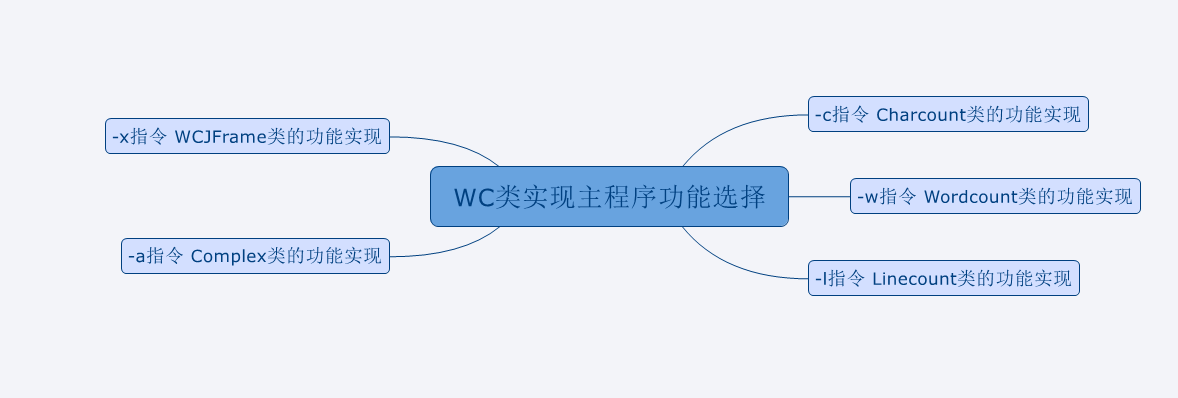
- WC类主程序
import java.io.BufferedReader;

import java.io.FileInputStream;

import java.io.FileNotFoundException;

import java.io.IOException;

import java.io.InputStream;

import java.io.InputStreamReader;

import java.util.Scanner;

public class WC {

	public static void main(String[] args) throws IOException{

		while(true) {

		System.out.println("指令说明:");

		System.out.println("**************************************");

		System.out.println("wc.exe -c  返回文件 file.c 的字符数:");

		System.out.println("wc.exe -w  返回文件 file.c 的词的数目 ");

		System.out.println("wc.exe -l  返回文件 file.c 的行数");

		System.out.println("wc.exe -a  返回文件 file.c 的空行,代码行,注释行");

		System.out.println("wc.exe -x  启用图形界面");

		System.out.println("**************************************");

		System.out.println("输入指令:");

    	Scanner input=new Scanner(System.in);  //从键盘上输入指令并执行

    	String commend=input.nextLine();

    	switch (commend) {

		case "-c":

			 Charcount ch = new Charcount();

			break;

		case "-w":

			 Wordcount wc = new Wordcount();

			 break;

		case "-l":

			Linecount line = new Linecount();

			break;

		case "-a":

			Complex cp = new Complex();

			break;

		case "-x":

			WCJFrame wf = new WCJFrame();

			break;

		default:

			System.out.println("指令错误,请重新输入:");

			break;

		}

	}

	}

} - -c指令实现
public class Charcount {

	    String REGEX ="\\S";

	    Charcount() throws IOException {

	    System.out.println("输入路径:");

		Scanner input=new Scanner(System.in);

		String path=input.nextLine();

		BufferedReader fis =new BufferedReader(new FileReader(path));

		int charcount=0;

	    String w;

		Pattern p =Pattern.compile(REGEX);//匹配合适的字符

		while((w=fis.readLine()) != null) {

			Matcher m =p.matcher(w);

			while(m.find())    //找到对应字符时字符数+1

			   charcount ++;

		}

		System.out.println("字符数:"+charcount);

		fis.close();

}

} - -w指令实现
public class Wordcount {

	String REGEX ="[a-zA-Z]+\\b";   //判定为单词的正则表达式条件

      Wordcount() throws IOException {

	    System.out.println("输入路径:");

		Scanner input=new Scanner(System.in);

		String path=input.nextLine();

		BufferedReader fis =new BufferedReader(new FileReader(path));

		int wordcount =0;

		String w;

		Pattern p =Pattern.compile(REGEX);

		while((w=fis.readLine()) != null) {

			Matcher m =p.matcher(w);

			while(m.find())   //当找到符合条件的内容时单词数+1

				   wordcount ++;

		}

        System.out.println("单词数:"+wordcount);

        fis.close();

}

} - -l指令实现
public class Linecount {

	Linecount() throws IOException {

    System.out.println("输入路径:");

	Scanner input=new Scanner(System.in);

	String path=input.nextLine();

	BufferedReader fis =new BufferedReader(new FileReader(path));

	int linecount=0;

	while(fis.readLine()!=null) {  //当前行不为空时,行数+1

		linecount++;

		}

	System.out.println("行数:"+linecount);

	fis.close();

}

} - -a指令实现
public class Complex {

      Complex() throws IOException{

    	  System.out.println("输入路径:");

    	  Scanner a = new Scanner(System.in);

    	  String path = a.nextLine();

    	  BufferedReader fis = new BufferedReader(new FileReader(path));

    	  int spacecount = 0;

    	  int notecount = 0;

    	  int codecount = 0;

    	  boolean state = false;

    	  String c;

    	  while((c=fis.readLine())!=null) {

    			 if(c.contains("/*")) {   //多行注释开始标记

    				 notecount++;

    				 state = true;

    			 }

    			 else if(state) {

        			 notecount++;

    				 if(c.contains("*/")) {  //多行注释结束标记

    				 state = false;}

    			 }

    			 else if(c.contains("//")) {  //单行注释标记

    				 notecount++;

    			 }

    			 else if(c.trim().length()>1) {  //判定为代码行条件

    				 codecount++;

    			 }

    			 else {spacecount++;}

    		 }

    	  fis.close();

    	  System.out.println("空白行:"+spacecount);

    	  System.out.println("注释行:"+notecount);

    	  System.out.println("代码行:"+codecount);

      }

}
六、功能测试
1.测试文档:
空文件(1.txt)
只有一个字符的文件(2.txt)
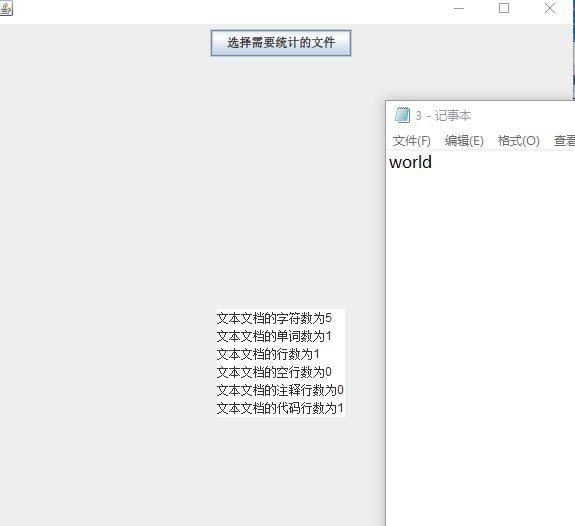
只有一个词的文件(3.txt)
只有一行的文件(4.txt)
一个典型的源文件(5.txt)
2.-c指令回归测试

3.-w、-a、-x指令测试

4.-x指令测试

七、心得回顾
第一次详细制定计划去完成一个项目,各方面都觉得收获匪浅。不仅回顾了以前学过的知识,还学会了运用刚学会的知识。但在时间安排上还存在很大的问题,这点有待改进。
WC.exe(Java实现)的更多相关文章
- 个人项目-WC.exe (Java实现)
一.Github项目地址:https://github.com/blanche789/wordCount/tree/master/src/main/java/com/blanche 二.PSP表格 P ...
- 小白のjava实现wc.exe功能
GitHub地址 项目完成情况 基本功能列表(已实现) wc.exe -c file.c //返回文件 file.c 的字符数 wc.exe -w file.c //返回文件 file. ...
- java实现wc.exe
Github地址:https://github.com/ztz1998/wc/tree/master 项目相关要求 实现一个统计程序,它能正确统计程序文件中的字符数.单词数.行数,以及还具备其他扩展功 ...
- 软工作业No.1。Java实现WC.exe
网址:https://github.com/a249970271/WC WC 项目要求 wc.exe 是一个常见的工具,它能统计文本文件的字符数.单词数和行数.这个项目要求写一个命令行程序,模仿已有w ...
- JAVA实现WC.exe功能
项目要求 实现一个统计程序,它能正确统计程序文件中的字符数.单词数.行数,以及还具备其他扩展功能,并能够快速地处理多个文件. 具体功能要求: 程序处理用户需求的模式为: wc.exe [paramet ...
- Java 实现 WC.exe
Github:https://github.com/YJOED/Code/tree/master/WC/src 一.题目:实现一个统计程序,它能正确统计程序文件中的字符数.单词数.行数,以及还具备其他 ...
- 软件工程:Java实现WC.exe基本功能
项目相关要求 GitHub地址:https://github.com/3216004716/WC 实现一个统计程序,它能正确统计程序文件中的字符数.单词数.行数,以及还具备其他扩展功能,并能够快速地处 ...
- 软工作业1:wc.exe项目开发(java)
Github地址:https://github.com/Zzhaomin/learngit 项目相关要求 : wc.exe 是一个常见的工具,它能统计文本文件的字符数.单词数和行数.这个项目要求写一个 ...
- WC.exe(基于Java实现)
一.github地址 https://github.com/Mazin-hub/MyWC.exe.git 二.PSP表格 PSP2.1 Personal Software Process Stage ...
随机推荐
- jenkins部署报404错误
环境:tomcat 7+jdk1.7+win10 64 jenkins_1.5.23 部署完成后服务器启动输入网址:http://192.168.3.100:8080/jenkins打开无法访问报40 ...
- SQL中group by的注意事项
最最最最重要的: group by有一个原则,就是select后面所有的列中,没有使用聚合函数的列,必须出现在group by子句中. group by子句中的注意事项: 1,不能使用别名(因为执行顺 ...
- [Taro] Taro 环境安装 (一)
Taro 环境安装 Taro是一个前端小程序框架,通过这个框架写一套代码,再通过 Taro 的编译工具,就可以将源代码分别编译出可以在不同端(微信/百度/支付宝/字节跳动小程序.H5.React-N ...
- A1070 Mooncake (25 分)
一.参考代码 #include<cstdio> #include<algorithm> #include<iostream> using namespace std ...
- VC修改本机IP地址
http://www.vcchar.com/thread-1527-1-1.html 设置IP地址只需要更改注册表中关于适配器的相应设置,但更改后需要重新启动系统才能生效,而AddIPAddress函 ...
- IDEA中把普通的Java项目转换成gradle项目
1.在该项目的跟目录下创建build.gradle 和 settings.gradle文件,内容如下: build.gradle: plugins { id 'java' } group 'coco' ...
- 【转】python中numpy模块下的np.clip()的用法
转自:https://blog.csdn.net/HHTNAN/article/details/79799612 Numpy 中clip函数的使用 一维数组 其中a是一个数组,后面两个参数分别表示最小 ...
- 远程文件传输命令•RHEL8/CentOS8文件上传下载-用例
scp协议 scp [options] [本地用户名@IP地址:]file1 [远程用户名 @IP 地址 :] file2 options: -v 用来显示进度,可以用来查看连接,认证,或是配置错误. ...
- IDEA 最新破解方法,2019 版本已支持(持续更新,更新时间2019-05-14)
一.安装进入官网下载适合自己系统的版本,下载地址:https://www.jetbrains.com/idea/download/#section=windows 2. 安装中选择适合本机的64位 ...
- idea找不到tomcat,找不到Tomcat server
打开settings 添加即可 如果再没有,可能需要先安装timcat插件