
使用nuget打包类库并发布
前言
NuGet 是免费、开源的包管理开发工具,专注于在 .NET 应用开发过程中,简单地合并第三方的组件库。今天的目的就是记录一下如何打包一个类库,并发布到官网。在开始之前需要在www.nuget.org上注册一个账号,下载最新版本的nuget命令行工具https://dist.nuget.org/win-x86-commandline/latest/nuget.exe,并添加到环境变量中。
开始打包自己的类库
1.修改项目程序集信息AssemblyInfo.cs
我这里要打包的类库Zeroes.WeixinSDK来源于https://github.com/night-king/weixinSDK开源项目,修改完信息后重新生成一下。
using System.Reflection;

using System.Runtime.CompilerServices;

using System.Runtime.InteropServices;

// General Information about an assembly is controlled through the following

// set of attributes. Change these attribute values to modify the information

// associated with an assembly.

[assembly: AssemblyTitle("Zeroes.WeixinSDK")]

[assembly: AssemblyDescription("ZeroesSuit快速开发框架微信SDK库")]

[assembly: AssemblyConfiguration("")]

[assembly: AssemblyCompany("Zeroes")]

[assembly: AssemblyProduct("Zeroes.WeixinSDK")]

[assembly: AssemblyCopyright("Copyright © Microsoft 2016")]

[assembly: AssemblyTrademark("")]

[assembly: AssemblyCulture("")]

// Setting ComVisible to false makes the types in this assembly not visible

// to COM components.  If you need to access a type in this assembly from

// COM, set the ComVisible attribute to true on that type.

[assembly: ComVisible(false)]

// The following GUID is for the ID of the typelib if this project is exposed to COM

[assembly: Guid("135e92df-8241-4d2c-97aa-910e1c53af81")]

// Version information for an assembly consists of the following four values:

//

//      Major Version

//      Minor Version

//      Build Number

//      Revision

//

// You can specify all the values or you can default the Build and Revision Numbers

// by using the '*' as shown below:

// [assembly: AssemblyVersion("1.0.*")]

[assembly: AssemblyVersion("0.0.0.1")]

[assembly: AssemblyFileVersion("0.0.0.1")]
2.命令行下使用nuget spec命令生成Zeroes.WeixinSDK.nuspec打包配置文件
打开命令行定位到Zeroes.WeixinSDK项目所在目录,输入命令:nuget spec

修改生成的nuspec文件,内容如下:
<?xml version="1.0"?>

<package >

  <metadata>

    <id>$id$</id>

    <version>$version$</version>

    <title>$title$</title>

    <authors>$author$</authors>

    <owners>$author$</owners>

    <licenseUrl>http://www.apache.org/licenses/LICENSE-2.0.html</licenseUrl>

    <projectUrl>http://www.cnblogs.com/zeroes</projectUrl>

    <iconUrl>http://files.cnblogs.com/files/zeroes/Z.ico</iconUrl>

    <requireLicenseAcceptance>false</requireLicenseAcceptance>

    <description>$description$</description>

    <releaseNotes>Zeroes.WeixinSDK封装了微信api的调用方法,可以方便的调用。</releaseNotes>

    <copyright>Copyright 2016</copyright>

    <tags>Zeroes</tags>

  </metadata>

</package>
3.打包类库
打开命令行定位到Zeroes.WeixinSDK项目所在目录,输入命令:nuget pack Zeroes.WeixinSDK.csproj
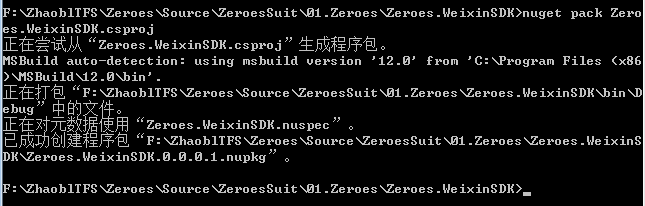
4.发布类库
登陆www.nuget.org网站,打开https://www.nuget.org/packages/manage/upload地址。
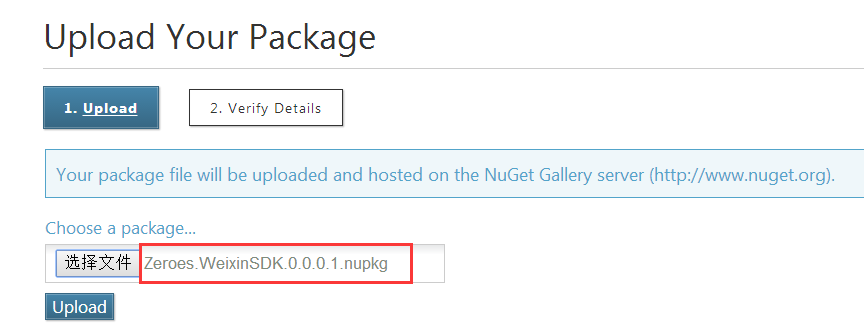
点击“Upload”上传后,显示信息确认页面,然后点击 “Submit”,发布完成,来张谍照:
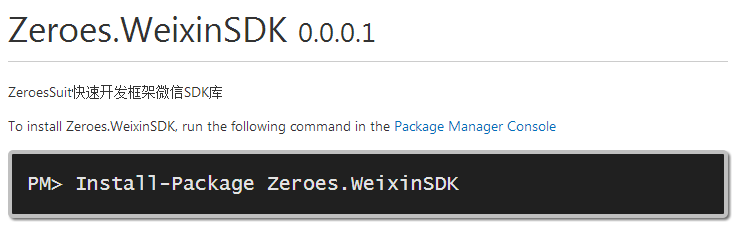
5.使用nuget安装类库

参考文章:http://www.cnblogs.com/daxnet/archive/2013/05/07/3064577.html#3527602
使用nuget打包类库并发布的更多相关文章
- 使用 Nuget打包类库
使用 Nuget打包类库 NuGet是个开源项目,项目包括 NuGet VS插件/NuGet Explorer/NuGetServer/NuGet命令行等项目,.NET Core项目完全使用Nuget ...
- .NET Core 系列5 :使用 Nuget打包类库
NuGet是个开源项目,项目包括 NuGet VS插件/NuGet Explorer/NuGetServer/NuGet命令行等项目,.NET Core项目完全使用Nuget 管理组件之间的依赖关系, ...
- Nuget打包类库及引用
什么是nuget 适用于任何现代开发平台的基本工具可充当一种机制,通过这种机制,开发人员可以创建.共享和使用有用的代码. 通常,此类代码捆绑到"包"中,其中包含编译的代码(如 DL ...
- .NET Core 控制台项目中的Nuget打包类库及引用
由于使用的是MAC版本的VSCode,所以全部是通过dotnet命令来完成的. 1.dotnet new lib 创建类库项目: 2.编辑项目根目录下的.csproj文件,添加版本号(建议): < ...
- 使用NuGet打包并发布至ProGet过程 (步骤详细,附python脚本)【上篇】
一.基本知识 (1)NuGet : NuGet是一个为大家所熟知的Visual Studio扩展,通过这个扩展,开发人员可以非常方便地在Visual Studio中安装或更新项目中所需要的第三方组件, ...
- 【NuGet】使用NuGet打包并发布至ProGet过程 (步骤详细,附python脚本)【上篇】
一.基本知识 (1)NuGet : NuGet是一个为大家所熟知的Visual Studio扩展,通过这个扩展,开发人员可以非常方便地在Visual Studio中安装或更新项目中所需要的第三方组件, ...
- 使用NuGet打包并发布至ProGet过程 (打包再次详解)【下篇】
一.前言 上篇[1]主要介绍了利用csproj文件使用NuGet打包至ProGet的过程,并附上了用于在Jenkins上运行的python脚本.本篇的主要内容分为以下几点: 1. Nuspec与Nup ...
- 【NuGet】使用NuGet打包并发布至ProGet过程 (打包再次详解)【下篇】
一.前言 上篇[1]主要介绍了利用csproj文件使用NuGet打包至ProGet的过程,并附上了用于在Jenkins上运行的python脚本.本篇的主要内容分为以下几点: 1. Nuspec与Nup ...
- Nuget~打包时添加powershell初始化脚本
对于进行nuget打包时,有时我们需要添加一个配置文件,就是一些文本文件,而这些文件我们在网站发布时需要同时复制到输出目录,否则会出现文件丢失的问题,我们在打包时通过添加powershell脚本来解决 ...
随机推荐
- 在C#代码中应用Log4Net(二)典型的使用方式
不管用什么框架,学什么东西,最初的想法还不是尽快地用上这个框架,所以我们在这个章节还是不打算介绍具体配置节的应用,而是直接给出一个经典的使用样例,让你尽快上手.即使你对Log4Net的配置不熟悉也完全 ...
- 微冷的雨之Java中的多线程初理解(一)
在讲解多线程前,我们必须理解什么是多线程?而且很多人都会将进程和线程做对比. 进程和线程 进程:进程是操作系统结构的基础,是一次程序的执行,是一个程序及其数据在处理机上顺序执行时所发生的活动,是程序在 ...
- LInux MySQL 数据库 的一些操作
数据库安装: ………… 创建数据库连接新用户: 1.登录mysql #mysql -u root -p 2.新增用户 insert into mysql.user(Host,User,Password ...
- Chrome开发者工具不完全指南(四、性能进阶篇)
前言 Profiles面板功能的作用主要是监控网页中各种方法执行时间和内存的变化,简单来说它就是Timeline的数字化版本.它的功能选项卡不是很多(只有三个),操作起来比较前面的几块功能版本来说简单 ...
- jQuery源码分析系列(38) : 队列操作
Queue队列,如同data数据缓存与Deferred异步模型一样,都是jQuery库的内部实现的基础设施 Queue队列是animate动画依赖的基础设施,整个jQuery中队列仅供给动画使用 Qu ...
- OpenCASCADE Curve Length Calculation
OpenCASCADE Curve Length Calculation eryar@163.com Abstract. The natural parametric equations of a c ...
- Vue.js学习笔记(8)拖放
小颖在目前负责的项目中,负责给同事提供所需组件,在这期间,我们家大颖姐姐让我 写个拖拽组件,一开始我是用click实现,先将你要拖拽的dom点一下,然后再点你要放的位置,这个dom再通过小颖写的方法, ...
- eclipse导入web项目之后项目中出现小红叉解决办法
项目中有小红叉我遇到的最常见的情况: 1.项目代码本身有问题.(这个就不说了,解决错误就OK) 2.项目中的jar包丢失.(有时候eclipse打开时会出现jar包丢失的情况,关闭eclipse重新打 ...
- Hibernate4.0之HibernateSessionFactory源码详解
import org.hibernate.HibernateException; import org.hibernate.Session; import org.hibernate.cfg.Conf ...
- 效率和协作工具--OneNote
身边有很多的朋友,都是在电脑上办公.除了会计和外贸相关的工作,用到Excel,公司的ERP比较多.日常工作中,特别是事情一多,大家基本不知道从何处完成今天的任务,而已有时经常丢三落四.同事在QQ或者M ...