
save tracking results into csv file for oxuva long-term tracking dataset (from txt to csv)
save tracking results into csv file for oxuva long-term tracking dataset (from txt to csv)
2019-10-25 09:42:03
Official Tools: OxUvA long-term tracking benchmark [ECCV'18] [Github]
Project page: https://oxuva.github.io/long-term-tracking-benchmark/
import os

import numpy as np

import cv2

import time

import oxuva

import pdb

# export PYTHONPATH="/home/wangxiao/THOR/long-term-tracking-benchmark-master/python:$PYTHONPATH"

# txtPath = '/home/wangxiao/THOR/benchmark/results/OXUVA/Tracker/'

# txtFiles = os.listdir(txtPath)

# csv_path = './oxuva_csv_results/'

# for index in range(len(txtFiles)):

#     txtName = txtFiles[index]

#     pointPosition = txtName.find('.')

#     videoName = txtName[:pointPosition]

#     preds = np.loadtxt(txtPath + txtName, delimiter=',')

#     preds = preds.tolist()

#     spacePosition = txtName.find('_')

#     if spacePosition:

#         obj =

#     else:

#         obj = txtName[spacePosition:spacePosition+]

#     preds_file = os.path.join(csv_path, '{}_{}.csv'.format(videoName, obj))

#     tmp_preds_file = os.path.join(csv_path, '{}_{}.csv.tmp'.format(videoName, obj))

#     with open(tmp_preds_file, 'w', encoding='utf-8-sig') as fp:

#         pdb.set_trace()

#         oxuva.dump_predictions_csv(videoName, obj, preds, fp)

#     os.rename(tmp_preds_file, preds_file)

#     pdb.set_trace()

import json

import pdb

import cv2

import os

import pandas as pd

resultpath= '/home/wangxiao/tracking_results_oxuva/'

videopath="/home/wangxiao/dataset/OxUvA/images/test/"

videos=os.listdir(videopath)

txtFiles = os.listdir(resultpath)

for i in range(len(videos)):

    txtName = videos[i] + "_oxuva-baseline.txt"

    preds = np.loadtxt(resultpath + txtName, delimiter=',')

    print("==>> txtName: ", txtName)

    xmin=[]

    xmax=[]

    ymin=[]

    ymax=[]

    video_ids=[]

    obj_ids=[]

    frame_nums=[]

    presents=[]

    scores=[]

    video_id=videos[i][:]

    if(len(videos[i])==):

        obj_id='obj0000'

    elif(videos[i][-]==''):

        obj_id='obj0001'

    else:

        obj_id='obj0002'

    present='True'

    score=0.5

    # l=result['res']

    imgs=os.listdir(videopath+videos[i]+'/')

    imgs = np.sort(imgs)

    # pdb.set_trace()

    image=cv2.imread(videopath+videos[i]+'/'+imgs[])

    imgh=image.shape[]

    imgw=image.shape[]

    for j in range(len(imgs)):

        # pdb.set_trace()

        x=preds[j][]

        y=preds[j][]

        w=preds[j][]

        h=preds[j][]

        ## results relative to original image size.

        x1=x/imgw

        x2=(x+w)/imgw

        y1=y/imgh

        y2=(y+h)/imgh

        x1=round(x1,)

        x2=round(x2,)

        y1=round(y1,)

        y2=round(y2,)

        frame=imgs[j][:]

        if(frame==''):

            frame_num=

        else:

            frame_num=frame.lstrip('')

        xmin.append(x1)

        xmax.append(x2)

        ymin.append(y1)

        ymax.append(y2)

        video_ids.append(video_id)

        obj_ids.append(obj_id)

        frame_nums.append(frame_num)

        presents.append(present)

        scores.append(score)

    # pdb.set_trace()

    dataframe=pd.DataFrame({'video_id':video_ids,'object_id':obj_ids,'frame_num':frame_nums,'present':presents,\

                            'score':scores,'xmin':xmin,'xmax':xmax,'ymin':ymin,'ymax':ymax})

    savepath='./oxuva_csv_results/' +videos[i][:]+'_'+obj_id+'.csv'

    columns=['video_id','object_id','frame_num','present','score','xmin','xmax','ymin','ymax']

    dataframe.to_csv(savepath,index=False,columns=columns,header=None)

    # pdb.set_trace()
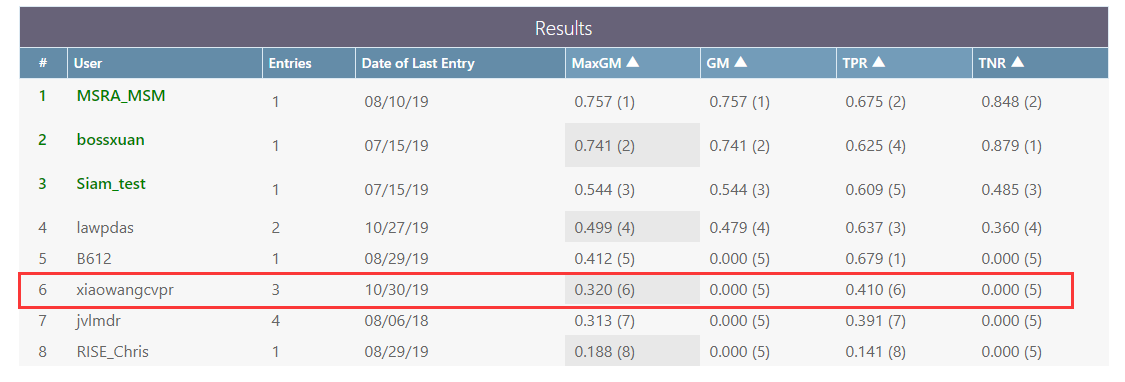
========= Results
==
save tracking results into csv file for oxuva long-term tracking dataset (from txt to csv)的更多相关文章
- 关于视觉跟踪中评价标准的相关记录(The Evaluation of Visual Tracking Results on OTB-100 Dataset)
关于视觉跟踪中评价标准的相关记录(The Evaluation of Visual Tracking Results on OTB-100 Dataset) 2018-01-22 21:49:17 ...
- ogr2ogr: Export Well Known Text (WKT) for one feature to a CSV file
Perhaps you’re looking for this? ogr2ogr -f “CSV” “E:\4_GIS\NorthArkCartoData\UnitedStates\MO_wkt” “ ...
- C# - CSV file reader
// ------------------------------------------------------------------------------------------------- ...
- SQL SERVER – Import CSV File Into SQL Server Using Bulk Insert – Load Comma Delimited File Into SQL Server
CSV stands for Comma Separated Values, sometimes also called Comma Delimited Values. Create TestTabl ...
- Matlab Code for Visualize the Tracking Results of OTB100 dataset
Matlab Code for Visualize the Tracking Results of OTB100 dataset 2018-11-12 17:06:21 %把所有tracker的结果画 ...
- [PowerShell Utils] Create a list of virtual machines based on configuration read from a CSV file in Hyper-V
Hello everyone, this is the third post of the series. . Background =============== In my solution, ...
- Qt Read and Write Csv File
This page discusses various available options for working with csv documents in your Qt application. ...
- HBase import tsv,csv File
一,HBase中创建table 表(liupeng:test)并创建 info ,contect 列簇 hbase(main):258:0> create "liupeng:Test& ...
- Python: Write UTF-8 characters to csv file
To use codecs, we can write UTF-8 characters into csv file import codecs with open('ExcelUtf8.csv', ...
随机推荐
- 25、vuex改变store中数据
以登录为例: 1.安装vuex:npm install vuex --save 2.在main.js文件中引入: import store from '@/store/index.js'new Vue ...
- CSS 案例
一.滑动门案例 二.小黄人案例 三.圣杯布局&双飞翼布局
- 你能想象未来的MES系统是什么样吗?
“智能制造”热潮席卷神州大地,在工业4.0热潮,以及国家大力推进中国制造2025的背景下,建设智能工厂,推进智能制造已成为制造企业共同的目标.作为承上启下的车间级综合信息系统,MES系统得到了制造企业 ...
- Java JDBC 操作二进制数据、日期时间
二进制数据 mysql提供了四种类型来存储二进制数据: TinyBlob 最多可存储255字节 Blob 最多可存储65KB MediumBlob 最多可存储16MB LongBlob ...
- 避免SQL全表模糊查询查询 下载文件时-修改文件名字
避免SQL全表模糊查询查询 1.模糊查询效率很低: 原因:like本身效率就比较低,应该尽量避免查询条件使用like:对于like %...%(全模糊)这样的条件,是无法使用索引的,全表扫描自然效 ...
- SQL SERVER-查看内存使用情况
--使用内存的各对象 SELECT type, sum(virtual_memory_reserved_kb) as VM_Reserved, sum(virtual_memory_committed ...
- Unity 渲染教程(二):着色器基础
转载:https://www.jianshu.com/p/7db167704056 这是关于渲染基础的系列教程的第二部分.这个渲染基础的系列教程的第一部分是有关矩阵的内容.在这篇文章中我们将编写我们的 ...
- commix 命令注入工具
关于系统命令注入,可以参考这篇文章:命令攻击介绍 系统命令注入场景 在对企业进行安全测试时候,很少会发现系统注入漏洞.这是因为大部分情况下代码业务主要是数据操作.文件操作.逻辑处理和api接口调用等, ...
- dfs 解决(隐式)图搜索问题
132. 单词搜索 II 中文 English 给出一个由小写字母组成的矩阵和一个字典.找出所有同时在字典和矩阵中出现的单词.一个单词可以从矩阵中的任意位置开始,可以向左/右/上/下四个相邻方向移动. ...
- How do I fix "selector not recognized" runtime exceptions when trying to use category methods from a static library?
https://developer.apple.com/library/content/qa/qa1490/_index.html A: If you're seeing a "select ...