
GitLab的权限管理及Merge Request
GitLab的权限管理及Merge Request
目录
1、前言
团队目前在日常开发工作中都是在线下进行代码审查,但是这样的模式根本无法做到过程留痕。因此,需要使用GitLab的Merge Request或者Gerrit这样的工具进行过程管理。这里详述一下如何通过Merge Request进行线上的代码审查。
2、角色权限
首先,在GitLab中的角色分为以下5种:Guest、Reporter、Developer、Maintainer、Owner。具体权限可以参考官方文档
https://docs.gitlab.com/ee/user/permissions.html
具体的权限可以参考以下:
| Action | Guest | Reporter | Developer | Maintainer | Owner |
|---|---|---|---|---|---|
| Create new issue | ✓ 1 | ✓ | ✓ | ✓ | ✓ |
| Create confidential issue | ✓ 1 | ✓ | ✓ | ✓ | ✓ |
| View confidential issues | (✓) 2 | ✓ | ✓ | ✓ | ✓ |
| Leave comments | ✓ 1 | ✓ | ✓ | ✓ | ✓ |
| See related issues | ✓ | ✓ | ✓ | ✓ | ✓ |
| See a list of jobs | ✓ 3 | ✓ | ✓ | ✓ | ✓ |
| See a job log | ✓ 3 | ✓ | ✓ | ✓ | ✓ |
| Download and browse job artifacts | ✓ 3 | ✓ | ✓ | ✓ | ✓ |
| View wiki pages | ✓ 1 | ✓ | ✓ | ✓ | ✓ |
| Create and edit wiki pages | ✓ | ✓ | ✓ | ||
| Delete wiki pages | ✓ | ✓ | |||
| View license management reports | ✓ 1 | ✓ | ✓ | ✓ | ✓ |
| View Security reports | ✓ 1 | ✓ | ✓ | ✓ | ✓ |
| View project code | 1 | ✓ | ✓ | ✓ | ✓ |
| Pull project code | 1 | ✓ | ✓ | ✓ | ✓ |
| Download project | 1 | ✓ | ✓ | ✓ | ✓ |
| Assign issues | ✓ | ✓ | ✓ | ✓ | |
| Assign merge requests | ✓ | ✓ | ✓ | ||
| Label issues | ✓ | ✓ | ✓ | ✓ | |
| Label merge requests | ✓ | ✓ | ✓ | ||
| Create code snippets | ✓ | ✓ | ✓ | ✓ | |
| Manage issue tracker | ✓ | ✓ | ✓ | ✓ | |
| Manage labels | ✓ | ✓ | ✓ | ✓ | |
| See a commit status | ✓ | ✓ | ✓ | ✓ | |
| See a container registry | ✓ | ✓ | ✓ | ✓ | |
| See environments | ✓ | ✓ | ✓ | ✓ | |
| See a list of merge requests | ✓ | ✓ | ✓ | ✓ | |
| Manage related issues | ✓ | ✓ | ✓ | ✓ | |
| Lock issue discussions | ✓ | ✓ | ✓ | ✓ | |
| Create issue from vulnerability | ✓ | ✓ | ✓ | ✓ | |
| View Error Tracking list | ✓ | ✓ | ✓ | ✓ | |
| Pull from Maven repository or NPM registry | ✓ | ✓ | ✓ | ✓ | |
| Publish to Maven repository or NPM registry | ✓ | ✓ | ✓ | ||
| Lock merge request discussions | ✓ | ✓ | ✓ | ||
| Create new environments | ✓ | ✓ | ✓ | ||
| Stop environments | ✓ | ✓ | ✓ | ||
| Manage/Accept merge requests | ✓ | ✓ | ✓ | ||
| Create new merge request | ✓ | ✓ | ✓ | ||
| Create new branches | ✓ | ✓ | ✓ | ||
| Push to non-protected branches | ✓ | ✓ | ✓ | ||
| Force push to non-protected branches | ✓ | ✓ | ✓ | ||
| Remove non-protected branches | ✓ | ✓ | ✓ | ||
| Add tags | ✓ | ✓ | ✓ | ||
| Cancel and retry jobs | ✓ | ✓ | ✓ | ||
| Create or update commit status | ✓ | ✓ | ✓ | ||
| Update a container registry | ✓ | ✓ | ✓ | ||
| Remove a container registry image | ✓ | ✓ | ✓ | ||
| Create/edit/delete project milestones | ✓ | ✓ | ✓ | ||
| View approved/blacklisted licenses | ✓ | ✓ | ✓ | ✓ | ✓ |
| Use security dashboard | ✓ | ✓ | ✓ | ||
| Dismiss vulnerability | ✓ | ✓ | ✓ | ||
| Apply code change suggestions | ✓ | ✓ | ✓ | ||
| Use environment terminals | ✓ | ✓ | |||
| Run Web IDE’s Interactive Web Terminals | ✓ | ✓ | |||
| Add new team members | ✓ | ✓ | |||
| Push to protected branches | ✓ | ✓ | |||
| Enable/disable branch protection | ✓ | ✓ | |||
| Turn on/off protected branch push for devs | ✓ | ✓ | |||
| Enable/disable tag protections | ✓ | ✓ | |||
| Rewrite/remove Git tags | ✓ | ✓ | |||
| Edit project | ✓ | ✓ | |||
| Add deploy keys to project | ✓ | ✓ | |||
| Configure project hooks | ✓ | ✓ | |||
| Manage Runners | ✓ | ✓ | |||
| Manage job triggers | ✓ | ✓ | |||
| Manage variables | ✓ | ✓ | |||
| Manage GitLab Pages | ✓ | ✓ | |||
| Manage GitLab Pages domains and certificates | ✓ | ✓ | |||
| Remove GitLab Pages | ✓ | ✓ | |||
| View GitLab Pages protected by access control | ✓ | ✓ | ✓ | ✓ | ✓ |
| Manage clusters | ✓ | ✓ | |||
| Manage license policy | ✓ | ✓ | |||
| Edit comments (posted by any user) | ✓ | ✓ | |||
| Manage Error Tracking | ✓ | ✓ | |||
| Switch visibility level | ✓ | ||||
| Transfer project to another namespace | ✓ | ||||
| Remove project | ✓ | ||||
| Delete issues | ✓ | ||||
| Force push to protected branches 4 | |||||
| Remove protected branches 4 | |||||
| View project Audit Events | ✓ | ✓ | |||
| View project statistics | ✓ | ✓ | ✓ | ✓ | |
| View Insights charts | ✓ | ✓ | ✓ | ✓ | ✓ |
从上图可以看出来,Maintainer能够push代码到受保护分支,而Developer只能创建Merge Request,这就为团队推行强制代码审查并做到有迹可循提供了技术保证。
3、强制代码审查
一、设置受保护分支
通过菜单 Project -> Settings -> Repository -> Protected Branches,然后按照下图步骤设置,最终可以得到第十步的结果:


二、创建及批核Merge Request
我们把本地修改的代码提交到个人远程分支上,并想把个人分支合并到某个Dev分支上用于SIT提测即可参考以下步骤。这里用从dev_sp16_man 合并到 Dev_Sprint16_Kid 作为例子。
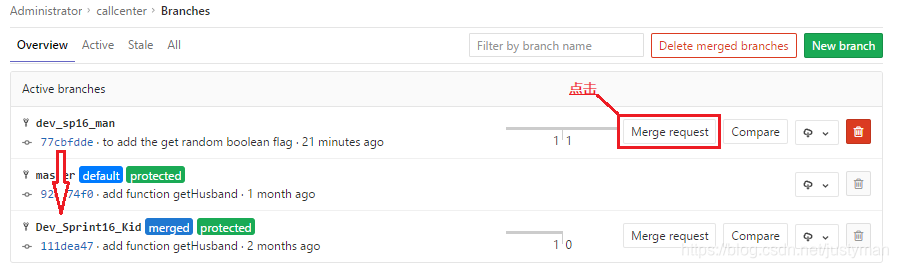
第一步:Team1_Dev(开发人员)创建MR并提交,MR主要填写以下5个参数:(同步你可以根据团队情况选择勾选【remove source branch when merge request is accepted】)
- Title
- Description
- Assignee
- Source branch
- Target branch


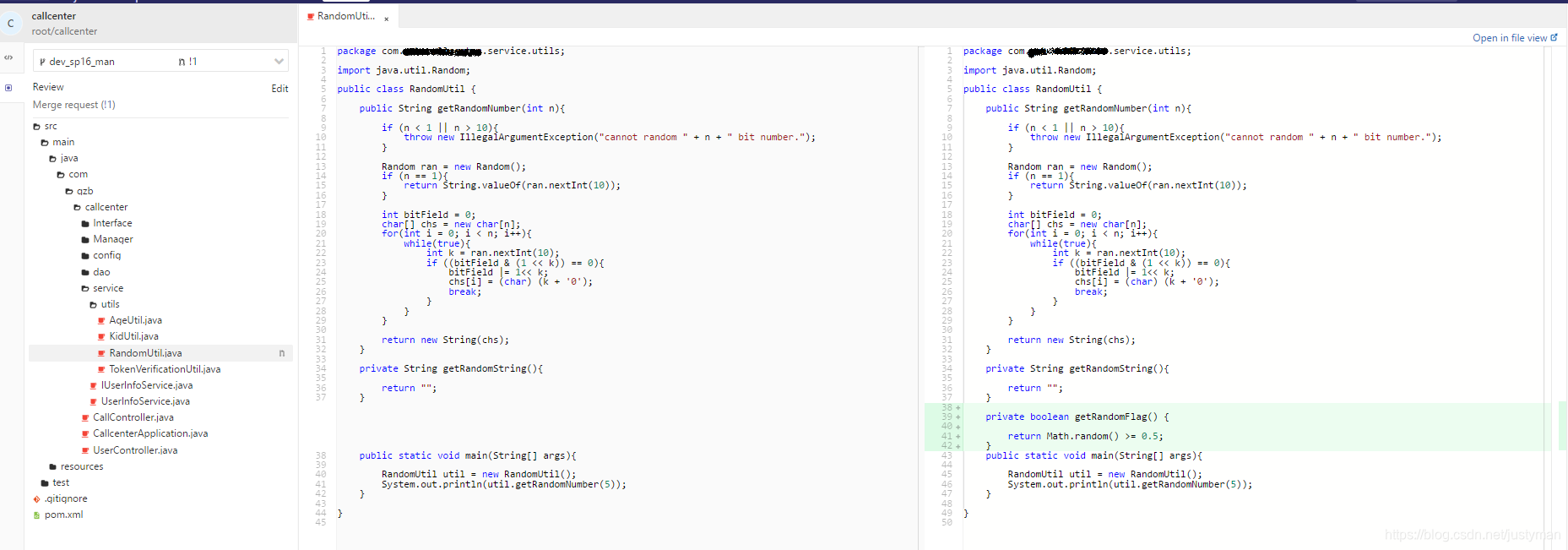
第二步:Team1_Leader登录,在【Merge Request】的角标已经提醒有一个request需要审核。

然后,在点击该merge request后,可以通过GitLab自带的Web IDE或者下载到本地IDE进行查看。
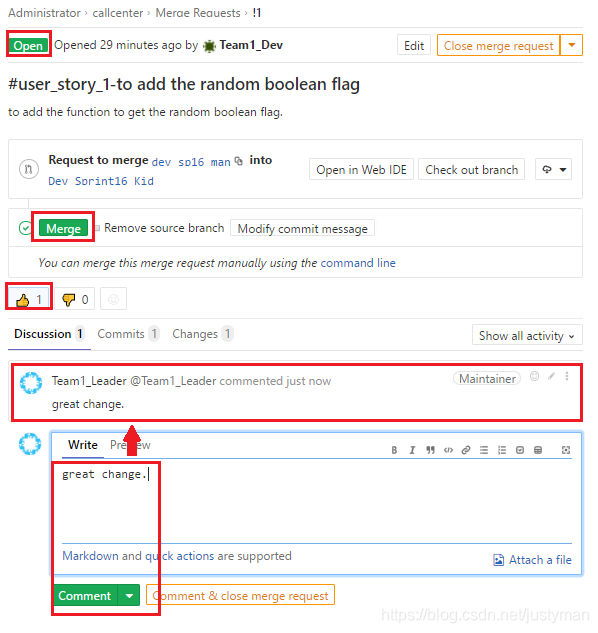
第三步:在代码审核无误后,可以添加comment并点击【Merge】进行代码合并,可以看到这时候的左上角状态仍然是【Open】。
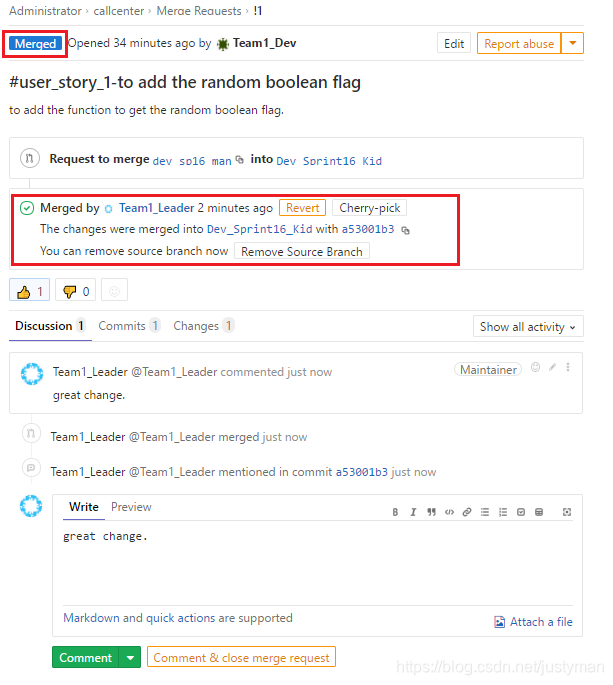
第四步:在点击【Merge】后,可以看到代码合并已经成功,这时候左上角状态变为【Merged】。
三、历史查询
通过菜单 Project 选择你想进入的项目,然后点击【Merge Request】,然后再点击【All】即可展示所有的代码审查历史,这样就能在流程层面保证所有的代码合并是经过审核的,并可以做到有迹可循。


GitLab的权限管理及Merge Request的更多相关文章
- git学习------> 解决Gitlab 版本升级之后,发送 merge request 出现 http 500 的返回码错误
今天有同事在Gitlab上发送 Merge Request的时候,直接出现如下所示的界面,提示http 500,服务器内部出错. 一.错误描述 1.1 创建新的 Merge Request 1.2 填 ...
- Centos7安装gitlab11 学习笔记之基础概念、部署安装、权限管理、issue管理
一.基础介绍 1.简介 一个基于GIT的源码托管解决方案 基于rubyonrails开发 集成了nginx postgreSQL redis sidekiq等组件 2.安装要求 2g内存以上,有点占内 ...
- git使用-merge request开发操作步骤
0. 如果当前不在develop分支,则切换到develop分支 git checkout develop 1. 获取develop分支最新代码 git pull 注意:这一步正常来说应该是一个Fas ...
- Gitlab+Jenkins学习之路(三)之gitlab权限管理--issue管理
1.创建Group,User,Project 创建一个组,组名为java Group path http://192.168.56.11/java Visibility Level: #为权限级别,一 ...
- 自动化部署之gitlab权限管理--issue管理
一.删除测试项目 先进入项目,选择编辑项目 二.拉取到最下方,移除项目 三 输入你要删除的项目名称 二 创建Group,User,Project 2.1 创建一个组,组名为java Group pat ...
- 【转】GitHub 的 Pull Request 和 GitLab 的 Merge Request 有区别吗?
在 GitHub 上混久了,经常听到 Pull Request,在 GitLab 上混久了,则经常 提起 Merge Request ,然而它们之间有不同吗?为什么要用两个不同的名称? 要追溯这两个名 ...
- GitLab:解决Merge Request中Commits不更新的问题
最近在使用 GitLab 的 Merge Requests 功能进行 Code Review .操作流程是这样的: 1)开发人员A要给一个项目增加一个新功能,先在这个项目上创建一个 Git 分支. 2 ...
- gitlab 一键 merge request(III)
已经有两位同学写过类似的 wiki 了,值得一看: gitlab一键提交request merge & assign 为啥我又来凑热闹呢?基于下面两个原由: 我的机子是 Win10,上面脚本的 ...
- 使用 gitlab 进行代码管理
这里使用 gitlab 做服务器, 客户端主要使用 git extensions. ============================= gitlab 项目成员类型: ============= ...
随机推荐
- Busness Client 客户端配置
1,打开Busness Client,点击新建按钮: 2,选择New System Connection(SAP Logon),这个是配置GUI登陆的,就相当于用BC登陆GUI. 这里就和GUI的配置 ...
- 排序算法的c++实现——冒泡排序
冒泡排序 冒泡排序是我们大多数人接触到的第一种排序算法,原理简单易懂,不多解释.说明三点: 1. 冒泡排序是稳定排序,只有当两个元素不同时才会交换: 2. 冒泡排序是原址排序,不需要借助额外的空间; ...
- Buuctf-------WEB之admin
1.抓包扫描一把梭,无事发生地说 注释里发现 万能密码试试,报错 用的flask,pythonweb 后面发现报错页面可以调试,嘿嘿嘿 康康我们发现了什么 拿去破解,无果 于是打算代码拿下来康康,em ...
- 接口自动化--unittest
今天我介绍一个测试框架:不管我们是做接口自动化还是UI自动化,我们都要用的一个框架---unittest unittest是python里面的一个单元测试框架,我们做自动化测试的话,都是要用到这个测试 ...
- maven:读取程序版本号的三种方案
方案1在应用项目中,如果应用程序需要获取当前程序的版本号,可以读取”/META-INF/maven/${groupId}/${artifactId}/pom.properties“,获取maven生成 ...
- P1081 开车旅行[倍增](毒瘤题)
其实就是个大模拟. 首先,根据题意,小A和小B从任意一个城市开始走,无论\(X\)如何,其路径是一定唯一的. 显然对于两问都可以想出一个\(O(n^2)\)的暴力,即直接一步一步地向右走. 首先,我们 ...
- 如何显示隐藏的文件在win7系统中
点左下角“开始”菜单,再点击“计算机”. 点击窗口顶部靠左位置的“组织”菜单,选择其中的“文件夹和搜索选项”. 在弹出的窗口里点击切换到“查看”选项卡. 在窗口中部位置下拉滚动条,找到“显示隐藏的 ...
- idea启动项目连接mysql数据库后台报duplicate name异常
自己写的sql语句在MySQL数据库中运行是没有问题的 但是在使用idea启动项目的时候,后台在运行这行sql语句的时候居然报错了,duplicate name:重复的名字,最后自己经过思考,修改了一 ...
- python - 将数据转换成 excl 表格, json 等文件 (dajngo - 打开网页后自动下载)
本篇只讲述怎么用. 具体 tablib 更多详细用法可参考博客 : https://blog.csdn.net/liangyuannao/article/details/41476277 # 不得不 ...
- Reincarnation HDU - 4622 (后缀自动机)
Reincarnation \[ Time Limit: 3000 ms\quad Memory Limit: 65536 kB \] 题意 给出一个字符串 \(S\),然后给出 \(m\) 次查询, ...