
微信之获取微信的openid(二)详细版
第一步 :配置测试号,网页授权获取用户基本信息。
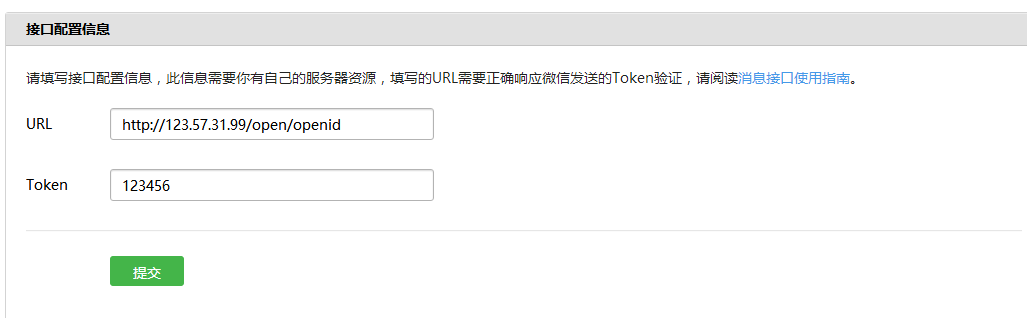
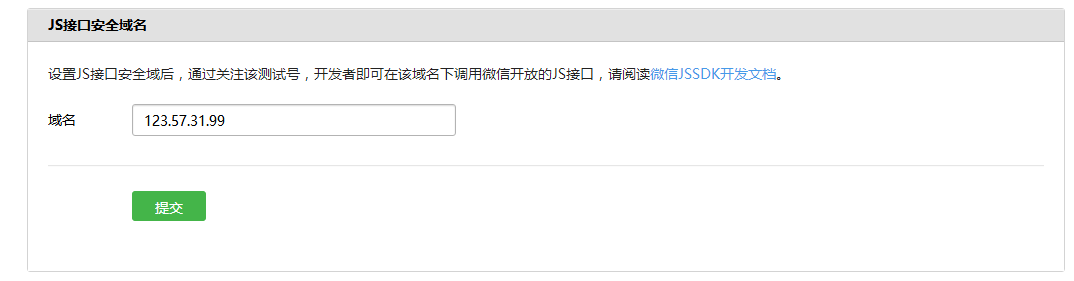

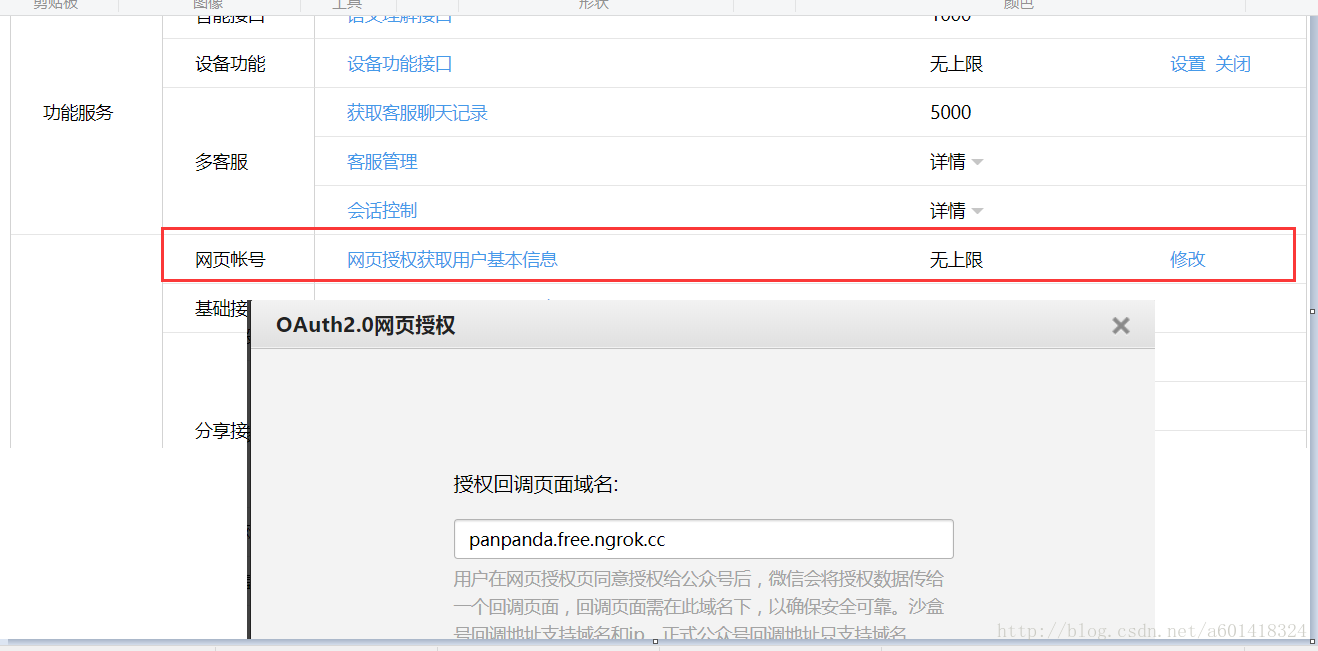
该授权回掉页面域名为ngrok 映射的域名,我的映射地址是127.0.0.1:8080。
到此微信配置完毕,接下来就是直接上代码了
2.用户同意授权
我是把这个url写在微信菜单下的,当进入这个页面的时候就让用户同意。注意:好像是静默授权的,用户不知道
参数:appid:公众号的唯一标识
redirect_uri:重定向的url,就是授权后要跳转的页面
scope:应用授权作用域
snsapi_base:不弹出授权页面,直接跳转,只能获取用户openid
snsapi_userinfo:弹出授权页面,可通过openid拿到昵称、性别、所在地
state:重定向后带的参数
2.用户同意后会产生一个code,只有5分钟时间的有效期。
先说第一种
(1)首先需要先访问微信的链接
这里的 uri就是直接回掉我们的服务地址,一定要记住,服务校验的判断,我是按照来判断的echostr(第二种方式也是这样)
import java.io.IOException;

import java.io.InputStream;

import java.io.PrintWriter;

import java.net.HttpURLConnection;

import java.net.MalformedURLException;

import java.net.URL;

import javax.servlet.http.HttpServletResponse;

import org.springframework.stereotype.Controller;

import org.springframework.web.bind.annotation.RequestMapping;

import org.springframework.web.bind.annotation.ResponseBody;

import com.alibaba.fastjson.JSONObject;

@Controller

@RequestMapping("/open")

public class OpenController {

  @RequestMapping("/toOpenId")

  public @ResponseBody String getOpenId(String code,String echostr,HttpServletResponse res) throws IOException{

    if(echostr==null){

      String url="https://api.weixin.qq.com/sns/oauth2/access_token?appid=wx24d47d2080f54c5b&secret=95011ac70909e8cca2786217dd80ee3f&code="+code+"&grant_type=authorization_code";

      System.out.println(code);

      String openId="";

      try {

        URL getUrl=new URL(url);

        HttpURLConnection http=(HttpURLConnection)getUrl.openConnection();

        http.setRequestMethod("GET");

        http.setRequestProperty("Content-Type","application/x-www-form-urlencoded");

        http.setDoOutput(true);

        http.setDoInput(true);

        http.connect();

        InputStream is = http.getInputStream();

        int size = is.available();

        byte[] b = new byte[size];

        is.read(b);

        String message = new String(b, "UTF-8");

        JSONObject json = JSONObject.parseObject(message);

        openId = json.getString("openid");

        } catch (MalformedURLException e) {

          e.printStackTrace();

        } catch (IOException e) {

          e.printStackTrace();

        }

      return openId;

    }else{

      PrintWriter out = res.getWriter();

      out.print(echostr);

      return null;

    }

  }

  //做服务器校验

  @RequestMapping("/tovalid")

  public void valid(String echostr,HttpServletResponse res) throws IOException{

    PrintWriter out = res.getWriter();

    out.print(echostr);

  }

}
第二种
(1)
https://open.weixin.qq.com/connect/oauth2/authorize?appid=xxxxxxxx&redirect_uri=http:// 域名
/open/openid&response_type=code&scope=snsapi_userinfo&state=1&connect_redirect=1#wechat_redirect
import java.io.IOException;

import java.io.PrintWriter;

import javax.servlet.ServletException;

import javax.servlet.http.HttpServletRequest;

import javax.servlet.http.HttpServletResponse;

import net.sf.json.JSONObject;

import org.springframework.stereotype.Controller;

import org.springframework.web.bind.annotation.RequestMapping;

@Controller

@RequestMapping("/weixin")

public class Oauth2Action {

  @RequestMapping("/oauth")

  public void auth(HttpServletRequest request, HttpServletResponse response)

      throws ServletException, IOException {

    String echostr = request.getParameter("echostr");

    if(echostr==null){

      String appId = "wx24d47d2080f54c5b";

      String appSecret = "95011ac70909e8cca2786217dd80ee3f";

      //拼接

      String get_access_token_url = "https://api.weixin.qq.com/sns/oauth2/access_token?"

          + "appid="

          + appId

          + "&secret="

          + appSecret

          + "&code=CODE&grant_type=authorization_code";

      String get_userinfo = "https://api.weixin.qq.com/sns/userinfo?access_token=ACCESS_TOKEN&openid=OPENID&lang=zh_CN";

      request.setCharacterEncoding("UTF-8");

      response.setCharacterEncoding("UTF-8");

      String code = request.getParameter("code");

      System.out.println("******************code=" + code);

      get_access_token_url = get_access_token_url.replace("CODE", code);

      String json = HttpsGetUtil.doHttpsGetJson(get_access_token_url);

      JSONObject jsonObject = JSONObject.fromObject(json);

      String access_token = jsonObject.getString("access_token");

      String openid = jsonObject.getString("openid");

      get_userinfo = get_userinfo.replace("ACCESS_TOKEN", access_token);

      get_userinfo = get_userinfo.replace("OPENID", openid);

      String userInfoJson = HttpsGetUtil.doHttpsGetJson(get_userinfo);

      JSONObject userInfoJO = JSONObject.fromObject(userInfoJson);

      String user_openid = userInfoJO.getString("openid");

      String user_nickname = userInfoJO.getString("nickname");

      String user_sex = userInfoJO.getString("sex");

      String user_province = userInfoJO.getString("province");

      String user_city = userInfoJO.getString("city");

      String user_country = userInfoJO.getString("country");

      String user_headimgurl = userInfoJO.getString("headimgurl");

      response.setContentType("text/html; charset=utf-8");

      PrintWriter out = response.getWriter();

      out.println("<!DOCTYPE HTML PUBLIC \"-//W3C//DTD HTML 4.01 Transitional//EN\">");

      out.println("<HTML>");

      out.println(" <HEAD><TITLE>A Servlet</TITLE></HEAD>");

      out.println(" <BODY>");

      out.print(" This is ");

      out.print(this.getClass());

      out.println(", using the POST method \n");

      out.println("openid:" + user_openid + "\n\n");

      out.println("nickname:" + user_nickname + "\n\n");

      out.println("sex:" + user_sex + "\n\n");

      out.println("province:" + user_province + "\n\n");

      out.println("city:" + user_city + "\n\n");

      out.println("country:" + user_country + "\n\n");

      out.println("<img src=/" + user_headimgurl + "/");

      out.println(">");

      out.println(" </BODY>");

      out.println("</HTML>");

      out.flush();

      out.close();

    }else{

      PrintWriter out = response.getWriter();

      out.print(echostr);

    }

  }

}
import java.io.IOException;

import java.io.InputStream;

import java.net.HttpURLConnection;

import java.net.MalformedURLException;

import java.net.URL;

public class HttpsGetUtil {

  public static String doHttpsGetJson(String Url)

  {

    String message = "";

    try

    {

      System.out.println("doHttpsGetJson");//TODO:dd

      URL urlGet = new URL(Url);

      HttpURLConnection http = (HttpURLConnection) urlGet.openConnection();

      http.setRequestMethod("GET");   //必须是get方式请求  24

      http.setRequestProperty("Content-Type","application/x-www-form-urlencoded");

      http.setDoOutput(true);

      http.setDoInput(true);

      System.setProperty("sun.net.client.defaultConnectTimeout", "30000");//连接超时30秒28

      System.setProperty("sun.net.client.defaultReadTimeout", "30000"); //读取超时30秒29 30

      http.connect();

      InputStream is =http.getInputStream();

      int size =is.available();

      byte[] jsonBytes =new byte[size];

      is.read(jsonBytes);

      message=new String(jsonBytes,"UTF-8");

    }

    catch (MalformedURLException e)

    {

       e.printStackTrace();

     }

    catch (IOException e)

     {

       e.printStackTrace();

     }

    return message;

  }

}
微信之获取微信的openid(二)详细版的更多相关文章
- 微信获取用户的openid和详细信息
获取用户的信息的原理,首先用户会点击一个url,这个url会包含一个参数redirect_uri,这个url是指向微信那边的服务器的,然后微信会把这个http请求重定向到redirect_uri,即我 ...
- 前端微信登录获取code,userInfo,openid
getUser(e) { wx.getUserProfile({ desc: '用户完善会员资料', success: res => { let userInfo = res.userInfo; ...
- 微信授权获取用户openid前端实现
近来,倒霉的后台跟我说让我拿个openid做微信支付使用,寻思很简单,开始干活. 首先引导用户打开如下链接,只需要将appid修改为自己的就可以,redirect_url写你的重定向url h ...
- webform获取微信用户的授权
这是一个利用webform做出来的简单demo,微信授权,获取微信用户的基本信息.方便以后加深记忆. public partial class Index : System.Web.UI.Page { ...
- 微信公众号开发系列-获取微信OpenID
在微信开发时候在做消息接口交互的时候须要使用带微信加密ID(OpenId),下面讲讲述2中类型方式获取微信OpenID.接收事件推送方式和网页授权获取用户基本信息方式获取. 1.通过接收被动消息方式获 ...
- PHP PC端微信扫码支付【模式二】详细教程-附带源码(转)
博主写这破玩意儿的时候花了大概快两天时间才整体的弄懂逻辑,考虑了一下~还是把所有代码都放出来给大家~抱着开源大无私的精神!谁叫我擅长拍黄片呢?同时也感谢我刚入行时候那些无私帮过我的程序员们! 首先还是 ...
- Android (微信扫码登录) 获取微信二维码+扫码登录
话不多说 直接上菜! 一.因为是微信扫码登录,所有要在微信开放平台 微信开放平台 (qq.com) 进行注册----- 如下 1.资源中心 里面也有详细的官方讲解,里面也有demo 可以下载 2 ...
- 微信接口-获取用户openid基本信息
一.协助获取微信用户openid功能 https://open.weixin.qq.com/connect/oauth2/authorize?appid=APPID&redirect_uri= ...
- 微信公众平台如何获取用户的OpenID(一)
如何获取用户的OpenID,对于微信开发模式下的开发来说,那就是一个非常简单的小功能了.简单介绍一下我是怎样去获取OpenID的. 微信服务器与公众账号服务器交互的信息可以分为3类:请求消息.事件和响 ...
随机推荐
- SignalR 填坑记
1.发送文字消息没有问题,如何发送文件消息 SignalR可以将参数序列化和反序列化. 这些参数被序列化的格式叫做Hub 协议, 所以Hub协议就是一种用来序列化和反序列化的格式. Hub协议的默认协 ...
- 使用Android手机进行开发的尝试
使用Android手机查看和修改Excel文件.PowerPoint文件并连接幻灯机进行演示等办公方式想必大家已经有所了解.今天介绍一下怎样使用Android进行软件开发. Termux 使用Andr ...
- codesmith设置mysql的连接字符串
.net core,codesmith连不上 server=192.168.3.240;Initial Catalog=tpmdb;User=root;Password=root .net frame ...
- Git如何切换账户
如果你不知道现在本地Git用的帐号是什么,你可以输入 git config user.name 查看用户名 git config user.email 查看用户邮箱 修 ...
- 1.4 Linux下对lvm逻辑卷分区大小的调整(针对xfs和ext4不同文件系统)
当我们在安装系统的时候,由于没有合理分配分区空间,在后续维护过程中,发现有些分区空间不够使用,而有的分区空间却有很多剩余空间.如果这些分区在装系统的时候使用了lvm(前提是这些分区要是lvm逻辑卷 ...
- Centos7下RabbitMQ的安装与配置
具体按照步骤以此为准 第一步:安装最新版的erlang依赖 通过github设置版本号:https://github.com/rabbitmq/erlang-rpm vi /etc/yum.repos ...
- 深度学习-深度强化学习(DRL)-Policy Gradient与PPO笔记
Policy Gradient 初始学习李宏毅讲的强化学习,听台湾的口音真是费了九牛二虎之力,后来看到有热心博客整理的很细致,于是转载来看,当作笔记留待复习用,原文链接在文末.看完笔记再去听一听李宏毅 ...
- HTML登录注册页面简单实现
github:传送门 , 码云: 传送门 效果参考: 登录页面,注册页面 使用了bootstrap,jQuery. 后端使用的CGI处理表单,存入MySQL数据库.(之后更新) 登录页面源码 < ...
- yii框架中的各种小问题
1.默认路径的修改 2.分页的做法
- 计数数据存入Mysql
引用dll MySql.Data.dll 建一个数据连接静态类 public static class mysql{public static string constr = "databa ...