
matplotlib绘图难题解决
# coding=utf-8

import pandas as pd

import yagmail

import requests

import arrow

import numpy as np

import matplotlib as mpl

from matplotlib.font_manager import _rebuild

_rebuild()  # reload一下

mpl.rcParams['font.sans-serif'] = ['SimHei']

mpl.rcParams['font.serif'] = ['SimHei']

now = arrow.now()

start_time = now.format("YYYY-MM-DD")

end_time = now.shift(days=7).format("YYYY-MM-DD")

filter = '''[{"cxxx"}]''' % (

start_time, end_time)

brand_url = 'hxxx}

headers = {xxx

}

def get_brand_info(tar):

    visible_flag = True

    info = requests.post(brand_url, data=data, headers=headers)

    df_data = info.json()['data']['records']

    df = pd.DataFrame(df_data)

    df_8 = df[df['ad_zone_id'] == 8]

    df_105 = df[df['ad_zone_id'] == 105]

    df_8 = df_8[['ptdate', 'fill_rate']]

    df_105 = df_105[['ptdate', 'fill_rate']]

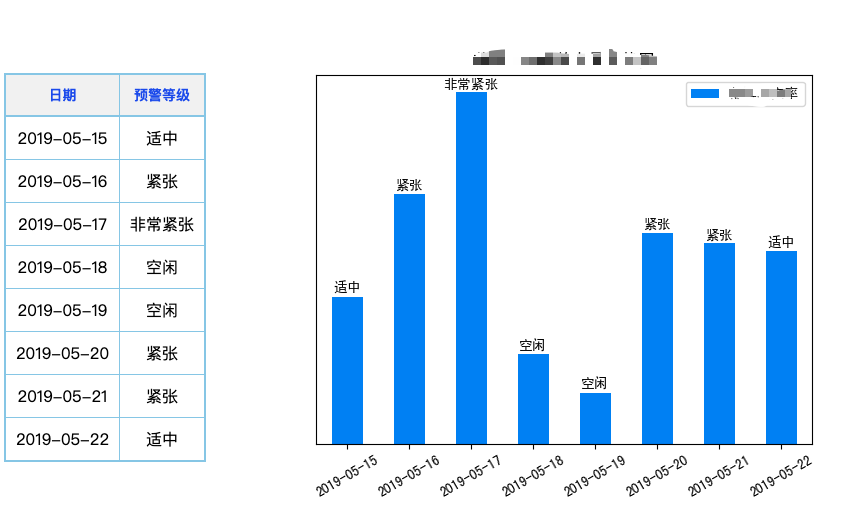
    df_8['预xxx级'] = pd.cut(df_8['fill_rate'], bins=[0, 0.05, 0.10, 0.15, np.inf], labels=['空闲', '适中', '紧张', '非常紧张'])

    df_105['预xxx级'] = pd.cut(df_105['fill_rate'], bins=[0, 0.05, 0.10, 0.15, np.inf], labels=['空闲', '适中', '紧张', '非常紧张'])

    df_8.rename(columns={'ptdate': '日期', 'fill_rate': '品xxxx率'}, inplace=True)

    df_105.rename(columns={'ptdate': '日期', 'fill_rate': '品xxx率'}, inplace=True)

    if tar == 'inner':

        ax_8 = df_8.plot('日期', '品xxxx率', kind='bar', title='首页未来xxxx图', rot=30,

                         color='#0f88eb')

        vals_8 = ax_8.get_yticks()

        ax_8.set_yticklabels(['{:,.2%}'.format(x) for x in vals_8])

        ax_8.set_xticklabels(df_8['日期'].tolist())

        for i, v in enumerate(df_8['品xxx率'].tolist()):

            ax_8.text(i, v + 0.002, str(df_8['预xx级'].tolist()[i]), ha='center', fontweight='bold')

        ax_8.yaxis.set_visible(visible_flag)

        fig_8 = ax_8.get_figure()

        fig_8.savefig('fig8_inner.png')

        ax_105 = df_105.plot('日期', '品牌填充率', kind='bar', title='回xxxx图', rot=30,

                             color='#0f88eb')

        vals_105 = ax_105.get_yticks()

        ax_105.set_yticklabels(['{:,.2%}'.format(x) for x in vals_105])

        ax_105.set_xticklabels(df_105['日期'].tolist())

        for index, value in enumerate(df_105['品xx率'].tolist()):

            ax_105.text(index, value + 0.002, str(df_105['预xxx等级'].tolist()[index]), ha='center', fontweight='bold')

        ax_105.yaxis.set_visible(visible_flag)

        fig_105 = ax_105.get_figure()

        fig_105.savefig('fig105_inner.png')

        df_8['品xxxx充率'] = round(df_8['品xxxx率'] * 100, 2).apply(str) + '%'

        df_105['xxxx率'] = round(df_105['品xxx率'] * 100, 2).apply(str) + '%'

    if tar == 'outter':

        visible_flag = False

        ax_8 = df_8.plot('日期', '品xxxx充率', kind='bar', title='首xxxxx图', rot=30,

                         color='#0f88eb')

        vals_8 = ax_8.get_yticks()

        ax_8.set_yticklabels(['{:,.2%}'.format(x) for x in vals_8])

        ax_8.set_xticklabels(df_8['日期'].tolist())

        for i, v in enumerate(df_8['品xxxx率'].tolist()):

            ax_8.text(i, v + 0.002, str(df_8['预xxx级'].tolist()[i]), ha='center', fontweight='bold')

        ax_8.yaxis.set_visible(visible_flag)

        fig_8 = ax_8.get_figure()

        fig_8.savefig('fig8_outter.png')

        ax_105 = df_105.plot('日期', '品xxx率', kind='bar', title='回xxxx量走势图', rot=30,

                             color='#0f88eb')

        vals_105 = ax_105.get_yticks()

        ax_105.set_yticklabels(['{:,.2%}'.format(x) for x in vals_105])

        ax_105.set_xticklabels(df_105['日期'].tolist())

        for index, value in enumerate(df_105['品xxxx率'].tolist()):

            ax_105.text(index, value + 0.002, str(df_105['xxx级'].tolist()[index]), ha='center', fontweight='bold')

        ax_105.yaxis.set_visible(visible_flag)

        fig_105 = ax_105.get_figure()

        fig_105.savefig('fig105_outter.png')

        df_8.drop('品xxxxx率', axis=1, inplace=True)

        df_105.drop('品xxx率', axis=1, inplace=True)

    all_html_8 = df_8.to_html(escape=False, index=False).replace("\n", "")

    all_html_105 = df_105.to_html(escape=False, index=False).replace("\n", "")

    body = \

        """

            <body>

            <div align="center" class="header">

                <!--标题部分的信息-->

                <h1 align="center">您好,以下为xxxx占量情况!</h1>

            </div>

            <hr>

            <div class="content">

                <!--正文内容-->

                <div>

                    <h4>近一xxxxxx量数据</h4>

                    {}

                    <div style="float:left;margin-left:30px;">

                        <img src='./fig8_{}.png' />

                    </div>

                </div>

                <br/>

                <br/>

                <div style="clear:both"></div>

                <div>

                    <h4>近xxx据</h4>

                    {}

                    <div style="float:left;margin-left:30px;">

                        <img src='./fig105_{}.png' />

                    </div>

                </div>

                <div style="clear:both"></div>

                <hr>

                <p style="text-align: left">

                    —— 本次报告完 ——

                </p>

            </div>

            </body>

        """.format(all_html_8, tar,all_html_105,tar)

    head = \

        '''

        <head>

            <meta charset="utf-8">

            <STYLE TYPE="text/css" MEDIA=screen>

                table.dataframe {

                    border-collapse: collapse;

                    border: 2px solid #a19da2;

                    float:left;

                    margin-top:56px;

                    /*居中显示整个表格*/

                    /*margin: auto;*/

                }

                table.dataframe thead {

                    border: 2px solid #91c6e1;

                    background: #f1f1f1;

                    padding: 10px 10px 10px 10px;

                    color: #333333;

                }

                table.dataframe tbody {

                    border: 2px solid #91c6e1;

                    padding: 10px 10px 10px 10px;

                }

                table.dataframe tr {

                }

                table.dataframe th {

                    vertical-align: top;

                    font-size: 14px;

                    padding: 10px 10px 10px 10px;

                    color: #105de3;

                    font-family: 微软雅黑;

                    text-align: center;

                }

                table.dataframe td {

                    text-align: center;

                    padding: 10px 10px 10px 10px;

                }

                body {

                    font-family: 微软雅黑;

                }

                h1 {

                    color: blue;

                }

                div.header h2 {

                    color: #0002e3;

                    font-family: 微软雅黑;

                }

                h3 {

                    font-size: 22px;

                    background-color: rgba(0, 2, 227, 0.71);

                    text-shadow: 2px 2px 1px #de4040;

                    color: rgba(239, 241, 234, 0.99);

                    line-height: 1.5;

                }

                h4 {

                    color: blue;

                    font-family: 微软雅黑;

                    font-size: 20px;

                    text-align: left;

                }

            </STYLE>

            </head>

        '''

    foot = \

        '''

        <br/>

        <p>

<br/>

        </p>

        '''

    html_msg = "<html>" + head + body + foot + "</html>"

    html_msg = html_msg.replace("\n", "")

    with open('./' + tar + '.html', 'w', encoding='UTF-8', newline='') as fout:

        fout.write(html_msg)

    print(df_8.head())

    print(df_105.head())

def send_week_mail(tar):

    yag = yagmail.SMTP(user="xxxx@zhihu.com", password="cxxxx", host='smtp.xxxx.com')

    print('正在准xxxx...')

    if tar == 'inner':

        # 链接邮箱服务器

        # zhihu_staff = [xxx]

        yag.send(to=zhihu_staff, subject='未来xxxx页占量',

                 contents=open('./' + tar + '.html', 'r', encoding='UTF-8', newline='').read())

        print('内部xxxx发送!')

    else:

        # agent_staff = ['cxxx']

        agent_staff = ['zxxxx']

        yag.send(to=agent_staff, subject='未来xxxxx页占量',

                 contents=open('./' + tar + '.html', 'r', encoding='UTF-8', newline='').read())

        print('外部每日xxxx发送!')

def main():

    target = ['inner', 'outter']

    for tar in target:

        get_brand_info(tar)

        send_week_mail(tar)

if __name__ == '__main__':

    main()
matplotlib绘图难题解决的更多相关文章
- matplotlib 绘图
http://blog.csdn.net/jkhere/article/details/9324823 都打一遍 5 matplotlib-绘制精美的图表 matplotlib 是python最著名的 ...
- ssh调用matplotlib绘图报错RuntimeError: Invalid DISPLAY variable
1.问题:在本地用matplotlib绘图可以,但是在ssh远程绘图的时候会报错 RuntimeError: Invalid DISPLAY variable 2.原因:matplotlib的默认ba ...
- python实战学习之matplotlib绘图续
学习完matplotlib绘图可以设置的属性,还需要学习一下除了折线图以外其他类型的图如直方图,条形图,散点图等,matplotlib还支持更多的图,具体细节可以参考官方文档:https://matp ...
- matplotlib绘图的基本操作
转自:Laumians博客园 更简明易懂看Matplotlib Python 画图教程 (莫烦Python)_演讲•公开课_科技_bilibili_哔哩哔哩 https://www.bilibili. ...
- python中利用matplotlib绘图可视化知识归纳
python中利用matplotlib绘图可视化知识归纳: (1)matplotlib图标正常显示中文 import matplotlib.pyplot as plt plt.rcParams['fo ...
- matplotlib绘图基本用法-转自(http://blog.csdn.net/mao19931004/article/details/51915016)
本文转载自http://blog.csdn.net/mao19931004/article/details/51915016 <!DOCTYPE html PUBLIC "-//W3C ...
- python实战学习之matplotlib绘图
matplotlib 是最流行的Python底层绘图库,主要做数据可视化图表 可以将数据可视化,能够更直观的呈现数据 matplotlib绘图基本要点 首先实现一个简单的绘图 # 导入pyplot f ...
- 【原】在Matplotlib绘图中添加Latex风格公式
Matplotlib绘图的过程中,可以为各个轴的Label,图像的Title.Legend等元素添加Latex风格的公式. 只需要在Latex公式的文本前后各增加一个$符号,Matplotlib就可以 ...
- Matplotlib绘图双纵坐标轴设置及控制设置时间格式
双y轴坐标轴图 今天利用matplotlib绘图,想要完成一个双坐标格式的图. fig=plt.figure(figsize=(20,15)) ax1=fig.add_subplot(111) ax1 ...
随机推荐
- Indellij IDEA的菜单 File Edit View等主菜单栏不小心删除,恢复的解决办法
修改以后保存,重启Idea
- Java8 lambda表达式10个示例<转>
例1.用lambda表达式实现Runnable 我开始使用Java 8时,首先做的就是使用lambda表达式替换匿名类,而实现Runnable接口是匿名类的最好示例.看一下Java 8之前的runna ...
- python获取文件路径
摘自:https://blog.csdn.net/Poo_Chai/article/details/89764001 import os root_path = os.path.abspath(os. ...
- 基于传统方法点云分割以及PCL中分割模块
之前在微信公众号中更新了以下几个章节 1,如何学习PCL以及一些基础的知识 2,PCL中IO口以及common模块的介绍 3,PCL中常用的两种数据结构KDtree以及Octree树的介绍 ...
- xpath和contains模糊匹配
xpath可以以标签定位,也可以@任意属性: 如:以input标签定位:driver.find_element_by_xpath("//input[@id='kw']") 如:@t ...
- phpspreadsheet 中文文档(三) 计算引擎
2019年10月11日13:59:52 使用PhpSpreadsheet计算引擎 执行公式计算 由于PhpSpreadsheet表示内存中的电子表格,因此它还提供公式计算功能.单元格可以是值类型(包含 ...
- Appium脚本(4) 使用uiautomator方法定位元素
from app.find_element.capability import driver from time import sleep # 使用uiautomator方法定位元素 accunt_i ...
- Javacript Remove Elements from Array
參考自: https://love2dev.com/blog/javascript-remove-from-array/ 1. Removing Elements from End of Array ...
- 1-2docker-基本的使用
1.Docker 官⽅提供了⼀个公共的镜像仓库 https://hub.docker.com 2.获取镜像 docker pull [选项] [Docker Registry 地址[:端⼝]/]仓库名 ...
- 解决chrome浏览器插件开发者模式每次启动要确认弹出框的问题
在日常工作中,我们经常会用到一些浏览器插件,有些插件因为没上架到浏览器的应用商店,只能以开发者模式运行,但是chrome浏览器出了限制,每次重新启动浏览器的时候,就会弹出该插件是否要禁止运行的对话框, ...