
Node: 通过Console打印日志 (Log Message via Console)
In normal development, we are likely to use 'console.log' for message logging, yet it’s simple, we are unfortunately not able to persist the messages in production mode. And you may look for some third party libraries to meet this demand, actually we can easily achieve it via 'Console' object, so why don’t implement one by ourselves?
Today I will show you a simple logger program with 'Console' object, and imitate a real logger library.
As we mentioned above, we often use 'console.log' for printing message on terminal, in fact, the 'console' is a module in Node.js, we can import explicitly with require('module'), but unnecessary, because it's also a build-in global variable, that's why we can use it directly.
Since the global console instance configured to write to 'process.stdout' and 'process.stderr', the two forms below will behave the same:
// to stdout

console.log('hello');

// to stderr

console.warn('warn');

console.error('error');

// they are equivalent to:

// create our own console

let myConsole = new console.Console(process.stdout, process.stderr);

// to stdout

myConsole.log('hello');

// to stderr

myConsole.warn('warn');

myConsole.error('error');
What if we change process.stdout and process.stderr to other streams? The file streams, for an instance:
// index.js

let fs = require('fs');

let options = {

  flags: 'a',         // append mode

  encoding: 'utf8',   // utf8 encoding

};

let stdout = fs.createWriteStream('./stdout.log', options);

let stderr = fs.createWriteStream('./stderr.log', options);

let logger = new console.Console(stdout, stderr);

// to stdout.log file

logger.log('hello');

// to stderr.log file

logger.warn('warn');

logger.error('error');
Run the code it will create two files: 'stdout.log' and 'stderr.log', and write messages into them:
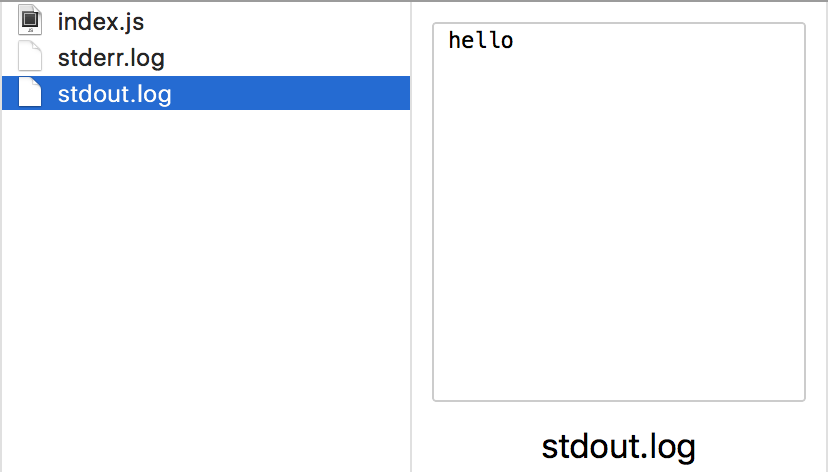
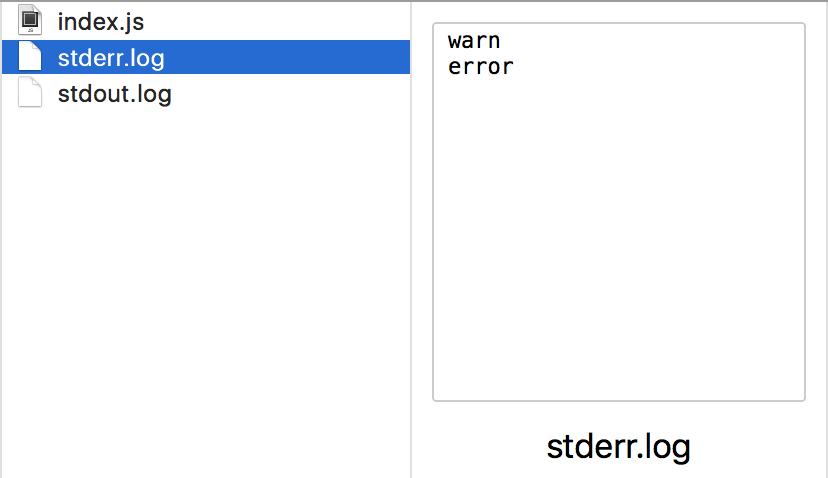
And then, we can improve it slightly by adding datetime prefix to the message, which make it more like a real log library:
// index.js

let fs = require('fs');

// add a format prototype function

Date.prototype.format = function (format) {

  if (!format) {

    format = 'yyyy-MM-dd HH:mm:ss';

  }

  // pad with 0

  let padNum = function (value, digits) {

    return Array(digits - value.toString().length + 1).join('0') + value;

  };

  let cfg = {

    yyyy: this.getFullYear(),                          // year

    MM: padNum(this.getMonth() + 1, 2),                // month

    dd: padNum(this.getDate(), 2),                     // day

    HH: padNum(this.getHours(), 2),                    // hour

    mm: padNum(this.getMinutes(), 2),                  // minute

    ss: padNum(this.getSeconds(), 2),                  // second

    fff: padNum(this.getMilliseconds(), 3),            // millisecond

  };

  return format.replace(/([a-z])(\1)*/ig, function (m) {

    return cfg[m];

  });

}

let options = {

  flags: 'a',         // append mode

  encoding: 'utf8',   // utf8 encoding

};

let stdout = fs.createWriteStream('./stdout.log', options);

let stderr = fs.createWriteStream('./stderr.log', options);

let logger = new console.Console(stdout, stderr);

for (let i = 0; i < 100; i++) {

  let time = new Date().format('yyyy-MM-dd HH:mm:ss.fff');

  logger.log(`[${time}] - log message ${i}`);

  logger.error(`[${time}] - err message ${i}`);

}
Run the code again, and take a look at the file contents:
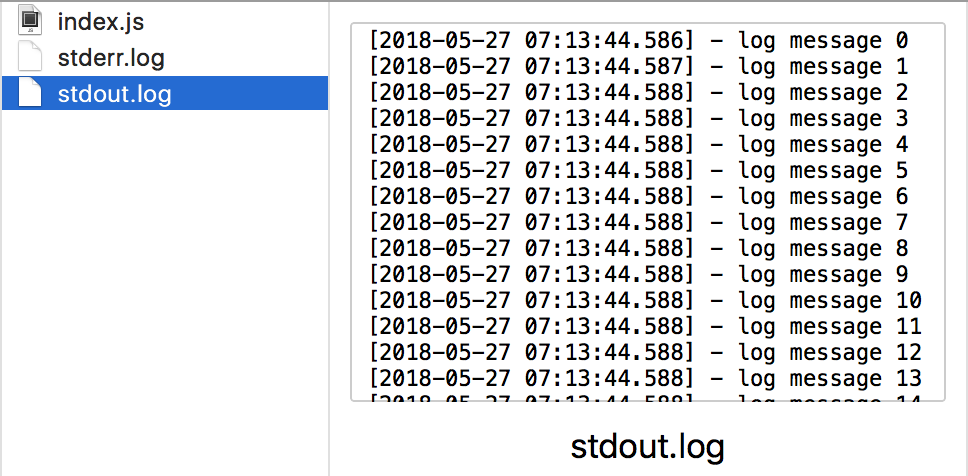
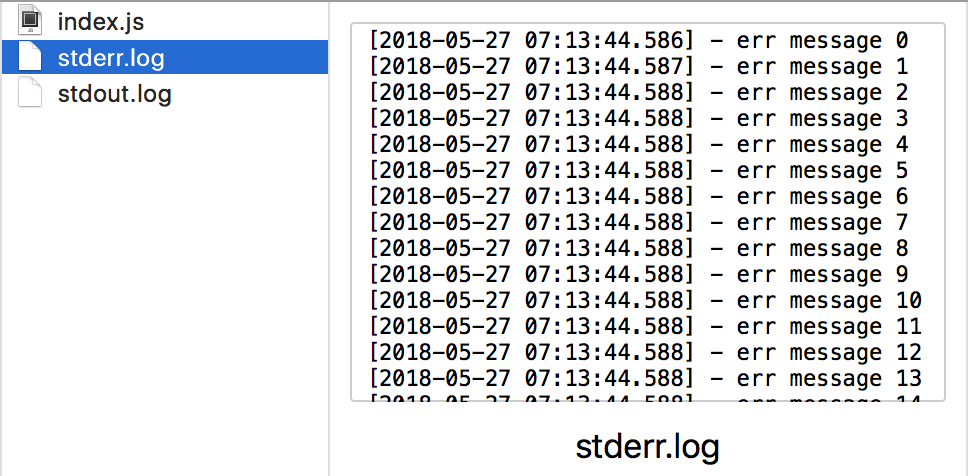
Looks pretty, isn't it? Now we should think about a question, how to log message into new files according to some rules? By doing so, we can easily locate the exact logs. Yeah, that's the so-called 'rolling' policy.
We will be rolling the logs by time here.
'node-schedule' is great module for this feature, it's a flexible and easy-to-use job scheduler for Node.js, and we can create our policy based on it.
The following program is bound to print the message at the beginning of every minute:
let schedule = require('node-schedule');

// invoke the function at each time which second is 0

schedule.scheduleJob({second: 0}, function() {

  console.log('rolling');

});
And accordingly, 'minute: 0' config will run the function code at the beginning of each hour, 'hour: 0' config will run it at the beginning of each day.
Going back to our logger program, now all we need to do is create a new 'logger' instance for new stream files and replace the old one, let's change the code for adding a schedule:
let fs = require('fs');

let schedule = require('node-schedule');

// add a format prototype function

Date.prototype.format = function (format) {

  if (!format) {

    format = 'yyyy-MM-dd HH:mm:ss';

  }

  // pad with 0

  let padNum = function (value, digits) {

    return Array(digits - value.toString().length + 1).join('0') + value;

  };

  let cfg = {

    yyyy: this.getFullYear(),                          // year

    MM: padNum(this.getMonth() + 1, 2),                // month

    dd: padNum(this.getDate(), 2),                     // day

    HH: padNum(this.getHours(), 2),                    // hour

    mm: padNum(this.getMinutes(), 2),                  // minute

    ss: padNum(this.getSeconds(), 2),                  // second

    fff: padNum(this.getMilliseconds(), 3),            // millisecond

  };

  return format.replace(/([a-z])(\1)*/ig, function (m) {

    return cfg[m];

  });

};

function getLogger() {

  let options = {

    flags: 'a',         // append mode

    encoding: 'utf8',   // utf8 encoding

  };

  // name the file according to the date

  let time = new Date().format('yyyy-MM-dd');

  let stdout = fs.createWriteStream(`./stdout-${time}.log`, options);

  let stderr = fs.createWriteStream(`./stderr-${time}.log`, options);

  return new console.Console(stdout, stderr);

}

let logger = getLogger();

// alter the logger instance at the beginning of each day

schedule.scheduleJob({hour: 0}, function() {

  logger = getLogger();

});

// logging test

setInterval(function () {

  for (let i = 0; i < 100; i++) {

    let time = new Date().format('yyyy-MM-dd HH:mm:ss.fff');

    logger.log(`[${time}] - log message ${i}`);

    logger.error(`[${time}] - err message ${i}`);

  }

}, 1000);
It's done, we will get two new log files at 00:00 of each day, and all messages will be writen into them.
Now, a simple logger program is completed, and it can be published as a library after proper encapsulation.
Node: 通过Console打印日志 (Log Message via Console)的更多相关文章
- python打印日志log
整理一个python打印日志的配置文件,是我喜欢的格式. # coding:utf-8 # 2019/11/7 09:19 # huihui # ref: import logging LOG_FOR ...
- 打印日志 Log
Log.v(tag,msg);所有内容 Log.d(tag,msg);debug Log.i(tag,msg);一般信息 Log.w(tag,msg);警告信息 Log.e(tag,msg);错误信息
- Android学习----打印日志Log
Log.v(tag,msg);所有内容 Log.d(tag,msg);debug Log.i(tag,msg);一般信息 Log.w(tag,msg);警告信息 Log.e(tag,msg);错误信息 ...
- 大数据项目中js中代码和java中代码(解决Tomcat打印日志中文乱码)
Idea2018中集成Tomcat9导致OutPut乱码找到tomcat的安装目录,打开logging.properties文件,增加一行代码,覆盖默认设置,将日志编码格式修改为GBK.java.ut ...
- Node.js系列文章:利用console输出日志文件
通常我们在写Node.js程序时,都习惯使用console.log打印日志信息,但这也仅限于控制台输出,有时候我们需要将信息输出到日志文件中,实际上利用console也可以达到这个目的的,今天就来简单 ...
- Log打印日志遇到的问题
Log日志打印出现空指针问题 AndroidRuntime(372): Caused by: java.lang.NullPointerException: println needs a messa ...
- 使用log4j2打印Log,log4j不能打印日志信息,log4j2不能打印日志信息,log4j和logj2,idea控制台信息乱码(文末)
说来惭愧,今天就写了个"hello world",了解了一下log4j的日志. 本来是想在控制台打印个log信息,也是遇到坎坷重重,开始也没去了解log4j就来使用,log4j配置 ...
- Ubuntu系统配置日志/var/log/message
ubuntu系统默认不生成/var/log/messages文件,有时候想查看相关日志就很不方便,于是我们可以设置使系统生成此文件. 1.先安装 apt-get install rsyslog2.用v ...
- rsyslog 不打印日志到/var/log/messages
*.info;mail.none;authpriv.none;cron.none;local3.none /var/log/messages 表示 所有来源的info级别都记录到/var/log/me ...
随机推荐
- Java学习-055-Jsoup爬虫通过设置获取响应数据大小的最大值,解决因默认获取 1MB 响应数据导致的无法获取全部的响应数据内容问题
在日常工作中,通常会遇到获取各种网络数据使用的情况,Java中可使用Jsoup(Python中可使用 BeatifulSoup)进行数据的获取及处理. 今天有朋友问,在使用 Jsoup 进行请求数据时 ...
- (转)2019年 React 新手学习指南 – 从 React 学习线路图说开去
原文:https://www.html.cn/archives/10111 注:本文根据 React 开发者学习线路图(2018) 结构编写了很多新手如何学习 React 的建议.2019 年有标题党 ...
- python初级(302) 7 列表
一.列表的概念: 1.创建一个列表 friends = list() 2.列表可以包含的内容: m_list = [5, 7, 9, 20] letters = ['a', 'b', 'e'] 3.从 ...
- Linux 修改用户的JDK版本
1. vi .bash_profile 2.复制以下到bash_profile 文件,并将此文件里原来的JAVA_HOME和PATH删掉 JAVA_HOME=/java/jdk1..0_22 JRE ...
- zabbix自动停用与开启agent
我们在升级环境时遇到了一个问题,那就是zabbix会自动发送邮件给领导,此时领导心里会嘎嘣一下,为了给领导营造一个良好的环境,减少不必要的告警邮件,减少嘎嘣次数,于是在升级之前,取消zabbix监控的 ...
- vs2015 debug时出现 C2039“cout”: 不是“std”的成员
今天想起电脑上的vs2015,发现好久没用了,用了下,遇到了一个问题 由于不常用c++,还是觉得应该记录下来,以免下次遇到,不知怎么处理 新建项目Hello Hello.cpp #include &q ...
- docker搭建samba共享目录
需求:因同事需要共享文件夹来传输数据.整好接触docker,所以想用docker来搭建samber 系统:Centos7.4 docker搭建就不在赘述,如有需要请参考:https://www.jia ...
- K8S+GitLab+.net core-自动化分布式部署-3
K8S+GitLab-自动化分布式部署ASP.NET Core(三) 更新镜像版本并部署到K8S上 一.介绍 前一篇,介绍了ASP.NET Core部署到K8S上,下面介绍我们在发布新一版本中怎么 ...
- 【springcloud】Transaction rolled back because it has been marked as rollback-only
问题: 一个ajax请求,发生系统错误,错误内容:Transaction rolled back because it has been marked as rollback-only 原因是调用的s ...
- TCP/IP学习笔记1--概述,分组交换协议
1.TCP/IP 互联网是由许多独立发展的网络通信技术融合而成的,能够使它们不断融合并实现统一的正式TCP/IP技术,TCP/IP使通信协议的统称. TCP/IP协议模型(Transmission C ...