
利用art.template模仿VUE
首先先看一下Typescript代码:
import template = require('art-template/lib/template-web');

interface TemplateBindConfig {

    el: string

    data: object

}

class TmpBind {

    el: string

    template: any

    data: object

    renderFn: any

    // 构造函数

    constructor(config:TemplateBindConfig) {

        // 绑定的容器id

        this.el = config.el;

        // 注入的数据

        this.data = config.data;

        this.renderFn = null

        var nodes=document.querySelector(config.el).children;

        var i=nodes.length;

        if(i>0){

            while(i--){

                if(nodes[i].tagName.toLowerCase()=="script" && nodes[i].getAttribute("type")=="text/html"){

                    // 模版id

                    this.template = nodes[i].innerHTML;

                    break;

                }

            }

        }

        this.render()

    }

    // 渲染模版

    render(data?): void {

        if (data) {

            this.data = data;

        }

        // 解析模版

        if(!this.renderFn){

            this.renderFn= template.compile(this.template);

        }

        const source = this.renderFn(this.data);

        // 更新容器的值

        document.querySelector(this.el).innerHTML = source;

    }

    setData(value: any): void {

        this.data=value;

        this.render();

    }

    // 重新设置模板

    setTemplate(value: any): void {

        this.template = value;

        this.renderFn= template.compile(value);

        this.render();

    }

    // 获取数据

    getData(): object {

        return this.data;

    }

}
编译后的JavaScript代码:
    var TmpBind = /** @class */ (function () {

        // 构造函数

        function TmpBind(config) {

            // 绑定的容器id

            this.el = config.el;

            // 注入的数据

            this.data = config.data;

            this.renderFn = null;

            var nodes = document.querySelector(config.el).children;

            var i = nodes.length;

            if (i > 0) {

                while (i--) {

                    if (nodes[i].tagName.toLowerCase() == "script" && nodes[i].getAttribute("type") == "text/html") {

                        // 模版id

                        this.template = nodes[i].innerHTML;

                        break;

                    }

                }

            }

            this.render();

        }

        // 渲染模版

        TmpBind.prototype.render = function (data) {

            if (data) {

                this.data = data;

            }

            // 解析模版

            if (!this.renderFn) {

                this.renderFn = template.compile(this.template);

            }

            var source = this.renderFn(this.data);

            // 更新容器的值

            document.querySelector(this.el).innerHTML = source;

        };

        TmpBind.prototype.setData = function (value) {

            this.data = value;

            this.render();

        };

        // 重新设置模板

        TmpBind.prototype.setTemplate = function (value) {

            this.template = value;

            this.renderFn = template.compile(value);

            this.render();

        };

        // 获取数据

        TmpBind.prototype.getData = function () {

            return this.data;

        };

        return TmpBind;

    }());
因为是基于art-template/lib/template-web.js 请下载并引用一下。https://github.com/aui/art-template
实用示例:
<button id="button1">设置新值</button>

<button id="button2">获取值</button>

<div id="div1">

    <script type="text/html">

        {{msg}}

        <div>

            <img src="{{url}}"/>

        </div>

        <ul>

            {{each list as item i}}

            <li>{{item}}</li>

            {{/each}}

        </ul>

    </script>

</div>
var vm = new TmpBind({

        el: "#div1",

        data: {msg: "欢迎来到模版绑定的世界", list: ['1', 2, 3, 4, 5], url: "https://www.baidu.com/img/bd_logo1.png"}

    });

    // 设置值

    document.querySelector("#button1").addEventListener("click", function (evt) {

        var data = vm.getData()

        data.msg="欢迎来到模版绑定的世界222222222";

        vm.setData(data);

    })

    // 获取值

    document.querySelector("#button2").addEventListener("click", function (evt) {

        alert(JSON.stringify(vm.getData()))

    })
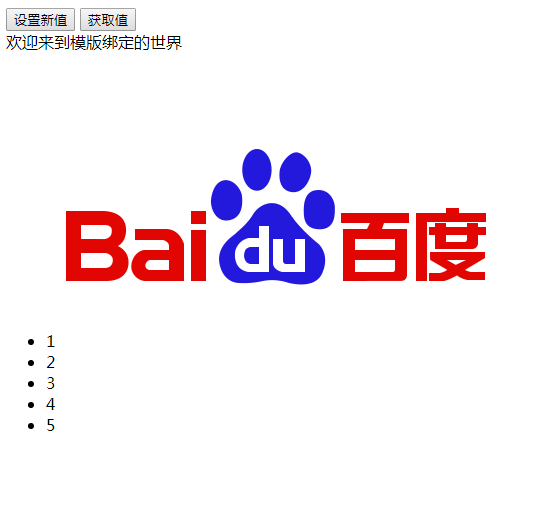
实现效果如下:
如果这篇文章对您有帮助,您可以打赏我

技术交流QQ群:15129679
利用art.template模仿VUE的更多相关文章
- 利用art.template模仿VUE 一次渲染多个模版
TypeScript代码 import template = require('art-template/lib/template-web'); interface TemplateBindConfi ...
- 利用 vue-cli 构建一个 Vue 项目
一.项目初始构建 现在如果要构建一个 Vue 的项目,最方便的方式,莫过于使用官方的 vue-cli . 首先,咱们先来全局安装 vue-cli ,打开命令行工具,输入以下命令: $ npm inst ...
- art template前端模板引擎
偶然看到后台有一段代码 采用的是art template的模板引擎 地址为 http://aui.github.io/artTemplate/ 这段代码很简洁 var html = template( ...
- 用ES6的class模仿Vue写一个双向绑定
原文地址:用ES6的class模仿Vue写一个双向绑定 点击在线尝试一下 最终效果如下: 构造器(constructor) 构造一个TinyVue对象,包含基本的el,data,methods cla ...
- 利用Atomic, ThreadLocal, 模仿AQS, ReentrantLock
/** * @description 队列同步器,利用原子整形模仿AQS,非公平锁(简单自适应自旋) * @since 2020/2/4 */ public class QueueSynchroniz ...
- 利用vue-cli3快速搭建vue项目详细过程
一.介绍 Vue CLI 是一个基于 Vue.js 进行快速开发的完整系统.有三个组件: CLI:@vue/cli 全局安装的 npm 包,提供了终端里的vue命令(如:vue create .vue ...
- 利用模板template动态渲染jsp页面
一.场景 在js中写html简直是噩梦,刚进新公司,在codereview的时候得知可以通过将html模板写在jsp页面,然后由js调取模板,利用replace()方法替换传值的方式避免在js中拼接h ...
- 利用VUE-CLI脚手架搭建VUE项目
前言 在学习完vue基础语法之后,学着利用vue-cli脚手架搭建一个项目,本篇随笔主要记录搭建的过程,供大家一起学习. 具体内容 搭建vue项目的准备工作 1.安装Nodejs.NPM以及VSCod ...
- art.template 循环里面分组。
后台提供给我们一个数组,我们要用模版实现上面的格式输出怎么版呢? 下面就是解决方案: <h2>循环4个一组</h2> <script type="text/ht ...
随机推荐
- Linux安装和配置MySQL5.7【修改密码、修改字符集等配置】(5.7.18+版本也可参考,我是5.7.22)
本文是转载篇,这里是 原文原文原文. --------------------分割线------------------------------- 这下面内容讲述如何修改密码为简单密码(比如:1234 ...
- 大数据之kafka-05.讲聊聊Kafka的版本号
今天聊聊kafka版本号的问题,这个问题实在是太重要了,我觉得甚至是日后能否用好kafka的关键.上一节我们介绍了kafka的几种发行版,其实不论是哪种kafka,本质上都内嵌了最核心的Apache ...
- 随笔小skill
1.用拉链函数zip()将字典转换成元组对!函数中的两个参数必须是序列!p = {'name':'zhangsanfeng','age':18,'gender':'nan'}print(list(zi ...
- FreeBSD关机后自动重启的解决办法
我用的是华硕的笔记本电脑,不知道别的电脑有没有这个情况,按handbook关机指令为shutdown -p now,但是我执行这个指令后电脑却自动重启,用Linux关机指令shutdown -h no ...
- python测试开发django-rest-framework-64.序列化(serializers.Serializer)
前言 REST framework中的serializers与Django的Form和ModelForm类非常像.我们提供了一个Serializer类,它为你提供了强大的通用方法来控制响应的输出, 以 ...
- rocketmq那些事儿之本地调试环境搭建
上一篇文章中我们已经介绍过rocketmq的集群环境搭建,然而在源码的学习中我们还需要进行本地的调试和问题的定位查找,毕竟还是在本地方便些,今天就说一说如何进行源码的本地调试 下载编译 对于rocke ...
- Beta之前-凡事预则立(校园帮-追光的人)
所属课程 软件工程1916 作业要求 Beta之前-凡事预则立 团队名称 追光的人 作业目标 在Beta冲刺之前,提前做好准备和规划 议题 1.讨论组长是否重选的议题和结论. 2.下一阶段需要改进完善 ...
- Oracle两表关联,只取B表的第一条记录
背景: A表.B表两表关联,关联出来的结果里B表有不止一条,需求是只要B表结果中的某一条(按某字段排序) 首先想到了直接写个带排序的子查询去匹配外围的值,从这个结果集中只要第一条,但是经过验证发现, ...
- about云Hadoop相关技术总结
让你真正明白spark streaminghttp://www.aboutyun.com/forum.php?mod=viewthread&tid=21141(出处: about云开发)
- 创建django项目完整实例
虚拟环境搭配 安装和配置 安装虚拟环境的命令: 1)sudo pip install virtualenv #安装虚拟环境 2)sudo pip install virtualenvwrapper # ...