
openresty开发系列30--openresty中使用http模块
OpenResty默认没有提供Http客户端,需要使用第三方提供的插件

我们可以从github上搜索相应的客户端,比如https://github.com/pintsized/lua-resty-http

安装方法:将 lua-resty-http/lib/resty/ 目录下的 http.lua 和 http_headers.lua

两个文件拷贝到 /usr/local/openresty/lualib/resty 目录下即可

(假设 OpenResty 安装目录为 /usr/local/openresty)

local res, err = httpc:request_uri(uri, {

    method = "POST/GET",  ---请求方式

    query = str,  ---get方式传参数

    body = str,     ---post方式传参数

    path = "url" ----路径

    headers = {  ---header参数

        ["Content-Type"] = "application/json",

    }

})

示例:编写模拟请求天猫的查询

--引入http模块

local http = require("resty.http")

--创建http客户端实例

local httpc = http:new()

local resp,err = httpc:request_uri("https://list.tmall.com",

{

    method = "GET",    ---请求方式

    --path="/search_product.htm?q=ipone",

    query="q=iphone",    ---get方式传参数

    body="name='jack'&age=18",    ---post方式传参数

    path="/search_product.htm",    ----路径

    ---header参数

    headers = {["User-Agent"]="Mozilla/5.0 (Windows NT 6.1; WOW64) AppleWebKit/537.36 (KHTML, like Gecko) Chrome/40.0.2214.111 Safari/537.36"}

})

if not resp then

    ngx.say("request error:",err)

    return

end

--获取状态码

ngx.status = resp.status

--获取响应信息

--响应头中的Transfer-Encoding和Connection可以忽略,因为这个数据是当前server输出的。

--获取遍历返回的头信息

for k, v in pairs(resp.headers) do

    if k ~= "Transfer-Encoding" and k ~= "Connection" then

        ngx.header[k] =v

    end

    if type(v) == "table" then

        ngx.log(ngx.WARN,"table:"..k, ": ", table.concat(v, ", "))

    else

        ngx.log(ngx.WARN,"one:"..k, ": ", v)

    end

end

ngx.say("end")

--响应体

ngx.say(resp.body)

httpc:close()

httpc:close()

# 后台日志

# /usr/local/openresty/nginx]# tail -f logs/debug.log

// :: [warn] #: * [lua] testhttp02.lua:: one:ufe-result: A6, client: 192.168.10.164, server: www.server1.com, request: "GET /testhttp02 HTTP/1.1", host: "192.168.10.164"

// :: [warn] #: * [lua] testhttp02.lua:: one:Date: Fri,  Aug  :: GMT, client: 192.168.10.164, server: www.server1.com, request: "GET /testhttp02 HTTP/1.1", host: "192.168.10.164"

// :: [warn] #: * [lua] testhttp02.lua:: one:Location: https://login.taobao.com/jump?target=https%3A%2F%2Flist.tmall.com%2Fsearch_product.htm%3Ftbpm%3D1%26q%3Diphone, client: 192.168.10.164, server: www.server1.com, request: "GET /testhttp02 HTTP/1.1", host: "192.168.10.164"

// :: [warn] #: * [lua] testhttp02.lua:: one:Connection: keep-alive, client: 192.168.10.164, server: www.server1.com, request: "GET /testhttp02 HTTP/1.1", host: "192.168.10.164"

// :: [warn] #: * [lua] testhttp02.lua:: one:EagleEye-TraceId: 0bfa16f315665542845385751e42fa, client: 192.168.10.164, server: www.server1.com, request: "GET /testhttp02 HTTP/1.1", host: "192.168.10.164"

// :: [warn] #: * [lua] testhttp02.lua:: one:Strict-Transport-Security: max-age=, client: 192.168.10.164, server: www.server1.com, request: "GET /testhttp02 HTTP/1.1", host: "192.168.10.164"

// :: [warn] #: * [lua] testhttp02.lua:: one:Content-Length: , client: 192.168.10.164, server: www.server1.com, request: "GET /testhttp02 HTTP/1.1", host: "192.168.10.164"

// :: [warn] #: * [lua] testhttp02.lua:: one:Timing-Allow-Origin: *, client: 192.168.10.164, server: www.server1.com, request: "GET /testhttp02 HTTP/1.1", host: "192.168.10.164"

// :: [warn] #: * [lua] testhttp02.lua:: one:Server: Tengine/Aserver, client: 192.168.10.164, server: www.server1.com, request: "GET /testhttp02 HTTP/1.1", host: "192.168.10.164"
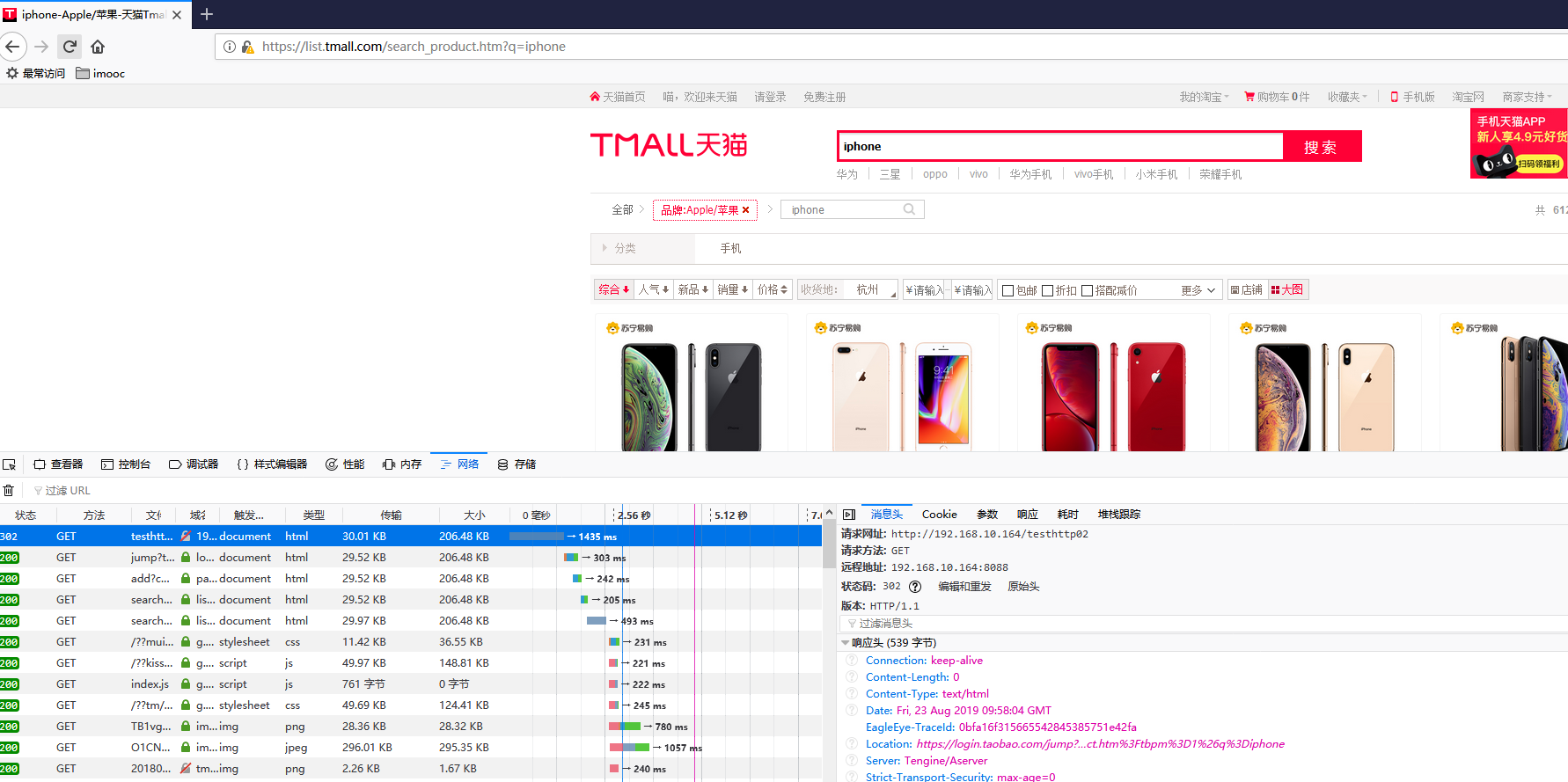
-------------------------------------------------------

发现报错

request error :no resolver defined to resolve "list.tmall.com"

此错误是因为要配置DNS解析器resolver 8.8.8.8,否则域名是无法解析的。

在nginx.conf配置文件中 http模块加上resolver 8.8.8.8; Google提供的免费DNS服务器的IP地址

配置好后,重启nginx

---------------------------------------------------------

访问https错误,因为我们访问的https,需要配置ssl证书

在nginx配置文件中,server虚拟主机模块设置

lua_ssl_verify_depth ;

lua_ssl_trusted_certificate "/etc/ssl/certs/ca-bundle.crt";

--------------------------------------------------------

http模块应用场景很多,这里只简单介绍了一下http模块的使用

还有很多openresty模块,可以参考 https://github.com/bungle/awesome-resty

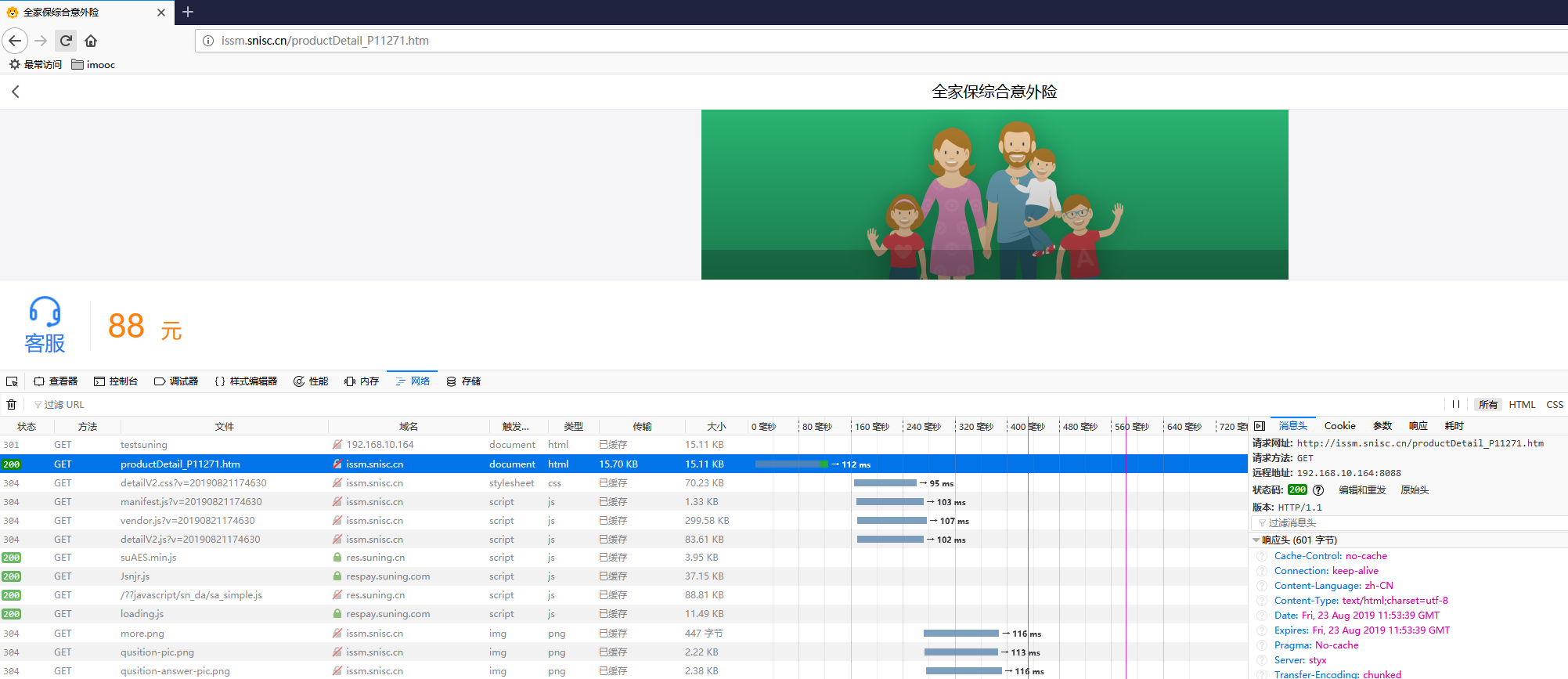
以suning.com为例:

local http = require("resty.http")

--创建http客户端实例

local httpc = http:new()

local resp,err = httpc:request_uri("http://issm.suning.com",

{

    method = "GET",

    path="/productDetail_P11271.htm",

    headers = {["User-Agent"]="Mozilla/5.0 (Windows NT 6.1; WOW64) AppleWebKit/537.36 (KHTML, like Gecko) Chrome/40.0.2214.111 Safari/537.36"}

})

if not resp then

    ngx.say("request error:",err)

    return

end

--获取状态码

ngx.status = resp.status

--获取响应信息

--响应头中的Transfer-Encoding和Connection可以忽略,因为这个数据是当前server输出的。

for k,v in pairs(resp.headers) do

    if k ~= "Transfer-Encoding" and k ~= "Connection" then

        ngx.header[k] =v

    end

end

--响应体

ngx.say(resp.body)

httpc:close()
配置示例
# cat /usr/local/openresty/nginx/conf/nginx.conf

worker_processes  ;

#pid        logs/nginx.pid;

events {

    worker_connections  ;

}

http {

    include       mime.types;

    default_type  text/html;

    sendfile        on;

    keepalive_timeout  ;

    resolver 8.8.8.8;

    server {

        listen       ;

        server_name  www.server1.com;

    lua_ssl_verify_depth ;

    lua_ssl_trusted_certificate "/etc/ssl/certs/ca-bundle.crt";

    location /tmall {

        access_by_lua_file /usr/local/lua/tmall.lua;

    }

        location / {

            root   html;

            index  index.html index.htm;

        }

        error_page        /50x.html;

        location = /50x.html {

            root   html;

        }

    }

}
lua脚本
# cat /usr/local/lua/tmall.lua

--引入http模块

local http = require("resty.http")

--创建http客户端实例

local httpc = http:new()

local resp,err = httpc:request_uri("https://list.tmall.com",

{

    method = "GET",    ---请求方式

    --path="/search_product.htm?q=ipone",

    query="q=iphone",    ---get方式传参数

    body="name='jack'&age=18",    ---post方式传参数

    path="/search_product.htm",    ----路径

    ---header参数

    headers = {["User-Agent"]="Mozilla/5.0 (Windows NT 6.1; WOW64) AppleWebKit/537.36 (KHTML, like Gecko) Chrome/40.0.2214.111 Safari/537.36"}

})

if not resp then

    ngx.say("request error:",err)

    return

end

--获取状态码

ngx.status = resp.status

--获取响应信息

--响应头中的Transfer-Encoding和Connection可以忽略,因为这个数据是当前server输出的。

--获取遍历返回的头信息

for k, v in pairs(resp.headers) do

    if k ~= "Transfer-Encoding" and k ~= "Connection" then

        ngx.header[k] =v

    end

    if type(v) == "table" then

        ngx.log(ngx.WARN,"table:"..k, ": ", table.concat(v, ", "))

    else

        ngx.log(ngx.WARN,"one:"..k, ": ", v)

    end

end

ngx.say("end")

--响应体

ngx.say(resp.body)

httpc:close()
openresty开发系列30--openresty中使用http模块的更多相关文章
- openresty开发系列36--openresty执行流程之6日志模块处理阶段
openresty开发系列36--openresty执行流程之6日志模块处理阶段 一)header_filter_by_lua 语法:header_filter_by_lua <lua-scri ...
- openresty开发系列30--openresty中使用全局缓存
openresty开发系列30--openresty中使用全局缓存 Nginx全局内存---本地缓存 使用过如Java的朋友可能知道如Ehcache等这种进程内本地缓存.Nginx是一个Master进 ...
- openresty开发系列29--openresty中发起http请求
openresty开发系列29--openresty中发起http请求 有些场景是需要nginx在进行请求转发 用户浏览器请求url访问到nginx服务器,但此请求业务需要再次请求其他业务:如用户请求 ...
- openresty开发系列28--openresty中操作mysql
openresty开发系列28--openresty中操作mysql Mysql客户端 应用中最常使用的就是数据库了,尤其mysql数据库,那openresty lua如何操作mysql呢? ...
- openresty开发系列27--openresty中封装redis操作
openresty开发系列27--openresty中封装redis操作 在关于web+lua+openresty开发中,项目中会大量操作redis, 重复创建连接-->数据操作-->关闭 ...
- openresty开发系列26--openresty中使用redis模块
openresty开发系列26--openresty中使用redis模块 在一些高并发的场景中,我们常常会用到缓存技术,现在我们常用的分布式缓存redis是最知名的, 操作redis,我们需要引入re ...
- openresty开发系列25--openresty中使用json模块
openresty开发系列25--openresty中使用json模块 web开发过程中,经常用的数据结构为json,openresty中封装了json模块,我们看如何使用 一)如何引入cjson模块 ...
- openresty开发系列24--openresty中lua的引入及使用
openresty开发系列24--openresty中lua的引入及使用 openresty 引入 lua 一)openresty中nginx引入lua方式 1)xxx_by_lua ---> ...
- openresty开发系列16--lua中的控制结构if-else/repeat/for/while
openresty开发系列16--lua中的控制结构if-else/repeat/for/while 一)条件 - 控制结构 if-else if-else 是我们熟知的一种控制结构.Lua 跟其他语 ...
- openresty开发系列40--nginx+lua实现获取客户端ip所在的国家信息
openresty开发系列40--nginx+lua实现获取客户端ip所在的国家信息 为了实现业务系统针对不同地区IP访问,展示包含不同地区信息的业务交互界面.很多情况下系统需要根据用户访问的IP信息 ...
随机推荐
- Systemweaver — 电子电气协同设计研发平台
当前电子电气系统随着功能安全.AutoSAR.车联网.智能驾驶等新要求,导致其复杂性.关联性日益上升.当前,传统基于文档的设计由于其低复用性.无关联性.无协同性等缺点,已经无法适应日益 ...
- python基础之面试常问
目录 python相对其他语言有什么特点? python内存管理机制,gc机制的了解,gc回收三种算法. lambda函数 高级函数 map.reduce.filter.sorted等. 简述六种基本 ...
- python高级特性-迭代器
凡是可作用于for循环的对象都是Iterable类型: 凡是可作用于next()函数的对象都是Iterator类型,它们表示一个惰性计算的序列: 集合数据类型如list.dict.str等是Itera ...
- 2019-ACM-CCPC-Online-Contest
2019-ACM-CCPC-Online-Contest 1.^&^ 题意: 求一个最小的正整数\(C\),使得\((A\oplus C) \&(B\oplus C)\)最小. 思 ...
- JAVA对象结构
对象的内存布局 在HotSpot虚拟机中,对象在内存中存储的布局可以分为3块区域:对象头(Header),实例数据(Instance Data)和对象填充(Padding). 实例数据:对象真正存储的 ...
- c++ default关键字
PicServer() = default; ~PicServer() = default; CString 似乎也可以写出来, https://blog.csdn.net/a1875566250 ...
- 4.Linq to Xml
目录 1.Linq to Xml函数构造方法 2.创建包含文本节点的Xml文档 3.保存和加载Xml 4.处理Xml片段 5.从数据库中生成XML 1.Linq to Xml函数构造方法 Linq t ...
- 牛客NOIP暑期七天营-普及组1 解题报告
A 对于\(100\%\),直接开个桶统计即可.入门题目. 代码:https://ac.nowcoder.com/acm/contest/view-submission?submissionId=41 ...
- redis和memcached有什么区别?redis的线程模型是什么?为什么单线程的redis比多线程的memcached效率要高得多(为什么redis是单线程的但是还可以支撑高并发)?
1.redis和memcached有什么区别? 这个事儿吧,你可以比较出N多个区别来,但是我还是采取redis作者给出的几个比较吧 1)Redis支持服务器端的数据操作:Redis相比Memcache ...
- Vector(同步)和Arraylist(异步)的异同
// 同步 异步 //1 同步 //2 异步 //未响应 = 假死 占用内存过多 内存无法进行处理 //请求方式:同步 异步 //网页的展现过程中:1 css文件的下载 ...