
表格插件BootStrap-Table使用教程
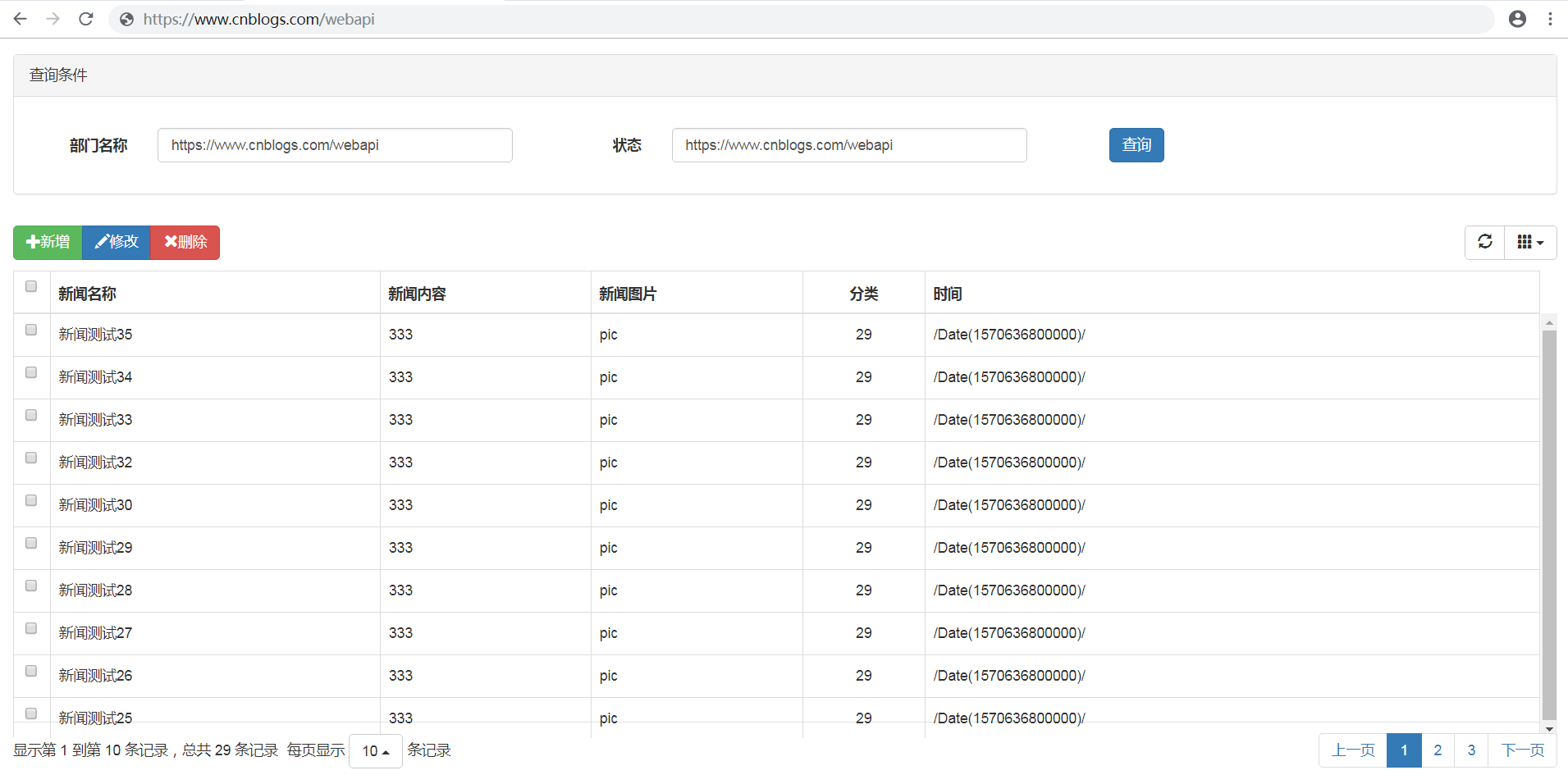
前端代码
<!DOCTYPE html>

<html>

<head>

    <meta name="viewport" content="width=device-width" />

    <title>BootStrap Table使用</title>

    @*1、Jquery组件引用*@

    <script src="https://cdn.staticfile.org/jquery/3.2.1/jquery.min.js"></script>

    @*2、bootstrap组件引用*@

    <link rel="stylesheet" href="https://cdn.jsdelivr.net/npm/bootstrap@3.3.7/dist/css/bootstrap.min.css">

    <script src="https://cdn.jsdelivr.net/npm/bootstrap@3.3.7/dist/js/bootstrap.min.js"></script>

    @*3、bootstrap table组件以及中文包的引用*@

    <link rel="stylesheet" href="https://unpkg.com/bootstrap-table@1.15.3/dist/bootstrap-table.min.css">

    <script src="https://unpkg.com/bootstrap-table@1.15.3/dist/bootstrap-table.min.js"></script>

    <script src="https://unpkg.com/bootstrap-table@1.15.3/dist/locale/bootstrap-table-zh-CN.min.js"></script>

    @*4、页面Js文件的引用*@

    <script src="~/Scripts/table/Home/Index.js"></script>

</head>

<body>

    <div class="panel-body" style="padding-bottom:0px;">

        <div class="panel panel-default">

            <div class="panel-heading">查询条件</div>

            <div class="panel-body">

                <form id="formSearch" class="form-horizontal">

                    <div class="form-group" style="margin-top:15px">

                        <label class="control-label col-sm-1" for="txt_search_departmentname">部门名称</label>

                        <div class="col-sm-3">

                            <input type="text" class="form-control" id="txt_search_departmentname">

                        </div>

                        <label class="control-label col-sm-1" for="txt_search_statu">状态</label>

                        <div class="col-sm-3">

                            <input type="text" class="form-control" id="txt_search_statu">

                        </div>

                        <div class="col-sm-4" style="text-align:left;">

                            <button type="button" style="margin-left:50px" id="btn_query" class="btn btn-primary">查询</button>

                        </div>

                    </div>

                </form>

            </div>

        </div>

        <div id="toolbar" class="btn-group">

            <button id="btn_add" type="button" class="btn btn-success">

                <span class="glyphicon glyphicon-plus" aria-hidden="true"></span>新增

            </button>

            <button id="btn_edit" type="button" class="btn btn-primary">

                <span class="glyphicon glyphicon-pencil" aria-hidden="true"></span>修改

            </button>

            <button id="btn_delete" type="button" class="btn btn-danger">

                <span class="glyphicon glyphicon-remove" aria-hidden="true"></span>删除

            </button>

        </div>

        <table id="tb_departments"></table>

    </div>

</body>

</html>
js代码
$(function () {

    //1.初始化Table

    var oTable = new TableInit();

    oTable.Init();

    //2.初始化Button的点击事件

    var oButtonInit = new ButtonInit();

    oButtonInit.Init();

});

var TableInit = function () {

    var oTableInit = new Object();

    //初始化Table

    oTableInit.Init = function () {

        $('#tb_departments').bootstrapTable({

            url: '/Admin/news/getlist1',         //请求后台的URL(*)

            method: 'get',                      //请求方式(*)

            dataType: 'json',

            toolbar: '#toolbar',                //工具按钮用哪个容器

            theadClasses:'.thead-light',

            striped: true,                      //是否显示行间隔色

            cache: false,                       //是否使用缓存,默认为true,所以一般情况下需要设置一下这个属性(*)

            pagination: true,                   //是否显示分页(*)

            showPaginationSwitch: false,        //是否显示分页数

            sortable: false,                     //是否启用排序

            sortName: "title",                     //是否启用排序

            sortOrder: "desc",                   //排序方式

            queryParams: oTableInit.queryParams,//传递参数(*)

            queryParamsType: '',                //如果要在oTableInit.queryParams方法获取pageNumber和pageSize的值,需要将此值设置为空字符串(*)

            sidePagination: "server",           //分页方式:client客户端分页,server服务端分页(*)

            pageNumber:1,                       //初始化加载第一页,默认第一页

            pageSize: 10,                       //每页的记录行数(*)

            pageList: [10, 25, 50, 100],        //可供选择的每页的行数(*)

            search: false,                       //是否显示表格搜索,此搜索是客户端搜索,不会进服务端,所以,个人感觉意义不大

            strictSearch: true,

            showColumns: true,                  //是否显示所有的列

            showRefresh: true,                  //是否显示刷新按钮

            minimumCountColumns: 2,             //最少允许的列数

            clickToSelect: true,                //是否启用点击选中行

            singleSelect: false,                 //是否单选模式

            height: $(window).height() - 200,   //table总高,如果没有设置height属性,表格自动根据记录条数觉得表格高度

            uniqueId: "ID",                     //每一行的唯一标识,一般为主键列

            showToggle: false,                    //是否显示详细视图和列表视图的切换按钮

            cardView: false,                    //是否显示详细视图

            detailView: false,                   //是否显示父子表

            paginationPreText: "上一页",

            paginationNextText: "下一页",

            columns: [{

                checkbox: true

            }, {

                field: 'title',

                title: '新闻名称'

            }, {

                field: 'cons',

                title: '新闻内容'

            }, {

                field: 'pic',

                title: '新闻图片'

            }, {

                field: 'classID',

                title: '分类',

                align: 'center'

            }, {

                    field: 'times',

                    title: '时间'

                },]

        });

    };

    //得到查询的参数

    oTableInit.queryParams = function (params) {

        // 特别说明:

        //这里的键的名字和控制器的变量名必须一直,这边改动,控制器也需要改成一样的

     // 如果queryParamsType=limit,params包含{limit, offset, search, sort, order}

     // 如果queryParamsType!=limit,params包含{pageSize, pageNumber, searchText, sortName, sortOrder}

        var temp = {

            pageSize: params.pageSize,   //页面大小

            pageNumber: params.pageNumber,  //页码

            departmentname: $("#txt_search_departmentname").val(),

            statu: $("#txt_search_statu").val()

        };

        return temp;

    };

    return oTableInit;

};

var ButtonInit = function () {

    var oInit = new Object();

    var postdata = {};

    oInit.Init = function () {

        $("#btn_add").click(function () {

            alert("add")

        });

        $("#btn_edit").click(function () {

            var arrselections = $("#tb_departments").bootstrapTable('getSelections');

            if (arrselections.length > 1) {

                alert('只能选择一行进行编辑');

                return;

            }

            if (arrselections.length <= 0) {

                alert('请选择有效数据');

                return;

            }

            alert("edit")

            //$("#myModalLabel").text("编辑");

            //$("#txt_departmentname").val(arrselections[0].DEPARTMENT_NAME);

            //$("#txt_parentdepartment").val(arrselections[0].PARENT_ID);

            //$("#txt_departmentlevel").val(arrselections[0].DEPARTMENT_LEVEL);

            //$("#txt_statu").val(arrselections[0].STATUS);

            //postdata.DEPARTMENT_ID = arrselections[0].DEPARTMENT_ID;

            //$('#myModal').modal();

        });

        $("#btn_delete").click(function () {

            var arrselections = $("#tb_departments").bootstrapTable('getSelections');

            if (arrselections.length <= 0) {

                alert('请选择有效数据');

                return;

            }

            Ewin.confirm({ message: "确认要删除选择的数据吗?" }).on(function (e) {

                if (!e) {

                    return;

                }

                $.ajax({

                    type: "post",

                    url: "/Home/Delete",

                    data: { "": JSON.stringify(arrselections) },

                    success: function (data, status) {

                        if (status == "success") {

                            toastr.success('提交数据成功');

                            $("#tb_departments").bootstrapTable('refresh');

                        }

                    },

                    error: function () {

                        toastr.error('Error');

                    },

                    complete: function () {

                    }

                });

            });

        });

        $("#btn_submit").click(function () {

            //postdata.DEPARTMENT_NAME = $("#txt_departmentname").val();

            //postdata.PARENT_ID = $("#txt_parentdepartment").val();

            //postdata.DEPARTMENT_LEVEL = $("#txt_departmentlevel").val();

            //postdata.STATUS = $("#txt_statu").val();

            //$.ajax({

            //    type: "post",

            //    url: "/Home/GetEdit",

            //    data: { "": JSON.stringify(postdata) },

            //    success: function (data, status) {

            //        if (status == "success") {

            //            toastr.success('提交数据成功');

            //            $("#tb_departments").bootstrapTable('refresh');

            //        }

            //    },

            //    error: function () {

            //        toastr.error('Error');

            //    },

            //    complete: function () {

            //    }

            //});

        });

        $("#btn_query").click(function () {

            $("#tb_departments").bootstrapTable('refresh');

        });

    };

    return oInit;

};
接口代码
public JsonResult getlist1(int pageSize, int pageNumber, string departmentname, string statu)

        {

            var total = ;

            var list=bllNews.FindPageList(pageNumber, pageSize, out total, x=>x.passed=, false, x => x.ID).ToList();

            return Json(new { total = total, rows = list }, JsonRequestBehavior.AllowGet);

        }
还可以实现无限极树形网格,需要用到插件jquery-treegrid
官方演示https://www.bootstrap-table.com.cn/examples/extensions/treegrid/
表格插件BootStrap-Table使用教程的更多相关文章
- 好用的自适应表格插件-bootstrap table (支持固定表头)
最近工作中找到了一款十分好用的表格插件,不但支持分页,样式,搜索,事件等等表格插件常有的功能外,最主要的就是他自带的冻结表头功能,让开发制作表格十分容易,不过网上大多都是英文文档,第一次使用会比较麻烦 ...
- 轻量级表格插件Bootstrap Table。拥有强大的支持固定表头、单/复选、排序、分页、搜索及自定义表头等功能。
Bootstrap Table是轻量级的和功能丰富的以表格的形式显示的数据,支持单选,复选框,排序,分页,显示/隐藏列,固定标题滚动表,响应式设计,Ajax加载JSON数据,点击排序的列,卡片视图等. ...
- 【转载】BootStrap表格组件bootstrap table详解
(转载,来源“脚本之家”,作者不详) 一.Bootstrap Table的引入 关于Bootstrap Table的引入,一般来说还是两种方法: 1.直接下载源码,添加到项目里面来.由于Bootstr ...
- [前端插件]Bootstrap Table服务器分页与在线编辑应用总结
先看Bootstrap Table应用效果: 表格用来显示数据库中的数据,数据通过AJAX从服务器加载,同时分页功能有服务器实现,避免客户端分页,在加载大量数据时造成的用户体验不好.还可以设置查询数据 ...
- Bootstrap表格组件 Bootstrap Table
Bootstrap Table是Bootstrap的一个组件 Bootstrap Table Demo:http://issues.wenzhixin.net.cn/bootstrap-table/i ...
- [译]MVC网站教程(四):MVC4网站中集成jqGrid表格插件(系列完结)
目录 1. 介绍 2. 软件环境 3. 在运行示例代码之前(源代码 + 示例登陆帐号) 4. jqGrid和AJAX 5. GridSettings 6. ...
- Bootstrap Table使用方法详解
http://www.jb51.net/article/89573.htm bootstrap-table使用总结 bootstrap-table是在bootstrap-table的基础上写出来的,专 ...
- 使用bootstrap table 插件固定表头时 表头与表格内容无法对齐
在使用bootstrap table开发后台管理系统,表格利用bootstrap-table插件来实现,使用bootstrap-table过程中,会出现表头错位的情况 表头对不齐效果: 解决的方法: ...
- [转]手把手教你--Bootstrap Table表格插件及数据导出(可导出Excel2003及Exce2007)
原文地址:https://blog.csdn.net/javayoucome/article/details/80081771 1.介绍 Bootstrap Table介绍见官网:http://boo ...
- bootstrap table + spring + springmvc + mybatis 实现从前端到后端的表格分页
1.使用准备 前台需要的资源文件,主要有Bootstrap3相关css.js以及bootstrap Table相关css.js: <-- 样式 --> <link rel=" ...
随机推荐
- 阿里云虚拟空间.net 网站错误
Web.config 文件的 <compilation> 元素中的“targetFramework”特性仅用于目标 .NET Framework 版本 4.0 或更高版本(例如“< ...
- vue中js文件中export常见方法及使用
js文件一般放静态资源或动态资源,我将在这两种不同资源的请求下以不同的方式export出来 第一种在js中使用function 动态资源 在vue文件中引用调用这些方法 import进来 在生命周期函 ...
- springboot+RabbitMQ 问题 RabbitListener 动态队列名称:Attribute value must be constant
因为多机环境fanout广播模式,每台机器需要使用自己的队列接受消息 所以尝试使用以下的方案 private static final String QUEUE_NAME="foo.&quo ...
- web应急:新闻源网站劫持
新闻源网站一般权重较高,收录快,能够被搜索引擎优先收录,是黑灰产推广引流的必争之地,很容易成为被攻击的对象.被黑以后主要挂的不良信息内容主要是博彩六合彩等赌博类内容,新闻源网站程序无论是自主开发的还是 ...
- 像修改本机代码一样修改远端服务器的PHP网站
映射vps目录到自己电脑的摸索记录 最近拿discuz做了一个网站,需要修改模板文件之类的,还需要调试微信和QQ登陆的接口.都是些位置零散的小修改,但是有些需要在线上才能调试(QQ微信的oauth登陆 ...
- SharpSocket类库功能介绍
SharpSocket是高性能.轻量级.接口清晰.使用简单的C#语言编写的.NET通信类库.支持TCP收发文本和二进制数据,比如图片.音视频.文档等各类数据.SharpSocket封装了很多底层通信细 ...
- 2019-09-16 http 和 https的区别
一.Http和Https的基本概念 Http:超文本传输协议(Http,HyperText Transfer Protocol)是互联网上应用最为广泛的一种网络协议.设计Http最初的目的是为了提供一 ...
- 写给自己的 SOA 和 RPC 理解
1.SOA SOA(Service-Oriented Architecture)面向服务架构,将应用程序不同功能单元(称为服务)进行拆分,并通过这些服务之间定义良好的接口和契约联系起来. SOA 不是 ...
- Web API接口安全了解
2017版OWASP top 10 将API安全纳入其中,足以说明API被广泛使用且安全问题严重.自己尝试整理一下,但限于本人搬砖经验还不足.水平有限,本文只能算是抛砖引玉,希望大伙不吝赐教. 了解W ...
- android studio学习---模板
Android Studio还为开发人员提供多种模板选项,从而大大提升开发速度.这些模板能自动创建Activity以及必要的XML文件.大家还可以利用这些模板创建出较为基础的Android应用程序,并 ...