
Windows Server 2012 R2安装部署Office Web Apps Server
微软官方参考地址https://technet.microsoft.com/zh-cn/library/jj219455.aspx,建议参考官方说明。
注意:每一步进行完成后重启服务器!!!
一、 安装Office Web Apps的服务器除了Office Web Apps之外,不能安装其他应用。包括不能安装Office,lync,,sharepoint等应用,即要单独部署。(如果安装过以上软件要确保卸载干净);
二、 安装.NET Framework 4.5.2
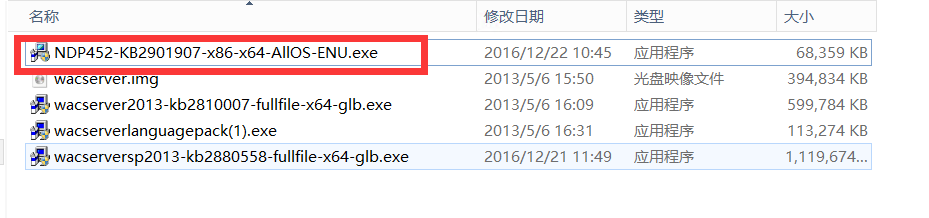
三、 以管理员身份打开 Windows PowerShell 提示符,然后运行此命令示例来安装必需的角色和服务。
Add-WindowsFeature Web-Server,Web-Mgmt-Tools,Web-Mgmt-Console,Web-WebServer,Web-Common-Http,Web-Default-Doc,Web-Static-Content,Web-Performance,Web-Stat-Compression,Web-Dyn-Compression,Web-Security,Web-Filtering,Web-Windows-Auth,Web-App-Dev,Web-Net-Ext45,Web-Asp-Net45,Web-ISAPI-Ext,Web-ISAPI-Filter,Web-Includes,InkandHandwritingServices,NET-Framework-Features,NET-Framework-Core,NET-HTTP-Activation,NET-Non-HTTP-Activ,NET-WCF-HTTP-Activation45
注:如果这一步命令报错,出现这种报错信息,意味着你的本机没有源路径,找不到对应的安装源,这个时候要将win server 2012 r2系统iso文件装载,这里我选择的是D盘,因为winserver的系统装载在D盘这个盘符下,就在命令最后加上源文件的路径,-Source D:\Sources\SxS,报错内容为如图所示:

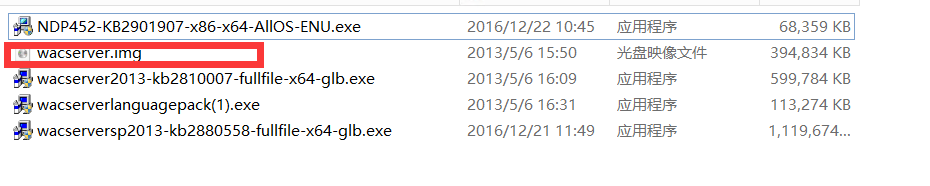
四、 安装Office Web Apps Server
五、 安装Office Web Apps Server SP1
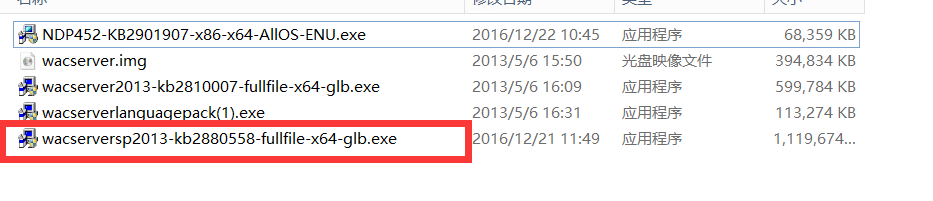
六、 安装Office Web Apps Server语言包

七、 部署 Office Web Apps Server 场
1、创建 Office Web Apps Server 服务器场
以管理员身份打开 Windows PowerShell 提示符
New-OfficeWebAppsFarm -InternalURL "http://servername" -AllowHttp -EditingEnabled

2、验证是否成功创建了 Office Web Apps Server 服务器场
http://servername/hosting/discovery

这个集成的过程,就是启用Office Web Apps服务器场来渲染/编辑SharePoint文档库中的Office文档。
这个配置也很简单,打开SharePoint的PowerShell脚本窗口,执行两句话:
1: New-SPWOPIBinding -ServerName <WacServerName> -AllowHTTP
注:WacServerName为OWA服务器的IP,并且没有<>
2: Set-SPWopiZone internal-http
第一句话是在SharePoint场和Office Web Apps场之间建立关系,其中的AllowHTTP参数和之前的概念是一样的;
第二句话,是配置区域的链接方式,区域分为internal和external,协议分为http和https,默认是internal + https,这里我们使用internal-http,以便和之前配置Office Web Apps服务器场的时候相匹配。
然后就可以用了。
Windows Server 2012 R2安装部署Office Web Apps Server的更多相关文章
- [转载]部署Office Web Apps Server并配置其与SharePoint 2013的集成
Office Web Apps Server 是新的 Office 服务器产品,它提供 Word.PowerPoint.Excel 和 OneNote 的基于浏览器的版本.单个 Office Web ...
- 部署Office Web Apps Server并配置其与SharePoint 2013的集成
部署Office Web Apps Server并配置其与SharePoint 2013的集成 Office Web Apps Server 是新的 Office 服务器产品,它提供 Word.P ...
- office web apps server安装部署
操作系统:windows 2012 软件下载地址: 链接:https://pan.baidu.com/s/1c3WWFs8 密码:4dcy NDP452-KB2901954-Web.exe(.Net ...
- Office Web Apps Server 概述
Office Web Apps Server 是新的 Office 服务器产品,它提供 Word.PowerPoint.Excel 和 OneNote 的基于浏览器的版本.单个 Office Web ...
- Office Web Apps Server 2013与PDF(一)
好吧--这个消息有点旧,迟了将近4个月. Office Web Apps是微软各大服务产品系列中的一个基础服务,可以为SharePoint 2013.Exchange 2013.Lync 2013提供 ...
- Windows Server 2012 R2 安装.NET Framework 3.5报错
简单记录一下,Windows Server 2012 R2 安装.NET Framework 3.5报错,下面是解决方法 载入ISO文件Windows Server 2012 R2,而且在安装的过程中 ...
- windows server 2012 r2 安装无法找到install.wim 错误代码0x80070026,以及制作U启动盘决解ISO文件超过5G大小限制的解决方案(转)
戴尔服务器r530 windows server 2012 r2 安装无法找到install.wim 错误代码0x80070026,以及制作U启动盘决解ISO文件超过5G大小限制的解决方案 关于在服务 ...
- SCCM 2012 R2安装部署过程和问题(一)
在进行Windows Server 2012 R2虚拟化测试前,由于需要安装,部署和管理很多的服务器,自然会想到该如何提高效率和有效的管理.在Windows Server 2008的时代微软已经提供称 ...
- 安装Office Web Apps Server 2013 – KB2592525安装失败
在Windows Server 2008 R2上安装 office web apps Server 的其中一个先决条件是 安装KB2592525. 但由于服务器已经打了SP1及其它大部分的patch, ...
随机推荐
- mysql 表联结,内部联结
mysql> select * from user; +------+----------+-----------+ | id | name | address | +------+------ ...
- Make sure you've included captcha.urls as explained in the INSTALLATION section on
原因:django-simple-captcha将客户端编号与验证码默认存储在数据库中 解决办法: python manage.py migrate
- 移动端点击事件兼容问题,在pc端可以点,在手机上不可以点
ms-click="showCodeExplain()" onClick="javascript:;" 在点击事件后面加上onClick="javas ...
- docker_概念
为什么有docker? 1. 宿主机可以虚拟一个硬件平台:其上会有内核(在虚拟机上的操作系统),内核负责资源调度和通信:内核之上会有用户态,运行在用户态(用户空间)之上多是应用程序,也就是进程.硬件( ...
- 范仁义html+css课程---6、表格
范仁义html+css课程---6.表格 一.总结 一句话总结: 表格中最常用的元素就是table.tr.td.th,还有语义化的thead.tbody.tfoot标签 1.表格构成三个基本要素? t ...
- 工具系列 | 使用Lodop进行WEB打印程序开发
Lodop(标音:劳道谱,俗称:露肚皮)是专业WEB控件,用它既可裁剪输出页面内容,又可用程序代码直接实现 复杂打印.控件功能强大,却简单易用,所有调用如同JavaScript扩展语句. WEB套打可 ...
- Java多个线程顺序打印数字
要求 启动N个线程, 这N个线程要不间断按顺序打印数字1-N. 将问题简化为3个线程无限循环打印1到3 方法一: 使用synchronized 三个线程无序竞争同步锁, 如果遇上的是自己的数字, 就打 ...
- net use命令详解(转)
net use命令详解 1)建立空连接: net use \\IP\ipc$ "" /user:"" (一定要注意:这一行命令中包含了3个空格) 2)建立非空连 ...
- springboot 整合mongodb
Mongodb Mongodb是为快速开发互联网Web应用而构建的数据库系统,其数据模型和持久化策略就是为了构建高读/写吞吐量和高自动灾备伸缩性的系统. 在pom.xml中添加相关依赖 <!-- ...
- EasyDSS高性能RTMP、HLS(m3u8)、HTTP-FLV、RTSP流媒体服务器同步输出http-flv协议流是怎么实现的?
http-flv是什么 http-flv是以http为传输协议,flv媒体格式为内容的方式实时下载flv音视频帧.为什么选择flv格式而非mp4?原因是mp4必须要有moov box或者moof bo ...