
纯 CSS 画 iphone
好几天没有更新了,直接上效果吧,哈哈!(我想这个应该大部分都会!哈哈哈!)
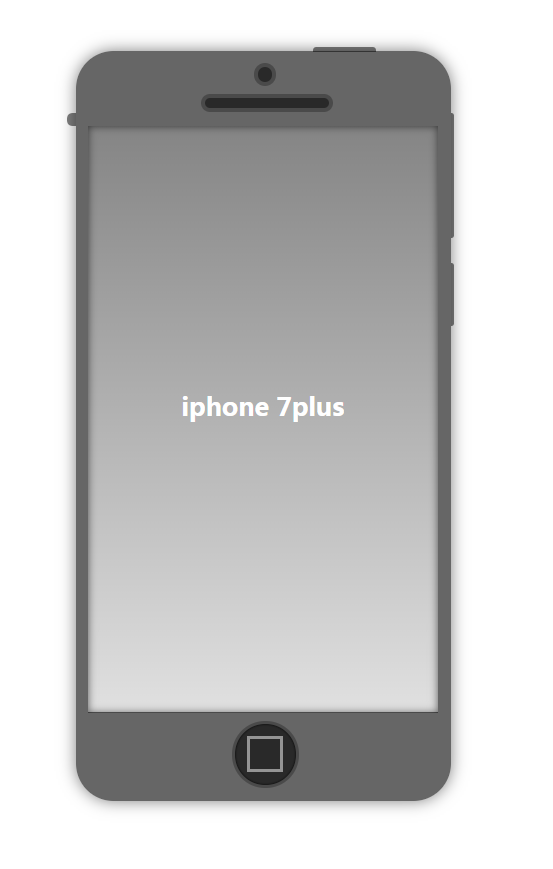
代码如下:
html:
<div class="container">

    <div class="round"></div>

    <div class="longround"></div>

    <div class="screen">iphone 7plus</div>

     <div class="home"></div>

</div>
css:
<style type="text/css">

        .container {

            width: 300px;

            height: 600px;

            background-color: rgba(0, 0, 0, .6);

            margin: 50px auto;

            border-radius: 30px;

            box-shadow: 0 0 20px rgba(0, 0, 0, .5);

            position: relative;

            z-index:;

        }

        .container::before {

            content: "";

            width: 3px;

            height: 50px;

            background: rgba(0, 0, 0, .5);

            position: absolute;

            top: 170px;

            left: 300px;

            border-radius: 0 4px 4px 0;

        }

        .container::after {

            content: "";

            width: 3px;

            height: 100px;

            background: rgba(0, 0, 0, .5);

            position: absolute;

            top: 50px;

            left: 300px;

            border-radius: 0 4px 4px 0;

        }

        .container .round {

            width: 12px;

            height: 12px;

            border: 3px solid #4a4a4a;

            background-color: rgba(0, 0, 0, .6);

            border-radius: 50%;

            position: absolute;

            left: 50%;

            top: 10px;

            margin-left: -7.5px;

        }

        .container .longround {

            position: absolute;

            width: 100px;

            height: 8px;

            border: 3px solid #4a4a4a;

            background-color: rgba(0, 0, 0, .6);

            border-radius: 30px;

            position: absolute;

            left: 50%;

            margin-left: -50px;

            top: 35px;

        }

        .container .screen {

            width: 280px;

            height: 470px;

            background: linear-gradient(to bottom, rgba(255, 255, 255, .2), rgba(255, 255, 255, .8));

            position: absolute;

            top: 60px;

            left: 50%;

            margin-left: -140px;

            color: #fff;

            text-align: center;

            font-weight: bold;

            font-size: 20px;

            line-height: 450px;

            box-shadow: 0 0 10px rgba(0, 0, 0, .6) inset;

        }

        .container .screen::before {

            content: "";

            width: 50px;

            height: 4px;

            background: rgba(0, 0, 0, .5);

            border-radius: 3px 3px 0 0;

            position: absolute;

            top: -63px;

            left: 180px;

        }

        .container .screen::after {

            content: "";

            width: 7px;

            height: 10px;

            background: rgba(0, 0, 0, .5);

            border-radius: 5px 0 0 5px;

            position: absolute;

            top: -10px;

            left: -17px;

        }

        .container .home {

            width: 50px;

            height: 50px;

            border-radius: 50%;

            background-color: rgba(0, 0, 0, .6);

            border: 2px solid #4a4a4a;

            position: absolute;

            bottom: 10px;

            left: 50%;

            margin-left: -25px;

            box-shadow: 0 0 2px black inset;

        }

        .container .home::before {

            content: "";

            width: 25px;

            height: 25px;

            background-color: transparent;

            border: 2px solid rgba(255, 255, 255, .5);

            position: absolute;

            left: 10px;

            top: 10px;

        }

</style>
大家一起努力吧!!
纯 CSS 画 iphone的更多相关文章
- 用纯css画个三角形
用纯css画个三角形以下是源代码: <!DOCTYPE html PUBLIC "-//W3C//DTD XHTML 1.0 Transitional//EN" " ...
- 纯css画三角形
纯css画三角形与border元素相关 设置border的属性 width: 100px; height: 100px; border-style: solid; border-width: 100p ...
- CSS之纯CSS画的基本图形(矩形、圆形、三角形、多边形、爱心、八卦等)
图形包括基本的矩形.圆形.椭圆.三角形.多边形,也包括稍微复杂一点的爱心.钻石.阴阳八卦等.当然有一些需要用到CSS3的属性,所以在你打开这篇文章的时候,我希望你用的是firefox或者chrome, ...
- 【原创】纯CSS画黄金梅丽号!
代码如下 <!DOCTYPE html> <!-- saved from url=(0055)http://jadyoap.bj.bcebos.com/ife%2FcssCatAni ...
- 纯CSS画的基本图形
图形包括基本的矩形.圆形.椭圆.三角形.多边形,也包括稍微复杂一点的爱心.钻石.阴阳八卦等.当然有一些需要用到CSS3的属性,所以在你打开这篇文章的时候,我希望你用的是firefox或者chrome, ...
- 用纯CSS画大白
纯CSS打造网页大白知识点: 首先要把大白分割,整体baymax中包含header(eye1,eye2,mouth),torso(heart),belly(cover),l-bigfinge ...
- 理解纯CSS画三角形
pure css draw a triangle code { display: inline-block; width: 300px; background-color: #E0E0E0 } .te ...
- 8.17 纯css画一个着重号图标
今天看到一个同事写的着重号图标,我以为是图片,仔细一看,是span标签!哇!!学习一下哈哈 图标长这样: CSS代码: .hint{ display: inline-block; width: 20p ...
- 纯css 画气泡
我们知道运用css可以绘画出各式各样的形状:三角形,圆形,正方形,椭圆形,平行四边形等等,而通过他们之间进行两两组合可以变换出各种意想不到的效果图,气泡框就是其中一个.最简单的气泡框就是一个矩形框+一 ...
随机推荐
- 第06组 Alpha冲刺(4/6)
队名:拾光组 组长博客链接 作业博客链接 团队项目情况 燃尽图(组内共享) 组长:宋奕 过去两天完成了哪些任务 主要完成了用户联系模块的接口设计 完善后端的信息处理 GitHub签入记录 接下来的计划 ...
- Linux:读取文件,每行拆分,并比较拆分数组长度
读取文件,每行拆分,并比较拆分数组长度 #!/bin/bash FILENAME=./.txt function While_read_LINE(){ cat $FILENAME | while re ...
- Python Selenium Webdriver常用方法总结
Python Selenium Webdriver常用方法总结 常用方法函数 加载浏览器驱动: webdriver.Firefox() 打开页面:get() 关闭浏览器:quit() 最大化窗口: m ...
- 针对nginx,来具体聊聊正向代理与反向代理 (转载)
https://www.sohu.com/a/235704408_468627 先来说说什么是代理服务器? 所谓代理服务器就是位于发起请求的客户端与原始服务器端之间的一台跳板服务器,正向代理可以隐藏客 ...
- PostgreSQL中的表连接操作
- Git push origin dev-rgq-istokenstatus 【dev-rgq-istokenstatus -> dev-rgq-istokenstatus】
RenGuoQiang@PC-RENGUOQIANG MINGW64 /d/zgg/zgg-crm (dev-rgq-istokenstatus) $ git push origin dev-rgq- ...
- express下使用ES6
//环境切换配置 package.json scripts:{ "service": "NODE_ENV=production PORT=3000 npm start&q ...
- [LeetCode] 351. Android Unlock Patterns 安卓解锁模式
Given an Android 3x3 key lock screen and two integers m and n, where 1 ≤ m ≤ n ≤ 9, count the total ...
- [LeetCode] 445. Add Two Numbers II 两个数字相加之二
You are given two linked lists representing two non-negative numbers. The most significant digit com ...
- GenericObjectPool
commons-pool2源码走读(四) 对象池实现GenericObjectPool 2018年05月27日 18:24:56 蓝墨49 阅读数 1787 版权声明:本文为博主原创文章,遵循CC ...