
eclipse下整合springboot和mybatis
1.新建maven项目
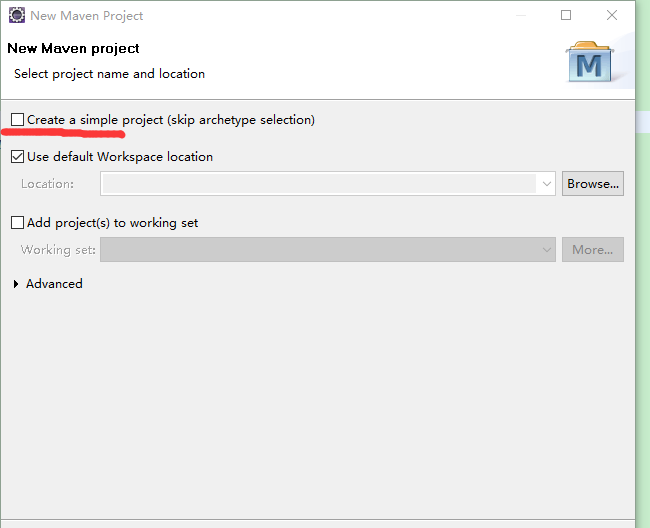
先新建一个maven项目,勾选上creat a simple project,填写groupid,artifactid
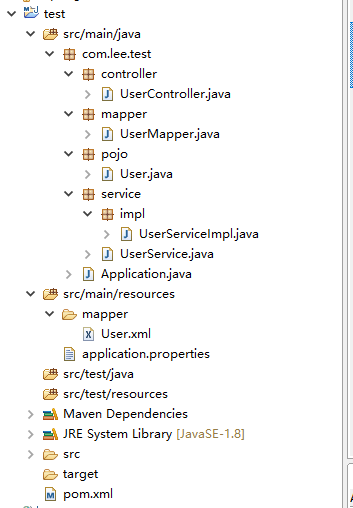
2.建立项目结构
3.添加依赖
<parent>

    <groupId>org.springframework.boot</groupId>

    <artifactId>spring-boot-starter-parent</artifactId>

    <version>2.0.3.RELEASE</version>

    <relativePath/> <!-- lookup parent from repository -->

</parent>

<properties>

    <project.build.sourceEncoding>UTF-8</project.build.sourceEncoding>

    <project.reporting.outputEncoding>UTF-8</project.reporting.outputEncoding>

    <java.version>1.8</java.version>

</properties>

<dependencies>

    <dependency>

        <groupId>org.springframework.boot</groupId>

        <artifactId>spring-boot-starter</artifactId>

    </dependency>

    <dependency>

        <groupId>org.springframework.boot</groupId>

        <artifactId>spring-boot-starter-test</artifactId>

        <scope>test</scope>

    </dependency>

    <dependency>

        <groupId>org.springframework.boot</groupId>

        <artifactId>spring-boot-starter-web</artifactId>

    </dependency>

     <dependency>

         <groupId>org.mybatis.spring.boot</groupId>

         <artifactId>mybatis-spring-boot-starter</artifactId>

         <version>1.3.2</version>

     </dependency>

     <dependency>

        <groupId>mysql</groupId>

        <artifactId>mysql-connector-java</artifactId>

    </dependency>

    <dependency>

      <groupId>junit</groupId>

      <artifactId>junit</artifactId>

      </dependency>

</dependencies>

<build>

    <plugins>

        <plugin>

            <groupId>org.springframework.boot</groupId>

            <artifactId>spring-boot-maven-plugin</artifactId>

        </plugin>

    </plugins>

</build>
4.代码编写
在包的最外层添加启动类
package com.lee.test;

import org.springframework.boot.SpringApplication;

import org.springframework.boot.autoconfigure.SpringBootApplication;

import org.springframework.cache.annotation.EnableCaching;

@SpringBootApplication

@EnableCaching

public class Application {

	public static void main(String[] args) {

		SpringApplication.run(Application.class, args);

	}

}
实体类
package com.lee.test.pojo;

import org.springframework.stereotype.Component;

@Component

public class User {

	private int id;

	private String name;

	private String telephone;

	public int getId() {

		return id;

	}

	public void setId(int id) {

		this.id = id;

	}

	public String getName() {

		return name;

	}

	public void setName(String name) {

		this.name = name;

	}

	public String getTelephone() {

		return telephone;

	}

	public void setTelephone(String telephone) {

		this.telephone = telephone;

	}

}
mapper接口
package com.lee.test.mapper;

import java.util.List;

import org.apache.ibatis.annotations.Mapper;

import com.lee.test.pojo.User;

@Mapper

public interface UserMapper {

	List<User> getUser(int id);

}
service接口
package com.lee.test.service;

import java.util.List;

import com.lee.test.pojo.User;

public interface UserService {

	public List<User> getUser(int id);

}
service接口实现
package com.lee.test.service.impl;

import java.util.List;

import org.springframework.beans.factory.annotation.Autowired;

import org.springframework.stereotype.Service;

import com.lee.test.mapper.UserMapper;

import com.lee.test.pojo.User;

import com.lee.test.service.UserService;

@Service

public class UserServiceImpl implements UserService {

	@Autowired

	private UserMapper userMapper;

	@Override

	public List<User> getUser(int id) {

		return userMapper.getUser(id);

	}

}
controller层
package com.lee.test.controller;

import java.util.List;

import org.springframework.beans.factory.annotation.Autowired;

import org.springframework.web.bind.annotation.RequestMapping;

import org.springframework.web.bind.annotation.RequestParam;

import org.springframework.web.bind.annotation.RestController;

import com.lee.test.pojo.User;

import com.lee.test.service.UserService;

@RestController

public class UserController {

	@Autowired

	private UserService userService;

	@RequestMapping("/getUser")

	public List<User> getUser(@RequestParam("id") int id) {

		return userService.getUser(id);

	}

}
还有mapper.xml的实现
<?xml version="1.0" encoding="UTF-8"?>

<!DOCTYPE mapper PUBLIC "-//mybatis.org//DTD Mapper 3.0//EN" "http://www.mybatis.org/dtd/mybatis-3-mapper.dtd">

<mapper namespace="com.lee.test.mapper.UserMapper">

   <select id="getUser" parameterType="java.lang.Integer" resultType="com.lee.test.pojo.User">

    select * from t_user where id = #{id}

   </select>

</mapper>
最后是一些配置在application.properties中
spring.datasource.driverClassName=com.mysql.jdbc.Driver

spring.datasource.url=jdbc:mysql://localhost:3306/test?useUnicode=true&characterEncoding=UTF-8

spring.datasource.username=root

spring.datasource.password=root

mybatis.mapper-locations: classpath:mapper/*.xml
eclipse下整合springboot和mybatis的更多相关文章
- Seata整合SpringBoot和Mybatis
Seata整合SpringBoot和Mybatis 一.背景 二.实现功能 三.每个服务使用到的技术 1.账户服务 2.订单服务 四.服务实现 1.账户服务实现 1.引入jar包 2.项目配置 3.建 ...
- 2分钟在eclipse下使用SpringBoot搭建Spring MVC的WEB项目
1. 首先用eclipse创建一个maven工程, 普通maven工程即可 2. 修改pom如下: <?xml version="1.0" encoding="UT ...
- intellij idea 整合springboot和mybatis
参考: http://blog.csdn.net/winter_chen001/article/details/77249029
- 基于 SpringBoot2.0+优雅整合 SpringBoot+Mybatis
SpringBoot 整合 Mybatis 有两种常用的方式,一种就是我们常见的 xml 的方式 ,还有一种是全注解的方式.我觉得这两者没有谁比谁好,在 SQL 语句不太长的情况下,我觉得全注解的方式 ...
- SpringBoot和Mybatis的整合
这里介绍两种整合SpringBoot和Mybatis的模式,分别是“全注解版” 和 “注解xml合并版”. 前期准备开发环境 开发工具:IDEAJDK:1.8技术:SpringBoot.Maven.M ...
- SpringBoot与Mybatis整合方式01(源码分析)
前言:入职新公司,SpringBoot和Mybatis都被封装了一次,光用而不知道原理实在受不了,于是开始恶补源码,由于刚开始比较浅,存属娱乐,大神勿喷. 就如网上的流传的SpringBoot与Myb ...
- springboot+springmvc+mybatis项目整合
介绍: 上篇给大家介绍了ssm多模块项目的搭建,在搭建过程中spring整合springmvc和mybatis时会有很多的东西需要我们进行配置,这样不仅浪费了时间,也比较容易出错,由于这样问题的产生, ...
- SpringBoot系列——MyBatis整合
前言 MyBatis官网:http://www.mybatis.org/mybatis-3/zh/index.html 本文记录springboot与mybatis的整合实例:1.以注解方式:2.手写 ...
- 零基础IDEA整合SpringBoot + Mybatis项目,及常见问题详细解答
开发环境介绍:IDEA + maven + springboot2.1.4 1.用IDEA搭建SpringBoot项目:File - New - Project - Spring Initializr ...
随机推荐
- ZOJ - 3992 - One-Dimensional Maze (思维)
题意: 一条长度为n的直线,你一开始在位置m上 其中每个整点都有一个字符'L'或'R',如果是'L'那么你必须往左走一步,否则往右走一步 如果你到达位置1或位置n你任务就完成了 不过有可能你永远到不了 ...
- Python学习笔记(1)对象类型
强制转换字符串函数str 如果我们求2的一百万次方是多少那么我们可以 print(2**1000000) 如果我们要求2的一百万次方有多少位那么我们可以用str函数强制转换成字符串然后len函数计算 ...
- python_ 学习笔记(基础语法)
python的注释 使用(#)对单行注释 使用('''或者""")多行注释,下面的代码肯定了python的牛逼 print("python是世界上最好的语言吗? ...
- 每日命令:(5)rm
昨天学习了创建文件和目录的命令mkdir ,今天学习一下linux中删除文件和目录的命令: rm命令.rm是常用的命令,该命令的功能为删除一个目录中的一个或多个文件或目录,它也可以将某个目录及其下的所 ...
- Go:闭包
闭包就是一个函数和与其相关的引用环境组合的一个整体(实体). package main import "fmt" func add() func(int) int { i := 0 ...
- Centos6文本安装教程
Centos6.4文本方式安装 虚拟机中文本安装(内存512),内存大于512默认为图形安装 1.选择安装媒体,在vbox中选skip跳过 2.选择安装语言(chinese(simplifired)简 ...
- 关于python字典中文显示的处理办法
最近工作中遇到字典包含中文,显示\uxxxx的问题,怎么转换都无法输入正常的中文:{"gc": "\u4eba\u751f\u7f8e\u597d", &quo ...
- 51NOD欧姆诺姆和项链——KMP算法(非水题)
>>点击进入原题测试<< 思路:好久不见,今天要开始真正写题了.这个题之前我的理解有点问题,导致写了很久最终都是一直都只能过样例.需要注意的是输出中每一个“1”都是和别的输出相 ...
- hdu 2094拓扑排序map实现记录
#include<stdio.h> #include<iostream> #include<algorithm> #include<string> #i ...
- tomcat服务器配置把Http协议强制转化为Https
1)在命令提示符窗口,进入Tomcat目录,执行以下命令: keytool -genkey -alias tomcat -keyalg RSA -keypass changeit -storepass ...