
ElasticSearch 索引查询使用指南——详细版
- 我们通常用用
_catAPI检测集群是否健康。 确保9200端口号可用:
curl 'localhost:9200/_cat/health?v'
绿色表示一切正常, 黄色表示所有的数据可用但是部分副本还没有分配,红色表示部分数据因为某些原因不可用.
2.通过如下语句,我们可以获取集群的节点列表:
curl 'localhost:9200/_cat/nodes?v'
3。通过如下语句,列出所有索引:
curl 'localhost:9200/_cat/indices?v'
返回结果:
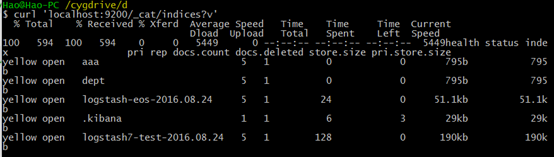
4.创建索引
现在我们创建一个名为“customer”的索引,然后再查看所有的索引:
curl -XPUT 'localhost:9200/customer?pretty'
curl 'localhost:9200/_cat/indices?v'
结果如下:

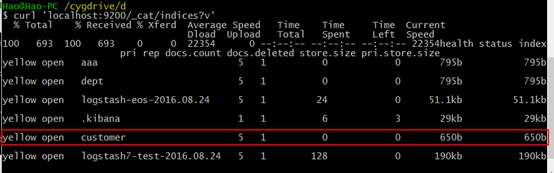
上图中红框所表示的是:我们有一个叫customer的索引,它有五个私有的分片以及一个副本,在它里面有0个文档。
5.插入和获取
现在我么插入一些数据到集群索引。我们必须给ES指定所以的类型。如下语句:"external" type, ID:1:
主体为JSON格式的语句: { "name": "John Doe" }
curl -XPUT 'localhost:9200/customer/external/1?pretty' -d '
{
"name": "John Doe"
}'
返回结果为:create:true 表示插入成功。
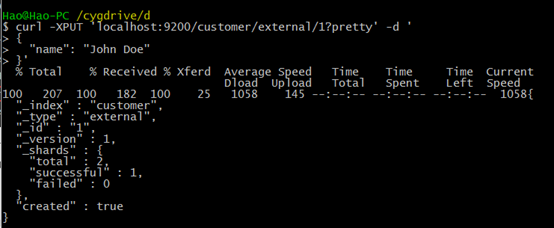
获取GET,语句如下:
curl -XGET 'localhost:9200/customer/external/1?pretty'
其中含义为:获取customer索引下类型为external,id为1的数据,pretty参数表示返回结果格式美观。
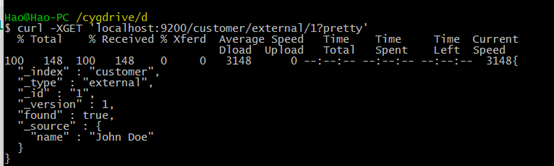
6.删除索引 DELETE
curl -XDELETE 'localhost:9200/customer?pretty'
curl 'localhost:9200/_cat/indices?v'
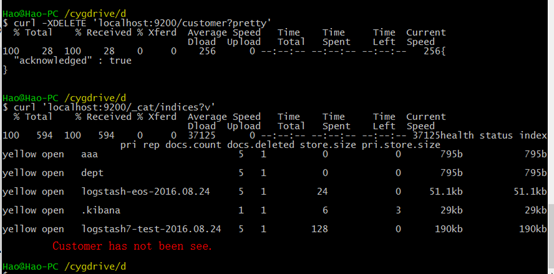
表示索引删除成功。
7.通过以上命令语句的学习,我们发现索引的增删改查有一个类似的格式,总结如下:
curl -X<REST Verb> <Node>:<Port>/<Index>/<Type>/<ID>
<REST Verb>:REST风格的语法谓词
<Node>:节点ip
<port>:节点端口号,默认9200
<Index>:索引名
<Type>:索引类型
<ID>:操作对象的ID号
8 修改数据
curl -XPUT 'localhost:9200/customer/external/1?pretty' -d '
{
"name": "John Doe"
}'
curl -XPUT 'localhost:9200/customer/external/1?pretty' -d '
{
"name": "Jane Doe"
}'
上述命令语句是:先新增id为1,name为John Doe的数据,然后将id为1的name修改为Jane Doe。
9.更新数据
9.1 这个例子展示如何将id为1文档的name字段更新为Jane Doe:
curl -XPOST 'localhost:9200/customer/external/1/_update?pretty' -d '
{
"doc": { "name": "Jane Doe" }
}'
9.2 这个例子展示如何将id为1数据的name字段更新为Jane Doe同时增加字段age为20:
curl -XPOST 'localhost:9200/customer/external/1/_update?pretty' -d '
{
"doc": { "name": "Jane Doe", "age": 20 }
}'
9.3 也可以通过一些简单的scripts来执行更新。一下语句通过使用script将年龄增加5:
curl -XPOST 'localhost:9200/customer/external/1/_update?pretty' -d '
{
"script" : "ctx._source.age += 5"
}'
10 删除数据
删除数据那是相当的直接. 下面的语句将执行删除Customer中ID为2的数据:
curl -XDELETE 'localhost:9200/customer/external/2?pretty'
11 批处理
举例:
下面语句将在一个批量操作中执行创建索引:
curl -XPOST 'localhost:9200/customer/external/_bulk?pretty' -d '
{"index":{"_id":"1"}}
{"name": "John Doe" }
{"index":{"_id":"2"}}
{"name": "Jane Doe" }
'
下面语句批处理执行更新id为1的数据然后执行删除id为2的数据
curl -XPOST 'localhost:9200/customer/external/_bulk?pretty' -d '
{"update":{"_id":"1"}}
{"doc": { "name": "John Doe becomes Jane Doe" } }
{"delete":{"_id":"2"}}
'
12.导入数据集
你可以点击这里下载示例数据集:accounts.json
其中每个数据都是如下格式:
{
"index":{"_id":"1"}
}
{
"account_number": 0,
"balance": 16623,
"firstname": "Bradshaw",
"lastname": "Mckenzie",
"age": 29,
"gender": "F",
"address": "244 Columbus Place",
"employer": "Euron",
"email": "bradshawmckenzie@euron.com",
"city": "Hobucken",
"state": "CO"
}
导入示例数据集:
curl -XPOST 'localhost:9200/bank/account/_bulk?pretty' --data-binary "@accounts.json"
curl 'localhost:9200/_cat/indices?v'

上图红框表示我们已经成功批量导入1000条数据索引到bank索引中。
13.查询
Sample:
curl 'localhost:9200/bank/_search?q=*&pretty'
{
"took" : 63,
"timed_out" : false,
"_shards" : {
"total" : 5,
"successful" : 5,
"failed" : 0
},
"hits" : {
"total" : 1000,
"max_score" : 1.0,
"hits" : [ {
"_index" : "bank",
"_type" : "account",
"_id" : "1",
"_score" : 1.0, "_source" : {"account_number":1,"balance":39225,"firstname":"Amber","lastname":"Duke","age":32,"gender":"M","address":"880 Holmes Lane","employer":"Pyrami","email":"amberduke@pyrami.com","city":"Brogan","state":"IL"}
}, {
"_index" : "bank",
"_type" : "account",
"_id" : "6",
"_score" : 1.0, "_source" : {"account_number":6,"balance":5686,"firstname":"Hattie","lastname":"Bond","age":36,"gender":"M","address":"671 Bristol Street","employer":"Netagy","email":"hattiebond@netagy.com","city":"Dante","state":"TN"}
}, {
"_index" : "bank",
"_type" : "account",
上面示例返回所有bank中的索引数据。其中 q=* 表示匹配索引中所有的数据。
等价于:
curl -XPOST 'localhost:9200/bank/_search?pretty' -d '
{
"query": { "match_all": {} }
}'
14 查询语言
匹配所有数据,但只返回1个:
curl -XPOST 'localhost:9200/bank/_search?pretty' -d '
{
"query": { "match_all": {} },
"size": 1
}'
注意:如果siez不指定,则默认返回10条数据。
curl -XPOST 'localhost:9200/bank/_search?pretty' -d '
{
"query": { "match_all": {} },
"from": 10,
"size": 10
}'
返回从11到20的数据。(索引下标从0开始)
curl -XPOST 'localhost:9200/bank/_search?pretty' -d '
{
"query": { "match_all": {} },
"sort": { "balance": { "order": "desc" } }
}'
上述示例匹配所有的索引中的数据,按照balance字段降序排序,并且返回前10条(如果不指定size,默认最多返回10条)。
15.执行搜索
下面例子展示如何返回两个字段(account_number balance)
curl -XPOST 'localhost:9200/bank/_search?pretty' -d '
{
"query": { "match_all": {} },
"_source": ["account_number", "balance"]
}'
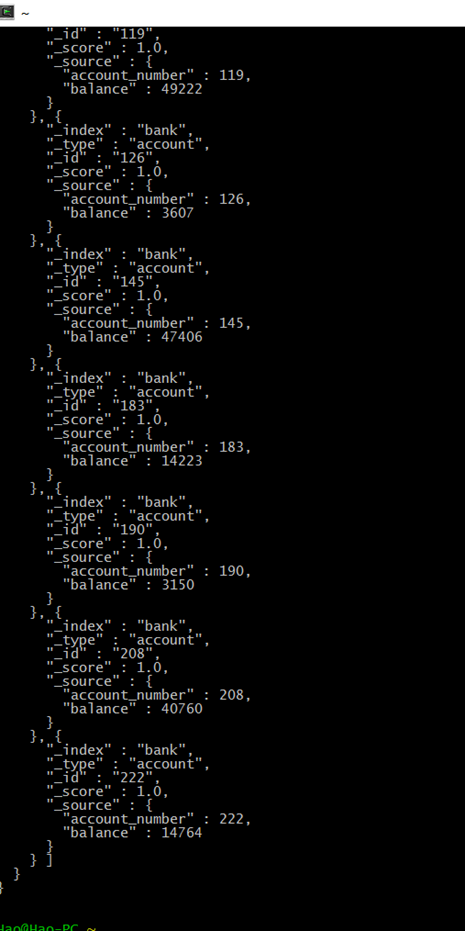
返回account_number 为20 的数据:
curl -XPOST 'localhost:9200/bank/_search?pretty' -d '
{
"query": { "match": { "account_number": 20 } }
}'
返回address中包含mill的所有数据::
curl -XPOST 'localhost:9200/bank/_search?pretty' -d '
{
"query": { "match": { "address": "mill" } }
}'
返回地址中包含mill或者lane的所有数据:
curl -XPOST 'localhost:9200/bank/_search?pretty' -d '
{
"query": { "match": { "address": "mill lane" } }
}'
和上面匹配单个词语不同,下面这个例子是多匹配(match_phrase短语匹配),返回地址中包含短语 “mill lane”的所有数据:
curl -XPOST 'localhost:9200/bank/_search?pretty' -d '
{
"query": { "match_phrase": { "address": "mill lane" } }
}'
以下是布尔查询,布尔查询允许我们将多个简单的查询组合成一个更复杂的布尔逻辑查询。
这个例子将两个查询组合,返回地址中含有mill和lane的所有记录数据:
curl -XPOST 'localhost:9200/bank/_search?pretty' -d '
{
"query": {
"bool": {
"must": [
{ "match": { "address": "mill" } },
{ "match": { "address": "lane" } }
]
}
}
}'
上述例子中,must表示所有查询必须都为真才被认为匹配。
相反, 这个例子组合两个查询,返回地址中含有mill或者lane的所有记录数据:
curl -XPOST 'localhost:9200/bank/_search?pretty' -d '
{
"query": {
"bool": {
"should": [
{ "match": { "address": "mill" } },
{ "match": { "address": "lane" } }
]
}
}
}'
上述例子中,bool表示查询列表中只要有任何一个为真则认为匹配。
下面例子组合两个查询,返回地址中既没有mill也没有lane的所有数据:
curl -XPOST 'localhost:9200/bank/_search?pretty' -d '
{
"query": {
"bool": {
"must_not": [
{ "match": { "address": "mill" } },
{ "match": { "address": "lane" } }
]
}
}
}'
上述例子中,must_not表示查询列表中没有为真的(也就是全为假)时则认为匹配。
我们可以组合must、should、must_not来实现更加复杂的多级逻辑查询。
下面这个例子返回年龄大于40岁、不居住在ID的所有数据:
curl -XPOST 'localhost:9200/bank/_search?pretty' -d '
{
"query": {
"bool": {
"must": [
{ "match": { "age": "40" } }
],
"must_not": [
{ "match": { "state": "ID" } }
]
}
}
}'
16.过滤filter(查询条件设置)
下面这个例子使用了布尔查询返回balance在20000到30000之间的所有数据。
curl -XPOST 'localhost:9200/bank/_search?pretty' -d '
{
"query": {
"bool": {
"must": { "match_all": {} },
"filter": {
"range": {
"balance": {
"gte": 20000,
"lte": 30000
}
}
}
}
}
}'
17 聚合 Aggregations
下面这个例子: 将所有的数据按照state分组(group),然后按照分组记录数从大到小排序,返回前十条(默认):
curl -XPOST 'localhost:9200/bank/_search?pretty' -d '
{
"size": 0,
"aggs": {
"group_by_state": {
"terms": {
"field": "state"
}
}
}
}'
注意:我们设置size=0,不显示查询hits,因为我们只想看返回的聚合结果。
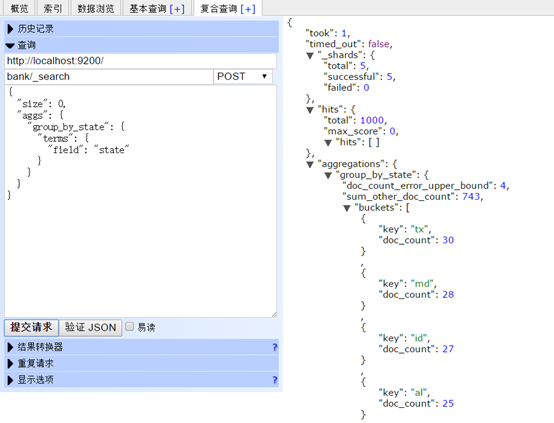

上述语句类似于以下SQL语句:
SELECT state, COUNT(*) FROM bank GROUP BY state ORDER BY COUNT(*) DESC
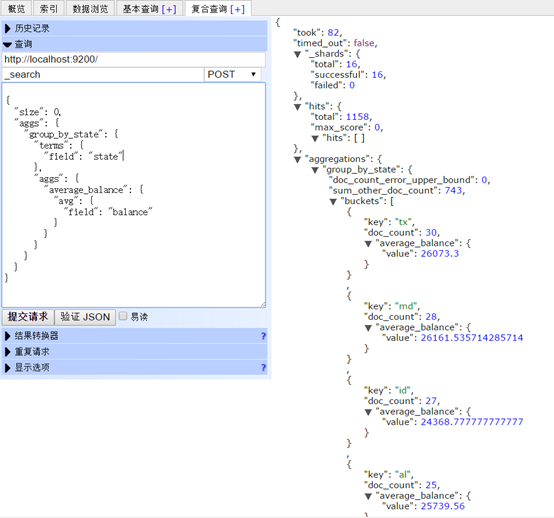
下面这个实例按照state分组,降序排序,返回balance的平均值:
curl -XPOST 'localhost:9200/bank/_search?pretty' -d '
{
"size": 0,
"aggs": {
"group_by_state": {
"terms": {
"field": "state"
},
"aggs": {
"average_balance": {
"avg": {
"field": "balance"
}
}
}
}
}
}'
ElasticSearch 索引查询使用指南——详细版的更多相关文章
- ElasticSearch 索引查询使用指南
1.检测集群是否健康,我们通常用下面的命令.确保9200端口号可用: http://localhost:9200/_cat/health?v 或者 http://localhost:9200/_clu ...
- elasticsearch索引查询,日志搜素
索引查询 http://10.199.137.115:9200/_cat/indices?format=json 返回json字符串的索引状态 增加索引名称过滤 http://10.199.137.1 ...
- Elasticsearch 索引生命周期管理 ILM 实战指南
文章转载自:https://mp.weixin.qq.com/s/7VQd5sKt_PH56PFnCrUOHQ 1.什么是索引生命周期 在基于日志.指标.实时时间序列的大型系统中,集群的索引也具备类似 ...
- elasticsearch之多索引查询
一.问题源起 在elasticsearch的查询中,我们一般直接通过URL来设置要search的index: 如果我们需要查询的索引比较多并且没有什么规律的话,就会面临一个尴尬的局面,超过URL的长度 ...
- Elasticsearch索引和查询性能调优的21条建议
Elasticsearch部署建议 1. 选择合理的硬件配置:尽可能使用 SSD Elasticsearch 最大的瓶颈往往是磁盘读写性能,尤其是随机读取性能.使用SSD(PCI-E接口SSD卡/SA ...
- ElasticSearch 常用查询语句
为了演示不同类型的 ElasticSearch 的查询,我们将使用书文档信息的集合(有以下字段:title(标题), authors(作者), summary(摘要), publish_date(发布 ...
- HBase和ElasticSearch索引类型及存储位置
本篇博文主要对HyperBase(HBase).Search(ElasticSearch)的索引类型及具体存储位置进行概要总结,让大家从整体上了解TDH平台中HyperBase和Search索引的管理 ...
- 正确遍历ElasticSearch索引
1:ElasticSearch的查询过程 2:由ES查询模式引起的深度分页问题 3:如何正确遍历索引中的数据 ElasticSearch的查询过程 es的数据查询分两步: 第一步是的结果是获取满足查询 ...
- ES3:ElasticSearch 索引
ElasticSearch是文档型数据库,索引(Index)定义了文档的逻辑存储和字段类型,每个索引可以包含多个文档类型,文档类型是文档的集合,文档以索引定义的逻辑存储模型,比如,指定分片和副本的数量 ...
随机推荐
- 关于自动化测试环境的集成(Jenkins+RobotFramework+TestLink+SVN)
本人主要从事网络安全产品的测试,由于一些产品功能在后期稳定后每个版本的迭代仍需要投入大量的时间和精力去测试,所以近期计划逐步的去了解自动化测试的一些内容来节省和解放一些资源.由于自己并没有什么编码基础 ...
- 【图文并茂】DEV配置NTL库
一开始根据陈老师的博客:再说如何在DEV C++中搭建NTL库 后来发现自己虽然跟着一步一步来做,还是做错了很多回. 究竟怎么一回事呢?后来我发现一个致命的错误很容易忽视,所以我就重新写一篇博客. 来 ...
- javase(13)_网络编程
一.概述 1.网络编程的核心是IP.端口(表示应用程序).协议三大元素 2.网络编程的本质是进程间通信 3.网络编程的2个主要问题:1是定位主机,2是数据传输 二.网络通信的概念 1.网络通信协议 计 ...
- Clover启动mbr的win7/win8
对以传统bios安装在mbr分区的win7/WIN8也可以使用EFI引导直接进入win.首先进win提取EFI引导文件,以管理员员身份运行cmd,输入如下命令 bcdboot c:\windows / ...
- vim中使用pydiction对python代码进行补全
在配置完vim插件YouCompleteMe之后,在vim编写python的时候按tab键会报错,E121: Undefined variable: g:pydiction_location Pydi ...
- Many-to-one
创建模型 from django.db import models class Reporter(models.Model): first_name = models.CharField(max_le ...
- PAT Basic 1052
1052 卖个萌 萌萌哒表情符号通常由“手”.“眼”.“口”三个主要部分组成.简单起见,我们假设一个表情符号是按下列格式输出的: [左手]([左眼][口][右眼])[右手] 现给出可选用的符号集合,请 ...
- CSS布局基础--BFC
1,什么是BFC BFC(Block Formatting Context)块级格式化上下文,它就是一个环境,HTML元素在这个环境中按照一定规则进行布局.一个环境中的元素不会影响到其他环境中的布局. ...
- win7定时关机
菜单>附件>系统工具>任务计划程序>创建基本任务 alt+r>cmd>shutdown/? 查看相关参数 /l 注销 /s 关机 /r 重启 /g 重启,重启后,重 ...
- linux 搭建apache 服务器
1.查看apache服务器 /etc/init.d/httpd status 若没有,则使用yum -y install httpd 安装软件 2.设置开机启动 chkconfig httpd o ...