
.net core mvc启动顺序以及主要部件2
前一篇提到WebHost.CreateDefaultBuilder(args)方法创建了WebHostBuilder实例,WebHostBuilder实例有三个主要功能 1、构建了IConfiguration实例和基础环境配置,2、构建了IServiceCollection服务,也就是依赖注入的容器,3、创建了webhost实例,这个webhost就是我们的接收请求的第一个管道,其中暴露出来的主要方法Build,请看源代码:
 public IWebHost Build()

         {

             if (!_webHostBuilt)

             {

                 _webHostBuilt = true;

                 AggregateException hostingStartupErrors;

                 IServiceCollection serviceCollection = BuildCommonServices(out hostingStartupErrors);

                 IServiceCollection serviceCollection2 = serviceCollection.Clone();

                 IServiceProvider hostingServiceProvider = _003CBuild_003Eg__GetProviderFromFactory_007C13_0(serviceCollection);

                 if (!_options.SuppressStatusMessages)

                 {

                     if (Environment.GetEnvironmentVariable("Hosting:Environment") != null)

                     {

                         Console.WriteLine("The environment variable 'Hosting:Environment' is obsolete and has been replaced with 'ASPNETCORE_ENVIRONMENT'");

                     }

                     if (Environment.GetEnvironmentVariable("ASPNET_ENV") != null)

                     {

                         Console.WriteLine("The environment variable 'ASPNET_ENV' is obsolete and has been replaced with 'ASPNETCORE_ENVIRONMENT'");

                     }

                     if (Environment.GetEnvironmentVariable("ASPNETCORE_SERVER.URLS") != null)

                     {

                         Console.WriteLine("The environment variable 'ASPNETCORE_SERVER.URLS' is obsolete and has been replaced with 'ASPNETCORE_URLS'");

                     }

                 }

                 AddApplicationServices(serviceCollection2, hostingServiceProvider);

                 WebHost webHost = new WebHost(serviceCollection2, hostingServiceProvider, _options, _config, hostingStartupErrors);

                 try

                 {

                     webHost.Initialize();

                     ILogger<WebHost> requiredService = webHost.Services.GetRequiredService<ILogger<WebHost>>();

                     foreach (IGrouping<string, string> item in from g in _options.GetFinalHostingStartupAssemblies().GroupBy((string a) => a, StringComparer.OrdinalIgnoreCase)

                                                                where g.Count() >

                                                                select g)

                     {

                         requiredService.LogWarning($"The assembly {item} was specified multiple times. Hosting startup assemblies should only be specified once.");

                     }

                     return webHost;

                 }

                 catch

                 {

                     webHost.Dispose();

                     throw;

                 }

             }

             throw new InvalidOperationException(Resources.WebHostBuilder_SingleInstance);

         }
这个方法中有几个笔记重要的部分,下面我给标记一下

调用BuildCommonServices私有方法主要是注入一些程序所需的基础组件,请看源代码:
  private IServiceCollection BuildCommonServices(out AggregateException hostingStartupErrors)

         {

             hostingStartupErrors = null;

             _options = new WebHostOptions(_config, Assembly.GetEntryAssembly()?.GetName().Name);

             if (!_options.PreventHostingStartup)

             {

                 List<Exception> list = new List<Exception>();

                 foreach (string item in _options.GetFinalHostingStartupAssemblies().Distinct(StringComparer.OrdinalIgnoreCase))

                 {

                     try

                     {

                         foreach (HostingStartupAttribute customAttribute in Assembly.Load(new AssemblyName(item)).GetCustomAttributes<HostingStartupAttribute>())

                         {

                             ((IHostingStartup)Activator.CreateInstance(customAttribute.HostingStartupType)).Configure(this);

                         }

                     }

                     catch (Exception innerException)

                     {

                         list.Add(new InvalidOperationException("Startup assembly " + item + " failed to execute. See the inner exception for more details.", innerException));

                     }

                 }

                 if (list.Count > )

                 {

                     hostingStartupErrors = new AggregateException(list);

                 }

             }

             string contentRootPath = ResolveContentRootPath(_options.ContentRootPath, AppContext.BaseDirectory);

             _hostingEnvironment.Initialize(contentRootPath, _options);

             _context.HostingEnvironment = _hostingEnvironment;

             ServiceCollection serviceCollection = new ServiceCollection();

             serviceCollection.AddSingleton(_options);

             ((IServiceCollection)serviceCollection).AddSingleton((IHostingEnvironment)_hostingEnvironment);

             ((IServiceCollection)serviceCollection).AddSingleton((Microsoft.Extensions.Hosting.IHostingEnvironment)_hostingEnvironment);

             serviceCollection.AddSingleton(_context);

             IConfigurationBuilder configurationBuilder = new ConfigurationBuilder().SetBasePath(_hostingEnvironment.ContentRootPath).AddConfiguration(_config);

             foreach (Action<WebHostBuilderContext, IConfigurationBuilder> configureAppConfigurationBuilderDelegate in _configureAppConfigurationBuilderDelegates)

             {

                 configureAppConfigurationBuilderDelegate(_context, configurationBuilder);

             }

             IConfigurationRoot configurationRoot = configurationBuilder.Build();

             ((IServiceCollection)serviceCollection).AddSingleton((IConfiguration)configurationRoot);

             _context.Configuration = configurationRoot;

             DiagnosticListener implementationInstance = new DiagnosticListener("Microsoft.AspNetCore");

             serviceCollection.AddSingleton(implementationInstance);

             ((IServiceCollection)serviceCollection).AddSingleton((DiagnosticSource)implementationInstance);

             serviceCollection.AddTransient<IApplicationBuilderFactory, ApplicationBuilderFactory>();

             serviceCollection.AddTransient<IHttpContextFactory, HttpContextFactory>();

             serviceCollection.AddScoped<IMiddlewareFactory, MiddlewareFactory>();

             serviceCollection.AddOptions();

             serviceCollection.AddLogging();

             serviceCollection.AddTransient<IStartupFilter, AutoRequestServicesStartupFilter>();

             serviceCollection.AddTransient<IServiceProviderFactory<IServiceCollection>, DefaultServiceProviderFactory>();

             serviceCollection.AddSingleton<ObjectPoolProvider, DefaultObjectPoolProvider>();

             if (!string.IsNullOrEmpty(_options.StartupAssembly))

             {

                 try

                 {

                     Type startupType = StartupLoader.FindStartupType(_options.StartupAssembly, _hostingEnvironment.EnvironmentName);

                     if (IntrospectionExtensions.GetTypeInfo(typeof(IStartup)).IsAssignableFrom(startupType.GetTypeInfo()))

                     {

                         serviceCollection.AddSingleton(typeof(IStartup), startupType);

                     }

                     else

                     {

                         serviceCollection.AddSingleton(typeof(IStartup), delegate (IServiceProvider sp)

                         {

                             IHostingEnvironment requiredService = sp.GetRequiredService<IHostingEnvironment>();

                             return new ConventionBasedStartup(StartupLoader.LoadMethods(sp, startupType, requiredService.EnvironmentName));

                         });

                     }

                 }

                 catch (Exception source)

                 {

                     ExceptionDispatchInfo capture = ExceptionDispatchInfo.Capture(source);

                     ((IServiceCollection)serviceCollection).AddSingleton((Func<IServiceProvider, IStartup>)delegate

                     {

                         capture.Throw();

                         return null;

                     });

                 }

             }

             foreach (Action<WebHostBuilderContext, IServiceCollection> configureServicesDelegate in _configureServicesDelegates)

             {

                 configureServicesDelegate(_context, serviceCollection);

             }

             return serviceCollection;

         }
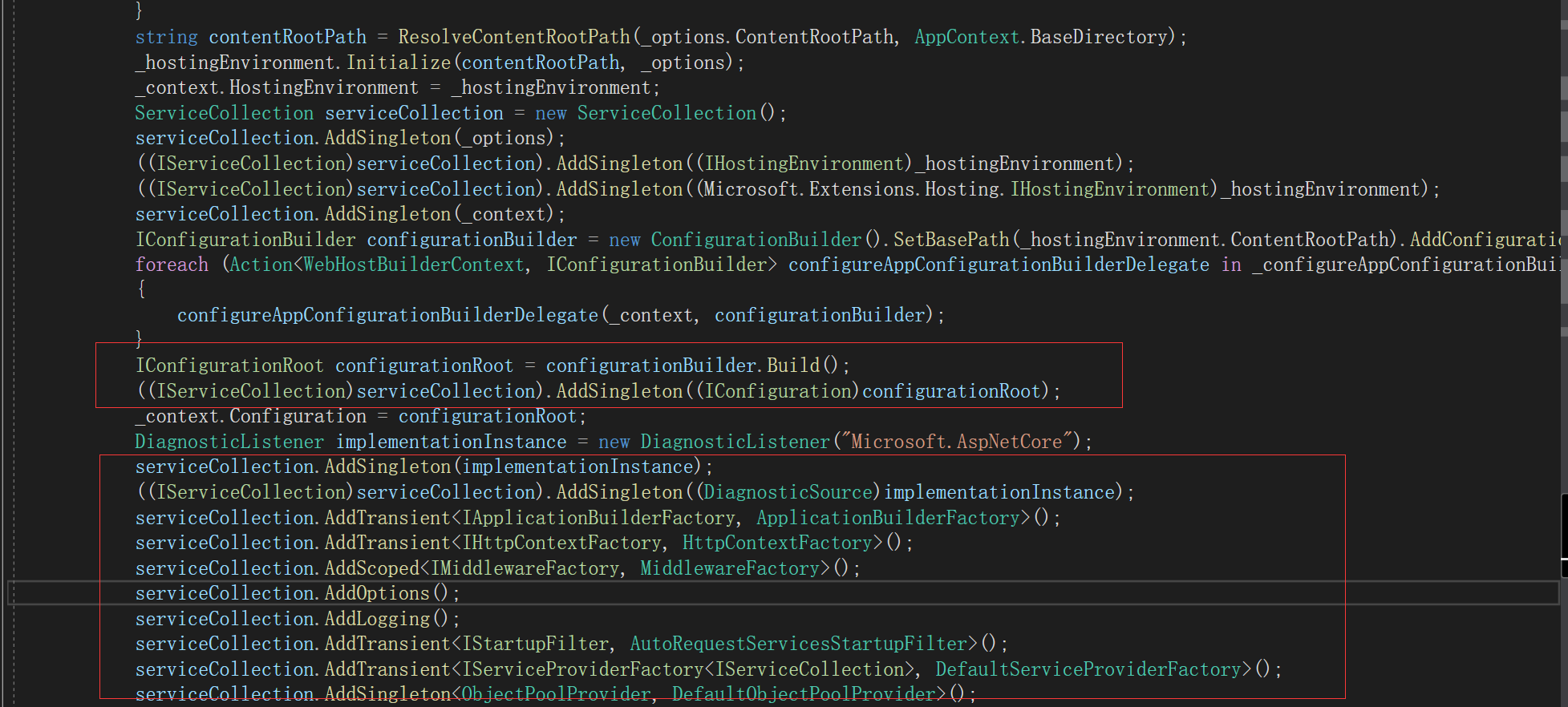
这个方法中其中就包含了注入IConfiguration的代码和构建IServiceCollection容器的代码,当然还有一些其他的主要中间件注入啊IApplicationBuilderFactory,包括HttpContextFactory等等都在这个方法里面被IServiceCollection容器管理,具体请看下图
这里讲清楚之后,我们直接进入UseStartup方法中,这个方法是注入了Startup的实例,请看主要源代码
 public static IWebHostBuilder UseStartup(this IWebHostBuilder hostBuilder, Type startupType)

         {

             string name = startupType.GetTypeInfo().Assembly.GetName().Name;

             return hostBuilder.UseSetting(WebHostDefaults.ApplicationKey, name).ConfigureServices(delegate (IServiceCollection services)

             {

                 if (IntrospectionExtensions.GetTypeInfo(typeof(IStartup)).IsAssignableFrom(startupType.GetTypeInfo()))

                 {

                     services.AddSingleton(typeof(IStartup), startupType);

                 }

                 else

                 {

                     services.AddSingleton(typeof(IStartup), delegate (IServiceProvider sp)

                     {

                         IHostingEnvironment requiredService = sp.GetRequiredService<IHostingEnvironment>();

                         return new ConventionBasedStartup(StartupLoader.LoadMethods(sp, startupType, requiredService.EnvironmentName));

                     });

                 }

             });

         }
上面只是被IServiceCollection所管理 并没有真正起作用,真正调用的是Main方法中的Build().Run(),这里的Build就是上面那个IWebHostBuilder中的主要的构建方法,而Run则是正式启动应用程序和调用Startup中的ConfigureServices方法
请看代码:

分享Program类的过程大致就到这里了
.net core mvc启动顺序以及主要部件2的更多相关文章
- .net core mvc启动顺序以及主要部件1
原文:.net core mvc启动顺序以及主要部件1 首先我是新人一个写这些东西也是为了增加记忆,有不对的地方请多多指教. 说回正题,打开Program.cs文件,看到在有个CrateWebHost ...
- .net core mvc启动顺序以及主要部件4-MVC
前面三章已经把MVC启动过程以及源代码做了讲解,本章开始正式MVC,mvc全称叫model view controller,也就是把表现层又细分三层,官网的图片描述: 默认创建了一个.net core ...
- .net core mvc启动顺序以及主要部件3-Startup
前面分享了.net core Program类的启动过程已经源代码介绍,这里将继续讲Startup类中的两个约定方法,一个是ConfigureServices,这个方法是用来写我们应用程序所依赖的组件 ...
- PCB MVC启动顺序与各层之间数据传递对象关系
准备着手基于MVC模式写一套Web端流程指示查看,先着手开发WebAPI打通数据接口,后续可扩展手机端 这里将MVC基本关系整理如下: 一.MVC启动顺序 二.MVC各层之间数据传递对象关系
- ASP.NET Core MVC 源码学习:MVC 启动流程详解
前言 在 上一篇 文章中,我们学习了 ASP.NET Core MVC 的路由模块,那么在本篇文章中,主要是对 ASP.NET Core MVC 启动流程的一个学习. ASP.NET Core 是新一 ...
- asp.net core mvc剖析:启动流程
asp.net core mvc是微软开源的跨平台的mvc框架,首先它跟原有的MVC相比,最大的不同就是跨平台,然后又增加了一些非常实用的新功能,比如taghelper,viewcomponent,D ...
- 解说asp.net core MVC 过滤器的执行顺序
asp.net core MVC 过滤器会在请求管道的各个阶段触发.同一阶段又可以注册多个范围的过滤器,例如Global范围,controller范围等.以ActionFilter为例,我们来看看过滤 ...
- linux下使用supervisor启动.net core mvc website的配置
发布好的asp.net core mvc项目, 如果想在window或linux下的以控制台程序启动的话,可以用下面的命令 dotnet MyProject.dll --urls="http ...
- net core mvc剖析:启动流程
net core mvc剖析:启动流程 asp.net core mvc是微软开源的跨平台的mvc框架,首先它跟原有的MVC相比,最大的不同就是跨平台,然后又增加了一些非常实用的新功能,比如taghe ...
随机推荐
- LeetCode 岛屿的最大面积
给定一个包含了一些 0 和 1的非空二维数组 grid , 一个 岛屿 是由四个方向 (水平或垂直) 的 1 (代表土地) 构成的组合.你可以假设二维矩阵的四个边缘都被水包围着. 找到给定的二维数组中 ...
- netfilter 和 iptables
http://blog.chinaunix.net/uid/23069658/cid--1-list-4.html 洞悉linux下的Netfilter&iptables 系列,有一到十六, ...
- 日志平台-ELK6.4
一.环境 linux-node1 192.168.127.201 linux-node2 192.168.127.202 centos7.3 elasticsearch6.4 logstash6.4 ...
- javascript 使用 load 和 unload 事件,解决浏览器打开和关闭时需要做的操作。
最近有一个业务,就是修改一个业务需要加上锁.也就是打开浏览器时,加锁.等用户操作完毕,关掉浏览器之后在把锁打开.一开始想问题很局限.只是想着,关闭浏览器解锁,刷新页面不做操作.然后就一直在找在调用un ...
- PyCharm(一)——PyCharm设置SSH远程调试
一.环境 系统环境:windows10 64位 软件:PyCharm2017.3 本地Python环境:Python2.7 二.配置 2.1配置远程调试 第一步:运行PyCharm,然后点击设置如下图 ...
- 收集自网络上有关Kali的各种源
更新源总结 #更新源 gedit /etc/apt/sources.list #中科大kali源 deb http://mirrors.ustc.edu.cn/kali kali-rollin ...
- Python基础知识-day2
格式化输出 %占位符,s字符串,d 数字, 表示% 用%% name = input("请输入姓名: ") age = input("请输入年龄: ") he ...
- python基础——14(shelve/shutil/random/logging模块/标准流)
一.标准流 1.1.标准输入流 res = sys.stdin.read(3) 可以设置读取的字节数 print(res) res = sys.stdin.readline() print(res) ...
- windons杀死8080进程
1,netstat -aon|findstr "8080" //8080端口号 2,taskkill -PID 2976 -F //2976 ,8080端口号对应的进程号
- Java-在一个包装器对象中包装一个原始类型
使用基本类型的包装对象,好处可以为空且可以序列化 package com.tj; public class MyClass2 { public static void main(String[] ar ...