
.net core mvc启动顺序以及主要部件2
前一篇提到WebHost.CreateDefaultBuilder(args)方法创建了WebHostBuilder实例,WebHostBuilder实例有三个主要功能 1、构建了IConfiguration实例和基础环境配置,2、构建了IServiceCollection服务,也就是依赖注入的容器,3、创建了webhost实例,这个webhost就是我们的接收请求的第一个管道,其中暴露出来的主要方法Build,请看源代码:
 public IWebHost Build()

         {

             if (!_webHostBuilt)

             {

                 _webHostBuilt = true;

                 AggregateException hostingStartupErrors;

                 IServiceCollection serviceCollection = BuildCommonServices(out hostingStartupErrors);

                 IServiceCollection serviceCollection2 = serviceCollection.Clone();

                 IServiceProvider hostingServiceProvider = _003CBuild_003Eg__GetProviderFromFactory_007C13_0(serviceCollection);

                 if (!_options.SuppressStatusMessages)

                 {

                     if (Environment.GetEnvironmentVariable("Hosting:Environment") != null)

                     {

                         Console.WriteLine("The environment variable 'Hosting:Environment' is obsolete and has been replaced with 'ASPNETCORE_ENVIRONMENT'");

                     }

                     if (Environment.GetEnvironmentVariable("ASPNET_ENV") != null)

                     {

                         Console.WriteLine("The environment variable 'ASPNET_ENV' is obsolete and has been replaced with 'ASPNETCORE_ENVIRONMENT'");

                     }

                     if (Environment.GetEnvironmentVariable("ASPNETCORE_SERVER.URLS") != null)

                     {

                         Console.WriteLine("The environment variable 'ASPNETCORE_SERVER.URLS' is obsolete and has been replaced with 'ASPNETCORE_URLS'");

                     }

                 }

                 AddApplicationServices(serviceCollection2, hostingServiceProvider);

                 WebHost webHost = new WebHost(serviceCollection2, hostingServiceProvider, _options, _config, hostingStartupErrors);

                 try

                 {

                     webHost.Initialize();

                     ILogger<WebHost> requiredService = webHost.Services.GetRequiredService<ILogger<WebHost>>();

                     foreach (IGrouping<string, string> item in from g in _options.GetFinalHostingStartupAssemblies().GroupBy((string a) => a, StringComparer.OrdinalIgnoreCase)

                                                                where g.Count() >

                                                                select g)

                     {

                         requiredService.LogWarning($"The assembly {item} was specified multiple times. Hosting startup assemblies should only be specified once.");

                     }

                     return webHost;

                 }

                 catch

                 {

                     webHost.Dispose();

                     throw;

                 }

             }

             throw new InvalidOperationException(Resources.WebHostBuilder_SingleInstance);

         }
这个方法中有几个笔记重要的部分,下面我给标记一下

调用BuildCommonServices私有方法主要是注入一些程序所需的基础组件,请看源代码:
  private IServiceCollection BuildCommonServices(out AggregateException hostingStartupErrors)

         {

             hostingStartupErrors = null;

             _options = new WebHostOptions(_config, Assembly.GetEntryAssembly()?.GetName().Name);

             if (!_options.PreventHostingStartup)

             {

                 List<Exception> list = new List<Exception>();

                 foreach (string item in _options.GetFinalHostingStartupAssemblies().Distinct(StringComparer.OrdinalIgnoreCase))

                 {

                     try

                     {

                         foreach (HostingStartupAttribute customAttribute in Assembly.Load(new AssemblyName(item)).GetCustomAttributes<HostingStartupAttribute>())

                         {

                             ((IHostingStartup)Activator.CreateInstance(customAttribute.HostingStartupType)).Configure(this);

                         }

                     }

                     catch (Exception innerException)

                     {

                         list.Add(new InvalidOperationException("Startup assembly " + item + " failed to execute. See the inner exception for more details.", innerException));

                     }

                 }

                 if (list.Count > )

                 {

                     hostingStartupErrors = new AggregateException(list);

                 }

             }

             string contentRootPath = ResolveContentRootPath(_options.ContentRootPath, AppContext.BaseDirectory);

             _hostingEnvironment.Initialize(contentRootPath, _options);

             _context.HostingEnvironment = _hostingEnvironment;

             ServiceCollection serviceCollection = new ServiceCollection();

             serviceCollection.AddSingleton(_options);

             ((IServiceCollection)serviceCollection).AddSingleton((IHostingEnvironment)_hostingEnvironment);

             ((IServiceCollection)serviceCollection).AddSingleton((Microsoft.Extensions.Hosting.IHostingEnvironment)_hostingEnvironment);

             serviceCollection.AddSingleton(_context);

             IConfigurationBuilder configurationBuilder = new ConfigurationBuilder().SetBasePath(_hostingEnvironment.ContentRootPath).AddConfiguration(_config);

             foreach (Action<WebHostBuilderContext, IConfigurationBuilder> configureAppConfigurationBuilderDelegate in _configureAppConfigurationBuilderDelegates)

             {

                 configureAppConfigurationBuilderDelegate(_context, configurationBuilder);

             }

             IConfigurationRoot configurationRoot = configurationBuilder.Build();

             ((IServiceCollection)serviceCollection).AddSingleton((IConfiguration)configurationRoot);

             _context.Configuration = configurationRoot;

             DiagnosticListener implementationInstance = new DiagnosticListener("Microsoft.AspNetCore");

             serviceCollection.AddSingleton(implementationInstance);

             ((IServiceCollection)serviceCollection).AddSingleton((DiagnosticSource)implementationInstance);

             serviceCollection.AddTransient<IApplicationBuilderFactory, ApplicationBuilderFactory>();

             serviceCollection.AddTransient<IHttpContextFactory, HttpContextFactory>();

             serviceCollection.AddScoped<IMiddlewareFactory, MiddlewareFactory>();

             serviceCollection.AddOptions();

             serviceCollection.AddLogging();

             serviceCollection.AddTransient<IStartupFilter, AutoRequestServicesStartupFilter>();

             serviceCollection.AddTransient<IServiceProviderFactory<IServiceCollection>, DefaultServiceProviderFactory>();

             serviceCollection.AddSingleton<ObjectPoolProvider, DefaultObjectPoolProvider>();

             if (!string.IsNullOrEmpty(_options.StartupAssembly))

             {

                 try

                 {

                     Type startupType = StartupLoader.FindStartupType(_options.StartupAssembly, _hostingEnvironment.EnvironmentName);

                     if (IntrospectionExtensions.GetTypeInfo(typeof(IStartup)).IsAssignableFrom(startupType.GetTypeInfo()))

                     {

                         serviceCollection.AddSingleton(typeof(IStartup), startupType);

                     }

                     else

                     {

                         serviceCollection.AddSingleton(typeof(IStartup), delegate (IServiceProvider sp)

                         {

                             IHostingEnvironment requiredService = sp.GetRequiredService<IHostingEnvironment>();

                             return new ConventionBasedStartup(StartupLoader.LoadMethods(sp, startupType, requiredService.EnvironmentName));

                         });

                     }

                 }

                 catch (Exception source)

                 {

                     ExceptionDispatchInfo capture = ExceptionDispatchInfo.Capture(source);

                     ((IServiceCollection)serviceCollection).AddSingleton((Func<IServiceProvider, IStartup>)delegate

                     {

                         capture.Throw();

                         return null;

                     });

                 }

             }

             foreach (Action<WebHostBuilderContext, IServiceCollection> configureServicesDelegate in _configureServicesDelegates)

             {

                 configureServicesDelegate(_context, serviceCollection);

             }

             return serviceCollection;

         }
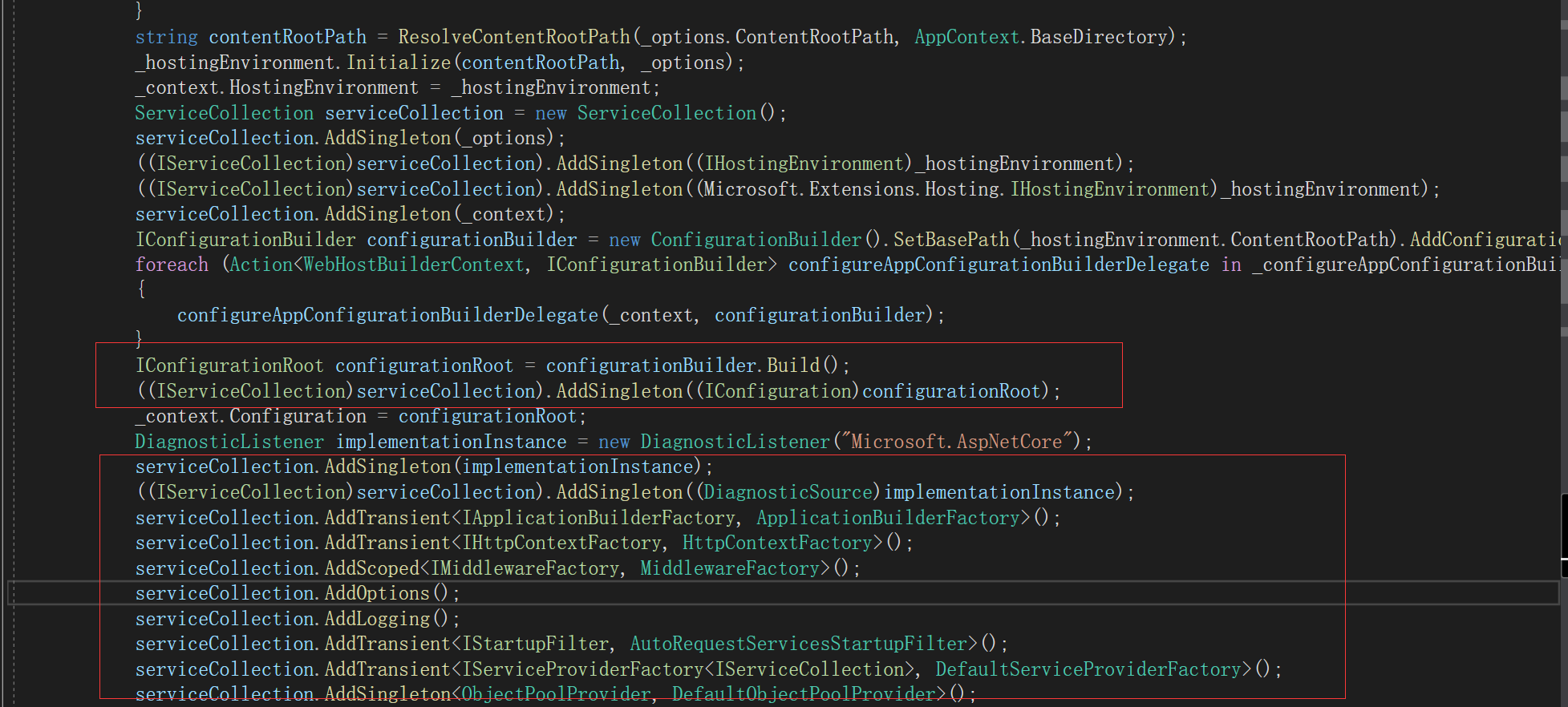
这个方法中其中就包含了注入IConfiguration的代码和构建IServiceCollection容器的代码,当然还有一些其他的主要中间件注入啊IApplicationBuilderFactory,包括HttpContextFactory等等都在这个方法里面被IServiceCollection容器管理,具体请看下图
这里讲清楚之后,我们直接进入UseStartup方法中,这个方法是注入了Startup的实例,请看主要源代码
 public static IWebHostBuilder UseStartup(this IWebHostBuilder hostBuilder, Type startupType)

         {

             string name = startupType.GetTypeInfo().Assembly.GetName().Name;

             return hostBuilder.UseSetting(WebHostDefaults.ApplicationKey, name).ConfigureServices(delegate (IServiceCollection services)

             {

                 if (IntrospectionExtensions.GetTypeInfo(typeof(IStartup)).IsAssignableFrom(startupType.GetTypeInfo()))

                 {

                     services.AddSingleton(typeof(IStartup), startupType);

                 }

                 else

                 {

                     services.AddSingleton(typeof(IStartup), delegate (IServiceProvider sp)

                     {

                         IHostingEnvironment requiredService = sp.GetRequiredService<IHostingEnvironment>();

                         return new ConventionBasedStartup(StartupLoader.LoadMethods(sp, startupType, requiredService.EnvironmentName));

                     });

                 }

             });

         }
上面只是被IServiceCollection所管理 并没有真正起作用,真正调用的是Main方法中的Build().Run(),这里的Build就是上面那个IWebHostBuilder中的主要的构建方法,而Run则是正式启动应用程序和调用Startup中的ConfigureServices方法
请看代码:

分享Program类的过程大致就到这里了
.net core mvc启动顺序以及主要部件2的更多相关文章
- .net core mvc启动顺序以及主要部件1
原文:.net core mvc启动顺序以及主要部件1 首先我是新人一个写这些东西也是为了增加记忆,有不对的地方请多多指教. 说回正题,打开Program.cs文件,看到在有个CrateWebHost ...
- .net core mvc启动顺序以及主要部件4-MVC
前面三章已经把MVC启动过程以及源代码做了讲解,本章开始正式MVC,mvc全称叫model view controller,也就是把表现层又细分三层,官网的图片描述: 默认创建了一个.net core ...
- .net core mvc启动顺序以及主要部件3-Startup
前面分享了.net core Program类的启动过程已经源代码介绍,这里将继续讲Startup类中的两个约定方法,一个是ConfigureServices,这个方法是用来写我们应用程序所依赖的组件 ...
- PCB MVC启动顺序与各层之间数据传递对象关系
准备着手基于MVC模式写一套Web端流程指示查看,先着手开发WebAPI打通数据接口,后续可扩展手机端 这里将MVC基本关系整理如下: 一.MVC启动顺序 二.MVC各层之间数据传递对象关系
- ASP.NET Core MVC 源码学习:MVC 启动流程详解
前言 在 上一篇 文章中,我们学习了 ASP.NET Core MVC 的路由模块,那么在本篇文章中,主要是对 ASP.NET Core MVC 启动流程的一个学习. ASP.NET Core 是新一 ...
- asp.net core mvc剖析:启动流程
asp.net core mvc是微软开源的跨平台的mvc框架,首先它跟原有的MVC相比,最大的不同就是跨平台,然后又增加了一些非常实用的新功能,比如taghelper,viewcomponent,D ...
- 解说asp.net core MVC 过滤器的执行顺序
asp.net core MVC 过滤器会在请求管道的各个阶段触发.同一阶段又可以注册多个范围的过滤器,例如Global范围,controller范围等.以ActionFilter为例,我们来看看过滤 ...
- linux下使用supervisor启动.net core mvc website的配置
发布好的asp.net core mvc项目, 如果想在window或linux下的以控制台程序启动的话,可以用下面的命令 dotnet MyProject.dll --urls="http ...
- net core mvc剖析:启动流程
net core mvc剖析:启动流程 asp.net core mvc是微软开源的跨平台的mvc框架,首先它跟原有的MVC相比,最大的不同就是跨平台,然后又增加了一些非常实用的新功能,比如taghe ...
随机推荐
- mycat中间件安装与使用
前提: 安装JDK版本在7.0及其以上 1.下载: 下载地址在:http://dl.mycat.io/ 选择1.6-release版本下载 2.安装: 直接解压即可: tar -zxf Mycat-s ...
- 编译openwrt_MT7688_hiwooya
参考链接: 无涯论坛地址: http://www.hi-wooya.com/forum.php openwrt官网地址:https://openwrt.org/zh-cn/doc/howto/buil ...
- 【转发】【composer】composer 命令行介绍
首页 入门 下载 安装包列表 中国镜像 命令行 你已经学会了如何使用命令行界面做一些事情.本章将向你介绍所有可用的命令. 为了从命令行获得帮助信息,请运行 composer 或者 composer l ...
- python插件,pycharm基本用法,markdown文本编写,jupyter notebook的基本操作汇总
5.14自我总结 一.python插件插件相关技巧汇总 安装在cmd上运行 #比如安装 安装:wxpy模块(支持 Python 3.4-3.+ 以及 2.7 版本):pip3 install wxpy ...
- 查找闲置ip
首先ping 一下该网段的广播地址,如ping 192.168.0.255 ,然后使用arp -a就可以查看到那些地址是被使用的,以及网卡的mac值.剩余的是暂时还未被使用的,当然没开机的机器就看不出 ...
- 剑指offer面试题43:n个筛子的点数
题目描述: 把n个筛子扔在地上,所有筛子朝上的一面点数之和为s,输入n,打印出s的所有可能的值出线的概率. 书上给了两种解法,第一种递归的方法由于代码太乱,没有看懂=.= 第二种方法很巧妙,lz已经根 ...
- Hive中文注释乱码解决方案(2)
本文来自网易云社区 作者:王潘安 执行阶段 launchTask 回到Driver类的runInternal方法,看以下执行过程.在runInternal方法中,执行过程调用了execute方法 ...
- ubuntu14.04 Cannot find OpenSSL's <evp.h>
Cannot find OpenSSL's <evp.h> when i configure php7 manually,i get trouble with that problem,f ...
- MySQL 待解决死锁
官方文档:https://dev.mysql.com/doc/refman/5.6/en/innodb-locks-set.html 线上出现一个死锁现象,信息显示的是两条对同一个表的不同记录的upd ...
- nginx的正则
~ 为区分大小写的匹配. ~* 不区分大小写的匹配(匹配firefox的正则同时匹配FireFox). !~ 不匹配的 !~* 不匹配的 . 匹配除换行符以外的 ...