
工作总结 2018-4-13 bootstrapTable 属性 queryParams: queryParams,//参数 get 中 %5B%5D 数组的意思
<table id="dataTable" data-toggle="table" data-show-columns="true" data-mobile-responsive="true"></table>
function getTab() {
        $('#dataTable').bootstrapTable({
            method: 'get', //这里要设置为get,不知道为什么 设置post获取不了
            url: '/AtmAtm/GetCodeList',
            cache: false,
            striped: true,
            pagination: true,
            pageList: [10, 30, 50, 100],
            pageSize: 10,
            pageNumber: 1,
            search: true,
            sidePagination: 'server',//设置为服务器端分页
            queryParams: queryParams,//参数
            showColumns: true,
            showRefresh: true,
            minimumCountColumns: 2,
            clickToSelect: true,
            smartDisplay: true,
            columns: [{
                checkbox: 'true',
                title: '@LangResources.Resource.Info_SelectList'

            },
            {
                field: 'AtmCode',
                title: '@LangResources.Resource.BarCode',
                align: 'center',
                width: '120',
                valign: 'center',
                sortable: true
            }, {
                field: 'AtmNo',
                title: '@LangResources.Resource.AtmNo',
                align: 'center',
                width: '100',
                valign: 'center',
                sortable: true,
                //formatter: operateFormatter
            }
            , {
                field: 'TerminalNum',
                title: '@LangResources.Resource.TerminalNum',
                align: 'center',
                width: '100',
                valign: 'center',
                sortable: true,
                //formatter: operateFormatter
            }
            , {
                field: 'ManufacturerObj',
                title: '@LangResources.Resource.ProducerName',
                align: 'center',
                width: '100',
                valign: 'center',
                sortable: true,
                //formatter: operateFormatter
            }
            , {
                field: 'atmname',
                title: '@LangResources.Resource.Info_JiJuMingCheng',
                align: 'center',
                width: '100',
                valign: 'center',
                sortable: true,
            },
             {
                 field: 'AtmTypeName',
                 title: '@LangResources.Resource.AtmTypeName',
                 align: 'center',
                 width: '150',
                 valign: 'center',
                 sortable: true,
                 //formatter: operateFormatter
             },

                {
                    field: 'CustomerName',
                    title: '@LangResources.Resource.CustomerName',
                    align: 'center',
                    width: '40',
                    valign: 'center',
                    sortable: true,
                    //formatter: operateFormatter
                }, {
                    field: 'Menu_CityRegion',
                    title: '@LangResources.Resource.Menu_CityRegion',
                    align: 'center',
                    width: '100',
                    valign: 'center',
                    sortable: true,
                    //formatter: operateFormatter
                }, {
                    field: 'BlockName',
                    title: '@LangResources.Resource.BlockName',
                    align: 'center',
                    width: '100',
                    valign: 'center',
                    sortable: true,
                    //formatter: operateFormatter
                }, {
                    field: 'StreetName',
                    title: '@LangResources.Resource.StreetName',
                    align: 'center',
                    width: '40',
                    valign: 'center',
                    sortable: true,
                    //formatter: operateFormatter
                },
                @*{
                    field: 'AtmStatus',
                    title: '@LangResources.Resource.AtmStatus',
                    align: 'center',
                    width: '40',
                    valign: 'center',
                    sortable: true,
                    //formatter: operateFormatter
                },*@
                {
                    field: 'JobType',
                    title: '@LangResources.Resource.JobType',
                    align: 'center',
                    width: '60',
                    valign: 'center',
                    sortable: true,
                    formatter: CodeFormatter
                },
                {
                    field: 'RevertPosition',
                    title: '@LangResources.Resource.RevertPosition',
                    align: 'center',
                    width: '60',
                    valign: 'center',
                    sortable: true,
                },
                {
                    field: 'BillAddress',
                    title: '@LangResources.Resource.BillAddress',
                    align: 'center',
                    width: '60',
                    valign: 'center',
                    sortable: true,
                },
                 {
                     field: 'provinceobj',
                     title: '@LangResources.Resource.province',
                     align: 'center',
                     width: '60',
                     valign: 'center',
                     sortable: true,
                 },
                   {
                       field: 'Districtobj',
                       title: '@LangResources.Resource.District',
                       align: 'center',
                       width: '60',
                       valign: 'center',
                       sortable: true,
                   },
                    {
                        field: 'DPSBinobj',
                        title: '@LangResources.Resource.dpsbin',
                        align: 'center',
                        width: '60',
                        valign: 'center',
                        sortable: true,
                    },
                     {
                         field: 'PasswordLimit',
                         title: '@LangResources.Resource.PasswordLimit',
                         align: 'center',
                         width: '60',
                         valign: 'center',
                         sortable: true,
                     },
                {
                    field: 'Address',
                    title: '@LangResources.Resource.Address',
                    align: 'center',
                    width: '100',
                    valign: 'center',
                    sortable: true,
                },
            {
                field: 'IsAt',
                title: '@LangResources.Resource.IsAt',
                align: 'center',
                width: '100',
                valign: 'center',
                sortable: true,
            },
             {
                 field: 'EndMDate',
                 title: '@LangResources.Resource.EndMDate',
                 align: 'center',
                 width: '100',
                 valign: 'center',
                 sortable: true,
             },
              {
                  field: 'AtmSetupType',
                  title: '@LangResources.Resource.AtmSetupType',
                  align: 'center',
                  width: '100',
                  valign: 'center',
                  sortable: true,
              }, {
                  field: 'IsNon',
                  title: 'nodv',
                  align: 'center',
                  width: '100',
                  valign: 'center',
                  sortable: true,
              },
              {
                  field: 'Remark',
                  title: '@LangResources.Resource.Remark',
                  align: 'center',
                  width: '100',
                  valign: 'center',
                  sortable: true,
              }, {
                  field: 'StartMDates',
                  title: '@LangResources.Resource.StartMDates',
                  align: 'center',
                  width: '80',
                  valign: 'center',
                  sortable: true,
                  formatter: dateFormatter
              },
                {
                    field: 'Id',
                    title: '@LangResources.Resource.Operation',
                    align: 'center',
                    width: '250',
                    valign: 'top',
                    sortable: true,
                    formatter: EditeOpt
                }
            ], onLoadSuccess: function () {

            },
            onLoadError: function () {
                //mif.showErrorMessageBox("数据加载失败!");
            }
        });
        $('#dataTable').bootstrapTable('hideColumn', 'Address');
    }
//设置传入参数
    function queryParams(params) {
        debugger
        console.info(params);
        var CustomerType = $("#CustomerType").val();
        var ATMModelType = $("#ATMModelType").val();
        var mxdrq = $("#mxdrq").val();
        var startdate = $("#startdate").val();
        var enddate = $("#enddate").val();

        return {
            "offset": params.offset,
            "limit": params.limit,
            "CustomerType": CustomerType,
            "ATMModelType": ATMModelType,
            "mxdrq": mxdrq,
            "startdate": startdate,
            "enddate": enddate,
            "sort": params.sort,
            "search": params.search,
            "order": params.order
        }

        return params;
    }
get请求 的参数 全部 保存在
queryParams: queryParams,//参数 里面(bootstrap 封装好的)

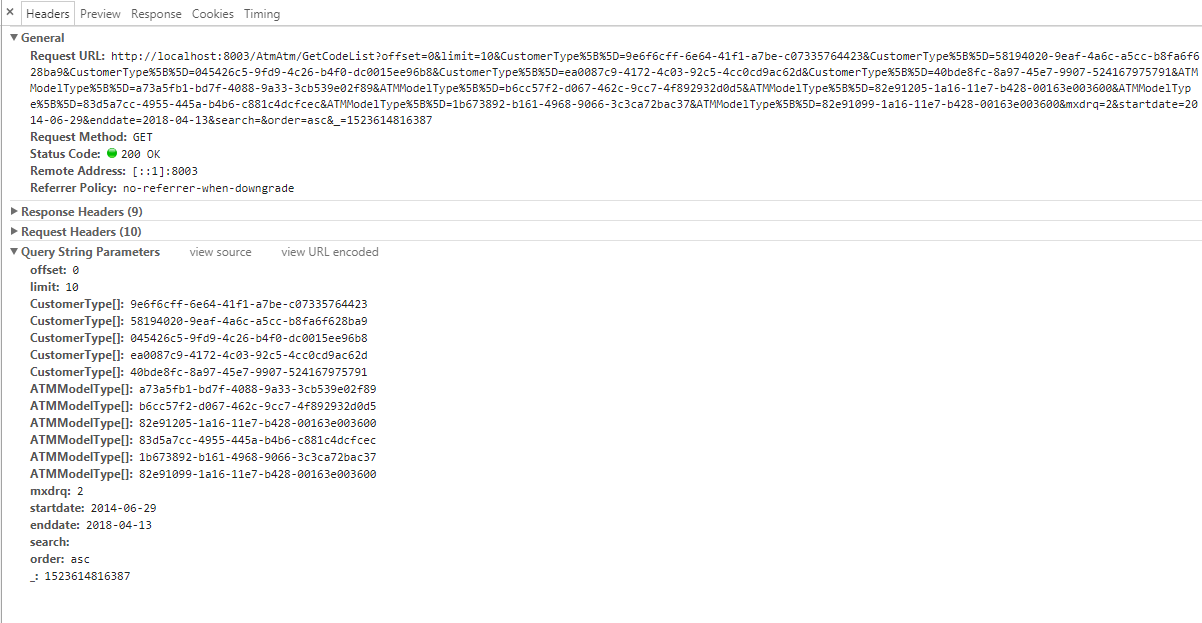
http://localhost:8003/AtmAtm/GetCodeList?offset=0&limit=10&CustomerType%5B%5D=9e6f6cff-6e64-41f1-a7be-c07335764423&CustomerType%5B%5D=58194020-9eaf-4a6c-a5cc-b8fa6f628ba9&CustomerType%5B%5D=045426c5-9fd9-4c26-b4f0-dc0015ee96b8&CustomerType%5B%5D=ea0087c9-4172-4c03-92c5-4cc0cd9ac62d&CustomerType%5B%5D=40bde8fc-8a97-45e7-9907-524167975791&ATMModelType%5B%5D=a73a5fb1-bd7f-4088-9a33-3cb539e02f89&ATMModelType%5B%5D=b6cc57f2-d067-462c-9cc7-4f892932d0d5&ATMModelType%5B%5D=82e91205-1a16-11e7-b428-00163e003600&ATMModelType%5B%5D=83d5a7cc-4955-445a-b4b6-c881c4dcfcec&ATMModelType%5B%5D=1b673892-b161-4968-9066-3c3ca72bac37&ATMModelType%5B%5D=82e91099-1a16-11e7-b428-00163e003600&mxdrq=2&startdate=2014-06-29&enddate=2018-04-13&search=&order=asc&_=1523614816387
%5B%5D 数组 的 意思
在后台
 //查询
            //string[] CustomerType = (Request["CustomerType[]"] + "").Split(new char[] { ',' }, StringSplitOptions.RemoveEmptyEntries);
            //string[] ATMModelType = (Request["ATMModelType[]"] + "").Split(new char[] { ',' }, StringSplitOptions.RemoveEmptyEntries);
            string CustomerType = (Request["CustomerType[]"] + "");
            string ATMModelType = (Request["ATMModelType[]"] + "");
get请求 Request 的话 这样
Request["CustomerType[]"]
获取 数组
post请求 的话 这样
public string GetCodeList(List<string> arr) 或者 对象中某属性
获取 数组
工作总结 2018-4-13 bootstrapTable 属性 queryParams: queryParams,//参数 get 中 %5B%5D 数组的意思的更多相关文章
- 工作总结 2018 - 4 - 13 select标签 multiple 属性 同时选择多个选项
<div class="col-xs-4"> @Html.DropDownList("CustomerType", (MultiSelectList ...
- (转)新手C#SQL语句的学习2018.08.13
1.创建数据库(create) CREATE DATABASE database-name 2.删除数据库(drop) drop database dbname 3.备份数据库 --- 创建 备份数据 ...
- java基础64 JavaScript中的Arrays数组对象和prototype原型属性(网页知识)
1.Arrays数组对象的创建方式 方式一: var 变量名=new Array(); //创建一个长度为0的数组. 方式二: var 变量名=new Array(长度); //创建一个指定长度的数组 ...
- bootstrap-table的一些配置参数例子
$('#reportTable').bootstrapTable({ method: 'post', url: '/qStock/AjaxPage', dataType: "json&quo ...
- [转贴]JavaScript中Array(数组)的属性和方法
数组有四种定义的方式 使用构造函数:var a = new Array();var b = new Array(8); var c = new Array("first", &qu ...
- javabean 参数收集 设置属性 设置不同级别的域对象的属性 默认存储在pagecontext中
javabean 参数收集 设置属性 设置不同级别的域对象的属性 默认存储在pagecontext中
- JavaScript中Array(数组)的属性和方法(转)
数组有四种定义的方式 使用构造函数:var a = new Array();var b = new Array(8);var c = new Array("first", &quo ...
- Servlet中的属性(attribute)和参数(parameter)的区别
1.引子 初学者对属性(attribute)和参数(parameter)容易搞混.没搞清他们的区别,项目中就可能出现一此莫名其妙的问题. 2.两者的区别 1) 属性(attribute) 属性是在后台 ...
- 【学习笔记】六:面向对象的程序设计——理解JS中的对象属性、创建对象、JS中的继承
ES中没有类的概念,这也使其对象和其他语言中的对象有所不同,ES中定义对象为:“无序属性的集合,其属性包含基本值.对象或者函数”.现在常用的创建单个对象的方法为对象字面量形式.在常见多个对象时,使用工 ...
随机推荐
- 【原创】如何编写c#用户登陆后用户名在前台显示
这种肯定是判断session啦!!!!! @{ string username = (string)Session["username"]; user user = new use ...
- RackTables在LNMP系统的安装及使用
RackTables是一款优秀的机房管理系统,可以十分方便的登记机房设备和连接情况,非常适合小型机房的运维.RackTables是PHP开发的免费系统,最新版本为0.20.14,PHP版本要求不低于P ...
- 删数问题(Noip1994)
1321:[例6.3]删数问题(Noip1994) 时间限制: 1000 ms 内存限制: 65536 KB提交数: 5127 通过数: 1595 [题目描述] 输入一个高精度 ...
- java实现搜索文件夹中所有文件包含的关键字的文件路径(递归搜索)
import java.io.File; import java.io.FileInputStream; import java.io.FileOutputStream; import java.io ...
- Google Chrome浏览器调试
作为Web开发人员,我为什么喜欢Google Chrome浏览器 [原文地址:http://www.cnblogs.com/QLeelulu/archive/2011/08/28/2156402.ht ...
- How To: IDENTIFY THE ASM DEVICE FROM ASMLIB
使用oracleasm querydisk可以查询到device的major和minor,从而对应. for i in `oracleasm listdisks` do oracleasm query ...
- Python 1-2模块的循环导入问题
run.py文件: import m1 # 第一次导入 # 验证解决方案一: ''' 正在导入m1 正在导入m2 ''' # print(m1.x) # print(m1.y) # 验证解决方案二: ...
- oracle dmp文件的导入导出
一.命令行方式 exp 用户名/密码@库名 file=文件位置.dmp owner=用户名 imp 用户名/密码@库名 file=文件位置.dmp 注意 : 导入过程若有的表已经存在可能会报错,可以全 ...
- hdu 2377 Bus Pass
Bus Pass Time Limit: 10000/5000 MS (Java/Others) Memory Limit: 32768/32768 K (Java/Others)Total S ...
- Matlab学习笔记(三)
二.MATLAB基础知识 (四)数组 MATLAB总是把数组看作存储和运算的基本单位,标量数据也被看作是(1×1)的数组 一维数组的创建 创建一维数组的几种方法:(e_two_14.m) 直接输入法: ...