
扩展 IHttpModule
上篇提到请求进入到System.Web后,创建完HttpApplication对象后会执行一堆的管道事件,然后可以通过HttpModule来对其进行扩展,那么这篇文章就来介绍下如何定义我们自己的module来实现对项目的一些扩展。
先看一下IHttpModule的接口源码,只有Dispose()和Init(HttpApplication context)这两个方法,从方法名称我们就可以知道Dispose方法是用来释放资源的,而Init方法自然就是用来初始化的,一般仅用于给期望的HttpApplication事件注册方法。
using System;

using System.Security.Permissions;

namespace System.Web

{

    /// <summary>

    /// Provides module initialization and disposal events to the implementing class.

    /// </summary>

    [AspNetHostingPermission(SecurityAction.LinkDemand, Level = AspNetHostingPermissionLevel.Minimal), AspNetHostingPermission(SecurityAction.InheritanceDemand, Level = AspNetHostingPermissionLevel.Minimal)]

    public interface IHttpModule

    {

        /// <summary>

        /// Initializes a module and prepares it to handle requests.

        /// </summary>

        /// <param name="context">

        /// An <see cref="T:System.Web.HttpApplication" /> that provides access to the methods, properties, and events common to all application objects within an ASP.NET application

        /// </param>

        void Init(HttpApplication context);

        /// <summary>

        ///    Disposes of the resources (other than memory) used by the module that implements <see cref="T:System.Web.IHttpModule" />.

        /// </summary>

        void Dispose();

    }

}
Init方法拥有HttpApplication的参数,那么我们先来实现一个自己定义的HttpModule。实现自定义的httpmodule需要实现IHttpModule接口。
namespace Jesen.Web.Core

{

    /// <summary>

    /// 自定义实现HttpModule,实现IHttpModule接口

    /// </summary>

    public class MyHttpModule : IHttpModule

    {

        public void Dispose()

        {

        }

        public void Init(HttpApplication context)

        {

            //在此处添加管道事件的处理

            context.BeginRequest += new EventHandler(Context_BeginRequest);

            context.EndRequest += new EventHandler(Context_EndRequest);

        }

        private void Context_BeginRequest(object sender, EventArgs e)

        {

            HttpApplication context = sender as HttpApplication;

            context.Response.Write("<h1 style='color:#00f'>来自MyHttpModule的处理开始</h1>");

        }

        private void Context_EndRequest(object sender, EventArgs e)

        {

            HttpApplication context = sender as HttpApplication;

            context.Response.Write("<h1 style='color:#00f'>来自MyHttpModule的处理结束</h1>");

        }

    }

}
实现完IHttpModule接口后我们还需要对自定义的HttpModule进行注册,注册的方式是通过web.config来配置。
VS2013及以后/IIS7.0之后的集成模式的配置位置:
<system.webServer>

      <modules runAllManagedModulesForAllRequests="false">

      <!--runAllManagedModulesForAllRequests处理静态文件的请求-->

      <remove name="FormsAuthentication" />

      <remove name="WindowsAuthentication" />

      <remove name="PassportAuthentication" />

      <remove name="RoleManager" />

      <remove name="FileAuthorization" />

      <remove name="UrlAuthorization" />

      <add name="MyHttpModule" type="Jesen.Web.Core.MyHttpModule,Jesen.Web.Core"/>

</system.webServer>
如果是VS2013以前/IIS7.0之前和经典模式的配置位置:
<system.web>

    <compilation debug="true" targetFramework="4.5" />

    <httpRuntime targetFramework="4.5" />

    <!--<httpModules>

      <remove name="FormsAuthentication" />

      <add name="MyHttpModule" type="Jesen.Web.Core.MyHttpModule,Jesen.Web.Core" />

      <add name="ApplicationInsightsWebTracking" type="Microsoft.ApplicationInsights.Web.ApplicationInsightsHttpModule, Microsoft.AI.Web" />

    </httpModules>

  </system.web>
接着我们运行程序,浏览器访问结果如下,浏览器输出我们上面自定义的HttpModule处理事件的代码。
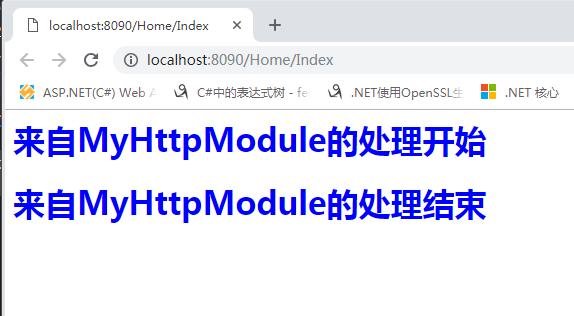
其实module对所有请求都起作用,在每次接收到请求的时候,都会有一堆的Module被执行,因为.Net框架已经在全局配置文件里面配好了一些必要的module,该配置文件地址:C:\Windows\Microsoft.NET\Framework64\v4.0.30319\Config\web.config,我们可以在自己的项目中的web.config文件中去移除一些不需要的module,例如上面的 <remove name="FormsAuthentication" />移除了Form表单验证。全局web.config配置文件对httpModule的配置如下:

至此我们可以总结一下module的作用,1、可以用来做权限认证;2、可以做Url转发;3、可以做性能监控;4、可以用来做反爬虫,检测同一个IP频繁的请求。当然,module不适合单独为某些请求而服务,因为它是针对所有请求的。
接下来我们来看下asp.net中的另一类事件,我们把代码改了一下,在我们自定义的Module里面我们定义了一个事件MyHttpModuleEvent,我们依然按照上面注册module的方法在web.config文件中注册好MyHttpModule。不同的是我们在项目启动文件Global.asax.cs文件中添加了 以web.config注册模块的名称_Module中的事件的一个方法。运行项目之后,我们发现该方法MyHttpModule_MyHttpModuleEvent被调用了。
  /// <summary>

    /// 自定义实现HttpModule,实现IHttpModule接口

    /// </summary>

    public class MyHttpModule : IHttpModule

    {

        public event EventHandler MyHttpModuleEvent;

        public void Dispose()

        {

        }

        public void Init(HttpApplication context)

        {

            //在此处添加管道事件的处理

            context.BeginRequest += new EventHandler(Context_BeginRequest);

            context.EndRequest += new EventHandler(Context_EndRequest);

        }

        private void Context_BeginRequest(object sender, EventArgs e)

        {

            HttpApplication application = sender as HttpApplication;

            HttpContext context = application.Context;//Url重写

            if (context.Request.Url.AbsolutePath.Equals("/Pipe/Some", StringComparison.OrdinalIgnoreCase))

                context.RewritePath("/Pipe/Another");

            if (MyHttpModuleEvent!= null)

                MyHttpModuleEvent.Invoke(this, e);

        }

        private void Context_EndRequest(object sender, EventArgs e)

        {

            HttpApplication application = sender as HttpApplication;

            HttpContext context = application.Context;

        }

    }
 protected void MyHttpModule_MyHttpModuleEvent(object sender, EventArgs e)

 {

      Response.Write("<h3>来自Global.asax 的 MyHttpModule_MyHttpModuleEvent</h2>");

 }
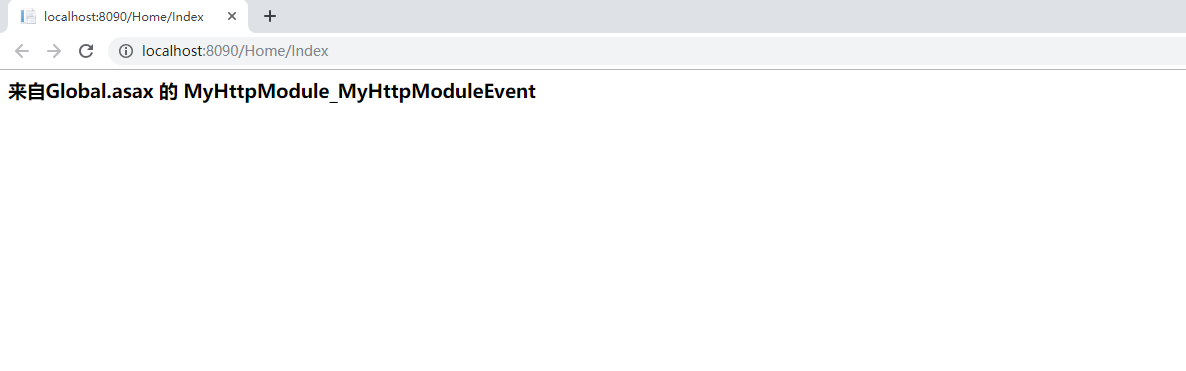
那么为什么这个方法会被调用,这个其实是.Net框架约定俗成的。约定命名方式:HttpModule注册名称_事件名称,而这个事件的执行时机是由我们在自定义的module中确定的。
最后我们来看下Global.asax.cs文件中的一些方法。
         /// <summary>
     /// 网站启动时,响应第一次请求的执行的

        /// 以后再以不执行了

        /// 挺合适做一些初始化

        /// </summary>

        protected void Application_Start()

        {

            AreaRegistration.RegisterAllAreas();//注册区域路由

            GlobalConfiguration.Configure(WebApiConfig.Register);//注册webapi路由

            FilterConfig.RegisterGlobalFilters(GlobalFilters.Filters);//注册全局过滤器

            RouteConfig.RegisterRoutes(RouteTable.Routes);//注册路由

            BundleConfig.RegisterBundles(BundleTable.Bundles);

        }

        protected void Application_End(object sender, EventArgs e)

        {

            //在应用程序关闭时运行的代码

            logger.Info("Application_End");

        }

        /// <summary>

        /// 请求出现异常,都可以处理

        /// 也可以完成全局异常处理

        /// filter只能处理控制器里面的异常

        /// </summary>

        /// <param name="sender"></param>

        /// <param name="e"></param>

        protected void Application_Error(object sender, EventArgs e)

        {

            // 在出现未处理的错误时运行的代码

            var error = Server.GetLastError();

            logger.Info("Application_Error");

            Response.Write("出错");

            Server.ClearError();

        }

        protected void Session_Start(object sender, EventArgs e)

        {

            // 在新会话启动时运行的代码

            logger.Info("Session_Start");

        }

        protected void Session_End(object sender, EventArgs e)

        {

            // 在会话结束时运行的代码。

            // 注意: 只有在 Web.config 文件中的 sessionstate 模式设置为

            // InProc(默认内存里) 时,才会引发 Session_End 事件。如果会话模式设置为 StateServer

            // 或 SQLServer,则不会引发该事件。

            logger.Info("Session_End");

        }
从该文件中,我们可以看到Session_Start和Session_End两个方法,它们的调用也是.Net框架约定的,因为我们通过反射查看SessionStateModule的源码,可以看到其定义了Start和End两个事件。
        public event EventHandler Start

        {

            add

            {

                this._sessionStartEventHandler = (EventHandler)Delegate.Combine(this._sessionStartEventHandler, value);

            }

            remove

            {

                this._sessionStartEventHandler = (EventHandler)Delegate.Remove(this._sessionStartEventHandler, value);

            }

        }

        public event EventHandler End

        {

            add

            {

                SessionOnEndTarget onEndTarget = this._onEndTarget;

                lock (onEndTarget)

                {

                    if (this._store != null && this._onEndTarget.SessionEndEventHandlerCount == )

                    {

                        this._supportSessionExpiry = this._store.SetItemExpireCallback(new SessionStateItemExpireCallback(this._onEndTarget.RaiseSessionOnEnd));

                    }

                    SessionOnEndTarget expr_4E = this._onEndTarget;

                    int sessionEndEventHandlerCount = expr_4E.SessionEndEventHandlerCount + ;

                    expr_4E.SessionEndEventHandlerCount = sessionEndEventHandlerCount;

                }

            }

            remove

            {

                SessionOnEndTarget onEndTarget = this._onEndTarget;

                lock (onEndTarget)

                {

                    SessionOnEndTarget expr_17 = this._onEndTarget;

                    int sessionEndEventHandlerCount = expr_17.SessionEndEventHandlerCount - ;

                    expr_17.SessionEndEventHandlerCount = sessionEndEventHandlerCount;

                    if (this._store != null && this._onEndTarget.SessionEndEventHandlerCount == )

                    {

                        this._store.SetItemExpireCallback(null);

                        this._supportSessionExpiry = false;

                    }

                }

            }

        }
需要注意的是在每处理一个Http请求时,应用程序事件都会触发一遍,但是Application_Start和 Application_End 例外,它仅在第一个资源文件被访问时被触发。Http Module无法注册和响应Session事件,对于Session_Start 和 Session_End,只能通过Glabal.asax来处理。
扩展 IHttpModule的更多相关文章
- 一种基于自定义代码的asp.net网站首页根据IP自动跳转指定页面的方法!
一种基于自定义代码的asp.net网站首页根据IP自动跳转指定页面的方法! 对于大中型网站,为了增强用户体验,往往需要根据不同城市站点的用户推送或展现相应个性化的内容,如对于一些大型门户网站的新闻会有 ...
- Asp.Net 管道事件注册/HttpApplication事件注册
一.HttpApplication简介 在HttpRuntime创建了HttpContext对象之后,HttpRuntime将随后创建一个用于处理请求的对象,这个对象的类型为HttpApplicati ...
- 一种基于自定义代码的asp.net网站访问IP过滤方法!
对于一些企业内部核心系统,特别是外网访问的时候,为了信息安全,可能需要对外部访问的IP地址作限制,虽然IIS中也提供了根据IP地址或IP地址段进行限制或允许,但并没有提供根据IP地址所在的城市进行限制 ...
- 你真的熟悉ASP.NET MVC的整个生命周期吗?
一.介绍 我们做开发的,尤其是做微软技术栈的,有一个方向是跳不过去的,那就是MVC开发.我相信大家,做ASP.NET MVC 开发有的有很长时间,当然,也有刚进入这个行业的.无论如何,如果有人问你,你 ...
- 通过IHttpModule,IHttpHandler扩展IIS
IIS对Http Request的处理流程 当Windows Server收到从浏览器发送过来的http请求,处理流程如下(引用自官方文档): 最终请求会被w3wp.exe处理,处理过程如下: 左边蓝 ...
- 17+个ASP.NET MVC扩展点【附源码】
1.自定义一个HttpModule,并将其中的方法添加到HttpApplication相应的事件中!即:创建一个实现了IHttpmodule接口的类,并将配置WebConfig. 在自定义的Http ...
- Asp.net Mvc模块化开发之分区扩展框架
对于一个企业级项目开发,模块化是非常重要的. 默认Mvc框架的AreaRegistration对模块化开发真的支持很好吗?真的有很多复杂系统在使用默认的分区开发的吗?我相信大部分asp.net的技术团 ...
- IHttpModule在webconfig中的注册
在asp.net中,提供了两种方式用来解决获取由asp.net服务器创建和维护的HttpApplication对象,方便注册HttpApplication对象的事件处理.这两种方式为:IHtpModu ...
- 【IHttpHandler】IHttpModule实现URL重写
1.用自定义IHttpModule实现URL重写 一般来说,要显示一些动态数据总是采用带参数的方式,比如制作一个UserInfo.aspx的动态页面用于显示系统的UserInfo这个用户信息表的数据, ...
随机推荐
- ThreadLocal工具类的使用(隔离思想)
ThreadLocal不是用来解决共享对象的多线程访问问题的, 通过ThreadLocal的set()方法设置到线程的ThreadLocal.ThreadLocalMap里的是是线程自己要存储的对象, ...
- 【SCOI 2003】 严格n元树
[题目链接] 点击打开链接 [算法] f[i]表示深度小于等于i的严格n元树 显然,一棵深度小于等于i的严格n元树,就是一个根节点,下面有n棵子树,这n棵子树都是深度小于等于i-1的严格n元树,每棵子 ...
- AutoIT: 如何通过坐标相对位置来对无法识别的Menu以及GridView进行定位点击操作
一般情况下,GridView中的数据来自数据库,我们通过Windows Info,是无法获取GridView中的信息的.而软件定制的Menu,很多时候无法通过系统提供的WinMenuSelectIte ...
- bzoj 4825: [Hnoi2017]单旋【dfs序+线段树+hash】
这个代码已经不是写丑那么简单了--脑子浆糊感觉np++分分钟想暴起打死我--就这还一遍A过了-- 先都读进来hash一下,因为是平衡树所以dfs序直接按照点值来就好 对于每个操作: 1:set维护已插 ...
- 51nod 1222 最小公倍数计数【莫比乌斯反演】
参考:https://www.cnblogs.com/SilverNebula/p/7045199.html 所是反演其实反演作用不大,又是一道做起来感觉诡异的题 转成前缀和相减的形式 \[ \sum ...
- 洛谷P4550 收集邮票(概率期望)
传送门 神仙题啊……这思路到底是怎么来的…… ps:本题是第$k$次买邮票需要$k$元,而不是买的邮票标号为$k$时花费$k$元 我们设$g[i]$表示现在有$i$张,要买到$n$张的期望张数,设$P ...
- redis问题集结
redis和memcached比较? redis中数据库默认是多少个db 及作用? python操作redis的模块? 如果redis中的某个列表中的数据量非常大,如果实现循环显示每一个值? redi ...
- python ftp小程序练习
作业要求: 开发一个支持多用户在线的FTP程序 要求: 1.用户加密认证 2.允许同时多用户登陆 3.每个用户都有自己的家目录,并且只能访问自己的家目录 4.对用户进行磁盘配额,每个用户的可用空间不同 ...
- _bzoj1007 [HNOI2008]水平可见直线【单调栈】
传送门:http://www.lydsy.com/JudgeOnline/problem.php?id=1007 按斜率排序,去掉斜率相同时,截距较小的直线(即只保留该斜率下截距最大的直线).若当前直 ...
- Stamps ans Envelope Sive UVA - 242
( ||{集合x}表示x中元素1||x中元素2||...||x的最后一个元素||(a,b)表示a||b) ans[i][j][k]表示考虑前i种邮票时取j个邮票能否得到面值kans[i][j][k]= ...