
python3.5 正则表达式
我们平时上网的时候,经常需要在一些网站上注册帐号,而注册帐号的时候对帐号信息会有一些要求。
比如:
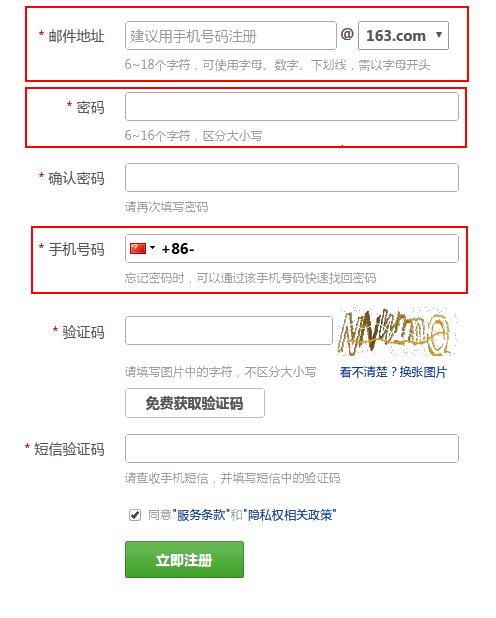
上面的图片中,输入的邮件地址、密码、手机号 符合要求才可以注册成功。
我们是我们自己写的网站,那么我们需要判断用户输入是否合法。
那么如何判断用户输入的内容是否合法呢? 自己写函数来依次判断?
python给我们提供了更方便的工具——re模块,也就是正则表达式模块。
在使用re模块的时候,我们需要了解一些正则表达式的基础知识。
什么是正则表达式?
正则表达式(Regular expressions) 其实就是描述字符串规则的代码。比如说我们的手机号码的规则是 由1开头的11位数字组成。最简单的正则表达式就是普通字符串,可以匹配其自身。比如,正则表达式 ‘hello’ 可以匹配字符串 ‘hello’。
注意:正则表达式并不是一个程序, 也不是python的一部分,它只是是用于处理字符串的一种模式,它有自己的一套语法规则,且十分强大。在提供正则表达式的编程语言里,正则表达式的语法都是一样的,区别在于不同的编程语言支持的语法数量不同,不过不用担心,
下面我们来学习一下正则表达式的基础知识。



学完了正则表达式,我们来学习re模块的使用。
re模块为我们提供了一些函数和常量。
匹配模式:
正则表达式提供了一些可用的匹配模式,比如说不区分大小写,多行匹配等等:
re.U (re.UNICODE) 使用Unicode模式匹配字符串,该模式为默认,\w, \W, \b, \B, \d, \D, \s, \S会受到影响。
re.A(re.ASCII):使 \w \W \b \B \s \S 只匹配 ASCII 字符,而不是 Unicode 字符。
re.I(re.IGNORECASE): 忽略大小写
re.L(re.LOCALE): 使预定字符类 \w \W \b \B \s \S 取决于当前区域设定
re.M(re.MULTILINE): 多行模式,改变'^'和'$'的行为,指定了以后,'^'会增加匹配每行的开始(也就是换行符后的位置);'$'会增加匹配每行的结束(也就是换行符前的位置)。
re.S(re.DOTALL): 点任意匹配模式,改变'.'的行为, 让'.'可以匹配包括'\n'在内的任意字符。
re.X(re.VERBOSE): 详细模式。这个模式下正则表达式可以是多行,忽略空白字符,并可以加入注释。以下两个正则表达式是等价的:
a = re.compile(r"""\d +  # the integral part

                   \.    # the decimal point

                   \d *  # some fractional digits""", re.X)

b = re.compile(r"\d+\.\d*")
学完了正则表达式,我们来看一下如何使用 re 模块。
re模块为我们提供了很多方法,我们来看常用的几个:
re.search(pattern, string, flags=0)
对整个字符串进行搜索,并返回第一个匹配的字符串的match对象。
pattern : 使用的正则表达式
string : 要匹配的字符串
flags : 用来控制正则表达式的匹配规则。比如是否区分大小写
示例:
>>> str1 = "Hello world"

>>> print(re.search(r"e", str1))

<_sre.SRE_Match object; span=(1, 2), match='e'>
re.match(pattern, string, flags)
从字符串“开头”去匹配,并返回匹配的字符串的match对象。匹配不到时,返回None
示例:
>>> str1 = "Hello world"

>>> print(re.match(r"e", str1))

None

>>> print(re.match(r"He", str1))

<_sre.SRE_Match object; span=(0, 2), match='He'>
re.fullmatch(pattern, string, flags=0)
如果正则表达式匹配整个字符串,则返回匹配到的match对象, 否则返回None。 注意这里不同于0长度的匹配。
>>> str1 = "Hello world"

>>> print(re.fullmatch(r"[a-z ]", str1, re.I))

None

>>> print(re.fullmatch(r"[a-z ]+", str1, re.I))

<_sre.SRE_Match object; span=(0, 11), match='Hello world'>
re.split(pattern, string, maxsplit=0, flags=0)
使用匹配到的内容分割字符串,返回一个列表,如果maxsplit非0,则根据指定的次数进行分割,剩余的内容作为列表的最后一个元素。
>>> re.split('\W+', 'Words, words, words.')

['Words', 'words', 'words', '']

>>> re.split('(\W+)', 'Words, words, words.')

['Words', ', ', 'words', ', ', 'words', '.', '']

>>> re.split('\W+', 'Words, words, words.', 1)

['Words', 'words, words.']

>>> re.split('[a-f]+', '0a3B9', flags=re.IGNORECASE)

['', '', '']

## 如果在进行分割的时候有分组,且匹配的内容的在字符串的起始位置,则结果的第一元素是一个空字符串,

>>> re.split('(\W+)', '...words, words...')

['', '...', 'words', ', ', 'words', '...', '']

## 注意这里的 x* 匹配的0个x 会被忽略

>>> re.split('x*', 'axbc')

['a', 'bc']

##  只能匹配空字符串的pattern 一般不会分割字符串 。因为这不是一个预期的行为,在python3.5中会报告 ValueError 错误

>>> re.split("^$", "foo\n\nbar\n", flags=re.M)

Traceback (most recent call last):

  File "<stdin>", line 1, in <module>

  ...

ValueError: split() requires a non-empty pattern match.
re.findall(pattern, string, flags=0)
返回一个所有匹配的字符串的字符串列表
示例:
>>> str1 = "Hello world"

>>> print(re.findall(r"e", str1))

['e']

>>> print(re.findall(r"z", str1))

[]
re.finditer(pattern, string, flags=0)
返回匹配对象组成的一个迭代器
示例:
>>> str1 = "Hello python, hello python."

>>> ite = re.finditer(r"[a-z]+", str1 , re.I )

>>> print(ite)

<callable_iterator object at 0x7f79690b92e8>

>>> for i in ite:print(i)

...

<_sre.SRE_Match object; span=(0, 5), match='Hello'>

<_sre.SRE_Match object; span=(6, 12), match='python'>

<_sre.SRE_Match object; span=(14, 19), match='hello'>

<_sre.SRE_Match object; span=(20, 26), match='python'>
re.sub(pattern, repl, string, count=0, flags=0)
使用repl替换string中每一个匹配的子串后返回替换后的字符串。
当repl是一个字符串时,可以使用\id或\g<id>、\g<name>引用分组,但不能使用编号0。
当repl是一个方法时,这个方法应当只接受一个参数(Match对象),并返回一个字符串用于替换(返回的字符串中不能再引用分组)。
count用于指定最多替换次数,不指定时全部替换。
>>> str1 = "hello 123, hello 456."

>>> re.sub(r"\d+", "world",str1)

'hello world, hello world.'

>>> def func(matchObj):

...     if matchObj:return "--"

...     else: return "++"

...

>>> re.sub(r"\d+", func,str1)

'hello --, hello --.'
re.subn(pattern, repl, string, count=0, flags=0)
效果和 sub() 一样,但是结果会返回一个元组 (new_string, number_of_subs_made)
>>> str1 = "hello 123, hello 456."

>>> re.subn(r"\d+", "world",str1)

('hello world, hello world.', 2)
re.escape(string)
转义pattern中 除了ASCII字母、数字、‘_’ 之外的所有字符。其实就是帮在特殊字符前面加 \ 。
>>> re.escape('www.python.org')

'www\\.python\\.org'
re.purge()
清楚正则表达式缓存
re.compile(pattern, flags=0)
将正则表达式编译为一个正则表达式对象, 可以把经常使用的正则表达式编译成正则表达式对象来提高效率
>>> regex = re.compile(r"\d+")

>>> match = regex.search("hello 123")

>>> if match: print(match.group())

...

123
正则表达式对象
通过 re.compile() 我们可以得到一个编译的正则表达式对象,他支持以下方法和属性
regex.search(string[, pos[, endpos]])
>>> pattern = re.compile("d")

>>> pattern.search("dog")     # Match at index 0

<_sre.SRE_Match object; span=(0, 1), match='d'>

>>> pattern.search("dog", 1)  # No match; search doesn't include the "d"
regex.match(string[, pos[, endpos]])
>>> pattern = re.compile("o")

>>> pattern.match("dog")      # No match as "o" is not at the start of "dog".

>>> pattern.match("dog", 1)   # Match as "o" is the 2nd character of "dog".

<_sre.SRE_Match object; span=(1, 2), match='o'>
regex.fullmatch(string[, pos[, endpos]])
>>> pattern = re.compile("o[gh]")

>>> pattern.fullmatch("dog")      # No match as "o" is not at the start of "dog".

>>> pattern.fullmatch("ogre")     # No match as not the full string matches.

>>> pattern.fullmatch("doggie", 1, 3)   # Matches within given limits.

<_sre.SRE_Match object; span=(1, 3), match='og'>
regex.split(string, maxsplit=0)
regex.findall(string[, pos[, endpos]])
regex.finditer(string[, pos[, endpos]])
regex.sub(repl, string, count=0)
regex.subn(repl, string, count=0)
regex.flags
regex匹配的flags,
regex.groups
返回pattern中分组的数量
>>> aa = re.compile(r'(\d{3})(\d{3})(\d{3})(\d{3})(\d{3})' )

>>> aa.groups

5
regex.groupindex
返回定义了名字的分组 组成的一个字典映射
>>> aa = re.compile(r'(?P<id01>\d{3})(?P<id02>\d{3})' )

>>> aa.groupindex

mappingproxy({'id01': 1, 'id02': 2})
regex.pattern
返回被编译的 pattern 字符串
>>> aa = re.compile(r'(?P<id01>\d{3})(?P<id02>\d{3})' )

>>> aa.pattern

'(?P<id01>\\d{3})(?P<id02>\\d{3})'
我们得到匹配后的文本后 会得到 匹配对象——Match对象
Match对象默认是一个为True 的布尔值。由于 match() and search() 在没有匹配到内容的时候会返回None值, 此时你可以用if语句测试是否有Match对象。
match = re.search(pattern, string)

if match:

    process(match)
Match对象支持以下方法和属性:
match.expand(template)
将匹配到的分组代入template中然后返回。template中可以使用\id或\g<id>、\g<name>引用分组,但不能使用编号0。\id与\g<id>是等价的;但\10将被认为是第10个分组,如果你想表达\1之后是字符'0',只能使用\g<1>0。
>>> m = re.match(r"(\w+) (\w+)", "Isaac Newton, physicist")

>>> m.expand(r"\2 \1 \2 \1")

'Newton Isaac Newton Isaac'
match.group([group1, ...])
获得匹配后的分组字符串,参数为编号或者别名;group(0)代表整个字符串,group(1)代表第一个分组匹配到的字符串,依次类推;如果编号大于pattern中的分组数或者小于0,则返回IndexError。另外,如果匹配不成功的话,返回None;如果在多行模式下有多个匹配的话,返回最后一个成功的匹配。
>>> m = re.match(r"(\w+) (\w+)", "Isaac Newton, physicist")

>>> m.group()

'Isaac Newton'

>>> m.group(0)

'Isaac Newton'

>>> m.group(1)

'Isaac'

>>> m.group(2)

'Newton'

>>> m.group(3)

Traceback (most recent call last):

  File "<stdin>", line 1, in <module>

IndexError: no such group
match.groups(default=None)
返回一个tuple,包含所有的分组匹配结果;如果default设为None的话,如果有分组没有匹配成功,则返回"None";若设为0,则返回"0"。
>>> m = re.match(r"(\w+) (\w+)", "Isaac Newton, physicist")

>>> m.groups()

('Isaac', 'Newton')
match.groupdict(default=None)
和上一个相似,不过返回的是dictionary,包含所有命名的分组和其匹配的值,如果有分组没有匹配成功,返回默认值"None"。
>>> m = re.match(r"(?P<id>\w+) (\w+)", "Isaac Newton, physicist")

>>> m.groupdict()

{'id': 'Isaac'}
match.start([group]) / match.end([group])
返回指定的组截获的子串在string中的起始索引(子串第一个字符的索引)/ 结束索引(子串最后一个字符的索引+1),group默认值为0。如果[group]存在但是没有匹配成功,返回-1。
>>> email = "tony@tiremove_thisger.net"

>>> m = re.search("remove_this", email)

>>> email[:m.start()] + email[m.end():]

'tony@tiger.net'
match.span([group])
返回一个分组[group]成功匹配时的信息,2-tuple,(m.start([group]), m.end([group]));如果分组没有成功匹配,返回(-1,-1)。
>>> email = "tony@tiremove_thisger.net"

>>> m = re.search("remove_this", email)

>>> m.span()

(7, 18)
match.pos
在string中匹配时,开始匹配的下标。
match.endpos
在 string中匹配时,结束匹配的下标。
>>> email = "tony@tiremove_thisger.net"

>>> m = re.search("remove_this", email)

>>> len(email)

25

>>> m.pos

0

>>> m.endpos

25
match.lastindex
最后一个被捕获的分组在文本中的索引。如果没有被捕获的分组,将为None。
>>> m = re.match(r"(?P<id>\w+) (\w+)", "Isaac Newton, physicist")

>>> m.lastindex

2
match.lastgroup
返回分组匹配最后成功的分组别名;如果没有一个分组匹配成功,或者最后一个成功匹配的分组没有别名,返回None。
>>> m = re.match(r"(?P<id>\w+) (\w+)", "Isaac Newton, physicist")

>>> m.lastgroup

>>> m = re.match(r"(?P<id>\w+) (?P<word>\w+)", "Isaac Newton, physicist")

>>> m.lastgroup

'word'
match.re
执行该match对象的正则表达式对象。
>>> m = re.match(r"(?P<id>\w+) (\w+)", "Isaac Newton, physicist")

>>> m.re

re.compile('(?P<id>\\w+) (\\w+)')
match.string
传递到match()或search()函数中的字符串。
>>> m = re.match(r"(?P<id>\w+) (\w+)", "Isaac Newton, physicist")

>>> m.string

'Isaac Newton, physicist'
python3.5 正则表达式的更多相关文章
- python3的正则表达式(regex)
正则表达式提供了一种紧凑的表示法,可用于表示字符串的组合,一个单独的正则表达式可以表示无限数量的字符串.常用的5种用途:分析.搜索.搜索与替代.字符串的分割.验证. (一)正则表达式语言python中 ...
- python3之正则表达式
1.正则表达式基础 正则表达式是用于处理字符串的强大工具,拥有自己独特的语法以及一个独立的处理引擎,效率上可能不然str自带方法,但功能十分强大. 正则表达式的大致匹配流程:依次拿出表达式和文本中的字 ...
- python3.x 正则表达式的应用
正则表达式是我认为比较难的一个东西,今天忽然又学到了这个,想到写下来,以后作为参考手册使用. python如果想使用python需要引用re方法,在文件开始进行引用. import re 接下来说一下 ...
- Python3之正则表达式详解
正则表达式 本节我们看一下正则表达式的相关用法,正则表达式是处理字符串的强大的工具,它有自己特定的语法结构,有了它,实现字符串的检索.替换.匹配验证都不在话下. 当然对于爬虫来说,有了它,我们从HTM ...
- Python3(七) 正则表达式与JSON
一. 初识正则表达式 1.定义:是一个特殊的字符序列,可以帮助检测一个字符串是否与我们所设定的字符序列相匹配. 2.作用:可以实现快速检索文本.实现替换文本的操作. 3.场景: 1.检测一串数字是否是 ...
- 自己动手实现html去标签和文本提取
随意观看 [TOC] 工具 python3.6 正则表达式(别的语言思路一样,容易借鉴) python正则表达式:flags的应用 这里主要介绍一下re.compile(pattern[, flags ...
- 537. Complex Number Multiplication
题目大意: 给出a, b两个用字符串表示的虚数,求a*b 题目思路: 偷了个懒,Python3的正则表达式匹配了一下,当然acm里肯定是不行的 class Solution: def complexN ...
- Python爱好者社区历史文章列表(每周append更新一次)
2月22日更新: 0.Python从零开始系列连载: Python从零开始系列连载(1)——安装环境 Python从零开始系列连载(2)——jupyter的常用操作 Python从零开始系列连载( ...
- Python3 如何优雅地使用正则表达式(详解一)
注:本文翻译自 Regular Expression HOWTO,小甲鱼童鞋对此做了一些注释和修改. 正则表达式介绍 正则表达式(Regular expressions 也称为 REs,或 regex ...
随机推荐
- 【转】Wireshark基本用法
原地址:http://blog.jobbole.com/70907/ 按照国际惯例,从最基本的说起. 抓取报文: 下载和安装好Wireshark之后,启动Wireshark并且在接口列表中选择接口名, ...
- React-webpack开发需要的那些坑
nvariant Violation: _registerComponent(...): Target container is not a DOM element. 就是一个找不到DOM节点的问题, ...
- 【转】iOS学习之适配iOS10
适配iOS10 2016年9月7日,苹果发布iOS 10.2016年9月14日,全新的操作系统iOS 10将正式上线. 作为开发者,如何适配iOS10呢? 1.Notification(通知) 自从N ...
- Leetcode Maximum Product Subarray
Find the contiguous subarray within an array (containing at least one number) which has the largest ...
- jsoup获取文档类示例
import java.io.IOException; import org.jsoup.Jsoup; import org.jsoup.nodes.Document; import org.jsou ...
- margin-top使用需要注意的地方
偶然的机会发现一个有趣的现象:一个div(背景色为绿色)里面包含一个div,里面的div给一个margin-top:100px; 代码: <div style="background: ...
- linux 下使用配置文件
最近鼓捣双机热备,写了些shell脚本 适用配置文件 以 ifbeat 为例,linux的标准的配置文件中等号两遍不能存在括号, 空格 或特殊符号可以用转衣服 ' \' beat=true prima ...
- c和oc小知识
1.const const 修饰了*p1 / *p2 const int * p1=&age; int const * p2=&age;//和上面的意义一样 ,换句话说就是 在 “ * ...
- Java调用批处理或可执行文件
import java.io.BufferedReader; import java.io.InputStreamReader; public class Test { public static v ...
- jquery 无刷新多级联动
原先不熟悉jquery时,总在寻找无刷新的方法,在此不断的积累自己所知道的jquery属性,常用方法.以下为jquery实现的无刷新联动事件 分公司: <select id="Sele ...