
Virnish使用
缓存基础原理
程序具有局部性
时间局部性
空间局部性
key-value 形式存储数据
key 访问路径、URL、hash
value web content
命中率 hit/(hit+miss)
文档命中率
从文档个数进行衡量
字节命中率
内容大小进行衡量
缓存对象
定期清理缓存
可缓存对象,缓存空间耗尽时
会发生缺页,发生页面置换,使用LRU(最近最少使用)
不可缓存对象
例如:用户私有数据等
缓存处理步骤
接收请求 ---> 解析请求(提取请求的URL及各种首部)---> 查询缓存 ---> 新鲜度检测 ---> 创建响应报文 ---> 发送响应报文 ---> 记录日志
新鲜度检测机制
过期时限
HTTP/1.0 Expires
Expires: expires: Fri, 07 Apr 2028 14:16:45 GMT
HTTP/1.1 Cache-Control
cache-control: max-age=315360000
有效性在验证 revalidate
如果原始内容为改变,则响应首部(不附带body部分),响应吗304 Not Modified
如果原始内容未发生改变,则正常响应,响应吗200
如果原始内容消失,则响应404,此时浏览器缓存中的cache object也应该被删除
条件式请求首部
If-Modified-Since
常用,基于请求内容的时间戳做验证
If-Unmodified-Since
If-Match
If-None-Match
Etag:fsahfi56435
如果Etag存在返回false,否则返回true,并带上请求内容
具体缓存参数
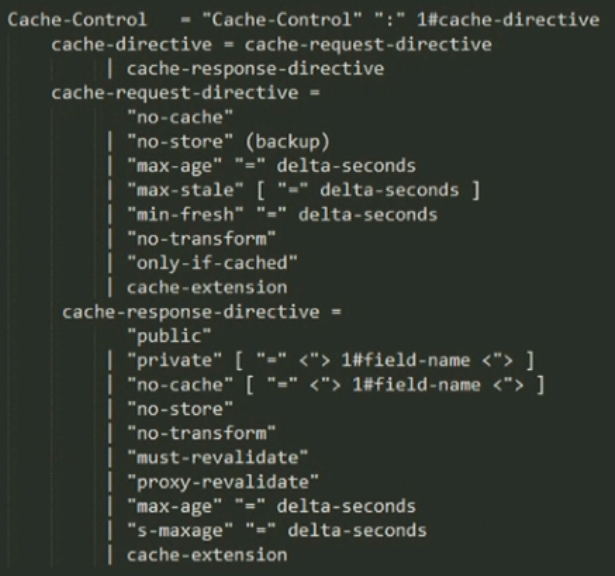
缓存参数解析
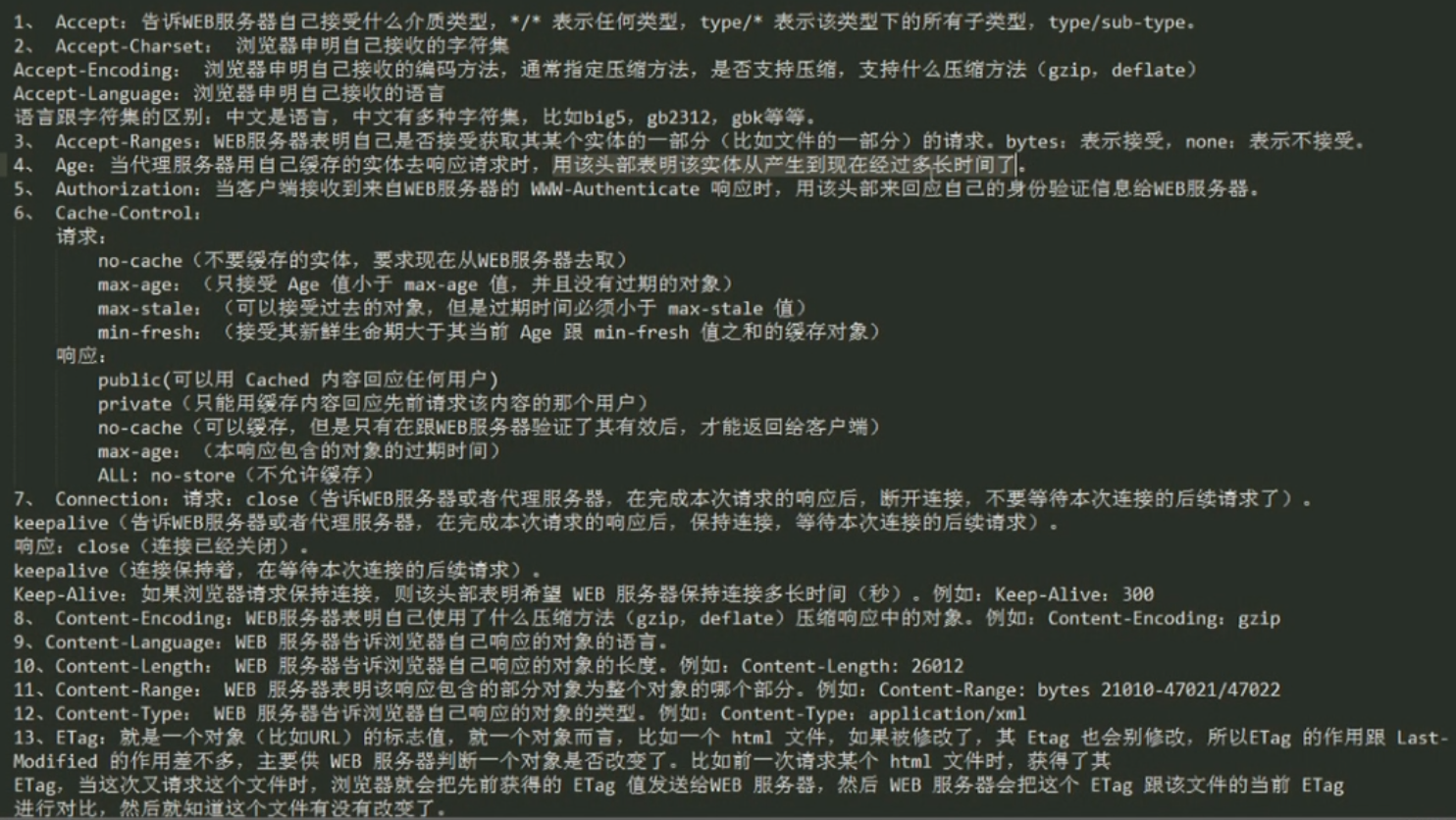
vanish基础了解
常见的缓存服务器开源解决方案
varnish
squid
官方站点
https://www.varnish-cache.org
varnish架构
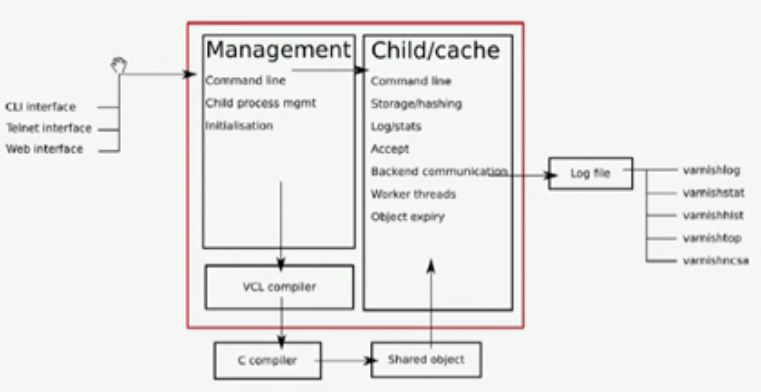
Managerment
Command line

    CLI interface

    Telnet interface

    Web interface

Initialization varnish CLI API

monitoring/mgmt Childs program
Managerment --> VCL complier --> C complier --> share object --> Child/cache
Child/cache
Command line 命令行接口

Storage/hashing hash 存储缓存对象

Log/stats 记录日志/统计各种数据

Acceptor 接收用户请求线程

Backend communication 如果缓存服务器没有请求内容,那么该缓存服务器会扮演客户端角色向后端服务器请求资源

Worker threads 工作线程,处理用户请求

Object expire 清理缓存中的过期对象
Log file
varnishlog  缓存对象日志

varnishstat 缓存对象状态

varnishhist  CLI命令缓存

varnishtop  缓存对象排名

varnishncsa  comment日志

# 共享内存日志大小一般默认为90MB

# 分为两部分前一部分为计数器,后一部分请求相关的数据

# Log file的内存空间对于各Child是共享的

# 对于内存中log日志如果存储满了Child会从头开始覆盖原先内容

# 所以必须要有程序能定时读取内存中log,最好是以守护进程方式一直运行
DSL
vcl (Varnish Configuration Language)
varnish配置语言
缓存策略配置接口
基于“域”的简单编程语言
核心依赖包
# jemalloc第一次在2005年作为FreeBSD libc分配器使用,从那以后它就找到了它。许多应用程序依赖于其可预测的行为。

# 2010年jemalloc开发工作扩展到包括开发人员支持特性。例如堆分析和广泛的监视/调优钩子。现代jemalloc发行版将继续集成到FreeBSD中,因此具有通用性

# 高效的内存分配回收

Installed Packages

Name        : jemalloc

Arch        : x86_64

Version     : 3.6.0

Release     : 1.el7

Size        : 317 k

Repo        : installed

From repo   : epel

Summary     : General-purpose scalable concurrent malloc implementation

URL         : http://www.canonware.com/jemalloc/

License     : BSD

Description : General-purpose scalable concurrent malloc(3) implementation.

            : This distribution is the stand-alone "portable" implementation of jemalloc.
软件包分析
/etc/varnish/default.vcl 主配置文件
/etc/varnish/varnish.params 各种环境变量,定义缓存工作机制
varnish 存储缓存方式
file
单个文件存储,不持久
性能提升不明显
*** varnish服务器不能随便重启,一但重启所有缓存对象将失效
malloc
基于内存缓存,不建议使用太大的空间,如果时间长了,缓存对象过期被删除,会留下很对内存碎片
persistent
基于文件的持久存储
配置varnish运行机制
varnish应用程序的命令行参数
监听的socket,使用的存储类型 ...
-p param = value 配置child子进程相关参数
-r param, param ... 设定只读参数列表
运行时参数
-p 选项指定
可以在程序运行中,通过CLI进行配置
vcl
配置缓存系统的缓存机制,通过vcl配置文件进行配置
/etc/varnish/varnish.params
需要先编译后应用,依赖C编译器
主配置文件分析及命令查看
man varnishd

vim /etc/varnish/varnish.params

    # 指定varnish配置文件读取路劲

    VARNISH_VCL_CONF=/etc/varnish/default.vcl

    # 指定监听端口

    VARNISH_LISTEN_PORT=6081

    # 指定管理IP

    VARNISH_ADMIN_LISTEN_ADDRESS=127.0.0.1

    # 指定管理端口

    VARNISH_ADMIN_LISTEN_PORT=6082

    # 密钥文件

    VARNISH_SECRET_FILE=/etc/varnish/secret

    # 存储机制

    VARNISH_STORAGE="file,/var/lib/varnish/varnish_storage.bin,1G"

    # VARNISH_STORAGE="malloc,256M"

    # 联系后端服务器超时时间

    VARNISH_TTL=120

    # 运行varnish的用户

    VARNISH_USER=varnish

    # 运行varnish的组

    VARNISH_GROUP=varnish

    # 进程选项

    #DAEMON_OPTS="-p thread_pool_min=5 -p thread_pool_max=500 -p thread_pool_timeout=300"

vim /etc/varnish/default.vcl

    # 后端服务主机

    backend default {

        .host = "192.168.180.130";

        .port = "";

    }
启动服务器测试
systemctl start varnish.service

curl http://192.168.180.128/xxx.html

# 如果缓存服务器上没有则去指定的后端服务器获取一份,先保存在回复给客户端
varnishadm
# 交互式命令行工具

    usage: varnishadm [-n ident] [-t timeout] [-S secretfile] -T [address]:port command [...]

        -n is mutually exlusive with -S and -T

# 使用

    varnishadm -S /etc/varnish/secret -T 127.0.0.1:6082

    help [<command>]

    ping [<timestamp>]  探测服务器存活情况

    auth <response>

    quit

    banner

    status  查看服务状态

    start

    stop

    vcl.load <configname> <filename>  编译、装载、命名文件

        vcl.load test default.vcl

        200

        VCL compiled

    vcl.inline <configname> <quoted_VCLstring>

    vcl.use <configname>  指定当前使用的VCL配置文件

    vcl.discard <configname>  指定删除VCL文件

    vcl.list  列出所有可用VCL文件

        # 文件当前状态  版本号  随服务引导启动

        active          0 boot

    param.show [-l] [<param>]  显示运行时参数

        param.show thread_pools

    param.set <param> <value>  设置参数值

        param.set thread_pools 4

        # 更改线程池不会立刻生效

    panic.show  查看子进程上一次崩溃详细

    panic.clear

    storage.list

    vcl.show [-v] <configname>  指定VCL编译前的信息

    backend.list [<backend_expression>]   后端服务器列表

    backend.set_health <backend_expression> <state>  设置后端服务器状态

    ban <field> <operator> <arg> [&& <field> <oper> <arg>]...  清理缓存中的缓存对象

    ban.list  列出所有ban规则
日志信息查看
varnishlog
man varnishlog
http://varnish-cache.org/docs/trunk/reference/varnishlog.html
varnishncsa
man varnishncsa
http://varnish-cache.org/docs/trunk/reference/varnishncsa.html
日志统计
varnishstat
man varnishstat
-l 查看能显示的字段
-f 指明只显示的字段
http://varnish-cache.org/docs/trunk/reference/varnishstat.html
日志排序
varnishtop
man varnishtop
http://varnish-cache.org/docs/trunk/reference/varnishtop.html
vanish状态引擎详解
官方文档
http://varnish-cache.org/docs/4.0/reference/vcl.html
vcl v2

vcl v3
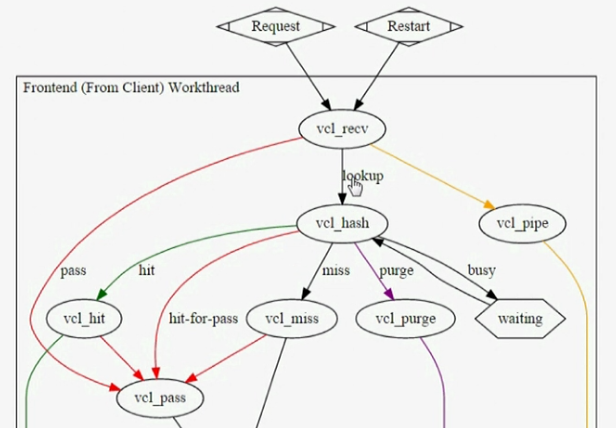
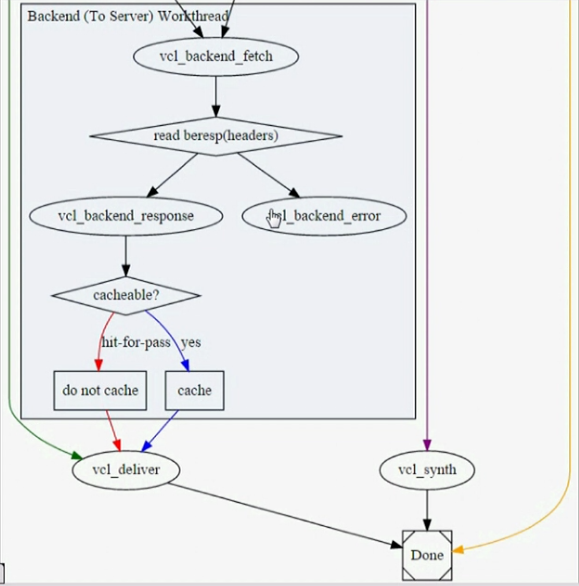
vcl v4
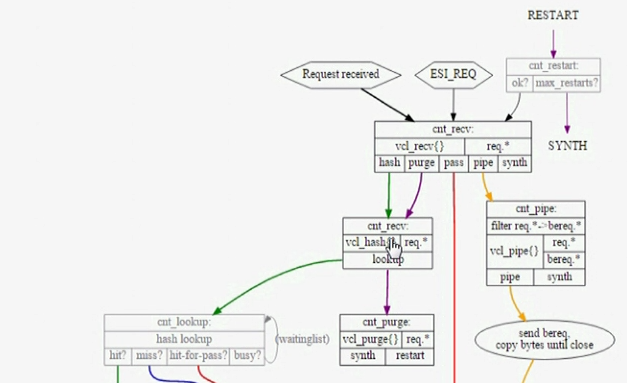
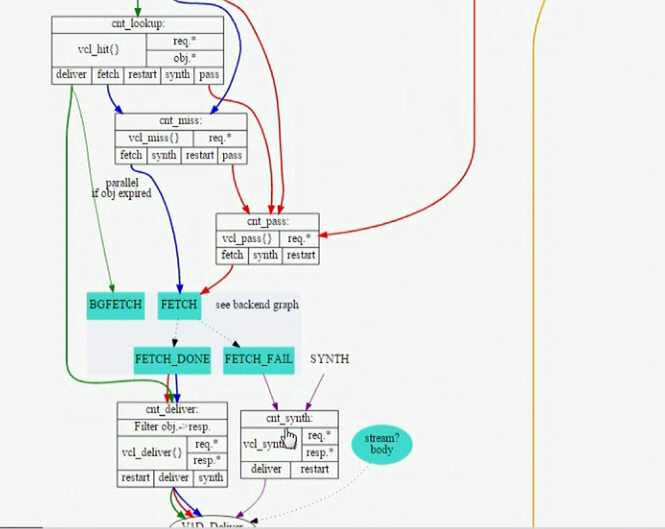
state engine
vcl_recv

vcl_hash

vcl_hit

vcl_miss

vcl_fetch

vcl_deliver

vcl_pipe

    如果请求使用的http方法不是get、head方法直接传递到后端服务器

vcl_pass

    遇到认证、用户私有数据get请求时,直接pass,请求直接传递到后端服务器

vcl_error

    拒绝客户端请求、其它异常情况时,自动合成error页面返回客户端

# engine之间在一定程度上的相关性

# 前驱engine需要return指明转移到哪一个后续engine
state engine workflow (v3)
vcl_recv ---> vcl_hash ---> vcl_hit ---> vcl_deliver

vcl_recv ---> vcl_hash ---> vcl_miss ---> vcl_fetch ---> vcl_deliver

vcl_recv ---> vcl_pass ---> vcl_fetch ---> vcl_deliver

vcl_recv ---> vcl_pipe
state engine workflow (v4)
如上图
vcl语法
The VCL Finite State Machine 通过 VCL 语言配置

1. 注释

    //, #, /* foo */ for comment

2. sub $name 用于定义例程

    sub vcl_recv {

    }

3. 不支持循环

    no loop

4. 有众多内置变量,变量的可调用位置与state engine 有密切相关性

5. 支持终止语句,return(action),没有返回值

6. “域”专用

7. 操作符: =, ==, ~, !, &&, ||

8. 条件判断

    if (CONDITION){

    }else{

    }

    set name=value 设置变量值

    unset name

9. 获取HTTP请求报文首部

    req.http.HEADER

        req.http.X-Forwarded-For

        req.http.Authorication

        req.http.cookie
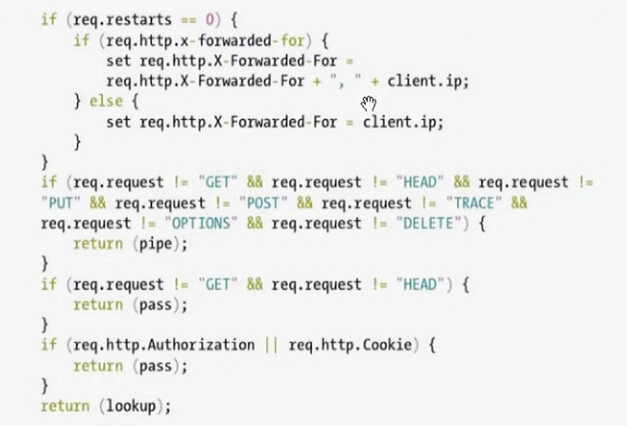
编辑一个VCL文件
sub vcl_recv {

    if(req.method == "PRI"){

        return (synth(405));

    }

    if (req.method!="GET" &&

        req.method!="HEAD" &&

        req.method!="PUT" &&

        req.method!="POST" &&

        req.method!="TRACE" &&

        req.method!="OPTIONS" &&

        req.method!="DELETE" &&{

            return (pipe);

        }

    )

    if (req.method!="GET" && req.method!="HEAD"){

        return (pass);

    }

    if (req.http.Authorication || req.http.Cookie){

        return (pass)

    }

    return (hash)

}

sub vcl_deliver {

    if (obj.hits>0) {

        set resq.http.X-cache = "HIT";

    }else{

        set resq.http.X-cache = "MISS";

    }

}
使用VCL例程
varnish -S /etc/varnish/secret -T 127.0.0.1:6082

vcl.load test1 test.vcl

vcl.use test1

vcl.show test1
varnish 内置变量
breq
# 由varnish发往backend server

bereq

    Type: HTTP

    Readable from: backend

    The entire backend request HTTP data structure

bereq.backend

    Type: BACKEND

    Readable from: vcl_pipe, backend

    Writable from: vcl_pipe, backend

bereq.between_bytes_timeout

    Type: DURATION

    Readable from: backend

    Writable from: backend

    The time in seconds to wait between each received byte from the backend. Not available in pipe mode.

bereq.connect_timeout

    Type: DURATION

    Readable from: vcl_pipe, backend

    Writable from: vcl_pipe, backend

    The time in seconds to wait for a backend connection.

bereq.first_byte_timeout

    Type: DURATION

    Readable from: backend

    Writable from: backend

    The time in seconds to wait for the first byte from the backend. Not available in pipe mode.

bereq.http.

    Type: HEADER

    Readable from: vcl_pipe, backend

    Writable from: vcl_pipe, backend

    The corresponding HTTP header.

bereq.method

    Type: STRING

    Readable from: vcl_pipe, backend

    Writable from: vcl_pipe, backend

    The request type (e.g. "GET", "HEAD").

bereq.proto

    Type: STRING

    Readable from: vcl_pipe, backend

    Writable from: vcl_pipe, backend

    The HTTP protocol version used to talk to the server.

bereq.retries

    Type: INT

    Readable from: backend

    A count of how many times this request has been retried.

bereq.uncacheable

    Type: BOOL

    Readable from: backend

    Indicates whether this request is uncacheable due to a pass in the client side or a hit on an existing uncacheable object (aka hit-for-pass).

bereq.url

    Type: STRING

    Readable from: vcl_pipe, backend

    Writable from: vcl_pipe, backend

    The requested URL.

bereq.xid

    Type: STRING

    Readable from: backend

    Unique ID of this request.
beresp
beresp

    Type: HTTP

    Readable from: vcl_backend_response, vcl_backend_error

    The entire backend response HTTP data structure

beresp.backend.ip

    Type: IP

    Readable from: vcl_backend_response, vcl_backend_error

    IP of the backend this response was fetched from.

beresp.backend.name

    Type: STRING

    Readable from: vcl_backend_response, vcl_backend_error

    Name of the backend this response was fetched from.

beresp.do_esi

    Type: BOOL

    Readable from: vcl_backend_response, vcl_backend_error

    Writable from: vcl_backend_response, vcl_backend_error

    Boolean. ESI-process the object after fetching it. Defaults to false. Set it to true to parse the object for ESI directives. Will only be honored if req.esi is true.

beresp.do_gunzip

    Type: BOOL

    Readable from: vcl_backend_response, vcl_backend_error

    Writable from: vcl_backend_response, vcl_backend_error

    Boolean. Unzip the object before storing it in the cache. Defaults to false.

beresp.do_gzip

    Type: BOOL

    Readable from: vcl_backend_response, vcl_backend_error

    Writable from: vcl_backend_response, vcl_backend_error

    Boolean. Gzip the object before storing it. Defaults to false. When http_gzip_support is on Varnish will request already compressed content from the backend and as such compression in Varnish is not needed.

beresp.do_stream

    Type: BOOL

    Readable from: vcl_backend_response, vcl_backend_error

    Writable from: vcl_backend_response, vcl_backend_error

    Deliver the object to the client directly without fetching the whole object into varnish. If this request is pass'ed it will not be stored in memory.

beresp.grace

    Type: DURATION

    Readable from: vcl_backend_response, vcl_backend_error

    Writable from: vcl_backend_response, vcl_backend_error

    Set to a period to enable grace.

beresp.http.

    Type: HEADER

    Readable from: vcl_backend_response, vcl_backend_error

    Writable from: vcl_backend_response, vcl_backend_error

    The corresponding HTTP header.

beresp.keep

    Type: DURATION

    Readable from: vcl_backend_response, vcl_backend_error

    Writable from: vcl_backend_response, vcl_backend_error

    Set to a period to enable conditional backend requests.

    The keep time is cache lifetime in addition to the ttl.

    Objects with ttl expired but with keep time left may be used to issue conditional (If-Modified-Since / If-None-Match) requests to the backend to refresh them.

beresp.proto

    Type: STRING

    Readable from: vcl_backend_response, vcl_backend_error

    Writable from: vcl_backend_response, vcl_backend_error

    The HTTP protocol version used the backend replied with.

beresp.reason

    Type: STRING

    Readable from: vcl_backend_response, vcl_backend_error

    Writable from: vcl_backend_response, vcl_backend_error

    The HTTP status message returned by the server.

beresp.status

    Type: INT

    Readable from: vcl_backend_response, vcl_backend_error

    Writable from: vcl_backend_response, vcl_backend_error

    The HTTP status code returned by the server.

beresp.storage_hint

    Type: STRING

    Readable from: vcl_backend_response, vcl_backend_error

    Writable from: vcl_backend_response, vcl_backend_error

    Hint to Varnish that you want to save this object to a particular storage backend.

beresp.ttl

    Type: DURATION

    Readable from: vcl_backend_response, vcl_backend_error

    Writable from: vcl_backend_response, vcl_backend_error

    The object's remaining time to live, in seconds. beresp.ttl is writable.

beresp.uncacheable

    Type: BOOL

    Readable from: vcl_backend_response, vcl_backend_error

    Writable from: vcl_backend_response, vcl_backend_error

    Inherited from bereq.uncacheable, see there.

    Setting this variable makes the object uncacheable, which may get stored as a hit-for-pass object in the cache.

    Clearing the variable has no effect and will log the warning "Ignoring attempt to reset beresp.uncacheable".
client
# 将用户请求调度至后端,并做回话保持的

client.identity

    Type: STRING

    Readable from: client

    Writable from: client

    Identification of the client, used to load balance in the client director.

client.ip

    Type: IP

    Readable from: client

    The client's IP address.
now
now

    Type: TIME

    Readable from: vcl_all

    The current time, in seconds since the epoch. When used in string context it returns a formatted string.
obj
obj.grace

    Type: DURATION

    Readable from: vcl_hit

    The object's remaining grace period in seconds.

obj.hits

    Type: INT

    Readable from: vcl_hit, vcl_deliver

    The count of cache-hits on this object. A value of 0 indicates a cache miss.

obj.http.

    Type: HEADER

    Readable from: vcl_hit

    The corresponding HTTP header.

obj.keep

    Type: DURATION

    Readable from: vcl_hit

    The object's remaining keep period in seconds.

obj.proto

    Type: STRING

    Readable from: vcl_hit

    The HTTP protocol version used when the object was retrieved.

obj.reason

    Type: STRING

    Readable from: vcl_hit

    The HTTP status message returned by the server.

obj.status

    Type: INT

    Readable from: vcl_hit

    The HTTP status code returned by the server.

obj.ttl

    Type: DURATION

    Readable from: vcl_hit

    The object's remaining time to live, in seconds.

obj.uncacheable

    Type: BOOL

    Readable from: vcl_deliver

    Whether the object is uncacheable (pass or hit-for-pass).
req
req

    Type: HTTP

    Readable from: client

    The entire request HTTP data structure

req.backend_hint

    Type: BACKEND

    Readable from: client

    Writable from: client

    Set bereq.backend to this if we attempt to fetch.

req.can_gzip

    Type: BOOL

    Readable from: client

    Does the client accept the gzip transfer encoding.

req.esi

    Type: BOOL

    Readable from: client

    Writable from: client

    Boolean. Set to false to disable ESI processing regardless of any value in beresp.do_esi. Defaults to true. This variable is subject to change in future versions, you should avoid using it.

req.esi_level

    Type: INT

    Readable from: client

    A count of how many levels of ESI requests we're currently at.

req.hash_always_miss

    Type: BOOL

    Readable from: vcl_recv

    Writable from: vcl_recv

    Force a cache miss for this request. If set to true Varnish will disregard any existing objects and always (re)fetch from the backend.

req.hash_ignore_busy

    Type: BOOL

    Readable from: vcl_recv

    Writable from: vcl_recv

    Ignore any busy object during cache lookup. You would want to do this if you have two server looking up content from each other to avoid potential deadlocks.

req.http.

    Type: HEADER

    Readable from: client

    Writable from: client

    The corresponding HTTP header.

req.method

    Type: STRING

    Readable from: client

    Writable from: client

    The request type (e.g. "GET", "HEAD").

req.proto

    Type: STRING

    Readable from: client

    Writable from: client

    The HTTP protocol version used by the client.

req.restarts

    Type: INT

    Readable from: client

    A count of how many times this request has been restarted.

req.ttl

    Type: DURATION

    Readable from: client

    Writable from: client

req.url

    Type: STRING

    Readable from: client

    Writable from: client

    The requested URL.

req.xid

    Type: STRING

    Readable from: client

    Unique ID of this request.
resp

    Type: HTTP

    Readable from: vcl_deliver, vcl_synth

    The entire response HTTP data structure

resp.http.

    Type: HEADER

    Readable from: vcl_deliver, vcl_synth

    Writable from: vcl_deliver, vcl_synth

    The corresponding HTTP header.

resp.proto

    Type: STRING

    Readable from: vcl_deliver, vcl_synth

    Writable from: vcl_deliver, vcl_synth

    The HTTP protocol version to use for the response.

resp.reason

    Type: STRING

    Readable from: vcl_deliver, vcl_synth

    Writable from: vcl_deliver, vcl_synth

    The HTTP status message that will be returned.

resp.status

    Type: INT

    Readable from: vcl_deliver, vcl_synth

    Writable from: vcl_deliver, vcl_synth

    The HTTP status code that will be returned.
server.hostname

    Type: STRING

    Readable from: vcl_all

    The host name of the server.

server.identity

    Type: STRING

    Readable from: vcl_all

    The identity of the server, as set by the -i parameter. If the -i parameter is not passed to varnishd, server.identity will be set to the name of the instance, as specified by the -n parameter.

server.ip

    Type: IP

    Readable from: client

    The IP address of the socket on which the client connection was received.
storage
storage.<name>.free_space

    Type: BYTES

    Readable from: client, backend

    Free space available in the named stevedore. Only available for the malloc stevedore.

storage.<name>.used_space

    Type: BYTES

    Readable from: client, backend

    Used space in the named stevedore. Only available for the malloc stevedore.

storage.<name>.happy

    Type: BOOL

    Readable from: client, backend

    Health status for the named stevedore. Not available in any of the current stevedores.
Functions
The following built-in functions are available:

ban(expression)

    Invalidates all objects in cache that match the expression with the ban mechanism.

call(subroutine)

    Run a VCL subroutine within the current scope.

hash_data(input)

    Adds an input to the hash input. In the built-in VCL hash_data() is called on the host and URL of the request. Available in vcl_hash.

new()

    Instanciate a new VCL object. Available in vcl_init.

return()

    End execution of the current VCL subroutine, and continue to the next step in the request handling state machine.

rollback()

    Restore req HTTP headers to their original state. This function is deprecated. Use std.rollback() instead.

synthetic(STRING)

    Prepare a synthetic response body containing the STRING. Available in vcl_synth and vcl_backend_error.

regsub(str, regex, sub)

    Returns a copy of str with the first occurrence of the regular expression regex replaced with sub. Within sub, \0 (which can also be spelled \&) is replaced with the entire matched string, and \n is replaced with the contents of subgroup n in the matched string.

regsuball(str, regex, sub)

    As regsub() but this replaces all occurrences.
varnish实用用法
官方文档
http://www.varnish-cache.org/trac/wiki/VCLExamples
man文档
man varnishd
man vmod_directors
常用示例
添加后端服务器
backend csssrv {

    .host = "192.168.180.130";

    .port = "";

    .probe = [

        .url = "/test1.html";

    ]

}

backend imagesrv {

    .host = "192.168.180.130";

    .port = "";

    # 可用参数

        host (mandatory)

            # The host to be used. IP address or a hostname that resolves to a single IP address.

        port

            # The port on the backend that Varnish should connect to.

        host_header

            # A host header to add.

        connect_timeout

            # Timeout for connections.

        first_byte_timeout

            # Timeout for first byte.

        between_bytes_timeout

            # Timeout between bytes.

        probe

            # Attach a probe to the backend. See Probes.

            # 健康状态使用如下

        max_connections

            # Maximum number of open connections towards this backend. If Varnish reaches the maximum Varnish it will start failing connections.

}
初始化定义backend集群
import directors;

sub vcl_init {

    new cluster1 = directors.round_robin();

    cluster1.add_backend(csssrv, 1.0);

    cluster1.add_backend(imagesrv, 1.0);

}

# 可使用负载均很算法

    fallback

    random

    round_robin

    hash

    ...
健康状态检测
probe name {

    .attribute = "value";

    # 可用属性

        url

        The URL to query. Defaults to "/".

        request

            # Specify a full HTTP request using multiple strings. .request will have rn automatically inserted after every string. If specified, .request will take precedence over .url.

        expected_response

            # The expected HTTP response code. Defaults to 200.

        timeout

            # The timeout for the probe. Default is 2s.

        interval

            # How often the probe is run. Default is 5s.

        initial

            # How many of the polls in .window are considered good when Varnish starts. Defaults to the value of threshold - 1. In this case, the backend starts as sick and requires one single poll to be considered healthy.

        window

            # How many of the latest polls we examine to determine backend health. Defaults to 8.

        threshold

            # How many of the polls in .window must have succeeded for us to consider the backend healthy. Defaults to 3.

        # window and treshold 最近8次请求中,只要有3个成功就算正常

}
添加支持虚拟主机或集群
sub vcl_recv {

    if (req.http.host ~ "www.exmaple.com") {

        ...

    }

}

sub vcl_recv {

    set req.backend_hint = cluster1.backend();

}
强制对某资源请求不检查缓存
sub vcl_recv {

    if (req.url ~ "(?i)^/xxx.html$") {

        return (pass);

    }

}
对公共类型资源,取消Cookie
sub vcl_backend_fetch {

    if (beresp.http.cache-control !~ "s-maxage") {

        if (req.url ~ "(?i)\.jpg$") {

            set beresp.ttl = 3600 s;

            unset beresp.http.Set-Cookie;

        }

        if (req.url ~ "(?i)\.css$") {

            set beresp.ttl = 600 s;

            unset beresp.http.Set-Cookie;

        }

    }

}
资源请求分离配置
sub vcl_recv {

    if (req.url ~ "(?i)\.(jpg|png|gif)$") {

        ser req.backend_hint = imagesrv;

    }

    else if (req.url ~ "(?i)\.css$")  {

        ser req.backend_hint = csssrv;

    }

}
Virnish使用的更多相关文章
- Rhel6-varnish配置文档
系统环境: rhel6 x86_64 iptables and selinux disabled 主机: 192.168.122.160:virnish apache server60.example ...
- varnish页面缓存服务
varnish页面缓存服务 https://www.cnblogs.com/L-dongf/p/9310144.html http://blog.51cto.com/xinzong/1782669 阅 ...
- CDN加速的实现 --- varnish
一.什么是CDN cdn全称为内容分发网络(Content Delivery Network).基本思想是尽可能避开互联网上有可能影响数据传输速度和稳定性的瓶颈和环节,是内容传输地更快.更稳定.通过在 ...
- varnish web cache服务
varnish介绍 缓存开源解决方案: - varnish - 充分利用epoll机制(能显著提高程序在大量并发连接中只有少量活跃的情况下的系统CPU利用率),并发量大,单连接资源较轻 - squid ...
随机推荐
- 多维的vector定义和初始化
vector<vector<int> >vv(3, vector<int>(4));//这里,两个“>”间的空格是不可少的 将构造一个二维向量vv,它含有三个 ...
- idea快速生成实体类Entity
1)打开idea 2)添加mysql的数据连接 3)生成类
- lucene4.10.2实例(增删改查)
最新jar和src免费下载:http://download.csdn.net/detail/u011518709/8248403 lucene 包的组成结构:对于外部应用来说索引模块(index)和检 ...
- JS面试题--使用for循环打印1-10,每个数字出现的间隔约500ms
又来刷面试题啦,哈哈. 要求:使用for循环打印1-10,每个数字出现的间隔约500ms. 分析:考察点--闭包,块级作用域 方式一.使用闭包+立即执行函数,自己当时的思路也是这样想的,但是,结果却没 ...
- CentOS 7 升级gcc/g++编译器
gcc的升级必须要使用源码进行升级,也就说,必须要使用源码进行编译才行.我的7.2的CentOS目前自带的gcc是4.8.5的,gcc从4.8之后开始支持C++11,但是鉴于现在C++14.C++17 ...
- 使用 HTML5 Geolocation 构建基于地理位置的 Web 应用学习网站分享
HTML5 中的新功能 HTML5 是最新一代的 HTML 规范,是 W3C 与 WHATWG 合作的结果,目前仍外于开发中.自从上一代 HTML4,Web 世界已经发生了巨大的变化,HTML5 的到 ...
- centos7.2 安装nginx
一.首先检查gcc编译器安装了没 二 首先安装必要的库(nginx 中gzip模块需要 zlib 库,rewrite模块需要 pcre 库,ssl 功能需要openssl库),检查一下是否已经安装了( ...
- 哈夫曼树:HDU5884-Sort(队列、哈夫曼树)
Sort Time Limit: 3000/1000 MS (Java/Others) Memory Limit: 32768/32768 K (Java/Others) 题目链接:http://ac ...
- kali2018 安装****
1.安装需要的依赖包: apt-get install qt5-qmake qtbase5-dev libqrencode-dev libappindicator-dev libzbar-dev ro ...
- Jmeter下载安装配置
一,进入官网:http://jmeter.apache.org/ 1.第一步进入官网如下图 2.选择进行下载,下载下来为一个压缩包,解压即可. 3.我下载的是jmeter4.0版本,对应jdk1.8. ...