
JSP | 基础 | 新建Hello world 的三种方式
第一种:
直接写一个 test.jsp 文件到ROOT文件目录下,内容如下,访问 “http://localhost:8080/test.jsp”
<%--

Licensed to the Apache Software Foundation (ASF) under one or more

contributor license agreements.  See the NOTICE file distributed with

this work for additional information regarding copyright ownership.

The ASF licenses this file to You under the Apache License, Version 2.0

(the "License"); you may not use this file except in compliance with

the License.  You may obtain a copy of the License at

    http://www.apache.org/licenses/LICENSE-2.0

Unless required by applicable law or agreed to in writing, software

distributed under the License is distributed on an "AS IS" BASIS,

WITHOUT WARRANTIES OR CONDITIONS OF ANY KIND, either express or implied.

See the License for the specific language governing permissions and

limitations under the License.

--%>

<%@ page session="false" pageEncoding="UTF-8" contentType="text/html; charset=UTF-8" %>

<%

java.text.SimpleDateFormat sdf = new java.text.SimpleDateFormat("yyyy");

request.setAttribute("year", sdf.format(new java.util.Date()));

request.setAttribute("tomcatUrl", "http://tomcat.apache.org/");

request.setAttribute("tomcatDocUrl", "/docs/");

request.setAttribute("tomcatExamplesUrl", "/examples/");

%>

<!DOCTYPE html>

<html lang="en">

<head>

    <meta charset="UTF-8">

    <meta name="viewport" content="width=device-width, initial-scale=1.0">

    <meta http-equiv="X-UA-Compatible" content="ie=edge">

    <title>Document</title>

</head>

<body>

    <%

        out.print("hello world!");

    %>

</body>

</html>
第二种:
在webapps新建一个子目录“helloJsp”,在“helloJsp”的目录下新建一个“index.jsp”(内容跟上面“test.jsp”一样)和一个“WEB-INF”子目录,在“WEB-INF”下新建“web.xml”(复制../../ROOT文件里“WEB-INF”即可)文件,和两个空间目录,“classes” “lib”,

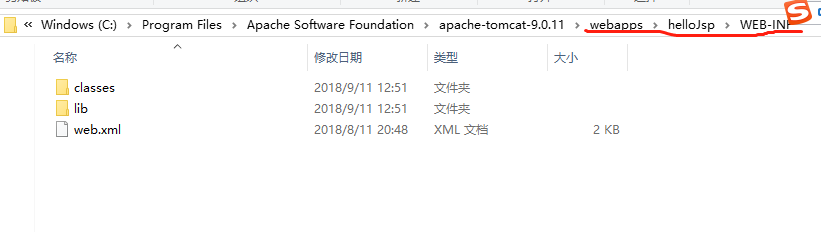
访问网址“http://localhost:8080/helloJsp/”
第三种:
通过建立web project 来新建hello world
参考网址: https://blog.csdn.net/u014079773/article/details/51397850
完。
JSP | 基础 | 新建Hello world 的三种方式的更多相关文章
- Python基础之格式化输出的三种方式
目录 1. 格式化输出的三种方式 1.1 占位符 1.2 format格式化 1.3 f-string格式化 1. 格式化输出的三种方式 在程序中,需要将输出信息打印成固定的格式,这时候就需要格式化输 ...
- JSP页面包含其他页面的三种方式及区别
一. <%@ include file="header.inc"%> 该指令在编译之前先读入指定的页面中的内容(并不对动态内容求值),融合后的完整页面再被整体的转换为一 ...
- 5、struct2的获得jsp参数的第三种方式
在前面已经讲解了通过在action中直接通过jsp的参数和ModelDiver的方式获得浏览器传递的参数,下面我们介绍第三种方式,也是在项目开发中推荐的方式 action不需要在实现ModelDriv ...
- java基础-jdbc——三种方式加载驱动建立连接
String url = "jdbc:mysql://localhost:3306/student?Unicode=true&characterEncoding=utf-8" ...
- Java基础知识强化之IO流笔记62:三种方式实现键盘录入
1. 三种方式实现键盘录入 System.in 标准输入流.是从键盘获取数据的 键盘录入数据三种方式: A:main方法的args接收参数. java HelloWorld hello w ...
- JavaScript 基础——使用js的三种方式,js中的变量,js中的输出语句,js中的运算符;js中的分支结构
JavaScript 1.是什么:基于浏览器 基于(面向)对象 事件驱动 脚本语言 2.作用:表单验证,减轻服务器压力 添加野面动画效果 动态更改页面内容 Ajax网络请求 () 3.组成部分:ECM ...
- JS基础语法---创建对象---三种方式创建对象:调用系统的构造函数;自定义构造函数;字面量的方式
创建对象三种方式: 调用系统的构造函数创建对象 自定义构造函数创建对象(结合第一种和需求通过工厂模式创建对象) 字面量的方式创建对象 第一种:调用系统的构造函数创建对象 //小苏举例子: //实例化对 ...
- Java基础 FileReader-FileWriter / 缓冲字符输入输出流 / 缓冲字节输入输出流 三种方式 进行文本文件的复制
易错的地方: /** 出错的地方: * 1.缓冲流儿输出时,务必:flush();不然可能输出不尽! * 2. bw缓冲字符输出流,记得这里! bw.write(b,0,len); * 3.字符流不能 ...
- Eclipse web工程 部署 三种方式 1
Eclipse web工程 部署 三种方式 1.run on 前提: 安装 好 eclipse.jdk.tomcat 然后 新建一个 web工程 注意此处Default output folder 最 ...
随机推荐
- 图像处理之基础---ffmpeg 中的图像缩放
http://blog.csdn.net/bweaglegao/article/details/8540860 http://www.cnblogs.com/acloud/archive/2011/1 ...
- iOS RAC常用方法
一直想写篇关于RAC的文章,一是分享二是做为笔记,由于项目忙先简单的贴一个自己当初学习的时候代码吧 一.RACCommand // RACCommand 的使用: 使用场景,监听按钮点击,网络请求 - ...
- debian iptables持久化
1 保存iptables iptables-save > /etc/iptables.rules 2 创建启动文件 touch /etc/network/if-pre-up.d/iptabl ...
- HDFS vs. MongoDB
HDFS MongoDB 共同点 http://www.mongoing.com/wp-content/uploads/2016/08/MDBSH2016/TJ_MongoDB+Spark.pdf 横 ...
- Struts2的工作原理(图解)详解
Struts2的工作原理 上图来源于Struts2官方站点,是Struts 2 的整体结构. 一个请求在Struts2框架中的处理大概分为以下几个步骤(可查看源码:https://github.com ...
- jquery.validate ajax验证
$("#form1").validate({ rules: { ctl00$ContentPlaceHolder1$txtShopName: { remote: { type: & ...
- Linux Linker
文章原文:http://zhidao.baidu.com/link?url=U2Mtcc6BKi4vuQ1MO8U6s9gNm4y9Epphz03veA2lVpRWMozyVdj0PYvw1ZU9qj ...
- spring-jar包详解整理(大合集)
转:https://blog.csdn.net/weisong530624687/article/details/50888094 spring.jar 是包含有完整发布模块的单个jar 包.但是不包 ...
- SQL Server 数据库备份策略,第一周运行失败的原因
一般生产库,采用 每10分钟备份Log,每天备份Diff,每周备份Full的策略. 同时存在异地备份.异地备份可使用SQL Server本身的cmdshell存储过程,调用系统命令. 在为新数据库,建 ...
- MYSQL初级学习笔记五:连接查询!(视频序号:初级_37-41)
知识点七:连接查询(37-41) 什么是连接查询: 连接查询是将两个或两个以上的表按某个条件连接起来,从中选取需要的数据.连接查询是同时查询两个或两个以上的表时使用的.当不同的表中存在相同意义的字段时 ...