
oracle (DBaaS) 服务介绍
转 https://oracle-base.com/articles/vm/oracle-cloud-database-as-a-service-dbaas-create-service?utm_source=tuicool&utm_medium=referral
Oracle Cloud : Database as a Service (DBaaS) - Create Service
This article provides a run through of creating a new DBaaS service on the Oracle Cloud.
- Create SSH Key
- Create Service
- Connecting to the VM using SSH
- Oracle Compute Cloud Service - Network (Firewall)
- Connecting to the database using Oracle Net
- Notes
Related articles.
- Database as a Service (DBaaS) on Oracle Cloud
- Oracle Cloud : Database as a Service (DBaaS) - Patch Service
- Oracle Databases in the Cloud
- A Cure for Virtual Insanity: A Vendor-Neutral Introduction to Virtualization Without the Hype
- Oracle Database Consolidation Comparison
Create SSH Key
Before you start, you are going to need a key pair for authentication to your service.
$ ssh-keygen -b 2048 -t rsa -f myOracleCloudKey

$ chmod 600 myOracleCloudKey*
Enter and confirm the passphrase when prompted. You will be asked to upload the public key during the service creation.
If you have any problems, or need instructions for using PuTTYgen on Windows, check out the documentation here.
Create Service
Log into your Oracle Cloud "My Services" dashboard. Scroll down to the "Oracle Database Cloud Service" section and click either the title, or the "Open Service Console" link.
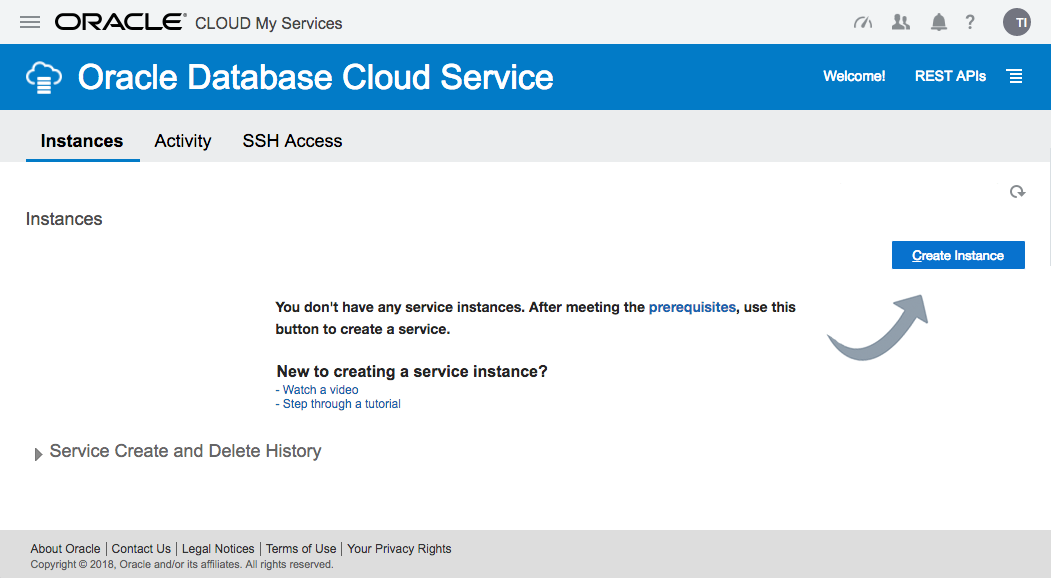
On the "Oracle Database Cloud Service" page, click the "Create Service" button.
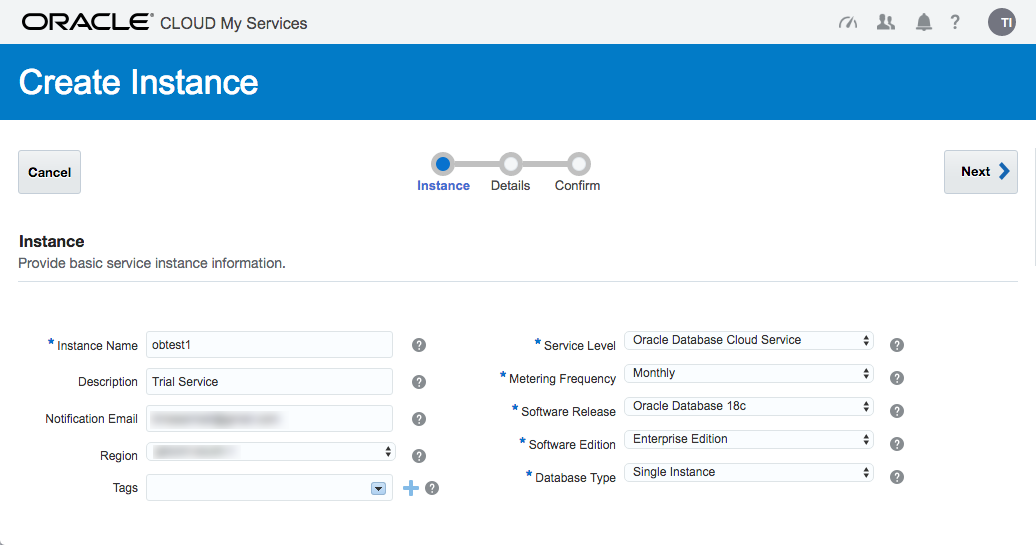
The next page allows you to enter the following details about the service.
- Subscription Type : "Oracle Database Cloud Service" or "Oracle Database Cloud Service - Virtual Image". Pick the first.
- SSH Public Key : Upload the key you created earlier.
- Software Release : 11gR2, 12cR1, 12cR2
- Software Edition : Standard Edition, Enterprise Edition, Enterprise Edition - High Performance, Enterprise Edition - Extreme Performance. Check the definitions of the options included in the Enterprise Edition variants.
- Billing Frequency : Hourly, Monthly
Once you are happy with your choices, click the "Next" button.
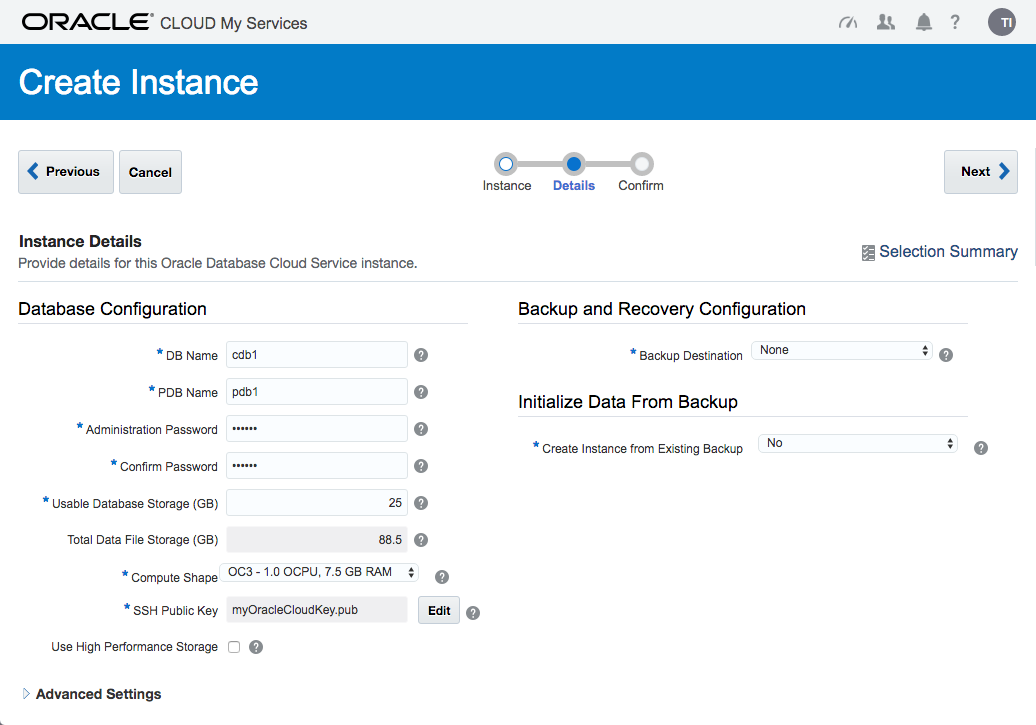
Enter the service details. The shape determines the number of virtual CPUs and memory associated with the service, so pick a shape that is relevant to your performance needs. Enter the database configuration details. Pick the backup configuration appropriate to your system. When you are happy with the configuration, click the "Next" button.
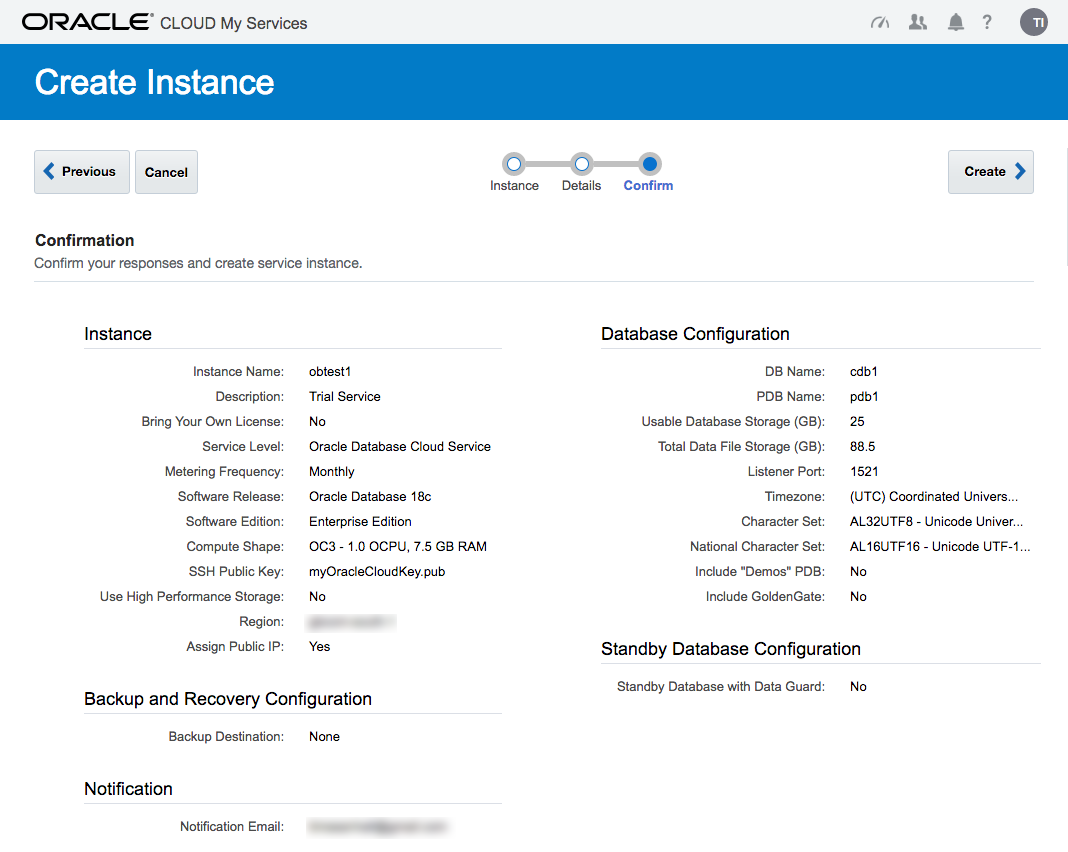
If you are happy with the service setting listed on the "Confirmation" screen, click the "Create" button.
Wait while the new service is created. The progress is shown under the status.
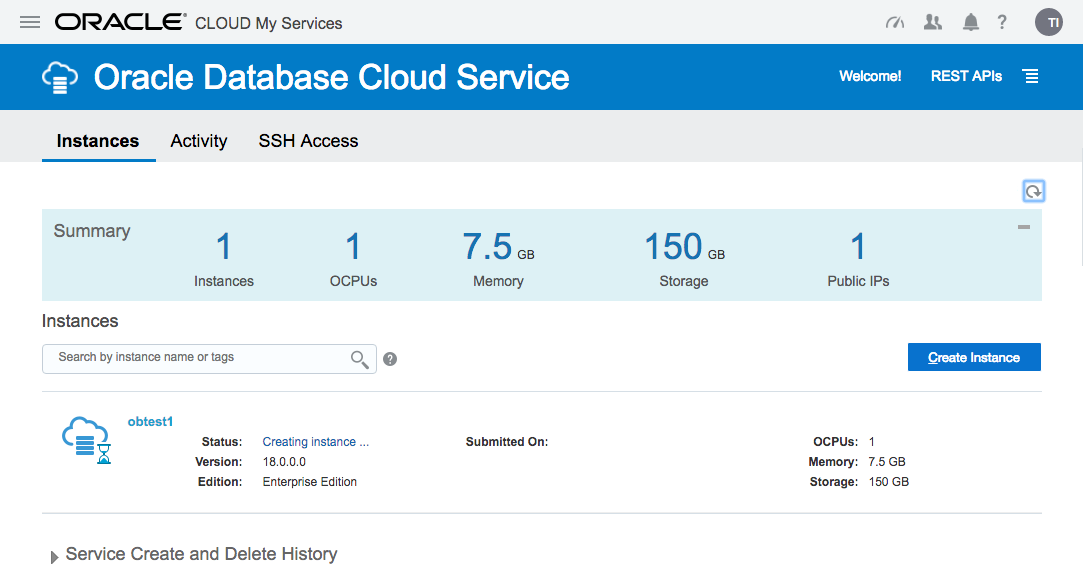
Once complete, the status disappears.
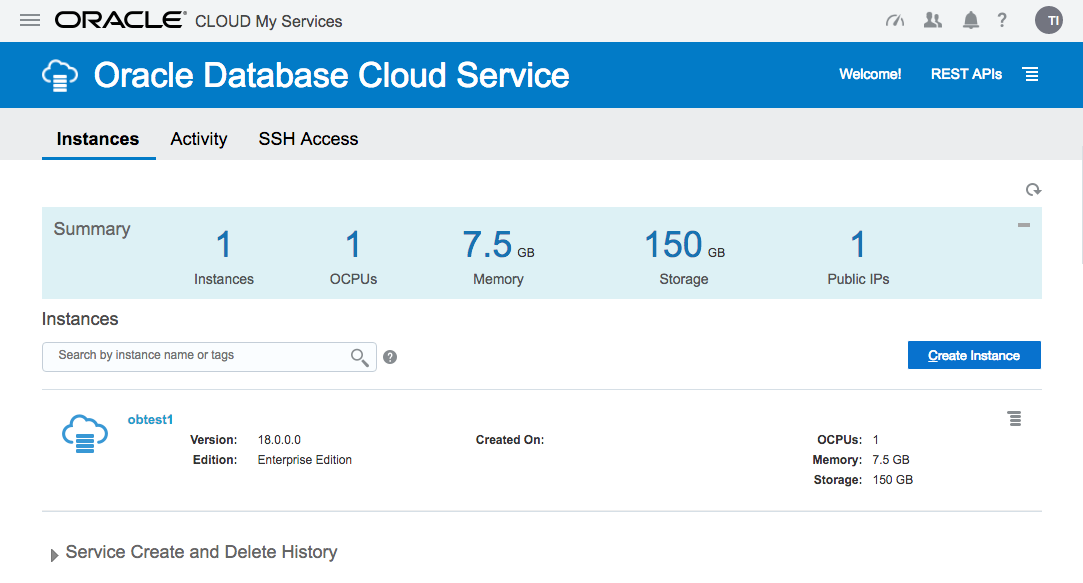
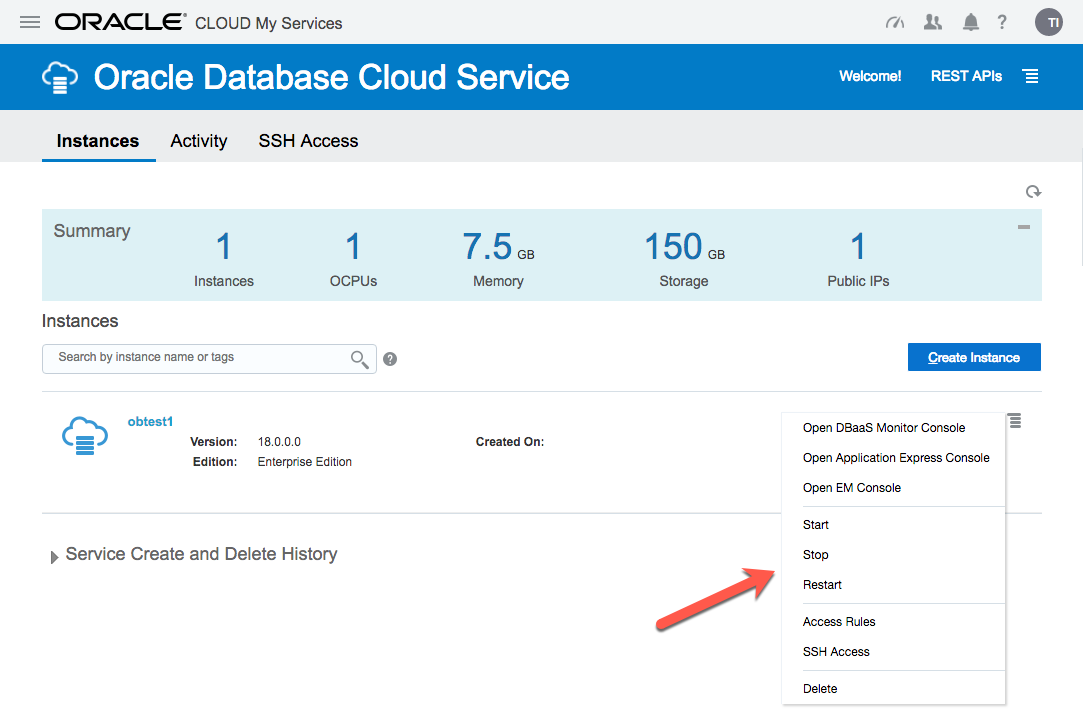
The service hamburger allows you to navigate to a number of management tools. You will need to amend the firewall rules to access these.
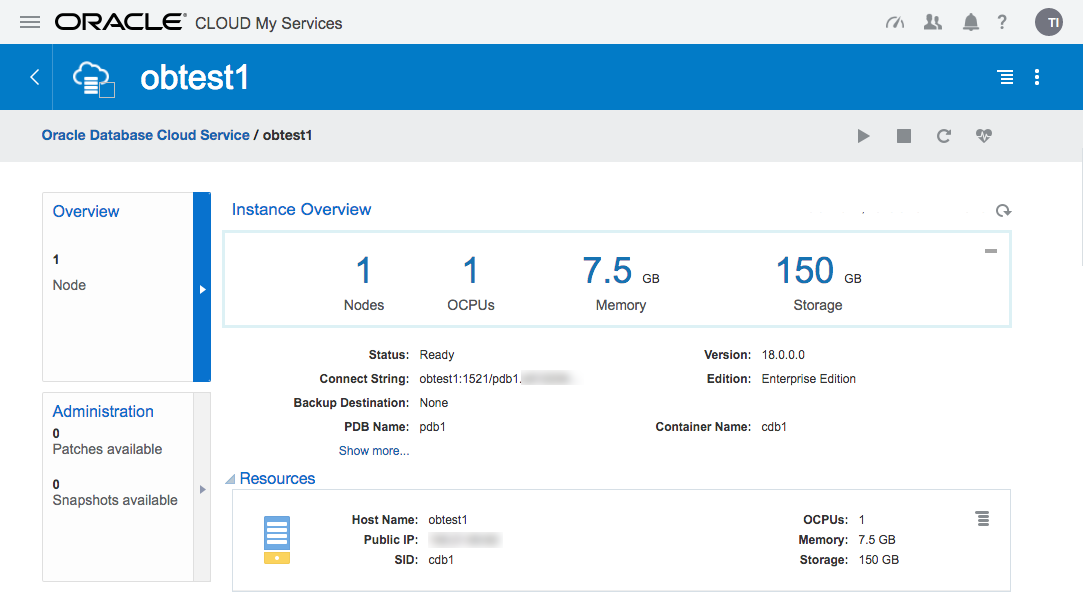
Click on the service name to drill down into the service. The detail page gives basic information about the service, including the public IP address and the database connection string.
The hamburger gives you basic management operations (Start, Stop, Restart, Scale Up/Down) for the service.
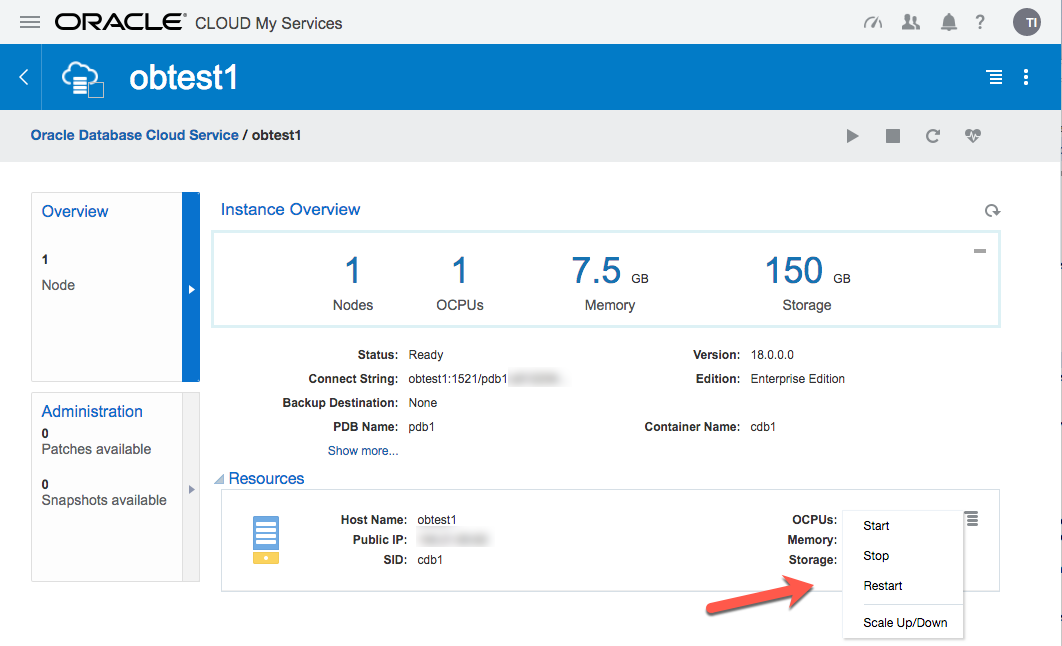
If there are any patches available for your database, they will be displayed in the "Administration" section.
Connecting to the VM using SSH
Most of the time you will probably be connecting to the "oracle" operating system user. You do this by specifying your private key and connect to the "oracle" user on the public IP address from your service detail page.
$ ssh -i ./myOracleCloudKey oracle@123.123.123.123

[oracle@obtest1 ~]$
Once connected, you can do all the usual stuff.
[oracle@obtest1 ~]$ sqlplus / as sysdba

SQL*Plus: Release 12.2.0.1.0 Production on Tue Nov 8 09:44:42 2016

Copyright (c) 1982, 2016, Oracle.  All rights reserved.

Connected to:

Oracle Database 12c Enterprise Edition Release 12.2.0.1.0 - 64bit Production

SQL> ALTER SESSION SET CONTAINER = pdb1;

Session altered.

SQL> CREATE USER test IDENTIFIED BY test;

User created.

SQL> GRANT CREATE SESSION TO test;

Grant succeeded.

SQL>
If you need to perform any tasks as root, you must connect to the "opc" user and run them using "sudo".
$ ssh -i ./myOracleCloudKey opc@123.123.123.123

-bash-4.1$ sudo vi /etc/hosts
Oracle Compute Cloud Service - Network (Firewall)
The DBaaS services are run under the Oracle Compute Cloud (IaaS). This has it's own firewall configuration, allowing you to limit access to your services. By default, all endpoints except SSH are disabled. There are a number of predefined "Security Rules" to open up the assorted endpoints, but they typically open the endpoints to public, which is rather risky. Instead, you should define custom rules, opening access to ports from specific machines.
- Navigate to the main "Oracle Database Cloud Service".
- Click on the hamburger next to the service of interest.
- Click the "Access Rules" option on the popup menu.
- Click the "Create Rule" button.
- Enter a "Rule Name".
- Select "" as the "Source" and enter your IP address in resulting box.
- Select "DB" as the "Destination".
- Enter "1521" as the "Destination Port(s)".
- Leave "TCP" as the "Protocol".
- Click the "Create" button.
You should now be able to connect to the database from the specified IP address.
You will need to do a similar process for the other tools you want to connect to, like APEX, DB Express etc.
Connecting to the database using Oracle Net
The "sqlnet.ora" file on the server contains the following entries, so any connections to the server are encrypted using Native Network Encryption by default.
SQLNET.ENCRYPTION_SERVER = required

SQLNET.CRYPTO_CHECKSUM_TYPES_SERVER = (SHA1)

SQLNET.CRYPTO_CHECKSUM_SERVER = required

ENCRYPTION_WALLET_LOCATION = (SOURCE=(METHOD=FILE)(METHOD_DATA=(DIRECTORY=/u01/app/oracle/admin/cdb1/tde_wallet)))

SQLNET.ENCRYPTION_TYPES_SERVER = (AES256, AES192, AES128)

NAMES.DIRECTORY_PATH = (TNSNAMES, EZCONNECT)

SQLNET.WALLET_OVERRIDE = FALSE

SQLNET.EXPIRE_TIME = 10

SSL_VERSION = 1.0

WALLET_LOCATION = (SOURCE=(METHOD=FILE)(METHOD_DATA=(DIRECTORY=/u01/app/oracle/admin/cdb1/db_wallet)))
SQL*Net access is disabled by default, but you can enable it as described above. Once enabled, create a local "tnsnames.ora" entry as follows. The connection details are available from your service detail screen.
pdb1_oc=

  (DESCRIPTION=

    (ADDRESS=

      (PROTOCOL=TCP)

      (HOST=123.123.123.123)

      (PORT=1521)

    )

    (CONNECT_DATA=

      (SERVICE_NAME=pdb1.my-identity.oraclecloud.internal)

    )

  )
Now you can connect to the database.
C:\>sqlplus test/test@pdb1_oc

SQL*Plus: Release 11.2.0.3.0 Production on Wed Aug 26 14:40:23 2015

Copyright (c) 1982, 2011, Oracle.  All rights reserved.

Connected to:

Oracle Database 12c Enterprise Edition Release 12.2.0.1.0 - 64bit Production

test@cdb1>
Alternatively, connect using the EZconnect URL.
C:\>sqlplus test/test@123.123.123.123:1521/pdb1.my-identity.oraclecloud.internal

SQL*Plus: Release 11.2.0.3.0 Production on Wed Aug 26 14:42:31 2015

Copyright (c) 1982, 2011, Oracle.  All rights reserved.

Connected to:

Oracle Database 12c Enterprise Edition Release 12.2.0.1.0 - 64bit Production

SQL>
Notes
- Assuming your public IP address were 123.123.123.123 and you've opened the relevant services on the firewall, the following URLs are available.
DBaaS Monitor: https://123.123.123.123/dbaas_monitor/
Username: dbaas_monitor
Password: (set during installation) APEX: https://123.123.123.123/ords/pdb1
Workspace: INTERNAL
Username : ADMIN
Password : (set during installation) Glassfish: https://123.123.123.123:4848/common/index.jsf
Username : admin
Password : (set during installation) DB Express : https://123.123.123.123:5500/em - The database created by the "Oracle Database Cloud Service" option does not have multiplexed redo logs, so you will need to sort this manually.
- The "Oracle Database Cloud Service - Virtual Image" option says there is a software installation present, but this is not the case. Instead, there is a tarball containing the software (/scratch/db12102_bits.tar.gz). To do the installation, you would need to Up Scale the service to add storage, then do the installation manually. I see no value in this offering. I would rather provision a regular compute node and do everything manually.
For more information see:
- Using Oracle Database Cloud - Database as a Service
- Database as a Service (DBaaS) on Oracle Cloud
- Oracle Cloud : Database as a Service (DBaaS) - Patch Service
- Oracle Databases in the Cloud
- A Cure for Virtual Insanity: A Vendor-Neutral Introduction to Virtualization Without the Hype
- Oracle Database Consolidation Comparison
oracle (DBaaS) 服务介绍的更多相关文章
- Oracle的服务介绍以及正常运行必须启动的服务
成功安装Oracle 11g数据库后,你会发现自己电脑运行速度会变慢,配置较低的电脑甚至出现非常卡的状况,通过禁止非必须开启的Oracle服务可以提升电脑的运行速度.那么,具体该怎么做呢? 按照win ...
- 转 Oracle 11g服务详细介绍
转自http://www.cnblogs.com/userWuLiang/archive/2013/04/13/3017900.html Oracle 11g服务详细介绍及哪些服务是必须开启的? 成功 ...
- MySQL-版本及服务介绍
一.MySQL各版本 1.MySQL产品 下载地址:https://www.mysql.com/downloads/ Oracle MySQL Cloud Service(commercial) 商业 ...
- Oracle 11g 服务端的安装步骤
Ø 简介 本文主要介绍 Oracle 11g 服务端的安装步骤,在介绍之前说明以下几点: 1. 所安装的服务器是本机的虚拟机,操作系统为 Windows Server 2019: 2. 以下 ...
- REST服务介绍二
之前一篇文章写过REST服务介绍, 今天再次来自回顾一下. REST是一种架构风格. 首次出现在2000年Roy Fielding的博士论文中,Roy Fielding是 HTTP 规范 ...
- Memcached服务介绍及安装指南
一.memcached服务介绍 1.为什么需要memcached服务 A:第一种场景 网站访问大多数情况下都需要查询数据库操作,如果网站的流量很大并且大多数的访问会造成数据库高负荷的状况下,由于大部分 ...
- iphone 使用 soap 服务 介绍
iphone 使用 soap 服务 介绍 目前比较常用的有几个办法: 1. WSDL to Objective C自动根据wsdl文件生成ios可以直接调用的Objective-C (Cocoa) 代 ...
- oracle 11g 服务端下载地址及安装说明
oracle 11g 服务端下载地址及安装说明 分类: Oracle 2013-11-17 19:40 988人阅读 ...
- Oracle优化器介绍
Oracle优化器介绍 本文讲述了Oracle优化器的概念.工作原理和使用方法,兼顾了Oracle8i.9i以及最新的10g三个版本.理解本文将有助于您更好的更有效的进行SQL优化工作. RBO优化器 ...
随机推荐
- Codeforces div.2 B. The Child and Set
题目例如以下: B. The Child and Set time limit per test 1 second memory limit per test 256 megabytes input ...
- SqlServer 经常使用分页方法总结
SqlServer 经常使用分页方法总结 以下演示样例总结了,SqlServer数据库 经常使用分页方法,仅供学习參考 A. 使用 RowNumber 和 Between And 组合分页: /*** ...
- ASP.net MVC+ViewData VS ViewBag
在使用MVC框架的过程中,往界面传值,我们使用的ViewData.如ITOO部分代码图解: 当然除了ViewData,我们还能够使用同卵兄弟(ViewBag)来完毕相同的功能,详情 ...
- linux远程管理工具:putty
使用QTP测试文件上传和目录做成是否成功,必须先将文件和目录下载到本地,再作比较.现在下载工具众多,其中putty是最出色的一个,支持linux服务器,这点很重要“免费的”.下面就让我们来看一下吧! ...
- PHP 按位与或 (^ 、&)
今天朋友群里朋友问了下 按位与或的问题.. 按位于主要是对二进制数操作. <?php $a = 1; $b = 2; $c = $a^b; ?> 这里不是单纯的相加关系 十进制 1换算成二 ...
- 深入浅出 - Android系统移植与平台开发(十二)- Android JNI机制
第五章.JNI机制 4.1 JNI概述 由前面基础知识可知,Android的应用层由Java语言编写,Framework框架层则是由Java代码与C/C++语言实现,之所以由两种不同的语言组合开发框架 ...
- Linux Shell 条件测试
1. 文件测试 -d 目录 -s 文件非空 -f 是正规文件 -w 有写权限 -r 有读权限 -x 有执行权限 -L 符号连接 -u 文件有suid位设置
- 02-Swift学习笔记-元组类型
02-Swift学习笔记-元组类型 元组类型由N个任意类型的数据组成(N>=0) 元组类型的数据称为"元素" eg var size = (x:100 , y:100) si ...
- 【iOS系列】-UIWebView加载网页禁止左右滑动
[iOS系列]-UIWebView加载网页禁止左右滑动 问题: 做项目时候,用UIWebView加载网页的时候,要求是和微信网页中打开的网页的效果一样,也即是只能上下滑动,不能左右滑动,也不能缩放. ...
- 包管理 import debug 模块管理 module
import sys, os this_file_abspath = os.path.dirname(os.path.abspath(__file__)) ProjectUtil_path = '{} ...