
树莓派 - 蓝牙 (1) 试试Beacon
首先先了解一下bluez, 以及常用的tools.
- hcitool、bluetoothctl等工具,可以进行BLE设备的扫描、连接、配对、广播等操作;
- hcitool可以发送HCI command,设置BLE的广播数据;
- gatttool可以在GATT层面,完成GATT profile的连接、service attribute的读写等操作;
bluez
安装
sudo apt-get install bluez
hciconfig
查看蓝牙设备
pi@raspberrypi:~ $ hciconfig

hci0:   Type: Primary  Bus: UART

    BD Address: B8:27:EB:26:23:F1  ACL MTU: 1021:8  SCO MTU: 64:1

    UP RUNNING

    RX bytes:822 acl:0 sco:0 events:57 errors:0

    TX bytes:4231 acl:0 sco:0 commands:57 errors:0
所有命令如下
pi@raspberrypi:~ $ hciconfig --help

hciconfig - HCI device configuration utility

Usage:

    hciconfig

    hciconfig [-a] hciX [command ...]

Commands:

    up                  Open and initialize HCI device

    down                Close HCI device

    reset               Reset HCI device

    rstat               Reset statistic counters

    auth                Enable Authentication

    noauth              Disable Authentication

    encrypt             Enable Encryption

    noencrypt           Disable Encryption

    piscan              Enable Page and Inquiry scan

    noscan              Disable scan

    iscan               Enable Inquiry scan

    pscan               Enable Page scan

    ptype      [type]   Get/Set default packet type

    lm         [mode]   Get/Set default link mode

    lp         [policy] Get/Set default link policy

    name       [name]   Get/Set local name

    class      [class]  Get/Set class of device

    voice      [voice]  Get/Set voice setting

    iac        [iac]    Get/Set inquiry access code

    inqtpl     [level]  Get/Set inquiry transmit power level

    inqmode    [mode]   Get/Set inquiry mode

    inqdata    [data]   Get/Set inquiry data

    inqtype    [type]   Get/Set inquiry scan type

    inqparms   [win:int]    Get/Set inquiry scan window and interval

    pageparms  [win:int]    Get/Set page scan window and interval

    pageto     [to]     Get/Set page timeout

    afhmode    [mode]   Get/Set AFH mode

    sspmode    [mode]   Get/Set Simple Pairing Mode

    aclmtu     <mtu:pkt>    Set ACL MTU and number of packets

    scomtu     <mtu:pkt>    Set SCO MTU and number of packets

    delkey     <bdaddr> Delete link key from the device

    oobdata             Get local OOB data

    commands            Display supported commands

    features            Display device features

    version             Display version information

    revision            Display revision information

    block      <bdaddr> Add a device to the blacklist

    unblock    <bdaddr> Remove a device from the blacklist

    lerandaddr <bdaddr> Set LE Random Address

    leadv      [type]   Enable LE advertising

            0 - Connectable undirected advertising (default)

            3 - Non connectable undirected advertising

    noleadv             Disable LE advertising

    lestates            Display the supported LE states
hcitool
pi@raspberrypi:~ $ hcitool --help

hcitool - HCI Tool ver 5.43

Usage:

    hcitool [options] <command> [command parameters]

Options:

    --help  Display help

    -i dev  HCI device

Commands:

    dev     Display local devices

    inq     Inquire remote devices

    scan    Scan for remote devices

    name    Get name from remote device

    info    Get information from remote device

    spinq   Start periodic inquiry

    epinq   Exit periodic inquiry

    cmd     Submit arbitrary HCI commands

    con     Display active connections

    cc      Create connection to remote device

    dc      Disconnect from remote device

    sr      Switch master/slave role

    cpt     Change connection packet type

    rssi    Display connection RSSI

    lq      Display link quality

    tpl     Display transmit power level

    afh     Display AFH channel map

    lp      Set/display link policy settings

    lst     Set/display link supervision timeout

    auth    Request authentication

    enc     Set connection encryption

    key     Change connection link key

    clkoff  Read clock offset

    clock   Read local or remote clock

    lescan  Start LE scan

    leinfo  Get LE remote information

    lewladd Add device to LE White List

    lewlrm  Remove device from LE White List

    lewlsz  Read size of LE White List

    lewlclr Clear LE White List

    lerladd Add device to LE Resolving List

    lerlrm  Remove device from LE Resolving List

    lerlclr Clear LE Resolving List

    lerlsz  Read size of LE Resolving List

    lerlon  Enable LE Address Resolution

    lerloff Disable LE Address Resolution

    lecc    Create a LE Connection

    ledc    Disconnect a LE Connection

    lecup   LE Connection Update

For more information on the usage of each command use:

    hcitool <command> --help
bluetoothctl
打开bluetoochctl工具: bluetoothctl
pi@raspberrypi:/etc/systemd/system $ bluetoothctl

[NEW] Controller B8:27:EB:26:23:F1 raspberrypi [default]
扫描: scan on
[bluetooth]# scan on

Discovery started

[CHG] Controller B8:27:EB:26:23:F1 Discovering: yes

[NEW] Device 00:26:5E:DD:78:E6 00-26-5E-DD-78-E6列出扫描到的设备:devices
[bluetooth]# devices

Device 00:26:5E:DD:78:E6 00-26-5E-DD-78-E6退出:exit
[bluetooth]# exit

[DEL] Controller B8:27:EB:26:23:F1 raspberrypi [default]

pi@raspberrypi:/etc/systemd/system $
所有的命令如下:
[bluetooth]# help

Available commands:

  list                       List available controllers

  show [ctrl]                Controller information

  select <ctrl>              Select default controller

  devices                    List available devices

  paired-devices             List paired devices

  power <on/off>             Set controller power

  pairable <on/off>          Set controller pairable mode

  discoverable <on/off>      Set controller discoverable mode

  agent <on/off/capability>  Enable/disable agent with given capability

  default-agent              Set agent as the default one

  advertise <on/off/type>    Enable/disable advertising with given type

  set-advertise-uuids [uuid1 uuid2 ...] Set advertise uuids

  set-advertise-service [uuid][data=[xx xx ...] Set advertise service data

  set-advertise-manufacturer [id][data=[xx xx ...] Set advertise manufacturer data

  set-advertise-tx-power <on/off> Enable/disable TX power to be advertised

  set-scan-filter-uuids [uuid1 uuid2 ...] Set scan filter uuids

  set-scan-filter-rssi [rssi] Set scan filter rssi, and clears pathloss

  set-scan-filter-pathloss [pathloss] Set scan filter pathloss, and clears rssi

  set-scan-filter-transport [transport] Set scan filter transport

  set-scan-filter-clear      Clears discovery filter.

  scan <on/off>              Scan for devices

  info [dev]                 Device information

  pair [dev]                 Pair with device

  trust [dev]                Trust device

  untrust [dev]              Untrust device

  block [dev]                Block device

  unblock [dev]              Unblock device

  remove <dev>               Remove device

  connect <dev>              Connect device

  disconnect [dev]           Disconnect device

  list-attributes [dev]      List attributes

  set-alias <alias>          Set device alias

  select-attribute <attribute> Select attribute

  attribute-info [attribute] Select attribute

  read                       Read attribute value

  write <data=[xx xx ...]>   Write attribute value

  notify <on/off>            Notify attribute value

  register-profile <UUID ...> Register profile to connect

  unregister-profile         Unregister profile

  version                    Display version

  quit                       Quit program
RaspberryPi 发送beacon
苹果在BLE的基础上推出了iBeacon协议。iBeacon使用了BLE的广播部分,但不建立连接。一个遵守iBeacon协议的外设称为Beacon。Beacon会广播自己的身份信息和发射信号的强度。中心设备接收到广播之后,除了可以获知Beacon的身份之外,还能通过信号的衰减算出自己与Beacon的距离。
pi@raspberrypi:~ $ sudo hciconfig hci0 noscan

pi@raspberrypi:~ $ sudo hciconfig hci0 leadv 3

pi@raspberrypi:~ $ sudo hcitool -i hci0 cmd 0x08 0x0008 1E 02 01 1A 1A FF 4C 00 02 15 63 6F 3F 8F 64 91 4B EE 95 F7 D8 CC 64 A8 63 B5 00 01 00 02 C5

< HCI Command: ogf 0x08, ocf 0x0008, plen 31

  1E 02 01 1A 1A FF 4C 00 02 15 63 6F 3F 8F 64 91 4B EE 95 F7

  D8 CC 64 A8 63 B5 00 01 00 02 C5

> HCI Event: 0x0e plen 4

  01 08 20 00
使用Android APP测试Beacon功能
iBeacon & Eddystone Scanner Google开发的,可以从Google Play下载运行(地址为:https://play.google.com/store/apps/details?id=de.flurp.beaconscanner.app&hl=zh_CN)。
如果你的Android设备不能访问Google Play,也可以通过在线APK下载网站(https://apkpure.com/)将APK下载到电脑后安装。
测试结果
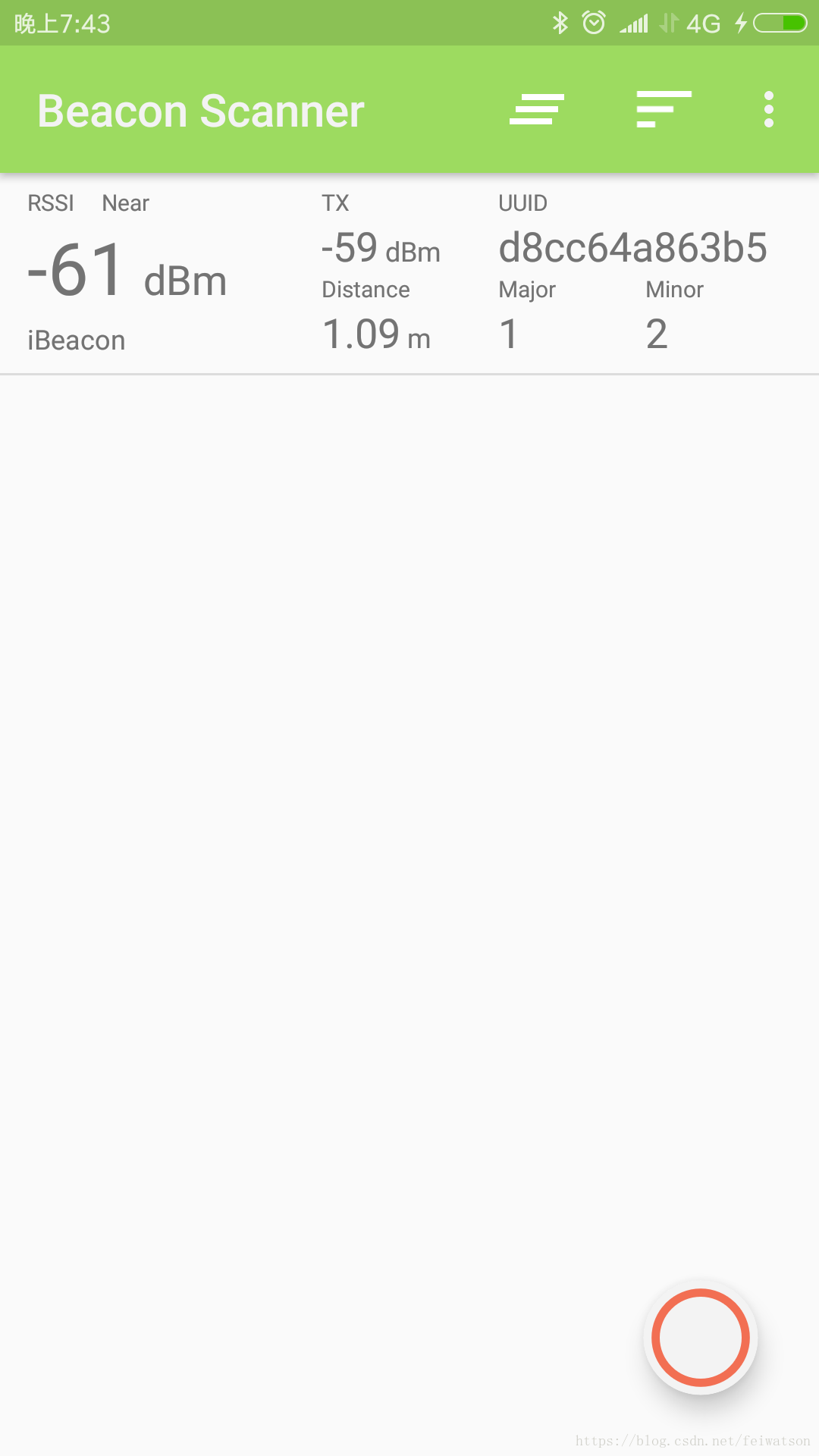
拿着手机走几步看看:
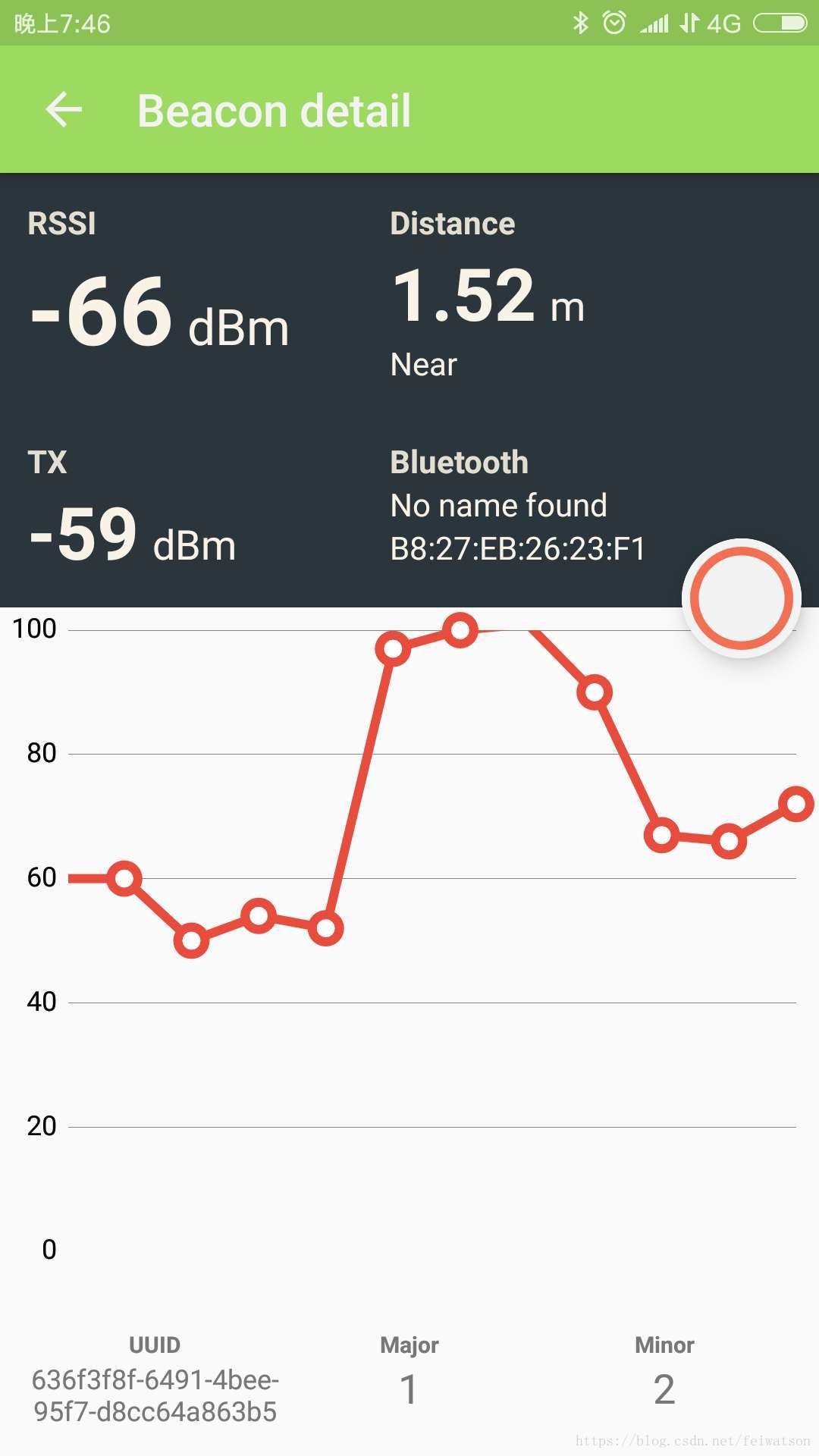
使用结束后,可以用下面命令来恢复扫描和停止广播:
sudo hciconfig hci0 piscan # 恢复扫描
sudo hciconfig hci0 noleadv # 停止广播
Reference
蓝牙串口
https://www.raspberrypi.org/forums/viewtopic.php?p=919420
https://blog.csdn.net/wanyeye/article/details/52909869?fps=1&locationNum=10
使用Beacon:
https://www.cnblogs.com/vamei/p/6753531.html
http://www.wowotech.net/bluetooth/eddystone_test.html
gatttool hcitool
https://blog.csdn.net/talkxin/article/details/50610984
https://blog.csdn.net/Chuck_lin/article/details/78846165
SPP
https://baike.baidu.com/item/%E8%93%9D%E7%89%99%E4%B8%B2%E5%8F%A3/1415870?fr=aladdin
SDP
https://www.cnblogs.com/hzl6255/p/3826558.html
树莓派 - 蓝牙 (1) 试试Beacon的更多相关文章
- 树莓派开发笔记(十一):蓝牙的使用,BlueZ协议(双树莓探测rssi并通过蓝牙互传获取的rssi信号强度)
若该文为原创文章,转载请注明原文出处本文章博客地址:https://blog.csdn.net/qq21497936/article/details/110940484长期持续带来更多项目与技术分享, ...
- Java 学习文章汇总
目前JAVA可以说是产业界和学术界最热门的语言,许多人都很急切想把JAVA学好. 但学习是需要步骤的,除非像电影中演的那样,能够把需要的专业技巧下载到脑海:主角只花了几秒下载资料,就马上具备飞行员的技 ...
- Linux 应用笔记
Linux 应用笔记 Linux 应用笔记 小书匠 Raspberry Pi 常用命令 CentOs Raspberry Ubuntu python 实用教程 Vim 权限问题 内存分配 shell ...
- 在树莓派3B、Ubuntu 18.04关闭板载Wifi、蓝牙
树莓派没有传统的BIOS设置界面,文件/boot/firmware/config.txt就相当一个BIOS设置.这里是config.txt的详细文档:https://github.com/raspbe ...
- 【树莓派】【转】树莓派3装Android 6.0,支持Wi-Fi和蓝牙
树莓派3装Android 6.0,支持Wi-Fi和蓝牙 相信对于许多树莓派初学者(包括我)来说,Android系统的确是一个不错的选择.但国内这方面资源稀缺,经本人FQ苦寻,找到了老外的树莓派Andr ...
- 蓝牙Beacon广播数据包格式以及解析
目录 1. 获取原始蓝牙广播包 2. 安装WireShark软件 3. 分析Beacon广播包数据 3.1 第一个数据包格式 3.2 第二个数据包格式 3.3 Android程序开发中的蓝牙广播包 4 ...
- 树莓派二:apt-get出错、蓝牙、汉化、输入法
用apt-get install一个软件的时候出现了一个错误: E: Encountered a section with no Package: header E: Problem with Mer ...
- 让你少走弯路的搭建树莓派的Net与NodeJS运行环境
树莓派是当前最火的嵌入计算平台没有之一,树莓派可以给我们无数的想象,树莓派的高性能.低功耗.低成本.可扩展性(最新的树莓派原生支持WIFI和蓝牙,这功能太赞了)深受大家的喜爱.虽然树莓派到目前为止 ...
- Beacon浅析
作者:hongbosun 一.Beacon简介 Beacon是基于BLE技术实现的物理设备.BLE(全称Bluetooth Low Energy)是蓝牙4.0技术规范的一部分.它起源于Nokia的Wi ...
随机推荐
- IOCP编程之基本原理
在我的博客之前写了很多关于IOCP的“行云流水”似的看了让人发狂的文章,尤其是几篇关于IOCP加线程池文章,更是让一些功力不够深厚的初学IOCP者,有种吐血的感觉.为了让大家能够立刻提升内力修为,并且 ...
- h5-15-svg格式图片
<!DOCTYPE html> <html> <head> <meta charset="UTF-8"> <title> ...
- JSP分页技术的实现(利用当前页进行前后加减,并利用href进行当前页面传值,传值当然是那个当前值变量)
一.可滚动结果集 Connection con = DriverManager.getConnection(); PreparedStatement stmt = con.prepareStat ...
- Eclipse安装svn插件的几种方式 -- 转
1.在线安装: (1).点击 Help --> Install New Software... (2).在弹出的窗口中点击add按钮,输入Name(任意)和Location(插件的URL),点击 ...
- 522 Longest Uncommon Subsequence II 最长特殊序列 II
详见:https://leetcode.com/problems/longest-uncommon-subsequence-ii/description/ C++: 方法一: class Soluti ...
- A. The Fault in Our Cubes 暴力dfs
http://codeforces.com/gym/101257/problem/A 把它固定在(0,0, 0)到(2, 2, 2)上,每次都暴力dfs检查,不会超时的,因为规定在这个空间上,一不行, ...
- [转]自定义ASP.NET MVC JsonResult序列化结果
本文转自:http://blog.163.com/luckcq@yeah/blog/static/17174770720121293437119/ 最近项目中前台页面使用EasyUI的jQuery插件 ...
- P2192 HXY玩卡片
题目描述 HXY得到了一些卡片,这些卡片上标有数字0或5.现在她可以选择其中一些卡片排成一列,使得排出的一列数字组成的数最大,且满足被90整除这个条件.同时这个数不能含有前导0,即0不能作为这串数的首 ...
- 转 Java 208道面试题及部分答案 补充部分答案
转自https://www.cnblogs.com/chen1005/p/10481102.html ---恢复内容开始--- 一.Java 基础 1.JDK 和 JRE 有什么区别? 答:JRE ...
- AJPFX简述Object类
Object类是所有类的超类,所有类都拥有Object的方法.其中的toString.equals是对业务模型而言非常常用的方法.a) toString方法当调用System.out.prin ...