
Apache Hadoop 2.9.2 的归档案例剖析
Apache Hadoop 2.9.2 的归档案例剖析
作者:尹正杰
版权声明:原创作品,谢绝转载!否则将追究法律责任。
能看到这篇文章说明你对NameNode 工作原理是有深入的理解啦!我们知道每个文件按照块存储,没饿过块的元数据存储在NameNode的内存中,因此Hadoop存储小文件会非常低效。因为大量的小文件会耗尽NameNode中的大部分内存。但注意,存储小文件所需要的磁盘容量和存储这些文件原始内容所需要的磁盘空间相比也不会增多。例如,一个2MB的文件大小为128MB的块存储,使用的是2MB的磁盘空间,而不是128MB。
一.Hadoop存档
Hadoop归档文件或HAR文件,是一个更高效的文件存档工具,它将文件存入HDFS块,在减少NameNode内存使用的同时,允许对文件进行透明访问。具体说来,Hadoop归档文件可以用作MapReduce的输入。
二.归档操作
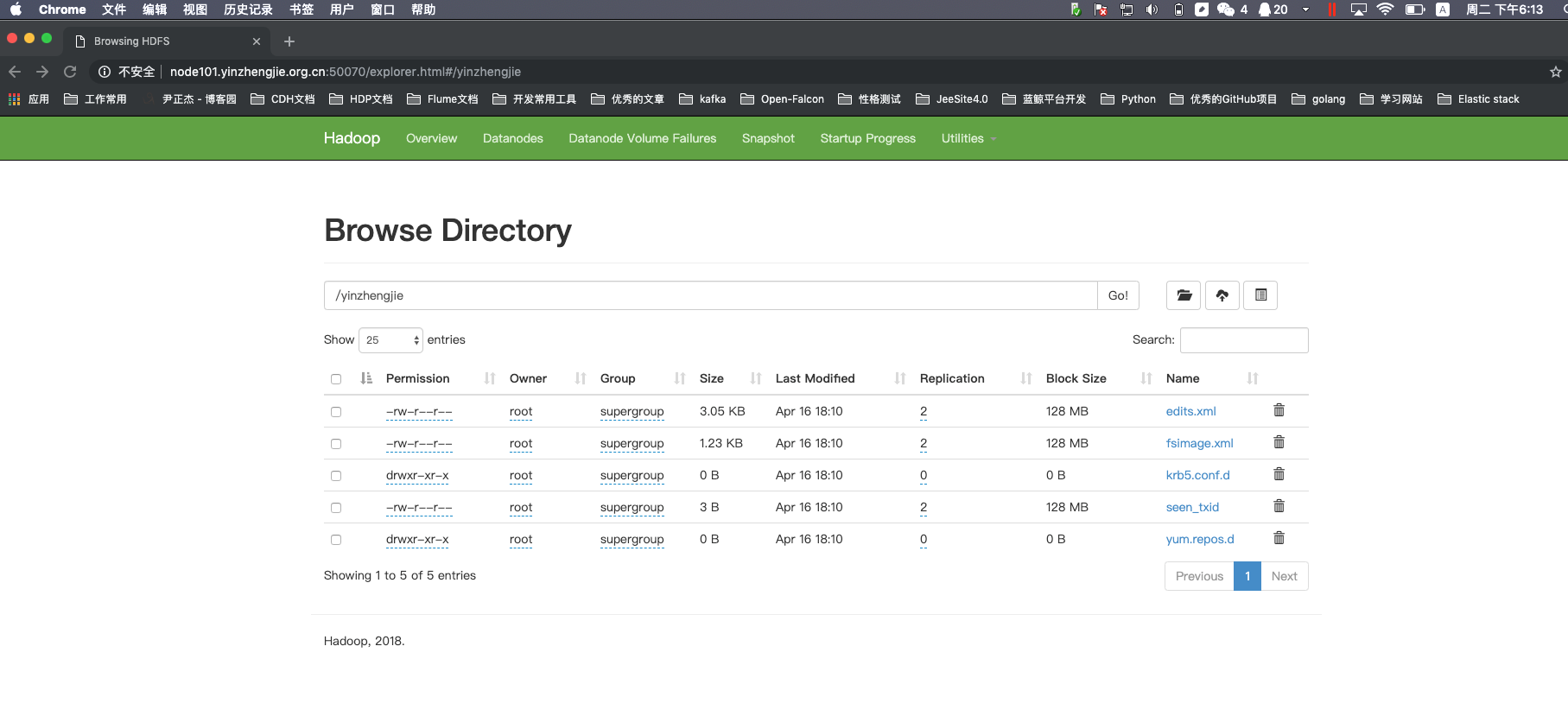
1>.上传测试文件到hdfs集群中
[root@node101.yinzhengjie.org.cn ~]# ll -R

.:

total

-rw-r--r--.  root root  Apr  : edits.xml

-rw-r--r--.  root root  Apr  : fsimage.xml

drwxr-xr-x   root root  Apr  : krb5.conf.d

-rw-r--r--.  root root     Apr  : seen_txid

drwxr-xr-x   root root  Apr  : yum.repos.d

./krb5.conf.d:

total

-rw-r--r--  root root  Apr  : krb5.conf

./yum.repos.d:

total

drwxr-xr-x  root root  Apr  : back

-rw-r--r--  root root  Apr  : CentOS-Base.repo

drwxr-xr-x  root root  Apr  : default

-rw-r--r--  root root   Apr  : epel.repo

-rw-r--r--  root root  Apr  : epel-testing.repo

./yum.repos.d/back:

total

-rw-r--r--  root root  Apr  : CentOS-Base.repo

./yum.repos.d/default:

total

-rw-r--r--  root root  Apr  : CentOS-Base.repo

-rw-r--r--  root root  Apr  : CentOS-CR.repo

-rw-r--r--  root root   Apr  : CentOS-Debuginfo.repo

-rw-r--r--  root root   Apr  : CentOS-fasttrack.repo

-rw-r--r--  root root   Apr  : CentOS-Media.repo

-rw-r--r--  root root  Apr  : CentOS-Sources.repo

-rw-r--r--  root root  Apr  : CentOS-Vault.repo

[root@node101.yinzhengjie.org.cn ~]#

[root@node101.yinzhengjie.org.cn ~]#
[root@node101.yinzhengjie.org.cn ~]# ll -R
[root@node101.yinzhengjie.org.cn ~]# ll

total

-rw-r--r--.  root root  Apr  : edits.xml

-rw-r--r--.  root root  Apr  : fsimage.xml

drwxr-xr-x   root root  Apr  : krb5.conf.d

-rw-r--r--.  root root     Apr  : seen_txid

drwxr-xr-x   root root  Apr  : yum.repos.d

[root@node101.yinzhengjie.org.cn ~]#

[root@node101.yinzhengjie.org.cn ~]# hadoop fs -mkdir /yinzhengjie

[root@node101.yinzhengjie.org.cn ~]#

[root@node101.yinzhengjie.org.cn ~]# hdfs dfs -put ./*  /yinzhengjie

[root@node101.yinzhengjie.org.cn ~]#

[root@node101.yinzhengjie.org.cn ~]# hdfs dfs -ls /yinzhengjie

Found 5 items

-rw-r--r--   2 root supergroup       3124 2019-04-16 18:10 /yinzhengjie/edits.xml

-rw-r--r--   2 root supergroup       1264 2019-04-16 18:10 /yinzhengjie/fsimage.xml

drwxr-xr-x   - root supergroup          0 2019-04-16 18:10 /yinzhengjie/krb5.conf.d

-rw-r--r--   2 root supergroup          3 2019-04-16 18:10 /yinzhengjie/seen_txid

drwxr-xr-x   - root supergroup          0 2019-04-16 18:10 /yinzhengjie/yum.repos.d

[root@node101.yinzhengjie.org.cn ~]#
2>. 启动yarn进程(我们使用归档时需要用到该服务进行资源调度)
[root@node101.yinzhengjie.org.cn ~]# ansible all -m shell -a 'jps'

node110.yinzhengjie.org.cn | SUCCESS | rc= >>

 Jps

 DataNode

node101.yinzhengjie.org.cn | SUCCESS | rc= >>

 FsShell

 NameNode

 DataNode

 SecondaryNameNode

 Jps

node103.yinzhengjie.org.cn | SUCCESS | rc= >>

 DataNode

 Jps

[root@node101.yinzhengjie.org.cn ~]#
[root@node101.yinzhengjie.org.cn ~]# ansible all -m shell -a 'jps' #yarn服务启动之前存在的进程
[root@node101.yinzhengjie.org.cn ~]# start-yarn.sh

starting yarn daemons

starting resourcemanager, logging to /yinzhengjie/softwares/hadoop-2.9./logs/yarn-root-resourcemanager-node101.yinzhengjie.org.cn.out

node103.yinzhengjie.org.cn: starting nodemanager, logging to /yinzhengjie/softwares/hadoop-2.9./logs/yarn-root-nodemanager-node103.yinzhengjie.org.cn.out

node101.yinzhengjie.org.cn: starting nodemanager, logging to /yinzhengjie/softwares/hadoop-2.9./logs/yarn-root-nodemanager-node101.yinzhengjie.org.cn.out

node110.yinzhengjie.org.cn: starting nodemanager, logging to /yinzhengjie/softwares/hadoop-2.9./logs/yarn-root-nodemanager-node110.yinzhengjie.org.cn.out

node102.yinzhengjie.org.cn: ssh: connect to host node102.yinzhengjie.org.cn port : No route to host

[root@node101.yinzhengjie.org.cn ~]#
[root@node101.yinzhengjie.org.cn ~]# start-yarn.sh
[root@node101.yinzhengjie.org.cn ~]# ansible all -m shell -a 'jps'

node110.yinzhengjie.org.cn | SUCCESS | rc= >>

 DataNode

 NodeManager

 Jps

node103.yinzhengjie.org.cn | SUCCESS | rc= >>

 NodeManager

 DataNode

 Jps

node101.yinzhengjie.org.cn | SUCCESS | rc= >>

 NodeManager

 FsShell

 NameNode

 Jps

 DataNode

 SecondaryNameNode

 ResourceManager

[root@node101.yinzhengjie.org.cn ~]#

[root@node101.yinzhengjie.org.cn ~]#
[root@node101.yinzhengjie.org.cn ~]# ansible all -m shell -a 'jps' #启动yarn服务之后,我们观察哪些进程启动成功啦!
3>.将多个目录进行归档操作
[root@node101.yinzhengjie.org.cn ~]# hdfs dfs -ls /yinzhengjie

Found  items

-rw-r--r--    root supergroup        -- : /yinzhengjie/edits.xml

-rw-r--r--    root supergroup        -- : /yinzhengjie/fsimage.xml

drwxr-xr-x   - root supergroup           -- : /yinzhengjie/krb5.conf.d

-rw-r--r--    root supergroup           -- : /yinzhengjie/seen_txid

drwxr-xr-x   - root supergroup           -- : /yinzhengjie/yum.repos.d

[root@node101.yinzhengjie.org.cn ~]#
[root@node101.yinzhengjie.org.cn ~]# hdfs dfs -ls /yinzhengjie #归档之前查看目录结构
[root@node101.yinzhengjie.org.cn ~]# hadoop archive -archiveName yinzhengjie-test.har  -p /yinzhengjie/yum.repos.d /yinzhengjie/output

// :: INFO client.RMProxy: Connecting to ResourceManager at node101.yinzhengjie.org.cn/172.30.1.101:

// :: INFO client.RMProxy: Connecting to ResourceManager at node101.yinzhengjie.org.cn/172.30.1.101:

// :: INFO client.RMProxy: Connecting to ResourceManager at node101.yinzhengjie.org.cn/172.30.1.101:

// :: INFO mapreduce.JobSubmitter: number of splits:

// :: INFO Configuration.deprecation: yarn.resourcemanager.system-metrics-publisher.enabled is deprecated. Instead, use yarn.system-metrics-publisher.enabled

// :: INFO mapreduce.JobSubmitter: Submitting tokens for job: job_1555408586551_0006

// :: INFO impl.YarnClientImpl: Submitted application application_1555408586551_0006

// :: INFO mapreduce.Job: The url to track the job: http://node101.yinzhengjie.org.cn:8088/proxy/application_1555408586551_0006/

// :: INFO mapreduce.Job: Running job: job_1555408586551_0006

// :: INFO mapreduce.Job: Job job_1555408586551_0006 running in uber mode : false

// :: INFO mapreduce.Job:  map % reduce %

// :: INFO mapreduce.Job:  map % reduce %

// :: INFO mapreduce.Job:  map % reduce %

// :: INFO mapreduce.Job: Job job_1555408586551_0006 completed successfully

// :: INFO mapreduce.Job: Counters:

        File System Counters

                FILE: Number of bytes read=

                FILE: Number of bytes written=

                FILE: Number of read operations=

                FILE: Number of large read operations=

                FILE: Number of write operations=

                HDFS: Number of bytes read=

                HDFS: Number of bytes written=

                HDFS: Number of read operations=

                HDFS: Number of large read operations=

                HDFS: Number of write operations=

        Job Counters

                Launched map tasks=

                Launched reduce tasks=

                Other local map tasks=

                Total time spent by all maps in occupied slots (ms)=

                Total time spent by all reduces in occupied slots (ms)=

                Total time spent by all map tasks (ms)=

                Total time spent by all reduce tasks (ms)=

                Total vcore-milliseconds taken by all map tasks=

                Total vcore-milliseconds taken by all reduce tasks=

                Total megabyte-milliseconds taken by all map tasks=

                Total megabyte-milliseconds taken by all reduce tasks=

        Map-Reduce Framework

                Map input records=

                Map output records=

                Map output bytes=

                Map output materialized bytes=

                Input split bytes=

                Combine input records=

                Combine output records=

                Reduce input groups=

                Reduce shuffle bytes=

                Reduce input records=

                Reduce output records=

                Spilled Records=

                Shuffled Maps =

                Failed Shuffles=

                Merged Map outputs=

                GC time elapsed (ms)=

                CPU time spent (ms)=

                Physical memory (bytes) snapshot=

                Virtual memory (bytes) snapshot=

                Total committed heap usage (bytes)=

        Shuffle Errors

                BAD_ID=

                CONNECTION=

                IO_ERROR=

                WRONG_LENGTH=

                WRONG_MAP=

                WRONG_REDUCE=

        File Input Format Counters

                Bytes Read=

        File Output Format Counters

                Bytes Written=

[root@node101.yinzhengjie.org.cn ~]#
[root@node101.yinzhengjie.org.cn ~]# hadoop archive -archiveName yinzhengjie-test.har -p /yinzhengjie/yum.repos.d /yinzhengjie/output
[root@node101.yinzhengjie.org.cn ~]# hdfs dfs -ls /yinzhengjie

Found  items

-rw-r--r--    root supergroup        -- : /yinzhengjie/edits.xml

-rw-r--r--    root supergroup        -- : /yinzhengjie/fsimage.xml

drwxr-xr-x   - root supergroup           -- : /yinzhengjie/krb5.conf.d

drwxr-xr-x   - root supergroup           -- : /yinzhengjie/output                  #这个目录就是我们存储归档文件的,我们在上一步已经指明了,我们可以查看该目录下存放文件的名称!

-rw-r--r--    root supergroup           -- : /yinzhengjie/seen_txid

drwxr-xr-x   - root supergroup           -- : /yinzhengjie/yum.repos.d

[root@node101.yinzhengjie.org.cn ~]#

[root@node101.yinzhengjie.org.cn ~]# hdfs dfs -ls /yinzhengjie/output

Found  items

drwxr-xr-x   - root supergroup           -- : /yinzhengjie/output/yinzhengjie-test.har      #大家看这个名称,我们在归档时使用了-archiveName参数归档文件目录!

[root@node101.yinzhengjie.org.cn ~]#

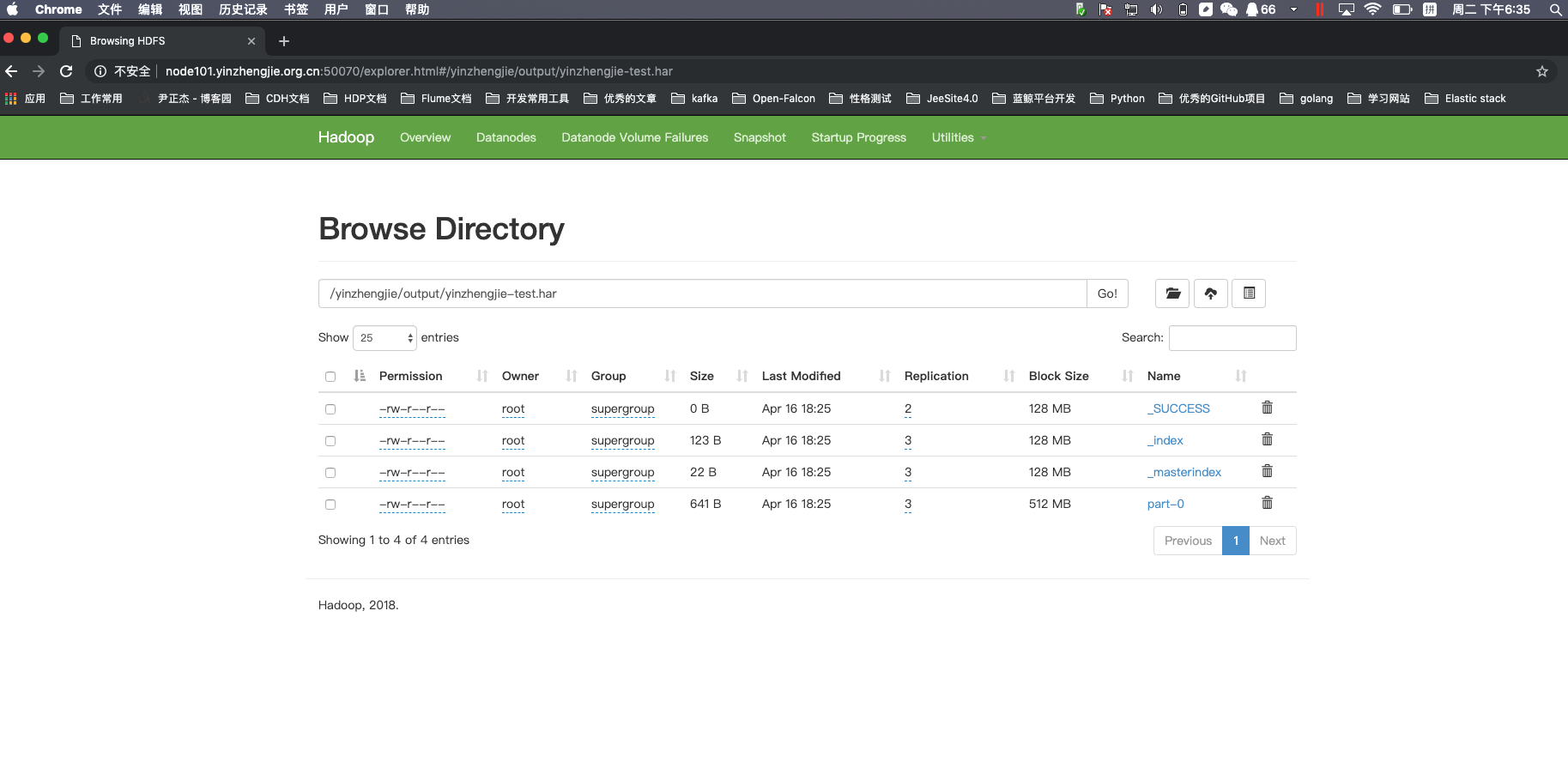
[root@node101.yinzhengjie.org.cn ~]# hdfs dfs -ls /yinzhengjie/output/yinzhengjie-test.har

Found  items

-rw-r--r--  root supergroup  -- : /yinzhengjie/output/yinzhengjie-test.har/_SUCCESS

-rw-r--r--  root supergroup  -- : /yinzhengjie/output/yinzhengjie-test.har/_index

-rw-r--r--  root supergroup  -- : /yinzhengjie/output/yinzhengjie-test.har/_masterindex

-rw-r--r--  root supergroup  -- : /yinzhengjie/output/yinzhengjie-test.har/part-

[root@node101.yinzhengjie.org.cn ~]#

[root@node101.yinzhengjie.org.cn ~]#
4>.查看归档文件
[root@node101.yinzhengjie.org.cn ~]# hadoop fs -ls -R /yinzhengjie/output/yinzhengjie-test.har

-rw-r--r--    root supergroup           -- : /yinzhengjie/output/yinzhengjie-test.har/_SUCCESS

-rw-r--r--    root supergroup        -- : /yinzhengjie/output/yinzhengjie-test.har/_index

-rw-r--r--    root supergroup          -- : /yinzhengjie/output/yinzhengjie-test.har/_masterindex

-rw-r--r--    root supergroup       -- : /yinzhengjie/output/yinzhengjie-test.har/part-

[root@node101.yinzhengjie.org.cn ~]#

[root@node101.yinzhengjie.org.cn ~]# hadoop fs -ls -R har:///yinzhengjie/output/yinzhengjie-test.har

-rw-r--r--    root supergroup        -- : har:///yinzhengjie/output/yinzhengjie-test.har/CentOS-Base.repo

drwxr-xr-x   - root supergroup           -- : har:///yinzhengjie/output/yinzhengjie-test.har/back

-rw-r--r--    root supergroup        -- : har:///yinzhengjie/output/yinzhengjie-test.har/back/CentOS-Base.repo

drwxr-xr-x   - root supergroup           -- : har:///yinzhengjie/output/yinzhengjie-test.har/default

-rw-r--r--    root supergroup        -- : har:///yinzhengjie/output/yinzhengjie-test.har/default/CentOS-Base.repo

-rw-r--r--    root supergroup        -- : har:///yinzhengjie/output/yinzhengjie-test.har/default/CentOS-CR.repo

-rw-r--r--    root supergroup         -- : har:///yinzhengjie/output/yinzhengjie-test.har/default/CentOS-Debuginfo.repo

-rw-r--r--    root supergroup         -- : har:///yinzhengjie/output/yinzhengjie-test.har/default/CentOS-Media.repo

-rw-r--r--    root supergroup        -- : har:///yinzhengjie/output/yinzhengjie-test.har/default/CentOS-Sources.repo

-rw-r--r--    root supergroup        -- : har:///yinzhengjie/output/yinzhengjie-test.har/default/CentOS-Vault.repo

-rw-r--r--    root supergroup         -- : har:///yinzhengjie/output/yinzhengjie-test.har/default/CentOS-fasttrack.repo

-rw-r--r--    root supergroup        -- : har:///yinzhengjie/output/yinzhengjie-test.har/epel-testing.repo

-rw-r--r--    root supergroup         -- : har:///yinzhengjie/output/yinzhengjie-test.har/epel.repo

[root@node101.yinzhengjie.org.cn ~]#

[root@node101.yinzhengjie.org.cn ~]#
三.解归档文件
1>.查看解归档之前的目录情况
[root@node101.yinzhengjie.org.cn ~]# hdfs dfs -ls /yinzhengjie

Found  items

-rw-r--r--    root supergroup        -- : /yinzhengjie/edits.xml

-rw-r--r--    root supergroup        -- : /yinzhengjie/fsimage.xml

drwxr-xr-x   - root supergroup           -- : /yinzhengjie/krb5.conf.d

drwxr-xr-x   - root supergroup           -- : /yinzhengjie/output

-rw-r--r--    root supergroup           -- : /yinzhengjie/seen_txid

drwxr-xr-x   - root supergroup           -- : /yinzhengjie/yum.repos.d

[root@node101.yinzhengjie.org.cn ~]#
2>.进行解归档操作
[root@node101.yinzhengjie.org.cn ~]#

[root@node101.yinzhengjie.org.cn ~]# hadoop fs -cp har:///yinzhengjie/output/yinzhengjie-test.har /yinzhengjie/output2019

[root@node101.yinzhengjie.org.cn ~]#

[root@node101.yinzhengjie.org.cn ~]# hdfs dfs -ls /yinzhengjie

Found  items

-rw-r--r--    root supergroup        -- : /yinzhengjie/edits.xml

-rw-r--r--    root supergroup        -- : /yinzhengjie/fsimage.xml

drwxr-xr-x   - root supergroup           -- : /yinzhengjie/krb5.conf.d

drwxr-xr-x   - root supergroup           -- : /yinzhengjie/output

drwxr-xr-x   - root supergroup           -- : /yinzhengjie/output2019

-rw-r--r--    root supergroup           -- : /yinzhengjie/seen_txid

drwxr-xr-x   - root supergroup           -- : /yinzhengjie/yum.repos.d

[root@node101.yinzhengjie.org.cn ~]#
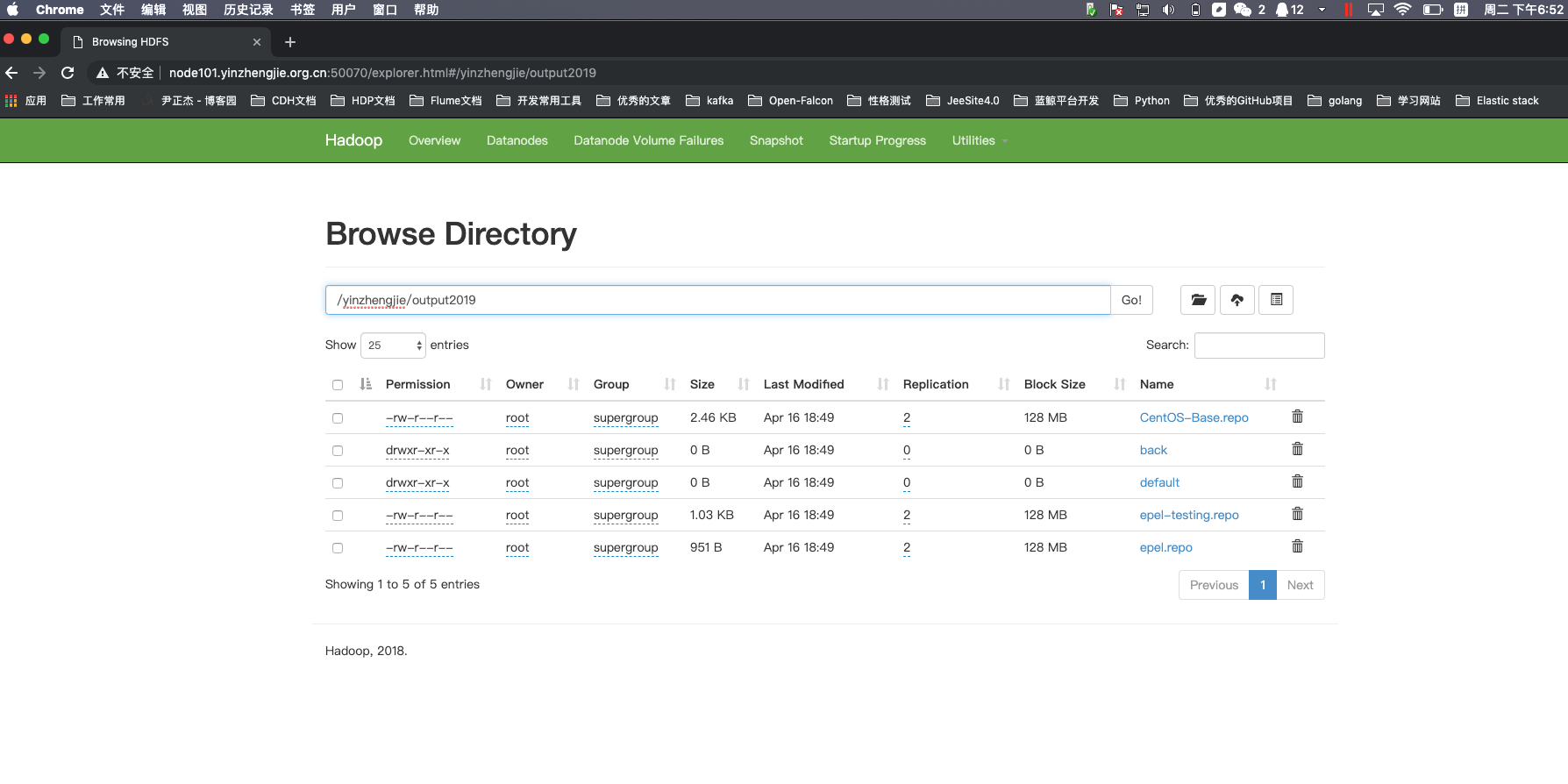
3>.对比归档前和解压后的数据是否一致
[root@node101.yinzhengjie.org.cn ~]# hdfs dfs -ls /yinzhengjie/output2019

Found  items

-rw-r--r--    root supergroup        -- : /yinzhengjie/output2019/CentOS-Base.repo

drwxr-xr-x   - root supergroup           -- : /yinzhengjie/output2019/back

drwxr-xr-x   - root supergroup           -- : /yinzhengjie/output2019/default

-rw-r--r--    root supergroup        -- : /yinzhengjie/output2019/epel-testing.repo

-rw-r--r--    root supergroup         -- : /yinzhengjie/output2019/epel.repo

[root@node101.yinzhengjie.org.cn ~]#

[root@node101.yinzhengjie.org.cn ~]# hdfs dfs -ls /yinzhengjie/yum.repos.d

Found  items

-rw-r--r--    root supergroup        -- : /yinzhengjie/yum.repos.d/CentOS-Base.repo

drwxr-xr-x   - root supergroup           -- : /yinzhengjie/yum.repos.d/back

drwxr-xr-x   - root supergroup           -- : /yinzhengjie/yum.repos.d/default

-rw-r--r--    root supergroup        -- : /yinzhengjie/yum.repos.d/epel-testing.repo

-rw-r--r--    root supergroup         -- : /yinzhengjie/yum.repos.d/epel.repo

[root@node101.yinzhengjie.org.cn ~]#
Apache Hadoop 2.9.2 的归档案例剖析的更多相关文章
- Hadoop入门进阶课程6--MapReduce应用案例
本文版权归作者和博客园共有,欢迎转载,但未经作者同意必须保留此段声明,且在文章页面明显位置给出原文连接,博主为石山园,博客地址为 http://www.cnblogs.com/shishanyuan ...
- hadoop笔记之MapReduce的应用案例(利用MapReduce进行排序)
MapReduce的应用案例(利用MapReduce进行排序) MapReduce的应用案例(利用MapReduce进行排序) 思路: Reduce之后直接进行结果合并 具体样例: 程序名:Sort. ...
- hadoop笔记之MapReduce的应用案例(WordCount单词计数)
MapReduce的应用案例(WordCount单词计数) MapReduce的应用案例(WordCount单词计数) 1. WordCount单词计数 作用: 计算文件中出现每个单词的频数 输入结果 ...
- Hadoop生态圈-Knox网关的应用案例
Hadoop生态圈-Knox网关的应用案例 作者:尹正杰 版权声明:原创作品,谢绝转载!否则将追究法律责任. 一.Knox网关简介 据Knox官网所述(http://knox.apache.org/) ...
- Hadoop生态圈-CDH与HUE使用案例
Hadoop生态圈-CDH与HUE使用案例 作者:尹正杰 版权声明:原创作品,谢绝转载!否则将追究法律责任. 一.HUE的介绍 1>.HUE的由来 HUE全称是HadoopUser Experi ...
- hadoop一代集群运行代码案例
hadoop一代集群运行代码案例 集群 一个 master,两个slave,IP分别是192.168.1.2.192.168.1.3.192.168.1.4 hadoop版 ...
- Hadoop基础-MapReduce的Partitioner用法案例
Hadoop基础-MapReduce的Partitioner用法案例 作者:尹正杰 版权声明:原创作品,谢绝转载!否则将追究法律责任. 一.Partitioner关键代码剖析 1>.返回的分区号 ...
- Hadoop基础-MapReduce的Combiner用法案例
Hadoop基础-MapReduce的Combiner用法案例 作者:尹正杰 版权声明:原创作品,谢绝转载!否则将追究法律责任. 一.编写年度最高气温统计 如上图说所示:有一个temp的文件,里面存放 ...
- Hadoop的ChainMapper和ChainReducer使用案例(链式处理)(四)
不多说,直接上干货! Hadoop的MR作业支持链式处理,类似在一个生产牛奶的流水线上,每一个阶段都有特定的任务要处理,比如提供牛奶盒,装入牛奶,封盒,打印出厂日期,等等,通过这样进一步的分 ...
随机推荐
- 路由刷rom手册
最近对家里面那5,6个路由器下手了. 路由列表:小米mini 2台. 优酷路由宝l1,tp wdr3320,tp wr840n, 友华wr1200js,小米路由r1n 步骤: 1. 想办法开启ssh ...
- 查看SQL Server服务运行帐户和SQL Server的所有注册表项
查看SQL Server服务运行帐户和SQL Server的所有注册表项 SELECT * FROM sys.dm_server_registry SELECT * FROM sys.dm_serve ...
- C# 当前 .NET SDK 不支持将 .NET Core 2.1 设置为目标。请将 .NET Core 2.0 或更低版本设置为目标,或使用支持 .NET Core 2.1 的 .NET SDK 版本。
报错信息: 严重性 代码 说明 项目 文件 行 禁止显示状态 错误 NETSDK1045 当前 .NET SDK 不支持将 .NET Core 2.2 设置为目标.请将 .NET Core 2.1 或 ...
- 简单介绍python的双向队列
介绍 大家都知道利用 .append 和 .pop 方法,我们可以把列表当作栈或者队列来用(比如,把 append 和 pop(0) 合起来用,就能模拟栈的“先进先出”的特点).但是删除列表的第一个元 ...
- RobotFramework第二篇之web自动化
(1)安装seleniumLibrary库: pip install --upgrade --pre robotframework-seleniumlibrary 使用第三方库关键字: (1)sett ...
- Kafka integration with Ganglia
In this blog post I will show you kafka integration with ganglia, this is very interesting & imp ...
- Tire树的学习
Tire树是一种基于空间换时间思想的,应用于字符串处理的数据结构. 题目地址 分析:设DP数组Can[MaxL],Can[i]=1表示第i位可以理解. 当Can[i]==1,对第i+1位进行匹配,若能 ...
- Ubuntu 18.04 安装 Apache, MySQL, PHP7, phpMyAdmin
https://blog.csdn.net/sanve/article/details/80770675
- Dora.Interception,为.NET Core度身打造的AOP框架 [1]:更加简练的编程体验
很久之前开发了一个名为Dora.Interception的开源AOP框架(github地址:https://github.com/jiangjinnan/Dora,如果你觉得这个这框架还有那么一点价值 ...
- mySQL查看运行的进程
查看运行的进程 show processlist kill id 杀掉进程