
python练习题-day20
1、json、pickle、shelve三个区别是什么?
首先,这三个模块都是序列化工具。

 1. json是所有语言的序列化工具,优点跨语言、体积小.只能序列化一些基本的数据类型。int\str\list\tuple\dict

 pickle是python语言特有序列化工具,所有数据都能序列化。只能在python中使用,存储数据占空间大.

 shelve模块是一个简单的k,v将内存数据通过文件持久化的模块,可以持久化任何pickle可支持的python数据格式。
2、json的作用是什么?
序列化,把dict,tuple,list等内存对象转换为字符串,持久化数据,存储到硬盘中或网络传输,因为网络和硬盘只接受bytes
3、为什么要设计好目录结构?
1.可读性高: 不熟悉这个项目的代码的人,一眼就能看懂目录结构,知道程序启动脚本是哪个,测试目录在哪儿,配置文件在哪儿等等。从而非常快速的了解这个项目。

2.可维护性高: 定义好组织规则后,维护者就能很明确地知道,新增的哪个文件和代码应该放在什么目录之下。这个好处是,随着时间的推移,代码/配置的规模增加,项目结构不会混乱,仍然能够组织良好。
4、打印出命令行的第一个参数。例如:
python argument.py luffy

打印出 luffy

import sys

print(sys.argv[1])
5、
'''

Linux当前目录/usr/local/nginx/html/

文件名:index.html

'''

import os

BASE_DIR = os.path.dirname(os.path.dirname(os.path.abspath('index.html')))

print(BASE_DIR)

打印

/usr/local/nginx/
6、os.path.dirname和os.path.abspath含义是什么?
os.path.dirname:指定文件的目录

os.path.abspath:指定文件的绝对路径
7、通过configparser模块完成以下功能
文件名my.cnf
[DEFAULT]

 [client]

 port = 3306

 socket = /data/mysql_3306/mysql.sock

 [mysqld]

 explicit_defaults_for_timestamp = true

 port = 3306

 socket = /data/mysql_3306/mysql.sock

 back_log = 80

 basedir = /usr/local/mysql

 tmpdir = /tmp

 datadir = /data/mysql_3306

 default-time-zone = '+8:00'
修改时区 default-time-zone = '+8:00' 为 校准的全球时间 +00:00
删除 explicit_defaults_for_timestamp = true
为DEFAULT增加一条 character-set-server = utf8
import configparser

import os

config = configparser.ConfigParser()

config.read('my.cnf')

new_file = 'my.cnf%s'%('new')

with open(new_file,'w') as new_f:

    print(config.sections())

    print(config)

    # 为DEFAULT增加一条 character-set-server = utf8

    config['DEFAULT']={'character-set-server':'utf8'}

    # 修改时区 default-time-zone = '+8:00' 为 校准的全球时间 +00:00

    config.set('mysqld','default-time-zone','+00:00')

    # 删除 explicit_defaults_for_timestamp = true

    config.remove_option('mysqld','explicit_defaults_for_timestamp')

    config.write(new_f)

os.remove('my.cnf')

os.rename(new_file,'my.cnf')
8、写一个6位随机验证码程序(使用random模块),要求验证码中至少包含一个数字、一个小写字母、一个大写字母.、
import random

a=list(range(48,58))+list(range(65,91))+list(range(97,123))

count=0

list_code=[]

c1=random.choice(list(range(48,58)))

list_code.append(c1)

c2=random.choice(list(range(65,91)))

list_code.append(c2)

c3=random.choice(list(range(97,123)))

list_code.append(c3)

while count<3:

    c=random.choice(a)

    list_code.append(c)

    count+=1

random.shuffle(list_code)

str_code=""

for i in list_code:

    str_code+=chr(i)

print(str_code)
9、利用正则表达式提取到 luffycity.com ,内容如下
s='''

<!DOCTYPE html>

<html lang="en">

<head>

   <meta charset="UTF-8">

   <title>luffycity.com</title>

</head>

<body>

</body>

</html>

'''

import re

match_s = re.findall('<title>(.*?)</title>',s)

print(match_s[0])
10、写一个用户登录验证程序,文件如下 1234.json
import json

import time

with open("1234.json","r+",encoding="utf-8") as f1:

    ret=json.load(f1)

count=0

if ret.get("status")==0:

    ex_t=ret.get("expire_date")

    st_t=time.strptime(ex_t,"%Y-%m-%d")

    c_t=time.mktime(st_t)

    g_t=c_t-time.time()

    if g_t>0:

        while count<3:

            uname=input("pls input your username:")

            pwd=input("pls input your password:")

            if uname =="" and pwd==ret.get("password"):

                print("登录成功")

                break

            else:

                print("用户名或密码错误,请重新输入(%s后锁定)"%(2-count))

                count+=1

        if count==3:

            print("账号已锁定")

            ret["status"]=1

            with open("1234.json","w+",encoding="utf-8") as f2:

                json.dump(ret,f2)

    else:

        print("密码已过期")

if ret.get("status")==1:

    print("账号已锁定")
11、把第上一题三次验证的密码进行hashlib加密处理。即:json文件保存为md5的值,然后用md5的值进行验证。
加密密码
f ='1234.json'

fp = open(f,'r+',encoding='utf-8')

j_user = json.load(fp)

md = hashlib.md5()

md.update('abc'.encode('utf-8'))

md_pwd = md.hexdigest()

print(md_pwd)

j_user["password"] = md_pwd

fp.seek(0)

fp.truncate()  # 清空文件内容

json.dump(j_user,fp)  # 写入md5密码信息

fp.close()
count = 0

exit_flag = False

md = hashlib.md5()

while count < 3:

    user = input('输入用户名: ')

    f = user.strip()+'.json'

    if os.path.exists(f):

        fp = open(f,'r+',encoding='utf-8')

        j_user = json.load(fp)

        if j_user["status"] == 1:

            print('账号已经锁定')

            break

        else:

            expire_dt = j_user["expire_date"]

            current_st = time.time()

            expire_st = time.mktime(time.strptime(expire_dt,'%Y-%m-%d'))

            # print(expire_st,current_st)

            if current_st > expire_st:

                print('用户已经过期')

                break

            else:

                while count < 3:

                    pwd = input('输入密码: ')

                    md.update(pwd.strip().encode('utf-8'))

                    md5_pwd = md.hexdigest()

                    if md5_pwd == j_user["password"]:

                        print('用户[%s]登录成功'%user)

                        exit_flag = True

                        break

                    else:

                        print('密码不对')

                        if count == 2:

                            print('用户登录已超过3次,锁定账号')

                            j_user["status"] = 1

                            fp.seek(0)

                            fp.truncate()  # 清空文件内容

                            json.dump(j_user,fp)  # 写入锁定信息

                            fp.close()

                    count += 1

    if exit_flag:

        break

    else:

        print('用户不存在')

        count += 1
12、
最近luffy买了个tesla,通过转账的形式,并且支付了5%的手续费,tesla价格为75万。文件为json,请用程序实现该转账行为。 需求如下:
目录结构为
.
├── account
│ ├── luffy.json
│ └── tesla.json
└── bin
└── start.py
当执行start.py时,出现交互窗口
------- Luffy Bank ---------
1. 账户信息
2. 转账
选择1 账户信息 显示luffy的当前账户余额。
选择2 转账 直接扣掉75万和利息费用并且tesla账户增加75万
对上题增加一个需求:提现。 目录结构如下
.
├── account
│ └── luffy.json
├── bin
│ └── start.py
└── core
└── withdraw.py
当执行start.py时,出现交互窗口
------- Luffy Bank ---------
1. 账户信息
2. 提现
选择1 账户信息 显示luffy的当前账户余额和信用额度。
选择2 提现 提现金额应小于等于信用额度,利息为5%,提现金额为用户自定义。
尝试把上一章的验证用户登陆的装饰器添加到提现和转账的功能上。
对第用户转账、登录、提现操作均通过logging模块记录日志,日志文件位置如下
  .
  ├── account
  │ └── luffy.json
  ├── bin
  │ └── start.py
  └── core
  | └── withdraw.py
  └── logs
  └── bank.log
目录结构
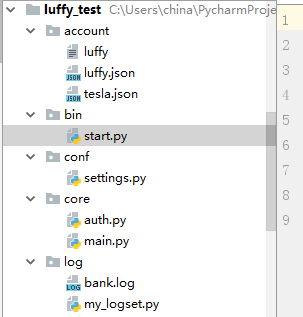
代码 settings.py
import os

'''

日志文件设置

'''

BASE_DIR = os.path.dirname(os.path.dirname(os.path.abspath(__file__)))

LOG_LEVEL='INFO'

LOG_FILE='bank.log'

'''

交易类型

'''

TRANS_TYPE={

    'withdraw':{'interest':0.05,'action':'minus'},

    'transfer': {'interest': 0.05, 'action': 'minus'}

}

print(BASE_DIR)
代码 my_logset.py
import logging

import os

from conf import settings

# 日志格式

log_format = '[%(asctime)s - %(levelname)s - %(name)s - %(filename)s - %(lineno)d ] %(message)s '

def get_mylogger(name):

    """

    get log

    :param name:

    :return:

    """

    logger = logging.getLogger(name)

    logger.setLevel(settings.LOG_LEVEL)

    console_handler = logging.StreamHandler()

    # 文件绝对路径

    logfile_path = os.path.join(settings.BASE_DIR, 'log',settings.LOG_FILE)

    file_handler = logging.FileHandler(logfile_path)

    logger.addHandler(console_handler)

    logger.addHandler(file_handler)

    file_format = logging.Formatter(fmt=log_format)

    console_format = logging.Formatter(fmt=log_format, datefmt='%Y-%m-%d %H:%M:%S ')

    console_handler.setFormatter(console_format)

    file_handler.setFormatter(file_format)

    return logger

if __name__ == '__main__':

    log = get_mylogger('access')

    log.info('access')

    log.error('Error')

    log1 = get_mylogger('trans')

    log1.info('trans')
代码 auth.py
import json

import time

import os

from conf import settings

from log import my_logset

from functools import wraps

# logger = my_logset.get_mylogger('access')

def login_required(func):

    """

     登录认证装饰器

    :param func:

    :return:

    """

    @wraps(func)

    def wrapper(*args,**kwargs):

        # print(args[0].get('is_authenticated'))

        if args[0].get('is_authenticated'):

            print('execute %s'%func.__name__)

            res = func(*args, **kwargs)

        else:

            exit('user is not authenticated')

        return res

    return wrapper

def acc_login(user, pwd,logger):

    """

     用户登录

    :param log_obj:

    :return:

    """

    # 账号文件

    account_file = os.path.join(settings.BASE_DIR,'account','%s.json'%user)

    if os.path.isfile(account_file):

        user_fp = open(account_file,'r',encoding='utf-8')

        account_data = json.load(fp=user_fp)

        if account_data["password"] == pwd:

            exp_time_stamp = time.mktime(time.strptime(account_data["expire_date"],'%Y-%m-%d'))

            status = account_data['status']

            if time.time() > exp_time_stamp:

                msg = 'Account [%s] has expired,please contact the back to get a new card!' % user

                logger.error(msg)

            elif status != 0:

                msg = 'Account [%s] has frozen' % user

                logger.error(msg)

            else:

                logger.info('***********欢迎{}登录***********'.format(user))

                return account_data

        else:

            logger.error("Account ID or password is incorrect!")

    else:

        msg = "Account [%s] does not exist!" % user

        logger.error(msg)

def auth_acc(user_data,logger):

    """

     用户登录

    :return:

    """

    retry_count = 0

    if user_data['is_authenticated'] is not True:

        while retry_count < 3:

            user = input('input username: ').strip()

            pwd = input('input password: ').strip()

            acc_data = acc_login(user, pwd,logger)

            if acc_data:

                user_data['is_authenticated'] = True

                return acc_data

            retry_count +=1

        else:

            exit("account too many login attempts" )

if __name__ == '__main__':

    logger = my_logset.get_mylogger('access')

    user_data = {'is_authenticated':False}

    auth_acc(user_data,logger)
代码 main.py
import os

import json

from core import auth

from core.auth import login_required

from conf import settings

from log import my_logset

user_data = {

    'user_id':None,

    'is_authenticated':False,

    'user':None

}

# transaction logger

trans_logger = my_logset.get_mylogger('transaction')

# access logger

access_logger = my_logset.get_mylogger('access')

@login_required

def account_info(user_data):

    """

       print acoount_info

       :param acc_data:

       :return:

       """

    curr_data = user_data['user']

    current_user = '''

       --------- USER INFO --------

       user_id:     {}

       Credit :     {}

       Balance:     {}

       expire_date: {}

       ----------------------------------

       '''.format(curr_data['id'], curr_data['credit'], curr_data['balance'],curr_data['expire_date'])

    access_logger.info(current_user)

@login_required

def withdraw(user_data):

    """

     print current balance and let user do the withdraw action

    :param user_data:

    :return:

    """

    curr_data = user_data['user']

    back_flag = False

    while not back_flag:

        withdraw_amount = input("Input withdraw amount:").strip()

        if withdraw_amount.isdigit():

                old_bal = curr_data['balance']

                curr_data['balance'] = old_bal - float(withdraw_amount)*settings.TRANS_TYPE['withdraw']['interest']

                if curr_data['balance']:

                    msg = "New Balance:%s" % (curr_data['balance'])

                    trans_logger.info(msg)

                    save_data(curr_data)

        elif withdraw_amount == 'b':

            back_flag = True

        else:

            msg = "[%s] is not a valid amount, only accept integer!" % withdraw_amount

            trans_logger.error(msg)

@login_required

def transfer(user_data):

    """

     print current balance and let user do the transfer action

    :param user_data:

    :return:

    """

    curr_data = user_data['user']

    back_flag = False

    while not back_flag:

        transfer_amount = input("Input transfer amount:").strip()

        tesla_data = get_data('tesla')  # 得到转账人的信息

        if transfer_amount.isdigit():

            transfer_amount = float(transfer_amount)  # 转账金额转化float

            old_bal = curr_data['balance']

            new_tesla_bal = tesla_data['balance'] + transfer_amount  # 得到转账人的余额

            curr_data['balance'] = old_bal - float(transfer_amount) * settings.TRANS_TYPE['withdraw']['interest']

            tesla_data['balance'] = new_tesla_bal

            if curr_data['balance']:

                msg = "New Balance: %s new_tesla_bal: %s " % (curr_data['balance'], new_tesla_bal)

                trans_logger.info(msg)

                # 保存数据

                save_data(curr_data)

                save_data(tesla_data)

        elif transfer_amount == 'b':

            back_flag = True

        else:

            msg = "[%s] is not a valid amount, only accept integer!" % transfer_amount

            trans_logger.error(msg)

def logout(user_data):

    """

    user logout

    :param acc_data:

    :return:

    """

    msg = "%s logout" % user_data['user_id']

    user_data['is_authenticated']= False

def save_data(acc_data):

    """

     保存acc_data

    :param acc_data:

    :return:

    """

    file = os.path.join(settings.BASE_DIR,'account',acc_data['id']+'.json')

    user_fp = open(file,'w',encoding='utf-8')

    print('save_data: ',file, acc_data)

    json.dump(acc_data,user_fp,ensure_ascii=False)

    user_fp.close()

def get_data(user_id):

    """

     得到acc_data

    :param user_id:

    :return:

    """

    file = os.path.join(settings.BASE_DIR, 'account', user_id+'.json')

    user_fp = open(file, 'r', encoding='utf-8')

    acc_data = json.load(user_fp)

    user_fp.close()

    return acc_data

def interactive(acc_data):

    '''

    interact with user

    :return:

    '''

    menu = """

    ------- Bank ---------

    1.  账户信息(功能已实现)

    2.  取款(功能已实现)

    3.  转账(功能已实现)

    4.  用户退出(功能已实现)

    """

    menu_dic = {

        '': account_info,

        '': withdraw,

        '': transfer,

        '': logout,

    }

    exit_flag = False

    while not exit_flag:

        print(menu)

        user_option = input(">>:").strip()

        if user_option in menu_dic:

            # print('accdata', acc_data)

            # print(menu_dic[user_option], acc_data)

            menu_dic[user_option](acc_data)

        else:

            print("Option does not exist!", "error")

            exit_flag = True

def run():

    '''

    this function will be called right a way when the program started, here handles the user interaction stuff

    :return:

    '''

    acc_data = auth.auth_acc(user_data,access_logger)

    # print(acc_data)

    # 如果用户认证成功

    if user_data['is_authenticated']:

         user_data['user'] = acc_data

         user_data['user_id'] = acc_data.get('id')

         interactive(user_data)

if __name__ == '__main__':

    run()

    # print(a[0])
代码 start.py
import sys,os

BASE_DIR=os.path.dirname(os.path.dirname(os.path.abspath(__file__)))

sys.path.append(BASE_DIR)  # 加入环境变量

from core import main as m

if __name__ == '__main__':

    m.run()
python练习题-day20的更多相关文章
- Python练习题 028:求3*3矩阵对角线数字之和
[Python练习题 028] 求一个3*3矩阵对角线元素之和 ----------------------------------------------------- 这题解倒是解出来了,但总觉得 ...
- Python练习题 027:对10个数字进行排序
[Python练习题 027] 对10个数字进行排序 --------------------------------------------- 这题没什么好说的,用 str.split(' ') 获 ...
- Python练习题 026:求100以内的素数
[Python练习题 026] 求100以内的素数. ------------------------------------------------- 奇怪,求解素数的题,之前不是做过了吗?难道是想 ...
- Python练习题 025:判断回文数
[Python练习题 025] 一个5位数,判断它是不是回文数.即12321是回文数,个位与万位相同,十位与千位相同. ---------------------------------------- ...
- Python练习题 024:求位数及逆序打印
[Python练习题 024] 给一个不多于5位的正整数,要求:一.求它是几位数,二.逆序打印出各位数字. ---------------------------------------------- ...
- Python练习题 004:判断某日期是该年的第几天
[Python练习题 004]输入某年某月某日,判断这一天是这一年的第几天? ---------------------------------------------- 这题竟然写了 28 行代码! ...
- Python练习题-1.使用匿名函数对1~1000求和,代码力求简洁。
Python 练习 标签(空格分隔): Python Python练习题 Python知识点 一.使用匿名函数对1~1000求和,代码力求简洁. 答案: In [1]: from functools ...
- PYTHON练习题 二. 使用random中的randint函数随机生成一个1~100之间的预设整数让用户键盘输入所猜的数。
Python 练习 标签: Python Python练习题 Python知识点 二. 使用random中的randint函数随机生成一个1~100之间的预设整数让用户键盘输入所猜的数,如果大于预设的 ...
- python 基础 2.8 python练习题
python 练习题: #/usr/bin/python #coding=utf-8 #@Time :2017/10/26 9:38 #@Auther :liuzhenchuan #@File ...
随机推荐
- 【web】服务器推送的实现方式(转)
轮询 http流 websocket https://www.cnblogs.com/freud/p/8397934.html http2.0 浅谈Websocket.Ajax轮询和长连接(lon ...
- 02-Django基础知识
一.内容回顾 1.web应用程序 2.HTTP协议 a.http协议特性 b.http请求格式 c.http响应格式 3.wsgiref模块 4.Django下载与简单应用 a.Django简介(MT ...
- SQL入门(3):定义约束/断言assertion/触发器trigger
本文介绍数据库的完整性 完整性控制程序: 指定规则,检查规则 (规则就是约束条件) 动态约束 intergrity constraint::=(O,P,A,R) O : 数据集合, 约束的对象 ?: ...
- iOS关键词weak和assign的区别
一.区别 首先说说在什么情况下使用 weak 关键字 1.ARC中,在有可能出现循环引用的时候,往往要通过让其中一端使用weak来解决,比如:delegate 的代理属性. 2.自身已经对它有过一次强 ...
- 详解 CAP 定理 Consistency(一致性)、 Availability(可用性)、Partition tolerance(分区容错性)
CAP原则又称CAP定理,指的是在一个分布式系统中,Consistency(一致性). Availability(可用性).Partition tolerance(分区容错性),三者不可得兼. 分布式 ...
- Java Spring Boot VS .NetCore (九) Spring Security vs .NetCore Security
Java Spring Boot VS .NetCore (一)来一个简单的 Hello World Java Spring Boot VS .NetCore (二)实现一个过滤器Filter Jav ...
- 【原创】sqlite ef6 踩坑
调试的时候配置写如下,这样写是没有问题的但是在实际环境中有问题,因为EF路径找不到.会提示错误:The underlying provider failed on open <connectio ...
- zTree 3-- jQuery 树插件笔记
地址:http://www.treejs.cn/v3/demo.php#_507 数据结构json,里可以自定义属性. var zNodes =[ { name:"父节点1 - 展开&quo ...
- (一)shell脚本入门
shell脚本入门 1.脚本格式 脚本以#!/bin/bash 开头(指定解析器) 2.第一个shell脚本:helloworld (1)需求:创建一个shell脚本,输出helloworld 运行: ...
- python 进程间通信(上)
一 使用queue来实现进程间的内存共享 #_*_coding:utf-8_*_ from multiprocessing import Process,Queue import os,time d ...