
安装指定版本的docker服务
参考博客:Docker CE 镜像源站
参考博客:docker启动异常driver not supported
1. 说明
之前部署docker服务的时候都是安装最新的docker版本,并使用docker swarm部署大数据组件。
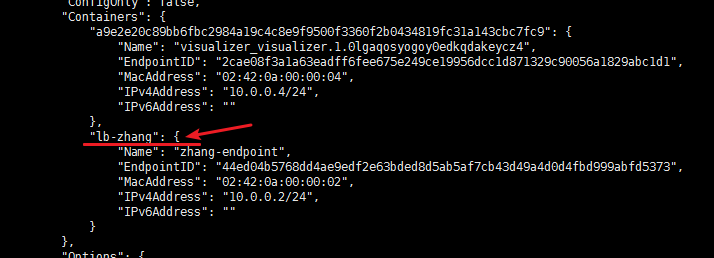
但是在近期的一次部署发现 docker 18.06.1 版本,在使用docker swarm部署大数据组件的时候namenode存储的datanode信息不正确。原因是 18.06.1 版本中的docker swarm 存在一个LB网络,造成了该问题。
这个问题对于Hadoop本身是没有任何问题的,但是当我们启动hbase的时候却有问题了。通过日志发现hbase找不到datanode的节点信息,因为hbase得到的是LB的IP而不是datanode本身的IP,最终导致hbase启动失败。
最后解决的方案就是docker版本回退到 17.09.0 版本,该版本不存在LB网络。Hadoop的namenode中存储的datanode信息是正确的。
 [root@mini03 docker-swarm]# docker -v

 Docker version 18.06.-ce, build e68fc7a

 [root@mini03 docker-swarm]# docker network ls

 NETWORK ID          NAME                DRIVER              SCOPE

 f28f7ab2d811        bridge              bridge              local

 51c95dea1e5c        docker_gwbridge     bridge              local

 7a7e31f4bce8        host                host                local

 3cxch31bl38k        ingress             overlay             swarm

 5ea08e9a282f        none                null                local

 pwk7oy2h3gnp        zhang               overlay             swarm  # 自己创建的网络

 [root@mini03 docker-swarm]# docker network inspect zhang

 ………………

         "Containers": {

             "a9e2e20c89bb6fbc2984a19c4c8e9f9500f3360f2b0434819fc31a143cbc7fc9": {

                 "Name": "visualizer_visualizer.1.0lgaqosyogoy0edkqdakeycz4",

                 "EndpointID": "2cae08f3a1a63eadff6fee675e249ce19956dcc1d871329c90056a1829abc1d1",

                 "MacAddress": "02:42:0a:00:00:04",

                 "IPv4Address": "10.0.0.4/24",

                 "IPv6Address": ""

             },

             "lb-zhang": {

                 "Name": "zhang-endpoint",

                 "EndpointID": "44ed04b5768dd4ae9edf2e63bded8d5ab5af7cb43d49a4d0d4fbd999abfd5373",

                 "MacAddress": "02:42:0a:00:00:02",

                 "IPv4Address": "10.0.0.2/24",

                 "IPv6Address": ""

             }

         },

 ………………
2. docker安装指定版本
 # 安装必要的一些系统工具

 [root@mini02 tools]# yum install -y yum-utils device-mapper-persistent-data lvm2

 # 添加软件源信息

 [root@mini02 tools]# yum-config-manager --add-repo http://mirrors.aliyun.com/docker-ce/linux/centos/docker-ce.repo

 # 查看可安装的版本信息

 [root@mini02 tools]# yum makecache fast

 [root@mini02 tools]# yum list docker-ce.x86_64 --showduplicates | sort -r

 * updates: mirrors.aliyun.com

 Loading mirror speeds from cached hostfile

 Loaded plugins: fastestmirror

  * extras: mirrors.aliyun.com

  * epel: mirrors.aliyun.com

 docker-ce.x86_64            18.06..ce-.el7                    docker-ce-stable

 docker-ce.x86_64            18.06..ce-.el7                    docker-ce-stable

 docker-ce.x86_64            18.03..ce-.el7.centos             docker-ce-stable

 docker-ce.x86_64            18.03..ce-.el7.centos             docker-ce-stable

 docker-ce.x86_64            17.12..ce-.el7.centos             docker-ce-stable

 docker-ce.x86_64            17.12..ce-.el7.centos             docker-ce-stable

 docker-ce.x86_64            17.09..ce-.el7.centos             docker-ce-stable

 docker-ce.x86_64            17.09..ce-.el7.centos             docker-ce-stable

 docker-ce.x86_64            17.06..ce-.el7.centos             docker-ce-stable

 docker-ce.x86_64            17.06..ce-.el7.centos             docker-ce-stable

 docker-ce.x86_64            17.06..ce-.el7.centos             docker-ce-stable

 docker-ce.x86_64            17.03..ce-.el7                    docker-ce-stable

 docker-ce.x86_64            17.03..ce-.el7.centos             docker-ce-stable

 docker-ce.x86_64            17.03..ce-.el7.centos             docker-ce-stable

 docker-ce.x86_64            17.03..ce-.el7.centos             docker-ce-stable

 # 安装指定版本的docker服务

 [root@mini02 tools]# yum -y install docker-ce-17.09..ce-.el7.centos

 # 版本信息查看

 [root@mini02 tools]# docker -v

 Docker version 17.09.-ce, build afdb6d4
3. 加入开机自启动
 [root@mini02 tools]# systemctl status docker

 ● docker.service - Docker Application Container Engine

    Loaded: loaded (/usr/lib/systemd/system/docker.service; disabled; vendor preset: disabled)

    Active: inactive (dead)

      Docs: https://docs.docker.com

 ………………

 [root@mini02 tools]# systemctl enable docker.service  # 加入开机自启动

 Created symlink from /etc/systemd/system/multi-user.target.wants/docker.service to /usr/lib/systemd/system/docker.service.
4. 问题解决
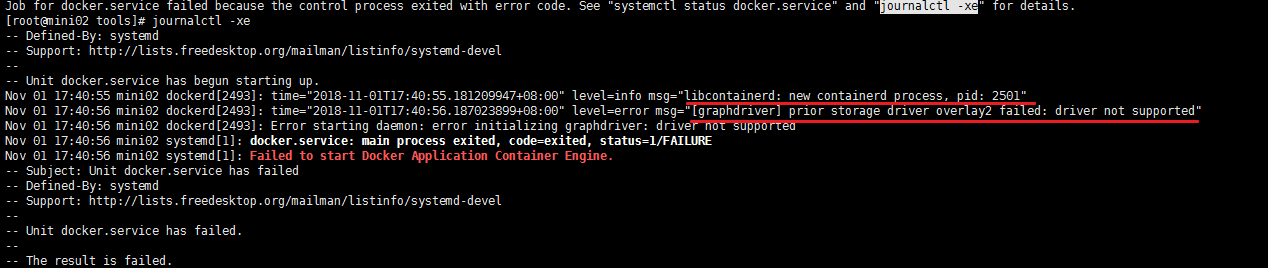
 [root@mini02 tools]# systemctl start docker

 Job for docker.service failed because the control process exited with error code. See "systemctl status docker.service" and "journalctl -xe" for details.

 [root@mini02 tools]# journalctl -xe  # 查询具体信息

 -- Defined-By: systemd

 -- Support: http://lists.freedesktop.org/mailman/listinfo/systemd-devel

 --

 -- Unit docker.service has begun starting up.

 Nov  :: mini02 dockerd[]: time="2018-11-01T17:40:55.181209947+08:00" level=info msg="libcontainerd: new containerd process, pid: 2501"

 Nov  :: mini02 dockerd[]: time="2018-11-01T17:40:56.187023899+08:00" level=error msg="[graphdriver] prior storage driver overlay2 failed: driver not supported"

 Nov  :: mini02 dockerd[]: Error starting daemon: error initializing graphdriver: driver not supported

 Nov  :: mini02 systemd[]: docker.service: main process exited, code=exited, status=/FAILURE

 Nov  :: mini02 systemd[]: Failed to start Docker Application Container Engine.

 -- Subject: Unit docker.service has failed

 -- Defined-By: systemd

 -- Support: http://lists.freedesktop.org/mailman/listinfo/systemd-devel

 ………………

 # 具体信息如下截图,解决方法如下,之后就可以正常起docker服务了

 [root@mini02 tools]# mv /var/lib/docker /var/lib/docker.old
安装指定版本的docker服务的更多相关文章
- 安装指定版本的docker
安装 Docker 从 2017 年 3 月开始 docker 在原来的基础上分为两个分支版本: Docker CE 和 Docker EE. Docker CE 即社区免费版,Docker EE 即 ...
- 容器学习笔记之CentOS7安装Docker(安装指定版本的Docker,加速,卸载)
0x00 概述 Docker从1.13版本之后采用时间线的方式作为版本号,分为社区版CE和企业版EE. 社区版是免费提供给个人开发者和小型团体使用的,企业版会提供额外的收费服务,比如经过官方测试认证过 ...
- 使用rpm安装指定版本的docker(1.12.6)
一.原因 如果系统是Centos7.3,直接使用yum install docker安装的docker版本是1.13.1,导致在创建容器的会报错,错误如下: 所以为了防止安装高版本的docker引发的 ...
- Ubuntu安装指定版本的docker
系统环境: Ubuntu 16.0.4 安装版本: docker 17.03.2 在进现在这家公司初期,需要使用rancher部署一个k8s集群,由于rancher也是由docker启动的,加上k8 ...
- CentOS7 安装特定版本的Docker
先卸载旧版本 sudo yum remove docker \ docker-client \ docker-client-latest \ docker-common \ docker-late ...
- 在Linux Centos 7.2 上安装指定版本Docker。
相关资料链接: https://docs.docker.com/install/linux/docker-ce/centos/#install-docker-ce 先清空下“历史” yum remov ...
- 在Linux Centos 7.2 上安装指定版本Docker 17.03
相关资料链接: https://docs.docker.com/install/linux/docker-ce/centos/#install-docker-ce 先清空下“历史” yum insta ...
- yum 安装指定版本Docker
版权声明:本文为博主原创文章,遵循 CC 4.0 BY-SA 版权协议,转载请附上原文出处链接和本声明.本文链接:https://blog.csdn.net/weixin_39553910/artic ...
- Centos7根据yum源安装指定版本docker
yum install -y yum-utils device-mapper-persistent-data lvm2 yum-config-manager --add-repo https://mi ...
随机推荐
- Python数据分析(一): ipython 技巧!
不一定非得使用Jupyter Notebook,试试ipython命令行 安装 ipython 我只试过Windows 10环境下的. 1.安装python安装包之后,应该就有ipython了. 2. ...
- Python内置函数(40)——map
英文文档: map(function, iterable, ...) Return an iterator that applies function to every item of iterabl ...
- performance数据
// 获取 performance 数据 var performance = { // memory 是非标准属性,只在 Chrome 有 // 财富问题:我有多少内存 memory: { usedJ ...
- C# for Python(Nugut Iron包)
cInronPython是一种在.NET和Mono上实现的Python语言,使用InronPython就可以在.NET环境中调用Python代码 安装InronPython Python: port ...
- Error: Cannot fit requested classes in a single dex file (# methods: 149346 > 65536)
引用第三方库的jar文件,都有可能会触发这个错误.解决方案如下: 参考<[Android]Cannot fit requested classes in a single dex file. T ...
- AndroidStudio意外崩溃,电脑重启,导致重启Find In Path...查找功能失效,搜索结果缺失
解决方案: <AndroidStudio意外崩溃,电脑重启,导致重启打开Androidstudio后所有的import都出错>
- vue keep-alive 实现详情返回列表保留页面数据
实现功能 详情页返回列表页,列表页保留上次浏览位置 其它页面进入到列表表,列表页刷新 当详情页有数据改变时,列表页也要更新该条数据 实现思路 用keep-alive保留列表页面数据 activated ...
- Chapter 5 Blood Type——26
"I saw his face — I could tell." “我看到他的脸了 —— 我知道.” "How did you see me? I thought you ...
- Linux下编译器的安装
一.Linux下gcc/g++/gfortran的安装 (1).gcc Linux下自带gcc编译器.可以通过“gcc -v”命令来查看是否安装. (2).g++安装g++编译器,可以通过命令“sud ...
- 开源 serverless 产品原理剖析 - Kubeless
背景 Serverless 架构的出现让开发者不用过多地考虑传统的服务器采购.硬件运维.网络拓扑.资源扩容等问题,可以将更多的精力放在业务的拓展和创新上. 随着 serverless 概念的深入人心, ...