
selenium-确定找到的element唯一(三)
在python + selenium 中经常会遇到找到的元素不唯一,导致定位到的元素不是预期的或者定位不到元素
解决方法:只要在页面进行确认找到的元素唯一后,再进行操作
页面确认方法:
1、通过html中检索功能确认
进入开发者模式:点击右上角三个点-->选则 search 进行查找
或者直接ctrl + F (windows下)/ command + F (mac系统下)
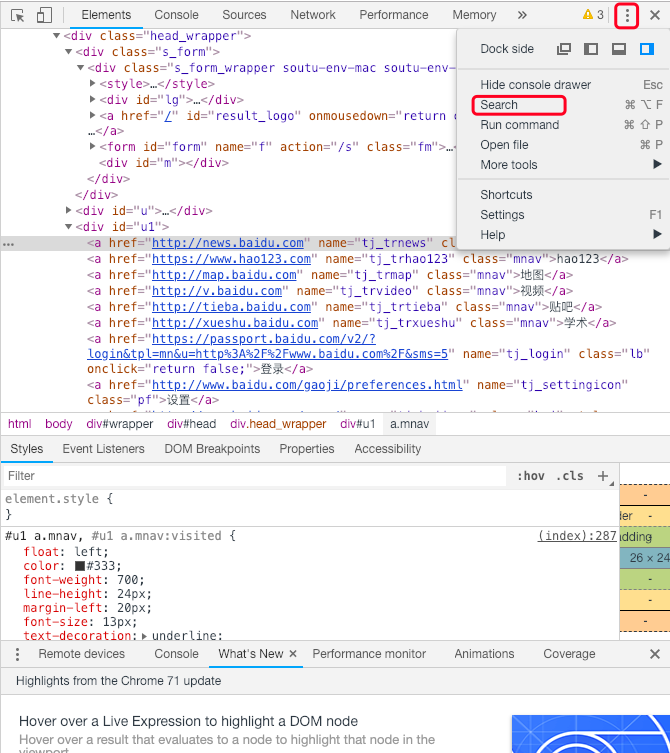
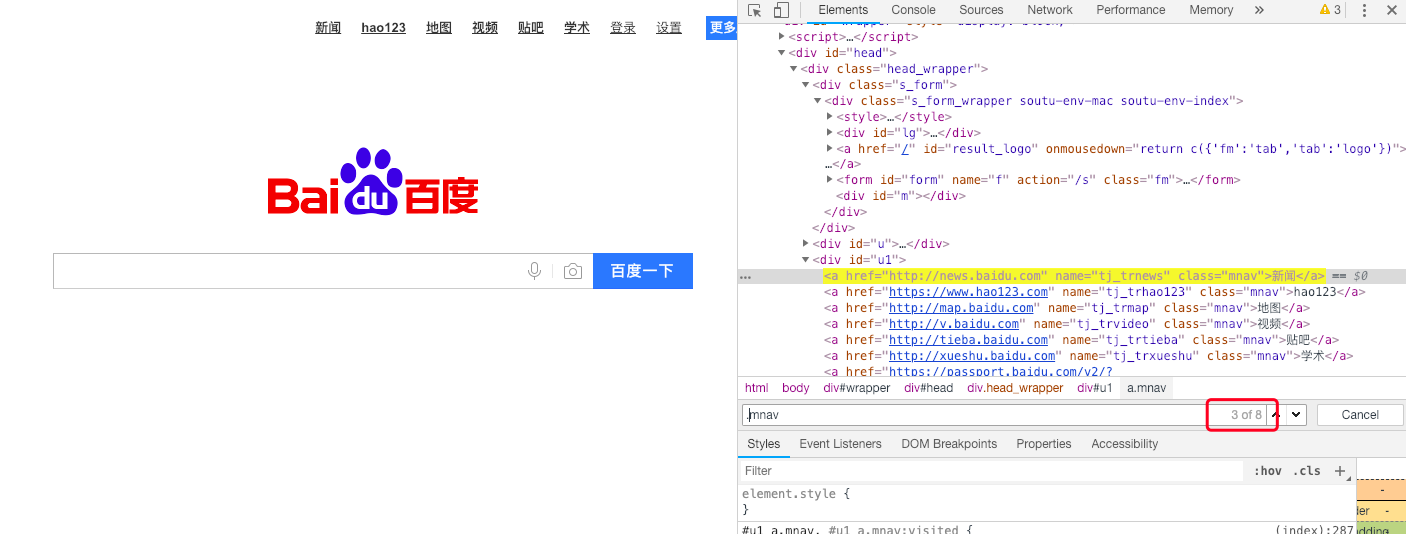
如下图进行查找,查找方法和 selenium 中一样,如 class = ‘mnav’则查找中输入 .mnav; id = ‘username’ 则输入#username; name = ‘pwd’则输入name=‘pwd’等
查找出后可在检索框后面确定找到的数量,然后通过上下键进行切换观察是否在html中唯一
这种方法有点麻烦,但也是确认元素唯一的一种方法,不推荐使用
2、通过控制台(Console)确认
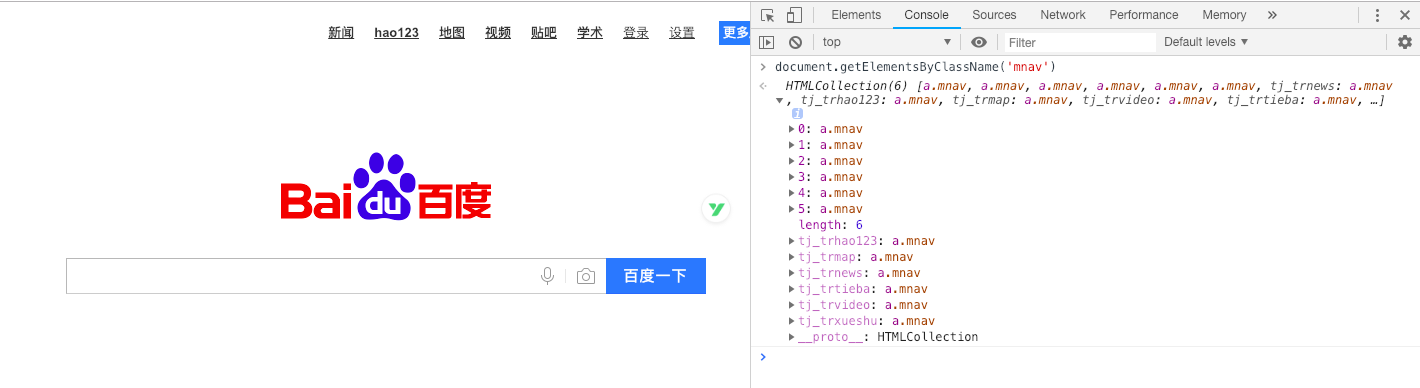
复制要查找的元素,例如:查找class = ‘.mnav’,则在控制台中输入 document.getElementsByClassName('mnav')
如下图也可以确认元素是否唯一
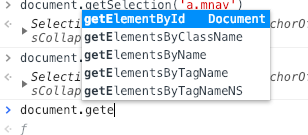
控制台中确认,和 selenium 定位类似
document.getElementById() // find id
document.getElementsByClassName() // find classname
document.getElementsByName() // find name
document.getElementsByTagName() // find tag
selenium-确定找到的element唯一(三)的更多相关文章
- Selenium Web 自动化 - 项目实战(三)
Selenium Web 自动化 - 项目实战(三) 2016-08-10 目录 1 关键字驱动概述2 框架更改总览3 框架更改详解 3.1 解析新增页面目录 3.2 解析新增测试用例目录 3. ...
- 【转】Selenium 报错:Element is not clickable at point的解决办法
天一同学在写Selenium Java脚本时遇到一个问题,登录进入系统之后,要点击左侧的一个菜单,但是执行到该语句时报下面的错误: Firefox中报错如下:org.openqa.selenium.E ...
- org.openqa.selenium.NoSuchElementException: no such element: Unable to locate element
org.openqa.selenium.NoSuchElementException: no such element: Unable to locate element(识别不到想要的元素) 想获取 ...
- UI自动化(selenium+python)之元素定位的三种等待方式
前言 在UI自动化过程中,常遇到元素未找到,代码报错的情况.这种情况下,需要用等待wait. 在selenium中可以用到三种等待方式即sleep,implicitly_wait,WebDriverW ...
- selenium webdriver API详解(三)
本系列主要讲解webdriver常用的API使用方法(注意:使用前请确认环境是否安装成功,浏览器驱动是否与谷歌浏览器版本对应) 一:获取页面元素的文本内容:text 例:获取我的博客名字文本内容 代码 ...
- Python+Selenium之cannot focus element 解决方法
有时候刚进入页面输入第一个值时脚本会报错:cannot focus element 贴下我的脚本和解决办法供大家参考 我原本的脚本是: WebDriverWait(driver,15,0.5).unt ...
- java使用Selenium操作谷歌浏览器学习笔记(三)键盘操作
我们用Selenium打开网页后,可能需要在输入框输入一些内容等等,这时候就需要键盘操作了 使用sendKEys进行键盘操作,在bing的搜索框中输入内容并点击跳转 1 import org.open ...
- fix org.openqa.selenium.NoSuchWindowException when find element on windows8.1 ie11.
Steps:1.I was able to resolve the issue after adding the site URL under trusted sites of IE. The sam ...
- Selenium 入门到精通系列:三
Selenium 入门到精通系列 PS:Driver_Element 常用方法 例子 #!/usr/bin/env python # -*- coding: utf-8 -*- # @Date : 2 ...
随机推荐
- 专访 | 新浪架构师:0-5年Java工程师的职业规划如何做?
经历了2018年末的阵痛,大家都积攒着一股暗劲蠢蠢欲动. 3月初即将迎来2019年互联网行业换工作的大潮,技术工程师的升级换位对于一家互联网公司来说无疑是命脉般的存在——技术强则公司强! 如何做一个抢 ...
- IO复用(较详细)
进程与线程的描述 一个进程至少会创建一个线程,多个线程共享一个程序进程的内存.程序的运行最终是靠线程来完成操作的.线程的数量跟CPU核数有关,一个核最多能发出两个线程.线程的操作主要分为:一:给CPU ...
- DOM事件第一弹
近期温习了部分w3c上关于DOM事件的规范,发现以前有些模糊的概念更加清晰,以及受到罗胖(罗辑思维)的影响,很是想分享自己的了解的东西,希望大家给予指正或补充. 一.事件类型 参数 事件接口 初始化方 ...
- 『数组的最大代价 贪心优化DP』
数组的最大代价(51nod 1270) Description 数组A包含N个元素A1, A2......AN.数组B包含N个元素B1, B2......BN.并且数组A中的每一个元素Ai,都满足1 ...
- 【朝花夕拾】Android性能篇之(二)Java内存分配
前言 在内存方面,相比于C/C++程序员,咱们java系程序员算是比较幸运的,因为对于内存的分配和回收,都交给了JVM来处理了,而不需要手动在代码中去完成.有了虚拟机内存管理机制,也就不 ...
- 把路由器改装成git服务器(OpenWRT环境的GIT服务器搭建)
在单位中,通常都标配了git服务器用来管理代码. 对于家庭或者小办公室,这种方式有点不经济.当然如果是开源项目就简单了,刚刚被微软收购的github是理想选择.但如果没有打算开源,我今天的话题可能对你 ...
- Spring中bean实例化的三种方式
之前我已经有好几篇博客介绍Spring框架了,不过当时我们都是使用注解来完成注入的,具体小伙伴可以参考这几篇博客(Spring&SpringMVC框架案例).那么今天我想来说说如何通过xml配 ...
- Spring 完美配置跨域请求
在SpringBoot2.0 上的跨域 用以下代码配置 即可完美解决你的前后端跨域请求问题 import org.springframework.context.annotation.Bean; im ...
- 记一次查询超时的解决方案The timeout period elapsed......
问题描述 在数据库中执行查询语句,大约1秒钟查询出来,在C#中用ado进行连接查询,一直等待很久未查出结果,最后抛出查询超时异常. 异常内容如下: Execution Timeout Expired. ...
- Thread之九:stop
搞过Java线程的人都知道,stop这个方法是臭名昭著了,早就被弃用了,但是现在任然有很多钟情与他的人,永远都放不下他,因为从他的字面意思上我们可以知道他貌似可以停止一个线程,这个需求是每个搞线程开发 ...