
Robot Framework 1
about Robot, learnt from the following document, perfect document !!!!
http://www.virtuousprogrammer.com/?s=robot
*** Settings ***

Library       Selenium Library

*** Testcases ***

Login Should Succeed When the Correct Username and Password are Entered

  Start Selenium Server

  Set Selenium Timeout  10

  Open Browser  file:///D:/robot/Login.htm  ie

  Sleep  3

  Input Allentext  uname  AUser

  Input Text  pwd    TestPass

  Click Button  login

  Page Should Contain  AUser

  Close Browser

  Stop Selenium Server
打开 Ride, 看到的如下:
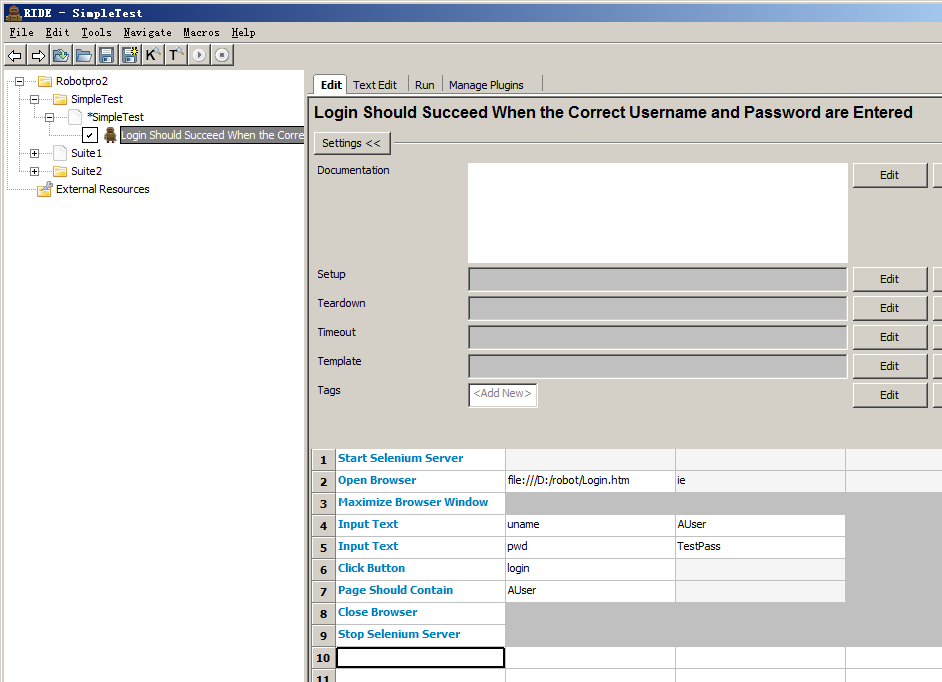
所以你一定问, 这种浅蓝色的 low level keyword 到底是在哪里定义的?
比如 Start Selenium Server:
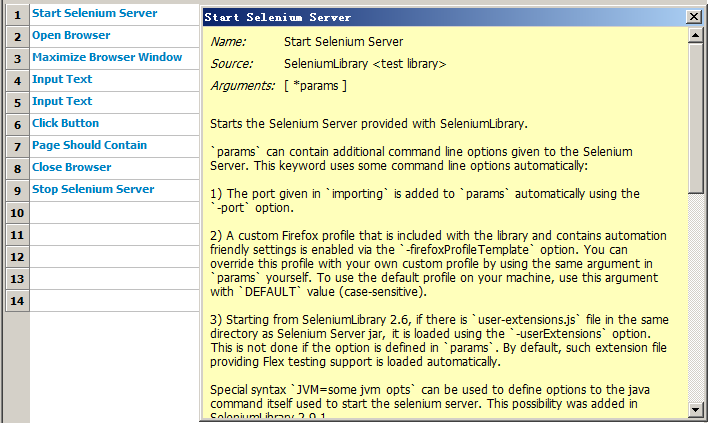
其实来源于:
*** Settings ***

Library       Selenium Library
RIDE UI 上是:
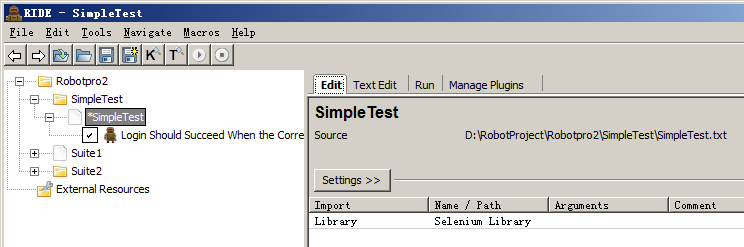
可只是一句 "Library Selenium Library" 就可以了么?到底 Selenium Library 在哪里?
很简单: C:\Python27\Lib\site-packages
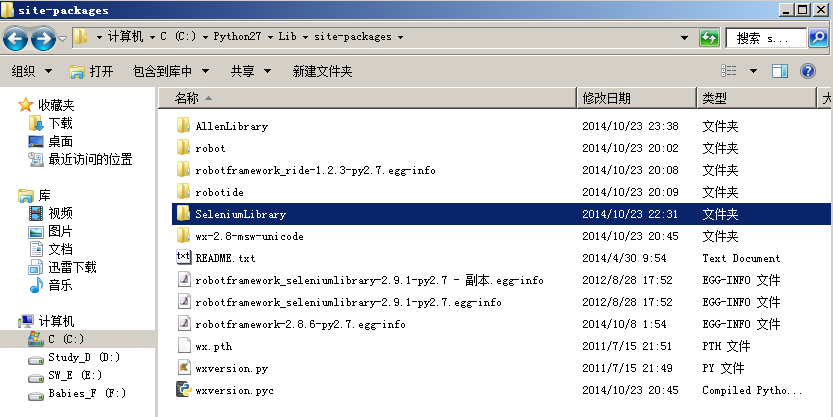
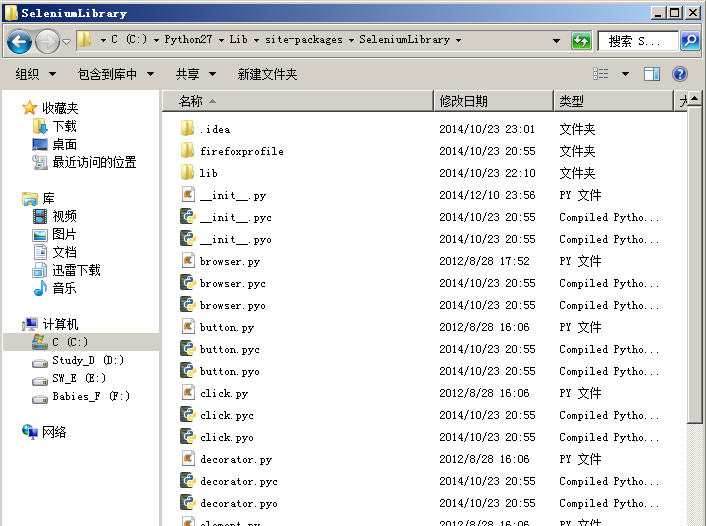
打开 __init__.py, 能够看到如下:
    def start_selenium_server(self, *params):

        """Starts the Selenium Server provided with SeleniumLibrary.

        `params` can contain additional command line options given to the

        Selenium Server. This keyword uses some command line options

        automatically:

        1) The port given in `importing` is added to `params` automatically

        using the `-port` option.

        2) A custom Firefox profile that is included with the library

        and contains automation friendly settings is enabled via the

        `-firefoxProfileTemplate` option. You can override this

        profile with your own custom profile by using the same argument

        in `params` yourself. To use the default profile on your machine,

        use this argument with `DEFAULT` value (case-sensitive).

        3) Starting from SeleniumLibrary 2.6, if there is `user-extensions.js`

        file in the same directory as Selenium Server jar, it is loaded using

        the `-userExtensions` option.  This is not done if the option is

        defined in `params`.  By default, such extension file providing Flex

        testing support is loaded automatically.

        Special syntax `JVM=some jvm opts` can be used to define options to

        the java command itself used to start the selenium server. This

        possibility was added in SeleniumLibrary 2.9.1.

        Examples:

        | Start Selenium Server | | | # Default settings. Uses the Firefox profile supplied with the library. |

        | Start Selenium Server | -firefoxProfileTemplate | C:\\\\the\\\\path | # Uses custom Firefox profile. |

        | Start Selenium Server | -firefoxProfileTemplate | DEFAULT | # Uses default Firefox profile on your machine. |

        | Start Selenium Server | -avoidProxy | -ensureCleanSession | # Uses various Selenium Server settings. |

        | Start Selenium Server | -JVM=-DserverName=somehost | # Define JVM options. |

        All Selenium Server output is written into `selenium_server_log.txt`

        file in the same directory as the Robot Framework log file.

        If the test execution round starts and stops Selenium Server multiple

        times, it is best to open the server to different port each time.

        *NOTE:* This keyword requires `subprocess` module which is available

        on Python/Jython 2.5 or newer.

        """

        params = ('-port', str(self._server_port)) + params

        logpath = os.path.join(self._get_log_dir(), 'selenium_server_log.txt')

        self._selenium_log = open(logpath, 'w')

        start_selenium_server(self._selenium_log, self._jar_path, *params)

        self._html('Selenium server log is written to <a href="file://%s">%s</a>.'

                   % (logpath.replace('\\', '/'), logpath))
这就是 start selenium server 的最源头。
我们也可以把整个 C:\Python27\Lib\site-packages\SeleniumLibrary 文件夹复制一份并且重命名为 "AllenLibrary", 然后打开 __init__.py, 把其中所有的 "SeleniumLibrary" 替换成 "AllenLibrary".
这时就可以直接使用 AllenLibrary了。
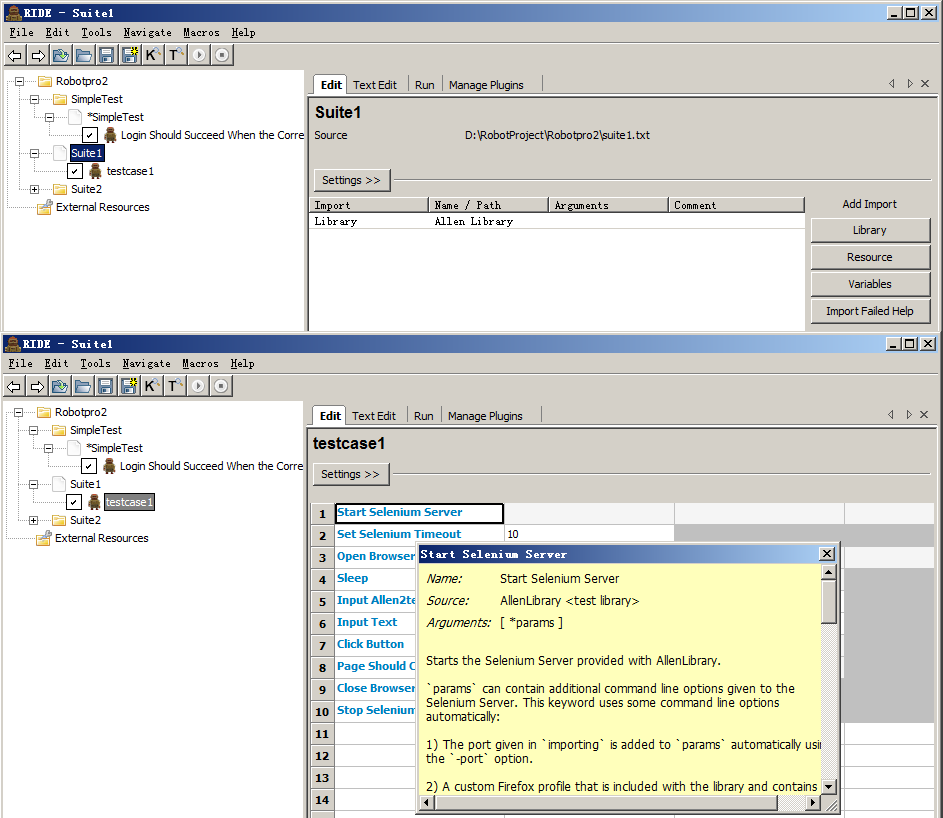
看,上面就是 Allen Library 的情况。
我们可以使用多个 library。
*** Settings ***

Library           Selenium Library

Library           Allen Library

*** Test Cases ***

testcase1

    AllenLibrary.Start Selenium Server

    AllenLibrary.Set Selenium Timeout    10

    SeleniumLibrary.Open Browser    file:///D:/robot/Login.htm    ie

    Sleep    3

    SeleniumLibrary.Input Allentext    uname    AUser

    SeleniumLibrary.Input Text    pwd    TestPass

    Comment    AllenLibrary.Input Allen2text    uname    BUser

    sleep    3

    AllenLibrary.Click Button    login

    AllenLibrary.Page Should Contain    AUser

    AllenLibrary.Close Browser

    AllenLibrary.Stop Selenium Server
只是之后使用的时候要表明清楚所用的方法是从 AllenLibrary来的,还是从 SeleniumLibrary来的。
Robot Framework 1的更多相关文章
- Robot Framework用户手册 (版本:3.0)
版权信息:诺基亚网络和解决中心 本翻译尊重原协议,仅用于个人学习使用 1.开始: 1.1 介绍: Robot Framework是一个基于Python的,为终端测试和验收驱动开发(ATDD)的可扩展的 ...
- RIDE -- Robot Framework setup
RobotFramework 是一款基于python 的可以实现关键字驱动和数据驱动并能够生成比较漂亮的测试报告的一款测试框架 这里使用的环境是 python-2.7.10.amd64.msi RID ...
- Robot Framework自动化测试 ---视频与教程免费分享
当我第一次使用Robot Framework时,我是拒绝的.我跟老大说,我拒绝其实对于习惯了代码的自由,所以讨厌这种“填表格”式的脚本.老大说,Robot Framework使用简单,类库丰富,还可以 ...
- Robot Framework 的安装和配置(转载)
Robot Framework 的安装和配置 在使用 RF(Rebot framework)的时候需要 Python 或 Jython 环境,具体可根据自己的需求来确定.本文以在有 Python 的环 ...
- 解决从jenkins打开robot framework报告会提示‘Opening Robot Framework log failed ’的问题
最新的jenkins打开jenkins robot framework报告会提示如下 Verify that you have JavaScript enabled in your browser. ...
- 在centos7中安装Robot Framework
安装前景介绍: 最初,我们是在Windows环境下搭建Robot Framework来对我们的服务进行接口测试的(想知道如何在Windows下安装Robot Framework,可以参考我同事的博客h ...
- 移动端自动化环境搭建-Robot Framework的安装
A.安装依赖 RF框架,robotframework本身. B.安装过程 可以通过下载 exe 程序进行安装,Robot Framework 分别提供了,win-amd64.exe 和 win32.e ...
- robot framework 安装配置
robot framework 是一款专门用作自动化测试的框架,提供了丰富的内置库,与第三方库,也支持用户自己编写的库,robot framework +library 可以 用来做ui的自动化测试, ...
- Robot Framework入门学习1 安装部署详解
安装注意: 目前Robot framework-ride不支持python3,安装时请下载python2.7版本. Robot Framework安装时出现了一点小问题,网上没有找到直接的介绍,现将安 ...
- Robot Framework自动化测试(七)--- jybot模式
虽然,很久不用关于Robot Framework框架了,但我这里应该是除了@齐涛-道长之外分享Robot Framework 相关资料比较多的地方了.所以,常常被问到一些关于该框架的问题. 虽然,我一 ...
随机推荐
- CodeBlocks(17.12) 代码调试基础方法&快捷方式
转载:CodeBlocks(17.12) 代码调试基础方法&快捷方式: https://www.cnblogs.com/DCD112358/p/8998053.html
- android studio发布项目到github
点击file setting ,打开对话框,如下,判断git是否安装成功 选择GitHub,填写github地址及密码 发布项目:
- Django-1-URL路由系统
一.分发地址 在APP中创建urls.py文件,将属于该APP的url地址都写入到这个文件中,当程序收到用户发送的请求时,先在根目录的urls.py文件中查找该地址属于哪个APP,将这个请求分发到该A ...
- rest_framework框架的认识
它是基于Django的,帮助我们快速开发符合RESTful规范的接口框架. 一 路由 可以通过路由as_view()传参 根据请求方式的不同执行对应不同的方法 在routers模块下 封装了很多关于 ...
- redis 数据结构及应用场景
1. String 常用命令: get.set.incr.decr.mget等 应用场景: String是最常用的数据类型,普通的key/value都可以归为此类,value其实不仅是String,也 ...
- 批量检测服务器是否能telnet连通
# coding: UTF-8import osimport sysimport jsonimport platformfrom _utils.patrol2 import data_format,r ...
- Codeforces 809E Surprise me! [莫比乌斯反演]
洛谷 Codeforces 非常套路的一道题,很适合我在陷入低谷时提升信心-- 思路 显然我们需要大力推式子. 设\(p_{a_i}=i\),则有 \[ \begin{align*} n(n-1)an ...
- iis7 设置自定义404页面无效解决方案
想给自己做的的网站自定义一个404页面,开始 双击红框提示的错误页图标 双击上图红框提示的所示404行 修改上图红框提示的内容如下:我是直接在根目录放了一个自己做的404.html,实际情况要填写你自 ...
- niagara Workbench module import IntelliJ
1. 在整个网络布线中使用一种布线方式,但是两端都有RJ-45 plug 的网络连线,无论是采用方式A还是方式B 端接的方式都是试用的.网络都是通用的,双绞线的顺序与RJ-45偶的引脚序号一一对应, ...
- nginx在后端服务维护时,自动挂公告页
本想用lua玩一把,但我发现我的要求很简单,直接用upstream的weight和backup就OK了. 于是,这样玩了一把. 作个记录. 1).down 表示当前的server暂时不参与负载2).w ...