
sql server 中隐藏掉无关数据库
先贴上我实际测试的效果

方法一:
Problem
I have a SQL Server instance that has hundreds of databases. Navigating the database tree in SSMS is a pain and I was wondering if there was a way to limit the list of databases that I see in SSMS?
Solution
SQL Server consolidation is becoming more popular these days to reduce costs and therefore more and more databases are being put on one instance. It is very common to host multiple databases on a consolidated instance from multiple applications and departments and sometimes application owners want to hide their databases to other users of the instance. They do not want to make their database visible to others. This tip will give you an understanding on how databases can be hidden.
Setup
Suppose there are two databases A and B from two different applications and they are hosted on the same SQL Server instance. The users of database A are not allowed to see database B and vice versa. Here we will create two different logins user_A and user_B and give them appropriate rights to their own databases.
CREATE DATABASE A

GO

CREATE DATABASE B

GO

CREATE LOGIN user_A with password='U$er_A@1234'

Go

CREATE LOGIN user_B with password='U$er_B@1234'

Go

USE A

GO

CREATE USER user_A for login user_A;

GO

EXEC sp_addrolemember 'db_owner', 'user_A'

GO

USE B

GO

CREATE USER user_B for login user_B

GO

EXEC sp_addrolemember 'db_owner', 'user_B'
NOTE:-DO NOT MAKE CHANGES IN PRODUCTION WITHOUT PROPER TESTINGS IN LOWER-LIFE CYCLE ENVIRNOMENTS
Hiding all user databases for all logins
Suppose you want to hide all databases for all logins. Generally we hide our databases for security purposes. We can run the below statements to hide all databases for all logins. The databases will then only be visible to sysadmin logins or owners of the database.
USE MASTER

GO

DENY VIEW ANY DATABASE TO PUBLIC

GO
Once you run the above statement, you will not be able to see any databases in SQL Server Management Studio unless you are a sysadmin or your login is the owner of a database(s).
Here you can see in the below screen shot, I have connected using logins user_A and user_B and none of the user databases are showing after running the Deny View access to public.
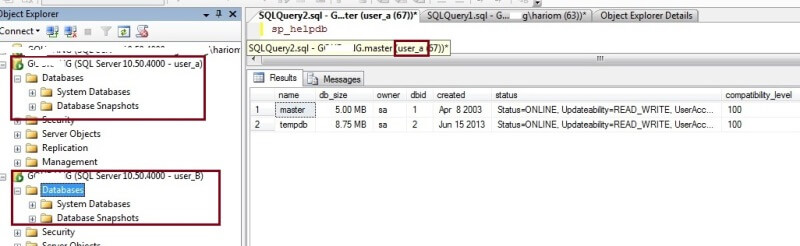
Only sysadmins and database owners can see databases
To allow the logins to see their databases, I will make both logins the owners for their respective databases. User_A will be owner of database A and user_B will be the owner of database B. Run the below statements to change the database owners.
USE A

GO

SP_changedbowner [USER_A]

GO

USE B

GO

SP_changedbowner [USER_B]
We can check the database owners by running sp_helpdb. As you can see in the below screenshot that the database owners have been changed for both databases.

Now we can connect to the SQL Server instance again using both logins and see the changes compared to before. Here we can see that only one database is visible for both logins. Database A is visible to user_A and database B is visible to user_B. This is because both logins are now the database owners of these databases.
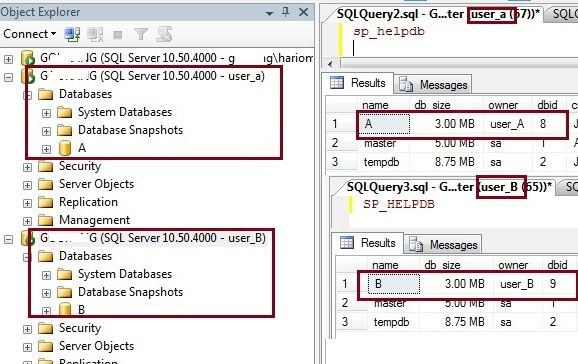
Does making a user a db_owner work
Now we will create a new login user_C and assign db_owner access to both databases and check whether these databases are visible to this new login.
CREATE LOGIN user_C with password='U$er_c@13'

GO

USE A

GO

CREATE USER user_C for login user_C;

GO

EXEC sp_addrolemember 'db_owner', 'user_C'

GO

USE B

GO

CREATE USER user_c for login user_C

GO

EXEC sp_addrolemember 'db_owner', 'user_C'
As we can see below, neither of these databases are visible for login user_C. So from this we can see that you have to be the database owner to be able to see the databases in SQL Server Management Studio if the DENY VIEW ANY DATABASE is enabled for public.
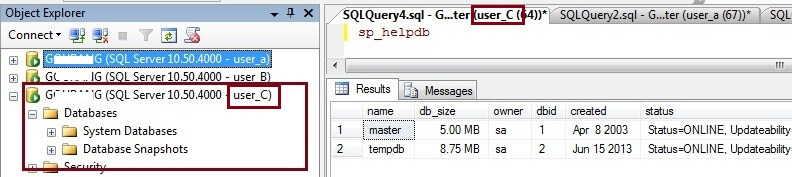
Steps to hide databases for a specific login
Suppose we don't want to do this across the board, but only do this for a specific login. We can run the below statement instead of DENY VIEW ANY DATABASE TO PUBLIC. After running the below statement, this login won't be able to see databases except for any database that this login is the database owner, but all other logins can see the database as long as you did not also deny view to Public.
USE MASTER

GO

GRANT VIEW ANY DATABASE TO PUBLIC; -- turn this back on if it was off

GO

DENY VIEW ANY DATABASE TO USER_A;

GO
Steps to view all databases
By default, the VIEW ANY DATABASE permission is granted to the public role. Therefore, by default, every user that connects to an instance of SQL Server can see all databases in the instance. To grant the VIEW ANY DATABASE permission to a specific login or to all logins run the following query:
--To grant the VIEW ANY DATABASE permission to a specific login.

USE MASTER

GO

GRANT VIEW ANY DATABASE TO [login_name];

GO

--To grant the VIEW ANY DATABASE permission to public.

USE MASTER

GO

GRANT VIEW ANY DATABASE TO PUBLIC;

Go
Note that if you use the DENY VIEW to PUBLIC this overrides the setting for an individual login, so if you DENY VIEW to PUBLIC and GRANT VIEW to a specific login this login will still not be able to see the databases.
If you are using DENY VIEW to PUBLIC and you want a login to still be able to see all databases without making that login a sysadmin you can do the following. Make the login a user in the master database and make that user a db_owner of the master database. This is not a very good option from a security perspective, but this does work. This way a login can see all databases without having to be a sysadmin.
Conclusion
As you can see from the above, there are limited options to hiding databases. Once you hide all databases the only logins that can see the databases are the logins that are the owners of the database or if the login is a sysadmin. Also, each database can only have one owner, so you can't assign multiple owners to the same database.
Next Steps
- Follow this process to hide your databases in SQL Server Management Studio.
- Read more SSMS tips
引用资料:How to hide SQL Server user databases in SQL Server Management Studio
方法二:
USE master;

GO

DENY VIEW ANY DATABASE TO [newlogin]; --关闭指定用户的查看任意数据库权限

GO

USE yourDB;

GO

DROP USER newlogin;--从指定数据库中删除登录用户

GO

USE master;

GO

ALTER AUTHORIZATION ON DATABASE::yourDB TO [newlogin];--对指定数据库重新授权用户(同时也修改了拥有者)

GO
sql server 中隐藏掉无关数据库的更多相关文章
- 转:SQL Server中服务器角色和数据库角色权限详解
当几个用户需要在某个特定的数据库中执行类似的动作时(这里没有相应的Windows用户组),就可以向该数据库中添加一个角色(role).数据库角色指定了可以访问相同数据库对象的一组数据库用户. 数据库角 ...
- SQL Server中怎么查看每个数据库的日志大小,以及怎么确定数据库的日志文件,怎么用语句收缩日志文件
一,找到每个数据库的日志文件大小 SQL Server:查看SQL日志文件大小命令:dbcc sqlperf(logspace) DBA 日常管理工作中,很重要一项工作就是监视数据库文件大小,及日志文 ...
- SQL Server 中4个系统数据库,Master、Model、Msdb、Tempdb。
(1)Master数据库是SQL Server系统最重要的数据库,它记录了SQL Server系统的所有系统信息.这些系统信息包括所有的登录信息.系统设置信息.SQL Server的初始化信息和其他系 ...
- 如何隐藏掉SQL Server中自带系统数据库,数据表,存储过程等显示文件,只显示用户的数据库,数据表等文件
企业管理器了,----> 编辑该数据库的注册属性--->“常规”属性页下面-->“显示系统数据库和系统对象”的选项去掉
- sql server中的系统数据库
1.master数据库 master是SQL Server中最重要的数据库,是整个数据库服务器的核心.用户不能直接修改该数据库,如果损坏了master数据库,整个SQL Server服务器将不能工作. ...
- 多个程序对sql server中的表进行查询和插入操作导致死锁
最近在做一个项目,是要用多个程序对sql server中的相同的数据库进行操作(查询和插入),所以在开始的时候常会出现死锁问题,后来在网上进行了咨询,发现了一些解决方法,留作大家参考: 并发去操纵一张 ...
- 解决SQL Server中无管理员账户权限问题
遇到忘记SQL Server管理员账户密码或管理员账户被意外删除的情况,如何在SQL Server中添加一个新的管理员账户?按一下步骤操作可添加一个windows账户到SQL Server中,并分配数 ...
- SQL Server 中为何拥有db_owner权限的账号删除不掉数据库
今天在公司的SQL Server服务器上,使用了一个只有public和dbcreator角色的账号"user1"在SMSS中去删除一个数据库,但是死活报错说没有权限,报错如下: D ...
- 如何进行数据库,比如ORACLE,SQL SERVER的逆向工程,将数据库导入到PowerDesigner中
Oracle的反向工程就是指将Oracle中的数据库,当然也可以是SQL Server中的数据库导入到PD中,这个需要建立一个数据库的链接,然后进行逆向工程的操作. 第一步:建立数据库的链接: Pow ...
随机推荐
- Java泛型
什么是泛型? 泛型(Generic type 或者 generics)是对 Java 语言的类型系统的一种扩展,以支持创建可以按类型进行参数化的类.可以把类型参数看作是使用参数化类型时指定的类型的一个 ...
- 《连载 | 物联网框架ServerSuperIO教程》- 12.服务接口的开发,以及与云端双向交互
1.C#跨平台物联网通讯框架ServerSuperIO(SSIO)介绍 <连载 | 物联网框架ServerSuperIO教程>1.4种通讯模式机制. <连载 | 物联网框架Serve ...
- Web Worker javascript多线程编程(二)
Web Worker javascript多线程编程(一)中提到有两种Web Worker:专用线程dedicated web worker,以及共享线程shared web worker.不过主要讲 ...
- 【原】低版本MyEclipse整合高版本Tomcat
[使用工具] 1.MyEclipse_6.0.1GA_E3.3.1_FullStackInstaller 2.Tomcat 7.0 [问题描述] 直接在MyEclipse中整合,因为这个版本的MyEc ...
- android ImageLoader 混淆加载drawable出现黑色图片的解决方案
在网上找了很久,没有找到.后来看了源码才知道... 多线程异步加载和显示图片(图片来源于网络.sd卡.assets文件夹,drawable文件夹(不能加载9patch),新增加载视频缩略图) Stri ...
- swift-字典
swift字典 在swift中,key:key值一定是可hash的,一定是独一无二的,swift的基本数据类型(String,Int,Float)都是可哈希的,所以都可以作为key值. value:没 ...
- win7的6个网络命令
1 名称: Ipconfig 参数: /all : 显示详细信息 /renew: 更新所有适配器 /renew EL*:更新所有名称以EL为开头的连接 /release *Con*: 释放所有匹配的连 ...
- VMware中CPU分配不合理以及License限制引起的SQL Scheduler不能用于查询处理
有一台SQL Server(SQL Server 2014 标准版)服务器中的scheduler_count与cpu_count不一致,如下截图所示: SELECT cpu_count , ...
- CSS:@font-face的使用方法
1.介绍 @font-face是CSS3中的一个模块,他主要是把自己定义的Web字体嵌入到你的网页中,随着@font-face模块的出现,我们在Web的开发中使用字体不怕只能使用Web安全字体,你们当 ...
- mongodb简介(转)
1.简介 MongoDB是一个基于分布式文件存储的数据库.由C++语言编写.旨在为WEB应用提供可扩展的高性能数据存储解决方案. MongoDB是一个介于关系数据库和非关系数据库之间的产品,是非关系数 ...