
跟技术胖学vue+koa
首页热卖商品组件
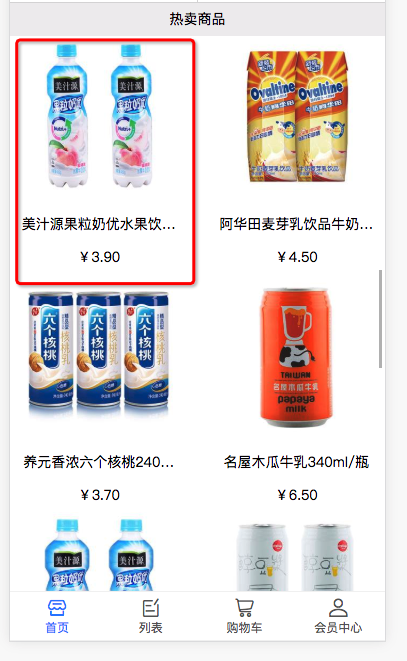
技术点:1热卖商品封装成单独的组件 2路由和参数的传递 3详情页面路由参数的接收
//首页
<template>
    <div>
        <div class="search-bar">
            <van-row>
                <van-col span="3">
                    <img :src="locationIcon" width="80%" class="location-icon"/>
                </van-col>
                <van-col span="16">
                    <input type="text" class="search-input" />
                </van-col>
                <van-col span="5">
                    <van-button size="mini">查找</van-button>
                </van-col>
            </van-row>
        </div>
        <!--swiper area-->
        <div class="swiper-area">
            <van-swipe :autoplay="1000">
                <van-swipe-item v-for="( banner ,index) in bannerPicArray" :key="index" >
                    <img v-lazy="banner.image" width="100%"/>
                </van-swipe-item>
            </van-swipe>
        </div>
        <!--type bar-->
        <div class="type-bar">
            <div v-for="(cate,index) in category" :key="index">
                <img v-lazy="cate.image" width="90%">
                <span>{{cate.mallCategoryName}}</span>

            </div>
        </div>
        <!--adbanner area-->
        <div>
            <img v-lazy="adBanner" width="100%" />
        </div>
        <!--Recommend goods area-->
        <div class="recommend-area">
            <div class="recommend-title">
                商品推荐
            </div>
            <div class="recommend-body">
                <swiper :options="swiperOption">
                   <swiper-slide v-for="(item,index) in recommendGoods " :key="index" >
                       <div class="recommend-item">
                           <img :src="item.image" width="80%">
                           <div>{{item.goodsName}}</div>
                           <div>¥{{item.price | moneyFilter}}(¥{{item.mallPrice  | moneyFilter}})</div>
                       </div>
                   </swiper-slide>
                </swiper>
            </div>
        </div>
        <floor-component :floorData="floor1" :floorTitle="floorName.floor1"></floor-component>
        <floor-component :floorData="floor2" :floorTitle="floorName.floor2"></floor-component>
        <floor-component :floorData="floor3" :floorTitle="floorName.floor3"></floor-component>
        <!--Hot Area-->
        <div class="hot-area">
            <div class="hot-title">热卖商品</div>
            <div class="hot-goods">
            <!--这里需要一个list组件-->
                <van-list>
                    <van-row gutter="20">
                        <van-col span="12" v-for="(item , index) in hotGoods" :key="index">
                     <goods-info :goodsId="item.goodsId" :goodsImage="item.image" :goodsName="item.name" :goodsPrice="item.price">

                     </goods-info>          //********************** 通过  :goodsId="item.goodsId" 传参
                        </van-col>
                    </van-row>
                </van-list>
            </div>
        </div>
    </div>
</template>

<script>
    import axios from 'axios'
    import 'swiper/dist/css/swiper.css'
    import {swiper , swiperSlide} from 'vue-awesome-swiper'

    import floorComponent from '../component/floorComponent'
    import { toMoney } from '@/filter/moneyFilter.js'
    import goodsInfo from '../component/goodsInfoComponent'
    import url from '@/serviceAPI.config.js'

    export default {
        data() {
            return {
                swiperOption:{
                    slidesPerView:3
                },
                msg: 'Shopping Mall',
                locationIcon: require('../../assets/images/location.png'),
                bannerPicArray:[],
                category:[],
                adBanner:'',
                recommendGoods:[],
                floor1:[],
                floor2:[],
                floor3:[],
                floorName:{},
                hotGoods:[],  //热卖商品
            }
        },
        filters:{
            moneyFilter(money){
                return toMoney(money)
            }
        },
        components:{swiper,swiperSlide,floorComponent,goodsInfo},
        created(){
            axios({
                url:url.getShopingMallInfo,
                method:'get',
            })
            .then(response=>{
                console.log(response)
                if(response.status==200){
                    this.category=response.data.data.category;
                    this.adBanner = response.data.data.advertesPicture.PICTURE_ADDRESS;
                    this.bannerPicArray= response.data.data.slides;
                    this.recommendGoods = response.data.data.recommend;
                    this.floor1 = response.data.data.floor1;
                    this.floor2 = response.data.data.floor2;
                    this.floor3 = response.data.data.floor3;
                    this.floorName = response.data.data.floorName;
                    this.hotGoods = response.data.data.hotGoods;
                }
            })
            .catch(error=>{
                console.log(error)
            })
        }

    }
</script>

<style scoped>
    .search-bar{
        height:2.2rem;
        background-color: #e5017d;
        line-height: 2.2rem;
        overflow: hidden;
    }
    .search-input{
        width:100%;
        height: 1.3rem;
        border-top:0px;
        border-left:0px;
        border-right:0px;
        border-bottom:1px solid #fff !important;
        background-color: #e5017d;
        color:#fff;
    }
    .location-icon{
        padding-top:.2rem;
        padding-left:.3rem;
    }
    .swiper-area{
        clear:both;
        max-height:15rem;
        overflow: hidden;
    }

    .type-bar{
        background-color: #fff;
        margin:0 .3rem .3rem .3rem;
        border-radius: .3rem;
        font-size:14px;
        display:flex;
        flex-direction:row;
        flex-wrap:nowrap;
    }
    .type-bar div{
        padding:.3rem;
        font-size:12px;
        text-align: center;
        flex:1;
    }
    .recommend-area{
        background-color: #fff;
        margin-top:.3rem;
    }
    .recommend-title{
        border-bottom:1px solid #eee;
        font-size:14px;
        padding:.2rem;
        color:#e5017d;
    }
    .recommend-body{
        border-bottom:1px solid #eee;
    }
    .recommend-item{
        width:99%;
        border-right:1px solid #eee;
        font-size:12px;
        text-align: center;
    }
    .hot-area{
        text-align: center;
        font-size:14px;
        height: 1.8rem;
        line-height:1.8rem;
    }
    .hot-goods{
        height: 130rem;
        overflow: hidden;
        background-color: #fff;
    }
</style>
热卖商品的子组件
<template>
    <div class="goods-info" @click="goGoodsPage()">
        <div class="goods-image">
            <img v-lazy="goodsImage" width="90%" />
        </div>
        <div class="goods-name">{{goodsName}}</div>
        <div class="goods-price">¥{{goodsPrice | moneyFilter }}</div>
    </div>
</template>

<script>
    import {toMoney}  from '@/filter/moneyFilter.js'
    export default {
        props:['goodsImage','goodsName','goodsPrice','goodsId'],      ***************prop 接收父组件的数据*************
        filters:{
            moneyFilter(money){
                return toMoney(money)
            }
        },
        methods: {
            goGoodsPage() {         //跳转详情页面函数
                this.$router.push({name:'Goods',query:{goodsId:this.goodsId}})     **************跳转到详情页 及传递id******************
            }
        },
    }
</script>

<style scoped>
 .goods-name{
        padding: 0 8px;
       overflow: hidden;
       text-overflow: ellipsis;
       white-space:nowrap;
    }
</style>
商品详情页面

<template>
    <div>
        <div class="navbar-div">
            <van-nav-bar
                title="商品详情"
                left-text="返回"
                left-arrow
                @click-left="onClickLeft"
            />
        </div>
        <div class="topimage-div">
            <img :src="goodsInfo.IMAGE1" width="100%" />
        </div>
        <div class="goods-name">{{goodsInfo.NAME}} </div>
        <div class="goods-price">价格 :¥{{goodsInfo.PRESENT_PRICE | moneyFilter}}元</div>
        <div>
            <van-tabs swipeable sticky>
                <van-tab title="商品详情">
                   <div class="detail" v-html="goodsInfo.DETAIL">

                   </div>
                </van-tab>
                <van-tab title="评论">
                    评论制作中
                </van-tab>
            </van-tabs>

        </div>

        <div class="goods-bottom">
            <div>
                <van-button size="large" type="primary" @click="addGoodsToCart">加入购物车</van-button>
            </div>
            <div>
                <van-button size="large" type="danger">直接购买</van-button>
            </div>
        </div>

    </div>
</template>

<script>
    import axios from 'axios'
    import url from '@/serviceAPI.config.js'
    import {Toast} from 'vant'
    import {toMoney} from '@/filter/moneyFilter.js'
    export default {
        data() {
            return {
                goodsId:'',
                goodsInfo:{},  //商品详细信息
            }
        },
        filters:{
            moneyFilter(money){
                return toMoney(money)
            }
        },
        created(){      //通过路由拿到id   然后根据id发请求
            this.goodsId= this.$route.query.goodsId ?this.$route.query.goodsId : this.$route.params.goodsId
            console.log(this.goodsId)
            this.getInfo()
        },
        methods: {
            getInfo() {
                axios({
                    url:url.getDetailGoodsInfo,
                    method:'post',
                    data:{goodsId:this.goodsId}
                })
                .then(response=>{

                    if(response.data.code== 200 && response.data.message){
                        this.goodsInfo= response.data.message
                    }else{
                        Toast('服务器错误,数据获取失败')
                    }
                     console.log(this.goodsInfo)
                })
                .catch(error=>{
                    console.log(error)
                })
            },
            onClickLeft(){
                this.$router.go(-1)
            },
            addGoodsToCart(){
                //取出本地购物车中的商品
                //localStorage.removeItem('cartInfo')
                let cartInfo = localStorage.cartInfo ? JSON.parse(localStorage.cartInfo) : []
                let isHaveGoods = cartInfo.find(cart=>cart.goodsId== this.goodsId)
                console.log(isHaveGoods)
                console.log(this.goodsInfo)
                if(!isHaveGoods){
                    let newGoodsInfo = {
                        goodsId:this.goodsInfo.ID,
                        name:this.goodsInfo.NAME,
                        price:this.goodsInfo.PRESENT_PRICE,
                        image:this.goodsInfo.IMAGE1,
                        count:1
                    }
                    cartInfo.push(newGoodsInfo)
                    localStorage.cartInfo = JSON.stringify(cartInfo)
                    Toast.success('添加成功')
                }else{
                    Toast.success('已有此商品')
                }

                this.$router.push({name:'Cart'})

            }

        },
    }
</script>

<style scoped>
    .goods-name{
        background-color: #fff;
    }
    .goods-price{
        background-color: #fff;
    }
    .detail {
        font-size:0px;
    }
    .goods-bottom{
        position:fixed;
        bottom:0px;
        left:0px;
        background-color: #FFF;
        width:100%;
        display: flex;
        flex-direction: row;
        flex-flow:nowrap;
    }

    .goods-bottom > div {
        flex:1;
        padding:5px;
    }
</style>

商品分类页面

技术点

<template>
  <div>
    <div class="navbar-div">
      <van-nav-bar title="类别列表"/>
    </div>

    <div>
      <van-row>
        <van-col span="6">
          <div id="leftNav">
            <ul>
              <li @click="clickCategory(index,item.ID)" :class="{categoryActice:categoryIndex==index}"
                  v-for="(item , index) in category" :key="index">
                {{item.MALL_CATEGORY_NAME}}
              </li>
            </ul>
          </div>

        </van-col>
        <van-col span="18">
          <div class="tabCategorySub">
            <van-tabs v-model="active" @click="onClickCategorySub">
              <van-tab v-for="(item,index) in categorySub" :key="index" :title="item.MALL_SUB_NAME">

              </van-tab>
            </van-tabs>
          </div>

          <div id="list-div">
            <van-pull-refresh v-model="isRefresh" @refresh="onRefresh">
              <van-list v-model="loading" :finished="finished" @load="onLoad">
                <div class="list-item" @click="goGoodsInfo(item.ID)" v-for="(item,index) in goodList" :key="index">
                  <div class="list-item-img">
                    <img :src="item.IMAGE1"
                         width="100%"
                         :onerror="errorImg"
                    />

                  </div>
                  <div class="list-item-text">
                    <div>{{item.NAME}}</div>
                    <div>¥{{item.ORI_PRICE | moneyFilter}}</div>
                  </div>
                </div>
              </van-list>
            </van-pull-refresh>
          </div>
        </van-col>
      </van-row>
    </div>

  </div>
</template>

<script>
  import axios from 'axios'
  import url from '@/serviceAPI.config.js'
  import {toMoney} from '@/filter/moneyFilter.js'

  export default {
    data() {
      return {
        category: [],
        categoryIndex: 0,
        categorySub: [],  //小类类别
        active: 0,    //激活标签的值
        loading: false,
        finished: false, //上拉加载是否有数据
        page: 1,        //商品列表的页数
        goodList: [],   //商品列表信息
        categorySubId: '', //商品子类ID
        isRefresh: false, //下拉刷新
        errorImg: 'this.src="' + require('@/assets/images/errorimg.png') + '"',
      }
    },
    filters: {
      moneyFilter(money) {
        return toMoney(money)
      }
    },
    created() {
      this.getCategory();

    },
    mounted() {
      let winHeight = document.documentElement.clientHeight
      document.getElementById("leftNav").style.height = winHeight - 46 - 50 + 'px'
      document.getElementById("list-div").style.height = winHeight - 90 - 50 + 'px'
    },
    methods: {
      getCategory() {
        axios({
          url: url.getCateGoryList,
          method: 'get',
        })
          .then(response => {
            console.log(response)
            if (response.data.code == 200 && response.data.message) {
              this.category = response.data.message
              this.getCategorySubByCategoryID(this.category[0].ID)
            } else {
              Toast('服务器错误,数据取得失败')
            }
          })
          .catch(error => {
            console.log(error)
          })

      },
      clickCategory(index, categoryId) {             编写clickCategory方法,点击大类时调用改方法,方法就是把点击的索引传递过去,然后付给刚才注册的categoryIndex属性

        this.categoryIndex = index
        this.page = 1
        this.finished = false
        this.goodList = []
        this.getCategorySubByCategoryID(categoryId)
      },
//根据大类ID读取小类类别列表
      getCategorySubByCategoryID(categoryId) {
        axios({
          url: url.getCateGorySubList,
          method: 'post',
          data: {categoryId: categoryId}
        })
          .then(response => {
            console.log(response)
            if (response.data.code == 200 && response.data.message) {
              this.categorySub = response.data.message
              this.active = 0
              this.categorySubId = this.categorySub[0].ID
              this.onLoad()
            }
          })
          .catch(error => {
            console.log(error)
          })
      },
//上拉加载方法
      onLoad() {
        setTimeout(() => {
          this.categorySubId = this.categorySubId ? this.categorySubId : this.categorySub[0].ID
          this.getGoodList()
        }, 1000)
      },
//下拉刷新方法
      onRefresh() {
        setTimeout(() => {
          this.isRefresh = false;
          this.finished = false;
          this.goodList = []
          this.page = 1
          this.onLoad()

        }, 500)
      },
      getGoodList() {
        axios({
          url: url.getGoodsListByCategorySubID,
          method: 'post',
          data: {
            categorySubId: this.categorySubId,
            page: this.page
          }
        })
          .then(response => {
            console.log(response)
            if (response.data.code == 200 && response.data.message.length) {
              this.page++
              this.goodList = this.goodList.concat(response.data.message)
            } else {
              this.finished = true
            }
            this.loading = false;

          })
          .catch(error => {
            console.log(error)
          })
      },
      onClickCategorySub(index, title) {
        this.categorySubId = this.categorySub[index].ID
        console.log('categorySubId:' + this.categorySubId)
        this.goodList = []
        this.finished = false
        this.page = 1
        this.onLoad()

      },
//跳转到商品详细页
      goGoodsInfo(id) {
        this.$router.push({name: 'Goods', params: {goodsId: id}})
      }

    },
  }
</script>

<style scoped>
  #leftNav {
    background-color: aliceblue;
  }

  #leftNav ul li {
    line-height: 2rem;
    border-bottom: 1px solid #E4E7ED;
    padding: 3px;
    font-size: 0.8rem;
    text-align: center;
  }

  .categoryActice {                 *******************点击选中的active****************
    background-color: #fff;
  }

  .list-item {
    display: flex;
    flex-direction: row;
    font-size: 0.8rem;
    border-bottom: 1px solid #f0f0f0;
    background-color: #fff;
    padding: 5px;
  }

  #list-div {
    overflow: scroll;
  }

  .list-item-img {
    flex: 8;
  }

  .list-item-text {
    flex: 16;
    margin-top: 10px;
    margin-left: 10px;
  }

</style>
跟技术胖学vue+koa的更多相关文章
- [Vue源码]一起来学Vue双向绑定原理-数据劫持和发布订阅
有一段时间没有更新技术博文了,因为这段时间埋下头来看Vue源码了.本文我们一起通过学习双向绑定原理来分析Vue源码.预计接下来会围绕Vue源码来整理一些文章,如下. 一起来学Vue双向绑定原理-数据劫 ...
- 技术胖Flutter第三季-17布局PositionedWidget层叠定位组件
博客地址: https://jspang.com/post/flutter3.html#toc-d7a 把我们上节的 Container的部分代码去掉. 使用:Positioned 有点像css里面的 ...
- 技术胖Flutter第三季-18布局CardWidget 卡片布局组件
技术胖Flutter第三季-18布局CardWidget 卡片布局组件 博客地址: https://jspang.com/post/flutter3.html#toc-420 最外面是Card布局,里 ...
- 技术胖Flutter第四季-19导航父子页面的跳转返回
技术胖Flutter第四季-19导航父子页面的跳转返回 博客地址: https://jspang.com/post/flutter4.html#toc-010 onPressed是当前按下的时候,按下 ...
- 技术胖Flutter第四季-20导航的参数传递和接受-1
技术胖Flutter第四季-20导航的参数传递和接受-1 视频地址:https://www.bilibili.com/video/av35800108/?p=21 先安装一个新的插件: Awesome ...
- 技术胖Flutter第四季-23静态资源和项目图片的处理
技术胖Flutter第四季-23静态资源和项目图片的处理 视频地址:https://www.bilibili.com/video/av35800108/?p=24 项目中引用图片静态资源文件 这里就是 ...
- 一起学Vue之样式绑定
在前端开发中,设置元素的 class 列表和内联样式是基本要求.本文主要讲解Vue开发中,样式列表和内联样式的绑定,仅供学习分享使用,如果有不足之处,还请指正. 概述 Vue操作元素的 class 列 ...
- 一起学Vue之计算属性和侦听器
概述 在Vue开发中,模板内的表达式非常便利,但是设计它们的初衷是用于简单运算的.在模板中放入太多的逻辑会让模板过重且难以维护.当你想要在模板中多次引用相同表达式时,就会更加难以处理.所以,对于任何复 ...
- 一起学Vue之模板语法
概述 Vue.js 使用了基于 HTML 的模板语法,允许开发者声明式地将 DOM 绑定至底层 Vue 实例的数据.所有 Vue.js 的模板都是合法的 HTML ,所以能被遵循规范的浏览器和 HTM ...
随机推荐
- time 与 datetime 模块的常用方法
时间格式 一个名词: UTC(Coordinated Universal Time):格林威治天文时,世界标准时间.中国为东八区 UTC+8 在编程的世界中,一定要了解的几种时间格式: 1.时间戳 从 ...
- nginx 出现504 Gateway Time-out的解决方法
本文介绍nginx出现504 Gateway Time-out问题的原因,分析问题并提供解决方法. 1.问题分析nginx访问出现504 Gateway Time-out,一般是由于程序执行时间过长导 ...
- C++中的getline
https://www.cnblogs.com/ymd12103410/p/9514896.html#undefined
- git提交步骤
1,为了确定在本地分支下操作,可以用命令查看一下是否在本地分支 git branch 2,可以查看状态,是否添加了哪些内容 git status 3,如果确认无误,使用命令进行提交本地代码,并加上注释 ...
- 在学习JavaScript中用到的示例
jQuery老师博客 一.定时器示例 功能:让input的文本框,显示时间,并实时更新 逻辑思路: 1.先定义一个函数,用来把当前时间赋值给input.value 2.开始button设置点击事件,并 ...
- scrapy框架学习第一天
今天是学习的第一天: 知识总结如下: 1,调试器相当于原料出口地(URL提供) 2,scrapy相当于中间加工商(具有销售权利)封装URL为request(请求) 3,下载器使用request(请求) ...
- Python-点滴
本节内容: python简介 安装(python,pycharm) 第一个程序(Hello,World!) 变量 用户输入 字符编码 格式化输出 if流程控制 while循环 for循环 一.Pyth ...
- C# [Win32] [API] WS_TABSTOP 無效的解決辦法
關鍵: IsDialogMessage function MSG msg; int bRet = 1; while (bRet != 0) { if (PeekMessageW(&msg, ( ...
- Https 单向验证 双向验证
通讯原理 participant Client participant Server Client->>Server: 以明文传输数据,主要有客户端支持的SSL版本等客户端支持的加密信息 ...
- Altium designer 新建快捷键
示例: 1.按下Ctrl: 2.点击需要建立快捷键的图标:点击交互式布线图标,然后在选择性输入要用到的快捷键: