
DatePickerAndroid用法
一、代码
/**

 * Sample React Native App

 * https://github.com/facebook/react-native

 */

'use strict';

import React, {Component} from 'react';

import{

    StyleSheet,

    Text,

    View,

    DatePickerAndroid,

    TouchableHighlight,

} from 'react-native';

//简单封装一个组件

class CustomButton extends Component {

    render() {

        return (

            <TouchableHighlight

                style={styles.button}

                underlayColor="#a5a5a5"

                onPress={this.props.onPress}>

                <Text style={styles.buttonText}>{this.props.text}</Text>

            </TouchableHighlight>

        );

    }

}

export default class App extends Component {

    constructor(props){

        super(props);

        this.state={

            presetDate: new Date(2016, 3, 5),

            allDate: new Date(2020, 4, 5),

            simpleText: '选择日期,默认今天',

            minText: '选择日期,不能比今日再早',

            maxText: '选择日期,不能比今日再晚',

            presetText: '选择日期,指定2016/3/5',

        };

    }

    formateDate(date) {

        var year = date.getFullYear() ;

        var month = date.getMonth() +1 ;

        var day = date.getDate() ;

        var formatedStr = year + '-' + month +'-' + day ;

        // console.log('formatedStr: ' + formatedStr ) ;

        return formatedStr ;

    }

    //进行创建时间日期选择器

    async showPicker(stateKey, options) {

        try {

            var newState = {};

            const {action, year, month, day} = await DatePickerAndroid.open(options);

            if (action === DatePickerAndroid.dismissedAction) {

                newState[stateKey + 'Text'] = 'dismissed';

            } else {

                var date = new Date(year, month, day);

                newState[stateKey + 'Text'] = this.formateDate(date);

                newState[stateKey + 'Date'] = date;

            }

            this.setState(newState);

        } catch ({code, message}) {

            console.warn(`Error in example '${stateKey}': `, message);

        }

    }

    render() {

        return (

            <View>

                <Text style={styles.welcome}>

                    日期选择器组件实例

                </Text>

                <TouchableHighlight

                    style={styles.button}

                    underlayColor="#a5a5a5"

                    onPress={this.showPicker.bind(this, 'simple',{date: this.state.simpleDate})}>

                    <Text style={styles.buttonText}>点击弹出基本日期选择器</Text>

                </TouchableHighlight>

                <CustomButton text={this.state.presetText}

                              onPress={this.showPicker.bind(this, 'preset', {date: this.state.presetDate})}/>

                <CustomButton text={this.state.minText}

                              onPress={this.showPicker.bind(this, 'min', {date: this.state.minDate,minDate:new Date()})}/>

                <CustomButton text={this.state.maxText}

                              onPress={this.showPicker.bind(this, 'max', {date: this.state.maxDate,maxDate:new Date()})}/>

            </View>

        );

    }

}

const styles = StyleSheet.create({

    welcome: {

        fontSize: 20,

        textAlign: 'center',

        margin: 10,

    },

    button: {

        margin:5,

        backgroundColor: 'white',

        padding: 15,

        borderBottomWidth: StyleSheet.hairlineWidth,

        borderBottomColor: '#cdcdcd',

    }

});
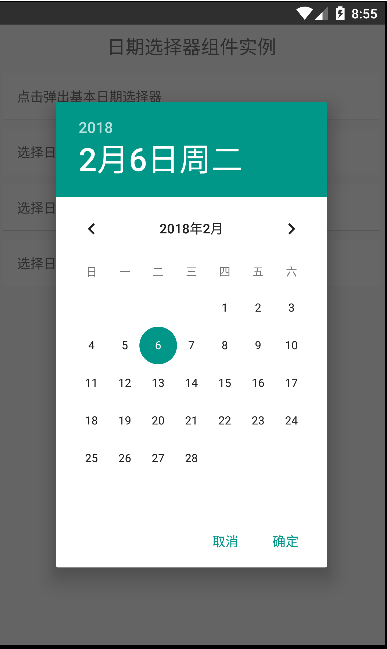
二、效果图
DatePickerAndroid用法的更多相关文章
- EditText 基本用法
title: EditText 基本用法 tags: EditText,编辑框,输入框 --- EditText介绍: EditText 在开发中也是经常用到的控件,也是一个比较必要的组件,可以说它是 ...
- jquery插件的用法之cookie 插件
一.使用cookie 插件 插件官方网站下载地址:http://plugins.jquery.com/cookie/ cookie 插件的用法比较简单,直接粘贴下面代码示例: //生成一个cookie ...
- Java中的Socket的用法
Java中的Socket的用法 Java中的Socket分为普通的Socket和NioSocket. 普通Socket的用法 Java中的 ...
- [转载]C#中MessageBox.Show用法以及VB.NET中MsgBox用法
一.C#中MessageBox.Show用法 MessageBox.Show (String) 显示具有指定文本的消息框. 由 .NET Compact Framework 支持. MessageBo ...
- python enumerate 用法
A new built-in function, enumerate() , will make certain loops a bit clearer. enumerate(thing) , whe ...
- [转载]Jquery中$.get(),$.post(),$.ajax(),$.getJSON()的用法总结
本文对Jquery中$.get(),$.post(),$.ajax(),$.getJSON()的用法进行了详细的总结,需要的朋友可以参考下,希望对大家有所帮助. 详细解读Jquery各Ajax函数: ...
- 【JavaScript】innerHTML、innerText和outerHTML的用法区别
用法: <div id="test"> <span style="color:red">test1</span> tes ...
- chattr用法
[root@localhost tmp]# umask 0022 一.chattr用法 1.创建空文件attrtest,然后删除,提示无法删除,因为有隐藏文件 [root@localhost tmp] ...
- 萌新笔记——vim命令“=”、“d”、“y”的用法(结合光标移动命令,一些场合会非常方便)
vim有许多命令,网上搜有一堆贴子.文章列举出各种功能的命令. 对于"="."d"."y",我在无意中发现了它们所具有的相同的一些用法,先举 ...
随机推荐
- 小程序中使用阿里图标库iconfont
小程序中使用阿里图标库iconfont 项目中常常需要使用到字体图标,微信小程序中使用字体图标与在平常的web前端中类似但是又有区别.下面以使用阿里图标为例子讲解如何在微信小程序中使用字体图标. 第一 ...
- TFLite基础知识
此基础知识仅为个人学习记录,如有错误或遗漏之处,还请各位同行给个提示. 概述 TFLite主要含有如下内容: (1)TFLite提供一系列针对移动平台的核心算子,包括量化和浮点运算.另外,TFLite ...
- mysql 循环、游标
mysql 循环只能在存储过程.代码记录 CREATE DEFINER=`front`@`%` PROCEDURE `a_1`() BEGIN -- 声明变量,接收游标循环变量 DECLARE _co ...
- 杨力第一次jjave作业
感觉jave学起来比c语言难一点,格式要求较高,有更多的东西要记,但是只要认真学应该不是很难,自己应该多写程序.
- windows异步通知I/O模型
回声服务器端: #include <stdio.h> #include <stdlib.h> #include <WinSock2.h> #define BUF_S ...
- C# 多线程 类构造函数 类方法之间的关系
先定一个类,既有构造函数又有类方法: public class WriteNumber { /// <summary> /// 构造函数 /// </summary> publ ...
- docker开发实践
一:docker的定义和使用场景: Docker是一个开源的引擎,可以轻松的为任何应用创建一个轻量级的.可移植的.自给自足的容器.开发者在笔记本上编译测试通过的容器可以批量地在生产环境中部署,包括VM ...
- cvte春招测试面试记录
cvte春招测试面试记录,挂在了综合面试(hr面)...尽量回忆面试的问题(可能不完全). 技术面一面: 1.自我介绍 2.根据实习项目问,智能客服怎么测正确率之类的. 3.测试人脸解锁 4.测试微信 ...
- rnn应用
Weather Recognition plays an important role in our daily lives and many computer vision applications ...
- SpringBoot 2.0 pom.xml 配置(热启动)
<?xml version="1.0" encoding="UTF-8"?><project xmlns="http://maven ...