
springboot情操陶冶-web配置(一)
承接前文springboot情操陶冶-@SpringBootApplication注解解析,在前文讲解的基础上依次看下web方面的相关配置
环境包依赖
在pom.xml文件中引入web依赖,炒鸡简单,如下
<dependency>

    <groupId>org.springframework.boot</groupId>

    <artifactId>spring-boot-starter-web</artifactId>

</dependency>
上述的三行依赖代码便完成了对web环境的配置,此时可以直接运行main()方法
package com.example.demospringbootweb;

import org.springframework.boot.SpringApplication;

import org.springframework.boot.autoconfigure.SpringBootApplication;

@SpringBootApplication

public class DemoSpringbootWebApplication {

    public static void main(String[] args) {

        SpringApplication.run(DemoSpringbootWebApplication.class, args);

    }

}
默认服务是挂载在Tomcat容器中,端口为8080。所以可以通过该链接直接访问http://127.0.0.1:8080便可得到以下页面(未配置index页面的效果)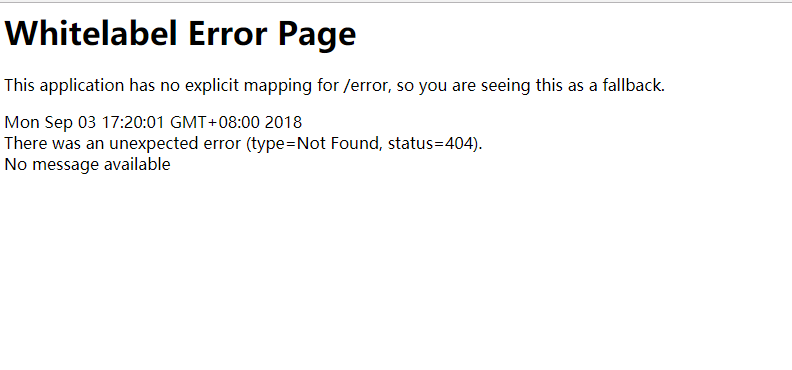
应用端口和上下文配置
本文将在上文的基础山讲解端口和上下文路径的具体配置以及解析。现附上简单的步骤操作
创建application-servlet.properties文件,专门用于配置应用服务
#server application config

server.port=9001

server.servlet.context-path=/demoWeb
在application.properties文件中指定激活的profile,用于使上述文件生效
spring.profiles.active=servlet
为了使界面变得稍微友好,引入index.html文件,放置于static目录下,如下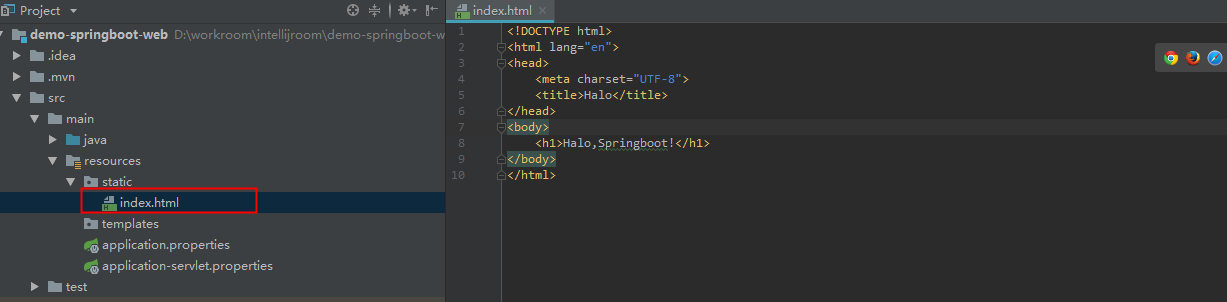
继续运行对应的main()函数,便可访问http://127.0.0.1:9001/demoWeb,得到以下结果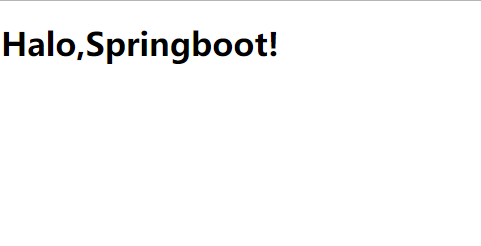
源码剖析
关于Tomcat等容器的配置,springboot采用了EmbeddedWebServerFactoryCustomizerAutoConfiguration和ServletWebServerFactoryAutoConfiguration两个类便完成了。笔者针对这两个类进行简单的分析
EmbeddedWebServerFactoryCustomizerAutoConfiguration
直接查看其内部源码,如下
@Configuration

@EnableConfigurationProperties(ServerProperties.class)

public class EmbeddedWebServerFactoryCustomizerAutoConfiguration {

	@ConditionalOnClass({ Tomcat.class, UpgradeProtocol.class })

	public static class TomcatWebServerFactoryCustomizerConfiguration {

		@Bean

		public TomcatWebServerFactoryCustomizer tomcatWebServerFactoryCustomizer(

				Environment environment, ServerProperties serverProperties) {

			return new TomcatWebServerFactoryCustomizer(environment, serverProperties);

		}

	}

	/**

	 * Nested configuration if Jetty is being used.

	 */

	@Configuration

	@ConditionalOnClass({ Server.class, Loader.class, WebAppContext.class })

	public static class JettyWebServerFactoryCustomizerConfiguration {

		@Bean

		public JettyWebServerFactoryCustomizer jettyWebServerFactoryCustomizer(

				Environment environment, ServerProperties serverProperties) {

			return new JettyWebServerFactoryCustomizer(environment, serverProperties);

		}

	}

	/**

	 * Nested configuration if Undertow is being used.

	 */

	@Configuration

	@ConditionalOnClass({ Undertow.class, SslClientAuthMode.class })

	public static class UndertowWebServerFactoryCustomizerConfiguration {

		@Bean

		public UndertowWebServerFactoryCustomizer undertowWebServerFactoryCustomizer(

				Environment environment, ServerProperties serverProperties) {

			return new UndertowWebServerFactoryCustomizer(environment, serverProperties);

		}

	}

}
主要是引入了ServerProperties配置类,样例中的server.port/server.servlet.context-path便是保存在ServerProperties对象中的,其是读取spring上下文环境中的以server为开头的属性,具体的属性用户可自行查看源码。
由上述的简单代码得知该自动配置类主要根据classpath环境创建不同的应用容器,默认springboot集成的都是tomcat。我们此处只关注下TomcatWebServerFactoryCustomizer类,下文中会有所提及
ServletWebServerFactoryAutoConfiguration
具体的ServletWebServer容器配置是通过ServletWebServerFactoryAutoConfiguration来创建的,由于代码过长笔者分为几个部分来讲解
头上注解先瞧一发
@Configuration

@AutoConfigureOrder(Ordered.HIGHEST_PRECEDENCE)

@ConditionalOnClass(ServletRequest.class)

@ConditionalOnWebApplication(type = Type.SERVLET)

@EnableConfigurationProperties(ServerProperties.class)

@Import({ ServletWebServerFactoryAutoConfiguration.BeanPostProcessorsRegistrar.class,

		ServletWebServerFactoryConfiguration.EmbeddedTomcat.class,

		ServletWebServerFactoryConfiguration.EmbeddedJetty.class,

		ServletWebServerFactoryConfiguration.EmbeddedUndertow.class })

public class ServletWebServerFactoryAutoConfiguration {

}
要想本自动配置生效则必须classpath环境中存在ServletRequest.class等servlet环境依赖类,这一般引入开头的starter-web版块便基本满足了
创建webServerFactory个性化配置类
	@Bean

	public ServletWebServerFactoryCustomizer servletWebServerFactoryCustomizer(

			ServerProperties serverProperties) {

		return new ServletWebServerFactoryCustomizer(serverProperties);

	}

	@Bean

	@ConditionalOnClass(name = "org.apache.catalina.startup.Tomcat")

	public TomcatServletWebServerFactoryCustomizer tomcatServletWebServerFactoryCustomizer(

			ServerProperties serverProperties) {

		return new TomcatServletWebServerFactoryCustomizer(serverProperties);

	}
这两个bean类和上文中的TomcatWebServerFactoryCustomizer很相似,但仔细阅读源码之后便发现其实这只是tomcat配置的分工处理,小结如下
- TomcatWebServerFactoryCustomizer 配置tomcat的主要信息,包含remoteIpValue、connector(最大/最小可接收线程、最大可接收头部大小等等)、uriEncoding、connectionTimeout、maxConnection等属性
- TomcatServletWebServerFactoryCustomizer 配置tomcat的额外信息,redirectContextRoot(是否在请求根上下文时转发,true则转发路径为/demoWeb/)和useRelativeRedirects(是否使用相对路径)等路径跳转问题处理
- ServletWebServerFactoryCustomizer 主要配置tomcat的servlet的信息,包含端口、上下文路径、应用名、Session配置、Servlet携带的初始变量等等
通过上述的三个bean类便基本完成了基本的tomcat配置,其都是WebServerFactoryCustomizer接口的实现类,那么是被谁来统一调用以完成上述的配置呢?
1.首先引入了WebServerFactory工厂类,此点可直接看由上述@Import引入的EmbeddedTomcat分析可得
	@Configuration

	@ConditionalOnClass({ Servlet.class, Tomcat.class, UpgradeProtocol.class })

	@ConditionalOnMissingBean(value = ServletWebServerFactory.class, search = SearchStrategy.CURRENT)

	public static class EmbeddedTomcat {

		@Bean

		public TomcatServletWebServerFactory tomcatServletWebServerFactory() {

			return new TomcatServletWebServerFactory();

		}

	}
创建了TomcatServletWebServerFactory的tomcat容器,其余的web容器读者可自行分析
2.最后通过beanPostProcessor接口来完成相应的容器初始化
由@Import引入的BeanPostProcessorsRegistrar类,注册了webServerFactoryCustomizerBeanPostProcessor类来完成相应的tomcat个性化配置
    // 初始化上述的WebServerFactory对象前操作

    public Object postProcessBeforeInitialization(Object bean, String beanName) throws BeansException {

        if (bean instanceof WebServerFactory) {

            this.postProcessBeforeInitialization((WebServerFactory)bean);

        }

        return bean;

    }

	// 调用所有实现了WebServerFactoryCustomizer接口的对象

    private void postProcessBeforeInitialization(WebServerFactory webServerFactory) {

        ((Callbacks)LambdaSafe.callbacks(WebServerFactoryCustomizer.class, this.getCustomizers(), webServerFactory, new Object[0]).withLogger(WebServerFactoryCustomizerBeanPostProcessor.class)).invoke((customizer) -> {

            customizer.customize(webServerFactory);

        });

    }

	// 查找当前bean工厂中所有类型为WebServerFactoryCustomizer接口对象集合

    private Collection<WebServerFactoryCustomizer<?>> getCustomizers() {

        if (this.customizers == null) {

            this.customizers = new ArrayList(this.getWebServerFactoryCustomizerBeans());

            this.customizers.sort(AnnotationAwareOrderComparator.INSTANCE);

            this.customizers = Collections.unmodifiableList(this.customizers);

        }

        return this.customizers;

    }

    private Collection<WebServerFactoryCustomizer<?>> getWebServerFactoryCustomizerBeans() {

        return this.beanFactory.getBeansOfType(WebServerFactoryCustomizer.class, false, false).values();

    }
具体的解析见上述的代码注释,其实也很简单并一目了然,所以如果用户想在tomcat上再作个性化的需求,可自行实现WebServerFactoryCustomizer接口并注册至bean工厂即可
@Configuration

public MyWebServerFactoryCustomizer implements WebServerFactoryCustomizer<ConfigurableServletWebServerFactory>{

	@Override

	public void customize(ConfigurableServletWebServerFactory factory) {

		PropertyMapper map = PropertyMapper.get().alwaysApplyingWhenNonNull();

		// do personal binding

	}

}
小结
本文只讲述tomcat的相关配置,并举例说明了其port/contextPath的应用配置,更多的配置读者可采用springboot实现的带server前缀的配置以及自行实现WebServerFactoryCustomizer接口去实现
springboot情操陶冶-web配置(一)的更多相关文章
- springboot情操陶冶-web配置(九)
承接前文springboot情操陶冶-web配置(八),本文在前文的基础上深入了解下WebSecurity类的运作逻辑 WebSecurityConfigurerAdapter 在剖析WebSecur ...
- springboot情操陶冶-web配置(七)
参数校验通常是OpenApi必做的操作,其会对不合法的输入做统一的校验以防止恶意的请求.本文则对参数校验这方面作下简单的分析 spring.factories 读者应该对此文件加以深刻的印象,很多sp ...
- springboot情操陶冶-web配置(四)
承接前文springboot情操陶冶-web配置(三),本文将在DispatcherServlet应用的基础上谈下websocket的使用 websocket websocket的简单了解可见维基百科 ...
- springboot情操陶冶-web配置(二)
承接前文springboot情操陶冶-web配置(一),在分析mvc的配置之前先了解下其默认的错误界面是如何显示的 404界面 springboot有个比较有趣的配置server.error.whit ...
- springboot情操陶冶-web配置(三)
承接前文springboot情操陶冶-web配置(二),本文将在前文的基础上分析下mvc的相关应用 MVC简单例子 直接编写一个Controller层的代码,返回格式为json package com ...
- springboot情操陶冶-web配置(八)
本文关注应用的安全方面,涉及校验以及授权方面,以springboot自带的security板块作为讲解的内容 实例 建议用户可直接路由至博主的先前博客spring security整合cas方案.本文 ...
- springboot情操陶冶-web配置(六)
本文则针对数据库的连接配置作下简单的分析,方便笔者理解以及后续的查阅 栗子当先 以我们经常用的mybatis数据库持久框架来操作mysql服务为例 环境依赖 1.JDK v1.8+ 2.springb ...
- springboot情操陶冶-web配置(五)
本文讲讲mvc的异常处理机制,方便查阅以及编写合理的异常响应方式 入口例子 很简单,根据之前的文章,我们只需要复写WebMvcConfigurer接口的异常添加方法即可,如下 1.创建简单的异常处理类 ...
- springboot情操陶冶-@SpringBootApplication注解解析
承接前文springboot情操陶冶-@Configuration注解解析,本文将在前文的基础上对@SpringBootApplication注解作下简单的分析 @SpringBootApplicat ...
随机推荐
- Rabin-Karp ACM训练
求解问题 寻找S中T出现的位置或次数.假设S的长度为n, T的长度为m, 通过枚举S长度为m的字串的hash值与T的hash值比较.此时使用滚动hash的优化使复杂度不为O(mn). 算法说明 滚动h ...
- DataTable的Merge\COPY\AcceptChange使用说明
在C#内使用DataTable的Merge().Copy().AcceptChange().Clone()方法的用途如下: 1.Merge()可将两个不同的表结构的表进行合并,合并后新表的列为之前两表 ...
- 网防G01管理检测系统Linux版安装
监测包内容: gov_defence_agent_x64_linux_v3.1.18.tar.gz LinuxVersion(datalog.sh getlog.sh setup.sh) 1. ...
- Flex布局—语法篇
网页布局(layout)是CSS的一个重点应用. 布局的传统解决方案,基于盒状模型,依赖 display属性 + position属性 + float属性.它对于那些特殊布局非常不方便,比如,垂直居中 ...
- cookie跟session自我介绍
Cookie是什么? cookie说的直白点就是保存在用户浏览器端的一个键值对,举个例子,你现在登录了京东商城,你把浏览器关闭之后,你再打开京东,你还是可以对你的账户继续操作,已经购买的商品,订单都是 ...
- 如何安装并且使用jmeter进行简单的性能测试
Jmeter 介绍 Jmeter 是一款使用Java开发的,开源免费的,测试工具, 主要用来做功能测试和性能测试(压力测试/负载测试). 而且用Jmeter 来测试 Restful API, 非常 ...
- 20190108C++MFC error 2065 未定义XX原因以及解决方式
今天写界面的时候,明明直接在rc和reourse.h里面加了控件下面是rc和reourse.h照片 编辑的时候一直报错,找了很久发现是新定义的控件有两处定义,定义到其他工程里了所以才会这样,把其他工程 ...
- IOS菜鸟学习
1.NS是系统库.2.IOS类的声明:@interface MyObject : NSObject { int memberVar1; // 实体变量 id memberVar2;} + ...
- 面试作业之浅析京东促销活动核心模型 - DDD
前言 京东作为中国最大的自营式B2C电商平台,提供一站式综合性购物,服务亿万家庭,涵盖3C.家电.消费品.服饰.家居家装.生鲜和新通路(B2B),满足了消费者的多元化需求.每天都会发布相关的促销活动, ...
- c++ 之bind使用
网络编程中, 经常要使用到回调函数. 当底层的网络框架有数据过来时,往往通过回调函数来通知业务层. 这样可以使网络层只专注于 数据的收发, 而不必关心业务 在c语言中, 回调函数的实现往往通过函数指针 ...