
ldap配置系列一:ldap的安装
ldap的安装
ldap的简介
LDAP是轻量目录访问协议,英文全称是Lightweight Directory Access Protocol,一般都简称为LDAP。它是基于X.500标准的,但是简单多了并且可以根据需要定制。与X.500不同,LDAP支持TCP/IP,这对访问Internet是必须的。LDAP的核心规范在RFC中都有定义,所有与LDAP相关的RFC都可以在LDAPman RFC网页中找到。
选择一个域名
我个人的域名为linuxpanda.tech,我给ldap服务配置一个域名为ldap.aibeike.com。通过dns解析添加一个A记录值为我自己的ldap服务器的外网ip。
测试域名正确性。
[root@VM_0_15_centos ~]# ping -c  ldap.linuxpanda.tech

PING ldap.linuxpanda.tech (39.106.157.220) () bytes of data.

 bytes from 39.106.157.220 (39.106.157.220): icmp_seq= ttl= time=3.40 ms

 bytes from 39.106.157.220 (39.106.157.220): icmp_seq= ttl= time=3.37 ms

--- ldap.linuxpanda.tech ping statistics ---

 packets transmitted,  received, % packet loss, time 1000ms

rtt min/avg/max/mdev = 3.370/3.385/3.401/0.060 ms
安装openldap服务端
[root@VM_0_15_centos ~]# yum install openldap-servers openldap-clients -y ^C

[root@VM_0_15_centos ~]# cp /usr/share/openldap-servers/DB_CONFIG.example  /var/lib/ldap/DB_CONFIG

[root@VM_0_15_centos ~]# chown -R ldap.ldap /var/lib/ldap

[root@VM_0_15_centos ~]# systemctl enable slapd

Created symlink from /etc/systemd/system/multi-user.target.wants/slapd.service to /usr/lib/systemd/system/slapd.service.

[root@VM_0_15_centos ~]# systemctl start slapd
[root@VM_0_15_centos ~]# systemctl status slapd
设置ldap的管理员用户的密码
# 设置ldap的管理员密码,用户名为root
[root@VM_0_15_centos ~]# slappasswd

New password:

Re-enter new password:

{SSHA}6qygfSS2fBqjb0KhiaPo21btIt9+8EbL


# 创建ldif文件

[root@VM_0_15_centos ldap]# cd /etc/openldap/

[root@VM_0_15_centos openldap]# mkdir myself

[root@VM_0_15_centos openldap]# cd myself/

[root@VM_0_15_centos myself]# vim chrootpw.ldif

dn: olcDatabase={}config,cn=config

changetype: modify

add: olcRootPW

olcRootPW: {SSHA}6qygfSS2fBqjb0KhiaPo21btIt9+8EbL


# 根据文件导入

[root@VM_0_15_centos myself]# ldapadd -Y EXTERNAL -H ldapi:/// -f chrootpw.ldif

SASL/EXTERNAL authentication started

SASL username: gidNumber=+uidNumber=,cn=peercred,cn=external,cn=auth

SASL SSF:

modifying entry "olcDatabase={0}config,cn=config"
添加基础的schema
ldapadd -Y EXTERNAL -H ldapi:/// -f /etc/openldap/schema/cosine.ldif

ldapadd -Y EXTERNAL -H ldapi:/// -f /etc/openldap/schema/nis.ldif

ldapadd -Y EXTERNAL -H ldapi:/// -f /etc/openldap/schema/inetorgperson.ldif
设置根域和数据库超级管理员
这里的根域和上面提到的linuxpanda.tech不是一回事,我们这里为了和自身域名还是保持一致好些,设置为dc=linuxpanda.tech,dc=com。
这里的数据库管理员和上面的超级管理员也不是一回事,为了方便,我们还是使用上面的管理员密码来设置数据库库的密码。
[root@VM_0_15_centos myself]# vim domain-dbadmin.ldif

[root@VM_0_15_centos myself]# cat domain-dbadmin.ldif

dn: olcDatabase={}monitor,cn=config

changetype: modify

replace: olcAccess

olcAccess: {}to *

  by dn.base="gidNumber=0+uidNumber=0,cn=peercred,cn=external,cn=auth" read

  by dn.base="cn=admin,dc=linuxpanda,dc=tech" read

  by * none

dn: olcDatabase={}hdb,cn=config

changetype: modify

replace: olcSuffix

olcSuffix: dc=linuxpanda,dc=tech

dn: olcDatabase={}hdb,cn=config

changetype: modify

replace: olcRootDN

olcRootDN: cn=admin,dc=linuxpanda,dc=tech

dn: olcDatabase={}hdb,cn=config

changetype: modify

add: olcRootPW

olcRootPW: {SSHA}6qygfSS2fBqjb0KhiaPo21btIt9+8EbL

dn: olcDatabase={}hdb,cn=config

changetype: modify

add: olcAccess

olcAccess: {}to attrs=userPassword,shadowLastChange

  by dn="cn=admin,dc=linuxpanda,dc=tech" write

  by anonymous auth

  by self write

  by * none

olcAccess: {}to dn.base=""

  by * read

olcAccess: {}to *

  by dn="cn=admin,dc=linuxpanda,dc=tech" write

  by * read

[root@VM_0_15_centos myself]# ldapadd  -Y EXTERNAL -H ldapi:/// -f domain-dbadmin.ldif
创建基本的用户节点,组节点,数据库管理员
[root@VM_0_15_centos myself]# vim basedomain.ldif

[root@VM_0_15_centos myself]# cat basedomain.ldif

dn: dc=linuxpanda,dc=tech

objectClass: top

objectClass: dcObject

objectclass: organization

o: Example Inc.

dc: linuxpanda

dn: ou=people,dc=linuxpanda,dc=tech

objectClass: organizationalUnit

ou: user

dn: ou=group,dc=linuxpanda,dc=tech

objectClass: organizationalUnit

ou: group

dn: cn=admin,dc=linuxpanda,dc=tech

objectClass: organizationalRole

cn: admin

description: Directory Administrator

[root@VM_0_15_centos myself]# ldapadd  -x -D cn=admin,dc=linuxpanda,dc=tech -W -f basedomain.ldif

Enter LDAP Password:

adding new entry "dc=linuxpanda,dc=tech"

adding new entry "ou=people,dc=linuxpanda,dc=tech"

adding new entry "ou=group,dc=linuxpanda,dc=tech"

adding new entry "cn=admin,dc=linuxpanda,dc=tech"
防火墙设置
[root@VM_0_15_centos myself]# firewall-cmd --permanent --add-service=ldap

success

[root@VM_0_15_centos myself]# firewall-cmd --reload

success
配置日志
[root@VM_0_15_centos myself]# vim log.ldif

[root@VM_0_15_centos myself]# cat log.ldif

dn: cn=config

changetype: modify

add: olcLogLevel

olcLogLevel:

"log.ldif" [New] 4L, 66C written

[root@VM_0_15_centos myself]# ldapmodify -Y EXTERNAL -H ldapi:/// -f log.ldif

SASL/EXTERNAL authentication started

SASL username: gidNumber=+uidNumber=,cn=peercred,cn=external,cn=auth

SASL SSF:

modifying entry "cn=config"

[root@VM_0_15_centos myself]# mkdir -p /var/log/slapd

[root@VM_0_15_centos myself]# chown ldap:ldap /var/log/slapd/

[root@VM_0_15_centos myself]# echo "local4.* /var/log/slapd/slapd.log" >> /etc/rsyslog.conf

[root@VM_0_15_centos myself]# systemctl restart rsyslog
[root@VM_0_15_centos myself]# systemctl restart slapd

[root@VM_0_15_centos myself]# tail -n  /var/log/slapd/slapd.log

Sep   :: VM_0_15_centos slapd[]: => test_filter

Sep   :: VM_0_15_centos slapd[]:    PRESENT

Sep   :: VM_0_15_centos slapd[]: <= test_filter

Sep   :: VM_0_15_centos slapd[]: slapd starting
使用工具连接
有些人喜欢安装套ldap环境来管理ldap用户, 我这里使用ldapadmin.exe来管理。下载地址为:
连接信息如下:
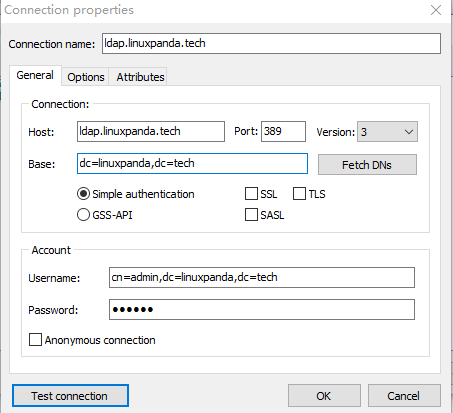
主界面如下:

这里强烈建议给每个用户配置邮箱。
添加用户或者测试组

常用查询命令
# 查询主域下的信息
[root@VM_0_15_centos ~]# ldapsearch  -LLL -w oracle  oracle -x -H ldap://58.87.98.84 -D"cn=admin,dc=linuxpanda,dc=tech" -b "dc=linuxpanda,dc=tech"

dn: dc=linuxpanda,dc=tech

dn: ou=people,dc=linuxpanda,dc=tech

dn: ou=group,dc=linuxpanda,dc=tech

dn: cn=admin,dc=linuxpanda,dc=tech

dn: uid=test01,ou=people,dc=linuxpanda,dc=tech

# 查询people组下面的uid=test01的用户

[root@VM_0_15_centos ~]# ldapsearch  -LLL -w oracle  oracle -x -H ldap://58.87.98.84 -D"cn=admin,dc=linuxpanda,dc=tech" -b "ou=people,dc=linuxpanda,dc=tech" "(uid=test01)"

dn: ou=people,dc=linuxpanda,dc=tech

dn: uid=test01,ou=people,dc=linuxpanda,dc=tech

# 备份

[root@VM_0_15_centos ~]# ldapsearch  -LLL -w oracle  oracle -x -H ldap://58.87.98.84 -D"cn=admin,dc=linuxpanda,dc=tech" -b "dc=linuxpanda,dc=tech" "(uid=test01)" >linuxpanda.tech.ldap.bak
参考
李广慧: https://www.jianshu.com/p/dc7112873e68
ldap-how-to: https://www.itzgeek.com/how-tos/linux/centos-how-tos/step-step-openldap-server-configuration-centos-7-rhel-7.html
wiki: https://en.wikipedia.org/wiki/Lightweight_Directory_Access_Protocol
ldap配置系列一:ldap的安装的更多相关文章
- ldap配置系列二:jenkins集成ldap
ldap配置系列二:jenkins集成ldap jenkins简介 jenkins是一个独立的.开放源码的自动化服务器,它可以用于自动化与构建.测试.交付或部署软件相关的各种任务. jenkins官方 ...
- ldap配置系列三:grafana集成ldap
ldap配置系列三:grafana集成ldap grafana的简介 grafana是一个类似kibana的东西,是对来自各种数据源的数据进行实时展示的平台,拥有这牛逼的外观.给一个官方的demo体验 ...
- java web开发环境配置系列(二)安装tomcat
在今天,读书有时是件“麻烦”事.它需要你付出时间,付出精力,还要付出一份心境.--仅以<java web开发环境配置系列>来祭奠那逝去的…… 1.下载tomcat压缩包,进入官网http: ...
- java web开发环境配置系列(一)安装JDK
在今天,读书有时是件“麻烦”事.它需要你付出时间,付出精力,还要付出一份心境.--仅以<java web开发环境配置系列>来祭奠那逝去的…… 1.下载JDK文件(http://www.or ...
- Centos 7 vsftpd ldap 配置
#ldap 安裝配置 环境Centos7#安装 yum install -y openldap openldap-clients openldap-servers migrationtools pam ...
- ldap配置记录
记录一下最近研究ldap+nfs的情况 ldap这个东西上次研究nis的时候就有人说那是上个世纪的老东西了,不应该继续使用.虽然意识到如此但时间不够还是使用了nis,这次乘着重做就干脆切换到ldap, ...
- centos6.5环境openldap实战之ldap配置详解及web管理工具lam(ldap-account-manager)使用详解
ldap常用名称解释 1.环境搭建 操作系统:centos6.5 x86_64 关闭防火墙.selinux 开启时间同步 # crontab -e 加入 # time sync */5 * * * * ...
- ldap 配置过程详解
ldap常用名称解释 1.环境搭建 操作系统:centos6.5 x86_64关闭防火墙.selinux开启时间同步# crontab -e加入# time sync*/5 * * * * /usr/ ...
- ArcGIS for Server安全与LDAP配置
ArcGIS for Server安全与LDAP配置 1.安全性概述 ArcGIS Server使用基于角色的访问控制来管理对受保护资源的访问.访问GIS资源的权限只能分配给角色.单独的用户只能通过从 ...
随机推荐
- company_base_info_staff_job
"company_base_info_staff_job": { "engine": "python script", # datax or ...
- 【面试题】Java实现String的IndexOf方法
先说题后感:程序员这一行,很多时候,自驱学习能力是自我成长一个很重要的因素(当然技术最好的学习途径都是通过项目实践去学习.理解.掌握).而自学方法中,除了看官方文档.技术博客等途径之外,学习源码也是一 ...
- PHP中获取某个网页或文件内容的方法
1. 通过file_get_contents()函数$contents = file_get_contents('http://demo.com/index.php');echo $contents; ...
- c#坐标系互相转换
转自群友的博客:https://www.xiaofengyu.com/?p=108 群友的github地址:https://github.com/jfwangncs/GPSConvert 各种坐标系 ...
- 《SpringMVC从入门到放肆》八、SpringMVC注解式开发(基本配置)
上一篇我们结束了配置式开发,配置式开发目前在企业中用的并不是很多,大部分企业都在使用注解式开发,所以今天我们就来学习注解式开发.所谓SpringMVC注解式开发是指,处理器是基于注解的类的开发方式.对 ...
- pycahrm 安装Vue项目
首先在pycharm > preference > plugins > vue > 点绿色install 创建一个文件夹 然后cmd里cd到这个文件夹 npm install ...
- [LeetCode] Length of Longest Fibonacci Subsequence 最长的斐波那契序列长度
A sequence X_1, X_2, ..., X_n is fibonacci-like if: n >= 3 X_i + X_{i+1} = X_{i+2} for all i + 2 ...
- Python基础之函数参数
一.实参 1.实参分类: 2.实参基础代码: def fun01(a, b, c): print(a) print(b) print(c) # 位置传参:实参与形参的位置依次对应 fun01(1, 2 ...
- 轮播效果/cursor
cursor属性:改变鼠标中的属性 例如: cursor:pointer(鼠标移动上去变小手) <!doctype html> <html> <head> < ...
- B4 and After: Managing Hierarchy, Partitioning, and Asymmetry for Availability and Scale in Google’s Sofware-Defined WAN
B4及之后:为谷歌软件定义WAN的可用性和扩展管理层次化.划分和不对称 本文为SIGCOMM 2018会议论文,由谷歌提供. 笔者翻译了该论文.由于时间仓促,且笔者英文能力有限,错误之处在所难免:欢迎 ...