
KafkaManager编译安装使用(支持kerberos认证)
为了能够方便的查看及管理Kafka集群,yahoo提供了一个基于Web的管理工具(Kafka-Manager)。
这个工具可以方便的查看集群中Kafka的Topic的状态(分区、副本及消息量等),支持管理多个集群、重新分配Partition及创建Topic等功能。
jdk、sbt自行安装吧
sbt源可参考:https://www.cnblogs.com/felixzh/p/10255145.html
Deployment
The command below will create a zip file which can be used to deploy the application.
./sbt clean dist


演示:
root@root:~/Downloads/kafka-manager-1.3.3.22# ./sbt clean dist

[info] Loading project definition from /root/Downloads/kafka-manager-1.3.3.22/project

[info] Updating {file:/root/Downloads/kafka-manager-1.3.3.22/project/}kafka-manager-1-3-3-22-build...

[info] Resolving org.fusesource.jansi#jansi;1.4 ...

[info] Done updating.

Missing bintray credentials /root/.bintray/.credentials. Some bintray features depend on this.

[info] Set current project to kafka-manager (in build file:/root/Downloads/kafka-manager-1.3.3.22/)

Missing bintray credentials /root/.bintray/.credentials. Some bintray features depend on this.

[warn] Credentials file /root/.bintray/.credentials does not exist

[success] Total time: 0 s, completed Jan 11, 2019 2:26:32 PM

[warn] Credentials file /root/.bintray/.credentials does not exist

SLF4J: Class path contains multiple SLF4J bindings.

SLF4J: Found binding in [jar:file:/root/.ivy2/cache/org.slf4j/slf4j-nop/jars/slf4j-nop-1.7.7.jar!/org/slf4j/impl/StaticLoggerBinder.class]

SLF4J: Found binding in [jar:file:/root/.ivy2/cache/org.slf4j/slf4j-simple/jars/slf4j-simple-1.7.12.jar!/org/slf4j/impl/StaticLoggerBinder.class]

SLF4J: See http://www.slf4j.org/codes.html#multiple_bindings for an explanation.

SLF4J: Actual binding is of type [org.slf4j.helpers.NOPLoggerFactory]

[info] Packaging /root/Downloads/kafka-manager-1.3.3.22/target/scala-2.11/kafka-manager_2.11-1.3.3.22-sources.jar ...

[info] Done packaging.

[info] Updating {file:/root/Downloads/kafka-manager-1.3.3.22/}root...

[info] Resolving org.apache.curator#curator-framework;2.10.0 ...

Warning: node.js detection failed, sbt will use the Rhino based Trireme JavaScript engine instead to run JavaScript assets[info] Resolving jline#jline;2.12.1 ...

[info] Done updating.

[warn] Scala version was updated by one of library dependencies:

[warn]     * org.scala-lang:scala-library:(2.11.6, 2.11.8, 2.11.11, 2.11.7, 2.11.5, 2.11.0) -> 2.11.12

[warn] To force scalaVersion, add the following:

[warn]     ivyScala := ivyScala.value map { _.copy(overrideScalaVersion = true) }

[warn] There may be incompatibilities among your library dependencies.

[warn] Here are some of the libraries that were evicted:

[warn]     * org.webjars:jquery:1.11.1 -> 2.1.4

[warn] Run 'evicted' to see detailed eviction warnings

[info] Wrote /root/Downloads/kafka-manager-1.3.3.22/target/scala-2.11/kafka-manager_2.11-1.3.3.22.pom

[info] Main Scala API documentation to /root/Downloads/kafka-manager-1.3.3.22/target/scala-2.11/api...

[info] Compiling 127 Scala sources and 2 Java sources to /root/Downloads/kafka-manager-1.3.3.22/target/scala-2.11/classes...

[info] LESS compiling on 1 source(s)

[info] Packaging /root/Downloads/kafka-manager-1.3.3.22/target/scala-2.11/kafka-manager_2.11-1.3.3.22-web-assets.jar ...

[info] Done packaging.

model contains 709 documentable templates

[info] Main Scala API documentation successful.

[info] Packaging /root/Downloads/kafka-manager-1.3.3.22/target/scala-2.11/kafka-manager_2.11-1.3.3.22-javadoc.jar ...

[info] Done packaging.

[info] Packaging /root/Downloads/kafka-manager-1.3.3.22/target/scala-2.11/kafka-manager_2.11-1.3.3.22.jar ...

[info] Done packaging.

[info] Packaging /root/Downloads/kafka-manager-1.3.3.22/target/scala-2.11/kafka-manager_2.11-1.3.3.22-sans-externalized.jar ...

[info] Done packaging.

[info]

[info] Your package is ready in /root/Downloads/kafka-manager-1.3.3.22/target/universal/kafka-manager-1.3.3.22.zip

[info]

[success] Total time: 80 s, completed Jan 11, 2019 2:27:52 PM

root@root:~/Downloads/kafka-manager-1.3.3.22# cd /root/Downloads/kafka-manager-1.3.3.22/target/universal/

root@root:~/Downloads/kafka-manager-1.3.3.22/target/universal# ls

kafka-manager-1.3.3.22.zip  scripts
Please refer to play framework documentation on production deployment/configuration.
配置
修改conf/application.conf文件中zk的地址以及启用Kafka-Manager使用账号登录和消费者的配置
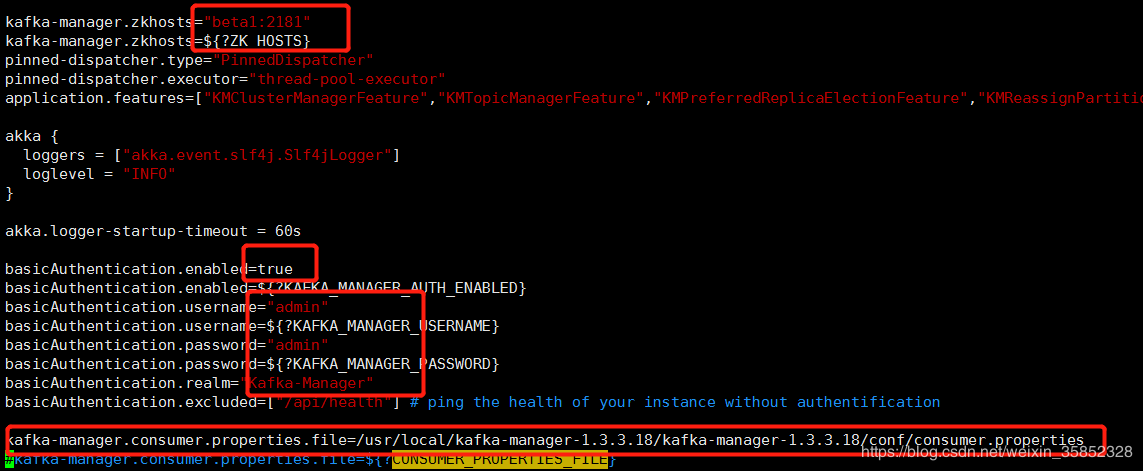
修改conf/consumer.properties内容如下:
security.protocol=SASL_PLAINTEXT

key.deserializer=org.apache.kafka.common.serialization.ByteArrayDeserializer

value.deserializer=org.apache.kafka.common.serialization.ByteArrayDeserializer

sasl.mechanism=GSSAPI

sasl.kerberos.service.name=kafka
因为做了kerberos认证,所以需要jaas.conf文件指定到启动命令后面。
配置前要保证票据可用!
klist -l
kinit -kt /etc/security/keytabs/kafka.service.keytab kafka/你的主机
Starting the service
After extracting the produced zipfile, and changing the working directory to it, you can run the service like this:
$ bin/kafka-manager
By default, it will choose port 9000. This is overridable, as is the location of the configuration file. For example:
$ bin/kafka-manager -Dconfig.file=/path/to/application.conf -Dhttp.port=8080
Again, if java is not in your path, or you need to run against a different version of java, add the -java-home option as follows:
$ bin/kafka-manager -java-home /usr/local/oracle-java-8
Starting the service with Security
To add JAAS configuration for SASL, add the config file location at start:
$ bin/kafka-manager -Djava.security.auth.login.config=/path/to/my-jaas.conf

如:bin/kafka-manager -Djava.security.auth.login.config=/etc/kafka/conf/kafka_jaas.conf

注意:
kafka-manager-1.3.3.22之前的版本启动会有问题,异常log如下:
java.util.NoSuchElementException: key not found: PLAINTEXT
详见github issue:https://github.com/yahoo/kafka-manager/issues/502
已经在https://github.com/yahoo/kafka-manager/pull/532修复
NOTE: Make sure the user running kafka manager has read permissions on the jaas config file
Packaging(可以打RPM包)
If you'd like to create a Debian or RPM package instead, you can run one of:
sbt debian:packageBin

sbt rpm:packageBin
Credits
Logo/favicon used is from Apache Kafka.
Most of the utils code has been adapted to work with Apache Curator from Apache Kafka.
License
Apache Licensed. See accompanying LICENSE file.
https://github.com/yahoo/kafka-manager
https://blog.csdn.net/weixin_35852328/article/details/83656002
KafkaManager编译安装使用(支持kerberos认证)的更多相关文章
- 1-18 编译安装内核支持ntfs文件系统
大纲: 源码编译Linux内核 使用Linux内核模块 实战:编译一个NTFS内核模块,实现Linux挂载NTFS文件系统并实现读写功能 =============================== ...
- 重新编译安装swoole支持OpenSSL
1.下载:wget http://pecl.php.net/get/swoole-1.9.22.tgz 2.解压:tar zxvf swoole-1.9.22.tgz 3.扩展模块:cd swoole ...
- Kafka监控系统Kafka Eagle:支持kerberos认证
在线文档:https://ke.smartloli.org/ 作者博客:https://www.cnblogs.com/smartloli/p/9371904.html 源码地址:https://gi ...
- llvm+clang编译安装
最近一段时间在llvm+clang上做一些东西,所以顺便将自己如何编译安装llvm+clang写了篇文章发在这里,希望能帮助刚接触llvm+clang的童鞋少走一些弯路(我刚接触的时候为了编译安装这个 ...
- Nginx服务编译安装、日志功能、状态模块及访问认证模式实操
系统环境 [root@web ~]# cat /etc/redhat-release CentOS release 6.9 (Final) [root@web ~]# uname -a Linux d ...
- CentOS下PHP7的编译安装,MySQL的支持和一些问题的解决
最近试了一下PHP7,在编译和支持MySQL上都遇到一些问题,相信不少同学也同样遇到,所以在这里聊一下这个过程.简单来讲编译PHP7只需要3步: 1../buildconf --force 2../c ...
- nginx在centos 7中源码编译安装【添加grpc的支持】
安装依赖软件 1.安装编译工具gcc gcc是一个开源编译器集合,用于处理各种各样的语言:C.C++.Java.Ada等,在linux世界中是最通用的编译器,支持大量处理器:x86.AMD64.Pow ...
- 编译安装haproxy开启支持SSL
1.下载程序包 # wget http://www.haproxy.org/download/1.7/src/haproxy-1.7.5.tar.gz # tar xvf haproxy-1.7.5. ...
- centos6编译安装zabbix3.0和中文支持整理文档
编者按: 最近公司部分业务迁移机房,为了更方便的监控管理主机资源,决定上线zabbix监控平台.运维人员使用2.4版本的进行部署,个人在业余时间尝鲜,使用zabbix3.0进行部署,整理文档如下,仅供 ...
随机推荐
- 【朝花夕拾】Handler篇
如果您的app中没有使用过Handler,那您一定是写了个假app:如果您笔试题中没有遇到Handler相关的题目,那您可能做了份假笔试题:如果您面试中没被技术官问到Handler的问题,那您也许碰到 ...
- ImportError: cannot import name UnrewindableBodyError
错误信息: File "/usr/lib/python2.7/site-packages/urllib3/util/__init__.py", line 4, in <mod ...
- leetcode — partition-list
/** * Source : https://oj.leetcode.com/problems/partition-list/ * * * Given a linked list and a valu ...
- Perl IO:read()函数
read()函数 read()函数用于从文件句柄中读取指定字节数的数据并写入到一个标量中.如果文件句柄是以Unicode方式打开的,则表示读取指定字符数而非字节数. 有两种read方式: read F ...
- 大前端的自动化工厂(5)—— 基于Karma+Mocha+Chai的单元测试和接口测试
一. 前端自动化测试 大多数前端开发者对测试相关的知识是比较缺乏的,一来是开发节奏很快,来不及写,另一方面团队里也配备了"人肉测试机",完全没必要自己来.但随着项目体量的增大,许多 ...
- Phpstudy升级到Mysql8
之前一直用的mysql5.5,最近发现Mysql8更新了很多新特性以及查询效率的提升,觉得很有必要更新下开发版本,好,废话不多说: 1.下载安装包,下载地址:mysql8.0 .如果你想要下载其它版 ...
- jquery 实现省市二级联动,附带完整的省市json数据 (粘贴即用)
1.可以单独定义一个js,保存省市json数据. citydata = { "安徽": [ "合肥", "芜湖", "蚌埠&quo ...
- CTSC 2018酱油记
Day0 5.5 花了一上午的时间把codechef div2的前四题切了,又在zbq老司机的指导下把第五题切了 中午12:00 gryz电竞组从机房出发,临走的时候看到很多学长挺恋恋不舍的,毕竟可能 ...
- Apex 单元测试辅助函数简介
startTest和stopTest的使用 在Apex的Test类中,有startTest和stopTest两个函数.这两个函数经常配对使用. 每个单元测试函数都只能调用它们一次. startTest ...
- 设置Editext的光标宽高与颜色
在Editext的布局属性上加上 android:textCursorDrawable="@drawable/cursor_shape" cursor_shape如下: <? ...