
unittest同时支持参数化和生成html报告
最近在用python3.6+unittest+requests做自动化接口测试。发现一个问题,unittest中使用第3方插件parameterized进行参数化,再生成html报告时,运行就会失败。很奇怪,最终没有让这2个同时实现。
经过一段时间后,发现有2种方法;
1、用discover+测试报告
在run.py中,使用discover()方法找到要运行的测试用例,然后放到测试报告中:
 import time

 import unittest

 from BeautifulReport import BeautifulReport

 test_dir = './test_case'

 discover = unittest.defaultTestLoader.discover(test_dir,pattern='*testcase.py')

 if  __name__ == '__main__':

     now = time.strftime("%Y-%m-%d %H_%M_%S")

     html_file = r'D:\report'

    suite.addTest(ParametrizedTestCase.parametrize(WorkPlaceTestCase, 'test_b2_addplace'))   # 测试用例加入到测试套件

     runner = unittest.TextTestRunner()

     BeautifulReport(discover).report(filename='测试报告' + now, description='测试', log_path=html_file)

     runner.run(discover)
2、使用ParametrizedTestCase类
这个感觉绕了很大的弯,是最开始使用的。
百度到了一个人写的可参数化的ParametrizedTestCase类。再改动了一下,加上比较简单的list。虽然看起来很Low。但是最终目的还算是实现了。
接口测试用例的类如下:
 import unittest

 from pylibrary.PyLib import *

 class ParametrizedTestCase(unittest.TestCase):  #可参数化的类

     """ TestCase classes that want to be parametrized should

         inherit from this class.

     """

     def __init__(self, methodName='runTest', param=None):

         super(ParametrizedTestCase, self).__init__(methodName)

         self.param = param

     @staticmethod

     def parametrize(testcase_klass,defName=None, param=None):    #参数化方法

         """ Create a suite containing all tests taken from the given

             subclass, passing them the parameter 'param'.

         """

         testloader = unittest.TestLoader()

         testnames = testloader.getTestCaseNames(testcase_klass)

         suite = unittest.TestSuite()

         if defName !=None:

             for name in testnames:

                 if name==defName:

                     suite.addTest(testcase_klass(name, param=param))

         else:

             for name in testnames:

                 suite.addTest(testcase_klass(name, param=param))

         return suite

 list = [('2018-09-26', '2018-09-26', '测试', '', 49, 'TotalCallNum'),

         ('2018-09-26', '2018-09-26', '测试', '', 60, 'TotalCallAnswered'),

         ('2018-09-26', '2018-09-26', '测试', '', 60, 'RingNum'),

         ('2018-09-13', '2018-09-13', '测试', '', 4, 'TotalCallNum_Transfer')]

 class   Interface_report1(ParametrizedTestCase):

     def test_Agreport1(self):  #要被测试的用例

         self.num = self.param[4]

         self.report_num1 = PyLib().getAgReport(self.param[0],self.param[1],self.param[2],self.param[3])

         self.report_num=self.report_num1[0][self.param[5]]

         self.assertEqual(self.num,self.report_num)
再用run.py调用上面的testcase
 from interface.Interface_report1 import *

 from BeautifulReport import BeautifulReport

 if  __name__ == '__main__':

     now = time.strftime("%Y-%m-%d %H_%M_%S")

     # # 构造测试集

     # suite = unittest.TestSuite()

     # suite.addTest(Interface_report1('test_Agreport1'))

     #

     htmlfile = 'D:\\Python_code\\report\\'

     # fp = open(htmlfile, 'wb')

     # runner = HTMLTestRunner(stream=fp, title='测试报告', description='用例执行情况')

     # runner.run(suite)

     # fp.close()

     suite = unittest.TestSuite()

     #suite.addTest(Interface_report1('test_Agreport1'))

     for i in list:   #使用list

         suite.addTest(ParametrizedTestCase.parametrize(Interface_report1, 'test_Agreport1',param=i))

     BeautifulReport(suite).report(filename='测试报告'+now,description='测试报告',log_path=htmlfile)
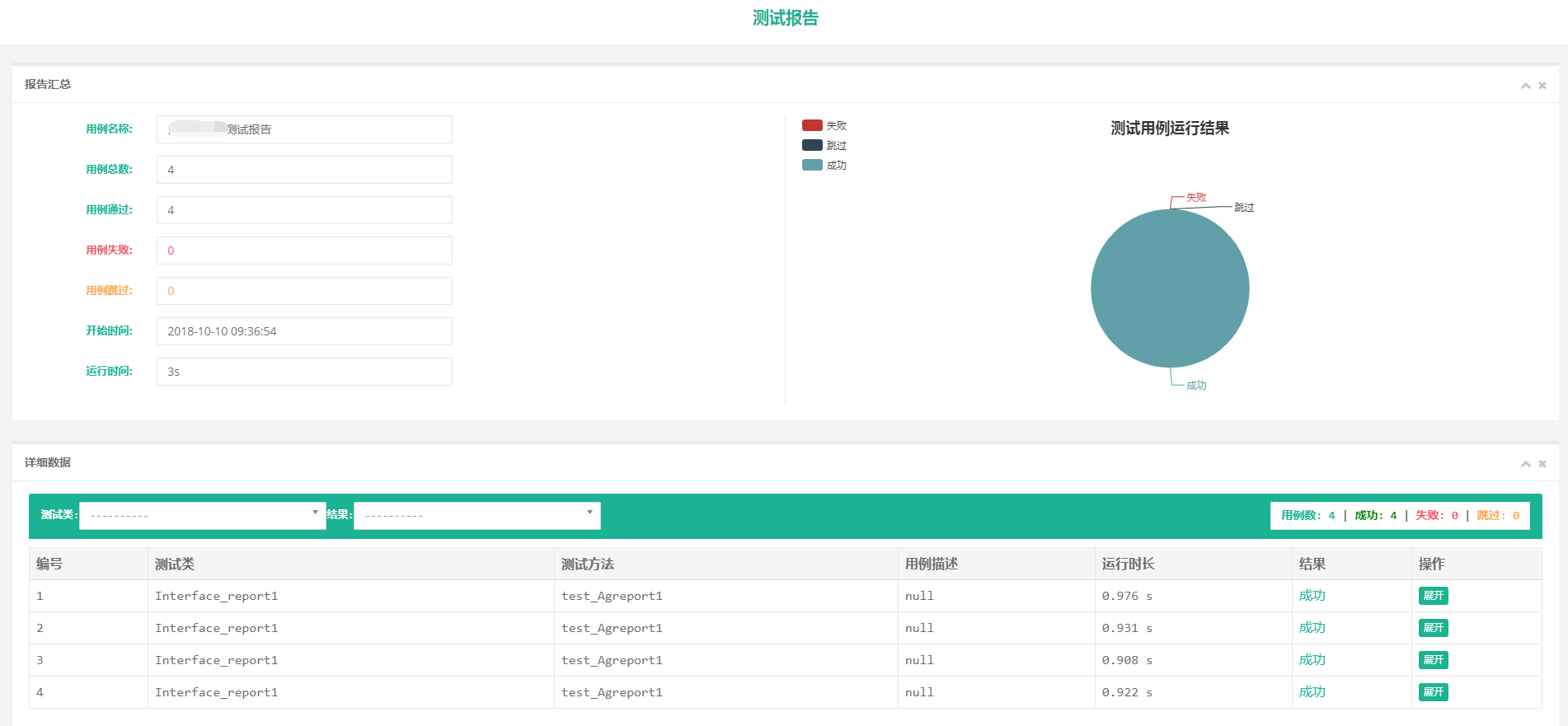
最后运行就可以了,生成的报告用的beautifulreport。感觉还是比较好看的
unittest同时支持参数化和生成html报告的更多相关文章
- 自动化测试===unittest配套的HTMLTestRunner.py生成html报告源码
更改版: 全部复制,命名为 HTMLTestRunner.py 文件 #使用方法参见之前的文档:自动化测试===unittest和requests接口测试案例,测试快递查询api(二) " ...
- pytest 学习笔记二:兼容unittest、执行方式、生成报告
1.官方文档上说pytest兼容unittest时,不支持setUpModule 和 tearDownModule,但实际验证是可以的. 验证的场景是py文件中,只有一个测试类, 经验证有多个测试类, ...
- python+requests+excel+unittest+ddt接口自动化数据驱动并生成html报告
1.环境准备: python3.6 requests xlrd openpyxl HTMLTestRunner_api 2.目前实现的功能: 封装requests请求方法 在excel填写接口请求参数 ...
- python+requests+excel+unittest+ddt接口自动化数据驱动并生成html报告(二)
可以参考 python+requests接口自动化完整项目设计源码(一)https://www.cnblogs.com/111testing/p/9612671.html 原文地址https://ww ...
- python+requests+excel+unittest+ddt接口自动化数据驱动并生成html报告(已弃用)
前言 1.环境准备: python3.6 requests xlrd openpyxl HTMLTestRunner_api 2.目前实现的功能: 封装requests请求方法 在excel填写接口请 ...
- unittest 运行slenium(五)---运行代码并生成HTMLTestRunner报告
整体代码如下: import os import sys import time import datetime import unittest import HTMLTestRunner # git ...
- python生成HTMl报告(unittest)
Python3 使用HTMLTestRunner.py 报错ImportError: No module named 'StringIO'处理方法 HTMLTestRunner.py文件是基于Py ...
- 解惑unittest框架中导入HTMLTestRunner模块后正常运行却无法生成HTML报告问题
1.HTMLTestRunner介绍 HTMLTestRunner是一个第三方的unittest HTML报告库,用于python单元测试框架的TestRunner.它是生成一个HTML报告,以一目了 ...
- pytest十六:allure2 生成 html 报告
allure 是一个 report 框架,支持 java 的 Junit/testng 等框架,当然也可以支持 python 的 pytest 框架,也可以集成到 Jenkins 上展示高大上的报告界 ...
随机推荐
- python range的用法小题
题目(1)for i in range(10): print(i) 结果:123456789 题目(2) for lst in range(100): if lst % 7 == 0 and str( ...
- POJ 3162 bit区间查询最值+树形DP
POJ 3162 『题目链接』POJ 3162 『题目类型』bit区间查询最值+树形DP ✡Problem: 一棵n个节点的树.wc爱跑步,跑n天,第i天从第i个节点开始跑步,每次跑到距第i个节点最远 ...
- #WEB安全基础 : HTTP协议 | 0x16 HTTPS:加密的秘密
公开秘钥加密&&共享秘钥加密 这两个冗长的短语,让我拿什么理解? 我们知道HTTPS有加密功能,以上的两个短语很常用.先摆在这,接下来开始尝试理解它们. 共享秘钥加密(对称秘钥加密): ...
- #WEB安全基础 : HTTP协议 | 0x10 扩展HTTP报文结构概念和内容编码
#以后的知识都是HTTP协议的扩展,如果精力有限可以选择暂时忽略,注意只是暂时忽略,以后的东西同样重要 HTTP传输数据时可以直接传输也可以对数据进行编码,由于编码在计算机内运行,所以会占用一些CPU ...
- Linux定时任务调用sh文件
1.编写sh文件 创建:vi test.sh 写入:date >> /xiaol/data.txt 2.默认创建的这个sh问件是没有执行权限的,修改权限 chmod 777 test.sh ...
- 用requests库和BeautifulSoup4库爬取新闻列表
import requests from bs4 import BeautifulSoup url='http://news.gzcc.cn/html/xiaoyuanxinwen/' res=req ...
- 在绘图的时候import matplotlib.pyplot as plt报错:ImportError: No module named '_tkinter', please install the python-tk package
在绘图的时候import matplotlib.pyplot as plt报错:ImportError: No module named '_tkinter', please install the ...
- kubernetes-pod-infrastructure:latest
解决方法:试试通过手动下载 docker pull registry.access.redhat.com/rhel7/pod-infrastructure:latest docker pull 是还是 ...
- WPF中查找指定类型的父控件
/// <summary> /// 查找父控件 /// </summary> /// <typeparam name="T"></type ...
- 无法加载协定为“NM3.IClrService”的终结点配置部分,因为找到了该协定的多个终结点配置。请按名称指示首选的终结点配置部分
<binding name="NetTcpBinding_IClrService1" receiveTimeout="00:10:00" sendTime ...