
asp.net core NLog将日志写到文件
1、安装Nlog包
Install-Package NLog.Extensions.Logging -Pre
2、在项目添加nlog.config文件
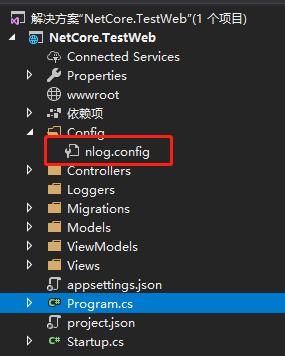
2.1、nlog.config
<?xml version="1.0" encoding="utf-8" ?>

<nlog xmlns="http://www.nlog-project.org/schemas/NLog.xsd"

      xmlns:xsi="http://www.w3.org/2001/XMLSchema-instance"

      autoReload="true"

      internalLogLevel="Warn"

      internalLogFile="internal-nlog.txt">

  <!-- define various log targets -->

  <targets>

    <!-- write logs to file -->

    <target xsi:type="File" name="allfile" fileName="Loggers/${shortdate}.log"

                 layout="${longdate}|${logger}|${uppercase:${level}}|${message} ${exception}" />

    <target xsi:type="File" name="ownFile-web" fileName="Loggers/${shortdate}.log"

             layout="${longdate}|${logger}|${uppercase:${level}}|  ${message} ${exception}" />

    <target xsi:type="Null" name="blackhole" />

  </targets>

  <rules>

    <!--All logs, including from Microsoft-->

    <logger name="*" minlevel="Trace" writeTo="allfile" />

    <!--Skip Microsoft logs and so log only own logs-->

    <logger name="Microsoft.*" minlevel="Trace" writeTo="blackhole" final="true" />

    <logger name="*" minlevel="Trace" writeTo="ownFile-web" />

  </rules>

</nlog>
3、在项目中添加project.json 配置文件

3.2、project.json 文件内容
{

  "publishOptions": {

    "include": [

      "wwwroot",

      "Views",

      "appsettings.json",

      "web.config",

      "Config/nlog.config" //加上nlog配置文件

    ]

  }

}
4、在Startup.cs 中Configure方法添加如下代码
  // This method gets called by the runtime. Use this method to configure the HTTP request pipeline.

        public void Configure(IApplicationBuilder app, IHostingEnvironment env,ILoggerFactory loggerFactor)

        {

            if (env.IsDevelopment())

            {

                app.UseDeveloperExceptionPage();

            }

            //此方法被LogManager.LoadConfiguration替代

            //loggerFactor.ConfigureNLog("Config/nlog.config");

            //加载Nlog的nlog.config配置文件

            LogManager.LoadConfiguration("Config/nlog.config");

            //添加NLog

            loggerFactor.AddNLog();

            app.UseMvcWithDefaultRoute();

            app.Run(async (context) =>

            {

                await context.Response.WriteAsync("Hello World!");

            });

        }
5、Controller 调用Nlog 方法
   public class BlogController : Controller

    {

        private TestDBContext dBContext;

        private readonly ILogger<BlogController> logger;

        public BlogController(TestDBContext _dBContext, ILogger<BlogController>  _logger)

        {

            dBContext = _dBContext;

            logger = _logger;

        }

        public IActionResult Index()

        {

            logger.LogInformation("你访问了首页55555");

            logger.LogWarning("警告信息55555");

            logger.LogError("错误信息55555");

            var list = dBContext.Blog.Select(a => new BlogViewModel() {

                CreateTime = a.CreateTime,

                Id = a.BlogId,

                Title = a.Title,

                Url = a.Url

            }).ToList();

            return View(list);

        }

}
6、运行项目成功,查看log
log 目录在bin 目录下

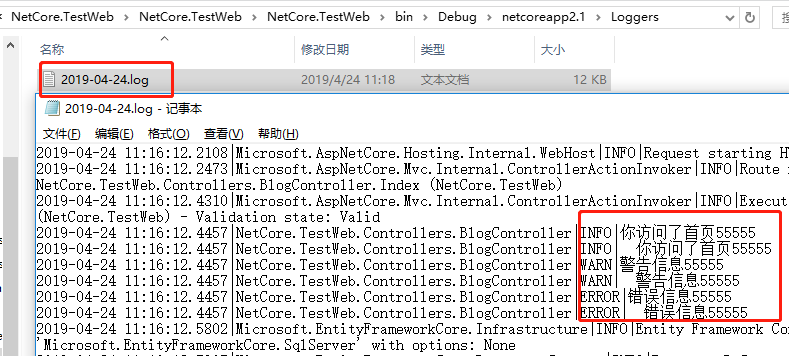
7、NLog GitHub 项目
https://github.com/linezero/Blog/tree/master/NETCoreLogging
asp.net core NLog将日志写到文件的更多相关文章
- Asp.Net Core NLog 将日志输出到数据库以及添加LayoutRenderer的支持
在这之前打算用Apache的Log4Net,但是发现其AdoNetAppender方法已经不存在了,无法使用配置文件直接输出到数据库了,因此我便改用了NLog框架. 一.对项目添加NLog 通过Nug ...
- ASP.NET Core 2.1 : 十二.内置日志、使用Nlog将日志输出到文件
应用离不开日志,虽然现在使用VS有强大的调试功能,开发过程中不复杂的情况懒得输出日志了(想起print和echo的有木有),但在一些复杂的过程中以及应用日常运行中的日志还是非常有用. ASP.NET ...
- 第七节:Asp.Net Core内置日志和整合NLog(未完)
一. Asp.Net Core内置日志 1. 默认支持三种输出方式:控制台.调试(底部输出窗口).EventSource,当然也可以在Program类中通过logging.ClearProviders ...
- 玩转ASP.NET Core中的日志组件
简介 日志组件,作为程序员使用频率最高的组件,给程序员开发调试程序提供了必要的信息.ASP.NET Core中内置了一个通用日志接口ILogger,并实现了多种内置的日志提供器,例如 Console ...
- ASP.NET Core 中的日志记录
目录 内置日志的使用 使用Nlog 集成ELK 参考 内置日志的使用 Logger 是 asp .net core 的内置 service,所以我们就不需要在ConfigureService里面注册了 ...
- ASP.NET Core 异常处理与日志记录
1. ASP.NET Core 异常处理与日志记录 1.1. 异常处理 1.1.1. 异常产生的原因及处理 1.1.2. ASP.NET Core中启动开发人员异常页面 1.2. 日志记录 1.2.1 ...
- asp.net core 集成 log4net 日志框架
asp.net core 集成 log4net 日志框架 Intro 在 asp.net core 中有些日志我们可能想输出到数据库或文件或elasticsearch等,如果不自己去实现一个 Logg ...
- asp.net core 系列 13 日志
一.概述 ASP.NET Core 支持适用于各种内置和第三方日志记录, 供程序的日志记录 API,本文介绍了如何将日志记录 API 与内置提供程序一起使用.对于第三方日志记录提供程序使用,文章最后有 ...
- (14)ASP.NET Core 中的日志记录
1.前言 ASP.NET Core支持适用于各种内置和第三方日志记录提供应用程序的日志记录API.本文介绍了如何将日志记录API与内置提供应用程序一起使用. 2.添加日志提供程序 日志记录提供应用程序 ...
随机推荐
- samba介绍和安装
samba基本介绍 为什么需要samba 早期网络文件数据在不同主机之间传输大都可以使用Ftp完成,不过ftp使用有个小小的问题,它不能让你之间修改主机上的文件.要想修改必须要通过下载——修改——上传 ...
- arts打卡第二周
Algorithm 旋转数组 Given an array, rotate the array to the right by k steps, where k is non-negative. Ex ...
- Nmon实时监控并生成HTML监控报告
前面的博客介绍了服务端监控工具:Nmon使用方法,最近在github找到了一个nmon自动监控并生成HTML格式报告的工具:easyNmon,使用体验蛮不错的,这里介绍下它的安装及使用方法. 一.关于 ...
- Kubernetes 网络排错指南
本文介绍各种常见的网络问题以及排错方法,包括 Pod 访问异常.Service 访问异常以及网络安全策略异常等. 说到 Kubernetes 的网络,其实无非就是以下三种情况之一 Pod 访问容器外部 ...
- MySQL二进预编译制安装
+++++++++++++++++++++++++++++++++++++++++++标题:MySQL二进预编译制安装时间:2019年2月25日内容:MySQL二进制预编译安装重点:MySQL二进制预 ...
- Redis之持久化(RDB AOF)
Redis 提供了 RDB 和 AOF 两种持久化方案: RDB:生成指定时间间隔内的 Redis 内存中数据快照,是一个二进制文件 dumpr.rdb AOF:记录 Redis 除了查询以外的所有写 ...
- flutter 返回键监听
本篇为继上片监听返回键基础下优化: 以下做返回键监听两种情况: import 'package:fluttertoast/fluttertoast.dart'; //提示第三方插件 1. 单击提示双击 ...
- 电脑突然使用不了复制粘贴快捷键,Ctrl+C和Ctrl+V没用
今天不知道怎么回事,在复制代码的时候突然用不了Ctrl+C和Ctrl+V了 刚开始我还以为是eclipse出问题,然后我在idea中是可以复制 和 粘贴的,然后我又打开文本编辑器notepad++,发 ...
- 能ping通虚拟机中的Ubuntu,使用XShell连不上
1.在宿主机上telnet 虚拟机ip 22如果显示端口无法接通,说明你的/etc/init.d/sshd 是stop或者是异常的. 2.如果没有sshd服务,使用" sudo apt-g ...
- vscode常用快捷键
一.vs code 的常用快捷键列表 1.注释: a) 单行注释:[ctrl+k,ctrl+c] 或 ctrl+/ b) 取消单行注释:[ctrl+k,ctrl+u] (按下ctrl不放,再按k + ...