
Visual Studio Git本地Repos和GitHub远程Repos互操作
近期准备将一个项目开源到GitHub中,N-Sharding,.Net版本的分库分表数据访问框架。中间遇到了点小问题,整理了一下。
1. GitHub上Create New Repos
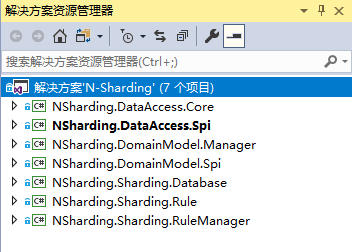
2. 代码Check In到本地Git Repos
3. Push到GitHub远程Repos
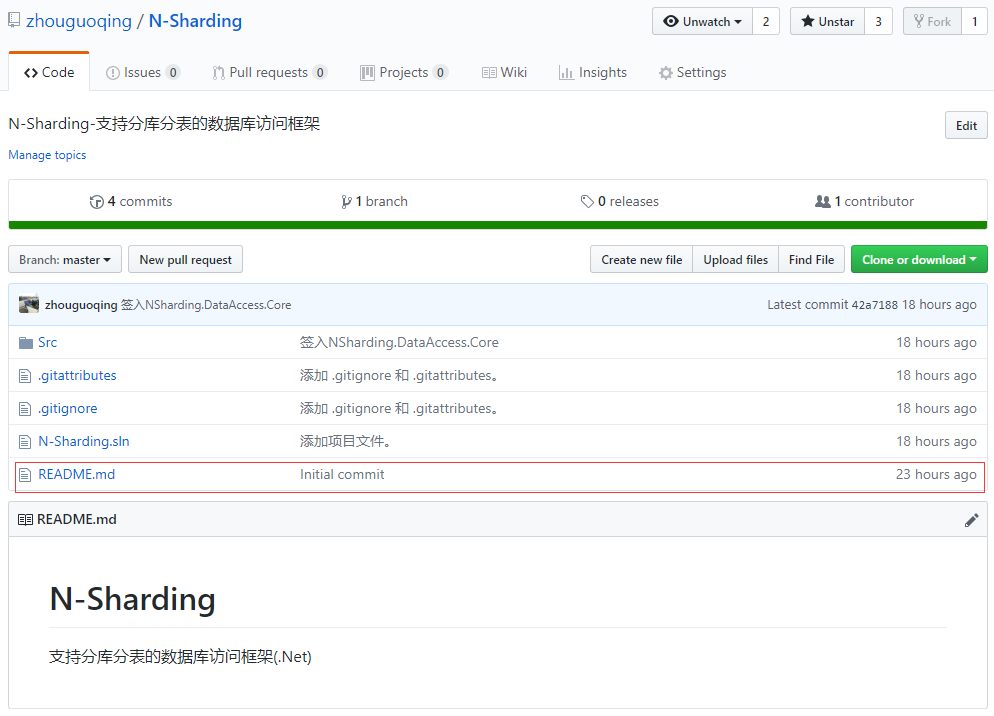
一、GitHub上Create New Repos:N-Sharding
2. 代码Check In到本地Git Repos
3. Push到GitHub远程Repos
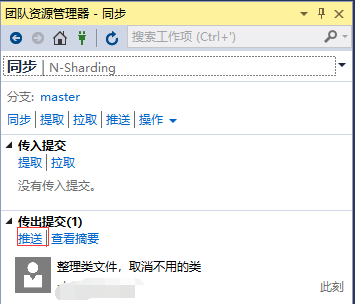
推送提示一下错误:
将分支推送到远程存储库时遇到错误: rejected Updates were rejected because the tip of your current branch is behind its remote counterpart. Integrate the remote changes  before pushing again.

Error: failed to push some refs to 'https://github.com/*****/N-Sharding.git'

Error: hint: Updates were rejected because the tip of your current branch is behind

hint: its remote counterpart. Integrate the remote changes (e.g.

hint: 'git pull ...') before pushing again.

hint: See the 'Note about fast-forwards' in 'git push --help' for details.
看中间第三句话:Updates were rejected because the tip of your current branch is behind
说明本地分支是旧的,远程Master分支要新。为什么呢?
突然想起来,在GitHub上Create New Repos时,增加了Readme.md。本地没有这个文件。
一顿百度后:https://www.cnblogs.com/gzdaijie/p/5186516.html
解决方案:
1. 打开Git Bash
2. Git拉取最新的代码到本地,一定要rebase,强制同步更新本地分支
git pull --rebase origin master

关于Git rebase,可以参考:https://git-scm.com/docs/git-rebase
3. 推送Push到Master主分支
git push -u origin master
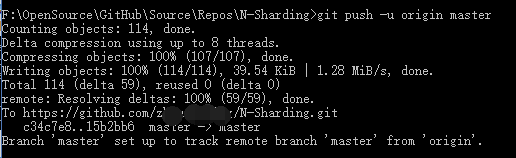
Push 成功,代码成功提交到master。
Tips:关于git merge 与 git rebase
. git merge 和 git rebase 都是将远程分支与本地分支合并的一种方法,git merge 会生成一个新的节点,例如A和B都位于同一个HEAD,A提交了2个commit C1和C2,B 提交了2个commit C3和C4,git merge的结果是在C3和C4之后合并生成C5,这样提交历史比较清晰,但多了一个C5

. 假设A已经将C1和C2 push到了远程分支,那么B 使用git rebase则会将C3和C4缓存到.git/rebase中,恢复到之前的状态,更新C1和C2,然后再将C3和C4作为补丁应用到C2的状态上。结果如下:

原始状态->C1->C2->C3'->C4',C3'和C4'为git 根据C3和C4生成的补丁,log是一条直线,而且没有多余的C5,但是平行信息丢失。
关于git pull 与 git pull --rebase
. git pull = git fetch + git merge

. git pull --rebase = git fetch + git rebase
以上,分享给大家。
周国庆
2019/3/17
Visual Studio Git本地Repos和GitHub远程Repos互操作的更多相关文章
- Git - Git本地仓库与GitHub远程仓库关联
前言 Git本地仓库与GitHub仓库的关联逻辑如下 创建Key 在本地仓库下,新建Key文件夹,然后打开Key文件夹,单击鼠标右键,选择Git Bash Here. 输入命令:ssh-keygen ...
- git本地仓库与github远程仓库链接协议问题
前提条件:有github账号,本地安装了git,能上网. 环境:ubuntu14.0.4LTS 首先在你得在github上创建一个仓库new repository,然后再本地创建一个文件夹mkdir ...
- Git本地仓库与Github远程仓库关联
如果你已经在本地创建了一个Git仓库,又想在GitHub创建一个Git仓库,并且让这两个仓库进行远程同步,那就需要用到SSH Key,github拿到了你的公钥就会知道内容是你推送的. SSH Key ...
- git本地项目连接私人远程仓库以及遇到的问题
一.引言 1.最开始的时候,我本地项目连接的是github远程仓库,现在要转到公司的私人远程仓库. 2.我和大家说两个事: (1)本地项目连接github远程仓库, (2)本地项目连接私人远程仓库, ...
- Visual Studio 2019 使用 Web Deploy 发布远程站点到IIS服务器
Visual Studio 2019 使用 Web Deploy 发布远程站点到IIS服务器的方式 在开发完项目之后,我们需要把开发的项目发布到指定的服务器上,有两种方式,如下 1.把项目发布成文件系 ...
- Git操作_从github远程仓库克隆到本地仓库, 本地代码提交
实现目的: 从github远程仓库克隆到本地仓库:本地代码提交到远程仓库. 一.从github远程仓库克隆到本地仓库: 命令行切换到指定的仓库想存放的目录,执行如下命令:git clone 远程仓库 ...
- 在Visual Studio 2015 Preview 中使用Github 版本控制
打开Visual Studio,新建项目,右下角勾选,如下图: 点击‘OK’后,出现下图窗口,选择'Git' : 如果是现有项目可以在‘文件’菜单下找到‘Add to Source Control’ ...
- 使用命令创建github代码仓库,push本地仓库到github远程代码仓库
1.利用命令创建github远程代码仓库 在将本地代码push到github远程代码仓库之前,总是需要新建github代码仓库,在将本地仓库关联到github远程仓库.其中最为繁琐的操作是建立gith ...
- git本地项目上传远程
Git的安装就不说了. 原文:https://blog.csdn.net/zamamiro/article/details/70172900 github官网说明: …or create a new ...
随机推荐
- 管理Android设备的唤醒状态
当一个Android设备闲置时,首先它的屏幕将会变暗,然后关闭屏幕,最后关闭CPU. 这样可以防止设备的电量被迅速消耗殆尽.但是,有时候也会存在一些特例: Apps such as games or ...
- SQLyog 最新版本12.5-64bit 完美破解,亲测可用!
声明:本文只是提供一个网络上找到的针对12.5版本的注册码使用方式做一个说明,不建议企业用户破解,有条件的还是希望大家购买原版.当然个人学习用的但又不想购买原版的,这里只是提供个途径,请勿用做商业用途 ...
- react中constructor()和super()的具体含义以及如何使用
1.constructor()---super( )的基本含义 constructor()--构造方法 这是ES6对类的默认方法,通过new命令生成对象实例时自动调用该方法.并且,该方法是类中必须有的 ...
- __http原理__01__通信流程_消息格式
本文转自 菜鸟教程 一.HTTP协议(HyperText Transfer Protocol,超文本传输协议) 是因特网上应用最为广泛的一种网络传输协议, 是用于从万维网(WWW:World Wi ...
- css3图形绘制
以下几个例子主要是运用了css3中border.bordr-radius.transform.伪元素等属性来完成的,我们先了解下它们的基本原理. border:简单的来说border语法主要包含(bo ...
- eclipse spring-boot-mybatis 的记录
例子来源: https://gitee.com/lfalex/spring-boot-example.git spring-boot-mybatis 例子使用 mysql5.1.46 版本; 环境:e ...
- Java根据链接生成二维码
Java根据链接生成二维码 相关 jar 包: core-3.1.0.jar 源码及 jar 包下载:http://files.cnblogs.com/files/liaolongjun/qrcode ...
- F#周报2019年第15期
新闻 Hedgehog新站点 Bolero 0.4发布,增加远程认证 FsToolkit.ErrorHandling与Cvdm.ErrorHandling合并了 F#里的3D图形编程与游戏开发 有趣的 ...
- 自学stm32就要记住入了这个“大坑”要耐得住寂寞
在现在的MCU使用量中,STM32绝对是翘楚!因为现在使用STM32开发产品的公司非常多,这主要得益于ST公司对自家MCU的大力推广,而且ST对自己MCU也配套了一系列开发软件,也有相应的硬件开发板供 ...
- Source Insight相关设置
#Source Insight中按快捷键在其他编辑器中打开当前文件 "D:\Program Files\Zend\ZendStudio-5.5.0\bin\ZDE.exe" %f ...