
vue + BMap实现常用地图
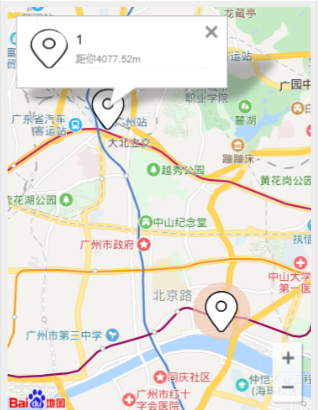
实现功能:
缩放
自定义icon maker
多个覆盖点的点击事件
获取两点的距离
信息窗口的点击事件
<template>

  <div id="allmap" ref="mymap"></div>

</template>

<style scoped>

  #allmap {

    width: 100%;

    height: calc(100vh - 50vw);

    margin-bottom: 9.3333vw;

  }

  .map-wrap /deep/ .anchorBL{

    display: none;

  }

</style>

<script>

import BMap from 'BMap'

import loc  from '../../assets/image/organization/location.png'

export default {

  mounted(){

       this.initMap()

  },

  data () {

    return {

      center: {

        lng: 113.284,

        lat: 23.125

      },

      locationIcon: {

        url: loc,

        size: {width: 18, height: 18}

      },

      // 附近的人

      aroundList: [

        {

          point: "113.264531|23.157003",

          userName: "1",

          atlas: loc,

          userId: '0'

        },

        {

          point: "113.330934|23.113401",

          userName: "2",

          atlas: loc,

          userId: '1'

        },

        {

          point: "113.310854|23.113605",

          userName: "3",

          atlas: loc,

          userId: '2'

        }

      ],

    }

  },

  methods: {

    initMap: function() {

      this.createMap()

      this.addMapControl()

      this.addAround(this.aroundList)

    },

    // 创建地图

    createMap: function() {

      var map = new BMap.Map(this.$refs.mymap)

      var point = new BMap.Point(this.center.lng,this.center.lat)

      map.centerAndZoom(point,15)

      window.map = map

    },

    // 添加控件

    addMapControl(){

      //向地图中添加缩放控件

      var ctrl_nav = new BMap.NavigationControl({anchor:BMAP_ANCHOR_BOTTOM_RIGHT,type:BMAP_NAVIGATION_CONTROL_LARGE});

      map.addControl(ctrl_nav);

      // 创建当前用户标注

      var ctrl_marker = new BMap.Point(this.center.lng,this.center.lat)

      var myIcon = new BMap.Icon(loc,new BMap.Size(40,49))

      var marker_one = new BMap.Marker(ctrl_marker,{icon:myIcon})

      map.addOverlay(marker_one)

      // 创建一个圆

      var circle = new BMap.Circle(ctrl_marker,500,{strokeColor:"#f3c6b1",fillColor:"#f3c6b1", strokeWeight:1, strokeOpacity:0.5})

      map.addOverlay(circle);

    },

    // 添加一个位置标记点

    addMarker: function(point){

      var marker = new BMap.Marker(point)

      map.addOverlay(marker,15)

    },

    //  加载附近的人信息

    addAround: function(markerList) {

      if(markerList.length>0){

        for(var i=0;i<markerList.length;i++){

          // 经度

          var info1 = markerList[i].point.split('|')[0]

          // 纬度

          var info2 = markerList[i].point.split('|')[1]

          // 绘制附近人点坐标

          var pointA = new BMap.Point(this.center.lng,this.center.lat)

          var point = new BMap.Point(info1,info2)

          // 距离

          var path = map.getDistance(pointA, point).toFixed(2)

          var myIcon = new BMap.Icon(markerList[i].atlas,new BMap.Size(40,49))

          var marker = new BMap.Marker(point,{icon:myIcon})

          map.addOverlay(marker)

          //悬浮提示信息

          var content = {

            userName:markerList[i].userName,

            atlas: markerList[i].atlas,

            userId: markerList[i].userId,

            distance: path

          }

          map.addOverlay(marker)

          this.addClickHandler(content,marker)

        }

      } else{

        return

      }

    },

    //点击提示信息

    addClickHandler: function(content,marker){

      var _this = this

      var sContent = `<div id="ssst" style="display: flex;flex-direction: row;align-items: center;width: 50.3333vw;">

          <img src="${content.atlas}" alt="" style="width: 12.5333vw;height: 12.5333vw;border-radius: 50%;margin-right: 2.2667vw;">

          <div>

            <p style="font-size: 4vw;">${content.userName}</p>

            <p style="font-size: 3.2vw;color: #999;margin-top: 1.3333vw;">距你${content.distance}m</p>

          </div>

          </div>`

      var userid = content.userId

      var infoWindow = new BMap.InfoWindow(sContent)

      marker.addEventListener("click",function(e){

        e.preventDefault = true

        e.stop

        this.openInfoWindow(infoWindow)

        setTimeout(() => {

          e.preventDefault = true

          e.stop

          _this.chatWith(userid)

        }, 0);

      })

    },

    // 弹窗点击跳转事件

    chatWith(userid){

      var _this = this

      var ssst = document.getElementById('ssst')

      ssst.addEventListener('click',function() {

        _this.$router.push({

          path: '/home',

          query: {

            userId: userid

          }

        })

      })

    }

  }

}

</script>
vue + BMap实现常用地图的更多相关文章
- Vue中使用百度地图——设置地图标注
知识点:创建Map实例,为指定的位置设置标注 参考博客:https://www.cnblogs.com/liuswi/p/3994757.html 1.效果图:初始化地图,设置指定经纬度为地图中心点坐 ...
- 基于vue实现百度离线地图
基于vue实现百度离线地图 1. 百度地图API文件获取 有网络 的情况下,需引入百度地图API文件.如下: <script type="text/javascript" s ...
- vue中引入百度地图
xxx.vue <template> <div> <el-input v-model="inputaddr"> </el-input> ...
- Vue.js之常用指令
vue常用指令 vue.js官方给自己的定义是数据模板引擎,并给出了一套渲染数据的指令.本文详细介绍vue.js的常用指令. 官网:点我 一.v-text.v-html v-text:用于绑定文本 v ...
- vue 中引用 百度地图
1.在 http://lbsyun.baidu.com/ 申请 秘钥 2.在index.html文件中引入 <script src="http://api.map.baidu.com/ ...
- 1.Vue.js的常用指令
Vue.js介绍 Vue.js是当下很火的一个JavaScript MVVM库,它是以数据驱动和组件化的思想构建的.相比于Angular.js,Vue.js提供了更加简洁.更易于理解的API,使得 ...
- vue封装一些常用组件loading、switch、progress
vue封装一些常用组件loading.switch.progress github文档https://github.com/zengjielin/vue-component-library loadi ...
- vue项目接入百度地图
方法一 :使用第三方工具 vue-baidu-map 安装命令: yarn add vue-baidu-map --save 文档地址:https://dafrok.github.io/vue-bai ...
- Vue专题-js常用指令
vue.js官方给自己的定为是数据模板引擎,并给出了一套渲染数据的指令.本文详细介绍了vue.js的常用指令. vue.js常用指令 Vue.js使用方式及文本插值 Vue.js 使用了基于 HTML ...
随机推荐
- MSDN订户下载权限被屏蔽的办法
使用Chrome浏览器,在加载完成页面之后,按F12,在控制台选项卡当中输入下面代码,即可解除屏蔽. $("#SubMigratedMessageArea").remove(); ...
- golang开源项目qor快速搭建网站qor-example运行实践
最近想找几个基于Go语言开发的简单的开源项目学习下,分享给大家,github上有心人的收集的awesome-go项目集锦:github地址 发现一个Qor项目: Qor 是基于 Golang 开发的的 ...
- java 8 Lambda
警告: 初学者随笔, 请关闭此网页, 以免浪费你的时间
- jenkins 关闭和重启的实现
jerkins自带的重启手段重启过程缓慢,在jenkins的操作过程中可使用以下操作: 关闭Jenkins 只需要在访问jenkins服务器的网址url地址后加上exit.例如我jenkins的地址h ...
- Git 工具 - 储藏(Stashing)
储藏(Stashing) 经常有这样的事情发生,当你正在进行项目中某一部分的工作,里面的东西处于一个比较杂乱的状态,而你想转到其他分支上进行一些工作.问题是,你不想提交进行了一半的工作,否则以后你无法 ...
- pandas groupby生成新的dataframe
mark地址:https://blog.csdn.net/weixin_41784098/article/details/79486259
- 七月在线爬虫班学习笔记(六)——scrapy爬虫整体示例
第六课主要内容: 爬豆瓣文本例程 douban 图片例程 douban_imgs 1.爬豆瓣文本例程 douban 目录结构 douban --douban --spiders --__init__. ...
- Java容器解析系列(8) Comparable Comparator
Comparable和Comparator接口是两个用于对对象进行大小比较的接口,在java集合相关类中,也被经常地使用到. 关于其使用,可以参考网络上的其他博客(没什么好说的);这里阐述关于这两个接 ...
- 信息技术手册可视化进度报告 基于jieba的关键字提取技术
在这一篇博客之前,我已经将word文件中的内容通过爬虫的方式整理到数据库中了,但是为了前台展示的需要,还必须提取出关键字,用于检索. 我用的是jieba分词,GitHub地址:https://gith ...
- 安装mavlink遇到的问题(future找不到)
从官网下载mavlink(git clone https://github.com/mavlink/mavlink.git) 然后进入mavlink 目录执行 git submodule update ...