
性能测试学习 第八课--LR12中针对WebServices协议的三种脚本开发模式
一,webservices协议简介
webservices是建立可交互操作的分布式应用程序的新平台,它通过一系列的标准和协议来保证程序之间的动态连接,
其中最基本的协议包括soap,wsdl,uddi.
1,SOAP(simple object access protocl)
SOAP是消息传递协议,它规定了web services之间如何传递消息。SOAP基于xml和xsd,xml是soap的数据编码方式。
2,WSDL(web services Description Language)
WSDL是web services的定义语言,和soap一起构成web服务的核心结构单元。wsdl协议规定了有关webservices描述的标准。
3,UDDI(Universal Description,Discovery,and Intergration)
UDDI是访问登记的标准,它建立了一个平台独立,开放的框架,通过英特网来描述服务,发现业务并整合业务服务。简单来说
UDDI用于集中存放和查找wsdl描述文件,起着目录服务器的作用。
二,我们在性能测试的工作中,难免会遇到webservices协议的接口,这里我简单介绍一下用loadrunner12来开发webservices协议脚本
的三种模式,咱们就以天气预报的网站来为例吧:
1,web_service_call模式
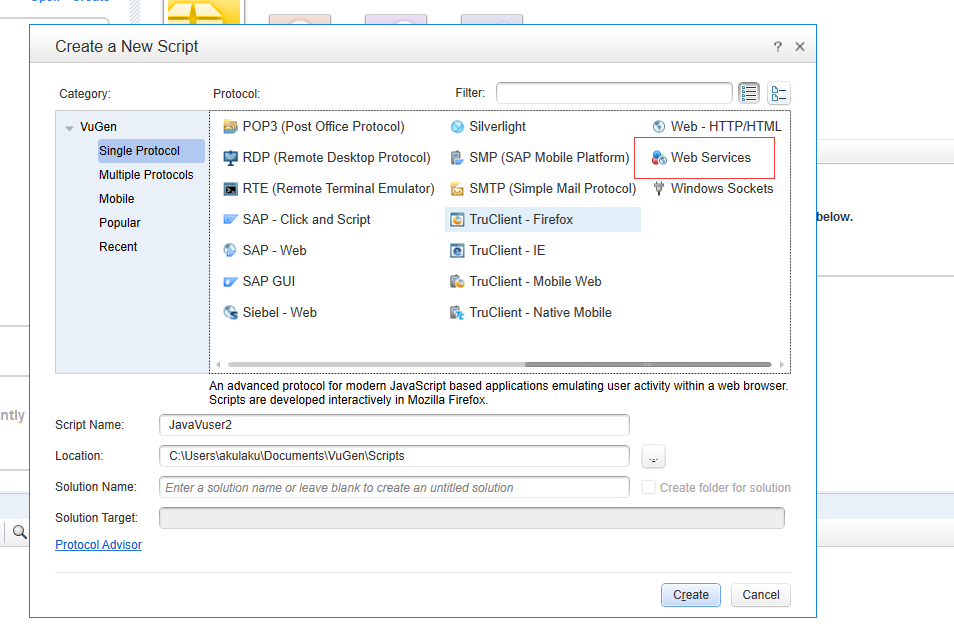
1)启动“virtual user Generator”,新建“web services”虚拟用户,
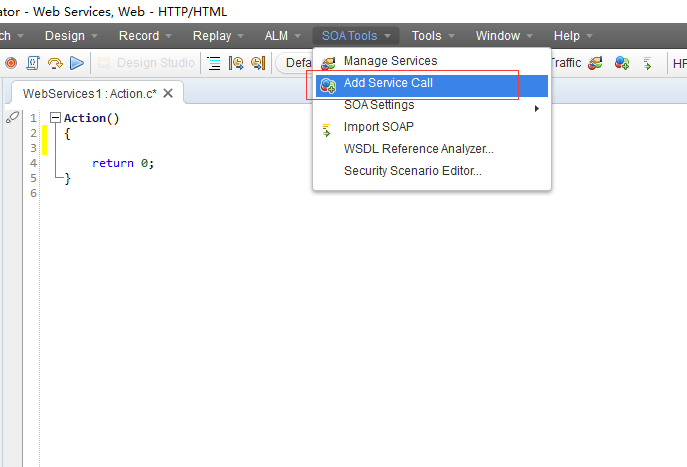
2)选择上方SOA Tool中的Add Service Call,如下图
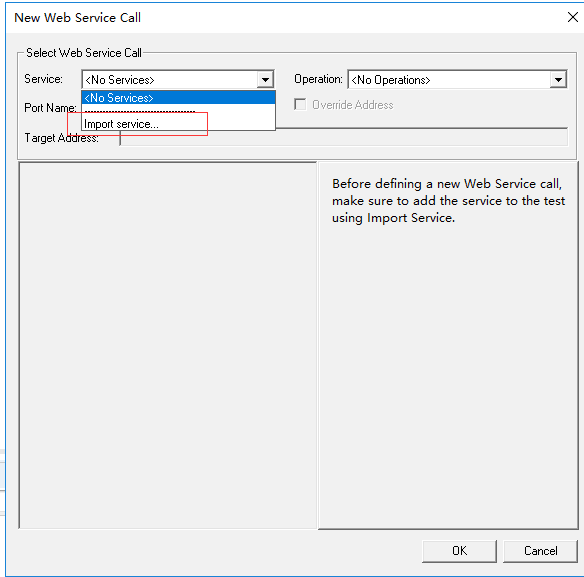
3)弹出New Web Service Call对话框,选择Service-import service
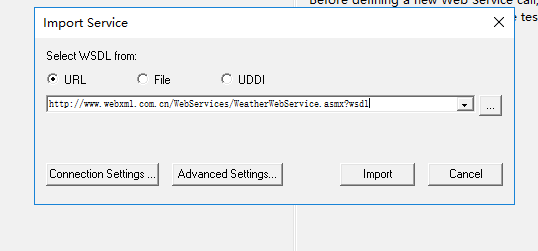
4)输入要测试的网址
5)下面选择Operation,输入城市,以及设置获取返回值参数
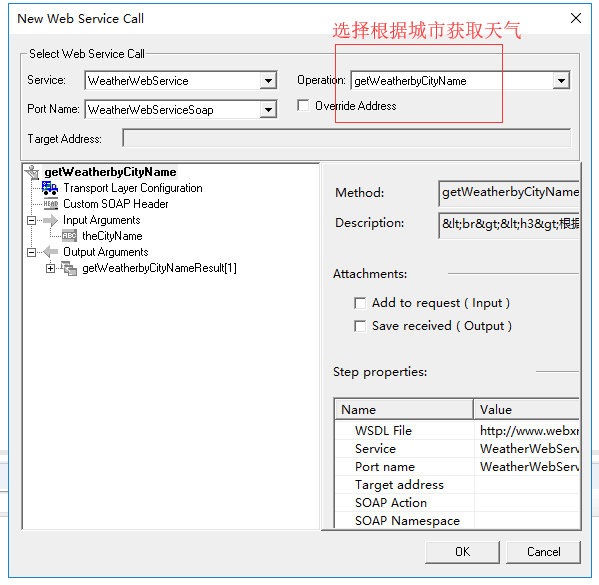


6)点击OK后,得到下面的脚本
|
1
2
3
4
5
6
7
8
9
10
11
12
13
14
15
16
17
18
19
20
|
Action(){ web_service_call( "StepName=getWeatherbyCityName_104", //步骤名称 "SOAPMethod=WeatherWebService|WeatherWebServiceSoap|getWeatherbyCityName", //服务名称|soap获取哪个接口 "ResponseParam=response", //返回的参数信息 "Service=WeatherWebService", //webservices的服务 "ExpectedResponse=SoapResult", //请求返回的信息 "Snapshot=t1555545923.inf", //快照 BEGIN_ARGUMENTS, //输入参数开始 "theCityName=广州", //请求的参数与值 END_ARGUMENTS, //结束参数 BEGIN_RESULT, //返回值的开始 "getWeatherbyCityNameResult/*[1]=Param_string", //保存返回参数 END_RESULT, //返回值结束 LAST); return 0;} |
6)然后做参数化,断言
|
1
2
3
4
5
6
7
8
9
10
11
12
13
14
15
16
17
18
19
20
21
22
23
24
25
26
27
28
29
30
31
|
Action(){ lr_start_transaction("获取天气预报"); web_service_call( "StepName=getWeatherbyCityName_104", //步骤名称 "SOAPMethod=WeatherWebService|WeatherWebServiceSoap|getWeatherbyCityName", //服务名称|soap获取哪个接口 "ResponseParam=response", //返回的参数信息 "Service=WeatherWebService", //webservices的服务 "ExpectedResponse=SoapResult", //请求返回的信息 "Snapshot=t1555545923.inf", //快照 BEGIN_ARGUMENTS, //输入参数开始 "theCityName={city_name}", //请求的参数与值 END_ARGUMENTS, //结束参数 BEGIN_RESULT, //返回值的开始 "getWeatherbyCityNameResult/*[2]=Param_string", //保存返回参数 END_RESULT, //返回值结束 LAST); if(strcmp(lr_eval_string("{Param_string}"),lr_eval_string("{city_name}"))==0) { lr_end_transaction("获取天气预报",LR_PASS); } else { lr_end_transaction("获取天气预报",LR_FAIL); } return 0;} |
7)最后保存,设置日志级别,然后Replay我们的脚本
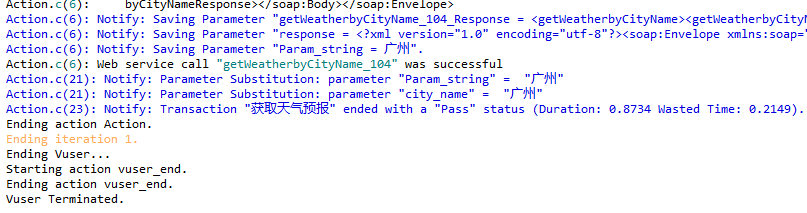
2,soap_request模式
1)打开WeatherWebService网站,
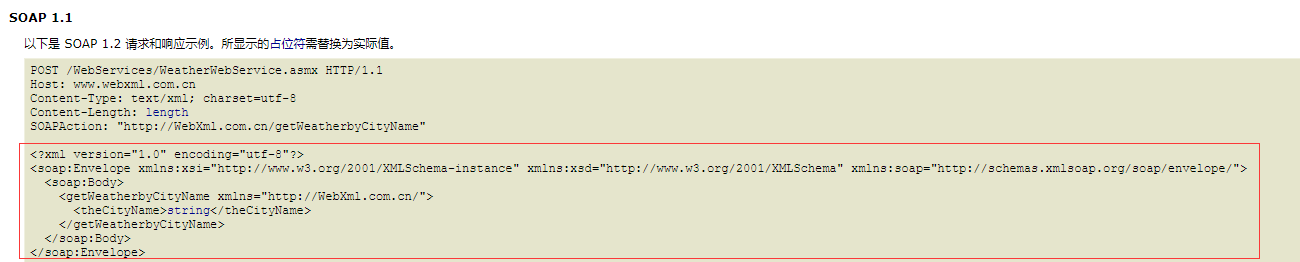
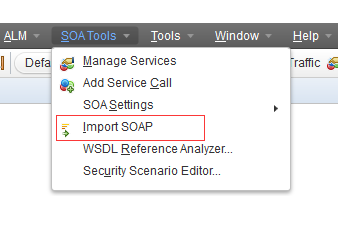
2)复制上面的代码,在notepad++中新建一个文件,将代码粘贴上去,保存到D盘,然后在loadrunner12中
点击下图的import SOAP

3)在对话框中,我们输入保存的xml文件地址,输入URL,URL=http://{Host}+{POST} 参数从
上图所示取,输入对应的SOAPAction,具体如下图所示
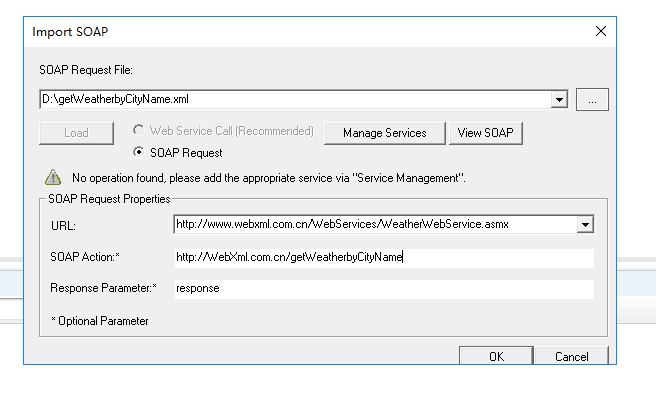
4)点击OK,生成下面的脚本
|
1
2
3
4
5
6
7
8
9
10
11
12
13
14
15
16
17
18
19
20
21
22
|
Action(){ soap_request("StepName=SOAP Request", "URL=http://www.webxml.com.cn/WebServices/WeatherWebService.asmx", "SOAPEnvelope=" "<soap:Envelope xmlns:xsi=\"http://www.w3.org/2001/XMLSchema-instance\" xmlns:xsd=\"http://www.w3.org/2001/XMLSchema\" xmlns:soap=\"http://schemas.xmlsoap.org/soap/envelope/\">" "<soap:Body>" "<getWeatherbyCityName xmlns=\"http://WebXml.com.cn/\">" "<theCityName>广州</theCityName>" "</getWeatherbyCityName>" "</soap:Body>" "</soap:Envelope>", "SOAPAction=http://WebXml.com.cn/getWeatherbyCityName", "ResponseParam=response", "Snapshot=t1555549382.inf", LAST); return 0;} |
5)这里有个难题就是如何做xml断言?我们看一下下图的响应示例
|
1
2
3
4
5
6
7
8
9
10
11
12
13
14
15
|
HTTP/1.1 200 OKContent-Type: application/soap+xml; charset=utf-8Content-Length: length<?xml version="1.0" encoding="utf-8"?><soap12:Envelope xmlns:xsi="http://www.w3.org/2001/XMLSchema-instance" xmlns:xsd="http://www.w3.org/2001/XMLSchema" xmlns:soap12="http://www.w3.org/2003/05/soap-envelope"> <soap12:Body> <getWeatherbyCityNameResponse xmlns="http://WebXml.com.cn/"> <getWeatherbyCityNameResult> <string>string</string> <string>string</string> </getWeatherbyCityNameResult> </getWeatherbyCityNameResponse> </soap12:Body></soap12:Envelope> |
这里引入lr_xml_get_values函数来获取xml的返回值
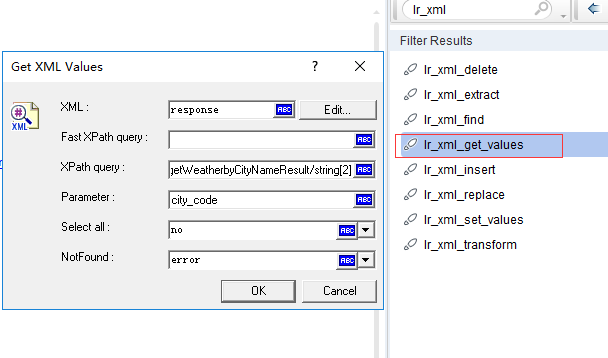
XPath query中填入city值的xpath定位的绝对路径:/Envelope/Body/getWeatherbyCityNameResponse/getWeatherbyCityNameResult/string[2]
6)最后加入事物函数,做断言
|
1
2
3
4
5
6
7
8
9
10
11
12
13
14
15
16
17
18
19
20
21
22
23
24
25
26
27
28
29
30
31
32
33
34
35
36
37
38
39
40
41
42
43
|
Action(){ lr_convert_string_encoding(lr_eval_string("{city_name}"),NULL,"utf-8","city"); lr_save_string(lr_eval_string("{city}"),"cityName"); lr_start_transaction("获取天气预报"); soap_request("StepName=SOAP Request", "URL=http://www.webxml.com.cn/WebServices/WeatherWebService.asmx", "SOAPEnvelope=" "<soap:Envelope xmlns:xsi=\"http://www.w3.org/2001/XMLSchema-instance\" xmlns:xsd=\"http://www.w3.org/2001/XMLSchema\" xmlns:soap=\"http://schemas.xmlsoap.org/soap/envelope/\">" "<soap:Body>" "<getWeatherbyCityName xmlns=\"http://WebXml.com.cn/\">" "<theCityName>{cityName}</theCityName>" "</getWeatherbyCityName>" "</soap:Body>" "</soap:Envelope>", "SOAPAction=http://WebXml.com.cn/getWeatherbyCityName", "ResponseParam=response", "Snapshot=t1555549382.inf", LAST); lr_convert_string_encoding(lr_eval_string("{response}"),"utf-8",NULL,"msg"); lr_xml_get_values( "XML={response}", "Query=/Envelope/Body/getWeatherbyCityNameResponse/getWeatherbyCityNameResult/string[2]", "ValueParam=city_code", LAST); lr_output_message("返回城市名称:%s",lr_eval_string("city_code")); if(strcmp(lr_eval_string("{city_code}"),lr_eval_string("{city_name}"))==0) { lr_end_transaction("获取天气预报", LR_PASS); } else { lr_end_transaction("获取天气预报", LR_FAIL); } return 0;} |
7)保存后点击Replay,得到下面的结果:
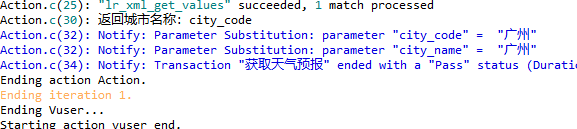
3,web_custom_request模式
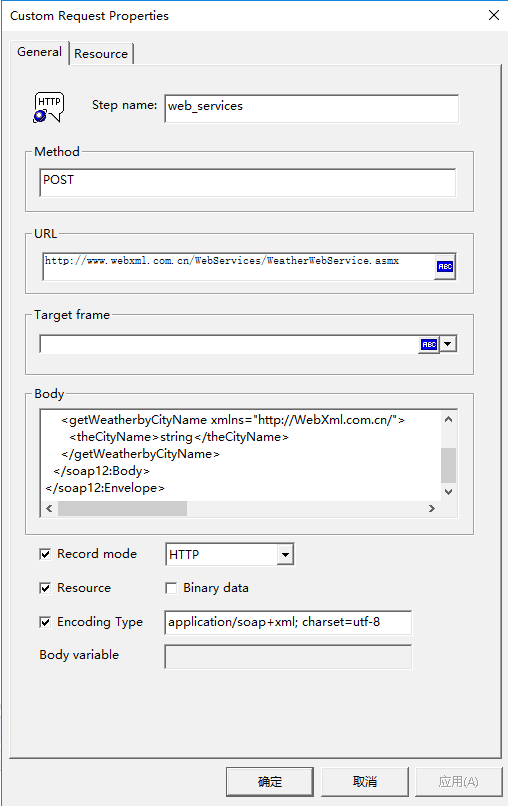
输入对应的URL,body里面输入SOAP的请求体,点击确定,最后生成如下的代码
|
1
2
3
4
5
6
7
8
9
10
11
12
13
14
15
16
17
18
19
20
21
22
23
|
Action(){ web_custom_request("web_services", "URL=http://www.webxml.com.cn/WebServices/WeatherWebService.asmx", "Method=POST", "TargetFrame=", "Resource=1", "Referer=", "Mode=HTTP", "EncType=application/soap+xml; charset=utf-8", "Body=<?xml version=\"1.0\" encoding=\"utf-8\"?>""<soap12:Envelope xmlns:xsi=\"http://www.w3.org/2001/XMLSchema-instance\" xmlns:xsd=\"http://www.w3.org/2001/XMLSchema\" xmlns:soap12=\"http://www.w3.org/2003/05/soap-envelope\">" "<soap12:Body>" "<getWeatherbyCityName xmlns=\"http://WebXml.com.cn/\">" "<theCityName>59287</theCityName>" "</getWeatherbyCityName>" "</soap12:Body>""</soap12:Envelope>", LAST); return 0;} |
后面做脚本强化就行了。
性能测试学习 第八课--LR12中针对WebServices协议的三种脚本开发模式的更多相关文章
- LR12中针对WebServices协议的三种脚本开发模式
一,webservices协议简介 webservices是建立可交互操作的分布式应用程序的新平台,它通过一系列的标准和协议来保证程序之间的动态连接, 其中最基本的协议包括soap,wsdl,uddi ...
- 性能测试学习 第七课 --loadrunner中JavaVuser脚本的编写
1.环境准备: LoadRunner11----->对应JDK1.6版本(32位) LoadRunner12----->对应JDK1.7版本(32位) (一).JDK下载安装完成 ...
- 六十八、SAP中内表插入的三种方法之二,COLLECT的使用,用于计算数字字段之和
一.使用COLLECT时,如果关键字没有,那么插入,如果有则求所有关键字列的和,代码如下 二.sy-index在循环中,每次循环从1开始递增 三.查看T_DATA数据 四.如下 五.循环时候,我们查看 ...
- vue中通过cross-env插件配置三种环境(开发,测试,生产)打包,不用切换api
1. 话不多说,第一步就是安装必要的插件 npm install cross-env --save 2.修改config里面的参数,这里只展示一个test,其他类似 3.修改package.json ...
- python学习第八讲,python中的数据类型,列表,元祖,字典,之字典使用与介绍
目录 python学习第八讲,python中的数据类型,列表,元祖,字典,之字典使用与介绍.md 一丶字典 1.字典的定义 2.字典的使用. 3.字典的常用方法. python学习第八讲,python ...
- Elasticsearch7.X 入门学习第八课笔记-----索引模板和动态模板
原文:Elasticsearch7.X 入门学习第八课笔记-----索引模板和动态模板 版权声明:本文为博主原创文章,遵循CC 4.0 BY-SA版权协议,转载请附上原文出处链接和本声明. 本文链接: ...
- Java中获取键盘输入值的三种方法
Java中获取键盘输入值的三种方法 Java程序开发过程中,需要从键盘获取输入值是常有的事,但Java它偏偏就没有像c语言给我们提供的scanf(),C++给我们提供的cin()获取键盘输入值 ...
- Tomcat中部署web应用的三种方式
Tomcat中部署web应用的三种方式(静态部署) 第一种,针对war或解压后的war,最为常用的是直接操作webapp目录,将完整的war包或者web应用直接放到webapp目录下.使用 ...
- MVC3中,在control里面三种Html代码输出形式
MVC3中,在control里面三种Html代码输出形式:ViewData["msg"] = "<br /> Title <br />" ...
随机推荐
- SQL解析
private static String getCountSql(String sql) { return "select count(*) from "+cutOrderByO ...
- Linux 系统调用sysconf
1.前言 当前计算机都是多核的,linux2.6提供了进程绑定cpu功能,将进程指定到某个core上执行,方便管理进程.linux提供了sysconf系统调用可以获取系统的cpu个数和可用的cpu个数 ...
- jquery +ajax 上传加预览
<!DOCTYPE html><html lang="en"><head> <meta charset="UTF-8" ...
- 大前端服务器渲染 发布和部署 Vue + vue(SSR)
https://blog.csdn.net/sinat_15951543/article/details/80109521 就是到服务器dist 下面 npm run start & 然 ...
- html中去除ul,li标签的样式列表标签的点?
- 机器学习实战1-K均值
本例来源于github项目:https://github.com/jakevdp/sklearn_pycon2015/blob/master/notebooks/04.2-Clustering-KMe ...
- Lesson 1-1
1.1常见难记的几种运算符 1.1.1 除运算 ‘/’ 除运算的结果为小数,即浮点数. >>> 10/3 3.3333333333333335 >>> 10/2 5 ...
- 学习java23种设计模式自我总结
首先先做个广告,以前看过@maowang 这位大神转的Java开发中的23种设计模式详解(转) ,但是看了之后都忘差不多了, 所以,开个帖子边学习边自我总结(纯手敲).一直以来像这种需要长久的运动,真 ...
- jmeter beanshell遍历接口返回的json数组
import java.util.LinkedHashMap; import com.jayway.jsonpath.JsonPath; import com.jayway.jsonpath.Pred ...
- 通过GIT_COMMIT进行代码回滚
首先需要安装插件:conditional-buildstep A buildstep wrapping any number of other buildsteps, controlling thei ...