
在action中进行文件下载,下载时运行不报错,可是也不下载
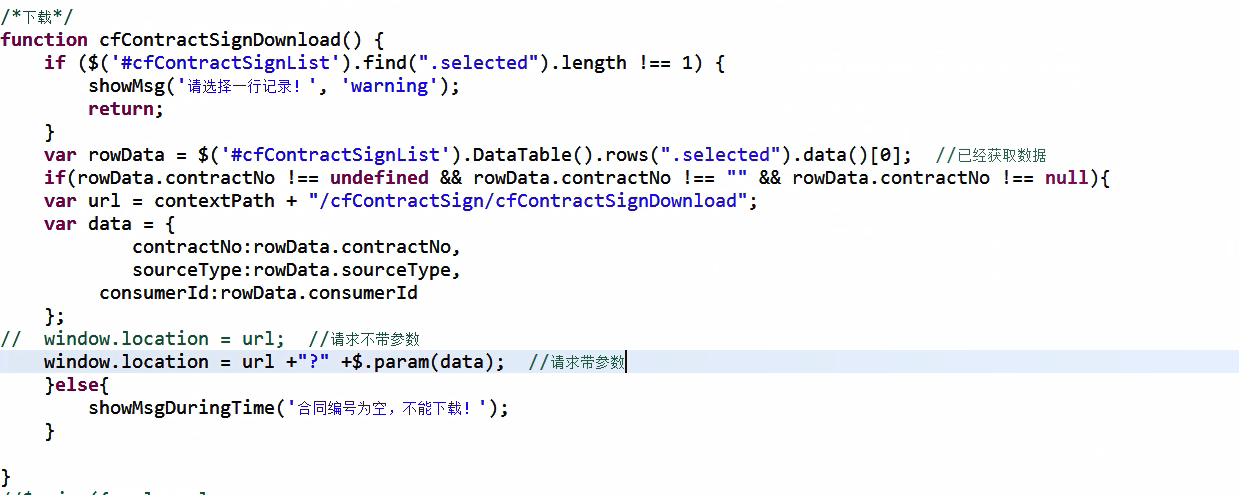
一:在写前端下载页面时,使用ajax方式调用action中的方法,然后就将下载内容返回js中了,所以没有下载,之后改为使用Windows.location进行下载,就没有问题了。
action中代码:

 if(decode = null ll decode. length = 0){

log.warn("****无下载内容**)

 throw new Exception();

}

 String filename =contractNo+".pdf";

/设置文件名的编码

 if(request.getHeader("user-agent "). toLowerCase().contains("msie")){

 filename URLEncoder. encode(filename,"utf-8");//将不安全的文件名改为UTF-8格式

}else{

 filename new String(filename. getBytes("utf-8"),"iso-8859-1");/火狐浏览器

}

//告知浏览器要下载文件

 response. setHeader("content-disposition","attachment; filename="+filename); response.setHeader("content-type,"application/pdf");

 response setCharacterEncoding("utf-8)告知服务器使用什么编码

//创建一个文件输出流

 out response getOutputStream():

 out.write(decode);

 }catch(Exception e){

log.warn("****下载合同结束异******");

 throw e;

 finally {

 if (out != null){

 try {

 out.close();

 catch(Exception e){

 throw e;

}
js中代码:
/*下载*/

 function cfContractsignDownload(){

 if($('#cfContractsignList')find".selected").length!== 1){

 showMsg('请选择一行记录','warning');

 return;

}

 var rowData=$('#cfContractsignList').DataTable().rows(". selected").data()[0];//已经获取数据

if(rowData. contractNo != undefined & rowData. contractNo !=="&& rowData. contractNo !== null){ var url= contextPath +"/cfContractsign/cfContractsignDownload",

 var data={

 contractNo:rowData.contractNo,

 sourceType: rowData. sourceType,

 consumerId: rowData. consumerId

}

 //window.location=ur1;//请求不带参数

 window.location=url+"?"+$.pram(data);//请求带参数

 Else{

);

 showMsgDuringTime(合同编号为空,不能下载!)

}
文件下载资料:https://blog.csdn.net/feng2147685/article/details/80515371
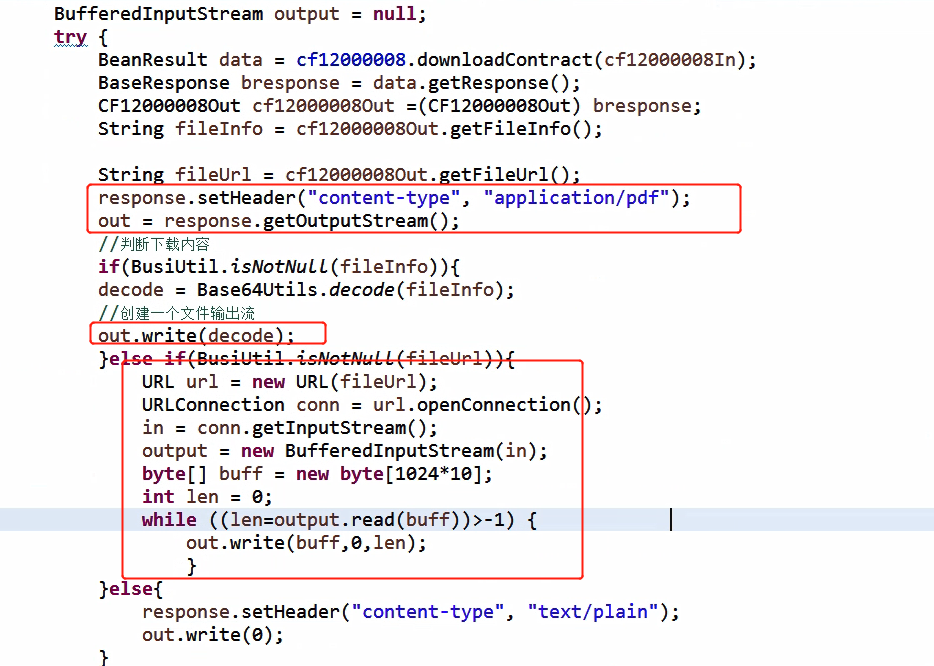
二:js中使用xhr.open("get",url,true)
action中:
BufferedInputStream output = null;

		try {

			BeanResult data = cf12000008.downloadContract(cf12000008In);

			BaseResponse bresponse = data.getResponse();

			CF12000008Out cf12000008Out =(CF12000008Out) bresponse;

			String fileInfo = cf12000008Out.getFileInfo();

			String fileUrl = cf12000008Out.getFileUrl();

			response.setHeader("content-type", "application/pdf");

			out = response.getOutputStream();

			//判断下载内容

			if(BusiUtil.isNotNull(fileInfo)){

			decode = Base64Utils.decode(fileInfo);

			//创建一个文件输出流

			out.write(decode);

			}else if(BusiUtil.isNotNull(fileUrl)){

				URL url = new URL(fileUrl);

				URLConnection conn = url.openConnection();

				in = conn.getInputStream();

				output = new BufferedInputStream(in);

				byte[] buff = new byte[1024*10];

				int len = 0;

				while ((len=output.read(buff))>-1) {

					out.write(buff,0,len);

					}

			}else{

				response.setHeader("content-type", "text/plain");

				out.write(0);

			}
js中代码:

if($("#contractNo").val() !== "" && $("#contractNo").val() !== null && $("#contractNo").val() !== undefined){

	var url = contextPath + "/cfContractSign/cfContractSignDownload";

	 var xhr = new XMLHttpRequest();

	 xhr.open("get", url +"?" +$.param(data), true);

	 xhr.responseType = "blob";

	 xhr.onload = function() {

		 if (this.status == 200) {

			 var blob = this.response;

			 if(blob.type == "text/xml"){

				 parent.showMsgDuringTime("下载失败,请检查合同编号");

				 return false

				 }else if(blob.type == "text/plain"){

					 parent.showMsgDuringTime("下载失败,后台返回为空");

					 return false

				 }

			 var fileName = $("#contractNo").val()+".pdf";

			 if(window.navigator.msSaveOrOpenBlob){

				 // IE浏览器下

				 navigator.msSaveBlob(blob, fileName);

				 } else {

					 var  link = document.createElement("a");

					 link.href = window.URL.createObjectURL(blob);

					 link.download = fileName;

					 link.click();

					 window.URL.revokeObjectURL(link.href);

					 parent.showMsgDuringTime("下载成功");

					 contractAddCancel();

					 }

			 }else{

				 showMsg('请求错误', 'warning');

				 }

		 }

	 xhr.onloadend = function(res){

	 }

	 xhr.send();

	}
在action中进行文件下载,下载时运行不报错,可是也不下载的更多相关文章
- 在eclipse动态网页项目中,编写web.xml时,servlet标签报错.
cvc-complex-type.2.4.b: The content of element 'servlet' is not complete. One of '{"http:// jav ...
- homestead虚拟机,通过npm下载依赖包和解决运行gulp报错问题 yarn出错问题
homestead虚拟机,通过npm下载依赖包和解决运行gulp报错问题 yarn出错问题 1. 在虚拟器运行 npm 下载依赖组件时报错: npm ERR! EPROTO: protocol err ...
- pytest——pycharm中右击运行(run)没有问题,在terminal中运行pytest报错:E ModuleNotFoundError: No module named
参考了这个解决办法:https://blog.csdn.net/qq_36829091/article/details/82180866 我的是Windows,linux的和Windows的解决办法有 ...
- vs2010一运行就报错deven.exe assert failure 解决方法,卸载系统中.netFramework最新版本的(简体中文)
vs2010一运行就报错deven.exe assert failure 解决方法,卸载系统中.netFramework最新版本的(简体中文)
- php中读取中文文件夹及文件报错
php读取时出现中文乱码 一般php输出中出现中文乱码我们可用 header ('content:text/html;charset="utf-8"'); php中读取中文文件夹及 ...
- soamanager发布的Webservice服务,调用时出现http500报错
最近再给薪酬那边发布ws服务时出现了报错,调用方反馈了errorCode:BEA-380002.在使用XMLspy工具去调用这个WSDL时候,则反馈http500的错误消息.如下图: 遇到这种问题我通 ...
- 关于使用stanfordcorenlp一直运行不报错的解决方法
一.问题描述: 最近在使用stanfordcorenlp时,遇到了我在运行时代码不报错但同时也没有结果的问题,等了很久也没有出结果.其实是很简单的一个步骤,但却花了好几天的时间都没有成功!网上更多的是 ...
- python3写入文件时编码问题报错
在字符串写入文件时,有时会因编码问题导致无法写入,可在open方法中指定encoding参数 chfile = open(filename, 'w', encoding='utf-8') 这样可解决大 ...
- javascript的倒计时功能中newData().getTime()在iOS下会报错问题解决
javascript的倒计时功能中newData().getTime()在iOS下会报错问题解决 在做移动端时间转化为时间戳时,遇到了一个问题,安卓手机上访问时,能拿到时间戳,从而正确转换时间,而在i ...
随机推荐
- C语言第02次作业--循环结构
1.本章学习总结 1.1思维导图 1.2本章学习体会及代码量学习体会 1.2.1学习体会 1- 经过这两周的学习,我深切地体会C语言非常的难(对于我而言).大部分情况都是题目不理解和没有思路,或者编译 ...
- SpringMVC和Struts2的区别及优势
1.SpringMVC和Struts2的区别比较 1.Struts2是类级别的拦截, 一个类对应一个request上下文,SpringMVC是方法级别的拦截,一个方法对应一个request上下文,而方 ...
- CF822C Hacker, pack your bags!(思维)
Hacker, pack your bags [题目链接]Hacker, pack your bags &题意: 有n条线段(n<=2e5) 每条线段有左端点li,右端点ri,价值cos ...
- Linux定时任务调用sh文件
1.编写sh文件 创建:vi test.sh 写入:date >> /xiaol/data.txt 2.默认创建的这个sh问件是没有执行权限的,修改权限 chmod 777 test.sh ...
- python3.*的一些笔记
因为使用python越来越频繁,有一些细节的东西经常用后一段时间没去用就会忘记,做些简单的笔记吧. 1.break和continue和pass a = 0 while 1: a+=1 if(a%3== ...
- Python笔记之数据类型
数据类型 计算机顾名思义就是可以做数学计算的机器,因此,计算机程序理所当然地可以处理各种数值.但是,计算机能处理的远不止数值,还可以处理文本.图形.音频.视频.网页等各种各样的数据,不同的数据,需要定 ...
- 阿里云 SSL 证书 总结
历时2天左右的证书上传部署,终于结束了! 因为公司要开发小程序,小程序部署到开发环境必须支持https证书行. 阿里云目前的证书还是比较多的额,大致分为2类,一类是支持单域名,一类是支持泛域名. 自己 ...
- c++常用
常用函数,方便查找,不定时更新. 1. 生成随机数 #include <iostream> #include <stdlib.h> #include <time.h> ...
- Connector for Python
连接mysql, 需要mysql connector, conntector是一种驱动程序,python连接mysql的驱动程序,mysql官方给出的名称为connector/python, 可参考m ...
- CCF CSP 201809-2 买菜
题目链接:http://118.190.20.162/view.page?gpid=T78 问题描述 小H和小W来到了一条街上,两人分开买菜,他们买菜的过程可以描述为,去店里买一些菜然后去旁边的一个广 ...