
asp.net core 2.1 部署 centos7
asp.net core 2.1 部署 centos7
Kestrel 非常适合从 ASP.NET Core 提供动态内容。 但是,Web 服务功能不像服务器(如 IIS、Apache 或 Nginx)那样功能丰富。 反向代理服务器可以从 HTTP 服务器卸载服务静态内容、缓存请求、压缩请求和 SSL 终端等工作。 反向代理服务器可能驻留在专用计算机上,也可能与 HTTP 服务器一起部署。
鉴于此指南的目的,使用 Nginx 的单个实例。 它与 HTTP 服务器一起运行在同一服务器上。
- 参考文档
- 64位安装SDK所需依赖
- yum update
- yum -y install libunwind
- yum -y install libicu
- 注册微软产品密钥
- 安装SDK/runtime
- yum -y install dotnet-sdk-2.1 或 yum -y install aspnetcore-runtime-2.1
- 检测安装
- 执行 dotnet --info,验证安装结果,如下:
.NET Core SDK (reflecting any global.json):
Version: 2.1.401
Commit: 91b1c13032
Runtime Environment:
OS Name: centos
OS Version: 7
OS Platform: Linux
RID: centos.7-x64
Base Path: /usr/share/dotnet/sdk/2.1.401/
...
- 创建并允许实例
- 创建MVC应用程序 X:\mvcApp2 dotnet new mvc
- 本地运行(win10) dotnet run
- 浏览器访问
- 发布linux程序 dotnet publish -c Release -o "XX:\Web_IIS\mvcApp2" -r centos.7-x64
- xftp上传文件到指定目录 /home/doetnetcore/mvcApp2
- 运行程序 cd /home/dotnetcore/mvcApp2 dotnet mvcApp2.dll 如图:默认启用5000端口
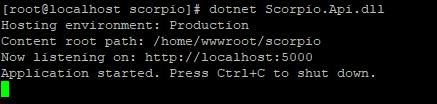
- centos7 外部计算机若无法访问,请检查网络防火墙(即使关闭防火墙端口默认只开放22)
- 检查站点运行情况 curl http://localhost:5000
- 查看防火墙状态 firewall-cmd --state //running 表示运行
附防火墙相关命令
启动: systemctl start firewalld
查看状态:systemctl status firewalld
停止:systemctl disable firewalld
禁用:systemctl stop firewalld
启动服务:systemctl start firewalld.service
关闭服务:systemctl stop firewalld.service
重启服务:systemctl restart firewalld.service
服务的状态:systemctl status firewalld.service
在开机时启用一个服务:systemctl enable firewalld.service
在开机时禁用一个服务:systemctl disable firewalld.service
查看服务是否开机启动:systemctl is-enabled firewalld.service
查看已启动的服务列表:systemctl list-unit-files|grep enabled
查看启动失败的服务列表:systemctl --failed
查看版本: firewall-cmd --version
查看帮助: firewall-cmd --help
显示状态: firewall-cmd --state
查看所有打开的端口: firewall-cmd --zone=public --list-ports
更新防火墙规则: firewall-cmd --reload
查看区域信息: firewall-cmd --get-active-zones
查看指定接口所属区域: firewall-cmd --get-zone-of-interface=eth0
拒绝所有包:firewall-cmd --panic-on
取消拒绝状态: firewall-cmd --panic-off
查看是否拒绝: firewall-cmd --query-panic
- 配置Nginx转发
- 安装Nginx
命令 curl -o nginx.rpm http://nginx.org/packages/centos/7/noarch/RPMS/nginx-release-centos-7-0.el7.ngx.noarch.rpm
rpm -ivh nginx.rpm
yum install nginx
- 检查端口占用情况 yum install net-tools netstat -a //端口列表
- 启动 nginx
命令:systemctl start nginx
设置开机启动 systemctl enable nginx
firewall-cmd --zone=public --add-port=80/tcp --permanent(永久启用80端口)
重启防火墙 systemctl restart firewalld
浏览器测试nginx能否正常访问
- 修改nginx配置文件
yum -y install vim 可用默认vi替代
修改 /etc/nginx/conf.d/default.conf 文件。
通过 vim /etc/nginx/conf.d/default.conf 打开,编辑里面的内容,保存时按 Esc 再输入 :wq! 命令保存退出
修改为如下脚本:
 server {

    listen 80;

    location / {

        proxy_pass http://localhost:5000;

        proxy_http_version 1.1;

        proxy_set_header Upgrade $http_upgrade;

        proxy_set_header Connection keep-alive;

        proxy_set_header Host $host;

        proxy_cache_bypass $http_upgrade;

    }

  }
- 启动站点 浏览器正常访问asp.netcore 应用程序
- Nginx参考文献
http://nginx.org/en/docs/
http://tengine.taobao.org/book/index.html
配置守护服务(Supervisor)
配置Apache转发
- 配置Jexus
1.使用Jexus 5.8.2在Centos下部署运行Asp.net core
asp.net core 2.1 部署 centos7的更多相关文章
- (转) 将ASP.NET Core应用程序部署至生产环境中(CentOS7)
原文链接: http://www.cnblogs.com/ants/p/5732337.html 阅读目录 环境说明 准备你的ASP.NET Core应用程序 安装CentOS7 安装.NET Cor ...
- 将ASP.NET Core应用程序部署至生产环境中(CentOS7)(转)
阅读目录 环境说明 准备你的ASP.NET Core应用程序 安装CentOS7 安装.NET Core SDK for CentOS7. 部署ASP.NET Core应用程序 配置Nginx 配置守 ...
- Asp.Net Core在CentOS部署与注意
部署具体步骤参考:将ASP.NET Core应用程序部署至生产环境中(CentOS7) 1.wwwroot是放静态文件的,Startup的配置里面要app.UseStaticFiles(); 2.在不 ...
- ASP.NET Core开发-Docker部署运行
ASP.NET Core开发Docker部署,.NET Core支持Docker 部署运行.我们将ASP.NET Core 部署在Docker 上运行. 大家可能都见识过Docker ,今天我们就详细 ...
- ASP.NET Core 1.0 部署 HTTPS (.NET Framework 4.5.1)
var appInsights=window.appInsights||function(config){ function r(config){t[config]=function(){var i= ...
- ASP.NET Core 1.0 部署 HTTPS
ASP.NET Core 1.0 部署 HTTPS ASP.NET Core 1.0 部署 HTTPS (.NET Framework 4.5.1) 提示 更新时间:2016年01月23日. 在目前介 ...
- ASP.NET Core开发期间部署到IIS自定义主机域名并附加进程调试
在.NET Framework环境下,我们经常会这么做 把一个web项目不经过发布直接部署到IIS里去,配置上主机名,修改一下hosts文件,就可以用自定义的域名来访问我们的应用程序,使用附加到进程( ...
- asp.net core 2.1 部署IIS(win10/win7)
asp.net core 2.1 部署IIS(win10/win7) 概述 与ASP.NET时代不同,ASP.NET Core不再是由IIS工作进程(w3wp.exe)托管,而是使用自托管Web服务器 ...
- ASP.NET Core托管和部署Linux实操演练手册
一.课程介绍 ASP.NET Core 是一种全新的跨平台开源 .NET 框架,能够在 IIS.Nginx.Apache.Docker 上进行托管或在自己的进程中进行自托管. 作为一个.NET Web ...
随机推荐
- [Swift]LeetCode713. 乘积小于K的子数组 | Subarray Product Less Than K
Your are given an array of positive integers nums. Count and print the number of (contiguous) subarr ...
- windows下golang实现Kfaka消息发送及kafka环境搭建
kafka环境搭建: 一.安装配置java-jdk (1)kafka需要java环境,安装java-jdk,下载地址:https://www.oracle.com/technetwork/java/j ...
- python网络-Socket之udp编程(24)
一.udp简介 udp --- 用户数据报协议,是一个无连接的简单的面向数据报的运输层协议. udp不提供可靠性,它只是把应用程序传给IP层的数据报发送出去,但是并不能保证它们能到达目的地. udp在 ...
- 【Zara原创】SqlSugar4轻量级ORM框架的使用指南
前言:sqlSugar出生已经有3年之久了,从1.0到现在的4.x的版本,为了以后方便使用SqlSugar,所以特意花了2个小时来叙述它. 关于SqlSugar 性能:性能最好的ORM之一,具有超越D ...
- Qt5模块简介
原文链接:Qt5 模块简介 无意中看到这篇文章,虽然讲的不是经常用的东西,但是看了这篇文章之后,可以对qt有个大致的了解,能够清晰的知道自己想要什么,应该关注那一部分,学习了,相信以后会又很大 ...
- Kafka分区与消费者的关系
1. 前言 我们知道,生产者发送消息到主题,消费者订阅主题(以消费者组的名义订阅),而主题下是分区,消息是存储在分区中的,所以事实上生产者发送消息到分区,消费者则从分区读取消息,那么,这里问题来了, ...
- Nancy in .Net Core学习笔记 - 初识Nancy
前言 去年11月份参加了青岛MVP线下活动,会上老MVP衣明志介绍了Nancy, 一直没有系统的学习一下,最近正好有空,就结合.NET Core学习总结了一下. 注: 本文中大部分内容都是对官网文档的 ...
- Kali~2018安装后的配置
今天,物理机上成功的安装了Kali Linux系统,但是要想用的顺手还需要花费许多时间和精力,下面就是我对它的养成之路. 一.添加普通用户 useradd -m -G sudo,video,audio ...
- window环境下使用filezilla server搭建ftp服务器
前言 在做项目的时候,需要提供ftp服务,开始的时候使用微软自动的iss上的ftp服务,一段时间后发现无法自定义用户,只能使用系统的用户,使用起来很不方便,在权限管理方面也是不太好.所以换用了file ...
- Nginx的正向代理与反向代理详解
正向代理和反向代理的概念 代理服务(Proxy),通常也称为正向代理服务. 如果把局域网外Internet想象成一个巨大的资源库,那么资源就分布到了Internet的各个点上,局域网内的客户端要访问这 ...